VM-230-SP - Uncategorized Watson - Free user manual and instructions
Find the device manual for free VM-230-SP Watson in PDF.


| Product Type | Home Appliance |
| Brand | Watson |
| Model | VM-230-SP |
| Dimensions (approx.) | 300 x 200 x 150 mm (11.8 x 7.9 x 5.9 in) |
| Weight (approx.) | 2.5 kg (5.5 lb) |
| Power Supply | AC 220-240 V, 50 Hz |
| Power Consumption (rated) | 800 W |
| Main Functions | Basic operation with on/off switch, indicator light, and adjustable settings |
| Operation Method | Manual control via buttons or dials |
| Noise Level (approx.) | Below 75 dB(A) |
| Material | ABS plastic and metal components |
| Cord Length (approx.) | 5 m (16.4 ft) |
| Safety Features | Thermal overload protection, non-slip feet, child lock (if applicable) |
| Cleaning and Maintenance | Wipe with a soft dry cloth; do not use abrasive cleaners or immerse in water |
| Filter Type | Washable foam filter |
| Spare Parts Availability | Contact Watson customer service for replacements |
| Reparability | Repairs should be carried out by qualified technicians only |
| General Information | Refer to user manual for full instructions and safety guidelines |
| Certifications | CE, RoHS compliant (assumed) |
| Country of Origin | China (typical) |
Frequently Asked Questions - VM-230-SP Watson
User questions about VM-230-SP Watson
0 question about this device. Answer the ones you know or ask your own.
Ask a new question about this device
Download the instructions for your Uncategorized in PDF format for free! Find your manual VM-230-SP - Watson and take your electronic device back in hand. On this page are published all the documents necessary for the use of your device. VM-230-SP by Watson.
USER MANUAL VM-230-SP Watson
Thank you for choosing Watson Pro
Please read and follow these instructions, and keep this manual in a safe place.
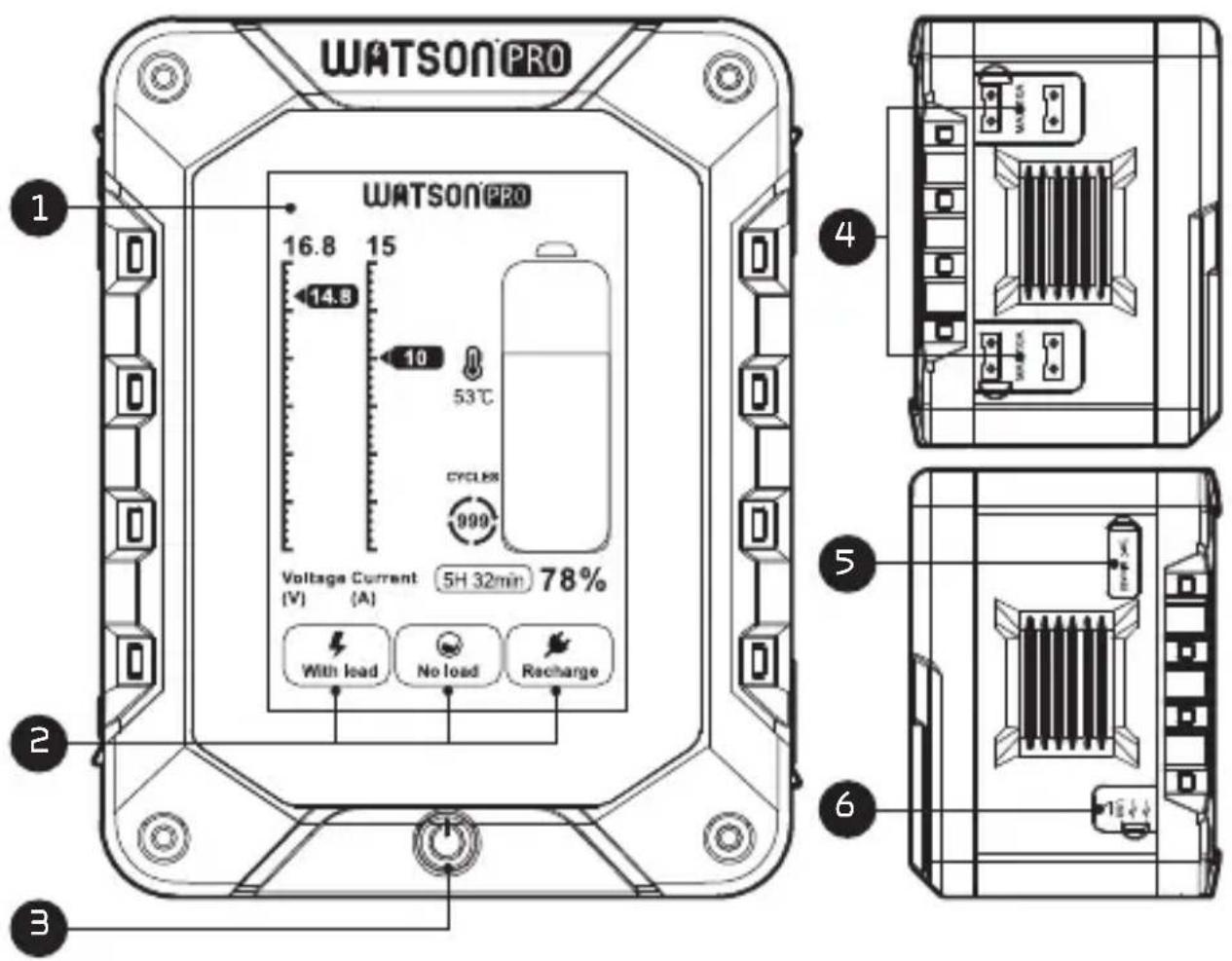
OVERVIEW
- LCD Screen: Displays charge status, run time, voltage/current, cycle count, and battery temperature. When the battery is recharging, the LCD displays input voltage and current, and remaining charging time. Battery operating temperature is displayed in all operating modes. The cycle icon shows how many times the battery has been fully depleted and recharged.
- Battery Status: Powering, Idling, and Charging.
- Check Button: Press to activate LCD screen.
- D-tap Ports
- USB-C Port
- USB Standard-A Ports
PRODUCT FEATURES
• The Check button activates the LCD screen.
- The LCD smart screen displays remaining battery capacity, output voltage, and current when powering devices.
- The USB-C port can recharge the battery as well as power devices.
- The USB Standard-A ports power USB devices like laptops, smartphones, Bluetooth headphones, and wireless transmitters and receivers.
- The D-tap output ports power cameras and camcorders, and accessories like monitors and lights.
- Built-in intelligent control circuits protect against damage caused by current, voltage, temperature, and short-circuiting.
OPERATING INSTRUCTIONS
The battery comes charged at approximately 50% capacity. On first use, run the battery until it has completely discharged.
Fully charge and discharge the battery for the first three uses.
Fully charge the battery before long-term storage. Fully recharge the battery when operating it following long-term inactivity or storage.
SAFETY INSTRUCTIONS
• Make sure the battery is fully charged before use.
- When the battery is not in use, remove it from its device. Some electronic equipment will draw current even when the switch is off.
- Do not short-circuit the terminals. This battery is protected with an internal self-resetting fuse, but short circuits may still cause severe damage to the battery.
- Do not attempt to open the battery case under any circumstances.
- Do not remove the battery from any equipment that is powered on. Always power off your equipment before removing the battery.
- Use the battery only under proper environmental conditions: -4°F to 113°F (-20°C to 45°C), and with a relative humidity (RH) less than 85%.
- The battery should be fully charged for long-term storage. After 4 months of storage, the battery will require a full recharge.
- Storage environment: short term (one month) -4°F to 104°F (-20°C to 40°C) and RH 45% to 85%; medium term (three months) -4°F to 86°F (-20°C to 30°C) and RH 45% to 85%; long term (one year) -4°F to 77°F (-20°C to 25°C) and RH 45% to 85%.
- The battery may be warm during use or recharging. This is normal.
- Keep the battery out of fire, heat, and high pressure.
- Do not expose the battery to rain or moisture.
- Do not drop the battery or expose it to strong shocks.
- Keep this unit away from water and any flammable gases or liquids.
- Clean the battery and terminals with a clean, soft, and dry cloth.
- When operation time has noticeable decreased, the battery may need to be replaced.
- Keep this product away from children.
• Store the battery in a cool, dry place.
• All images are for illustrative purposes only.
SPECIFICATIONS
| Mount Type V-mount | |
| Chemistry Lithium-ion | |
| Output Voltage 14.4 V | |
| Maximum Output 15 A | |
| Capacity (Ah) | VM-293-SP: 20.4VM-230-SP: 15.6 |
| Capacity (Wh) | VM-293-SP: 293VM-230-SP: 230 |
| Accessory Port | D-tap (4) (Output)USB Standard-A (2) (Output)USB-Type C (Input/Output) |
| USB Output | USB Type-C: 5 V/3 A, 9 V/3 A, 12 V/3 A,15 V/3 A, 20 V/3.1 AUSB Standard-A: 5 V/2 A |
| Max USB-C Load 63 W | |
| D-Tap Output 14.4 V | |
| Screen Type LCD | |
| Operating Temperature -4°F to 113°F (-20°C to 45°C) | |
| Operating Humidity <85% | |
| Weight | VM-293-SP: 3.48 lb. (1.58 kg)VM-230-SP: 3.24 lb. (1.47 kg) |
| Dimensions | VM-293-SP: 4.8×3.7×4.1 in.(12.1×9.5×10.6 cm)VM-230-SP:4.8×3.7×3.8 in.(12.1×9.5×9.6 cm) |
ONE-YEAR LIMITED WARRANTY
This Watson product is warranted to the original purchaser to be free from defects in materials and workmanship under normal consumer use for a period of one (1) year from the original purchase date or thirty (30) days after replacement, whichever occurs later. The warranty provider's responsibility with respect to this limited warranty shall be limited solely to repair or replacement, at the provider's discretion, of any product that fails during normal use of this product in its intended manner and in its intended environment. Inoperability of the product or part(s) shall be determined by the warranty provider. If the product has been discontinued, the warranty provider reserves the right to replace it with a model of equivalent quality and function.
This warranty does not cover damage or defect caused by misuse, neglect, accident, alteration, abuse, improper installation or maintenance. EXCEPT AS PROVIDED HEREIN, THE WARRANTY PROVIDER MAKES NEITHER ANY EXPRESS WARRANTIES NOR ANY IMPLIED WARRANTIES, INCLUDING BUT NOT LIMITED TO ANY IMPLIED WARRANTY OF MERCHANTABILITY OR FITNESS FOR A PARTICULAR PURPOSE. This warranty provides you with specific legal rights, and you may also have additional rights that vary from state to state.
To obtain warranty coverage, contact the Watson Customer Service Department to obtain a return merchandise authorization ("RMA") number, and return the defective product to Watson along with the RMA number and proof of purchase. Shipment of the defective product is at the purchaser's own risk and expense.
For more information or to arrange service, visit www.poweredbywatson.com or call Customer Service at 212-594-2353.

WATSON® A Gradus Group Brand
Product warranty provided by the Gradus Group.
www.gradusgroup.com
Watson is a registered trademark of the Gradus Group. © 2024 Gradus Group LLC. All Rights Reserved.
Brand : Watson
Model : VM-230-SP
Category : Uncategorized