
EcoSmart ACAC230SG - Fan Ausclimate - Free user manual and instructions
Find the device manual for free EcoSmart ACAC230SG Ausclimate in PDF.


| Product Type | Air Circulator Fan |
| Brand | Ausclimate |
| Model | EcoSmart ACAC230SG |
| Power Supply | 220-240V ~ 50Hz |
| Power Consumption | Approx. 50 W |
| Dimensions (H x W x D) | Approx. 45 x 35 x 35 cm |
| Weight | Approx. 4 kg |
| Speed Settings | 12 speeds + Turbo mode (2-3 min) |
| Oscillation | Side-to-side and up/down (independent or combined) |
| Timer | On Timer and Off Timer: 1, 2, 4, 6, 8 hours |
| Remote Control | Yes, with CR2032 coin cell battery |
| Wi-Fi | 2.4 GHz only, compatible with Ausclimate app |
| App Features | Remote control via smartphone, scheduling, auto scan pairing |
| Safety Features | Auto shut-off after 8 hours; overheat protection; child lock (via app?) |
| Cleaning | Unplug before cleaning; use damp cloth; vacuum grills; front guard removable for blade cleaning |
| Warranty | 2 years (extendable to 4 years upon registration at Ausclimate website) |
| Intended Use | Household indoor use only |
| Included Accessories | Remote control, user manual |
Frequently Asked Questions - EcoSmart ACAC230SG Ausclimate
User questions about EcoSmart ACAC230SG Ausclimate
0 question about this device. Answer the ones you know or ask your own.
Ask a new question about this device
Download the instructions for your Fan in PDF format for free! Find your manual EcoSmart ACAC230SG - Ausclimate and take your electronic device back in hand. On this page are published all the documents necessary for the use of your device. EcoSmart ACAC230SG by Ausclimate.
USER MANUAL EcoSmart ACAC230SG Ausclimate
healthy indoor climate solutions
EcoSmart Desk
Air Circulator
User Manual

natural_image
Two modern electric fans with black blades and white bases, displayed against a blue striped background (no text or symbols visible)General Care and Safety Guide
YOUR SAFETY IS IMPORTANT TO US. PLEASE ENSURE YOU TAKE NOTE OF THE INSTRUCTIONS AND WARNINGS OUTLINED IN THIS MANUAL.
- This appliance is not intended for use by persons (including children) with reduced physical, sensory or mental capabilities, or lack of experience and knowledge, unless they have been given supervision or instruction concerning use of the appliance by a person responsible for their safety.
- Children should be supervised to ensure that they do not play with the appliance.
- If the supply cord is damaged, it must be replaced by the manufacturer, its service agent or similarly qualified persons in order to avoid a hazard.
- Ensure that the fan is switched off from the supply mains before removing the guard.
- Use only the voltage specified on the rating plate of the appliance.
- Keep all objects at least 1 Metre from the front, sides and rear of the appliance
- This appliance is intended for household use only and not for commercial or industrial use.
- Use this appliance only as described in this manual. Any other use is not recommended by the manufacturer and may cause fire, electric shock or injury.
- The common cause of overheating is deposits of dust or fluff in the appliance. Ensure these deposits are removed regularly by unplugging the appliance and vacuum cleaning the air vents and grills.
- Always unplug appliance when not in use.
- When the appliance has been unpacked, check it for transport damage and ensure all parts have been delivered. If parts are missing or the appliance has been damaged, contact the Customer Services Team.
- If your appliance does not work, or is not working properly, contact the place of purchase. Repair work on the appliance by unqualified persons can cause serious risk to the user.
- Ensure hands are dry before handling the plug or the main unit.
- Carry out regular checks of the supply cord to ensure no damage is evident.
- Ensure that the cord is fully extended (not coiled) while in use.
- Avoid contact with the moving parts. Keep hands, hair, clothing, away from blade of the fan during operation to reduce the risk of injury to person and/or damage to the unit.
- Switch off and use handles provided when moving.
- It is recommended that this fan is plugged directly into the wall socket.
- A correctly specified, undamaged extension cord may be used with this fan provided it is used in a safe manner.
General Care and Safety Guide
- Never place appliance close to radiant heat source.
- Never operate in areas where petrol, paint or other flammable liquids are used or stored.
- Never use the appliance to dry clothes.
- Never insert or allow foreign objects to enter any ventilation or exhaust opening, as this may cause an electric shock, fire or damage to the appliance.
- Never use abrasive cleaning products on this appliance. Clean with a damp cloth (not wet) rinsed in hot soapy water only. Always remove plug from the mains supply before cleaning.
- Never connect the appliance to mains supply until completely assembled and adjusted.
- Never remove plug from power socket until the appliance has been switched off.
- Never remove plug from power socket by pulling cord – always grip plug.
- Never twist, kink or wrap the cord around the appliance, as this may cause the insulation to weaken and split. Always ensure that all cord has been removed from any cord storage area and is unrolled before use.
- Never use this appliance in the immediate surrounds of a bath, a shower, or a swimming pool or other liquids. The appliance must not be immersed in any liquids.
- Due to the risk of injury, never use this appliance for any purpose other than its intended use. This appliance is intended for use in household and similar applications such as staff kitchen areas in shops, offices and other working environments; farmhouses, by clients in hotels, motels, bed and breakfast type environments and other residential type environments
- Never use this appliance outdoors.
- Never operate the appliance with a damaged cord or plug, after it malfunctions, or if it has been damaged in any manner. Have the appliance checked and repaired by a qualified electrician if repair is necessary.
- Never place the unit in wardrobes or other enclosed spaces as this may cause fire hazards.


General Care and Safety Guide
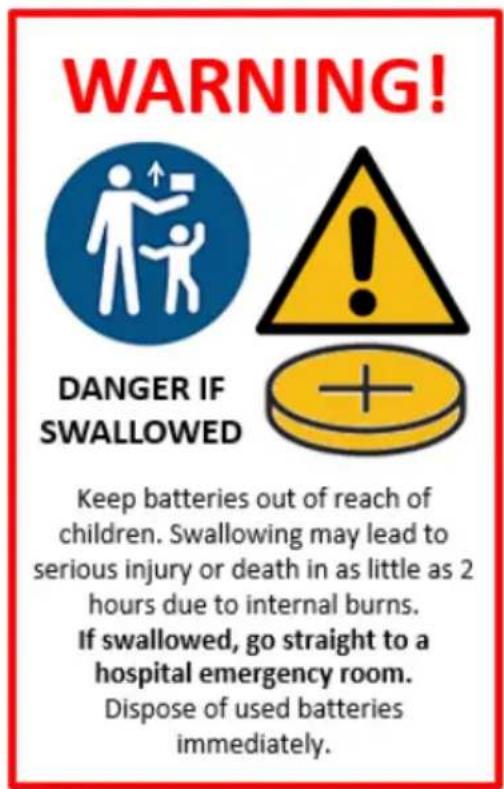
The remote control supplied with this device uses a CR2032 coin type battery. DANGER IF SWALLOWED OR PLACED INSIDE ANY PART OF THE BODY Keep batteries out of reach of children. Swallowing may lead to serious injury or death in as little as 2 hours due to internal burns.
If swallowed, go straight to a hospital emergency room. Dispose of used batteries immediately.
WARNING!

THIS PRODUCT CONTAINS BUTTON/COIN CELL BATTERIES

natural_image
Icon showing a family with an adult and child, symbolizing social or delivery (no text or symbols)KEEP OUT OF REACH OF CHILDREN
Button/Coin Cell Batteries are hazardous and must be kept out of reach of children at all times, whether the battery is new or used. These batteries can cause severe or fatal injuries in 2 hours or less if swallowed or placed inside any part of the body. Dispose of used batteries immediately.
If it is suspected a button/coin cell battery has been swallowed or placed inside any part of the body, seek medical attention immediately or for 24/7 fast, expert advice, contact
Australian Poisons Information Centre on 13 11 26 New Zealand National Poisons Information Centre on 0800 764 766
Operating Your Fan
Always choose a safe location for the fan, keeping in mind the safety precautions outlined. Ensure all packaging has been removed from the unit before use. This appliance requires no installation, it should be used solely as a portable appliance.
WARNING: Keep all objects at least 300mm from the front, sides and rear of the appliance.
Place the fan on a dry, level and sturdy surface.
Ensure the speed control is at OFF position before plugging the power cord into the socket.

ON/OFF
Press the Power button, the fan will start at speed 5 and the timer will automatically be set to turn off after 8 hours. Press the Power button again to turn off the product.
SPEED
There are 12 speed settings. You can adjust the speed by press the Speed Up or Speed Down buttons.
TURBO MODE
Press the Turbo Mode button to go to full wind speed. When this button has been pressed, the Speed Up/Speed Down buttons are inactive.
Note- the turbo mode setting is only active for 2-3 minutes at a time. It is recommended to put on speed setting 12 before activating the turbo mode setting.
OSCILLATION
The fan can oscillate from side to side as well as up and down. Press the corresponding buttons to achieve Side to Side or Up and Down oscillation or a combination of both.
Operating Your Fan
ON TIMER
While the fan is OFF, press the On Timer button to select a future time for the fan to turn off. 1-2-4-6-8 hours. Once this time has elapsed the fan will turn on.
You can also set fan Speed and Oscillation setting for when the fan comes on.
Once you have set the On Timer, pressing the button again will display what has been set.
OFF TIMER
Press the Off Timer button to select a time for the fan to turn off. 1-2-4-6-8 hours.
Press again to turn the timer off. It will go back to 8 hours automatic shutdown.
LIGHTS OFF
When the fan is operating, the brightness of the buttons will dim to 50% after no input after 15 seconds.
Pressing and key will restore the button illumination back to 100%.
REMOTE CONTROL
All functions of the fan can be activated by the remote control.
The remote control supplied with this heater uses a CR2032 coin type battery. DANGER IF SWALLOWED OR PLACED INSIDE ANY PART OF THE BODY!

WiFi – Downloading and Setting Up APP
This APP is supported only on 2.4GHz Wi-Fi channels. Please ensure your phone is 2.4GHz capable
Note this device will only work within your home WIFI system. This does not operate on 3G or 4G internet connections. You will need a connection to your home Wi-Fi.

Download Ausclimate mobile APP
- Open the APP Store or Google Play on your mobile phone.
- Open 'Search' and enter 'Ausclimate'
- Click 'GET' and begin to download and install.
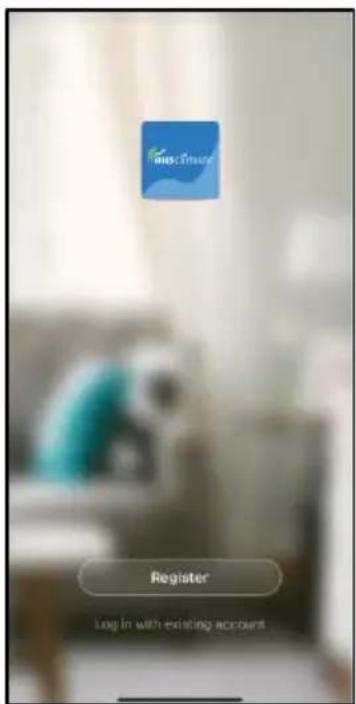
Once downloaded to your phone open the APP
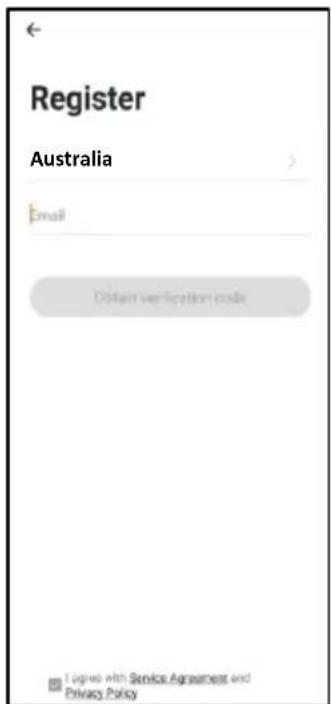
- Tap REGISTER near the bottom of the screen.
• Read and agree to the Privacy Policy. - Add your email address.
- Tap 'Obtain verification code'
You will then receive an email with a verification code.
- Enter the verification code from your email.
- Create a password.
- Then tap confirm.
If you haven't received a verification code via email, tap the resend button and when the verification code is received follow above steps.
Your APP is now registered and ready for pairing to your device.

Pairing APP to Device
Details for pairing this heater to the Ausclimate App can be found at the below website link.
Either scan the QR code below or enter the website into your browser.


Need Help?
Pairing Mode
To connect to the Ausclimate app you must ensure that your device is in pairing mode which is where the Wi-Fi Icon (located above the oscillation button) is flashing.
To enable Wi-Fi pairing mode:
- Turn the heater on at the ON/OFF button on the control panel.
- Press and hold the Side-to-Side Oscillation Button for 5 seconds. The indicator light above the button will light up and will flash rapidly.
Quick Connection
- Turn your phone's Bluetooth ON
- Ensure your device is in Pairing Mode (see instructions above)
- Tap the + on the top right corner to navigate to the main device screen. Tap ‘Auto Scan’ – your device will appear. Tap the device and follow the instructions.
- If Quick Connection does not work, follow the manual via the QR Code above
Cleaning
The fan requires regular cleaning to ensure trouble free operation.
Ensure that the fan is switched off from the supply mains before removing cleaning.
Unplug the fan from the mains supply before cleaning.
Use a damp cloth (not wet) to wipe the exterior of the fan to remove dust and dirt.
Use a vacuum cleaner to remove dust and fluff from around the grills.
To clean the grills and fan blade.
To remove the front grill, unscrew the screw that is on the top at the back of the fan head.
After removing the screw, slightly turn the front guard anti-clockwise until you feel the catch has been released, then pull to take out the front guard.
To remove the nut securing the fan blade, turn it in a clockwise direction to loosen and unscrew it. Pull out the fan blade.
Use a damp cloth (not wet) to wipe the fan blade and grill to remove dust and dirt. After cleaning the front guard and fan blade, ensure that they are thoroughly dried before putting and assembling them back into the fan.
The back guard cannot be removed for cleaning.
Ensure the fan is dry before plugging back into the mains supply.
Do not attempt to dismantle the fan. There are no user serviceable parts. For service or repair, contact an authorised electrical service technician.
PROOF OF PURCHASE
To receive warranty retain receipt as proof of purchase. (Refer to back of booklet).

healthy indoor climate solutions

SCAN HERE FOR HELP
www.ausclimate.com.au www.ausclimate.co.nz
Two Year Warranty
Thank you for purchasing this Ausclimate product. Your product is warranted against faults and manufacture when used in normal domestic use for a period of two years. In non-domestic use Ausclimate limits the voluntary warranty to three months.
Ausclimate present consumers with the option of extending their warranty by a further two years to a total warranty period of four years, if the unit is registered on the Ausclimate website.
Ausclimate undertake to repair or replace this product at no charge if found to be defective due to a manufacturing fault during the warranty period.
This warranty excludes damage caused by misuse, neglect, shipping accident, incorrect installation, or work carried out by anyone other than a qualified electrical service technician.
PLEASE KEEP YOUR RECEIPT AS THIS WILL HELP VERIFY YOUR WARRANTY.
The benefits given to you by this warranty are in addition to other rights and remedies available to you under law in relation to the goods or services to which this warranty relates.
In Australia, our goods come with guarantees that cannot be excluded under the Australian Consumer Law. You are entitled to a replacement or refund for a major failure and compensation for any other reasonably foreseeable loss or damage. You are also entitled to have the goods repaired or replaced if the goods fail to be of acceptable quality and the failure does not amount to a major failure.
In New Zealand this warranty is additional to the conditions and guarantees of the Consumers Guarantee Act (1993).
Ausclimate – New Zealand
CDB Media Ltd.
PO Box 100-707
N.S.M.C
Auckland
Phone 0800 232 633
www.ausclimate.co.nz
Ausclimate – Australia
CDB Goldair Australia Pty
PO Box 574
South Morang
Victoria, 3752
Phone 1800 122 100
www.ausclimate.com.au
Ausclimate Two Year Warranty (IMPORTANT: Please complete and retain this warranty card)
Name
Address
Place Of Purchase Date Of Purchase
Name Of Product Model Number
Attach a copy of the purchase receipt to this warranty card
CDB GROUP
Australia
PO Box 574,
South Morang,
Victoria, 3752
www.ausclimate.com.au
New Zealand
PO Box 100707,
North Shore Mail Centre,
Auckland, 0745
www.ausclimate.co.nz
- EcoSmart Desk
- Air Circulator
- User Manual
- General Care and Safety Guide
- YOUR SAFETY IS IMPORTANT TO US. PLEASE ENSURE YOU TAKE NOTE OF THE INSTRUCTIONS AND WARNINGS OUTLINED IN THIS MANUAL.
- WARNING!
- Operating Your Fan
- WARNING: Keep all objects at least 300mm from the front, sides and rear of the appliance.
- ON/OFF
- SPEED
- TURBO MODE
- OSCILLATION
- ON TIMER
- OFF TIMER
- LIGHTS OFF
- REMOTE CONTROL
- WiFi – Downloading and Setting Up APP
- Pairing APP to Device
- Need Help?
- Pairing Mode
- Quick Connection
- Cleaning
- PROOF OF PURCHASE
- SCAN HERE FOR HELP
- Two Year Warranty
Brand : Ausclimate
Model : EcoSmart ACAC230SG
Category : Fan