MLB820 - Bouilloire thermique N'oveen - Free user manual and instructions
Find the device manual for free MLB820 N'oveen in PDF.


| Product Type | Thermal Kettle (Electric Kettle with Keep Warm Function) |
| Brand | N'oveen |
| Model | MLB820 |
| Capacity | 1.7 L |
| Power | 1500 W |
| Voltage | 220-240 V ~ 50/60 Hz |
| Material | Stainless Steel body, BPA-free plastic lid |
| Weight | 1.2 kg |
| Dimensions (L x W x H) | 25 x 20 x 30 cm |
| Cord Length | 75 cm |
| Functions | Boil, Keep Warm with adjustable temperature (40-100°C) |
| Temperature Settings | Preset temperatures: 40°C, 60°C, 70°C, 80°C, 90°C, 100°C |
| Keep Warm Duration | Up to 12 hours |
| Safety Features | Auto shut-off, boil-dry protection, overheat protection |
| Filter | Removable stainless steel mesh filter for clean pouring |
| Cleaning | Wipe exterior with damp cloth; descale interior with vinegar or citric acid |
| Accessories | Power base, lid |
| Warranty | 1 year |
Frequently Asked Questions - MLB820 N'oveen
User questions about MLB820 N'oveen
0 question about this device. Answer the ones you know or ask your own.
Ask a new question about this device
Download the instructions for your Bouilloire thermique in PDF format for free! Find your manual MLB820 - N'oveen and take your electronic device back in hand. On this page are published all the documents necessary for the use of your device. MLB820 by N'oveen.
USER MANUAL MLB820 N'oveen
natural_image
White N'OVEEN water heater with black handle and wheels (no visible text or symbols)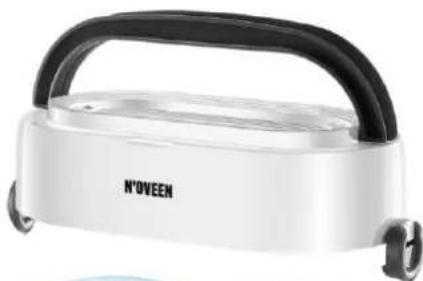
natural_image
White N'OVEEN portable food appliance with black handle and wheels (no visible text or symbols)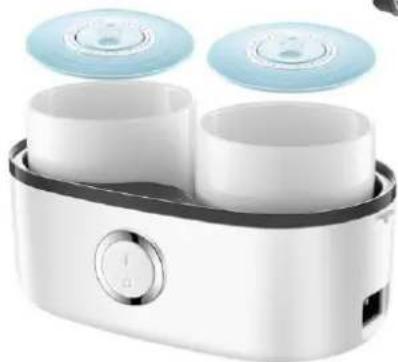
natural_image
White and blue electric guitar box with two cups and two circular speakers (no text or symbols visible)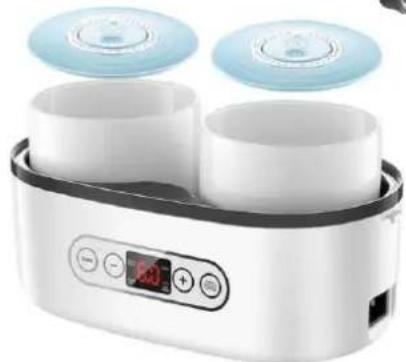
natural_image
Modern kitchen appliance with two cups and two circular gauges, featuring a digital display and control buttons (no visible text or symbols)• MULTI LUNCH BOX N'OVEEN MLB810
• MULTI LUNCH BOX N'OVEEN MLB820 DIGITAL
POLSKI......s. 3
ENGLISH.... p. 13
natural_image
Simple line drawing of a cylindrical container with horizontal lines inside, no text or symbols present.natural_image
Line drawing of a rice cooker with a lid and control panel (no text or symbols)natural_image
Line drawing of a rice cooker with two cylindrical containers (no text or symbols)natural_image
Illustration of a hand pointing at a circular object with an upward arrow, no text or symbols presentnatural_image
Illustration of a hand pressing down on a cylindrical container with a downward arrow (no text or symbols)natural_image
Illustration showing a hand pressing down on a cylindrical component and a close-up of a circular dial with a central knob (no text or symbols)Thank you for purchasing our product.
Before use, please read the user manual enclosed with the product. Keep this manual in case you need to use it again. We believe that the Lunch Box will bring comfort and convenience to you and your family thanks to its excellent functionality. If you have any questions, please do not hesitate to contact us or our service center, we will be happy to help! For more N'oveen brand products, please visit www.noveen.pl
Read all safety information before use and keep these operating instructions for future reference.
- Never disassemble the unit without consulting qualified personnel.
- If the power cord or other component is damaged, it must be replaced by the manufacturer, service representative or qualified personnel to avoid danger. If you attempt to repair the unit yourself, your warranty will be void.
- Check that the rated voltage is the same as the voltage you are using.
- Do not use flammable materials close by.
- Do not touch the power plug with wet hands - risk of electric shock.
- Only professional service personnel may repair the unit.
- Do not heat food longer than the time specified by the manufacturer.
- Do not place the device in a microwave or refrigerator, only containers can be heated or cooled separately.
- If there is an abnormal odor during normal operation, turn off the unit, disconnect the power supply and contact the service department.
- Never turn on the unit when the container is empty.
- Before cleaning and maintenance, disconnect the appliance from the power supply.
- The appliance should be used by or under the supervision of adults.
- If you are unsure whether the appliance is in full working order, contact the service department.
- The device heats up to 100 degrees, be careful!
- Water is used for heating and cooking, be careful!
- Use a kitchen glove or towel to handle ceramic containers after cooking.
- The device is operating under voltage, be careful!
Note: There are two holes on the cover of the unit through which hot steam escapes during operation. This applies to both the cooking and heating function, Careful: possibility of burns!!!!
Openings on the lid of the appliance must be exposed!
Do not carry the appliance during operation, you could be burned by hot water from inside the device.
During operation (cooking or heating) ceramic containers placed inside are hot!!!! Be careful.
When using the product, most parts can become hot, handle with care.
Do not open the cover while the unit is running, the unit during operation heats up the water to boiling point so it can escape after opening the lid.
After the heating or cooking process is complete, remove the heated containers from the appliance using cook's glove or other material.
FIRST USE
Remove the Lunch Box from the packaging, wash the containers, lids and gasket. Dry and wipe the device before use. Never immerse the unit body in water.
TECHNICAL DATA
| Model | Capacity | Power | Power supply | Product dimensions | Weight |
| MLB810 | 1,0l | 250 W | 220-240 V | 25 x 13 x 15.3 cm | 1,4 kg |
| MLB820 | 1,0l | 250 W | 220-240 V | 25 x 13 x 15.3 cm | 1,4 kg |
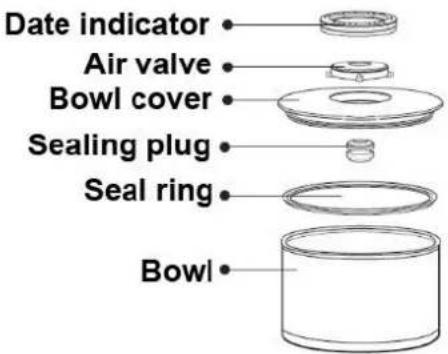
DEVICE CONSTRUCTION
1. Lunch Box
MLB810
MLB820
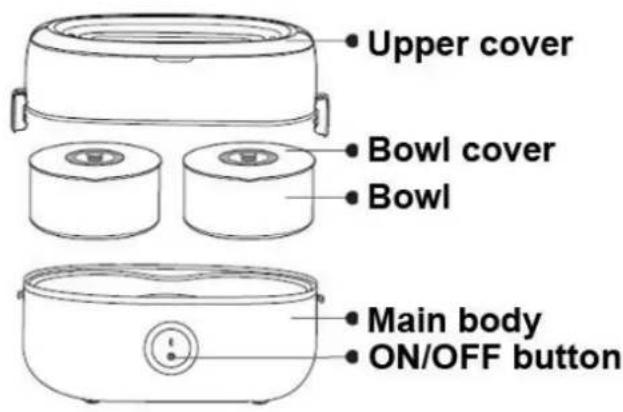
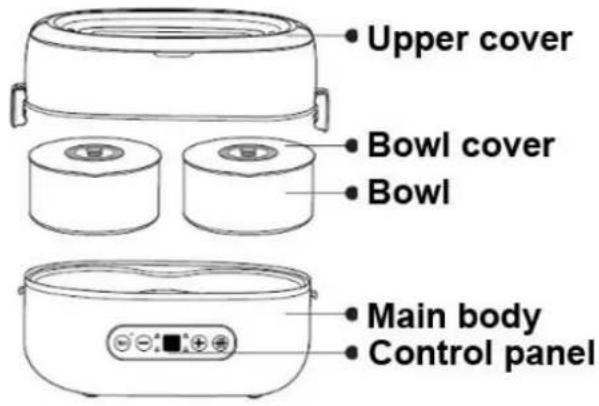
- Sealed ceramic container x 2 (for MLB810 & MLB820).

natural_image
Simple line drawing of a cylindrical container with horizontal lines inside, no text or symbols present.- Measuring cup to measure the required amount of water (for MLB810 & MLB820).
- Transport bag (for MLB810 & MLB820).
Directions for Use of the Electric Lunch Box
PROPOSED DISHES
| Function | Food amount | Water Added to Food (ml) | Water Added to Cooker (ml) | Cooking Time (min) |
| Heating | Appropriate | 0 | 120 | 30 |
| Steam Food | Appropriate | 0 | 120 | 30 |
| Rice Steaming | 120 g | 180 | 120 | 30-40 |
| Steam Egg | 4 eggs | 0 | 80 | 25-30 |
| Egg custard | 1 egg | 30 | 60 | 15-20 |
| Soup Making | Appropriate | 200 | 200 | 60-70 |
| porridge | 40 g | 240 | 200 | 60-70 |
| Steamed spareribs | Appropriate | 0 | 200 | 60-70 |
AUTOMATIC FUNCTIONS (MLB820 only)
| Function | Name | Food amount | Water Added to Food (ml) | Water Added to Cooker (ml) | Cooking Time (min) | Default (min) |
| Heating | STEAM FOOD | Appropriate | 0 | 120-200 | 20-60 | 30 |
| Steam Food | STEAM FOOD | Appropriate | 0 | 120-200 | 20-60 | 30 |
| Rice Steaming | STEAM RICE | 120 g | 180 | 120-200 | 30-60 | 40 |
| Soup Making | SOUP | Appropriate | Appropriate | 200 | 90-140 | 120 |
| Keep warm | KEEP WARM | Appropriate | 0 | 200 | 30 min – 9,5 godz. | 120 |
TIPS: Don't cover the bowl when steaming food or rice. Don't touch the lid or handle when the product is working.
1. How to cook food (MLB810 & MLB820)
Multi Lunch Box Noveen is a device without restrictions in the preparation of a meal.
Product boils water to the boiling point, all dishes or recipes that require such temperature can be prepared in our Product !!!
In addition, you can take a meal with you in two variants:
- Take the device in a portable bag, add the required amount of water, plug the power cord into the electricity and you can enjoy the warm meal that you prepared earlier !!!
- With ceramic containers you can take your meal prepared beforehand with you and reheat it in the microwave !!!
Prepare a healthy meal fast thanks to our device !!!
Just insert the product that you want to prepare in the container, e.g. soup, pour water, pour the right amount of water into the lunch box, close device, connect to the power supply and after sufficient time (see table above) you can enjoy a delicious dish!
2. Preparing a meal step by step
Use the measuring cup to add appropriate amount of water into the product. The amount is shown in the table.
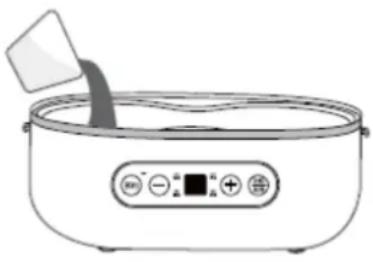
natural_image
Line drawing of a rice cooker with a lid and control panel (no text or symbols)Place the food in containers, add about 20 ml of water to each container
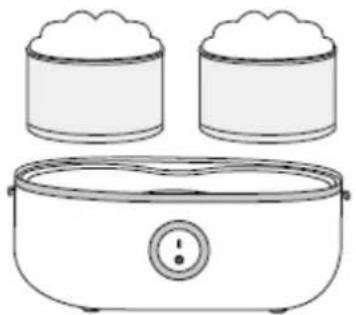
natural_image
Line drawing of a rice cooker with two cylindrical containers (no text or symbols)Then insert the containers into the Lunch Box and close the lid.
3. Plug in the power cord
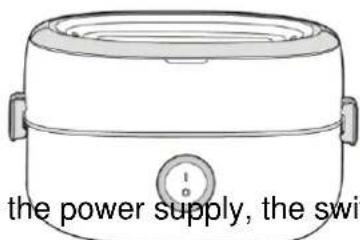
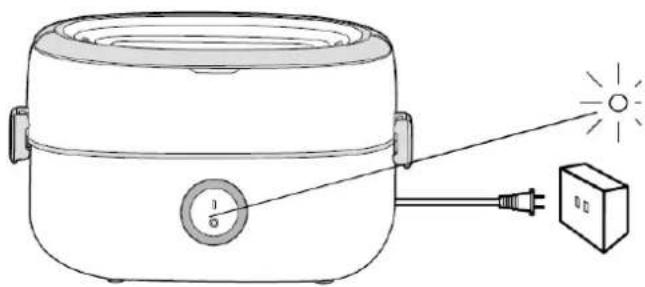
When connecting the device to the power supply, the switch should be set to 0, do not connect the device when the
switch indicates I (MLB810 model). After
natural_image
Line drawing of a rice cooker with a light bulb and power outlet, connected to a rectangular lamp (no text or symbols)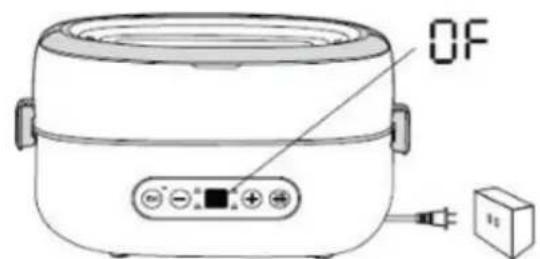
connecting the power supply and turning
on the unit in standby mode, the control panel displays "OF".
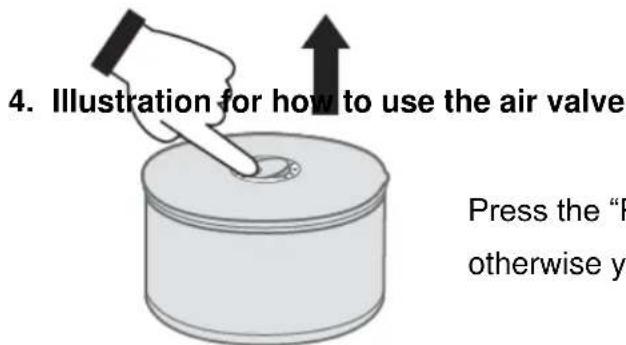
Press the "PUSH" button to open the air valve first, otherwise you cannot take off the container cover.
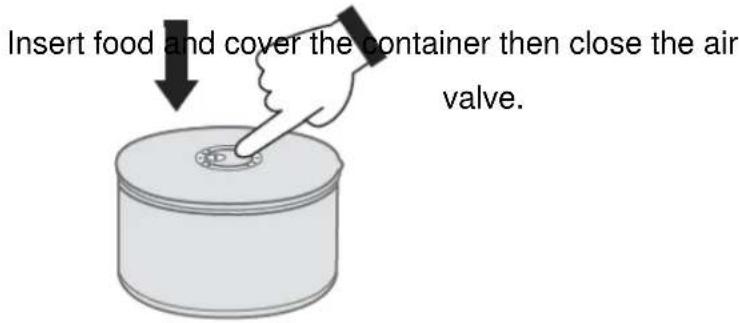
5. Illustration for how to use the date indicator
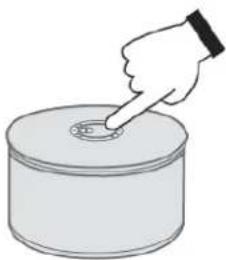
Turn the digit dialer to set the date (the current date) before storing in a refrigerator. Align the number with arrows on the air valve, and the digits pointed at by the arrows are the
start date of storage. The duration of storage can be calculated from these digits.
natural_image
Illustration of a hand pointing at a circular button on a cylindrical container (no text or symbols)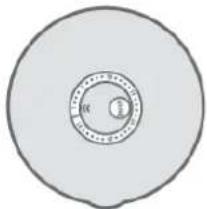
natural_image
Simple circular diagram with concentric rings and a small labeled circle (no text or symbols)Control panel operation (MLB820 only)
1. Setting the Timer
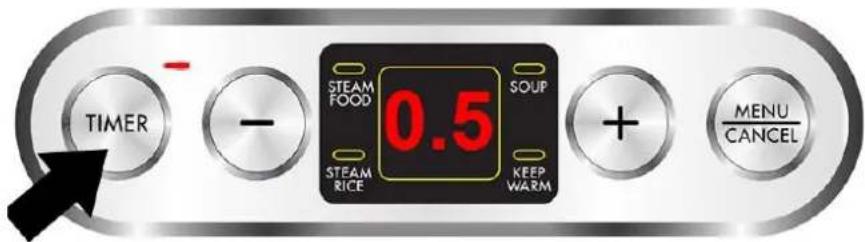
Icons on the control panel when setting the timer.
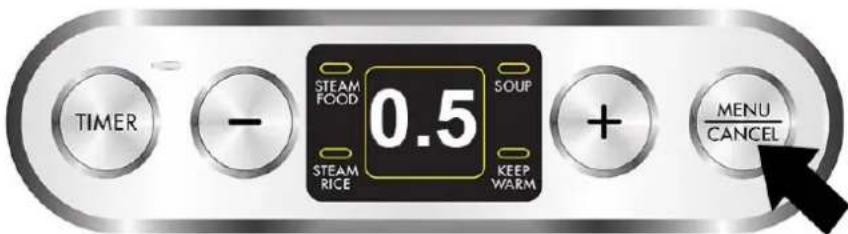
Enter the interface for function choosing after setting the timer.
Press "Timer" and the indicator of timer flashes and shows the default duration of "0.5". Press "+" or "-" to adjust the duration of timer, or you can long press "+" or "-" for quick increase/decrease. Later after setting the timer, press the "MENU/CANCEL" button and now the indicator is lit up constantly, which indicates successful setting of timer. The cooker is now in the stage of function selecting.
TIP: If there is no need to set the timer, directly press "MENU/CANCEL" to enter the stage of function selecting.
The time in the display is shown in the following mode:
The display shows 0.5 - the preset operation time is 50 min. Time can be reduced or increased every 10 minutes. (e.g. 0.3 is 30 min, 0.2 is 20 min.).
2. Other Functions
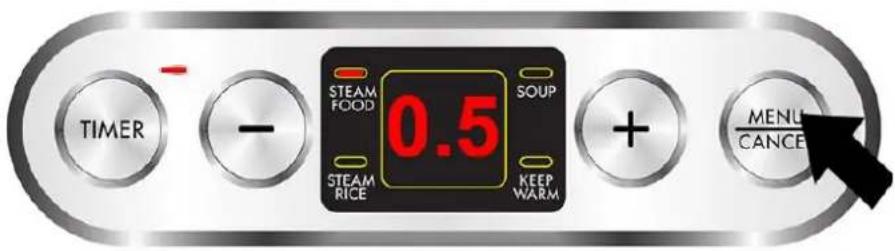
Picture of the control panel when selecting the function
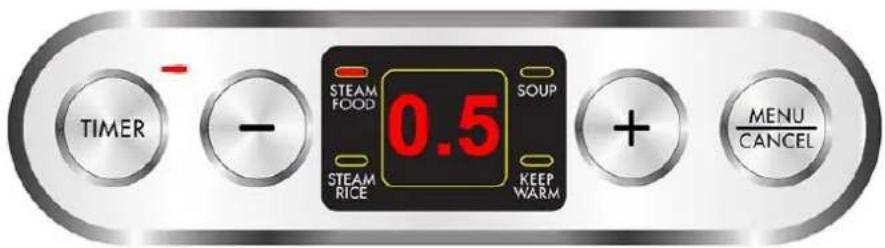
Picture of the control panel when starting work.
Starts automatically in 10s after function selection. In the standby mode or after setting the timer, you can press “MENU/CANCEL” to enter the stage of function selecting. Press the “MENU/CANCEL” to switch the function and the function indicator flashes. Now, press “Timer” button to adjust the work time and the product starts working automatically after 10 seconds. During operation you can press “MENU/CANCEL” to stop timer or steaming/cooking and enter the standby mode.
Notes:
a. The functions change in the following sequence: Steam Food – Steam Rice– Soup Making – Keep Warm – Standby.
b. In the stage of function selecting, the "Timer" button doesn't work. If any timer setting is required, please press "MENU/CANCEL" first to turn the product to the Standby mode where "OF" is shown.
3. After Completion of Work
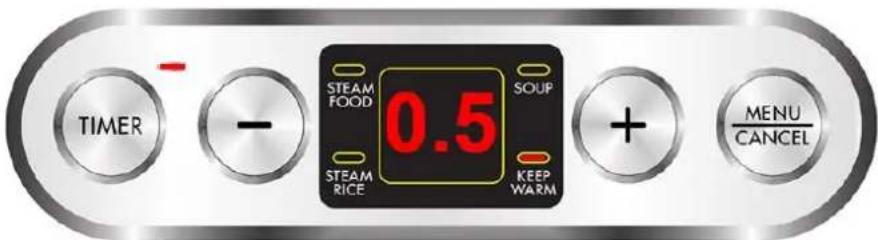
Picture of the panel in the "keep warm" mode
The product enters the “keep warm” mode automatically after the set work time ends. The product will enter the standby mode after the “keep warm” mode. You can also press “MENU/CANCEL” to stop working and turn off the power supply. Then the indicator turns off and you can plug out the power cord.
Attention
- When the water in the product dries out, the Electric Lunch Box will stop working and the digital display shows "EO"; after resetting the temperature controller, the product shows "OF" and enters standby mode. If you need to continue steaming or cooking or use keep warm function, please add water into the product and reset the function.
- Be careful when you are taking off the lid when the Electric Lunch Box is working, or the steam or the boiling water going out of the product may burn your hands.
- Prolonging work time may result in shortened "keep warm" time. Please set the "keep warm" function by hand and add appropriate amount of water into the product if you want to prolong the time.
Cleaning and Maintenance
- Unplug the power cord from the socket immediately after use.
- Clean the container and the lid with dishwashing liquid and sponge. Don't clean with hard steel wool, otherwise the surface of the container or the lid may be damaged.
- If the main body is dirty, wipe with a wet towel. Don't immerse the main body in water for cleaning, or electric leakage or accident may happen.
- Clean the product and put it in the packing box, keep it in a well ventilated and dry place if it will not be used for long time to avoid humidity and impaired performance.
- Clean the PTC heating element: If the PTC heating element is covered with water scale, clean it with a little water and citric acid or white vinegar for 5-10 minutes and then wipe it with a towel or hairbrush.
Troubleshooting
| Fault | Possible causes |
| Power indicator doesn’t light up | a. Power failure.b. Power cord is not connected to the socket.c. Power socket is turned off.d. Plug of the power cord fails to be connected tightly with the main body.e. ON/OFF button is in 0 position.f. The water dries up and the product is in protection against dry heating. |
| Food not fully cooked | a. Too much or too little water.b. The heating plate has accumulated too much water scale.c. Wrong setting of cooking time. |
UA
natural_image
Simple line drawing of a cylindrical container with horizontal lines inside, no text or symbols present.natural_image
Line drawing of a rice cooker with a lid and control panel (no text or symbols)natural_image
Line drawing of a rice cooker with two cylindrical containers above it (no text or symbols)ЄМНІСТЬ
natural_image
Line drawing of a rice cooker with lid and side handles (no text or symbols)natural_image
Line drawing of a rice cooker with a power outlet and a light bulb, no text or symbols present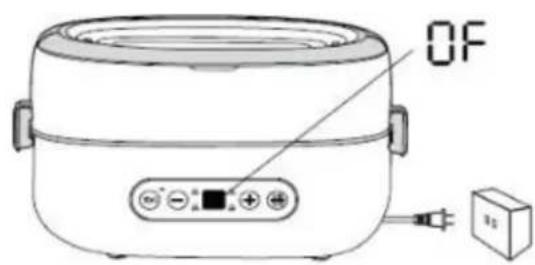
natural_image
Illustration of a hand pressing down on a cylindrical object with an upward arrow (no text or symbols)natural_image
Hand pointing at a circular button on a cylindrical object, with a downward arrow indicating action (no text or symbols)natural_image
Illustration of a hand pointing at a circular object on a cylindrical base (no text or symbols)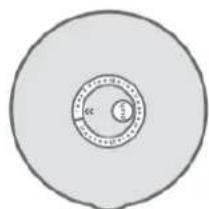
natural_image
Circular diagram with concentric rings and a central scale, no text or symbols present- Thank you for purchasing our product.
- Read all safety information before use and keep these operating instructions for future reference.
- FIRST USE
- DEVICE CONSTRUCTION
- Lunch Box
- How to cook food (MLB810 & MLB820)
- Prepare a healthy meal fast thanks to our device !!!
- Preparing a meal step by step
- Plug in the power cord
- Illustration for how to use the date indicator
- Control panel operation (MLB820 only)
- Setting the Timer
- Other Functions
- Notes:
- After Completion of Work
- Attention
- Cleaning and Maintenance
- UA
Brand : N'oveen
Model : MLB820
Category : Bouilloire thermique