
MaxiEV ALT100L - Battery tester Autel - Free user manual and instructions
Find the device manual for free MaxiEV ALT100L Autel in PDF.


| Product Type | Battery Leakage Tester |
| Model | MaxiEV ALT100L |
| Dimensions (W x L x H) | 280 x 300 x 200 mm |
| Weight | 3.5 kg |
| Power Supply | AC 90-265V, 50/60Hz, 20W max |
| Test Method | Pressure decay (nondestructive) |
| Test Pressure Range | 0-30 kPa |
| Sensor Resolution | 1 Pa |
| Test Accuracy | ±5 Pa |
| Display | 7-inch LCD touch screen |
| Communication Ports | RS485, USB 2.0 |
| Data Storage | Internal memory and export via USB |
| Air Supply | 0.1-1.0 MPa dry compressed air |
| Air Inlet / Outlet Ports | φ6 mm air pipes |
| Operating Temperature | -5°C to 50°C |
| Storage Temperature | -20°C to 70°C |
| Operating Humidity | 10% to 90% RH @25°C (non-condensing) |
| Components Included | Main unit, air inlet pipe, air outlet pipe, AC power cord, USB disk, user manual, carrying case |
| Key Features | High sensitivity sensor, large screen, barcode scanner support, visualized test process, pressure dual display, parameter memory, intelligent alarm, remote management (optional) |
| Safety Features | Audible and visual alarms for abnormal conditions; power switch; grounded power requirement |
| Warranty | 1 year for main unit (excluding artificial damage) |
| Application | Leakage test of EV battery packs |
| Calibration | Supported via settings menu |
| Language Support | English, Simplified Chinese, Traditional Chinese |
Frequently Asked Questions - MaxiEV ALT100L Autel
User questions about MaxiEV ALT100L Autel
0 question about this device. Answer the ones you know or ask your own.
Ask a new question about this device
Download the instructions for your Battery tester in PDF format for free! Find your manual MaxiEV ALT100L - Autel and take your electronic device back in hand. On this page are published all the documents necessary for the use of your device. MaxiEV ALT100L by Autel.
USER MANUAL MaxiEV ALT100L Autel
2. Safety Precautions....3
2.1 Operator Requirements .... 3
2.2 Operating Environment....3
2.3 Connection Precaution....3
2.4 Operating Precautions 4
2.5 Common Misoperation....4
2.6 Emergency Treatments on Abnormal Conditions 4
2.7 Other Safety Warnings....4
3. Main Technical Parameters ....5
4. Installation 5
5. Device Connection....6
5.1 Panel Description....6
5.2 Device Connection ....7
5.2.1 Air Supply Connection....7
5.2.2 Battery Pack Connection....7
5.2.3 AC Input Connection....7
6. Operating Instruction 8
6.1 Starting Up....8
6.2 Settings....8
6.2.1 Language....9
6.2.2 Units 9
6.2.3 Wi-Fi Connection....9
6.2.4 Log Management 9
6.2.5 Device Maintenance ....10
6.2.6 About....10
6.2.7 Calibration 10
6.2.8 Parameter Settings 10
6.3 Low Pressure Mode Leakage Test....11
6.3.1 Parameters Setting ......12
6.3.2 Test Start....13
6.4 Data Management....13
- Repair & Maintenance....15
- Transportation & Storage 15
- Environmental Statement....15
1. Overview
MaxiEV ALT100L Battery Leakage Tester is a newly developed high-accuracy nondestructive testing equipment. It mainly uses compressed air as the medium to apply specific pressure to the inner cavity or surface of the battery to be tested and then uses sensitive sensors to detect the variations of pressure to determine the leakage of the battery pack. It can improve customer testing efficiency and product quality with pollution-free, quick, and accurate testing characteristics in the new energy industry.
1.1 Features
- High Sensitivity: High-sensitivity pressure sensing significantly improves test accuracy and stability.
- Large Screen Display: A 7-inch big-size LCD touch screen visually displays the test progress and data.
- Barcode Scanner: it supports barcode scanner access, directly scans code, and displays the battery pack's ID to be tested.
- Visualized Process: display the progress time of each stage during the test.
- Pressure Dual Display: the pressure dial and the test curve will display on the same screen in real time.
- Parameters Management: the system auto-remembers the last test parameters, which is convenient for the next test modification and improves efficiency.
- Intelligent Alarm: the tester will prompt audible and visual alarms to ensure safety when the test is abnormal or failed.
- Remote Management: the device supports online system upgrades, and the optional cloud platform can realize remote data transmission and management.
1.2 Applications
This equipment is mainly used for the leakage test of battery packs.
1.3 Device Component
It is configured with the main unit, air inlet pipe, air outlet pipe, AC power cord, USB disk, user manual, and carrying case.
The main unit is organized by color LCD touch screen, data processing unit, and data acquisition unit.

flowchart
graph TD
    A["MaxiEV ALT100L"] --> B["Main Unit*1"]
    A --> C["Air Inlet Pipe*1"]
    A --> D["Air Outlet Pipe*1"]
    A --> E["AC Power Cord*1"]
    A --> F["USB Disk*1"]
    A --> G["User Manual*1"]
    A --> H["Carrying Case*1"]
    B --> I["LCD Touch Screen"]
    C --> J["Data Processing Unit"]
    D --> K["Data Acquisition Unit"]
2. Safety Precautions
2.1 Operator Requirements

Alarm
1) Operators are required to receive training related to the use of the equipment before operating.
2) Before operating, operators should read the user manual and the related regulations.
3) Please do not disassemble without the manufacturer's permission.
2.2 Operating Environment

Alarm
1) Operating temperature: -5\~50°C.
2) Relative humidity: 10\~90% @25°C, rainy day outdoor use is prohibited.
3) Non-corrosive, explosive, and destructive insulation gases and conductive dust of the test environment are required.
2.3 Connection Precaution

Alarm
1) Ensure the unit's AC power switch is off before completing all connecting.
2) Please strictly follow the instructions to connect the cables properly.

Danger
Warning signs need to be placed in the test work area to avoid the risk of tripping over the cable.

Alarm
When the equipment is running, it is necessary to ensure that the air inlet and outlet are free of obstructions.
2.4 Operating Precautions
The operation of the device is by touching the screen input. Please follow the screen prompts.

Alarm
The working power of this device is AC90\~265V. Please make sure the operating power is reliably grounded.

Alarm
Do not let the tester run unattended.
2.5 Common Misoperation
1) Operating tools are not insulated.
2) Operating the device without following the user manual.
2.6 Emergency Treatments on Abnormal Conditions
Disconnect the power supply.
2.7 Other Safety Warnings
Strictly observe safe operating practices and correct operation methods.
- Main Technical Parameters
| Model | MaxiEV ALT100L |
| Applicable | Suitable for the leakage test of EV battery packs |
| Test Power | 20W max |
| Test Method | pressure |
| Test Pressure Range | 0-30Kpa |
| Sensor Resolution | 1Pa |
| Test Accuracy | ±5Pa |
| Display | 7-inch LCD touchscreen |
| Communication Port | RS485, USB |
| Data Storage | Internal memory/download via USB disk |
| Power Supply | AC90~265V |
| Air Supply | 0.1~1.0 Mpa dry compressed air |
| Air Inlet Port | φ6mm air pipe |
| Test Port | φ6mm air pipe |
| Work Temperature | -5~50°C |
| Storage Temperature | -20~70°C |
| Work Humidity | 10%~90% @25°C, without condensation |
| Dimension(mm) | 280*300*200(W*L*H) |
| Weight | 3.5kg |
| Optional | air converter |
4. Installation
This device is mobile portable equipment and does not involve installation.
5. Device Connection
5.1 Panel Description

Front View

Back View
| No. | Name | Description |
| 1 | USB Port | for test data export and system local update |
| 2 | RS485 Port | for data copy and transmit |
| 3 | AC Power Supply | AC90~265V input and power switch |
| 1 | Air Inlet Port | air supply inlet |
| 5 | LP Air Outlet Port | low-pressure output |
| 6 | HP Air Outlet Port | not currently supported |
5.2 Device Connection
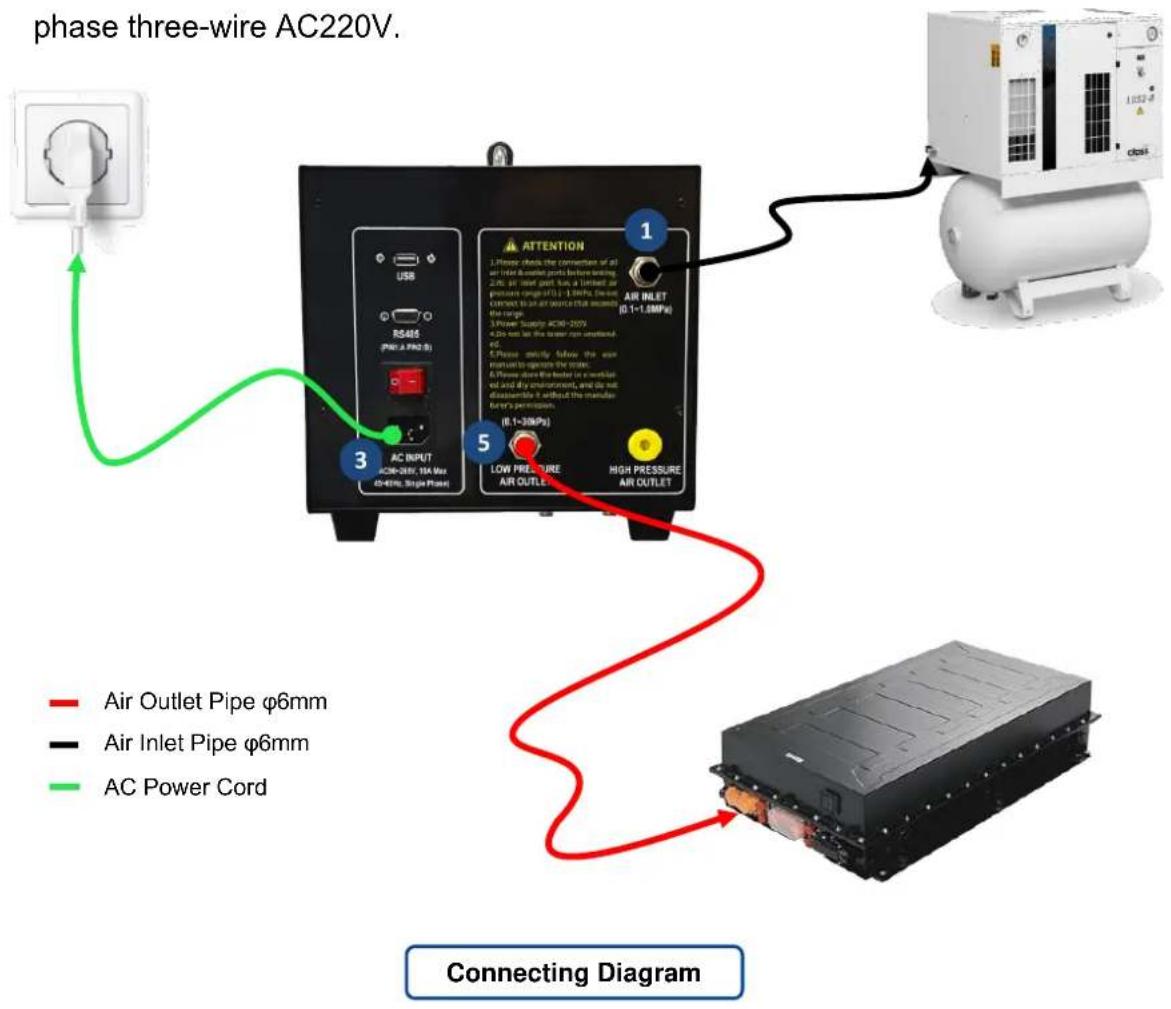
Please connect as per the instruction, and check all connections are fastened after joining.
5.2.1 Air Supply Connection
Connect the air source and tester's Air Inlet Port with a 6mm air pipe.
5.2.2 Battery Pack Connection
Connect the battery pack and tester's Air Outlet Port with a 6mm air pipe. Please ensure the airtightness of the connection.
5.2.3 AC Input Connection
Connect the power supply and the tester. The working power input is a single-phase three-wire AC220V.
6. Operating Instruction
6.1 Starting Up
After the device connection, turn on the AC Power Switch to start the tester.
The screen will display the Boot Animation with the Welcome and AUTEL brand logo, and then the system will automatically jump to the Main Menu Page, including Low Pressure Mode, Data Management, and Settings functions.


Boot Animation
MaxiEV ALT100L Battery Leakage Tester
Low Pressure Mode

Data Management

Settings
Main Menu Page
6.2 Settings
Press the Settings icon on the Main Menu Page to enter the Settings Page. It has eight sub-pages: Language, Units, Wi-Fi Connection, Log Management, Device Maintenance, About, Calibration, and Parameter Settings.
6.2.1 Language
The system supports three language switching, including English, Simplified Chinese, and Traditional Chinese.

Settings > Language
Settings > Unit
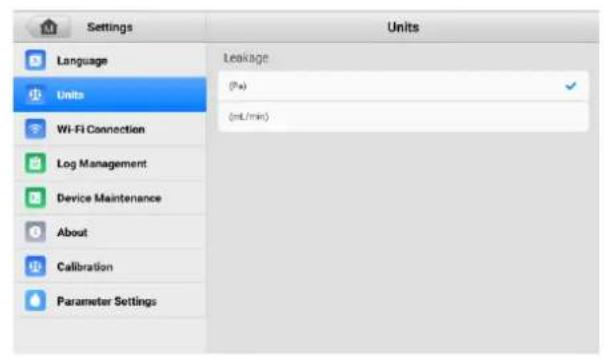
6.2.2 Units
Set the leakage unit according to the actual testing requirements.
6.2.3 Wi-Fi Connection
A wireless network connection is for online system upgrades of the standard unit and data transmission of optional cloud platform functions.

Settings > Wi-Fi Connection

Settings > Log Management
6.2.4 Log Management
The running log is used for analysis by manufacturers when analyzing exceptions. There is no need for the user to operate. Contact the manufacturer for guidance when the device is abnormal.
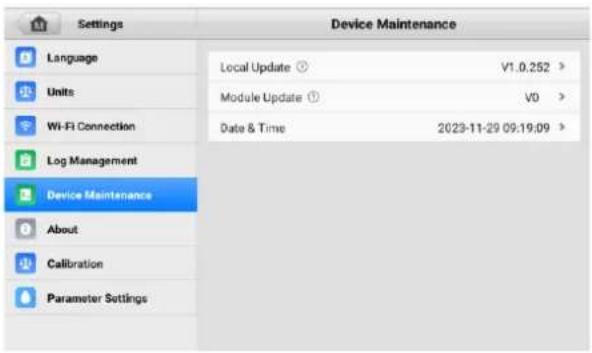
6.2.5 Device Maintenance
It is for local updates, module update, and date & time calibration. If necessary, please contact the manufacturer to get the updated file and operate following the manufacturer's guidance.
Settings > Device Maintenance

Settings > About
6.2.6 About
It will show the device info about the current software version, device ID, and device model, and users can operate the online upgrade on the page.
6.2.7 Calibration
It is used for calibration. Please operate according to actual test requirements.

Settings > Calibration

Settings > Parameter Settings
6.2.8 Parameter Settings
There are two inflation modes, including Default (2s) and Straight. Please select the proper inflation mode according to the actual testing situation, and press
Save to save the setting.
Default (2s): The inflation valve closes every 2 seconds, and the system detects the inner pressure after every 2 seconds.
Straight: The inflation is completed at one time, and the inflation valve will not be closed during the inflating process.
6.3 Low Pressure Mode Leakage Test

Low Pressure Test Page
Press Low Pressure Mode on the Main Menu Page to enter the Low Pressure Test Page. There are four parts on the page:
1 Real-time Data: display the real-time pressure value of the tested battery pack.
2 Leakage: display the real-time leakage value of the tested battery pack.
3 Test Info:
● show the battery pack ID and target pressure;
● show the test status and the test result;
- Set function icon for setting test parameters;
- Start and Stop function icons for test control.
1 Test Process: display the whole test progress as a curve.
6.3.1 Parameters Setting
Press the Set icon to set the test parameters. Users need to confirm the test parameters before testing. Remember to press Save to take effect.
For the first test, users need to complete the setting of all parameters. The system will automatically save the last test parameter, and you can enter the
Parameters Setting Page to confirm or modify it when you start the test next time.

Parameters Setting Page
| Parameter | Description |
| Pack ID: | Name the battery pack, and you can input the actual ID. |
| Pack Volume (L): | The battery pack volume; fill in the actual pack volume. |
| Target Pressure (kPa): | Set the target pressure for inflation. |
| Max Pressure (kPa): | The upper limit of the test range. It will be displayed on the real-time pressure dial. |
| Min Pressure (kPa): | The lower limit of the test range. It will be displayed on the real-time pressure dial. |
| Leakage (Pa): | Airtightness determines condition. actual leakage value ≤ Leakage → Qualified actual leakage value > Leakage → Unqualified |
| Inflation Time (s): | The inflation time can be set according to the battery pack size. |
| Holding Time (s): | A holding time that the tester will stop inflating and wait for inner pressure change. |
| Test Time (s): | The test time that the tester detects pressure changes after the Holding Time. The test page will display the test result after detection. |
| Deflation Time (s): | The time to deflate air after the test is complete. |
6.3.2 Test Start
Confirm the test parameters and press Save to back to the Low Pressure Test Page, then press Start to start the test. Users can check the real-time test data on the page. The test process will be carried out in the order of preparation (10s), Inflation, Holding, Test, and Deflation.

Test Start

Unqualified Test Result
No matter in which test stage, as long as the actual test data does not meet the preset parameters, the system will determine the test result as Unqualified. Please operate following the system Note.
6.4 Data Management
Press the Data Management icon on the Main Menu Page. The system supports automatic data saving during all testing processes and can view, delete, and export data on the Data Page after testing.
1) View
Slide the page to browse all test data. Click on the test data you want to check, and the system will show the test process screenshot to show you
the details.
2) Delete
Check or select all test data and press Delete to confirm the deletion.
3) Export
Insert the USB disk into the device's USB port, check or select all saved data, and press Export to download the corresponding data to the USB disk.

Data Page
7. Repair & Maintenance
1) The warranty period of the main tester is one year from the date of receipt, and the warranty does not cover artificial damage.
2) The manufacturer provides free repair during the defects liability period and technical consulting services for a lifetime. If you have any technical problems or advice, please get in touch with the manufacturer.
3) When the equipment is stored for a long time, there may be dust and other dirt on the mesh cover of the heat outlet, which needs to be cleaned regularly.
8. Transportation & Storage
1) This tester is equipped with a particular carry case and transported in a carton, which is shock-resistant and reliable in transportation.
2) Storage conditions: placed in a dry equipment storage room, temperature: -20\~70°C, humidity: <90%.
9. Environmental Statement
1) The tester uses a transport carton which is a recyclable material.
2) The main machine and other components are non-polluting sources.
- Safety Precautions....3
- Main Technical Parameters ....5
- Installation 5
- Device Connection....6
- Operating Instruction 8
- Low Pressure Mode Leakage Test....11
- Data Management....13
- Overview
- Features
- Applications
- Device Component
- Safety Precautions
- Operator Requirements
- Alarm
- Operating Environment
- Connection Precaution
- Danger
- Operating Precautions
- Common Misoperation
- Emergency Treatments on Abnormal Conditions
- Other Safety Warnings
- Installation
- Device Connection
- Panel Description
- Device Connection
- Air Supply Connection
- Battery Pack Connection
- AC Input Connection
- Operating Instruction
- Starting Up
- Settings
- Language
- Units
- Wi-Fi Connection
- Log Management
- Device Maintenance
- About
- Calibration
- Parameter Settings
- Low Pressure Mode Leakage Test
- Parameters Setting
- Test Start
- Data Management
- 1) View
- 2) Delete
- 3) Export
- Repair & Maintenance
- Transportation & Storage
- Environmental Statement
Brand : Autel
Model : MaxiEV ALT100L
Category : Battery tester