
Air Purifier AP100 - Air purifier Instant - Free user manual and instructions
Find the device manual for free Air Purifier AP100 Instant in PDF.


| Product Type | Air Purifier |
| Brand | Instant |
| Model | AP100 |
| Dimensions (approximate) | 10.2 x 10.2 x 18.5 inches |
| Weight | 12.8 lbs |
| Power Supply | 120V ~ 60Hz, 45W |
| Coverage Area | Up to 483 sq ft |
| CADR (Smoke/Dust/Pollen) | 140 / 145 / 160 CFM |
| Filter Type | Pre-filter, HEPA H13, Activated Carbon |
| Fan Speeds | 4 speeds (Low, Medium, High, Turbo) |
| Timer | 2, 4, 6, 8 hours |
| Night Mode | Yes, with display off function |
| Air Quality Sensor | Real-time PM2.5 display with color ring |
| Filter Replacement Indicator | Yes, based on usage hours |
| Noise Level | 24–48 dB (A) |
| Maintenance | Clean pre-filter monthly; replace HEPA and carbon filter every 6-12 months |
| Safety Features | Tip-over shutdown, child lock, auto shut off timer |
| Spare Parts | Replacement filters available (model IFILTER100) |
| Warranty | 1 year limited (extendable to 2 years with registration) |
Frequently Asked Questions - Air Purifier AP100 Instant
User questions about Air Purifier AP100 Instant
0 question about this device. Answer the ones you know or ask your own.
Ask a new question about this device
Download the instructions for your Air purifier in PDF format for free! Find your manual Air Purifier AP100 - Instant and take your electronic device back in hand. On this page are published all the documents necessary for the use of your device. Air Purifier AP100 by Instant.
USER MANUAL Air Purifier AP100 Instant
Breathe easier with cleaner air in an instant!
Instant Air Purifiers deliver peace of mind by cleaning the air in your home in minutes. And because it's from Instant Brands™ – makers of the world's most loved multicooker – you can set it and forget it, knowing it'll do its job simply and easily. Welcome to cleaner air!
CONTENTS
Important Safeguards 2
Safety Warnings 2
What's in the box? 4
What to expect 5
Control panel 6
Getting started 7
How to use your air purifier 8
How to care for your air purifier 12
If you have problems 13
Warranty
14
Learn more 16
Notes
17
This equipment has been tested and found to comply with the limits for a Class B digital device, pursuant to part 15 of the FCC Rules. These limits are designed to provide reasonable protection against harmful interference in a residential installation. This equipment generates, uses and can radiate radio frequency energy and, if not installed and used in accordance with the instructions, may cause harmful interference to radio communications. However, there is no guarantee that interference will not occur in a particular installation. If this equipment does cause harmful interference to radio or television reception, which can be determined by turning the equipment off and on, the user is encouraged to try to correct the interference by one or more of the following measures:
- Reorient or relocate the receiving antenna.
- Increase the separation between the equipment and receiver.
- Connect the equipment into an outlet on a circuit different from that to which the receiver is connected.
- Consult the dealer or an experiences radio.TV technician for help (FCC).
IMPORTANT SAFEGUARDS
SAFETY WARNINGS
WARNING
Read all instructions before using and only use this air purifier as described in this manual.
When using electrical appliances, basic safety precautions should always be followed to reduce the risk of fire, electric shock, and injury to persons.
Placement
- DO NOT use the air purifier in wet or humid environments, or outdoors. This appliance is designed for indoor use only.
- DO NOT use the air purifier in an enclosed space where toxic vapors, flammable dust, oxygen tanks, or flammable, combustible or explosive gases are present.
- DO keep all objects away from the air intake grill. This air purifier should only be used in rooms with temperatures between 50°F and 104°F (10°C to 40°C).
- DO allow 18 inches (457 mm) of clearance on all sides of the purifier to allow adequate circulation of air around the product.
- DO NOT place the unit on soft surfaces such as a bed or sofa. Always make sure to place the air purifier on a flat, level surface before operation
- DO NOT sit on or place anything on top of the purifier.
- DO NOT place the purifier directly below an air conditioner to prevent any moisture from getting into the purifier.
- DO NOT place the air purifier near or on top of sources of heat, such as stove tops, ovens, radiators or computers.
- DO NOT place the air purifier directly in front of open flames, including candles.
- DO NOT use this appliance with indoor smoke-type insect repellents or in places with oily residues, burning incense, or chemical fumes.
Power
- DO make sure the plug fits properly into a polarized power outlet. To reduce the risk of electric shock, this equipment has a polarized plug (one blade is wider than the other). This plug will fit in a polarized outlet only one way. If the plug does not fit fully in the outlet, reverse the plug. If it still does not fit, contact qualified personnel to install the proper outlet. Do not alter the plug in any way.
SAFETY WARNINGS
WARNING
- DO NOT operate the unit if cord or plug is damaged. Doing so may result in injury or damage to the unit.
- DO NOT run the power cord under carpeting, rugs, furniture or appliances. Place the power cord away from high-traffic areas.
• DO NOT use an extension cord with this unit.
• DO NOT use this appliance with any solid-state speed control device.
Cleaning and Repair
• DO unplug the appliance from the power supply before cleaning.
- DO inspect the unit frequently. Dirt that has collected should be removed regularly to prevent excessive accumulation that may result in flashover or fire.
- DO use appropriate personal protective equipment during cleaning and filter removal.
• DO NOT insert fingers or objects into the air outlet.
- DO NOT handle the unit with wet hands. Thoroughly dry your hands before handling any part of the air purifier.
• DO NOT immerse air purifier in water or liquids, or clean the appliance with any liquid to avoid electric shock and/or electrical fires.
- DO NOT attempt to repair this device in any way or use any replacement components or parts to modify the air purifier. Doing so will void your warranty. Contact Customer Support (page 16) immediately if your appliance is no longer working.
- If the unit is damaged, not functioning properly, produces a strange noise, burning smell or smoke, discontinue use, unplug immediately and contact Customer Support (page 16).
Filter
- DO only use Instant Air replacement filters for this unit, and in the correct size designed for this unit. Do not attempt to use other filters with this appliance.
• DO remove the plastic shipping bag from the Filter before use.
Other
- NOTE This appliance does not remove carbon monoxide (CO) or radon (Rn). It cannot be used as a safety device to prevent or clean up accidents with combustion processes and hazardous chemicals.
SAVE THESE INSTRUCTIONS
WHAT'S IN THE BOX?
Air Purifier\*

Filter
3-in-1 Filtration System

natural_image
Simple line drawing of a cylindrical container with a perforated top and a red dotted line pointing to the bottom (no text or symbols)Power cord included, not shown
*This product complies with the maximum allowable concentration of ozone of 0.050 parts per million by volume (ppmv) in a 24-h period
WHAT TO EXPECT
Your new Instant Air Purifier uses advanced technology for cleaner air.
3-in-1 Filtration System
Uses 3 advanced technologies to keep your air clean, capturing 99.9% of ultrafine airborne particles:
- HEPA-13 filter helps removes particles up to 0.3 microns in width.
- Activated carbon layer of the filter helps reduce odors.
- Antimicrobial filter coating to prevent microbial growth on the filter and protect the filter from degradation
Plasma Ion Technology
Projects positive and negative ions into the air.
Cleaner Air in Minutes
Instant Air Purifier is verified to purify air of impurities 5x per hour*.
Works Automatically
Intelligent sensors constantly monitor air quality and environment to automatically transition to Eco and Night modes. **
*Verified by AHAM, the Association of Home Appliance Manufacturers
**Sensors for air quality indicator have a margin of error of +/- 20 micrograms per cubic meter in detecting changes in air quality
CONTROL PANEL
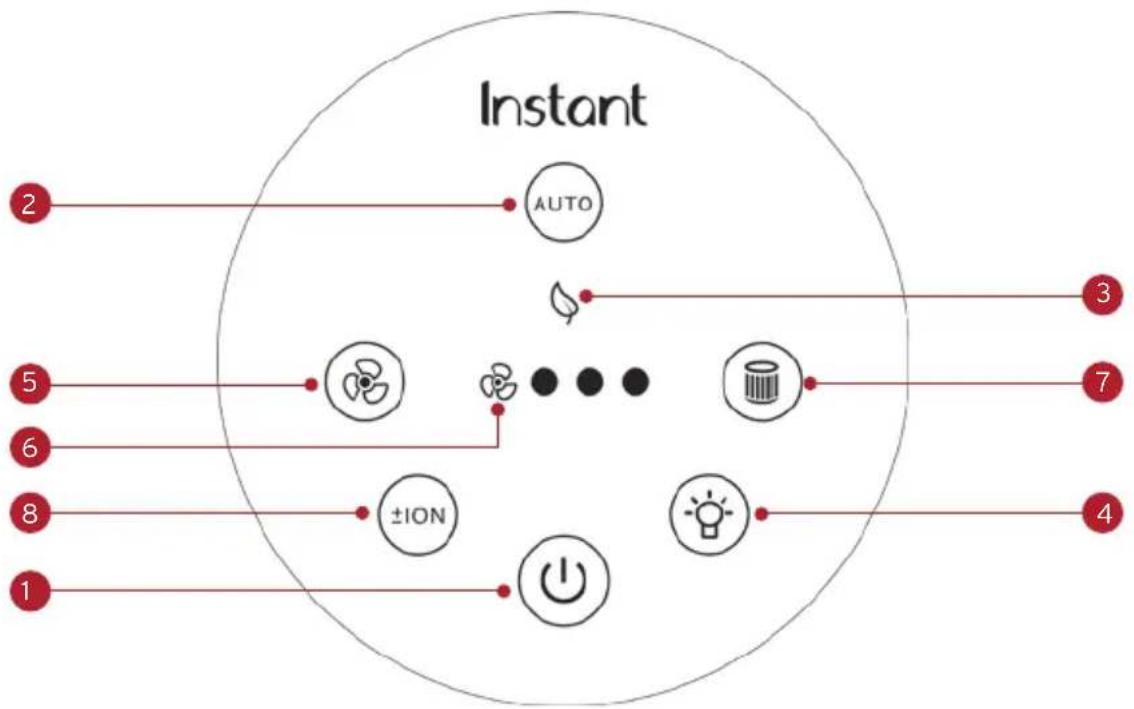
flowchart
graph TD
    A["2"] --> B["AUTO"]
    C["5"] --> D["fan icon"]
    E["6"] --> F["flame icon"]
    G["8"] --> H["±ION"]
    I["1"] --> J["Power icon"]
    K["3"] --> L["leaf icon"]
    M["7"] --> N["waste bin icon"]
    O["4"] --> P["lightbulb icon"]
- Power
- Touch to turn unit ON or OFF
- Auto
- When lit, unit is in Auto operation
- Touch to turn Auto operation ON and OFF
- Eco
- When lit, unit is in energy-saving Eco mode
- Light
- Touch to switch between light levels (0%, 20%, 60%, 100%)
- Fan
- Touch to switch between fan levels – overrides Auto operation
- Fan Speed
• Indicates fan level (low, medium, high)
- Filter
- When the light blinks orange, filter needs replacement
- Touch and hold for 3 seconds to reset after you've replaced filter
- Plasma lon
- Touch to turn plasma ion operation ON or OFF
GETTING STARTED
- Remove the air purifier from the box and place on a flat, sturdy surface.
- Remove the packaging material.
- Turn the air purifier on its side and twist the Removable Base counter-clockwise to loosen and remove.
- Remove the filter and remove the plastic bag. Reinsert the filter.
- Replace the removable base, turning it clockwise to tighten.
- Place unit on floor to ensure there's clearance on all sides to allow for proper circulation.
- Plug the power cord into an electrical outlet. This unit uses a polarized plug, with one wider prong. The unit will fit into the outlet only one way.
- Touch the power button to turn the unit on. The unit powers up, measures the room's air quality (this can take up to 30 seconds), and begins cleaning the air.
- The unit sets itself to Automatic operation.
HOW TO USE YOUR AIR PURIFIER
Turn on the unit
- If the unit is unplugged, plug the power cord into an electrical outlet.
- If the unit is plugged in but turned off, press the Power button to turn on the display.
Turn off the unit
- To stop the unit from operating, press the Power button until the display turns off.
Automatic operation
Your air purifier is designed to monitor air quality and automatically adjust the fan to increase filtration when the level of particles in the air increases and automatically transitions to Eco Mode for energy savings when the air quality is good for 30 minutes. There are 3 levels of automatic operation:
Auto Mode
• Automatically adjusts fan speed based on the air quality
| Air Quality Fan Level | |
| Good 1 (whisper quiet) | |
| Fair 2 | |
| Poor 3 |
Eco Mode
Your air purifier uses up to 50% less energy when in Eco mode.
- During Auto operation, the unit automatically starts Eco mode when the air quality is good for 30 minutes
- Automatically cycles the unit off and on every 10 minutes and checks the air quality when the fan is on.
| Air Quality Unit Operation | |
| Good Cycles off and on every 10 minutes | |
| Fair Exits Eco Mode and returns to Auto Mode | |
| Poor Exits Eco Mode and returns to Auto Mode |
Night Mode
Automatically detects room light:
- When dark, turns display and plasma ion operation off, and sets fan to level 1 to reduce sound
- When light, returns unit to Auto Mode
During Night mode, touch the LIGHT button to turn on the display.
| Room Light Display | |
| Dark Dims display | |
| Light Lights display |
Fan speed
You can override Automatic operation and set the fan speed manually.
- Touch the Fan button to cycle through Low, Medium and High speeds.
- To return to Automatic operation, touch the Auto button.
Light level
There are four levels of light brightness: 0%, 20%, 60%, and 100%.
The light levels are pre-set at these levels:
| Day light level Night light level | |
| 100% brightness 0% brightness |
You change the current light level manually.
- Press the Light button to cycle through the brightness levels: 0%, 20%, 60% and 100%.
The next time the unit switches to either Day or Night, the light level will change back to the pre-set level.
You can customize the pre-set for Day or Night light levels.
- First, set the light level manually. Then press and hold the Light button for 3 seconds to save the current setting as the Day or Night light level.
Air quality
As it constantly monitors the air in the room, your air purifier shows your air quality with a colored light (under the control panel) to give you an at-a-glance reading:
| Indicator Air Quality | |
| White GOOD (2.5- microgram particulate matter less than 35 micrograms per cubic meter) | |
| Yellow FAIR (2.5- microgram particulate matter between 35 and 55 micrograms per cubic meter) | |
| Red POOR (2.5- microgram particulate matter greater than 55 micrograms per cubic meter) |
Plasma ion
Your air purifier uses plasma ion technology to project positive and negative ions into the air.
- To turn off plasma ion feature, touch the ION button.
- To turn on the plasma ion feature if it's been turned off, touch the ION button.
Replace filter indicator
When it's time to replace the filter, the unit will light the Filter button on the control panel. The expected life of the filter is 6 to 8 months when operating continuously in Auto mode, depending on the quality of the air in your home.
- After you've replaced the filter, touch and hold the Filter button for 3 seconds to reset.
HOW TO CARE FOR YOUR AIR PURIFIER
Cleaning the unit
- To remove dust, lightly wipe the unit with a soft, clean cloth.
- If needed, wipe the unit with a clean damp cloth, then immediately dry with a clean dry cloth.
• DO NOT immerse the unit in water.
Replacing the filter
Visit instanthome.com to purchase compatible filters, designed to work with your unit. Use appropriate personal protective equipment during filter removal.
- Unplug the air purifier from the electrical outlet.
- Turn the air filter on its side and twist the removable base counterclockwise to loosen and remove.
- Remove the old filter and dispose of it properly. The filter is not recyclable.
- Remove the new filter from its packaging and insert it into the air filter.
- Replace the removable base, turning it clockwise to tighten.
- Place the air filter on the floor again and plug it back into the electrical outlet and press the Power button.
- The air purifier will automatically begin cleaning the air again.
When to turn off
Your air purifier is designed for ongoing use, and is safe to keep running all the time when you are home regularly.
- If you leave for longer than a day (such as for vacation), turn the unit off to save energy and the life of the filter.
IF YOU HAVE PROBLEMS
| Problem Cause Solution | ||
| Air purifier does not turn on | ·Unit is not plugged into an electrical outlet | ·Check that the unit is properly plugged into an electrical outlet |
| ·Outlet is not working properly | ·Plug the unit into a different electrical outlet | |
| ·Power cord is damaged or unit is defective or not functioning properly | ·Discontinue use and contact Customer Support | |
| Air purifier buttons not working | ·Unit is not plugged into an electrical outlet | ·Plug the unit into an electrical outlet |
| ·Power cord is damaged or unit is defective or not functioning properly | ·Discontinue use and contact Customer Support | |
| Air purifier is not removing odor | ·The quality of the air in the room is very poor (such as a large number of people smoking) | ·Open the window to circulate new air·You may also need to replace the filter |
| ·The filter has stopped working | ·Replace the filter | |
| ·The room is too large for this unit | ·Consider a larger air purifier. | |
| Air purifier always detects high levels of particulates. | ·The unit is operating in a very dusty environment | ·Consider turning the fan to HIGH |
| Air purifier is not delivering fresh air. | ·The filter was installed with the plastic bag | ·Remove the filter, remove the plastic bag and reinstall the filter |
| ·The air outlet is blocked | ·Remove any matter that is blocking the air outlet |
WARRANTY
One (1) Year Limited Warranty
This One (1) Year Limited Warranty applies to purchases made from authorized retailers of Instant Brands Inc. ("Instant Brands") by the original appliance owner and is not transferable. Proof of original purchase date and, if requested by Instant Brands, return of your appliance, is required to obtain service under this Limited Warranty. Provided the appliance was used in accordance with the use & care instructions, Instant Brands will, in its sole and exclusive discretion, either: (i) repair defects in materials or workmanship; or (ii) replace the appliance. In the event that your appliance is replaced, the Limited Warranty on the replacement appliance will expire twelve (12) months from the date of receipt. Failure to register your product will not reduce your warranty rights. The liability of Instant Brands, if any, for any allegedly defective appliance or part will not exceed the purchase price of a comparable replacement appliance.
What is not covered by this warranty?
- Products purchased, used, or operated outside of the United States and Canada.
- Products that have been modified or attempted to be modified.
- Damage resulting from accident, alteration, misuse, abuse, neglect, unreasonable use, use contrary to the operating instructions, normal wear and tear, commercial use, improper assembly, disassembly, failure to provide reasonable and necessary maintenance, fire, flood, acts of God, or repair by anyone unless directed by an Instant Brands representative.
- Use of unauthorized parts and accessories.
- Incidental and consequential damages.
- The cost of repair or replacement under these excluded circumstances.
EXCEPT AS EXPRESSLY PROVIDED HEREIN AND TO THE EXTENT PERMITTED BY APPLICABLE LAW, INSTANT BRANDS MAKES NO WARRANTIES, CONDITIONS OR REPRESENTATIONS, EXPRESS OR IMPLIED, BY STATUTE, USAGE, CUSTOM OF TRADE OR OTHERWISE WITH RESPECT TO THE APPLIANCES OR PARTS COVERED BY THIS WARRANTY, INCLUDING BUT NOT LIMITED TO, WARRANTIES, CONDITIONS, OR REPRESENTATIONS OF WORKMANSHIP, MERCHANTABILITY, MERCHANTABILITY, FITNESS FOR A PARTICULAR PURPOSE OR DURABILITY.
Some states or provinces do not allow for: (1) the exclusion of implied warranties of merchantability or fitness; (2) limitations on how long an implied warranty lasts; and/or (3) the exclusion or limitation of incidental or consequential damages; so these limitations may not apply to you. In these states and provinces, you have only the implied warranties that are expressly required to be provided in accordance with applicable law. The limitations of warranties, liability, and remedies apply to the maximum extent permitted by law. This limited warranty gives you specific legal rights, and you may also have other rights which vary from state to state or province to province.
Product Registration
Please visit www.instanthome.com/register to register your new Instant Brands™ appliance. Failure to register your product will not diminish your warranty rights. You will be asked to provide the store name, date of purchase, model number (found on the back of your appliance) and serial number (found on the bottom of your appliance) along with your name and email address. The registration will enable us to keep you up to date with product developments, recipes and contact you in the unlikely event of a product safety notification. By registering, you acknowledge that you have read and understand the instructions for use, and warnings set forth in the accompanying instructions.
Warranty Service
To obtain warranty service, please contact our Customer Care Department by phone at 1-800-828-7280 or by email to support@instanthome.com. You can also create a support ticket online at www.instanthome.com. If we are unable to resolve the problem, you may be asked to send your appliance to the Service Department for quality inspection. Instant Brands is not responsible for shipping costs related to warranty service. When returning your appliance, please include your name, mailing address, email address, phone number, and proof of the original purchase date as well as a description of the problem you are encountering with the appliance.
LEARN MORE
There's a whole world of Instant Air Purifier information and help just waiting for you. Here are some of the most helpful resources.
Register your product
Instanthome.com/register
Contact Consumer Care
Instanthome.com
support@instanthome.com
1-800-828-7280
Replacement parts and accessories
Instanthome.com
Connect and Share

Get started online with your new product!

Product Specifications
| Model Wattage Voltage Recommended Cleaning Area | Dimensions | |||
| AP100 38W 120V/ | 60Hz | 5 times per hour for 126 SQ FT | 8.62 inch (219mm) diameter x 13.55 inch (344.2 mm) height | |
NOTES
Instant Brands Inc.
495 March Road, Suite 200
Kanata, Ontario, K2K 3G1 Canada
instanthome.com
© 2021 Instant Brands Inc.
150-0001-01-0102


- CONTENTS
- IMPORTANT SAFEGUARDS
- SAFETY WARNINGS
- WARNING
- Read all instructions before using and only use this air purifier as described in this manual.
- Placement
- Power
- Cleaning and Repair
- Filter
- Other
- SAVE THESE INSTRUCTIONS
- WHAT'S IN THE BOX?
- Air Purifier\*
- WHAT TO EXPECT
- 3-in-1 Filtration System
- Plasma Ion Technology
- Cleaner Air in Minutes
- Works Automatically
- CONTROL PANEL
- GETTING STARTED
- HOW TO USE YOUR AIR PURIFIER
- Turn on the unit
- Turn off the unit
- Automatic operation
- Auto Mode
- Eco Mode
- Night Mode
- Fan speed
- Light level
- Air quality
- Plasma ion
- Replace filter indicator
- HOW TO CARE FOR YOUR AIR PURIFIER
- Cleaning the unit
- Replacing the filter
- When to turn off
- WARRANTY
- One (1) Year Limited Warranty
- What is not covered by this warranty?
- Product Registration
- Warranty Service
- LEARN MORE
- NOTES
Brand : Instant
Model : Air Purifier AP100
Category : Air purifier