
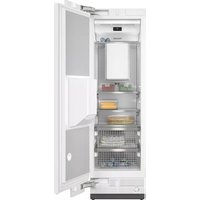
FNS 7740 F - Freezer MIELE - Free user manual and instructions
Find the device manual for free FNS 7740 F MIELE in PDF.


| Product Type | Freezer |
| Brand | Miele |
| Model | FNS 7740 F |
| Energy Efficiency Class | A++ |
| Annual Energy Consumption | 214 kWh |
| Climate Class | SN-T (10 to 43 °C) |
| Noise Level | 38 dB(A) |
| Total Net Capacity | 218 L |
| Freezing Capacity | 18 kg/24h |
| Storage Time in Case of Power Failure | 24 h |
| Dimensions (Height x Width x Depth) | 86 x 60 x 66 cm |
| Weight | 44 kg |
| Power Supply Voltage | 220-240 V |
| Frequency | 50 Hz |
| Power Consumption | 120 W |
| Refrigerant | R600a |
| Defrost Function | Automatic (NoFrost) |
| Control Type | Electronic with digital display |
| Safety Features | Door alarm, temperature alarm |
| Material | Stainless steel / Plastic coated steel |
| Maintenance | Condenser cleaning recommended annually |
| Spare Parts Availability | At least 10 years after discontinuation |
| Repair Index (for France) | 8.4/10 |
| Warranty | 2 years (extendable) |
Frequently Asked Questions - FNS 7740 F MIELE
User questions about FNS 7740 F MIELE
0 question about this device. Answer the ones you know or ask your own.
Ask a new question about this device
Download the instructions for your Freezer in PDF format for free! Find your manual FNS 7740 F - MIELE and take your electronic device back in hand. On this page are published all the documents necessary for the use of your device. FNS 7740 F by MIELE.
USER MANUAL FNS 7740 F MIELE
Operating instructions Freezer

It is essential to read these operating and installation instructions before installing and using the appliance. This prevents both personal injury and damage to the appliance.
Warning and Safety instructions.... 4
Caring for the environment 16
Installation.... 17
Installation location 17
Side-by-side combinations 18
Climate range 19
Ventilation.... 19
Furniture door 20
Horizontal and vertical gaps.... 20
Weight of the furniture door 21
Installation dimensions.... 22
Installation in a tall unit/side view.... 22
Connections and ventilation.... 23
Limiting the opening angle of the door 24
Electrical connection 25
Saving energy 26
Guide to the appliance 27
Control panel with start display.... 29
Settings mode ⚙ 29
Selecting the desired function in Settings mode ⚙ 31
Adjusting the interior fittings.... 32
Tilting the top drawer 32
Accessories supplied 32
Optional accessories.... 32
Switching on and off 33
Before using for the first time.... 33
Connecting the appliance 33
Switching on the appliance 33
Switching off the appliance.... 34
Switching off for longer periods of time.... 34
The correct temperature.... 35
Temperature display 35
Setting the temperature.... 35
Possible temperature settings.... 35
Using SuperFreeze 37
Switching SuperFreeze on and off.... 37
Selecting further settings 38
Explanation of the different settings.... 38
Party mode 38
Switching the lock function on.... 38
Sabbath mode 39
Information on Sabbath mode 40
Changing the time before the door alarm is triggered 40
Miele@home 41
Changing the volume of the alarms and buzzers / 43
Adjusting the display brightness ⚙ 43
Switching off Demo mode 43
Resetting the settings to their factory default settings 📂...... 44
Information i 44
Temperature and door alarm.... 45
Freezing and storing food.... 47
Freezing fresh food.... 47
Storing frozen food.... 47
Home freezing 48
Storage time for frozen food.... 49
Using accessories 50
Making ice cubes 50
Defrosting.... 51
Cleaning and care 52
Cleaning agents....52
Preparing the refrigeration appliance for cleaning 53
Cleaning the interior of the machine 53
Cleaning accessories by hand or in the dishwasher.... 54
Removing and dismantling accessories for cleaning.... 54
Inserting the glass shelves and drawers into the freezer section.... 54
Cleaning the door seal 55
Cleaning the ventilation gaps 55
After cleaning 55
Problem solving guide 56
Noises 64
Service.... 65
Contact in case of fault 65
Warranty 65
This refrigeration appliance complies with current local and national safety requirements. However, inappropriate use can lead to personal injury and damage to property.
Please read the operating and installation instructions carefully before using the refrigeration appliance for the first time. They contain important information on safety, installation, use and maintenance of the appliance. This is to protect yourself from injury and from damaging your refrigeration appliance.
In accordance with standard IEC 60335-1, Miele expressly and strongly advises that you read and follow all information provided concerning the installation of the refrigeration appliance, as well as safety notes and warnings.
Miele cannot be held liable for injury or damage caused by non-compliance with these instructions.
Keep these instructions in a safe place and pass them on to any future owner.
Correct application
This appliance is designed for domestic use and for use in similar environments by guests in hotel or motel rooms, bed & breakfasts and other typical living quarters. This does not include common/shared facilities or commercial facilities within hotels, motels or bed & breakfasts.
This appliance is not suitable for outdoor use.
This appliance is intended to store deep frozen food, freeze fresh food, and to make ice.
Any other usage is not supported by the manufacturer and could be dangerous.
This appliance is not suitable for storing and keeping cool medicines, blood plasma, laboratory preparations or similar substances or products. Incorrect use of the appliance for such purposes may cause deterioration of the items stored.
The appliance is also not suitable for use in areas where there is a risk of explosion.
Miele cannot be held liable for damage resulting from incorrect or improper use or operation of the appliance.
This appliance is not intended for use by persons (including children) with reduced physical, sensory or mental capabilities or lack of experience and knowledge, unless they have been given supervision and instruction concerning its use by a person responsible for their safety.
They may only use the appliance unsupervised if its operation has been clearly explained to them and they are able to use it safely and are able to understand and recognise the possible dangers caused by incorrect operation.
Safety with children
Young children must not be allowed to use this appliance. Older children may only use the appliance when its operation has been clearly explained to them and they are able to use it safely, recognizing the dangers of misuse. Cleaning work may only be carried out by older children under the supervision of an adult. Please supervise children in the vicinity of the appliance and do not let them play with it. Danger of suffocation! Children may be able to wrap themselves in packing material (e.g., foil) or pull it over their head with the risk of suffocation. Keep packaging material away from children.
Technical safety
The refrigerant circuit has been checked for leaks. The refrigeration appliance complies with all current local and national safety requirements.

Warning: Risk of fire / Flammable materials.
The refrigerant inside the appliance (details on the data plate) is environmentally friendly but flammable.
The use of this refrigerant does, however, sometimes lead to a slight increase in the noise level of the appliance. In addition to the noise of the compressor, you might be able to hear the refrigerant flowing around the system. Unfortunately, these effects cannot be avoided, but they do not affect the performance of the refrigeration appliance.
When transporting and installing the refrigeration appliance, ensure that no parts of the cooling circuit are damaged. Splashes of refrigerant can damage the eyes and leaking refrigerant can ignite. In the event of any damage:
- Avoid naked flames or anything which creates a spark.
- Disconnect the refrigeration appliance from the mains electricity supply.
- Ventilate the room in which the appliance is located for several minutes.
- Call Miele.
The more refrigerant there is in a refrigeration appliance, the larger the room should be in which it is installed. In the event of a leakage, if the appliance is in a small room, there is the danger of a combustible gas/air mixture building up. For every 8 g of refrigerant, at least 1 m³ of room space is required. The amount of refrigerant in the refrigeration appliance is stated on the data plate inside the appliance. To avoid the risk of damage to the appliance, make sure that the connection data (fuse rating, frequency and voltage) on the data plate corresponds to the household supply. Check that this is the case before connecting the appliance.
Consult a qualified electrician if in any doubt.
The electrical safety of this appliance can only be guaranteed when correctly earthed. It is essential that this standard safety requirement is met. If in any doubt, please have the electrical installation tested by a qualified electrician. ▶ Temporary or permanent operation with a self-sufficient or non-mains synchronous energy supply system (e.g., isolated networks, back-up systems) is possible. A requirement for the operation is that the energy supply system complies with all current local and national requirements that apply to stand-alone, solar and/or battery systems.
The protective measures provided in the installation and in this Miele product must also be assured in their function and operation in isolated operation or in non-mains synchronous operation, or replaced with equivalent measures in the installation.
If the electrical connection cable supplied is damaged, it must only be replaced by an original spare part to prevent a hazard for the user. Miele can only guarantee the safety of the appliance when original Miele spare parts are used.
Do not connect the appliance to the mains electricity supply by a multi-socket unit or an extension lead. These do not guarantee the required safety of the appliance (e.g., danger of overheating).
If moisture gets into electrical components or into the mains connection cable, it could cause a short circuit. Therefore, do not operate this refrigeration appliance in areas which are exposed to moisture (e.g., in a garage or laundry). This appliance must not be installed and operated in mobile installations (e.g., on a ship). Do not use a damaged appliance. It could be dangerous. Check the appliance for visible signs of damage. For safety reasons, this appliance may only be used when it has been fully installed. During installation, maintenance and repair work, the appliance must be disconnected from the mains electricity supply. It is only completely isolated from the electricity supply when:
- the mains circuit breaker has been switched off, or
- the screw-out fuse is removed (in countries where this is applicable), or
- it is switched off at the wall socket and the plug is withdrawn from the socket. Do not pull the mains connection cable but the mains plug to disconnect your appliance from the mains electricity supply.
▶ Repairs and other work by unqualified persons could be dangerous. Maintenance work and repairs to electrical appliances must only be carried out by a Miele authorised technician. The manufacturer's warranty will be invalidated if the appliance is not repaired by a Miele authorised technician. ▶ Faulty components must only be replaced with genuine Miele original spare parts. Miele can only guarantee the safety standards of the appliance when Miele spare parts are used.
In areas which may be subject to infestation by cockroaches or other vermin, pay particular attention to keeping the appliance and its surroundings clean at all times. Any damage caused by cockroaches or other vermin will not be covered by the warranty.
Correct installation
When installing the refrigeration appliance, it is a mandatory requirement to follow the installation instructions supplied with it.
▶ Always wear protective gloves when transporting and installing the refrigeration appliance.
▶ Two people are required to install the refrigeration appliance.
▶ Change the door hinging (if necessary) as described in the installation instructions supplied with the appliance.
▶ Only install the refrigeration appliance in a solid, rectangular, and level housing unit, positioned on an even and level floor.
Correct use
This refrigeration appliance is designed for use within specific ambient temperatures (climate range). Do not use it in ambient temperatures for which it is not designed. The climate class is stated on the data plate inside the refrigeration appliance. A lower ambient temperature will cause the compressor to switch off for longer periods, meaning that the refrigeration appliance is unable to maintain the required temperature. To ensure proper air flow in and out of the appliance, the ventilation gaps in the appliance and built-in structure must not be covered or blocked in any way. This would also increase the energy consumption and could cause damage to the appliance. If storing food which contains a lot of fat or oil in the appliance or the appliance door, make sure that it does not come into contact with plastic components as this could cause stress cracks or break the plastic. Make sure that no fat or oil leaks onto the plastic parts of the appliance. Risk of fire and explosion! Do not store any explosive materials or products containing flammable propellants (e.g. spray cans) in the refrigeration appliance. Electrical components can cause flammable mixes of gases to ignite. ▶ Danger of explosion! Do not operate any electrical equipment (e.g. an electric ice cream maker) inside the appliance. Danger of sparking and explosion. Risk of injury and damage! Do not store cans or bottles containing carbonated drinks or liquids which could freeze in the freezer section. Otherwise they could burst, causing injury or damage. Risk of injury and damage! When chilling drinks in the freezer section, make sure that bottles are not left in for more than one hour. Otherwise they could burst, causing injury or damage.
Danger of injury! Never handle frozen food or the metal parts of the appliance with wet hands. Your hands may freeze to the frozen food or to the metal. Danger of injury! Do not take ice cubes out with your bare hands and never place ice cubes or ice lollies in your mouth straight from the freezer zone. The very low temperature of the frozen goods can cause frost burn to the lips and tongue. Do not refreeze thawed or partially thawed food. Defrosted food should be used up as quickly as possible, as food soon loses its nutritional value and goes off. Defrosted food may only be refrozen after it has been cooked. ▶ Food stored for too long may present a risk of food poisoning. Storage times will depend on several factors, including the freshness and quality of the food, as well as the temperature at which it is stored. Follow the instructions given on the food manufacturer's packaging regarding storage conditions and use-by dates.
Accessories and spare parts
▶ Only use original Miele accessories. Using spare parts or accessories from other manufacturers will invalidate the warranty, and Miele cannot accept liability.
▶ Miele will guarantee to supply functional spare parts for a minimum of 10 years and up to 15 years following the discontinuation of your refrigeration appliance.
Cleaning and care
Do not use any oils or grease on the door seals, as these will cause the seals to deteriorate and become porous with time. Do not use a steam cleaning appliance to clean this appliance. Steam could reach the electrical components and cause a short circuit. ▶ Sharp edged or pointed objects will damage the evaporator, causing irreversible damage to the appliance. Do not use sharp edged or pointed objects to - remove frost and ice, or accelerate the defrosting process, - separate frozen foods and remove ice trays. ▶ Never place electric heaters or candles in the appliance to defrost it. These can damage the plastic parts. Do not use defrosting sprays or de-icers, as they might contain substances which could damage the plastic parts or which could cause a build-up of gases and pose a danger to health.
Transport
▶ To avoid damage to the appliance, always transport it upright and in its packaging. Risk of injury and damage! The refrigeration appliance is very heavy and must be transported by two people.
Disposal of your old appliance
Children playing could become trapped in the refrigeration appliance and could suffocate.
- Remove the appliance door(s).
- Remove the drawers.
- Leave the adjustable shelves in the refrigeration appliance so children cannot climb inside.
- If your old refrigeration appliance has a door lock, destroy it. This way you will prevent the risk of playing children accidentally locking themselves in and endangering their lives.
Risk of electric shock!
- Cut the power plug off the mains connection cable.
- Cut the mains connection cable off the old appliance.
▶ Dispose of everything separately from the old appliance. During and after disposal, make sure that the refrigeration appliance is not placed near petrol or other flammable gases and liquids. Risk of fire due to escaping oil or refrigerant!
The refrigerant and oil inside the appliance are flammable. In high enough concentrations, escaping refrigerant or oil may ignite if they come into contact with an external heat source.
During disposal, make sure that the cooling circuit is not damaged in order to prevent refrigerant and oil escaping in an uncontrolled manner (see the data plate for details of the refrigerant).
▶ Splashes of coolant can damage the eyes. Be careful not to damage any part of the pipework whilst awaiting disposal, e.g. by - puncturing the refrigerant channels in the condenser, - bending any pipework, or - scratching the surface coating.
Symbol on the compressor (depending on model)
This information is only relevant for recycling. There is no risk during normal operation.

The oil in the compressor can be fatal if swallowed or if it penetrates the airways.
Disposal of the packing material
The transport and protective packing has been selected from materials which are environmentally friendly for disposal, and can normally be recycled.
Recycling the packaging reduces the use of raw materials in the manufacturing process and also reduces the amount of waste in landfill sites. Ensure that any plastic wrappings, bags etc. are disposed of safely and kept out of the reach of babies and young children. Danger of suffocation!
Disposing of your old appliance
Electrical and electronic appliances contain many valuable materials. They also contain certain materials, compounds, and components which were essential for their correct functioning and safety. These could be hazardous to human health and to the environment if disposed of with general waste or if handled incorrectly. Please do not, therefore, dispose of your old appliance with your household waste.

Take care not to damage your refrigeration appliance before or during disposal in an authorised, environmentally friendly manner. This is to ensure that refrigerant in the cooling circuit and oil in the compressor is contained, and will not leak into the environment.
Please dispose of it at your local community waste collection/recycling centre for electrical and electronic appliances, or contact Miele. You are also responsible for deleting any personal data that may be stored on the appliance prior to disposal. You should remove any old batteries which are not securely enclosed by the appliance and remove any lamps without destroying them, where this is possible. These must be taken to a suitable collection point where they can be handed in free of charge. Please ensure that your old appliance presents no danger to children while being stored awaiting disposal.
Installation location
Danger of damage and injury due to the appliance tipping over! This refrigeration appliance is very heavy and can tip forward when the door is open. Keep the appliance door(s) closed until the refrigeration appliance has been built in. The refrigeration appliance must be secured in its building-in niche in accordance with the operating and installation instructions.
⚠️ Fire hazard and risk of damage from appliances that give off heat. Appliances that give off heat can catch fire and set fire to the refrigeration appliance. This refrigeration appliance must not be installed underneath a cooktop.
⚠️ Fire risk and danger of damage from open flames! Open flames can set fire to the refrigeration appliance. Keep open flames (e.g. a candle) away from the refrigeration appliance.
This appliance should be installed in a dry, well-ventilated room.
⚠️ Risk of damage due to high humidity.
In environments with high humidity, condensation can build up on external refrigeration appliance panels.
This condensate can cause corrosion on external appliance panels.
Install the refrigeration appliance in a dry and/or air-conditioned room with sufficient ventilation.
After installation, please make sure that the appliance door(s) closes (close) properly and the refrigeration appliance is installed in accordance with these installation instructions. It is essential to comply with the specified ventilation cut-out requirements.
When deciding on the installation site, please bear in mind that your refrigeration appliance will use more energy if installed near to a heater, a cooker or other appliance that gives off heat. Avoid direct sunlight. The higher the ambient temperature, the longer the compressor runs and the higher the energy consumption is.
Please note the following when installing the appliance:
- The mains socket must not be located directly behind the appliance and should be easily accessible.
- The plug and mains connection cable must not touch the rear of the refrigeration appliance as they could be damaged by vibrations from the appliance.
- Other appliances must also not be plugged into a socket located directly behind this appliance.
- WARNING: When positioning the appliance, ensure the mains connection cable is not trapped or damaged.
- WARNING: Do not locate multiple portable socket-outlets or portable power supplies at the rear of the appliance.
- The floor at the installation site must be horizontal and level and must be as high as the surrounding floor.
Side-by-side combinations
⚠️ Risk of damage due to condensation on the external appliance panels.
In environments with high humidity and a lack of ventilation, condensation can build up on external appliance panels, which can cause corrosion.
Do not place refrigeration appliances directly next to or on top of one another.
Your refrigeration appliance can be installed with another refrigeration appliance next to it as it is equipped with integrated heaters in the side panels. Each of the two refrigeration appliances must be built into a separate housing unit.
Climate range
This refrigeration appliance is designed for use within specific ambient temperatures (climate range). Do not use in ambient temperatures for which it is not designed.
A lower ambient temperature leads to the compressor switching off for longer periods. This can cause the internal temperature in the appliance to rise with the risk of food deteriorating and going off.
The climate class is stated on the data plate inside the refrigeration appliance.
| Climate range Ambient temperature | |
| SN +10 to +32 °C | |
| N +16 to +32 °C | |
| ST +16 to +38 °C | |
| T +16 to +43 °C |
Ventilation
⚠️ Risk of fire and damage due to insufficient ventilation!
If the appliance is not ventilated sufficiently, the compressor will run more frequently and for longer periods. This will result in increased energy consumption and a higher operating temperature of the compressor. This, in turn, can result in damage to the compressor.
Please ensure that there is adequate ventilation around the appliance.
It is essential to observe the required ventilation gaps.
The ventilation gaps must not be covered or blocked in any way.
They must also be cleaned on a regular basis to remove dust.
Air at the back of the refrigeration appliance gets warm. The appliance housing unit must therefore be constructed to allow sufficient space for ventilation (see “Installation dimensions” and the installation instructions provided).
Furniture door
Horizontal and vertical gaps
Depending on the style of kitchen furniture, the thickness and edge radius of the furniture door panel and the gap that runs around the door, vertically and horizontally, are specified.
It is essential to pay attention to the following:
- Horizontal gap
The gap between the furniture door panel and the housing unit door above or below it must be at least 3 mm.
- Vertical gap
If the gap between the refrigeration appliance furniture door panel and the adjoining housing unit door or wall on the hinged side is too small, the appliance door could collide with the adjoining furniture unit door or side wall when opened.
It may be necessary to adjust the size of this gap to suit the thickness and edge radius of the appliance furniture door.
This must be taken into consideration when planning your kitchen and when replacing an old refrigeration appliance with a new one to ensure the installation conditions required are met.
| Appliance furniture door thicknessA [mm] | Gap X [mm] for different edge radii B | |||
| R0 R | 1.2 R2 | R3 | ||
| ≥16–19 min. 3 | ||||
| 20 5 4 4 3.5 | ||||
| 21 5.5 5 4.5 4 | ||||
| 22 6.5 6 5.5 5 | ||||
![[mm] 42 2 A B X](/content/2026/05/1013486/images/06427d7461b01a175ad1c81feef8c84ac31d7005b4e9e312c6886eae7f80bd6e.jpg)
Adjoining kitchen furniture front
A = Furniture front thickness
B = Edge radius
X = Gap
![[mm] 42 2 A X B](/content/2026/05/1013486/images/37ca075100460be9fab4e14518139001dae32193deb467b80fb429d452c71e5f.jpg)
Adjoining side wall
A = Furniture front thickness
B = Edge radius
X = Gap
Useful tip: Fit a spacer between the housing unit body and the side wall. This way you will get a sufficiently wide gap.
Weight of the furniture door

If the door panel is too heavy, it can cause damage!
Fitting a furniture front which is heavier than the maximum permitted weight could damage the hinges.
Among other things, this damage can lead to functional impairments.
Before fitting furniture doors, ensure that the weight of the door does not exceed the maximum weight permitted:
The maximum permissible weight of the furniture door is:
Refrigeration appliance kg
FNS 7740 F 26
Installation dimensions
Installation in a tall unit/side view
All dimensions are given in mm.


Before installation, ensure the furniture unit dimensions are the correct size.
Connections and ventilation
All dimensions are given in mm.
The specified ventilation cross-sections must be adhered to in order to ensure the correct functioning of the refrigeration appliance.

① Front view ② Mains connection cable, length = 2200 mm A longer mains connection cable is available from Miele. ③ Ventilation cut-out min. 200 cm² ④ Ventilation ⑤ No connections permitted in the rear panel
Limiting the opening angle of the door
The door hinges are set at the factory to enable the door to be opened wide.
If the opening angle of the appliance door needs to be limited to approx. 90°, the hinge can be adjusted to accommodate this.
The locking pins for limiting the door opening must be fitted before the appliance is installed.

Place the locking pins supplied for limiting the door opening into the hinges from above.
The door opening angle is now limited to 90°.
Electrical connection
The refrigeration appliance must only be connected to an earthed socket using the connection cable supplied.
The socket should be easily accessible after the refrigeration appliance has been installed. If the socket is not easily accessible, ensure that a suitable means of disconnection is provided on the installation side for each pole.
⚠️ Risk of fire from overheating.
Connecting the appliance to a multi-socket plug adapter or to an extension lead can overload the cable.
For safety reasons, do not use an extension cable or multi-socket adapter.
All electrical work must be carried out by a suitably qualified and competent person in strict accordance with national and local safety regulations.
For safety reasons, we recommend using a suitable residual current device (RCD) in the relevant electrical installation for connecting the refrigeration appliance.
If the mains connection cable is damaged, it must only be replaced with a specific mains connection cable of the same type (available from Miele).
The data plate indicates the nominal power consumption and the connection data. Compare this information with the data of the on-site electrical connection. If in any doubt, consult a qualified electrician.
Temporary or permanent operation with a self-sufficient or non-mains synchronous energy supply system (e.g. isolated networks, back-up systems) is possible. A requirement for the operation is that the energy supply system complies with all current local and national requirements that apply to stand-alone, solar and/or battery systems.
The protective measures provided in the domestic installation and in this Miele product must also be assured in their function and operation in isolated operation or in non-mains synchronous operation, or replaced with equivalent measures in the installation.
Connecting the appliance
Insert the plug connector into the back of the appliance.
Make sure that the plug connector has locked into position correctly.
Insert the plug of the appliance into the socket and switch it on.
The appliance is now connected to the electricity supply.
How to save energy:
| Installation location | The refrigeration appliance has to cool more often at higher ambient temperatures and consumes more energy in the process. Therefore, you should:- Install the refrigeration appliance in a well-ventilated room.- Do not install the refrigeration appliance near to a heat source (heater element, cooker).- Protect the refrigeration appliance from direct sunlight.- Ensure an ideal ambient temperature of 20 °C.- Clean the ventilation gaps on a regular basis to remove any dust. |
Temperature setting: The colder the temperature, the higher the energy consumption. The following settings are recommended: -18 °C in the freezer section.
Use: Energy consumption is increased by heat input and impeded air circulation. Therefore, you should:
Only open the appliance door(s) when necessary and for as short a time as possible. Arrange the food in such a way that makes it easy to find in the appliance.
Always close the appliance door(s) properly after opening them.
Allow hot food and drinks to cool down before placing them in the refrigeration appliance.
Store food well packaged or covered.
Do not overfill the compartments to allow air to circulate.
Keep drawers and shelves arranged as they were when the appliance was delivered.
When placing food in the appliance, make sure that the ventilation gaps are not blocked.

Guide to the appliance
① Display ② NoFrost module ③ Tiltable freezer drawer ④ Freezer drawers
Control panel with start display

① Temperature display for the freezer section ② Sensors for selecting a setting ③ OK sensor for confirming a selection ④ Display for Miele@home connection status (only visible when the Miele@home function has been set up)
Settings mode ⚙️
In Settings mode, you can select the following appliance functions and alter their settings to some extent:
Symbol Function Factory
| default setting | ||
| Switching the Party mode function on or off(see “Selecting further settings”) | Off | |
| Switching the lock function on or off(see “Selecting additional settings”) | (Off) | |
| Switching the Sabbath mode function on or off(see “Selecting further settings”) | Off | |
| Calling up information on the Sabbath mode function(see “Selecting further settings”) | — | |
| Changing the time before the door alarm is triggered(see “Selecting further settings”) | 1:00 | |
| @ Setting up the Miele@home function for the first time,activating and deactivating Wi-Fi,or resetting the network configuration(see “Selecting further settings”) | APP | |
| / Switching the keypad tone on or off On | ||
| / Changing the volume of the alarms and buzzers orswitching them off entirely(see “Selecting further settings”) | On /Level 5 | |
| Changing the display brightness(see “Selecting further settings”) | Level 4 | |
| /°C / °F Changing the temperature unit(°Celsius or °Fahrenheit) | °C | |
| Switching the Demo mode function off(only visible when switched on)(see “Selecting further settings”) | Off | |
| Resetting to default settings(see “Selecting further settings”) | — | |
| Calling up information (model designation and serialnumber) about your refrigeration appliance(see “Selecting further settings”) | — | |
Selecting the desired function in Settings mode ⚙️
■ Touch the OK sensor on the control panel. appears in the display. ■ Use the < or > sensor to scroll to the ⚙ symbol. ■ Touch OK. ■ Select the function you want using the < or > sensor. ■ Touch OK to select the function you want.
When the function is switched on, a dot appears in the upper corner of the display ●.
■ Touch OK to deselect a selected function.
When the function is switched off, the dot in the upper corner of the display goes out.
Exiting Settings mode 🔊
■ Use the < or > sensor to scroll to the ⇌ symbol. ■ Touch OK. ■ Use the < or > sensor to scroll to the ⇌ symbol and touch OK. ■ Alternatively:
Wait approx. 15 seconds after the last press of a sensor.
Settings mode is then exited automatically.
Adjusting the interior fittings
Tilting the top drawer
The top drawer can be tilted to make it easier to remove frozen food.
Pull the drawer out.
The drawer is secured with pull-out stops and cannot fall out.
Accessories supplied
Ice cube tray
Optional accessories
A range of useful Miele accessories and care products is available for your appliance.
Optional accessories can be ordered from the Miele webshop. They can also be ordered directly from Miele (see end of this booklet for contact details).
Miele all purpose microfibre cloth
Light soiling and fingerprints on stainless steel fronts, control panels and furniture can be easily removed with this microfibre cloth.
SoftClose hinges
The SoftClose hinges ensure that your appliance door closes very softly and quietly.
Furthermore, they close the appliance door automatically if the angle of the open door is less than 30 degrees.
Before using for the first time
Remove all packaging material and protective film. Clean the inside of the appliance and the accessories (see “Cleaning and care”).
Connecting the appliance
Connect the appliance to the electricity supply as described in "Electrical connection".
Miele will then appear in the appliance display, followed by ⏻.
Switching on the appliance
Open the appliance door. Touch the OK sensor on the control panel.
The appliance will start to cool.
When the set freezer temperature is reached, the ⏻ symbol disappears, the temperature display of the freezer lights up constantly and the alarm stops.
If the alarm annoys you, tap OK.
The alarm will stop.
The refrigeration appliance will gradually reach the preset temperatures.
Do not place food in the freezer section until it has reached the preset temperature (min. -18 °C).
Switching off the appliance
Touch the OK sensor on the control panel. appears in the display. Touch OK. Use the < sensor to scroll to the ⏻ symbol. Touch OK.
Ⓐ appears in the display.
The cooling system is switched off.
Please note: the refrigeration appliance is not disconnected from the power supply when it is switched off.
Switching off for longer periods of time
If, during a long absence, the refrigeration appliance is switched off but not cleaned and the door is left shut, there is a danger of mould building up inside the appliance. It is essential to clean the appliance.
If the appliance is not going to be used for a longer period of time, observe the following:
■ Switch the appliance off. ■ Switch off at the wall and withdraw the plug from the socket, or switch off the mains circuit breaker. ■ Clean the refrigeration appliance and leave the door ajar to air the appliance and avoid odours building up inside.
It is very important to set the correct temperature for storing food in the appliance. Bacteria will cause food which is not stored at the correct temperature to deteriorate rapidly. Temperature influences the growth rate of these microorganisms. Reducing the temperature reduces their growth rate.
To freeze fresh food and to store frozen food for long periods, a temperature of -18 °C is required. At this temperature the growth of microorganisms is generally halted. As soon as the temperature rises above -10 °C, the bacteria become active in the food again so it cannot be kept as long. For this reason, partially defrosted or defrosted food must not be refrozen. Food may be refrozen once it has been cooked, as the high temperatures achieved during cooking destroy most bacteria.
The temperature in the appliance will rise:
- the more often the door is opened and the longer it is kept open.
- the more food is stored in it.
- the warmer the food is which is being put into it.
- the higher the ambient temperature surrounding the refrigeration appliance. This refrigeration appliance is designed for use within specific ambient temperatures (climate range). Do not use it in ambient temperatures for which it is not designed.
Temperature display
In normal operation, the temperature display shows the current maximum freezer section temperature in the refrigeration appliance.
Depending on the ambient temperature and the temperature setting, it can take the appliance a few hours to reach the required temperature and for this temperature to then be shown as a constant temperature in the display.
Setting the temperature
Touch the OK sensor on the control panel. The temperature display appears. Touch OK. Use the < and > sensors to change the temperature. Touch OK.
The temperature display will then change back to the current temperature in the refrigeration appliance.
Possible temperature settings
Freezer section: -15 to -28 °C
If you change the temperature setting:
Check the temperature display after a few hours. It will take this long for an accurate reading to be given. Wait for approx. 6 hours if the refrigeration appliance is not very full. Wait for approx. 24 hours if the refrigeration appliance is full.
If, after this time, the temperature is still too high or too low:
Adjust the temperature again.
SuperFreeze
When switched on, the SuperFreeze function can be used to rapidly reduce the temperature in the freezer section to its lowest setting (depending on the ambient temperature). The refrigeration appliance will work at full power and lower the temperature. Select this function before freezing fresh food. This helps food to freeze quickly and retain its nutrients, vitamins, flavours and appearance.
When the SuperFreeze function is switched on, the appliance may make more noise than usual.
SuperFreeze should be switched on approx. 6 hours before placing food in the freezer section. When freezing the maximum amount of food, the SuperFreeze function should be switched on 24 hours beforehand.
The SuperFreeze function ✿ will switch itself off automatically after a maximum of 72 hours. The appliance will then run at normal power again. The quantity of fresh food placed in the freezer will determine the duration before it switches off.
Useful tip: To save energy, you can manually switch the SuperFreeze function off once food and drinks are sufficiently chilled.
You do not need to switch on the SuperFreeze function:
- when placing food in the freezer that is already frozen.
- when freezing only up to 2 kg fresh food daily.
Switching SuperFreeze ✿️ on and off
■ Touch the OK sensor on the control panel. appears in the display. ■ Touch OK. ■ Use the < sensor to scroll to the ⚙ symbol. ■ Touch OK.
When the SuperFreeze function ⚙ is switched on, a dot appears in the upper corner of the display ●.
Explanation of the different settings
Only the settings that require further explanation are described below.
The door alarm and other warnings are automatically suppressed when you are in Settings mode ⚙️.
Party mode 🌿
The Party mode function ⚙ is recommended if you wish to chill or freeze large amounts of fresh food or drink quickly.
Useful tip: Switch on the Party mode function ⚙ approx. 4 hours before placing food in the appliance.
When Party mode ⚙ is switched on, the SuperFreeze ⚙ function is switched on automatically.
The Party mode function ⚙ will switch itself off automatically after approx. 24 hours. However, you can switch the Party mode function ⚙ off early at any time.
If there is a power outage, the Party mode function ⚙ is switched off.
Switching the lock function 🔒 on
When the lock function is switched on, it protects the refrigeration appliance from being switched off unintentionally and being adjusted unintentionally by unauthorised persons, e.g. children.
In Settings mode ⚙, use the < or > sensor to scroll to the 🔑 symbol. ■ Touch OK.
When the safety lock function 🔒 is switched on, a dot appears in the upper corner of the display •.
■ Close the appliance door. The safety lock function 🔒 will now be activated.
Deactivating the lock function 🔒 temporarily
If you want to adjust the temperature, for example, you can deactivate the safety lock function temporarily:
■ Touch OK. will appear in the display. ■ Touch the OK sensor for approx. 6 seconds. will appear in the display. ■ Touch OK. ■ Now select the required settings. ■ Touch OK.
Closing the appliance door will reactivate the safety lock function 🔒.
Switching the lock function 🔒 off completely
■ Touch OK.
will appear in the display.
■ Touch the OK sensor for approx. 6 seconds. will appear in the display. ■ Use the < or > sensor to scroll to the ⚙ symbol. ■ Touch OK. ■ Use the < or > sensor to scroll to the 🔒 symbol. ■ Touch OK.
When the safety lock function is switched off, 📋 appears in the display.
Sabbath mode ii
The appliance offers a Sabbath mode for the purpose of religious observance.
If Sabbath mode is switched on, this will be indicated in the start display.
The display switches off after 3 seconds.
When Sabbath mode is switched on, you cannot adjust any settings on your refrigeration appliance.
Ensure that the door is properly closed, as visual and audible alarms are switched off.
The Sabbath mode function will switch off automatically after approx. 120 hours.
When Sabbath mode is switched on, the following are deactivated:
- All audible and visual signals.
- The temperature display.
All other functions switched on previously remain activated.

Health risk due to consumption of spoiled food.
As power failures are not indicated while Sabbath mode is active, food may be exposed to increased temperatures for a certain period of time. This shortens the shelf life of the food.
If there is a power failure during Sabbath mode, check the quality of the food.
Switching Sabbath mode on
In Settings mode ⚙, use the < or > sensor to scroll to the symbol. ■ Touch OK.
When the Sabbath mode function is switched on, a dot appears in the upper corner of the display.
The display switches off after 3 seconds.
■ Close the appliance door.
Switching Sabbath mode off
■ Touch the OK sensor.
The symbol will appear in the display.
■ Touch OK.
When the Sabbath mode function is switched on, a dot appears in the upper corner of the display.
■ Touch OK.
When the Sabbath mode function is switched off, the dot in the upper corner of the display goes out.
Information on Sabbath mode
This product is certified by Star-K, an international institute for kosher certification.
You can find the Star-K certification version here.
Changing the time before the door alarm is triggered
You can set how quickly the door alarm should sound after an appliance door has been opened.
In Settings mode ⚙, use the < or > sensor to scroll to the 📋 symbol. ■ Touch OK. ■ Use the < and > sensors to set the time you want between 30 seconds and 3 minutes: 30 seconds. ■ Touch OK.
Miele@home
Your refrigeration appliance is equipped with an integrated Wi-Fi module.
Networking is deactivated at the factory.
To use this feature, you will need:
- a Wi-Fi network
- the Miele App
- a Miele user account. You can create a user account via the Miele App.
The Miele App will guide you as you connect your refrigeration appliance to your home Wi-Fi network.
Once the refrigeration appliance is connected to your Wi-Fi network, you can use the App to carry out the following activities, for example:
- Call up information on the operating status of your refrigeration appliance
- Change the settings on your refrigeration appliance
Connecting your refrigeration appliance unit to your Wi-Fi network will increase energy consumption, even when the appliance is switched off.
Make sure that the signal of your Wi-Fi network is sufficiently strong in the area where you want to set up your refrigeration appliance.
Availability of the Wi-Fi connection
The Wi-Fi connection shares a frequency range with other appliances (including microwave ovens and remote control toys). This may result in sporadic or even complete connection failures. Therefore, a constant availability of featured functions cannot be guaranteed.
Miele@home availability
The ability to use the Miele App depends on the availability of the Miele@home service in your country.
The Miele@home service is not available in every country.
For information about availability, please visit www.miele.com.
Miele App
You can download the Miele App from the Apple App Store® or the Google Play Store™ free of charge (only functional in selected countries).


Setting up Miele@home for the first time
In Settings mode ⚙, use the < or > sensor to scroll to the @ symbol. ■ Touch OK. ■ Use the < and > sensors to select the connection method you wish to use (App or WPS). ■ Touch OK.
After you have successfully logged in, will appear in the start display.
If a connection could not be created, ⊗ will appear.
Start the process again.
Deactivating or activating the Wi-Fi connection
In Settings mode ⚙, use the < or > sensor to scroll to the @ symbol. ■ Touch OK.
If the Wi-Fi is deactivated, the ⚫ symbol will appear in the display.
■ To reactivate the Wi-Fi connection, touch OK.
If the Wi-Fi is activated, the ⚪ symbol and a dot appear in the upper corner of the display •.
When the Wi-Fi connection is active, the 🔺 symbol appears in the start display.
Resetting the network configuration
In Settings mode ⚙, use the < or > sensor to scroll to the ⓐ symbol. ■ Touch OK. ■ Use the > sensor to scroll to the 🔑 symbol. ■ Touch OK. ■ Use the > sensor to scroll to the × symbol. ■ Touch OK.
All entered settings and values for Miele@home are reset to the default settings.
The Wi-Fi connection has been deactivated. ⚙ will go out in the start display.
Reset the network configuration if you are disposing of or selling your refrigeration appliance, or if you are putting a used refrigeration appliance into operation. All personal data is removed from the refrigeration appliance. This will also ensure that a previous owner is no longer able to access the appliance.
Changing the volume of the alarms and buzzers 📄 / 📄
You can change the volume of the alarms and buzzers (e.g. in the event of a door alarm or a fault message). Alternatively, you can switch the alarms and buzzers off if you find them annoying.
In Settings mode ⚙, use the < or > sensor to scroll to the 📋 symbol. ■ Touch OK. ■ Use the < and > sensors to select the volume you want for alarms and buzzers. ■ Touch OK.
When the alarms and buzzers are switched off, will appear.
Adjusting the display brightness
You can adjust the display brightness to the lighting conditions in the room.
In Settings mode ⚙, use the < or > sensor to scroll to the ⚙ symbol. Touch OK. Use the < and > sensors to select the display brightness you want. Touch OK.
Switching off Demo mode
Demo mode allows the refrigeration appliance to be presented in the showroom without the cooling system being switched on. Do not activate this setting for domestic use.
If Demo mode has been switched on as a default setting, it will appear in the display when the refrigeration appliance is switched on.
Touch the OK sensor on the control panel.
Miele will appear initially in the display, followed by the start screen.
Touch OK. In Settings mode ⚙, use the < or > sensor to scroll to the | symbol. Touch OK.
After Demo mode has been switched off, the refrigeration appliance shuts down and must be switched on again.
Resetting the settings to their factory default settings
All settings made on the refrigeration appliance will be reset to the factory default settings (for settings, see “Guide to the appliance”).
In Settings mode ⚙, use the < or > sensor to scroll to the 📂 symbol. Touch OK. Use the > sensor to scroll to the 🔒 symbol. Touch OK.
The refrigeration appliance shuts down and must be switched on again.
Information
Appliance data (model number and serial number) is shown in the display.
Keep this appliance data to hand:
- For integrating the refrigeration appliance into your Wi-Fi network (see “Selecting further settings – Miele@home”).
- When reporting an appliance fault to Miele (see "Service").
⚠️ Health risk due to consumption of spoiled food.
If the temperature in the freezer remains above -18 °C for a long time, the frozen food may start to defrost. This shortens the shelf life of the food.
Check whether the frozen food has started to defrost. If it has, check that the food is safe to use and if it is, use it as soon as possible or cook it before freezing it again.
Temperature alarm
The refrigeration appliance is equipped with a temperature alarm so that the temperature in the freezer section cannot rise unnoticed.
If the temperature in the freezer section becomes too warm, ⚙️ will light up red in the temperature display.
An alarm will sound until the cause of the alarm is rectified or the alarm is switched off.
The temperature the appliance is set at determines the temperature the appliance recognises as being too warm.
A temperature alarm is displayed before an existing door alarm.
The audible and visual signals may be activated in the following situations:
- The appliance is switched on and the temperature in the appliance differs greatly from the set temperature.
- A lot of warm room air enters the freezer as you are rearranging or taking out frozen goods.
- You are freezing large amounts of food at once.
- You are freezing warm food.
- There was a power outage.
- The appliance has a fault.
Before you switch the temperature alarm off, you must determine the cause and rectify it.
You can switch the alarm off early if you wish.
■ Touch OK.
The alarm message is confirmed: 🖼️ goes out and the alarm stops.
The start screen appears in the display: The warmest temperature recorded in the appliance will flash in the display for about 1 minute. Then the temperature display will change to the current temperature.
The alarm will stop. The ⚡ symbol will go out when the temperature reaches the correct level again.
Door alarm
The refrigeration appliance is equipped with a warning system to avoid increased energy consumption and food becoming warm if the appliance door is left open.
If the appliance door is left open for a longer period of time, ⏻ will appear in the temperature display. An alarm tone also sounds.
You can change the time before the door alarm is triggered. However, the door alarm can also be switched off (see “Selecting further settings”).
The alarm will stop and Ⓞ △ will go out in the display as soon as the door is closed.
Switching the door alarm off early
You can switch the alarm off early if you wish.
■ Touch OK.
The alarm will stop and the ⏻ symbol will go out.
If the appliance door is not closed, the alarm will sound again after 3 minutes.
Freezing fresh food
⚠️ Health risk due to consumption of spoiled food.
If the temperature in the freezer remains above -18 °C for a long time, the frozen food may start to defrost. This shortens the shelf life of the food.
Check whether the frozen food has started to defrost. If it has, check that the food is safe to use and if it is, use it as soon as possible or cook it before freezing it again.
Fresh food should be frozen as quickly as possible so that the nutritional value of the food, its vitamin content, appearance and flavour are maintained.
If food is frozen quickly, the cells have less time to lose moisture, so they shrink significantly less. As there is not so much moisture loss, it is easier for the food to reabsorb it during the defrosting process, and very little water collects around the defrosted food.
Storing frozen food
When buying frozen food to store in your freezer, make sure to check:
- that the packaging is not damaged.
- the use-by date.
- that the temperature at which the frozen food is being stored in the shop is -18 °C or colder.
■ Where possible, transport frozen food in an insulated bag and then store it quickly in the refrigeration appliance.
Home freezing
Before placing food in the appliance
■ When freezing more than 2 kg of fresh food, switch on the SuperFreeze function ✦ 6 hours before placing the food in the freezer. ■ When freezing even larger amounts of food, switch on the SuperFreeze function ✦ 24 hours before placing the food in the freezer.
This helps food which is already stored in the freezer to stay frozen.
■ Only freeze food which is fresh and in good condition.
Please note that some food is not suitable for freezing. These include, for example, vegetables that are usually eaten raw, such as lettuce or radishes.
Useful tip: To retain colour, taste, aroma, and vitamin C, vegetables should be blanched before they are frozen. To blanch, immerse the trimmed and washed vegetables in boiling water for 2-3 minutes. Remove and plunge into ice-cold water to cool quickly. Drain and pack ready for freezing.
Packaging food for freezing
■ Freeze food in portions.
Useful tip: Use suitable packaging to avoid freezer burn (such as freezer containers).
■ Expel as much air as possible from the packaging and close it tightly.
■ Label the packaging with the contents and the date of freezing.
Placing food in the freezer
⚠️ Risk of damage due to heavy loads.
Loading food which is too heavy can cause damage to the freezer drawers/glass shelves.
Do not exceed the relevant maximum load:
Freezer drawer = 12 kg
Glass shelf = 35 kg
Unfrozen food should not touch frozen food as this will cause the frozen food to begin to thaw.
To prevent food sticking together when frozen, make sure that the packaging and containers are dry.
To ensure that food freezes through to the core quickly, do not exceed the following packaging and container sizes:
- Fruit and vegetables: max. 1 kg
- Meat: max. 2.5 kg
- Freezing small amounts of food
Freeze small items in the upper freezer drawers.
Place the food flat in the bottom of the upper freezer drawers so that it freezes through to the core as quickly as possible.
- VarioRoom: freezing the maximum amount of food
If the ventilation slots are blocked, the cooling performance will decrease and energy consumption will increase.
When placing food in the freezer, make sure that the ventilation gaps are not blocked.
Useful tip: You can expand the space available in the freezer. If you wish to freeze large items such as a turkey or game, you can remove the glass shelves between the freezer drawers. To do this:
■ Remove the upper freezer drawers. ■ Place the food flat on the upper glass shelves so that it freezes through to the core as quickly as possible.
After the initial freezing process:
■ Switch the SuperFreeze function ✉ off.
■ Place the frozen food in the freezer drawers and push them back in.
Storage time for frozen food
| Food group Storage | time(months) |
| Ice cream 2 to 6 | |
| Bread, baked goods | 2 to 6 |
| Cheese 2 to 4 | |
| Fish, oily 1 to 2 | |
| Fish, lean 1 to 5 | |
| Sausage, ham 1 to 3 | |
| Game, pork 1 to 12 | |
| Poultry, beef 2 to 10 | |
| Vegetables, fruit 6 to | 18 |
| Herbs 6 to 10 |
The storage times given are guidelines only.
Where the storage time given on the packaging differs, follow the advice on the packaging.
By keeping the freezer at a constant temperature of -18 °C and taking appropriate hygiene measures, you can maximize the storage life of your food and avoid food waste.
Cooling drinks quickly
When cooling drinks quickly in the freezer, make sure bottles are not left in for more than one hour, otherwise they could burst, causing injury and damage.
Using accessories
Making ice cubes
■ Fill the ice cube tray 3/4 full with water and place it on the bottom of one of the freezer drawers. ■ Once frozen, use a blunt instrument such as a spoon handle to remove the ice cube tray from the freezer if it is stuck.
Useful tip: Ice cubes can be easily removed from the tray by briefly holding it under running water.
The appliance is equipped with a "NoFrost" system. The freezer defrosts automatically.
The moisture generated in the appliance collects on the evaporator and is automatically defrosted and dissipated from time to time.
This automatic defrosting system enables the refrigeration appliance to remain permanently ice-free. Food stored in the freezer will not defrost with this system.
The data plate located inside the refrigeration appliance must not be removed. It contains information which is required in the event of a fault.
Do not let water get into the electronic unit.

Risk of damage due to moisture.
The steam from a steam cleaning appliance can damage plastic parts and electrical components.
Do not use a steam cleaning appliance to clean the refrigeration appliance.
Cleaning agents
Cleaning and conditioning agents used in the interior of the refrigeration appliance must be food safe.
To avoid damaging the surfaces of your appliance, do not use:
- cleaning agents containing soda, ammonia, acid or chloride
- cleaning agents containing descaling agents
- abrasive cleaning agents, e.g. powder cleaners and cream cleaners
- solvent-based cleaning agents
- stainless steel cleaning agents
- dishwasher cleaners
- oven sprays
- glass cleaning agents
- hard, abrasive sponges and brushes, e.g. pot scourers
- dirt eraser sponges
- sharp metal scrapers
We recommend using lukewarm water with a little washing-up liquid to clean the appliance.
Preparing the refrigeration appliance for cleaning
■ Switch the appliance off. appears in the display and the cooling system is switched off. ■ Take any food out of the refrigeration appliance and store it in a cool place. ■ Take out any removable accessories for cleaning (see “Removing and dismantling accessories for cleaning”).
Cleaning the interior of the machine
Clean the appliance regularly, or at least once a month.
If soiling is left on for any length of time, it may become impossible to remove under certain circumstances. Surfaces may suffer discolouration or damage. Remove any soiling immediately.
■ Clean the interior with a clean sponge, lukewarm water and a little washing-up liquid. ■ After cleaning, wipe with a damp cloth and dry with a soft cloth. ■ Leave the door open to air the refrigeration appliance sufficiently for a short while and to prevent odour build-up.
Cleaning accessories by hand or in the dishwasher
The following components must be cleaned by hand only:
- All drawers
The following components are dishwasher-safe:

Risk of damage due to high dishwasher temperatures.
Parts of the refrigeration appliance may become unusable, e.g., deform, if they are washed in the dishwasher at more than 55 °C.
For dishwasher-safe components, always select dishwasher programs with a maximum temperature of 55 °C.
Contact with natural dyes from carrots, tomatoes, and ketchup, etc. may discolor the plastic parts in the dishwasher. This discoloration does not affect the stability of the parts.
- The ice cube tray
- The glass shelves
Removing and dismantling accessories for cleaning
Removing the drawers and glass shelves from the freezer section
■ Lift the drawer up slightly at the front and pull it out. ■ Pull the glass shelf forwards a little and out.
Inserting the glass shelves and drawers into the freezer section
■ Place the glass shelf on the guide rails at an angle. ■ Push in and lower the glass shelf. ■ Place the drawer on the guide rails at an angle. ■ Push in and lower the drawer.
Cleaning the door seal
⚠️ Risk of damage due to incorrect cleaning.
If you treat the door seals with oils or grease, they can become porous.
Do not use any oils or grease on the door seals.
■ The door seal should be cleaned regularly with clean water, and then wiped dry with a soft cloth.
Cleaning the ventilation gaps
A build-up of dust will increase the energy consumption of the appliance.
■ The ventilation gaps should be cleaned on a regular basis with a brush or vacuum cleaner (you could use a Miele Vacuum Cleaner dusting brush, for example).
After cleaning
■ Refit all removable parts and accessories in the appliance. ■ Switch the refrigeration appliance back on, if necessary.
The refrigeration appliance will start cooling again.
■ Switch the SuperFreeze ⚙️ function on for a while so that the freezer can cool down quickly. ■ Once the freezer has reached the required temperature, place the frozen food back in the freezer drawers in the freezer. ■ Switch the SuperFreeze ⚙ function off as soon as the temperature in the freezer is a constant -18 °C or colder. ■ Close the appliance door.
Many malfunctions and minor faults that can occur in daily operation can be corrected without contacting Miele. This will save you time and money because you will not need a service call.
You can find information on how to remedy faults yourself at www.miele.com/service.
Please note, however, that a call-out charge will be applied to unnecessary service visits where the problem could have been rectified as described in these operating instructions.
| To prevent cold from escaping, avoid opening the appliance door until the fault has been corrected. |
| Problem Possible cause | and remedy |
| The appliance is not cooling. | The refrigeration appliance is not switched on and the ⏻ symbol is lit up in the display.■ Switch the appliance on. |
| The plug is not properly inserted into the socket or the socket is not switched on.■ Insert the plug into the socket correctly and switch on. If the refrigeration appliance is switched off, ⏻ will appear in the display. | |
| The mains circuit breaker has tripped. There could be a fault with the refrigeration appliance, the household electrical wiring or another electrical appliance.■ Contact a qualified electrician or Miele. | |
| The compressor runs continuously. | This is not a fault. To save energy, the compressor runs at a lower speed when less cooling is required. This increases the running time of the compressor. |
| The compressor is switching on more frequently and for longer periods of time. The temperature in the appliance is too low. | The ventilation gaps are covered or have become too dusty.■ Do not block the ventilation gaps.■ Clean the dust from the ventilation gaps on a regular basis. |
| The appliance door has been opened too frequently, or a large amount of fresh food has been placed inside or frozen at the same time.■ Only open the door when necessary and for as short a time as possible. | |
| After a while, the temperature will return to normal by itself. | |
| The door is not properly closed. A thick layer of ice may have formed in the freezer section.■ Close the appliance door.After a while, the temperature will return to normal by itself.If a thick layer of ice has already formed, this will affect cooling and increase energy consumption.■ Defrost the refrigeration appliance and clean it. | |
| The ambient temperature is too high. The higher the ambient temperature, the longer the compressor runs.■ See the information in "Installation - Installation location". | |
| The appliance was not properly installed in the niche.■ Install the refrigeration appliance in the niche as described in the installation instructions supplied with it. | |
| The temperature setting is too low.■ Correct the temperature setting. | |
| A large amount of food has been placed in the freezer at once.■ See "Freezing and storing food". | |
| The SuperFreeze function ✦ is still switched on.■ Switch off the SuperFreeze function ✦ earlier to save energy. |
Problem solving guide
| Problem Possible cause | and remedy |
| The compressor comes on less and less often and for shorter periods of time. The temperature in the appliance rises. | This is not a fault. The temperature setting is too high.■ Correct the temperature setting.■ Check the temperature again after 24 hours. |
| The frozen food begins to defrost.The ambient temperature is too low for this refrigeration appliance.If the ambient temperature is too low, the compressor will run less frequently. This may cause the freezer to become too warm.■ See the information in "Installation - Location".■ Increase the ambient temperature. | |
| Ice or condensation has built up inside the refrigeration appliance.The appliance door may not close correctly. | The door seal has come out of its groove.■ Check that the door seal is correctly seated in the groove. |
| The door seal is damaged.■ Check if the door seal is damaged. | |
| The door seal is damaged and needs to be replaced. | No tools are required to change the door seal.■ Change the door seal. A replacement is available from Miele. |
Other problems
| Problem Possible cause | and remedy |
| Food has frozen together. | The food packaging was not dry when loaded in the freezer.■ Use a blunt instrument, e.g. a spoon handle or plastic scraper, to prise it apart carefully. |
| There is no audible alarm even though the door has been open for a long time. | This is not a fault. The alarm has been switched off in Settings mode. If you want to switch the audible alarm back on again:■ In Settings mode ⚙, use the < or > sensor to scroll to the 📁) symbol.■ Touch OK.■ Use the < and > sensors to select the volume you want for alarms and buzzers.■ Touch OK.When the alarms and buzzers are switched on, 📁) will appear. |
Messages in the display
| Message Possible cause | and remedy |
| lights up in the display. The refrigeration appliance does not get cold, although the appliance controls are working. | Demo mode has been activated.Touch OK.Miele will appear initially in the display, followed by the start screen.Touch OK.In Settings mode ⚙, use the < or > sensor to scroll to thesymbol.Touch OK.After Demo mode has been switched off, the refrigeration appliance shuts down and must be switched on again. |
| Nothing is visible in the display. The display is dark. | Sabbath mode is switched on.Touch OK.will appear in the display.Touch OK.When the Sabbath mode function is switched on, a dot appears in the upper corner of the display●.Touch OK.When the Sabbath mode function is switched off, the dot in the upper corner of the display goes out. |
| is lit up in the display and the refrigeration appliance cannot be used. | The lock function has been activated.Unlock the refrigeration appliance temporarily or switch the lock function off completely (see “Selecting further settings – Deactivating the lock function temporarily/switching off completely”). |
| lights up in the display and an alarm also sounds. | The door alarm has been activated.Touch OK.The alarm will stop and the symbol will go out.Close the appliance door. |
| is lit up in the temperature display and an alarm is also sounding. | The temperature alarm has been activated; the temperature in the freezer section has risen higher or fallen lower than the temperature set.Possible reasons for this include:- The appliance door has been opened too frequently.- A large quantity of fresh food has been placed in the freezer without switching on the SuperFreeze function.- A prolonged power cut (mains outage) has occurred.- The appliance has a fault.■ Touch OK.The alarm message is confirmed: goes out and the alarm stops.The warmest temperature recorded in the refrigeration appliance will flash for about 1 minute in the display. Then the temperature display will change to the current temperature.You can exit the flashing temperature display early:■ Touch OK.The warmest temperature displayed will disappear. The display will revert to showing the current temperature in the freezer.■ Rectify the cause of the alarm.■ Depending on the temperature displayed, you should check whether food in the freezer has started to thaw or has defrosted. Defrosted food may only be refrozen after it has been cooked. |
| -G lights up red in the display and an alarm also sounds. | There is a power cut: The temperature in the appliance over the last few days or hours has risen too high because of a power cut or an interruption to the power supply.■ Tap -G .The fault message is confirmed: -G goes out and the alarm will stop.The warmest temperature recorded in the refrigeration appliance will flash for about 1 minute in the display. Then the temperature display will change to the current temperature.You can exit the flashing temperature display early:■ Touch the temperature display.The warmest temperature display will disappear. The display will revert to showing the current temperature. The appliance will operate at the last temperature setting when the power is restored.■ Rectify the cause of the alarm.■ Depending on the temperature displayed, you should check whether food in the freezer has started to thaw or has defrosted. Defrosted food may only be refrozen after it has been cooked. |
| lights up red in the display and a fault code F with numbers may appear. An alarm tone also sounds. | There is a fault.Tap on the display to switch the alarm off.Call Miele.To report the fault, you need the fault code and also the model designation and serial number of your refrigeration appliance. You can access this information in the display.To do this touch in the display.The appliance data required will be shown in the display.Confirm with OK to exit the information display and the fault code will be shown again in the display.The appliance can be switched off directly from the fault code display. |
| There is an appliance fault: this display always has priority over any settings which have just been selected.An appliance fault has priority over any current door and/or temperature alarms in the display. |
Noises
| The refrigeration appliance is producing various noises during operation.If the cooling performance is low, the refrigeration appliance will conserve energy but operate for longer. The volume will be lower.Food will be chilled faster if the cooling performance is high.The volume will be higher. |
| Normal noises | What causes them |
| Brrrrr ... A humming noise is made by the compressor. This noise can get louder for brief periods when the compressor switches on. | |
| Blubb, blubb ... | A gurgling noise can be heard when coolant is circulating through the pipes. |
| Click ... Clickingsounds occur whenever the thermostat switches the compressor on or off. | |
| Sssrrrrr ... Youcan sometimes just hear the sound of the fan inside the appliance. | |
| Crack ... A cracking sound can be heard when materials expand inside the appliance. | |
| Please bear in mind that the noise of the compressor and the coolant circulating in the system is unavoidable. | |
| Noises Possible cause and remedy | |
| Rattling, vibrating, clinking | The refrigeration appliance is uneven. Realign the appliance using a spirit level. Do so by raising or lowering the adjustable feet underneath the refrigeration appliance.For niches of 140 cm and more: place the stabilising rods supplied underneath the appliance base. |
| Drawers, baskets or shelves are jiggling or are stuck. Check all removable items and refit them correctly. | |
| Bottles or containers are touching. Separate them. | |
You can find information on how to remedy faults yourself and about Miele spare parts at www.miele.com/service.
Contact in case of fault
In the event of a fault which you cannot remedy yourself, please contact Miele.
You can book a Miele customer service call-out online at www.miele.com/service.
Contact information for Miele can be found at the end of this booklet.
Please quote the model and serial number of your appliance (SN) when contacting Miele. Both of these can be found on the data plate inside the refrigeration appliance or, depending on the model, in the settings mode under information i.
Warranty
The manufacturer's warranty for this appliance is 2 years.
For more information about country-specific warranty terms and conditions, please contact Miele.
Miele Australia Pty. Ltd.
ACN 005 635 398
ABN 96 005 635 398
Miele Head Office Melbourne:
Level 4, 141 Camberwell Road
Hawthorn East, VIC 3123
1300 464 353 (1300 4 MIELE)
www.miele.com.au
Hong Kong, China
Miele (Hong Kong) Ltd.
41/F - 4101, Manhattan Place
23 Wang Tai Road, Kowloon Bay
Hong Kong
Tel.: (852) 2610 1025
Fax: (852) 3579 1404
E-mail: customerservices@miele.com.hk
Website: www.miele.hk
India
Miele India Pvt. Ltd.
1st Floor, Copia Corporate Suites,
Commercial Plot 9,
Mathura Road, Jasola,
New Delhi - 110025
E-mail: customercare@miele.in
Website: www.miele.in
Malaysia
Miele Sdn Bhd
Suite 12-2, Level 12
Menara Sapura Kencana Petroleum
Solaris Dutamas No. 1, Jalan Dutamas 1
50480 Kuala Lumpur, Malaysia
Phone: +603-6209-0288, Fax: +603-6205-3768
Miele New Zealand Ltd.
IRD 98 463 631
Head Office:
8 College Hill
Freemans Bay
Auckland 1011
0800 464 353 (0800 4 MIELE)
www.miele.co.nz
Singapore
Miele Pte. Ltd.
29 Media Circle
11-04 ALICE@Mediapolis
Singapore 138565
Tel: +65 6735 1191, Fax: +65 6735 1161
E-Mail: info@miele.com.sg
Internet: www.miele.sg
South Africa
Miele (Pty) Ltd
63 Peter Place, Bryanston 2194
P.O. Box 69434, Bryanston 2021
Tel.: (011) 875 9000, Fax: (011) 875 9035
Internet: www.miele.co.za
E-mail: info@miele.co.za
Thailand
Miele Appliances Ltd.
BHIRAJ TOWER at EmQuartier
43rd Floor Unit 4301-4303
689 Sukhumvit Road
North Klongton Sub-District
Vadhana District
Bangkok 10110, Thailand
Miele Global Headquarters Germany
Miele & Cie. KG, Carl-Miele-Straße 29, 33332 Gütersloh, Federal Republic of Germany
Miele
FNS 7740 ...


- OPERATING INSTRUCTIONS FREEZER
- WARNING AND SAFETY INSTRUCTIONS
- CARING FOR THE ENVIRONMENT
- INSTALLATION
- SAVING ENERGY
- GUIDE TO THE APPLIANCE
- SWITCHING ON AND OFF
- THE CORRECT TEMPERATURE
- USING SUPERFREEZE
- SELECTING FURTHER SETTINGS
- TEMPERATURE AND DOOR ALARM
- FREEZING AND STORING FOOD
- DEFROSTING
- CLEANING AND CARE
- PROBLEM SOLVING GUIDE
- NOISES
- SERVICE
- CORRECT APPLICATION
- SAFETY WITH CHILDREN
- TECHNICAL SAFETY
- CORRECT INSTALLATION
- CORRECT USE
- ACCESSORIES AND SPARE PARTS
- TRANSPORT
- DISPOSAL OF YOUR OLD APPLIANCE
- SYMBOL ON THE COMPRESSOR (DEPENDING ON MODEL)
- DISPOSAL OF THE PACKING MATERIAL
- DISPOSING OF YOUR OLD APPLIANCE
- INSTALLATION LOCATION
- SIDE-BY-SIDE COMBINATIONS
- CLIMATE RANGE
- VENTILATION
- FURNITURE DOOR
- HORIZONTAL AND VERTICAL GAPS
- HORIZONTAL GAP
- VERTICAL GAP
- WEIGHT OF THE FURNITURE DOOR
- INSTALLATION DIMENSIONS
- INSTALLATION IN A TALL UNIT/SIDE VIEW
- CONNECTIONS AND VENTILATION
- LIMITING THE OPENING ANGLE OF THE DOOR
- ELECTRICAL CONNECTION
- CONTROL PANEL WITH START DISPLAY
- SETTINGS MODE ⚙️
- SELECTING THE DESIRED FUNCTION IN SETTINGS MODE ⚙️
- EXITING SETTINGS MODE 🔊
- ADJUSTING THE INTERIOR FITTINGS
- TILTING THE TOP DRAWER
- ACCESSORIES SUPPLIED
- OPTIONAL ACCESSORIES
- MIELE ALL PURPOSE MICROFIBRE CLOTH
- SOFTCLOSE HINGES
- BEFORE USING FOR THE FIRST TIME
- CONNECTING THE APPLIANCE
- SWITCHING ON THE APPLIANCE
- SWITCHING OFF THE APPLIANCE
- SWITCHING OFF FOR LONGER PERIODS OF TIME
- TEMPERATURE DISPLAY
- SETTING THE TEMPERATURE
- POSSIBLE TEMPERATURE SETTINGS
- IF YOU CHANGE THE TEMPERATURE SETTING
- SUPERFREEZE
- SWITCHING SUPERFREEZE ✿️ ON AND OFF
- EXPLANATION OF THE DIFFERENT SETTINGS
- PARTY MODE 🌿
- SWITCHING THE LOCK FUNCTION 🔒 ON
- DEACTIVATING THE LOCK FUNCTION 🔒 TEMPORARILY
- SWITCHING THE LOCK FUNCTION 🔒 OFF COMPLETELY
- SABBATH MODE II
- SWITCHING SABBATH MODE ON
- SWITCHING SABBATH MODE OFF
- INFORMATION ON SABBATH MODE
- CHANGING THE TIME BEFORE THE DOOR ALARM IS TRIGGERED
- MIELE@HOME
- AVAILABILITY OF THE WI-FI CONNECTION
- MIELE@HOME AVAILABILITY
- MIELE APP
- SETTING UP MIELE@HOME FOR THE FIRST TIME
- DEACTIVATING OR ACTIVATING THE WI-FI CONNECTION
- RESETTING THE NETWORK CONFIGURATION
- CHANGING THE VOLUME OF THE ALARMS AND BUZZERS 📄 / 📄
- ADJUSTING THE DISPLAY BRIGHTNESS
- SWITCHING OFF DEMO MODE
- RESETTING THE SETTINGS TO THEIR FACTORY DEFAULT SETTINGS
- INFORMATION
- TEMPERATURE ALARM
- TOUCH OK
- DOOR ALARM
- SWITCHING THE DOOR ALARM OFF EARLY
- FREEZING FRESH FOOD
- STORING FROZEN FOOD
- HOME FREEZING
- BEFORE PLACING FOOD IN THE APPLIANCE
- PACKAGING FOOD FOR FREEZING
- PLACING FOOD IN THE FREEZER
- FREEZING SMALL AMOUNTS OF FOOD
- VARIOROOM: FREEZING THE MAXIMUM AMOUNT OF FOOD
- COOLING DRINKS QUICKLY
- USING ACCESSORIES
- MAKING ICE CUBES
- CLEANING AGENTS
- PREPARING THE REFRIGERATION APPLIANCE FOR CLEANING
- CLEANING THE INTERIOR OF THE MACHINE
- CLEANING ACCESSORIES BY HAND OR IN THE DISHWASHER
- REMOVING AND DISMANTLING ACCESSORIES FOR CLEANING
- REMOVING THE DRAWERS AND GLASS SHELVES FROM THE FREEZER SECTION
- INSERTING THE GLASS SHELVES AND DRAWERS INTO THE FREEZER SECTION
- CLEANING THE DOOR SEAL
- CLEANING THE VENTILATION GAPS
- AFTER CLEANING
- CONTACT IN CASE OF FAULT
- WARRANTY
- MIELE AUSTRALIA PTY. LTD
- (1300 4 MIELE)
- WWW.MIELE.COM.AU
- HONG KONG, CHINA
- INDIA
- MALAYSIA
- MIELE NEW ZEALAND LTD
- (0800 4 MIELE)
- WWW.MIELE.CO.NZ
- SINGAPORE
- ALICE@MEDIAPOLIS
- SOUTH AFRICA
- THAILAND
- MIELE GLOBAL HEADQUARTERS GERMANY
- MIELE
Brand : MIELE
Model : FNS 7740 F
Category : Freezer