iMate HAE69B - Camera tripod iOptron - Free user manual and instructions
Find the device manual for free iMate HAE69B iOptron in PDF.


| Product Type | Equatorial Mount with Tripod |
| Brand | iOptron |
| Model | iMate HAE69B |
| Category | Camera Tripod |
| Max Payload | ~15 kg (33 lbs) |
| Mount Type | Equatorial (German Style) |
| GoTo Capability | Yes, with internal GPS |
| Tracking Modes | Sidereal, Solar, Lunar, Custom |
| Power Supply | 12V DC, 3A (center positive) |
| Weight | ~10 kg (22 lbs) including tripod |
| Dimensions (Tripod max height) | Approx. 130 cm (51 in) |
| Material | Stainless steel tripod |
| Controller | Go2Nova hand controller (included) |
| Ports | USB, Autoguider, Hand controller, Power |
| Compatibility | DSLR, mirrorless, small telescopes |
| Warranty | 2 years limited |
| Maintenance | Clean with dry cloth; avoid moisture |
| Safety | Use on stable surface; do not exceed payload |
Frequently Asked Questions - iMate HAE69B iOptron
User questions about iMate HAE69B iOptron
0 question about this device. Answer the ones you know or ask your own.
Ask a new question about this device
Download the instructions for your Camera tripod in PDF format for free! Find your manual iMate HAE69B - iOptron and take your electronic device back in hand. On this page are published all the documents necessary for the use of your device. iMate HAE69B by iOptron.
USER MANUAL iMate HAE69B iOptron
natural_image
Blue square icon with white gear and letter K symbol (no text or numbers)TheKStarsHandbook
Contents
1Introduction1
2AQuickTourofKStars3
2.1TheSetupWizard......4
2.2HaveaLookAround......4
2.3ObjectsintheSky....5
2.3.1ThePopupMenu....5
2.3.2FindingObjects......7
2.3.3 Centering and Tracking......9
2.3.4KeyboardActions....9
2.4EndoftheTour....10
3ConfiguringKStars11
3.1SettingtheGeographicLocation....11
3.2SettingtheTime....12
3.3TheConfigureKStarsWindow....13
3.4CustomizingtheDisplay....15
4CommandReference
18
4.1 Menu Commands 18
4.1.1 File Menu 18
4.1.2 Time Menu 18
4.1.3 Pointing Menu 19
4.1.4 View Menu 19
4.1.5DevicesMenu....19
4.1.6ToolsMenu....20
4.1.7 Settings Menu 20
TheKStarsHandbook
4.1.8 HelpMenu....21
4.1.9PopupMenu....21
4.2KeyboardCommands....22
4.2.1NavigationKeys....22
4.2.2MenuShortcuts....23
4.2.3ActionsfortheSelectedObject......23
4.2.4ToolsShortcuts....24
4.3MouseCommands....24
5TheAstroInfoProject26
5.1AstroInfo:TableofContents......26
5.2CelestialCoordinateSystems....27
5.2.1 The Equatorial Coordinate System......28
5.2.2TheHorizontalCoordinateSystem......28
5.2.3TheEclipticCoordinateSystem....29
5.2.4TheGalacticCoordinateSystem....29
5.3TheCelestialEquator....29
5.4TheCelestialPoles....29
5.5TheCelestialSphere....30
5.6TheEcliptic....30
5.7TheEquinoxes....31
5.8 Geographic Coordinates 32
5.9 Great Circles 32
5.10 The Horizon 33
5.11 Hour Angle 33
5.12 The Local Meridian 33
5.13 Precession 34
5.14 The Zenith 34
5.15 Julian Day 35
5.16 Leap Years 35
5.17 Sidereal Time 36
5.18 Time Zones 38
5.19 Universal Time 38
5.20 Blackbody Radiation 39
5.21 Dark Matter 41
5.22 Flux 43
TheKStarsHandbook
5.23Luminosity....44
5.24Parallax....45
5.25RetrogradeMotion....46
5.26EllipticalGalaxies....47
5.27SpiralGalaxies....48
5.28MagnitudeScale....49
5.29Stars:AnIntroductoryFAQ....51
5.30StarColorsandTemperatures....52
6KStarsTools55
6.1ObjectDetailsWindow....56
6.2TheAstrocalculator....57
6.2.1 AngularDistancemodule....59
6.2.2ApparentCoordinatesmodule....60
6.2.3EclipticCoordinatesmodule 61
6.2.4 Equatorial/Galactic Coordinates module......62
6.2.5HorizontalCoordinatesmodule ......63
6.2.6Precessionmodule....64
6.2.7GeodeticCoordinatesmodule....65
6.2.8PlanetCoordinatesmodule....66
6.2.9DayDurationmodule......67
6.2.10 Equinoxes and Solstices module......68
6.2.11 Julian Day module 69
6.2.12 Sidereal Time module 70
6.3 AAVSO Light Curves 71
6.3.1 Introduction 71
6.3.2 About Variable Stars 72
6.3.3TheData....73
6.3.4 Updating your local copy of Variable Stars.....73
6.4 Altitude vs. Time Tool 74
6.5 What's Up Tonight? Tool 76
6.6TheScriptBuilderTool....77
6.6.1 Introduction to the Script Builder......77
6.6.2 Using the Script Builder 79
6.7 Solar System Viewer 81
6.8 JupiterMoonsTool....84
6.9 ObservingListTool......85
6.10 FITS Viewer Tool 86
TheKStarsHandbook
7Command-LinemodeforImageGeneration89
8AstronomicalDeviceControlwithINDI90
8.1INDISetup....92
8.2TelescopeSetup....93
8.3CCDandVideo-CaptureSetup....97
8.4CaptureImageSequence....98
8.5ConfigureINDI....99
8.6INDIConcepts....100
8.7RemoteDeviceControl....101
8.7.1 RunninganINDI server from the commandline.....103
8.7.2 Secure Remote Operation....103
8.8 INDI Frequently Asked Questions 104
9QuestionsandAnswers 106
10CreditsandLicense 110
AInstallation 112
A.1 How to obtain KStars 112
A.2 Requirements 112
A.3 Compilation and Installation 113
A.4 Configuration 113
B Index 114
TheKStarsHandbook
ListofTables
8.2 Supported Telescopes....90
8.4SupportedFocusers....91
8.6SupportedCCDs....91
8.8SupportedFilterWheels....91
8.10 Supported Webcams....91
8.12INDIStatecolorcode....101
Abstract
KStarsisagraphicaldesktopplanetariumforKDE.Itdepictsanaccuratesimulationofthenightsky,includingstars,constellations,starclusters,nebulae, galaxies,allplanets,theSun,theMoon,cometsandasteroids.Youcanseethe skyasitappearsfromanylocationonEarth,onanydate.Theuserinterface ishighlyintuitiveandflexible;thedisplaycanbepannedandzoomedwith themouse,andyoucaneasilyidentifyobjects,andtracktheirmotionacross thesky.KStarsincludesmanypowerfulfeatures,yettheinterfaceiscleanand simple,andfuntouse.
Chapter1
Introduction
KStarsletyouexplorethenightskyfromthecomfortofyourcomputerchair. Itprovidesanaccurategraphicalrepresentationofthenightskyforanydate, fromanylocationonEarth. Thedisplayincludes126,000starsto9thmagnitude(wellbelowthenaked-eyelimit),13,000deep-skyobjects(Messier,NGC, andICcatalogs),allplanets,theSunandMoon,hundredsofcometsandasteroids,theMilkyWay,88constellations,andguidelinessuchasthecelestial equator,thehorizonandtheecliptic.
However, KStarsismorethanasimplenight-skysimulator. Thedisplayprovidesacompellinginterfacetoanumberoftoolswithwhichyoucanlearn moreaboutastronomyandthenightsky.Thereisacontext-sensitivepopup menuattachedtoeachdisplayedobject,whichdisplaysobject-specificinformationandactions.Hundredsofobjectsprovidelinksintheirpopupmenus toinformativewebpagesandbeautifulimagestakenbytheHubbleSpaceTelescopeandotherobservatories.
Fromanobject'spopupmenu,youcanopenits DetailedInformationWindow, whereyoucanexaminepositionaldataabouttheobject,andqueryahugetreasuryofonlinedatabasesforprofessional-gradeastronomicaldataandliteraturereferencesabouttheobject.Youcanevenattachyourowninternetlinks, imagesandtextnotes,makingKStarsagraphicalfront-endtoyouroberving logsandyourpersonalastronomicalnotebook.
Our Astrocalculatortoolprovidesdirectaccesstomanyofthealgorithms the programusesbehindthescenes,includingcoordinateconvertersandtimecalculators. The AAVSO Lightcurve Generator tool will download a lightcurve foranyofthe6000+variablestarsmonitoredbytheAmericanAssociationof VariableStarObservers(AAVSO).Thelightcurvesaregenerated'onthefly' byqueryingtheAAVSOserverdirectly,ensuringthatyouhavetheverylatest datapoints.
You can plan an observing session using our Altitude vs. Time tool, which will plotcurvesrepresentingtheAltitudeasafunctionoftimeforanygroupof objects.Ifthatistoomuchdetail,wealsoprovidea What'sUpTonight?tool
TheKStarsHandbook
thatsummarizestheobjectsthatyouwillbeabletoseefromyourlocationon anygivennight.YoucanaddyourfavoriteobjectstotheObservingListtool, whichprovidesconvenientaccesstocommonactionsforalistofobjects.
KStarsalsoprovidesa SolarSystemViewer, whichshowsthecurrentconfigurationofthemajorplanetsinoursolarsystem.ThereisalsoaJupiterMoons ToolwhichshowsthepositionsofJupiter'sfourlargestmoonsasafunctionof time.
OurprimarygoalistomakeKStarsaninteractiveeducationaltoolforlearning aboutastronomyandthenightsky.Tothisend,theKStarsHandbookincludes the AstroInfoProject,aserisofshort,hyperlinkedarticlesonastronomical topicsthatcanbeexploredwithKStars.Inaddition,KStarsincludesDBUS functionsthatallowyoutowritecomplexscripts,makingKStarsapowerful "demoengine"forclassroomuseorgeneralillustrationofastronomicaltopics.
However, KStarsisnotjustforstudents. You can control telescopes and cameras with KStars, using the elegant and powerful INDI protocol. KStars supports several popular telescopes including Meade's LX200 family and Celestron GPS. Several popular CCD cameras, webcams, and computerized focusers are also supported. Simpleslew / track commands are integrated directly into the main window's popup menu, and the INDI Control Panel provides full access to all of your telescope's functions. INDI's Client / Server architecture allows for seamless control of any number of local or remote telescopes using a single KStar session.
We are very interested in your feedback; pleasereportbugsorfeaturerequests to the KStars development mailing list: kstars-devel@kde.org. You can also use the automated bugreporting tool, accessible from the Helpmenu.
TheKStarsHandbook
Chapter2
AQuickTourofKStars
ThischapterpresentsaguidedtourofKStars,introducingmanyofitsimportantfeatures.
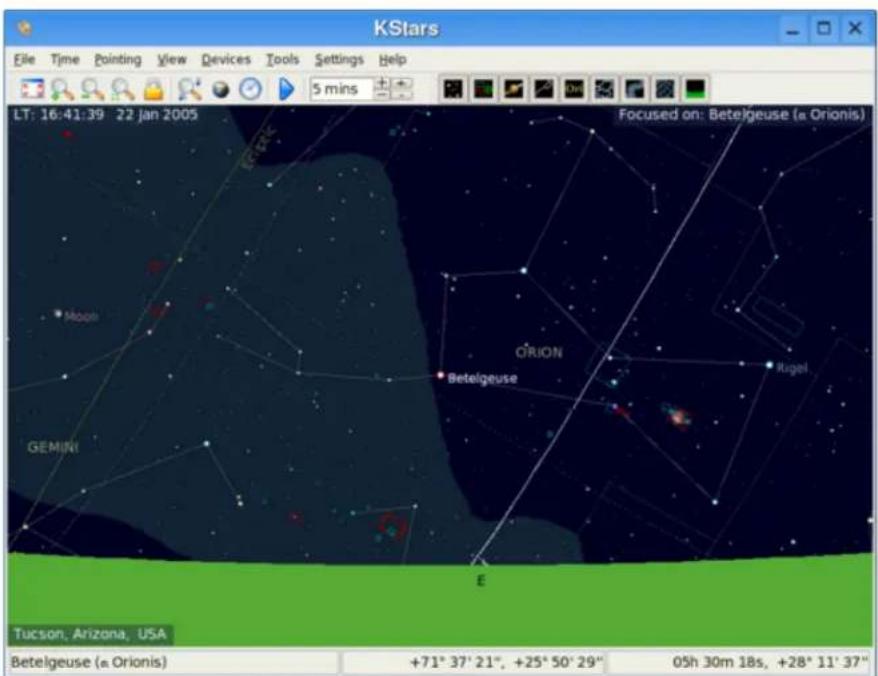
TheabovescreenshotshowsatypicalviewoftheKStarsprogram.Youcansee theskydisplaycenteredonBetelgeuse,thebrighteststarintheconstellation Orion.Orionhasjustrisenabovetheeasternhorizon.Starsaredisplayedwith realisticcolorsandrelativebrightnesses.Inthreecornersoftheskydisplay, thereareon-screentextlabelsdisplayingdataonthecurrenttime('LT:16:38:42
TheKStarsHandbook
23Jan2008'), thecurrentGeographicLocation('Tucson, Arizona, USA'), and thecurrentobjectinthecenterofthedisplay('Focusedon:Betelgeuse(alpha Orionis)').Abovetheskydisplay,therearetwotoolbars. Themaintoolbar containsshortcutsformenufunctions, as wellasatime-stepwidgetwhich controlshowfastthesimulationclockruns. Theviewtoolbarcontainsbuttons that togglethedisplayofdifferentkindsofobjectsinthesky.Atthebottom ofthewindow, thereisastatusbarwhichdisplaysthenameofanyobject youclickon, and theskycoordinates (bothRightAscension/Declinationand Azimuth/Altitude) ofthemousecursor.
2.1TheSetupWizard
The first time your run K Stars, you will be presented with a Setup Wizard, which allows you to easily set your geographic location and download some extradata files. You can press the Finish button at any time to exit the Setup Wizard.
ThefirstpageoftheSetupWizardallowsyoutochoosethestartinggeographic location,byselectingfromthelistofthe2500+knownlocationsontheright sideofthewindow.Thelistoflocationscanbefilteredtomatchthetextyou enterintheCity,Province,andCountryeditboxes.Ifyourdesiredlocationis notpresentinthelist,youcanselectanearbycityinsteadfornow.Lateron, youcanaddyourpreciselocationmanuallyusingthe SetGeographicLocation tool.Onceyouhaveselectedastartinglocation,presstheNextbutton.
ThesecondpageoftheSetupWizardallowsyoutodownloadextradatathat arenotincludedwiththestandarddistributionofKStars.Simplypressthe DownloadExtraDatabuttontoopentheGetNewStufftool.Whenyouareall done,presstheFinishbuttonintheSetupWizardtostartexploringKStars.
2.2HaveaLookAround
Nowthatwehavethetimeandlocationset,letushavealookaround.Youcan panthedisplayusingthearrowkeys.IfyouholddowntheShiftkeybefore panning,thescrollingspeedisincreased.Thedisplaycanalsobepannedby clickinganddraggingwiththemouse.Notethatwhilethedisplayisscrolling, notalobjectsaredisplayed.ThisisdonetocutdownontheCPUloadof recomputingobjectpositions,whichmakesthescrollingsmoother(youcan configurewhatgetshiddenwhilescrollingintheConfigureKStarswindow). Thereareseveralwaystochangethemagnification(orZoomlevel)ofthedisplay:
- Usethe+and-keys
- PresstheZoomIn/ZoomOutbuttonsinthetoolbar
- SelectZoomIn/ZoomOutfromtheViewmenu
TheKStarsHandbook
- SelectZoomtoAngularSize...fromtheViewmenu.Thisallowsyouto specifythethefield-of-viewangleforthedisplay, indegrees.
- Usethescrollwheelonyourmouse
- Dragthemouseupanddownwiththemiddlemousebuttonpressed.
- HolddownCtrlwhiledraggingthemouse. This will allowy outdefine arctangleinthemap. When you releasethemousebutton, the display will zoomtomatchtherectangle.
Noticethatasyouzoomin, youcanseefainterstarsthanatlowerzoomsettings.
Zoomoutuntilyoucanseeagreencurve;thisrepresentsyourlocal horizon.IfyouhavenotadjustedthedefaultKStarsconfiguration,thedisplay willbesolidgreenbelowthehorizon,representingthesolidgroundofthe Earth.Thereisalsoawhitecurve,whichrepresentsthecelestialequator,and abrowncurve,whichrepresentstheEcliptic,thepaththattheSunappears tofollowacrosstheskyoverthecourseofayear.TheSunisalwaysfound somewherealongtheEcliptic,andtheplanetsareneverfarfromit.
2.3ObjectsintheSky
KStarsdisplaysthousandsofcelestialobjects:stars,planets,comets,asteroids, clusters,nebulaeandgalaxies.Youcaninteractwithdisplayedobjectstoper- formationsonthemorobtainmoreinformationaboutthem.Clickingonan objectwillidentifyitinthestatusbar,andsimplyhoveringthemousecursor onanobjectwilllabelittemporarilyinthemap.Double-clickingwillrecenter thedisplayontheobjectandbegintrackingit(sothatitwillremaincentered astimepasses).Rightclickinganobjectopenstheobject'spopulation,which providesmoreoptions.
2.3.1 ThePopupMenu
Hereisanexampleoftherightclickpopupmenu,fortheOrionNebula:
TheKStarsHandbook
| M 42Orion Nebulagaseous nebulaOrion | |
| Rise time: 16:01Transit time: 21:50Set time: 03:37 | |
| Center & TrackAngular Distance To... [DetailsAttach LabelAdd to List | |
| Show HST ImageShow SEDS ImageShow KPNO AOP ImageShow NOAO ImageShow VLT ImageShow 1st-Gen DSS ImageShow 2nd-Gen DSS Image | |
| Wikipedia PageSEDS Information Page | |
| Add Link... |
Theappearanceofthepopupmenudependssomewhatonthekindofobject youright-clickon,butthebasicstructureislistedbelow.Youcangetmore detailedinformationaboutthepopupmenu .
Thetopsectioncontainssomelinesofinformationwhicharenotselectable: theobject'snames("M42";"OrionNebula"),objecttype("gaseousnebula"), andtheconstellationwhichcontainstheobject("Ori").Thenextthreelines showtheobject'srise,set,andtransittimes.Iftheriseandsettimessay"circumpolar",itmeansthattheobjectisalwaysabovethehorizonforthepresent location.
Themiddlesectioncontainsactionswhichcanbeperformedontheselected object,suchasCenterandTrack,Details...,andAttachLabel.Seethepopup menudescription forafulllistanddescriptionofeachaction.
Thebottomsectioncontainslinkstoimagesand/orinformativewebpages
TheKStarsHandbook
abouttheselectedobject.IfyouknowofanadditionalURLwithininformationorImageoftheobject,youcanaddacustomlinktotheobject'spopup menuusingtheAddLink...item.
2.3.2FindingObjects
YoucansearchfornamedobjectusingtheFindObjecttool,whichcanbe openedbyclickingonthesearchiconinthetoolbar,byselectingFindObject... fromthePointingmenu,orbypressingCtrl+F.TheFindObjectwindowis shownbelow:
TheKStarsHandbook
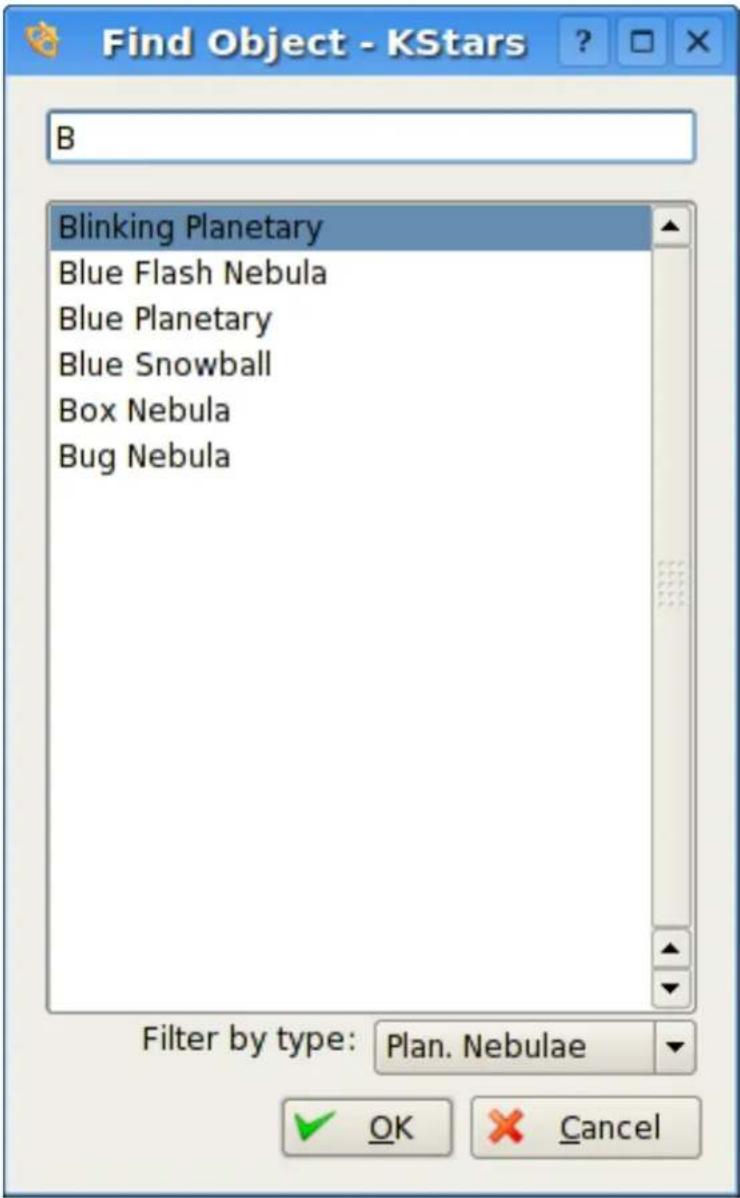
The window contains a list of all then named objects that KStarsis aware of. Many of the object only have an numeric catalog name (forexample, NGC 3077), but some object have a common name as well (forexample, Whirlpool Galaxy). You can filter the list by name and by object type. To filter by name, enter a string in the edit box at the top of the window; the list will then only contain names which start with that string. To filter by type, select at type from the combobox at the bottom of the window.
TheKStarsHandbook
Tocenterthedisplayonanobject, highlightthedesiredobjectinthelist, and pressOk. Notethatiftheobjectisbelowthehorizon, theprogramwillwarn youthatyoumaynotseeanythingexcepttheground(youcanmaketheground invisibleintheDisplayOptionswindow, orbypressingtheGroundbuttonin theViewtoolbar).
2.3.3 Centering and Tracking
KStarswillautomaticallybegintrackingonanobjectwheneveroneiscentered inthedisplay,eitherbyusingtheFindObjectwindow,bydouble-clickingon it,orbyselectingCenterandTrackfromitsright-clickpopupmenu.Youcan disengagetrackingbypanningthedisplay,pressingtheLockiconintheMain toolbar,orselectingTrackObjectfromthePointingmenu.
NOTE
WhentrackingonaSolarSystembody, KStarswillautomaticallyattachan'orbit trail', showingthepathofthebodyacrossthesky. Youwilllikelyneedtochange theclock'stimesteptoalargevalue(suchas'1day')toseethetrail.
2.3.4 KeyboardActions
When you click on an object in themap, it becomes the selected object, and its name is identified in the status bar. There are an number of quick key commands available which act on these selected object:
CCenterandTrackontheselectedobject
DShowtheDetailswindowfortheselectedobject
LToggleavisiblenamelabelontheselectedobject
OAddtheselectedobjecttotheObservingList
TTogglevisiblecurveonthesky, showing the path of the object across the sky (only applicable to Solar System bodies)
NOTE
ByholdingdowntheAltkey,youcanperformtheseactionsonthecenteredobject, ratherthantheselectedobject.
TheKStarsHandbook
2.4EndoftheTour
ThisconcludesthetourofKStars,althoughwehaveonlyscratchedthesurface oftheavailablefeatures.KStarsincludesmanyuseful astronomytools,itcan directly control your telescope, and it offers a wide variety of configuration andcustomizationoptions.Inaddition,thisHandbookincludestheAstroInfo Project,aserisofshort,interlinkedarticlesexplainingsomeofthecelestial andastrophysicalconceptsbehindKStars.
TheKStarsHandbook
Chapter3
ConfiguringKStars
3.1 Setting the Geographic Location
HereisascreenshotoftheSetGeographicLocationwindow:
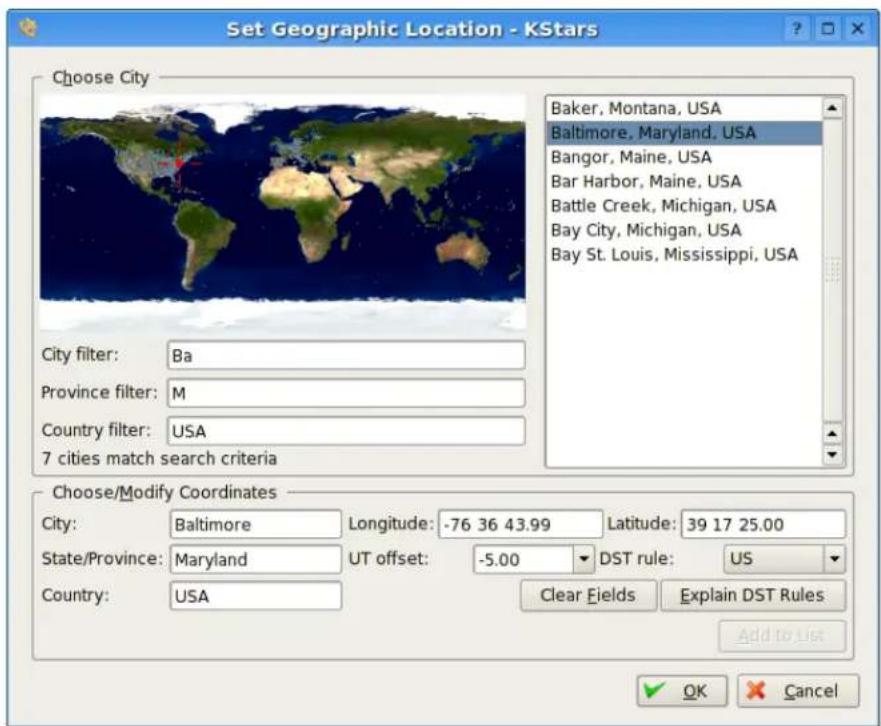
Thereisalistofover2500predefinedcitiesavailabletochoosefrom.Youset yourlocationbyhighlightingacityfromthislist.Eachcityisrepresentedin
TheKStarsHandbook
theworldmapasasmalldot, and when acity is highlighted in the list, ared crosshairs appear on its location in themap.
Itisnotpracticaltoscrollthroughthefulllistof2500locations,lookingfora specificcity.Tomakesearcheseasier,thelistcanbefilteredbyenteringtextin theboxesbelowthemap.Forexample,inthescreenshot,thetext'Ba'appears intheCityFilterbox,while'M'hasbeenenteredintheProvinceFilterbox,and 'USA'isintheCountryFilterbox.Notethatallofthecitiesdisplayedinthe listhavecity,province,andcountrynamesthatbeginwiththeenteredfilter strings,andthatthemessagebelowthefilterboxesindicatesthat7citiesare matchedbythefilters.Alsonoticethatthedotsrepresentingthesesevencities inthemaphavebeencoloredwhite,whiletheunmatchedcitiesremaingray.
Thelistcanalsobefilteredbylocationinthemap.Clickinganywhereinthe worldmapwillshowonlythosecitieswithintwodegreesoftheclickedlocation.Atthistime,youcansearchbyname,orbylocation,butnotbothatonce. Inotherwords,whenyouclickonthemap,thenamefiltersareignored,and viceversa.
The longitude, latitude and time zone information for the currently-selected locationaredisplayedintheboxesatthebottomofthewindow. If you feel that any of these values are inaccurate, you can modify them and press the AddtoListbutton to record your custom version of the location. You can also define a completely new location by pressing the Clear Fields button, and entering the data for the new location. Not that all field except the optional State/Provincemust be filled before the new location can be added to the list. K Stars will automatically load your custom locations for all futures sessions. Plesenote, at this point, the only way to remove a custom location to remove the appropriate line from the file/.kde/share/apps/kstars/my cities.dat.
If you add custom locations (ormodify existing ones), please send us your my cities. dat files that we can add your location to the master list.
3.2SettingtheTime
WhenKStarsstartsup, the time is set to your computer's system clock, and the K Stars clock is running to keep up with there a time. If you want to stop the clock, select Stop Clock from the Timemenu, or simply click on the Pause icon in the tool bar. You can make the clock run slower or faster than normal, even make it run backward, using the time-step spinbox in the tool bar. This spinbox has two times of up/down buttons. The first one will step through all 83 available timesteps, one by one. These second one will skip to then exceed higher (or lower) unit of time, which allows any to make target timestep changes more quickly.
YoucansetthetimeanddatebyselectingSetTime...fromtheTimemenu,or bypassingthetimeiconinthetoolbar.TheSetTimewindowusesastandard KDEDatePickerwidget,coupledwiththreespinboxesforsettingthehours, minutesandseconds.Ifyouwanttore-synchronizethesimulationclockback tothecurrentCPUtime,justselectSetTimetoNowfromtheTimemenu.
TheKStarsHandbook
NOTE
KStarscanacceptveryremotedatesbeyondtheusualimitsimposedbyQDate. Currently,youcansetthedatebetweentheyears-50000and+50000.Wemay extendthisrangeevenfurtherinfuturereleases.However,pleasebeawarethat theaccuracyofthesimulationbecomesmoreandmoredegradedasmoreremote datesareexamined.Thisisespeciallytrueforthepositionsofsolarsystembodies.
3.3TheConfigureKStarsWindow
TheConfigureKStarswindowallowsyoutomodifyawiderangeofdisplay options.Youcanaccessthetindowwiththeconfiguretoolbaricon,orby selectingConfigureKStars...fromtheSettingsmenu.Thewindowisdepicted below:
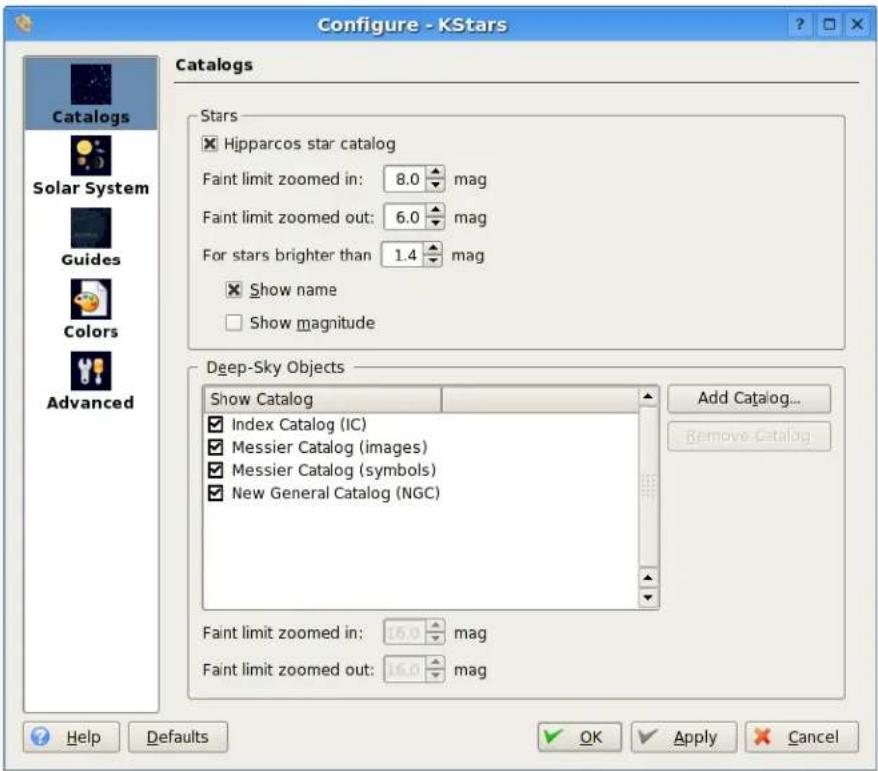
TheConfigureKStarswindowisdividedintofivetabs:Catalogs,Guides,Solar System,Colors,andAdvanced.
IntheCatalogstab,youdeterminewhichobjectcatalogsaredisplayedinthe map. The Stars section also allows you to set the 'faint magnitude limit' for stars,andthemagnitudelimitfordisplayingthenamesand/ormagnitudesof
TheKStarsHandbook
stars.Belowthestarssection,theDeep-SkyObjectssectioncontrolsthedisplay ofseveralnon-stellarobjectcatalogs.Bydefault,thelistincludestheMessier,NGCandICcatalogs.YoucanaddyourowncustomobjectcatalogsbypassingtheAddCustomCatalogbutton.Fordetailedinstructionsonpreparinga catalogdatafile,seetheREADME.customizefilethatshipswithKStars.
IntheSolarSystemtab,youcanspecifywhethertheSun,Moon,planets, cometsandasteroidsaredisplayed,andwhetherthemajorbodiesaredrawn ascoloredcirclesoractualimages.Youcanalsotogglewhethersolarsystem bodieshavenamelabelsattached,andcontrolhowmanyofthecometsand asteroidsgetnamelabels.Thereisanoptiontoautomaticallyattachatemporary'orbittrail'wheneverasolarsystembodyistracked,andanothertotoggle whetherthecoloroftheorbittrailfadesintothebackgroundskycolor.
TheGuidestabletsyoutogglewhethernon-objectsaredisplayed(i.e.,constellationlines,constellationnames,theMilkyWaycontour,the celestialequator, the ecliptic, the horizon line, and the opaque ground). You can also choose whetheryouwouldliketoseeLatinconstellationnames,IAU-standardthree-letterabbreviations,orconstellationnamesusingyourlocallanguage.
TheColorstaballowsyoutosetthecolorscheme, andtodefinecustomcolor schemes. Thetabissplitintotwop anels:
Theleftpanelshowsalistofalldisplayitemswithadjustablecolors.Clickon anyitemtobringupacolorselectionwindowtoadjustitscolor.Belowthe lististheStarColorModeselectionbox.Bydefault,KStarsdrawsstarswith a realisticcolortintaccordingtothespectraltypeofthestar.However,you mayalsochoosetodrawthestarsassolidwhite,blackorredcircles.Ifyouare usingtherealisticstarcolors,youcansetthesaturationlevelofthestarcolors withtheStarColorIntensityspinbox.
Therightpanelliststhedefinedcolorschemes.Therearefourpredefined schemes:theDefaultscheme,StarChart,whichusesblackstarsonawhite background,NightVision,whichusesonlyshadesofredinordertoprotect dark-adaptedvision,andMoonlessNight,amorerealistic,darktheme.Additionally,youcansavethecurrentcolorsettingsasacustomschemebyclicking theSaveCurrentColorsbutton.Itwillpromptyouforanameforthenew scheme,andthenyourschemewillappearinthelistinallfutureKStarsessions.Toremoveacustomscheme,simplyhighlighttitinthelist,andpressthe RemoveColorSchemebutton.
The Advanced Tab provides fine-grained control over themoresubtle behaviors of KStars.
TheCorrectforatmosphericrefractioncheckboxcontrolswhetherthepositions ofobjectsarecorrectedfortheeffectsoftheatmosphere. Because the atmosphereisasphericalshell, lightfromouterspaceis'bent'asitpassesthrough theatmospheretoourtelescopesoreyesontheEarth'ssurface. Theeffectis largestforobjectsnearthehorizon, and actuallychangesthepredictedriseor settimesofobjectsbyafewminutes. Infact, whenyou'see'asunset,the Sun'sactualpositionisalreadywellbelowthehorizon;atmosphericrefraction makesitseemasiftheSunisstillinthesky. Notethatatmosphericrefraction isneverappliedifyouareusingEquatorialcoordinates.
TheKStarsHandbook
TheUseanimatingslewingcheckboxcontrolshowthedisplaychangeswhen anewfocuspositionisselectedinthemap.Bydefault,youwillseetheskydriftor'slew'tothenewposition;ifyouuncheckthisoption,thenthedisplaywillinstead'snap'immediatelytothenewfocusposition.
If the Attachlabeltocenteredobjectcheckboxisselected, thenanamelabelwill automaticallybeattachedtoanobjectwhenitisbeingtrackedbytheprogram. Thelabelwillberemovedwhentheobjectisnolongerbeingtracked. Note that youcanalsomanuallyattachapersistentnamelabeltoanyobjectwithits popupmenu.
TherearethreesituationswhenKStarsmustredrawtheskydisplayveryrapidly: whenanewfocuspositionisselected(andUseanimatedslewingischecked), whentheskyisdraggedwiththemouse,andwhenthetimestepislarge. Inthesesituations,thepositionsofalobjectsmustberecomputedasrapidly aspossible,whichcanputalargeloadontheCPU.IftheCPUcannotkeepup withthedemand,thenthedisplaywillseemsluggishorjerky.Tomitigatethis, KStarswillhidecertainobjectsduringtheserapid-redrawsituations,aslong astheHideobjectswhilemovingcheckboxisselected.Thetimestepthreshold abovewhichobjectswillbehiddenisdeterminedbytheAlsohideiftimescale greaterthan:timestep-spinbox.Youanspecifytheobjectsthatshouldbehid-denintheConfigureHiddenObjectsgroupbox.
3.4 Customizing the Display
Thereareseveralwaystomodifythedisplaytoyourliking.
- Select a different color scheme in the Settings → Color Schemes menu. There are four predefined colors schemes, and you can define your own in the ConfigureKStarswindow.
- Toggle whether the Toolbars are drawn in the Settings → Toolbars menu. LikemostKDEtoolbars, theycanalsobedraggedaroundandanchoredon anywindowedge, orevendetachedfromthewindowcompletely.
- Toggle whether the Info Boxes are drawn in the Settings → Info Boxes menu. Inaddition,youcanmanipulatethethreeInfoBoxeswiththemouse.Each boxhasadditionallinesofdatathatarehiddenbydefault.Youcantoggle whethertheseadditionallinesarevisiblebydouble-clickingaboxto'shade' it.Also,youcanrepositionaboxbydraggingitwiththemouse.Whenabox hitsawindowedge,itwill'stick'totheedgewhenthewindowisresized.
- Choose an 'FOV Symbol' using the Settings → FOV Symbols menu. FOV isanacronymfor'field-of-view'. AnFOVsymbolisdrawnatthecenter ofthewindowtoindicatewherethedisplayispointing.Differencesymbols have differentangularsizes;youcanuseasymboltoshowwhattheview throughaparticulartelescopewouldlooklike.Forexample,ifyouchoose the'7x35Binoculars'FOVsymbol,thenacircleisdrawnonthedisplaythat is9.2degreesindiameter;thisisthefield-of-viewfor7x35binoculars.
TheKStarsHandbook
YoucandefinyourownFOVsymbols(ormodifytheexistingsymbols) usingtheEditFOVSymbols...menuitem,whichlaunchestheFOVEditor:
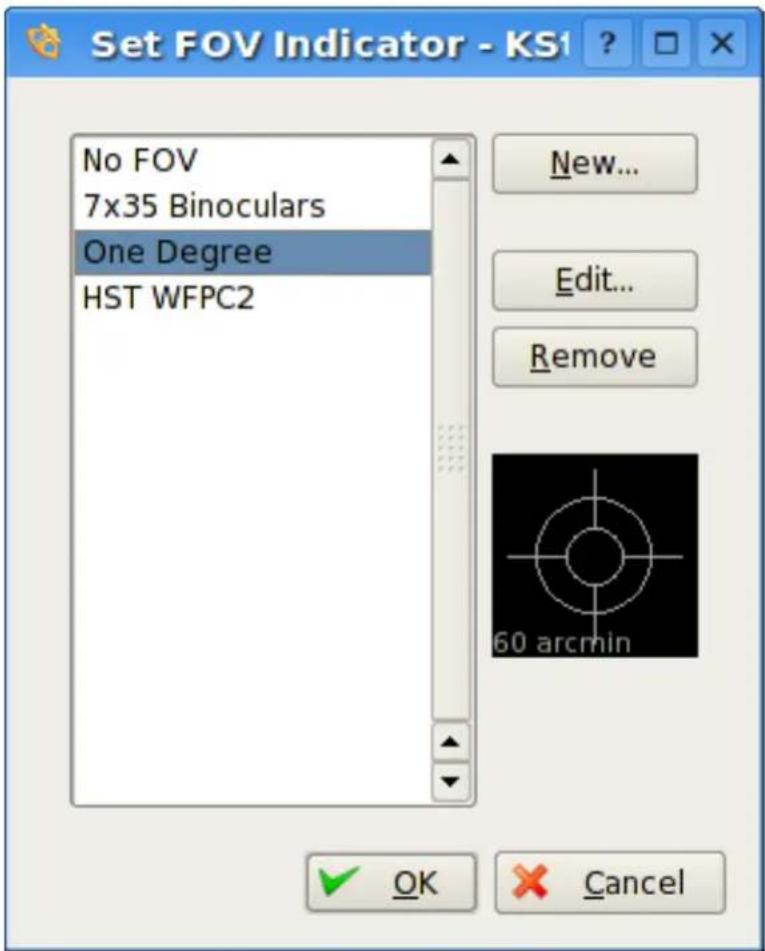
ThelistofdefinedFOVsymbolsisdisplayedontheleft.Ontherightare buttonsforaddinganewsymbol,editingthehighlightsymbol'sproperties,andremovingthehighlightsymbolfromthelist.Notethatyoucan evenmodifyorremovethefourpredefinedsymbols(ifyouremoveallsymbols,thefourdefaultswillberestoredthenexttimeyoustartKStars).Below theseethreebuttonsisagraphicalpreviewdisplayshowingthehighlightedsymbolfromthelist.WhentheNew...orEdit...buttonispressed,theNew FOVSymbolwindowisopened:
TheKStarsHandbook
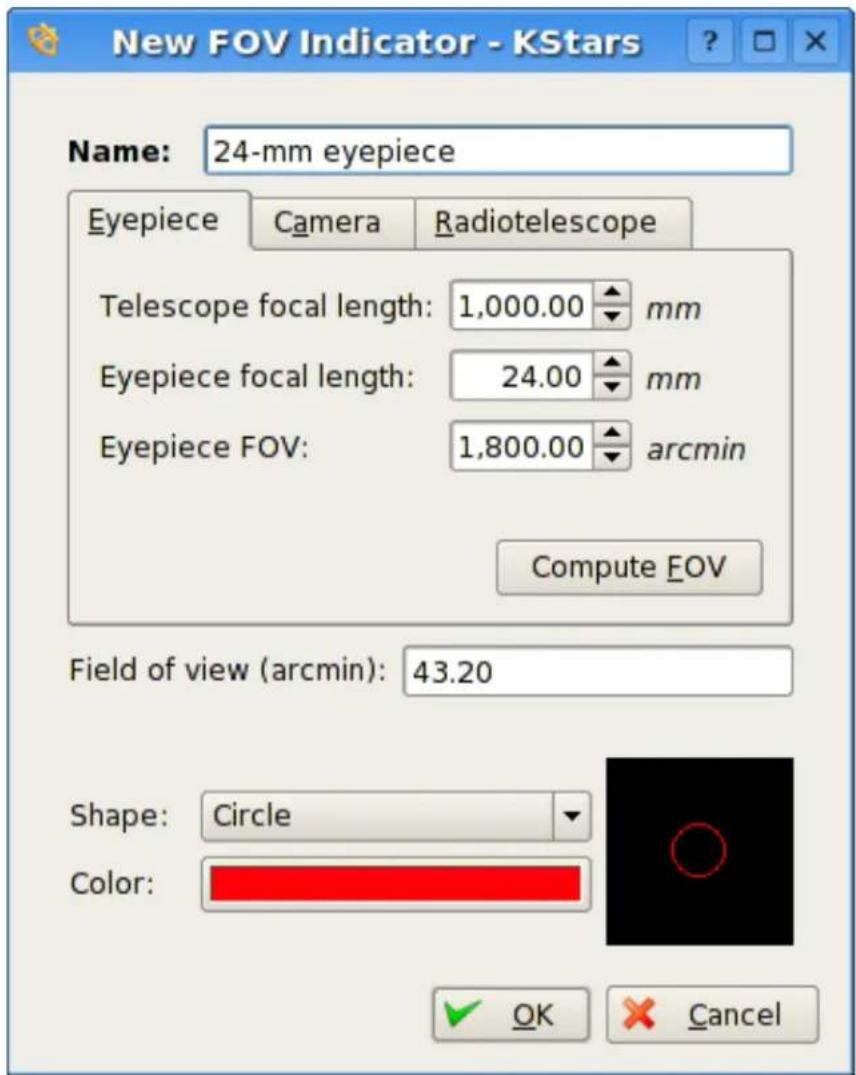
ThiswindowletyoumodifythefourpropertiesthatdefineaFOVsymbol: name,size,shape,andcolor.Theangularsizeforthesymbolcaneitherbe entereddirectlyintheFieldofVieweditbox,oryoucanusetheEyepiece/-CameraTabstocalculatethefield-of-viewangle,givenparametersofyour telescope/eyepieceortelescope/camerasetup.Thefouravailableshapes are:Circle,Square,Crosshairs,andBullseye.Onceyouhavespecifiedall fourparameters,pressOk,andthesymbolwillappearinthelistofdefined symbols.ItwillalsobeavailablefromtheSettings | FOVmenu.
Chapter4
CommandReference
4.1MenuCommands
4.1.1 FileMenu
File→NewWindow(Ctrl+N)OpenanotherKStarswindow
File→CloseWindow(Ctrl+W)CloseKStarswindow
File→DownloadData...(Ctrl+D)OpentheDownloadExtraDatatool
File→OpenFITS...(Ctrl+O)OpenaFITSimageintheFITSViewertool
File → Save Sky Image... (Ctrl+I) Create image on disk from current display
File→RunScript...(Ctrl+R)RunthespecifiedKStarsscript
File → Print... (Ctrl+P) Send the current sky map to the printer (or to a PostScript/PDFfile)
File→Quit(Ctrl+Q)QuitKStars
4.1.2 TimeMenu
Time→SetTimetoNow(Ctrl+E)Synctimetosystemclock
Time→SetTime...(Ctrl+S)Settimeanddate
Time→Start/StopClockTogglewhethertimepasses
TheKStarsHandbook
4.1.3PointingMenu
Pointing → Zenith (Z) Center the display at the Zenith point (straight up)
Pointing → North (N) Center the display above the North point on the hori- zon
Pointing → East (E) Center the display above the East point on the horizon
Pointing → South (S) Center the display above the South point on the horizon
Pointing → West (W) Center the display above the West point on the horizon
Pointing → Set Focus Manually... (Ctrl+M) Center the display on specific sky coordinates
Pointing → Find Object (Ctrl+F) Locate an object by name using the Find ObjectWindow
Pointing → Engage/Stop Tracking (Ctrl+T) Toggle tracking on/off. While tracking, the display will remain centered on the current position or object.
4.1.4ViewMenu
View→Zoomin(+)Zoomsviewin
View→Zoomout(-)Zoomsviewout
View→DefaultZoom(Ctrl+Z)RestorethedefaultZoomsetting
View → Zoom to Angular Size... (Ctrl+Shift+Z) Zoom to specified field-of-view angle
View→FullScreenMode(Ctrl+Shift+F)Togglefull-screenmode
View → Horizontal/Equatorial Coordinates (Space) Toggle between the Horizontal and Equatorial Coordinate Systems
4.1.5 DevicesMenu
Devices → Telescope Wizard... Opens the Telescope Wizard, which provides a step-by-step guidetohelpyouconnecttoyourtelescopeandcontrolit withKStars.
Devices → Capture Image Sequence... Acquire images from a CCD camera or webcamdevice
Devices→DeviceManagerOpensupthedevicemanager,whichallowsyou tostart/shutdowndevicedriversandconnecttoremoteINDIservers.
Devices→INDIControlPanelOpensupINDIControlPanel, which allows youtocontrolallthefeaturessupportedbyadevice.
Devices → Configure INDI Opens up a dialog to configure INDI-related feature such as automatic device updates.
TheKStarsHandbook
4.1.6 ToolsMenu
Tools Calculator... (Ctrl+C) Opens the AstroCalculator Tool, which provides fullaccesstomanyofthemathematicalfunctionsusedbyKStars.
Tools → AAVSO Light Curves... (Ctrl+V) Opens the AAVSO Light Curve Generator Tool, which allows youtodownloadalightcurve for any variable star from the American Association of VariableStarObservers.
Tools → Altitude vs. Time... (Ctrl+A) Opens the Altitude vs. Time Tool, which can plot curves representing the altitude of any object as a function of time. This is useful for planning observations sessions.
Tools → What's Up Tonight... (Ctrl+U) Opens the What's Up Tonight Tool, which presents a summary of the objects which are observable from your location on agivendate.
Tools → Script Builder... (Ctrl+B) Opens the Script Builder Tool, which provides a GUI interface for building KStarsDCOPscripts.
Tools → Solar System... (Ctrl+Y) Opens the Solar System Viewer, which displays an overhead view of the solar system on the current simulation date.
Tools → Jupiter's Moons... (Ctrl+J) Opens the Jupiter Moons Tool, which displays the positions of Jupiter's four brightest moons as a function of time.
4.1.7 SettingsMenu
Settings → Info Boxes → Hide/Show Info Boxes Toggle display of all three Info Boxes
Settings → Info Boxes → Hide/Show Time Toggle display of the Time Info Box
Settings → Info Boxes → Hide/Show Focus Toggle display of the Focus Info Box
Settings → Info Boxes → Hide/Show Location Toggle display of the Location InfoBox
Settings → Toolbars → Hide/Show Main Toolbar Toggle display of the Main Toolbar
Settings → Toolbars → Hide/Show View Toolbar Toggle display of the View Toolbar
Settings → Statusbar → Hide/Show Statusbar Toggle display of the Statusbar
Settings → Statusbar → Hide/Show Az/Alt field Toggle display of the mouse cursor's horizontal coordinates in the statusbar
Settings → Statusbar → Hide/Show RA/Dec field Toggle display of the mouse cursor's horizontal coordinates in the statusbar
TheKStarsHandbook
Settings → Color Schemes This submenu contains all of the defined color schemes, including your customs schemes. Select any item to set that colorscheme.
Settings → FOV Symbols This submenu lists the available field-of-view (FOV) Symbols. The FOVSymbolisdrawnatthecenterofthedisplay. You may choose from the list of predefined symbols (Nosymbol, 7x35Binoculars, Onedegree, or HSTWFPC2), or you may define your own symbols (or modify existing symbols) using the Edit FOV symbols...item.
Settings → Set Geographic Location... (Ctrl+G) Select a new geographic location
Settings → Configure KStars... Modify configuration options
4.1.8 HelpMenu
Help → KStars Handbook (F1) Invokes the KDE Help system starting at the KStarshelppages.(thisdocument).
Help → What's This? (Shift+F1) Changes the mouse cursor to a combination arrow and question mark. Clicking on items within K Stars will open a help window (if one exists for the particular item) explaining the item's function.
Help → Report Bug... Opens the Bug report dialog where you can report a bugorrequesta'wishlist'feature.
Help→AboutKStarsThiswilldisplayversionandauthorinformation.
Help → About KDE This displays the KDE version and other basic information.
4.1.9PopupMenu
Therightclickpopulationmenuiscontext-sensitive, meaning its content varies depending on what kind of object you click on. Welist all possible popup menu item shere, with therelevant object type [in brackets].
[All]Identificationandtype:Thetoponetothreelinesaredevotedtothe name(s)oftheobject,anditstype.Forstars,theSpectralTypeisalso shownhere.
[All]Rise, Transit, and Settimes for the object on the current simulation date areshown nonthen next threelines.
[All]CenterandTrack: Centerthedisplayonthislocation, andengagetracking. Equivalenttodouble-clicking.
TheKStarsHandbook
[All]AngularDistanceTo...:Enter"angulardistancemode".Inthismode, adottedlineisdrawnfromthefirsttargetobjecttothecurrentmouse position.Whenyouinvokethepopulationofasecondobject,thisitem willreadComputeAngularDistance.Selectingthisitemwilldisplaythe angulardistancebetweenthetwoobjectsinthestatusbar.Youcanpress theEsckeytoexitangulardistancemodewithoutmeasuringanangle.
[All]Details:OpentheObjectDetailswindowforthisobject.
[All]AttachLabel:Attachapermanentnamelabeltotheobject.Iftheobject alreadyhasalabelattached,thisitemwillreadRemoveLabel.
[All]Show...Image:downloadanimageoftheobjectfromtheinternet,and displayitintheImageViewertool.The"..."textisreplacedbyashort descriptionoftheimage'ssource.Anobjectmayhavemultipleimage linksavailableinitspopupmenu.
[All]...Page:Displayawebpageabouttheobjectinyourdefaultwebbrowser. The"..."textisreplacedbyashortdescriptionofthepage.Anobjectmay havemultipleweblinksavailableinitspopupmenu.
4.2KeyboardCommands
4.2.1NavigationKeys
Arrow Keys Use the arrow keys to pan the display. Holding down the Shift keydoublesthescrollingspeed.
+/-ZoomIn/Out
Ctrl+ZRestorethedefaultZoomsetting
Ctrl+Shift+ZZoomtospecifiedfield-of-viewangle
0-9CenterDisplayonamajorSolarSystembody:
•0:Sun
•1:Mercury
•2:Venus
•3:Moon
•4:Mars
•5:Jupiter
-6:Saturn
•7:Uranus
•8:Neptune
•9:Pluto
ZCenterthedisplayattheZenithPoint(straightup)
TheKStarsHandbook
NCenterthedisplayabovetheNorthpointonthehorizon
ECenterthedisplayabovetheEastpointonthehorizon
SCenterthedisplayabovetheSouthpointonthehorizon
WCenterthedisplayabovetheWestpointonthehorizon
Ctrl+TToggletrackingmode
<Advancethesimulationclockbackwardsbyonetimestep
Advancethesimulationclockforwardsbyonetimestep
4.2.2MenuShortcuts
Ctrl+NOpenanewKStarswindow
Ctrl+WCloseaKStarswindow
Ctrl+DDownloadextradata
Ctrl+OOpenaFITSimageintheFITSEditor
Ctrl+IExportskyimagetoafile
Ctrl+RRunaKStarsDBusscript
Ctrl+PPrintthecurrentskymap
Ctrl+QQuitKStars
Ctrl+ESynthesimulationclockwiththecurrentsystemtime
Ctrl+SSetthesimulationclocktoaspecifiedTimeandDate
Ctrl+Shift+FTogglefull-screenmode
Space Toggle between the Horizontal and Equatorial Coordinate Systems
F1OpentheKStarsHandbook
4.2.3 ActionsfortheSelectedObject
Eachofthefollowing keystrokesperformsanactionontheselectedobject. The selectedobjectisthelastobjectwhichwasclickedon(identifiedinthestatus bar). Alternatively, ifyouholddowntheShiftkey, thentheactionisperformed onthecenteredobjectinstead.
DOpentheDetailswindowfortheselectedobject
LToggleanamelabelfortheselectedobject
OAddtheselectedobjecttotheobservinglist
POpenthesetectedobject'spopulation
TToggleatrailontheselectedobject(solarsystembodiesonly)
TheKStarsHandbook
4.2.4 Tools Shortcuts
Ctrl+F Open the Find Object window, for specifying a sky object on which to center
Ctrl+MOpentheSetManualFocustool, forspecifyingRA/DecorAz/Alt coordinatesonwhichtocenter
[/Start/EndanAngularDistancemeasurementatthecurrentmousecursor position.Theangulardistancebetweenstartandendpointsisdisplayed inthestatusbar.
Ctrl+GOpentheSetGeographicLocationwindow
Ctrl+COpentheAstroCalculator
Ctrl+VOpentheAAVSOLightcurveGenerator
Ctrl+AOpentheAltitudevs.Timetool
Ctrl+UOpentheWhat'sUpTonight?tool
Ctrl+BOpentheScriptBuildertool
Ctrl+YOpentheSolarSystemViewer
Ctrl+JOpentheJupiterMoonstool
Ctrl+LOpentheObservingListtool
4.3MouseCommands
Movingthemouse Theskycoordinates(RA/Decand Az/Alt) of the mouse cursor are updated in the status bar
"Hovering"themouse A temporarynamelabelisattached to the object nearest to the mouse cursor.
Left-clickingTheobjectnearestthemouseclickisidentifiedinthestatusbar.
Double-clickingCenterandtrackonthelocationorobjectnearestthemouse click.Double-clickingonanInfoBoxwill'shade'ittoshow/hideextra information.
Right-clicking Open the popup menu for the location or object nearest the mousecursor.
ScrollingthemousewheelZoomthedisplayinorout.Ifyoudonothavea mousewheel,youcanholdthemiddlemousebuttonanddragvertically.
Click-and-dragging
DraggingtheskymapPanthedisplay, followingthedragmotion.
TheKStarsHandbook
Ctrl+draggingtheskymapDefinearectangleinthemap.Whenthe mousebuttonisreleased,thedisplayiszoomedintomatchthe field-of-viewtotheboundsoftherectangle.
DragginganInfoBoxTheInfoBoxisrepositionedinthemap.Info Boxeswill'stick'towindowedges,sothattheyremainontheedge whenthewindowisresized.
Chapter5
TheAstroInfoProject
HereyoucanfindacollectionofshortarticlesthatexplainvariousastronomicalconceptsusedinKStars.Fromcoordinatesystemstocelestialmechanics, youcanfindanswerstoyourquestionshere.
ThearticlessometimesalsocontainexcrisesthatyoucanperformwithKStars toillustratetheconceptbehindthearticle.
5.1 AstroInfo: TableofContents
THE SKY AND COORDINATE SYSTEMS
- CelestialCoordinateSystems
- CelestialEquator
- CelestialPoles
- CelestialSphere
•TheEcliptic
•TheEquinoxes
- GeographicCoordinates
•GreatCircles
•TheHorizon
•HourAngle
- LocalMeridian
•Precession
TheKStarsHandbook
•TheZenith
TIME
•JulianDay
- LeapYears
- SiderealTime
•TimeZones
-UniversalTime
PHYSICS
- BlackbodyRadiation
DarkMatter
•Flux
•Luminosity
•Parallax
•RetrogradeMotion
ASTROPHYSICS
- EllipticalGalaxies
•SpiralGalaxies
•TheMagnitudeScale
Abasicrequirementforstudyingtheheavensisdeterminingwhereinthesky thingsare.Tospecifyskypositions,astronomershavedevelopedseveralcoordinate systems. Each uses a coordinate grid projected on the Celestial Sphere, inanalogytotheGeographiccoordinatesystemusedonthesurfaceofthe Earth.Thecoordinatesystemsdifferonlyintheirchoiceofthefundamental plane, which divides the sky into two equal hemispheres along a great circle. (thefundamentalplaneofthegeographicsystemistheEarth'sequator).Each coordinatesystemisnamedforitschoiceoffundamentalplane.
TheKStarsHandbook
5.2.1 The Equatorial Coordinate System
The Equatorial coordinates system is probably the most widely used celestial coordinates system. It is also the closely related to the geographic coordinate system, because they use the same fundamental plane, and the same poles. The projection of the Earth's sequator onto the celestial sphere is called the Celestial Equator. Similarly, projecting the geographic poles onto the celestial sphere defines the North and South Celestial Poles.
However, there is an important difference between the equatorial and geographic coordinates systems: the geographic system is fixed to the Earth; it rotates as the Earth does. The Equatorial system is fixed to the stars ^1 , soit appear for rotate across the stars, but of course it is really the Earth rotating under the fixed sky.
The latitudinal (latitude-like) angle of the Equatorial system is called Declination (Decforshort). It measures the angle of an object above or below the Celestial Equator. The longitudinal angle is called the Right Ascension (RA for short). It measures the angle of an object East of the Vernal Equinox. Unlike longitude, Right Ascension is usually measured in hours instead of degrees, because the apparent rotation of the Equatorial coordinates system is closely related to Side-real Time and Hour Angle. Since a full rotation of the sky takes 24 hours to complete, there are (360 degrees/24 hours) = 15 degrees in one hour of Right Ascension.
5.2.2 The Horizontal Coordinate System
The Horizontal coordinate system uses the observer's local horizon as the Fundamental Plane. This conveniently dividest the key into the upper hemisphere that you can see, and the lower hemisphere that you can't (because the Earth is in the way). The pole of the upper hemisphere is called the Zenith. The pole of the lower hemisphere is called the nadir. The angle of an object above or below the horizon is called the Altitude (Alt for short). The angle of an object around the horizon (measured from the North point, toward the East) is called the Azimuth. The Horizontal Coordinate System is sometimes also called the Alt/AzCoordinateSystem.
TheHorizontalCoordinateSystemisfixedtotheEarth,nottheStars. Therefore,theAltitudeandAzimuthofanobjectchangeswithtime,astheobjectappearstodriftacrossthesky.Inaddition,becausetheHorizontalsystemis definedbyyourlocalhorizon,thesameobjectviewedfromdifferentlocations onEarthatthesametimewillhavedifferentvaluesofAltitudeandAzimuth.
Horizontal coordinates are very useful for determining the Rise and Set times of an object in the sky. When an object has Altitude = 0 degrees, it is either rising (if its Azimuth is < 180 degrees) or Setting (if its Azimuth is > 180 degrees).
TheKStarsHandbook
5.2.3 The Ecliptic Coordinate System
TheEclipticcoordinatesystemusestheEclipticforitsFundamentalPlane.TheEclipticisthepaththattheSunappearstofollowacrosstheskyoverthecourseofayear.ItisalsotheprojectionoftheEarth'sorbitalplaneontotheCelestialSphere.ThelatitudinalangleiscalledtheEclipticLatitude,andthelongitudinalangleiscalledtheEclipticLongitude.LikeRightAscensionintheEquatorialsystem,thezeropointoftheEclipticLongitudeistheVernalEquinox.
Whatdoyouthinksuchacoordinatesystemwouldbeusefulfor?If you guessedchartingsolarsystemobjects,youareright!Eachoftheplanets(exceptPluto)orbitstheSuninroughlythesameplane,sotheyalwaysappearto besomewhereneartheEcliptic(i.e.,theyalwayshavesmalleclipticlatitudes).
5.2.4 The Galactic Coordinate System
TheGalacticcoordinatesystemusestheMilkyWayasitsFundamentalPlane. ThelatitudinalangleiscalledtheGalacticLatitude,andthelongitudinalangle iscalledtheGalacticLongitude.Thiscoordinatesystemisusefulforstudying theGalaxyitself.Forexample,youmightwanttoknowhowthedensityof starschangesasafunctionofGalacticLatitude,tohowmuchthediskofthe MilkyWayisflattened.
5.3TheCelestialEquator
The Celestial Equator is an imaginary great circle on the celestial sphere. The celestialequatoristhefundamentalplaneoftheEquatorialCoordinateSystem, soitisdefinedasthelocusofpointswithDeclinationofzerodegrees.Itisalso theprojectionoftheEarth'sequatorontothesky.
TheCelestialEquatorandtheEclipticaresetatanangleof23.5degreesinthe sky.ThepointswheretheyintersectaretheVernalandAutumnal Equinoxes.
5.4TheCelestialPoles
Theskyappearstodriftoverheadfromeasttowest,completingafullcircuit aroundtheskyin24(Sidereal)hours.Thisphenomenonisduetothespinning oftheEarthonitsaxis.TheEarth'sspinaxisintersectstheCelestialSphere at two points. These points are the Celestial Poles. As the Earth spins; they remain fixed in the sky, and all other points seem to rotate around them. The celestialpolesarealsothepolesoftheEquatorialCoordinateSystem,meaning theyhaveDeclinationsof+90degreesand-90degrees(fortheNorthandSouth celestialpoles,respectively).
TheKStarsHandbook
The North Celestial Pole currently has nearly the same coordinates as the bright star Polaris (which is Latin for 'PoleStar'). This makes polaris useful for navigation: not only is it always above the North point of the horizon, but its Altitude angle is always (nearly) equal to the observer's Geographic Latitude (however, Polariscanonly beseen from locations in the Northern hemisphere).
ThefactthatPolarisisnearthepoleispurelyacoincidence. Infact, because of Precession, Polarisisonlynearthepoleforasmallfractionofthetime.
TIP
Exercises:
UsetheFindObjectwindow(Ctrl+F)tolocatePolaris.NoticethatitsDeclinationis almost(butnotexactly)+90degrees. ComparetheAltitudereadingwhenfocused on Polaristoyourlocation'sgeographiclatitude. They are always within one degree of each other. They are not exactly the same because Polarisisn't exactly at the Pole. (you can point exactly at the pole by switching to Equatorial coordinates, and pressing the up-arrow key until the kystops scrolling).
Use the Time Step spinbox in the tool bar to accelerate the time to a step of 100 seconds. You can see the entire sky appear to rotate around Polaris, while Polaris itself remains nearly stationary.
WesaidthatthecelestialpoleisthepoleoftheEquatorialcoordinatesystem.What doyouthinkisthepoleofthehorizontal(Altitude/Azimuth)coordinatesystem?(The Zenith).
5.5TheCelestialSphere
Thecelestialsphereisanimaginarysphereofgiganticradius,centeredonthe Earth. Allobjectswhichcanbeseenintheskycanbethoughtofaslyingon thesurfaceofthis sphere.
Ofcourse, we know that the objects in the thesky are not on the surface of a sphere centered on the Earth, sowhy bother with such a construct? Everything wesee in the sky is so very far away, that their distances are impossible to gauge just by looking at them. Since their distances are indeterminate, you only need to know the direction toward the object to locate it in the sky. In this sense, the celestial spheremodel is a very practical model form mapping the sky.
The direction toward various objects in the skysk can be quantified by constructing a Celestial Coordinate System.
5.6TheEcliptic
The ecliptic is an imaginary Great Circle on the Celestial Sphere along which the Sunappearstomoveoverthecourseofayear.Ofcourse,itisreallythe
TheKStarsHandbook
Earth'sorbitaroundtheSuncausingthechangeintheSun'sapparentdirection.TheeclipticisinclinedfromtheCelestialEquatorby23.5degrees.The twopointswheretheEclipticcrossestheCelestialEquatorareknownasthe Equinoxes.
Sinceoursolarsystemisrelativelyflat,theorbitsoftheplanetsarealsoclose totheplaneoftheecliptic.Inaddition,theconstellationsofthezodiacare locatedalongtheecliptic.Thismakestheeclipticaveryusefullineofreference toanyoneattemptingtolocatetheplanetsortheconstellationsofthezodiac, sincetheyallliterally'followtheSun'.
Becauseofthe23.5-degreetiltoftheEcliptic,theAltitudeoftheSunatnoon changesoverthecourseoftheyear,asitfollowsthepathoftheEclipticacross thesky.Thiscausestheseasons.IntheSummer,theSunishighintheskyat noon,anditremainsabovetheHorizonformorethanttwelvehours.Whereas,inthewinter,theSunislowintheskyatnoon,andremainsabovetheHorizonforlessthanttwelvehours.Inaddition,sunlightisreceivedattheEarth's surfaceatamoredirectangleintheSummer,whichmeansthatagivenarea atthesurfacereceivesmoreenergypersecondintheSummerthaninWinter. Thedifferencesindaydurationandinenergyreceivedperunitarealeadtothe differencesintemperatureweexperienceinSummerandWinter.
TIP
Exercises:
Makesureyourlocationissettosomewherethatisnotveryneartheequator fortheseexperiments.OpentheConfigureKStarswindow,andswitchtoHorizontalcoordinates,withtheOpaqueGroundshown.OpentheSetTimewindow (Ctrl+S),andchangetheDatetosometimeinthemiddleofSummer,andtheTime to12:00Noon.BackintheMainWindow,pointtowardtheSouthernHorizon(press S).NotetheheightoftheSunabovetheHorizonatNoonintheSummer.Now,changetheDatetosomethinginthemiddleofWinter(butkeeptheTimeat12:00 Noon).TheSunisnowmuchlowerintheSky.Youwillalsonoticethattheday durationsaredifferentifyouopentheWhat'sUpTonight?toolforeachdate.
5.7 TheEquinoxes
Mostpeopleknow the Vernaland Autumnal Equinoxes ascalendardates, signifying the beginning of the Northern hemisphere's Spring and Autumn, respectively. Did you know that the equinoxes are also positions in the sky?
The Celestial Equator and the Ecliptic are two Great Circles on the Celestial Sphere, set at an angle of 23.5 degrees. The two points where they intersect are called the Equinoxes. The Vernal Equinox has coordinates RA=0.0 hours, Dec=0.0 degrees. The Autumnal Equinox has coordinates RA=12.0 hours, Dec=0.0 degrees.
The Equinoxes are important for marking these seasons. Because they are on the Ecliptic, the Sunpasses through heachequinox every year. When the Sunpasses
TheKStarsHandbook
throughtheVernalEquinox(usuallyonMarch21st),itcrossestheCelestial EquatorfromSouthtoNorth,signifyingtheendofWinterfortheNorthern hemisphere.Similarly,whentheSunpassesthroughtheAutumnalEquinox (usuallyonSeptember21st),itcrossestheCelestialEquatorfromNorthto South,signifyingtheendofWinterfortheSouthernhemisphere.
5.8 Geographic Coordinates
LocationsonEarthcanbespecifiedusingasphericalcoordinatesystem.The geographic('earth-mapping')coordinatesystemisalignedwiththespinaxis oftheEarth.ItdefinestwoanglesmeasuredfromthecenteroftheEarth.One angle,calledtheLatitude,measurestheanglebetweenanypointandtheEquator. The other angle, called the Longitude, measures the angle along the Equator fromanarbitrarypointontheEarth(Greenwich,Englandistheacceptedzero-longitudepointinmostmodernsocieties).
Bycombiningthesetwoangles,anylocationonEarthcanbespecified.Forex-ample,Baltimore,Maryland(USA)hasalatitudeof39.3degreesNorth,anda longitudeof76.6degreesWest.So,avectordrawnfromthecenteroftheEarth toapoint39.3degreesabovetheEquatorand76.6degreeswestofGreenwich, EnglandwillpassthroughBaltimore.
The Equatoris obviously an important part of this coordinates system; it represents the zero point of the latitude angle, and the half way point between the poles. The Equator is the Fundamental Plane of the geographic coordinates system. All Spherical Coordinate Systems defines such a Fundamental Plane.
LinesofconstantLatitudearecalledParallels. Theytracecirclesonthesurface oftheEarth, but the only parallel that a Great Circle is the Equator (Latitude = 0 degrees). LinesofconstantLongitude are called Meridians. The Meridian passing through Greenwich is the Prime Meridian (longitude = 0 degrees). Unlike Parallels, all Meridians are great circles, and Meridians are not parallel: they intersect at then orthandsouth poles.
TIP
Exercise:
WhatisthelongitudeoftheNorthPole?Itslatitudeis90degreesNorth.
Thisisatrickquestion.TheLongitudeismeaninglessatthenorthpole(andthe southpoletoo).Ithasallongitudesatthesametime.
5.9 Great Circles
Considerasphere, such as the Earth, or the Celestial Sphere. The intersection of any planewith the sphere will result in a circle on the surface of the sphere. If the plane happens to contain the center of the sphere, the intersection circle is
TheKStarsHandbook
a Great Circle. Great circles are the largest circles that can be drawn on a sphere. Also, the shortest path between any twopoint sonasphere is always along a great circle.
Some examples of great circles on the celestial sphere include: the Horizon, the Celestial Equator, and the Ecliptic.
5.10TheHorizon
TheHorizonisthelinethatseparatesEarthfromSky.Moreprecisely,itisthe linethatdividesallofthedirectionsyoucanpossiblylookintotwocategories:thosewhichintersecttheEarth,andthosewhichdonot.Atmanylocations,theHorizonisobscuredbytrees,buildings,mountains,etc..However,ifyou areonashipatsea,theHorizonisstrikinglyapparent.
The horizon is the Fundamental Plane of the Horizontal Coordinate System. In other words, it isth elocusofpointss which have an Altitudeofzerodegrees.
5.11HourAngle
As explained in the Sidereal Time article, the Right Ascension of an object indicates the SiderealTime at which it will transit across your Local Meridian. An object's Hour Angle is defined as the difference between the current Local SiderealTime and the Right Ascension of the object:
$$ \mathrm{HA} _ {\mathrm{obj}} = \text { LST - RA } _ {\mathrm{obj}} $$
Thus, the object's Hour Angle indicates how much Sidereal Time has passed since the object was on the Local Meridian. It is also the angular distance between the object and the meridian, measured in hours (1 hour = 15 degrees). For example, if an object has an hour angle of 2.5 hours, it transited across the Local Meridian 2.5 hours ago, and is currently 37.5 degrees. West of the Meridian. Negative Hour Angles indicate the time until then next transit across the Local Meridian. Of course, an Hour Angle of zero mean the object is currently on the Local Meridian.
5.12TheLocalMeridian
TheLocalMeridianisanimaginary GreatCircleontheCelestialSpherethatis perpendiculartothelocalHorizon.ItpassesthroughtheNorthpointonthe Horizon, through the Celestial Pole, up to the Zenith, and through the South pointontheHorizon.
BecauseitisfixedtothelocalHorizon, starswillappeartodriftpasttheLocal MeridianastheEarthspins. Youcanuseanobject'sRightAscensionandthe LocalSiderealTimetodeterminewhenitwillcrossyourLocalMeridian(see HourAngle).
TheKStarsHandbook
5.13 Precession
PrecessionisthegradualchangeinthedirectionoftheEarth'sspinaxis. The spinaxistracesacone,completingafullcircuitin26,000years.Ifyouhave everspunatoporadreidel,the'wobbling'rotationofthetopasitspinsis precession.
Because the direction of the Earth's spin axis changes, sodoesthelocation of the Celestial Poles.
ThereasonfortheEarth'sprecessioniscomplicated.TheEarthisnotaperfect sphere,itisabitflattened,meaningtheGreatCircleoftheequatorislonger thana'meridonal'greatcirclethatpassesthroughthepoles.Also,theMoon andSunlieoutsidetheEarth'sEquatorialplane.Asaresult,thegravitational pulloftheMoonandSunontheoblateEarthinducesaslighttorqueinaddition toalinearforce.ThistorqueonthespinningbodyoftheEarthleadstothe precessionalmotion.
TIP
Exercise:
PrecessioniseasiesttoseebyobservingtheCelestialPole. Tofindthepole,first switchtoEquatorialCoordinatesintheConfigureKStarswindow,andthenhold down the Up arrow key until the display stops scrolling. The declination displayed inthecenteroftheInfoPanelshouldbe+90degrees,andthebrightstarPolaris shouldbenearlyatthecenterofthescreen.Tryslewingwiththeleftandrightarrow keys.NoticethattheskyappearstorotatearoundthePole. WewillnowdemonstratePrecessionbychangingtheDatetoaveryremoteyear, andobservingthatthelocationoftheCelestialPoleisnolongernearPolaris.Open theSetTimewindow(Ctrl+S),andsetthedatetotheyear8000(currently,KStars cannothandledasmuchmoreremotethanthis,butthisdateissufficientforour purposes).Noticethattheskydisplayisnowcenteredatapointbetweenthe constellationsCygnusandCepheus.Verifythatthisisactuallythepolebyslewing leftandright:theskyrotatesaboutthispoint;intheyear8000,theNorthcelestial polewillnolongerbenearPolaris.
5.14TheZenith
The Zenith is the point in the sky where you are looking when you look 'straight up' from the ground. More precisely, it is the point on the sky with an Altitude of +90 Degrees; it is the Pole of the Horizontal Coordinate System. Geometrically, it is the point on the Celestial Sphere intersected by a line drawn from the centeroftheEarththroughyourlocationontheEarth'ssurface.
TheZenithis,bydefinition,apointalongtheLocalMeridian.
TheKStarsHandbook
TIP
Exercise:
YoucanpointtotheZenithbypressingZorbyselectingZenithfromtheLocation menu.
5.15JulianDay
JulianDaysareawayofreckoningthecurrentdatebyasimplecountofthe numberofdaysthathavepassedsincesomeremote,arbitrarydate.ThisnumberofdaysiscalledtheJulianDay,abbreviatedasJD.Thestartingpoint,JD=0, isJanuary1,4713BC(or-4712January1,sincetherewasnoyear'0').JulianDaysareveryusefulbecausestheymakeiteasytodeterminethenumber ofdaysbetweentwoeventsbysimplysubtractingtheirJulianDaynumbers. Suchacalculationisdifficultforthestandard(Gregorian)calendar,because daysaregroupedintomonths,whichcontainavariablenumberofdays,and thereistheaddedcomplicationofLeapYears.
Convertingfromthestandard(Gregorian)calendartoJulianDaysandvice versaisbestlefttoaspecialprogramwrittentodothis,suchastheKStars Astrocalculator.However,forthoseinterested,hereisasimpleexampleofa GregoriantoJuliandayconverter:
JD=D-32075+1461*(Y+4800+(M-14)/12)/4+367*(M-2-(M-14)/12*12)/12-3*(Y+4900+(M-14)/12)/100)/4
whereDistheday(1-31), MistheMonth(1-12), and Yistheyear(1801-2099). Notethatthisformulaonlyworksfordatesbetween1801and2099. More remotedatesrequireamorecomplicatedtransformation.
AnexampleJulianDayis:JD2440588,whichcorrespondsto1Jan,1970.
JulianDayscanalsobeusedtotelltime;thetimeofdayisexpressedasa fractionofafullday,with12:00noon(notmidnight)asthezeropoint.So, 3:00pmon1Jan1970isJD2440588.125(since3:00pmis3hourssincenoon, and3/24=0.125day).NotethattheJulianDayisalwaysdeterminedfrom UniversalTime,notLocalTime.
Astronomers use certain Julian Day values as important reference points, called Epochs. One widely-used epoch is called J2000; it is the Julian Day for 1 Jan, 2000at12:00noon=JD2451545.0.
MuchmoreinformationonJulianDaysisavailableontheinternet.Agood startingpointistheU.S.NavalObservatory.Ifthatsiteisnotavailablewhen youreadthis,trysearchingfor'JulianDay'withyourfavoritesearchengine.
5.16 LeapYears
TheEarthhastwomajorcomponentsofmotion.First,itspinsonitsrotational axis; a full spin rotation takes one Day to complete. Second, it orbits around theSun;afullorbitalrotationtakesoneYeartocomplete.
TheKStarsHandbook
There are normally 365 days in one calendar year, but it turns out that a true year(i.e.,afullorbitoftheEartharoundtheSun;alsocalledatropicalyear)is alittlebitlongerthan365days.Inotherwords,inthetimeittakestheEarth tocompleteoneorbitalcircuit,itcompletes365.24219spinrotations.Donotbe toosurprisedbythis;thereisnoreasontoexpectthespinandorbitalmotions oftheEarthtobesynchronizedinanyway.However,itdoesmakemarking calendartimeabitawkward....
Whatwouldhappenifwesimplyignoredtheextra0.24219rotationattheend oftheyear,andsimplydefinedacalendaryeartoalwaysbe365.0dayslong? ThecalendarisbasicallyachartingoftheEarth'sprogressaroundtheSun.If weignoretheextrabitattheendofeachyear,thenwitheverypassingyear, thecalendardatelagsalittlemorebehindthetruepositionofEartharoundthe Sun.Injustafewdecades,thedatesofthesolsticesandequinoxeswillhave driftednoticeably.
Infact, it used to be that all years were defined to have 365.0 days, and the calendar 'drifted' away from the truesesasons as a result. In the year 46 BCE, Julius Caesar established the Julian Calendar, which implemented the world's first leap years: Hedecreed that every 4th year would be 366 days long, so that year was 365.25 days long, on average. This basically solved the calendard drift problem.
However, the problem wasn't completely solved by the Julian calendar, because at tropical year isn't 365.25 days long; it's 365.24219 days long. You still have acalendardrift problem, it just takes many centuriest to become noticeable. And so, in 1582, Pope Gregory XIII instituted the Gregorian calendar, which was largely the same as the Julian Calendar, with onemore trick added for leap years: even Century years (those ending with the digits '00') are only leap years if they are divisible by 400. So, they years 1700, 1800, and 1900 were not leap years (though they would have been under the Julian Calendar), where ast he year 2000 was a leap year. This changemakes the average length of year 365.2425 days. So, there is still at inical endardrift, but it amount to an error of only 3 days in 10,000 years. The Gregorian calendar is still used as a standard calendar throughout most of the world.
NOTE
FunTrivia: When Pope Gregory instituted the Gregorian Calendar, the Julian Calendar had been followed for over 1500 years, and so the calendar date had already drifted by over a week. Pope Gregory re-synchronized the calendar by simply eliminating 10 days: in 1582, the day after October 4th was October 15th!
5.17 SiderealTime
SiderealTimeliterallymeans'startime'.Thetimeweareusedtousinginour everydaylivesisSolarTime.ThefundamentalunitofSolarTimeisaDay:the timeittakes theSuntotravel360degreesaroundthesky,duetotherotation oftheEarth SmallerunitsofSolarTimearejustdivisionsofaDay:
TheKStarsHandbook
- 1/24Day=1Hour
- 1/60Hour=1Minute
- 1/60Minute=1Second
However, thereisaproblemwithSolarTime.TheEarthdoesnotactually spin around360degreesinoneSolarDay.TheEarthisinorbitaroundtheSun, andoverthecourseofoneday, itmovesaboutoneDegreealongitsorbit(360 degrees/365.25Daysforafullorbit=aboutoneDegreeperDay).So,in24 hours, thedirectiontowardtheSunchangesbyaboutaDegree.Therefore, theEarthhastospin361degreestomaketheSunlooklikeithastraveled360 degreesaroundtheSky.
Inastronomy, we are concerned with how long it takes the Earth to spin with respect to the fixed stars, not the Sun. So, would like timescale that remove the complication of Earth's or bit around the Sun, and just focuses on how long it takes the Earth to spin 360 degrees with respect to the stars. This rotational period is called a Sidereal Day. On average, it is 4 minutes shorter than a Solar Day, because of the extra degree the Earth spins a Solar Day. Rather than defining a Sidereal Day to be 23 hours, 56 minutes, we define Sidereal Hours, Minutes and Second that are the same fraction of a day as their Solar counterparts. Therefore, one Solar Second = 1.00278 Sidereal Seconds.
The SiderealTimeisusefulfordeterminingwherethestarsareatanygiven time.SiderealTimedividesonefullspinoftheEarthinto24SiderealHours; similarly, themapoftheskyisdividedinto24HoursofRightAscension.This isnocoincidence;LocalSiderealTime(LST)indicatestheRightAscensionon theskythatiscurrentlycrossingthe LocalMeridian.So,ifastarhasaRight Ascensionof05h32m24s,itwillbeonyourmeridianatLST=05:32:24.More generally,thedifferencebetweenanobject'sRAandtheLocalSiderealTime tellsyouhowfarfromtheMeridiantheobjectis.Forexample,thesameobject atLST=06:32:24(oneSiderealHourlater),willbeoneHourofRightAscension westofyourmeridian,whichis15degrees.Thisangulardistancefromthe meridianiscalledtheobject'sHourAngle.
TIP
TheLocalSiderealTimeisdisplayedbyKStarsintheTimeInfoBox,withthelabel 'ST'(youhaveto'unshade'theboxbydouble-clickingitinordertoseetheside-realtime).Notethatthechangingsiderealsecondsarenotsynchronizedwiththe changingLocalTimeandUniversalTimeseconds. Infact, ifyouwatchtheclocks forawhile,youwillnoticethattheSiderealsecondsreallyareslightlyshorterthan theLTandUTseconds.
Point to the Zenith (press Z or select Zenith from the Location menu). The Zenith is thepointontheskywhereyouarelooking'straightup'fromtheground,anditisa point on your Local Meridian. Note the Right Ascension of the Zenith: it is exactly thesameasyourLocalSiderealTime.
TheKStarsHandbook
5.18TimeZones
TheEarthisround, and itisalwayhalf-illuminated by the Sun. However, because the Earthisspinning, the half that is illuminated as always changing. We experience this a the passing of days where we are on the Earth's surface. At any given instant, there are places on the Earth passing from the dark half into the illuminated half (which seen as dawn on the surface). At the same instant, on the oppositeside of the Earth, points are passing from the illuminated halft to darkness (which seen as dusk at those locations). So, at any given time, different places on Earth are experiencing different part of the day. Thus, Solartime is defined locally, so that the clock time at any location describes the part of the day consistently.
This localizationoftimeisaccomplishedbydividingtheglobeinto24vertical slices called Time Zones. The Local Time is the same within any given zone, butthetimeineachzoneisoneHourearlierthanthetimeintheneighboring ZonetotheEast.Actually,thisisaidealizedsimplification;realTimeZone boundariesarenotstraightverticallines,becausetheyoftenfolldownational boundariesandotherpoliticalconsiderations.
NotethatbecausetheLocalTimealwaysincreasesbyanhourwhenmoving betweenZonestotheEast,bythetimeyoumovethroughall24TimeZones, youareafulldayaaheadofwhereyoustarted.Wedealwiththisparadox bydefiningtheInternationalDateLine,whichisaTimeZoneboundaryinthe PacificOcean,betweenAsiaandNorthAmerica.PointsjusttotheEastof thislineare24hoursbehindthepointsjusttotheWestoftheline.Thisleads tosomeinterestingphenomena.AdirectflightfromAustraliatoCalifornia arrivesbeforeitdeparts.Also,theislandsofFijistraddletheInternational DateLine,soifyouhaveabaddayontheWestsideofFiji,youcangooverto theEastsideofFijiandhaveachancetolivethesamedayalloveragain.
5.19UniversalTime
The time on our clocks is essentially a measurement of the current position of the Sun in the sky, which is different for places at different longitudes because the Earth is round (see Time Zones).
However, it is sometimes necessary to define a global time, on that is the same for all places on Earth. One way to do this stop pick a place on the Earth, and adopt the Local Time at that place as the Universal Time, abbreviated UT. (The name is abit of a misnomer, since Universal Time has little todow with the Universe. It would perhaps be better to think of its global time).
The geographic location chosen to represent Universal Time is Greenwich, England. The choice is arbitrary and historical. Universal Time became an important concept when Europeanships begantosail the wide open seas, far from any known landmarks. An navigator could reckon the ship's longitude by comparing the Local Time (as measured from the Sun's position) to the time back at the homeport (as kept by an accurate clock onboard the ship). Greenwich washometo England's Royal Observatory, which was charged with keeping
TheKStarsHandbook
timeveryaccurately,sothatshipsimportcouldre-calibratetheirclocksbefore settingsail.
TIP
Exercise:
Setthegeographiclocationto‘Greenwich,England’usingtheSetLocationwindow (Ctrl+G).NotethattheLocalTime(LT)andtheUniversalTime(UT)arenowthe same.
FurtherReading:Thehistorybehindtheconstructionofthefirstclockthatwas accurateandstableenoughtobeusedonshipstokeepUniversalTimeisafascinatingtale,andonetoldexpertlyinthebook'Longitude',byDavaSobel.
5.20BlackbodyRadiation
A blackbody refers to an opaque object that emits thermal radiation. A perfect blackbody is onethataborsallincominglightanddoesnotreflectany. At room temperature, such an object would appear to be perfectly black (hence the term blackbody). However, if heated to a high temperature, a blackbody will begin to glow with thermal radiation.
Infact, allobjectsemitthermalradiation (aslongastheirtemperatureisabove AbsoluteZero, or-273.15degreesCelsius), but no objectemitsthermalradiation perfectly; rather, they are better at emitting/absorbing somewhat wavelengths of light than others. These unevenefficiencies make it difficult to study the interaction of flight, heat and matter using normal objects.
Fortunately, it is possible to construct a nearly-perfect blackbody. Construct a box made of a thermally conductive material, such as metal. The box should be completely closed on all sides, so that the inside forms acavity that does not receive light from the surroundings. Then, make a small hole somewhere on the box. Thelightcoming out of this hole will almost perfectly resemble the light from an ideal black body, forth the temperature of the air inside the box.
Atthebeginningofthe20thcentury,scientistsLordRayleigh,andMaxPlanck(amongothers)studiedtheblackbodyradiationusingsuchadevice. After muchwork,Planckwasabletoempiricallydescribetheintensityoflightemitted by a blackbody as a function of wavelength. Furthermore, he was able to describe how this spectrum would change as the temperature changed. Planck's workonblackbodyradiationisoneoftheareasofphysicsthatledtothefoundationofthewonderfulscienceofQuantumMechanics,butthatisunfortunatelybeyondthescopeofthisarticle.
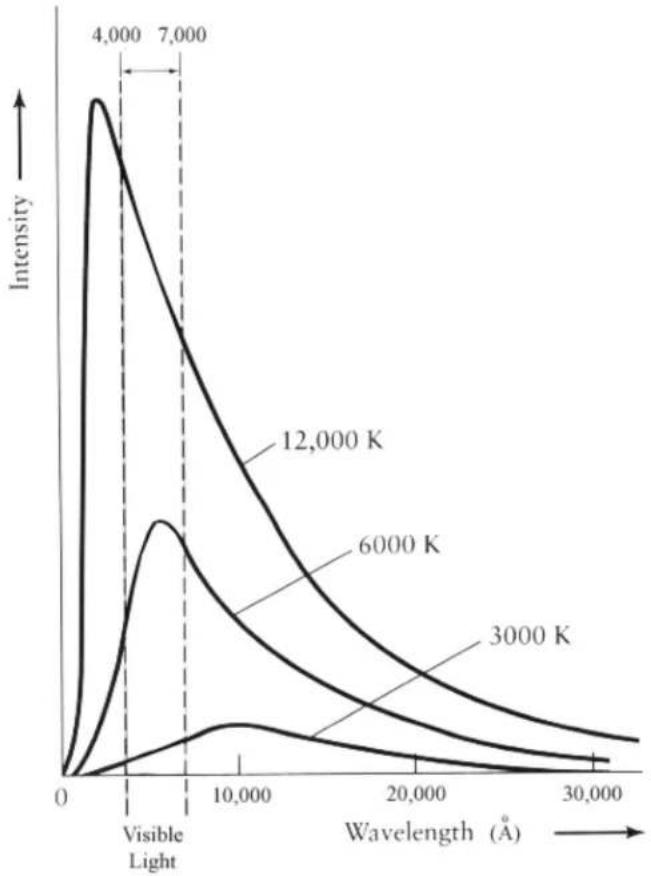
WhatPlanckandtheothersfoundwasthatasthetemperatureofabblackbody increases, the total amount of light emitted per second increases, and the wavelengthofthespectrum'speakshiftstobluercolors(seeFigure1).
TheKStarsHandbook
line
| Wavelength (Å) | Intensity (K = 12,000) | Intensity (K = 6000) | Intensity (K = 3000) | | -------------- | ---------------------- | --------------------- | --------------------- | | 0 | 0 | 0 | 0 | | 4,000 | ~1.5 | ~0.8 | ~0.2 | | 7,000 | ~1.2 | ~0.6 | ~0.1 | | 10,000 | ~0.8 | ~0.4 | ~0.1 | | 20,000 | ~0.3 | ~0.2 | ~0.1 | | 30,000 | ~0.1 | ~0.1 | ~0.1 |Figure1
Forexample, anironbarbecomesorange-red when heated to light temperatures and its color progressively shift toward blue and white as it is heated further.
In1893, Germanphysicist Wilhelm Wienquantified therelationship between blackbody temperature and the wavelength of the spectral peak with the following equation:
$$ \lambda_ {m a x} \cdot T = 0. 2 9 c m K $$
where TisthetemperatureinKelvin.Wien'slaw(alsoknownasWien'sdisplacementlaw)states that the wavelength of maximum emission from black-body is inversely proportional to its temperature. This makes sense; shorter wavelength (higher-frequency) light correspond to higher-energy photons, which you would expect from a higher-temperature object.
Forexample,thesunhasanaveragetemperatureof5800K,soitswavelength
TheKStarsHandbook
of maximumemissionisgivenby:
$$ \lambda_ {m a x} = \frac {0 . 2 9 c m}{5 8 0 0} = 5 0 0 n m $$
Thiswavelengthsfallsinthegreenregionofthevisiblelightspectrum,butthe sun'scontinuumradiatesphotonsbothlongerandshorterthanlambda(max) andthehumaneyesperceivesthesun'scolorasyellow/white.
In1879, Austrianphysicist Stephan Josef Stefanshowed that the luminosity, L, of a black body is proportional to the 4th power of its temperature T.
$$ L = A \cdot \alpha \cdot T ^ {4} $$
where Aisthesurfacearea, alphaisaconstantofproportionality, and Tisthe temperature in Kelvin. That is, if wedouble the temperature (e.g. 1000 K to 2000 K) thenthetotalenergyradiated from ablackbody increase by a factor of 2^4 or 16.
Fiveyearslater,AustrianphysicistLudwigBoltzmanderivedthesameequationandisnowknownastheStefan-Boltzmanlaw.Ifweassumeaspherical starwithradiusR,thentheluminosityofsuchastaris
$$ L = 4 \pi R ^ {2} \cdot \alpha \cdot T ^ {4} $$
whereRisthestarradiusincm,andthealphaistheStefan-Boltzmanconstant, whichhasthevalue:
$$ \alpha = 5. 6 7 0 \cdot 1 0 ^ {- 5} e r g s / s / c m ^ {2} / K ^ {- 4} $$
5.21DarkMatter
Scientistsarenowquitecomfortablewiththeideathat90%ofthemassinthe universeisinaformofmatterthatcannotbeseen.
Despitecomprehensivemapsofthenearbyuniversethatcoverthespectrum fromradiotogammarays,weareonlyabletoaccountof10%ofthemassthat mustbeoutthere.AsBruceH.Margon,anastronomerattheUniversityof Washington,toldtheNewYorkTimesin2001:[?].
The term given this 'missing mass' is Dark Matter, and those to words pretty well. Sumu everything we know about it at this point. We know there is 'Matter', because we can see the effect of its gravitational influence. However, the matter emits nodetectable electromagnetic radiation at all, hence it is 'Dark'. There exist several the oriesto account forth them missing mass ranging from exoticsubatomic particles, to a population of isolated black holes, to less soxic brown and whited warfs. The term 'missing mass might be misleading, since them assit itself is not missing, just its light. But what is exactly dark matter and howdowereally know it exists, if we cannot see it?
TheKStarsHandbook
Thestorybeganin1933whenAstronomerFritzZwickywasstudyingthemo-tionsofdistantandmassiveclustersofgalaxies,specificallytheComacluster andtheVirgocluster.Zwickyestimatedthemassofeachgalaxyintheccluster basedontheirluminosity,andaddedupallofthegalaxymassestogetatotalclustermass.Hethenmadeasecond,independentestimateofthecluster mass,basedonmeasuringthespreadinvelocitiesoftheindividualgalaxiesin the cluster. To his suprise, this second dynamical mass estimate was 400 times largerthantheestimatebasedonthegalaxylight.
Although the evidence was strong at Zwicky's time, it was not until the 1970s that scientists beganto explore this discrepancy comprehensively. It was at this time that the existence of Dark Matter begantobetakens seriously. The existence of such matter would not only resolvethemass deficiting alaxy clusters; it would also have farm or reaching consequences for the evolution and fate of the universe itself.
Anotherphenomenonthatsuggestedtheneedfordarkmatteristherotational curvesofSpiralGalaxies.SpiralGalaxiescontainalargepopulationofstars thatorbittheGalacticcenteronnearlycircularorbits,muchlikeplanetsorbita star.Likeplanetaryorbits,starswithlargergalacticorbitsareexpectedtohave slowerorbitalspeeds(thisisjustastatementofKepler's3rdLaw).Actually, Kepler's3rdLawonlyappliestostarsneartheperimeterofaSpiralGalaxy, becauseitassumesthemassenclosedbytheorbittobeconstant.
However, astronomers havemade observations of the orbitalspeeds of stars in the outer part so far argenumber of spiral galaxies, and none of them follow Kepler's 3rd Law as expected. Instead off falling off large radii, the orbital speeds remain remarkably constant. The implication is that them are enclosed by larger radius orbits increases, even for star that are apparently near the edge of the galaxy. While they are near the edge of the luminous part of the galaxy, the galaxy has a mass profile that apparently continues well beyond the regions occupied by stars.
Hereisanotherwaytothinkaboutit: Considerthestarsneartheperimeter ofaspiralgaxy, withtypicalobservedorbitalvelocities of 200kilometers per second. If thegalaxy consisted of only thematter that we can see, these stars would very quickly fly off from thegalaxy, because their orbitalspeeds are four times larger than thegalaxy's escape velocity. Since galaxies are not seen to be spinning apart, theremustbemassin thegalaxy that we are not accounting for when we add up all the parts we can see.
Severaltheorieshavesurfacedinliteraturetoaccountforthemissingmass suchasWIMPs(WeaklyInteractingMassiveParticles),MACHOs(MAssive CompactHaloObjects),primordialblackholes,massiveneutrinos,andothers; eachwiththeirprosandcons.Nosingletheoryhasyetbeenacceptedby the astronomicalcommunity,becausewesofarlackthemeanstoconclusivelytest onetheoryagainsttheother.
TheKStarsHandbook
TIP
YoucanseethegalaxyclustersthatProfessorZwickystudiedtodiscoverDark Matter. UsetheKStarsFindObjectWindow(Ctrl+F)tocenteron'M87'tofindthe VirgoCluster, andon'NGC4884'tofindtheComaCluster. Youmayhavetozoom intoseethegalaxies. NotethattheVirgoClusterappearstobemuchlargeron thesky. Inreality, Comaisthelargercluster; itonlyappearssmallerbecauseitis furtheraway.
5.22Flux
Thefluxistheamountofenergythatpassesthroughaunitareaeachsecond.
Astronomersusefluxtodenotetheapparentbrightnessofacelestialbody. Theapparentbrightnessisdefinedasthetheamountoflightreceivedfrom astarabovetheearthatmospherepassingthroughaunitareaeachsecond. Therefore,theapparentbrightnessissimplythefluxwereceivefromastar.
Thefluxmeasurestherateofflowofenergythatpassesthroughgeachcm^2(or anyunitarea)ofanobject'ssurfaceeachsecond. Thedetectedfluxdepends onthedistancefromthesourcethatradiatestheenergy. Thisisbecausethe energyhastospreadoveravolumeofspacebeforeitreachesus. Letusassumethatwehaveanimaginaryballoonthatenclosesastar. Eachdotonthe balloonrepresentsaunitofenergyemittedfromthestar. Initially, thedotsin anareaofonecm^2areincloseproximitytoeachotherandtheflux(energy emittedpersquarecentimeterpersecond)ishigh. Afteradistanced, thevolumeandsurfaceareaoftheballoonincreasedcausingthedotstospreadaway fromeach. Consequently, thenumberofdots(orenergy)enclosedinonecm^2 hasdecreasedasillustratedinFigure1.
TheKStarsHandbook
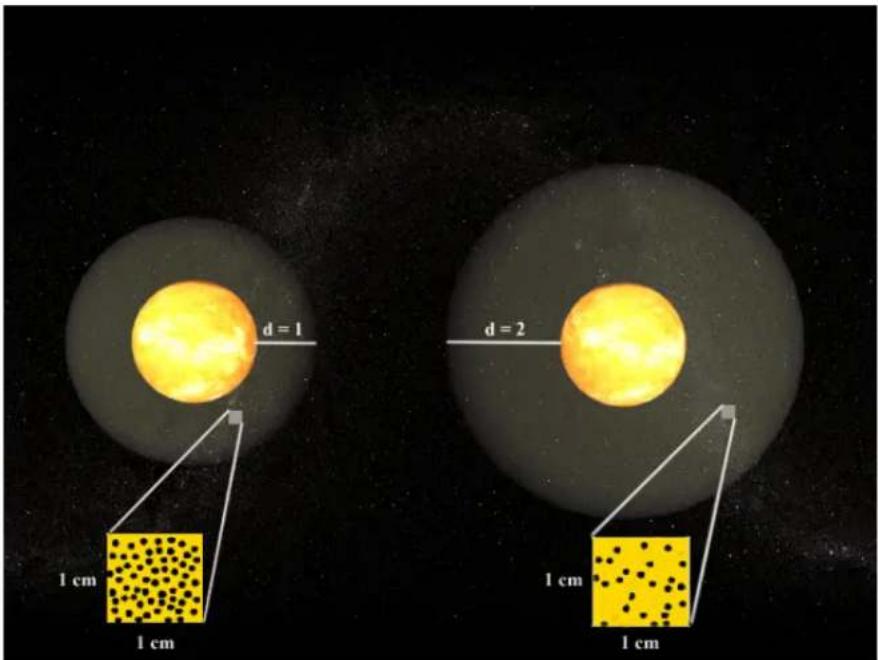
Figure1
Thefluxisinverselyproportionaltodistancebyasimpler ^2 relation. Therefore, ifthedistanceisdoubled, wereceive1/2 ^2 or1/4thoftheoriginalflux. Fromafundamentalstandpoint, thefluxistheluminosityperunitarea:
$$ F = \frac {L}{A} = \frac {L}{4 \cdot \pi \cdot R ^ {2}} $$
where(4*PI*R^2)isthesurfaceareaofasphere(oraballoon!)witharadius R.FluxismeasuredinWatts/m^2/sorascommonlyusedbyastronomers: Ergs/cm^2/s. Forexample,theluminosityofthesunisL=3.90*10^26W. Thatis,inonesecondthesunradiates3.90*10^26joulesofenergyintospace. Thus,thefluxwereceivepassingthroughonesquarecentimeterfromthesun atadistanceofoneAU(1.496*10^13cm)is:
$$ F = \frac {L}{4 \cdot \pi \cdot R ^ {2}} = \frac {3 . 9 0 \cdot 1 0 ^ {2 6}}{4 \cdot \pi \cdot (1 . 4 9 6 \cdot 1 0 ^ {1 3}) ^ {2}} = 0. 1 4 j o u l e s / c m ^ {2} / s e c $$
5.23Luminosity
Luminosityistheamountofenergyemittedbyastareachsecond.
TheKStarsHandbook
Allstarsradiatelightoverabroadrangeoffrequenciesintheelectromagnetic spectrumfromthelowenergyradiowavesuptothehighlyenergeticgamma rays.Astarthatemitspredominatelyintheultra-violetregionofthespectrum producesatotalamountofenergymagnitudeslargerthanthatproducedina starthatemitsprincipallyintheinfrared.Therefore,luminosityisameasure ofenergyemittedbyastaroverallwavelengths.Therelationshipbetween wavelengthandenergywasquantifiedbyEinsteinasE=h*vwherevisthe frequency,histhePlanckconstant,andEisthephotonenergyinjoules.That is,shorterwavelengths(andthushigherfrequencies)correspondtohigherenergies.
Forexample, awavelengthoflambda=10meterliesintheradioregionofthe electromagneticspectrumandhasafrequencyoff=c/lambda=3*10^8m/s/10=30MHzwherecisthespeedoflight.TheenergyofthisphotonisE=h*v=6.625*10^-34Js*30Mhz=1.988*10^-26joules.Ontheotherhand,visible lighthasmuchshorterwavelengthsandhigherfrequencies.Aphotonthathas awavelengthoflambda=5*10^-9meters(Agreenishphoton)hasanenergy E=3.975*10^-17jouleswhichisoverabilliontimeshigherthantheenergyof aradiophoton.Similarly,aphotonofredlight(wavelengthlambda=700nm) haslessenergythanaphotonofvioletlight(wavelengthlambda=400nm).
Luminosity depends both on temperature and surface area. This makes sense because a burning log radiates more energy than a match, even though both have the same temperature. Similarly, an iron rod heated to 2000 degrees, means more energy than when it is heated to only 200 degrees.
LuminosityisaveryfundamentalquantityinAstronomyandAstrophysics. Muchofwhatislearntaboutcelestialobjectscomesfromanalyzingtheirlight. Thisisbecausethephysicalprocessesthatoccurinsidestarsgetsrecorded and transmittedbylight.Luminosityismeasuredinunitsofenergypersecond. AstronomersprefertouseErgs,ratherthanWatts,whenquantifyingluminosity.
5.24Parallax
Parallaxistheapparentchangeofanobservedobject'spositioncausedbya shiftintheobserver'sposition.Asanexample,holdyourhandinfrontofyou atarm'slength,andobserveanobjectontheothersideoftheroombehindyour hand.Nowtiltyourheadtoyourrightshoulder,andyourhandwillappear ontheleftsideofthedistantobject.Tiltyourheadtoyourleftshoulder,and yourhandwillappeartoshifttotherightsideofthedistantobject.
Because the Earth is in orbit around the Sun, we observe the sky from a constantly moving position in space. Therefore, we should expect to see an annual parallax effect, in which the position so near by objects appears to 'wobble' back and forth in response to our motion around the Sun. This does einfach happen, but the distance to event the nearest stars are so great that you need to make careful observations with at least a detection ^2 .
TheKStarsHandbook
Moderntelescopesallowastronomerstousetheannualparallaxtomeasure thedistancetonearbystars,usingtriangulation.Theastronomercarefully measuresthepositionofthestarontwodates,spacedsixmonthsapart.The nearerthestaristotheSun,thelargertheapparentshiftinitspositionwillbe betweenthetwodates.
Overthesix-monthperiod,theEarthhasmovedthroughhalfitsorbitaround theSun;inthistimeitspositionhaschangedby2AstronomicalUnits(abbreviatedAU;1AUisthedistancefromtheEarthtotheSun,orabout150million kilometers).Thissoundslikeareallylongdistance,buteventheneareststar totheSun(alphaCentauri)isabout40trillionkilometersaway.Therefore,the annualparallaxisverysmall,typicallysmallerthanonearcsecond,whichis only1/3600ofonedegree.Aconvenientdistanceunitfornearbystarsisthe parsec,whichisshortfor"parallaxarcsecond".Oneparsecisthedistanceastar wouldhaveifitsobservedparallaxanglewasonearcsecond.Itisequalto3.26 light-years,or31trillionkilometers ^3 .
5.25 Retrograde Motion
RetrogradeMotionistheorbitalmotionofabodyinadirectionoppositethat whichisnormaltospatialbodieswithinagivensystem.
When we observethesky, we expect most object to appear to move in particular direction with the passing of time. The apparent motion of most bodies in the sky is from east to west. However it is possible to observe body moving west to east, such as an artificial satellite or spaces shuttle that is orbiting eastward. This orbit is considered retrograde Motion.
RetrogradeMotionismostoftenusedinreferencetothemotionoftheouter planets(Mars,Jupiter,Saturn,andsoforth).Thoughtheseplanetsappear tomovefromeasttowestonanightlybasisinresponsetothespinofthe Earth,theyareactuallydriftingslowlyeastwardwithrespecttothestationary stars,whichcanbeobservedbynotingthepositionoftheseplanetsforseveralnightsinarow.Thismotionisnormalfortheseplanets,however,andnot consideredRetrogradeMotion.However,sincetheEarthcompletesitsorbitin ashortoperiodoftimethantheseouterplanets,weoccasionallyovertakean outerplanet,likeafastercaronamultiple-lanehighway.Whenthiscurs,the planetwearepassingwillfirstappeartostopitseastwarddrift,anditwillthen appeartodriftbacktowardthewest.ThisisRetrogradeMotion,sinceitisina directionoppositethatwhichistypicalforplanets.Finally,astheEarthswings pastthetheplanetinitsorbit,theyappeartoresumetheirnormalwest-to-east driftonsuccessivenights.
parallaxinthepositionsofstars,theyconcludedthattheEarthcouldnotbeinmotionaroundthe Sun.WhattheydidnotrealizewasthatthestarsaremillionsoftimesfurtherawaythantheSun, sotheparallaxeffectisimpossibletoseewiththeunaidedeye.
^3 Astronomerslikethisunitsomuchthattheynowuse'kiloparsecs'tomeasuregalaxy-scale distances,and'Megaparsecs'tomeasureintergalacticdistances,eventhoughthesedistancesare muchtoolargetohaveanactual,observableparallax.Othermethodsarerequiredtodetermine thesedistances
TheKStarsHandbook
This Retrograde Motion of the planets puzzled ancient Greekastronomers, and was one reason why they named these bodies 'planets' which in Greek means 'wanderers'.
5.26 Elliptical Galaxies
EllipticalgalaxiesarespheroidalconcentrationsofbillionsofstarsthatresembleGlobularClustersonagrandscale.Theyhaveverylittleinternalstructure;thedensityofstarsdeclinessmoothlyfromtheconcentratedcenterto thediffuseedge,andtheycanhaveabroadrangeofellipticities(oraspectra-tios).Theytypicallycontainverylittleinterstellargasanddust,andnoyoung stellarpopulations(althoughthereareexceptionstotheserules).EdwinHub- blereferredtoEllipticalgalaxiesas'early-type'galaxies,becausehethought thattheyevolvedtobecomeSpiralGalaxies(whichhecalled'late-type'galaxies).Astronomersactuallynowbelievetheoppositeisthecase(i.e.,thatSpiral galaxiescanturnintoEllipticalgalaxies),butHubble'searly-andlate-typela- belsarestillused.
Oncethoughttobeasimplegalaxytype,ellipticalsarenowknowntobequite complexobjects.Partofthiscomplexityisduetotheiramazinghistory:ellipticalsarethoughttobetheendproductofthemergeroftwoSpiralgalaxies.You canviewacomputersimulationMPEGmovieofsuchamergerät thisNASA HSTwebpage(warning:thefileis3.4MB).
Ellipticalgalaxiesspanaverywiderangeofsizesandluminosities,fromgiant Ellipticalshundredsofthousandsoflightyearsacrossandnearlyatrillion timesbrighterthanthesun,todwarfEllipticalsjustabitbrighterthanthe averageglobularcluster.Theyaredividedtoseveralmorphologicalclasses:
cDgalaxies: Immense and bright object that can measure nearly 1 Megaparsec (3 million light years) across. Thesetitans are only found near the centers of large, dense clusters of galaxies, and are likely the result of many galaxy mergers.
NormalEllipticalgalaxiesCondensedObjectwithrelativelyhighcentralsurfacebrightness.Theyincludethegiantellipticals(gE'e),intermediate-luminosityellipticals(E's),andcompactellipticals.
Dwarfellipticalgalaxies(dE's)Thisclassofgalaxiesisfundamentallydifferentfromnormalellipticals. Theirdiametersontheorderof1to10kiloparsecwithsurfacebrightnessthatismuchlowerthannormalellipticals, givingthemamuchmorediffuseappearance. Theydisplaythesame characteristicgradualdeclineofstardensityfromarelativelydensecore outtoaddiffuseperiphery.
Dwarfspheroidalgalaxies(dSph's)Extremelow-luminosity, lowsurface-brightness and have only been observed in the vicinity of the Milky Way, and possibly other very near by galaxy groups, such as the Leogroup. Their absolute magnitudes are only 8 to 15 mag. The Dracodwarfspheroidal
TheKStarsHandbook
galaxyhasanabsolutemagnitudeof-8.6,makingitfainterthantheaverageglobularclusterintheMilkyWay!
Bluecompactdwarfgalaxies(BCD's)Smallgalaxiesthatareunusuallyblue. ThehavephotometriccolorsofB-V=0.0to0.30mag,whichistypical forrelativelyyoungstarsofspectraltypeA. This suggests that BCDs are currently actively forming stars. Thesesystems also have abundant interstellargas(unlikeotherEllipticalgalaxies).
TIP
YoucanseeexamplesofEllipticalgalaxiesinKStars,usingtheFindObjectwindow (Ctrl+F).SearchforNGC4881,whichistheGiantcDgalaxyintheComacluster ofgalaxies.M86isanormalEllipticalgalaxyintheVirgoclusterofgalaxies.M 32isadwarfEllipticalthatisasatelliteofourneighbor,theAndromedagalaxy(M 31).M110isanothersatelliteofM31thatisaborderlinedwarfspheroidalgalaxy ('borderline'becauseitissomewhatbrighterthanmostotherdwarfspheroidals).
5.27 Spiral Galaxies
Spiralgalaxiesarehugecollectionsofbillionsofstars,mostofwhichareflattenedintoadiskshape,withabright,sphericalbulgeofstarsatitscenter. Withinthedisk,therearetypicallybrightarmswheretheyoungest,brightest starsarefound. Thesearmswindoutfromthecenterinaspiralpattern,giving thegalaxiestheirname.Spiralgalaxieslookabitlikehurricanes,orlikewater flowingdownadrain.Theyaresomeofthemostbeautifulobjectsinthesky.
Galaxiesareclassified using a tuning fork diagram'. The end of the fork classifies elliptical galaxies on a scale from theroundest, which is an E0, to those that appear most flattened, which is rated as E7. The 'tines' of the tuning fork are where the two types of spiral galaxies are classified: normalspirals, and 'barred' spirals. A barred spiral is one whosenuclear bulge is stretched out into aline, so it literally looks like ithasa 'bar' of stars in its center.
Both types of spiral galaxies are sub-classified according to the prominence of their central bulge of stars, their overall surface brightness, and how tightly their spiral arms are wound. These characteristics are related, so that an Sb galaxy has a large central bulge, a high surface brightness, and tightly wound spiral arms. An Sb galaxy has a smaller bulge, a dimmer disk, and looser arm than an Sb, and soon through Scand Sd. Barred galaxies use the same classifications scheme, indicated by types SBa, SBb, SBc, and SBd.
ThereisanotherclassofgalaxycalledS0,whichismorphologicallyattransitionaltypebetweentruespiralsandellipticals.Itsspiralarmsaresotightly wound as to be indistinguishable; S0 galaxies have disks with a uniform brightness. They also have an extremely dominant bulge.
TheMilkyWaygalaxy,whichishometoearthandallofthestarsinoursky,isaSpiralGalaxy,andisbelievedtobeabarredspiral.Thename'MilkyWay'
TheKStarsHandbook
referstoabandofveryfaintstarsinthesky.Thisbandistheresultoflooking intheplaneofourgalaxy'sdiskfromourperspectiveinsideit.
Spiralgalaxiesareverydynamicentities. They are hotbedsofstarformation, and contain many youngstars in their disks. Their central bulgestendtobe made ofolderstars, and their diffuse halos are made of the very oldest stars in the Universe. Starformation is active in the disks because that is where the gas and dust are most concentrated; gas and dust are the building block sof star formation.
ModerntelescopeshaverevealedthatmanySpiralgalaxiesharborsupermassiveblackholesattheircenters,withmassesthatcanexceedthatofabillion Suns.Bothellipticalandspiralgalaxiesareknowntocontaintheseexoticobjects;infactmanyastronomersnowbelievethatallargegalaxiescontainasupermassiveblackholeintheirnucleus.OurownMilkyWayisknownto harborablackholeinitscorewithamassmillionsoftimesbiggerthanastar's mass.
TIP
TherearemanyfineexamplesofspiralgalaxiestobefoundinKStars,andmany havebeautifulimagesavailableintheirpopupmenu.Youcanfindthembyusing the FindObjectwindow.Hereisalistofsomespiralgalaxieswithniceimages available:
●M64, theBlack-EyeGalaxy(typeSa)
•M31, the Andromeda Galaxy(typeSb)
●M81, Bode's Galaxy(typeSb)
●M51, the Whirlpool Galaxy(typeSc)
- NGC300(typeSd)[useDSSimagelink]
•M83(typeSBa)
- NGC1530(typeSBb)
- NGC1073(typeSBc)
5.28 MagnitudeScale
2500yearsago,theancientGreekastronomerHipparchusclassifiedthebrightnessesofvisiblestarsintheskyonascalefrom1to6. Hecalledthevery brighteststarsinthesky'firstmagnitude',andtheveryfainteststarshecould see'sixthmagnitude'.Amazingly,twoandahalfmillenialater,Hipparchus's classificationschemeisstillwidelyusedbyastronomers,althoughhassince beenmodernizedandquantified.
TheKStarsHandbook
NOTE
Themagnitude scalarerunsbackwardstowhatyoumightexpect:brighterstarshave smaliemagnitudesthanfainterstars).
Themodernmagnitudescaleisaquantitativemeasurementofthefluxoflight comingfromastar,withalogarithmicscaling:
$$ \mathrm{m} = \mathrm{m} _ {-} 0 - 2. 5 \log (\mathrm{F} / \mathrm{F} _ {-} 0) $$
If you donotunderstand themath, this just says that the magnitude of a given star (m) is different from that of the same standard star (m_0) by 2.5 times the logarithm of their flux ratio. The 2.5* log factormeansthat if the flux ratio is 100, the difference in magnitudes is 5 mag. So, a 6th magnitude star is 100 times fainter than 1 st magnitude star. Thereason Hipparchus's simple classification translates to are relatively complex functionist that the human eye responds logarithmically to light.
Thereareseveraldifferentmagnitudescalesinuse,eachofwhichservesa differentpurpose. Themostcommonistheapparentmagnitudescale;this isjustthemeasureofhowbrightstars(andotherobjects)looktothehuman eye. TheapparentmagnitudescaledefinesthestarVegatohavemagnitude 0.0,andassignsmagnitudestoallotherobjectssusingtheaboveequation,and ameasureofthefluxratioofeachobjecttoVega.
Itisdifficulttounderstandstarsusingjusttheapparentmagnitudes.Imagine twostarsintheskywiththesameapparentmagnitude,sotheyappeartobe equallybright.Youcannotknowjustbylookingifthetwohavethesameintrinsicbrightness;itispossiblethatonestarisintrinsicallybrighter,butfurther away.Ifweknewthedistancestothestars(seethe parallaxarticle),wecould accountfortheirdistancesandassignAbsolutemagnitudeswhichwouldreflect theirtrue,intrinsicbrightness.Theabsolutemagnitudeisdefinedastheapparentmagnitudethestarwouldhaveifobservedfromadistanceof10parsecs(1 parsecis3.26light-years,or3.1x10^18cm).Theabsolutemagnitude(M)can bedeterminedfromtheapparentmagnitude(m)andthedistanceinparsecs (d)usingtheformula:
M=m+5-5*log(d)(notethatM=mwhend=10).
Themodernmagnitudescaleisnolongerbasedonthehumaneye;itisbased onphotographicplatesandphotoelectricphotometers.Withtelescopes,we canseeobjectsmuchfainterthanHipparchuscouldseewithhisunaidedeyes, sothemagnitudescalehasbeenextendedbeyond6thmagnitude. Infact,the HubbleSpaceTelescopecanimagestarsnearlyasfaintas30thmagnitude, whichisonetrilliontimesfainterthanVega.
Afinalnote:themagnitudeisusuallymeasuredthroughacolorfilterofsome kind, and these magnitudes are denoted by a subscript describing the filter (i.e., m_Visthemagnitudethrougha'visual'filter,whichisgreenish;m_Bisthe magnitudeethroughabluefilter;m_pgisthephotographicplatemagnitude, etc.).
TheKStarsHandbook
5.29Stars: An Introductory FAQ
1. Whatarethestars?
Starsaregigantic,self-gravitatingspheresof(mostly)Hydrogengas.Stars arealsothermonuclearengines;nuclearfusiontakesplacedeepinthe coresofstars,wherethedensityisextremeandthetemperaturereaches tensofmillionsofdegreesCelsius.
2. Isthe Sunastar?
Yes, the Sunisastar. It is the dominant centerpiece of oursolarsystem. Compared to other stars, our Sun is rather ordinary; it appears to be much bigger and brighterous because it is million times closer than any other star.
3. Whydostarsshine?
Theshortansweris:starshinebecausetheyareveryhot.Itisreally no morecomplicatedthanthat.Anyobjectheatedtothousandsofdegrees willradiatelight,justlikestarsdo.
4. The obvious next question is why are stars so hot?
Thisisatougherquestion.Theusualansweristhatstarsgettheirheat fromthethermonuclearfusionreactionsintheircores.However,this cannotbetheultimatecauseforthestars'heat,becauseastarmustbe hotinthefirstplacefornuclearfusiontobetriggered.Fusioncanonly sustainthehottemperature;itcannotmakeastarhot.Amorecorrect answeristhatstarsarehotbecausetheyhavecollapsed.Starsformfrom diffusegaseousnebulae;asthenebulousgascondensestoformastar,the gravitationalpotentialenergyofthematerialisreleased,firstaskinetic energy,andultimatelyasheatasthedensityincreases.
5.Arestarsallthesame?
Starshavemanythingsincommon:theyareallcollapsedspheresofhot, densegas(mostlyHydrogen),andnuclearfusionreactionsareoccurring atornearthecentersofeverystarinthesky. However,starsalsoshow agreatdiversityinsomeproperties. Thebrighteststarsshinealmost 100milliontimesasbrightlyasthefainteststars.Starsrangeinsurface temperaturefromonlyafewthousanddegreestoalmost50,000degrees Celsius.Thesedifferencesarelargelyduetodifferencesinmass:massive starsarebothhotterandbrighterthanlower-massstars.Thetemperature andLuminosityalsodependontheevolutionarystateofthestar.
6. WhatistheMainSequence?
Themainsequenceistheevolutionarystateofastarwhenitisfusing Hydrogeninitscore. Thisisthefirst(andlongest)stageofastar'slife (notincludingprotostarphases). Whathappenstoastarafteritruns outofcoreHydrogenisaddressedinthestellarevolutionarticle(coming soon).
TheKStarsHandbook
7.Howlongdostarslast?
Thelifetimeofastardependsverymuchonitsmass.Moremassive starsarehotterandshinemuchmorebrightly,causingthemtoconsume theirnuclearfuelmuchmorerapidly.Thelargeststars(roughly100times asmassiveastheSun),willrunoutoffuelinonlyafewmillionyears; whilethesmalleststars(roughlytenpercentthemassoftheSun),with theirmuchmorefrugalconsumptionrate,willshineon(albeitdimly)for trillionsofyears.NotethatthisismuchlongerthantheUniversehasyet beeninexistence.
5.30StarColorsandTemperatures
Starsappeartobeexclusivelywhiteatfirstglance.Butifwelookcarefully, wecannoticearangeofcolors:blue,white,red,andevengold.Inthewinter constellationofOrion,abeautifulcontrastisseenbetweenedBetelgeuse atOrion's" armpit" andtheblueBellatrixattheshoulder.Whatcausesstars toexhibitdifferentcolorsremainedamysteryuntiltwocenturiesago,when Physicistsgainedenoughunderstandingofthenatureoflightandthepropertiesofmatteratimmenselyhightemperatures.
Specifically, it wasthephysics of blackbodyradiation that enabled dustounderstand the variation of stellar colors. Shortly after blackbodyradiation was understood, it was noticed that the spectra of stars look extremely similar to blackbodyradiation curves of various temperatures, ranging from a few thousand Kelvin into 50,000 Kelvin. The obvious conclusion is that stars are similar to blackbodies, and that the color variation of stars is adirect consequence of their surfacetemperatures.
Coolstars(i.e., SpectralTypeKandM) radiatemostoftheirenergyinthe redandinfraredregionoftheelectromagneticspectrumandthusappeared, whilehotstars(i.e., SpectralTypeOandB)emitmostlyatblueandultra-violet wavelengths, makingthemappearblueorwhite.
Toestimatethesurfacetemperatureofastar, wecanusetheknownrelationship between the temperature of a blackbody, and the wavelength of light whereitsspectrumpeaks. Thatis, asyouincreasethetemperatureofabblackbody, thepeakofitsspectrummovestoshorter(bluer)wavelengthsoflight. ThisisillustratedinFigure1wheretheintensityofthreehypotheticalstarsis plottedagainstwavelength. The "rainbow" indicatestherangeofwavelengths thatarevisibletothehumaneye.
TheKStarsHandbook
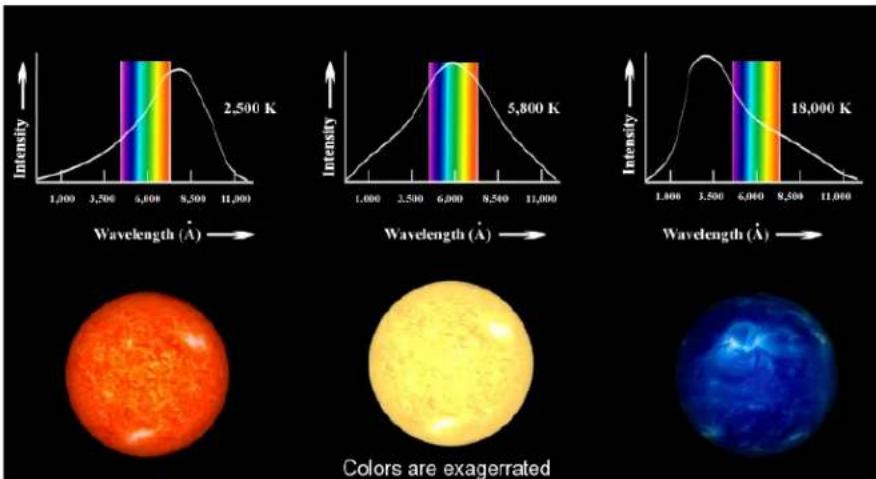
Figure1
Thissimplemethodisconceptuallycorrect,butitcannotbeusedtoobtain stellartemperaturesaccurately,becausestarsarenotperfectblackbodies.The presenceofvariouselementsinthestar'satmospherewillcausecertainwavelengthsoflighttobeabsorbed.Becausetheseabsorptionlinesarenotuniformlydistributedoverthespectrum,theycanskewthepositionofthespectralpeak.Moreover,obtainingausablespectrumofastarisatime-intensive processandisprohibitivelyinefficientforlargesamplesofstars.
Analternativemethodutilizesphotometrytomeasuretheintensityoflight passingthroughdifferentfilters.Eachfilterallowsonlyaspecificpartofthe spectrumoflighttopassthroughwhilerejectingallothers.Awidelyused photometricsystemiscalledtheJohnsonUBVsystem.Itemloysthreebandpassfilters:U("Ultra-violet"),B("Blue"),andV("Visible");eachoccupying differentregionsoftheelectromagneticspectrum.
TheprocessofUBVphotometryinvolvesusinglightsensitivedevices(suchas filmorCCDcameras)andaimingatelescopeatastartomeasuretheintensity oflightthatpassesthrougheachofthefiltersindividually. Thisprocedure givesthreeapparentbrightnessesorfluxes(amountofenergypercm^2per second)designatedbyFu,Fb,andFv.TheratiooffluxesFu/FbandFb/Fv isaquantitativemeasureofthestar's"color",andtheseratioscanbeused toestablishatemperaturescaleforstars. Generallyspeaking,thelargerthe Fu/FbandFb/Fvratiosofastar,thehotteritssurfacetemperature.
Forexample, thestarBellatrixinOrionhasFb/Fv=1.22, indicating that itis brighter through the Bfilter than through the Vfilter. Furthermore, its Fu/Fb ratio is 2.22, so it is brightest through the Ufilter. This indicates that the star must be very hot indeed, sinc the position of fit spectral peak must besome where in therange of the Ufilter, or at an even shorter wavelength. The surface temperature of Bellatrix (as determined from comparing it spectrum to detailed model that accounts for its absorption lines) is about 25,000 Kelvin.
TheKStarsHandbook
WecanrepeatthisanalysisforthestarBetelgeuse. ItsFb/FvandFu/Fbratios are0.15 and 0.18, respectively, soitisbrightestin Vand dimmestin U. So, the spectral peak of Betelgeuse must besomewhere in therange of the V filter, or at an even longer wavelength. Thesurface temperature of Betelgeuse is only 2,400 Kelvin.
Astronomersprefertoexpressstarcolorsintermsofadifferenceinmagnitudes, rather than a ratio of fluxes. Therefore, going back to blue Bellatrix we haveacolorindexequalto
$$ \mathrm{B} - \mathrm{V} = - 2. 5 \log (\mathrm{Fb} / \mathrm{Fv}) = - 2. 5 \log (1. 2 2) = - 0. 2 2, $$
Similarly, thecolorindexforredBetelgeuseis
$$ \mathrm{B-V} = - 2. 5 \log (\mathrm{Fb/Fv}) = - 2. 5 \log (0. 1 8) = 1. 8 5 $$
The color indices, like the magnitude scale, run backward. Hot and blue stars have smaller and negative values of B-V than the cooler and redder stars.
AnAstronomercanthenusethecolorindicesforastar,aftercorrectingfor reddeningandinterstellarextinction,toobtainanaccuratetemperatureofthat star. TherelationshipbetweenB-VandtemperatureisillustratedinFigure2.
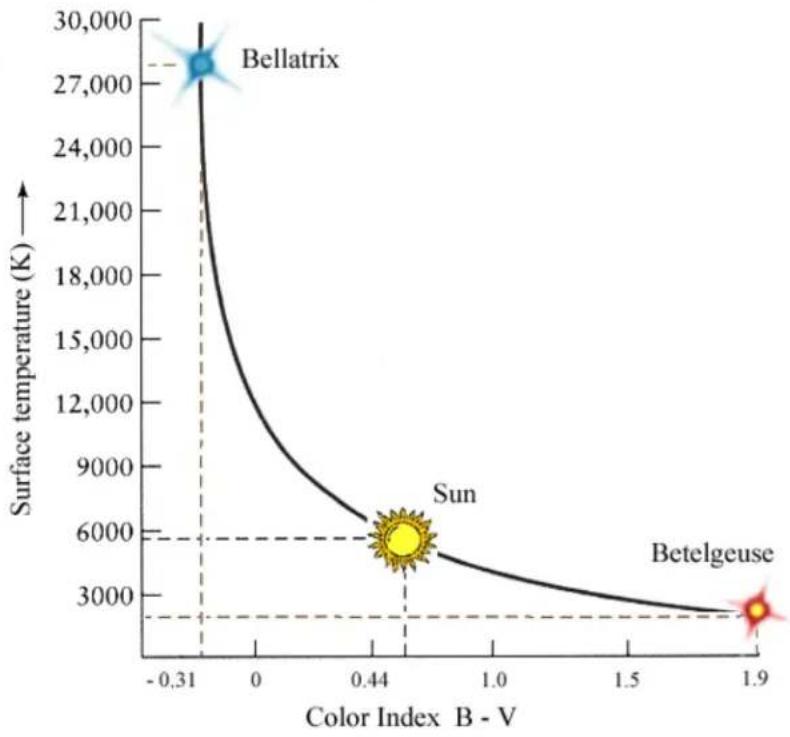
line
| Color Index B - V | Surface temperature (K) | | ----------------- | ------------------------ | | -0.31 | 27000 | | 0.44 | 6000 | | 1.9 | 3000 |Figure2
The Sunwith surface temperature of 5,800 Khasa B-V index of 0.62.
Chapter6
KStarsTools
KStarscomeswithanumberoftoolsthatallowyoutoexploresomemore advancedaspectsofastronomyandthenightsky.
-ObjectDetails
- Astrocalculator
- AAVSOLightcurves
- Altitudevs.TimePlotter
- What's Up Tonight?
-ScriptBuilder
- SolarSystemViewer
•JupiterMoonsTool
- ObservingListTool
•FITSViewer
6.1ObjectDetailsWindow
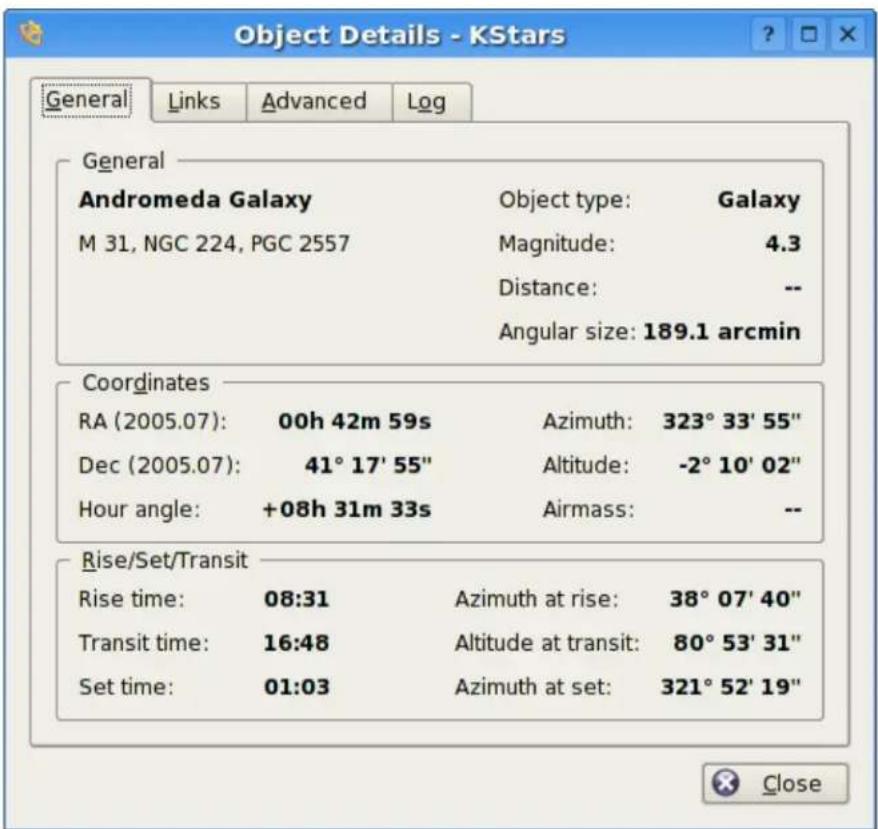
TheObjectDetailsWindowpresentsadvanceddataavailableaboutaspecific objectinthesky.Toaccessthistool,right-clickonanyobject,andselectthe Details...itemfromthepopupmenu.
The window is divided into an number of Tabs. In the General Tab, we present basic data about the current object. This includes names and catalog designations, object type, and magnitude (brightness). Also shown a the object's Equatorial and Horizontal coordinates, as well as its rise, set and transittimes.
IntheLinkstab,youcanmanagetheinternetlinksassociatedwiththisobject. TheImageandInformationlinksassociatedwiththeobjectarelisted. These arethelinksthatappearinthepopupmenuwhentheobjectisright-clicked. YoucanaddcustomlinkstotheobjectwiththeAddLink...button.Thiswill openawindowinwhichyoufillintheURLandlinktextforthenewlink(you canalsotesttheURLinthewebbrowserfromthiswindow).Keepinmind thatthecustomlinkcaneasilypointtoafileonyourlocaldisk,soyoucanuse thisfeaturetoindexyourpersonalastronomicalimagesorobservinglogs.
TheKStarsHandbook
YoucanalsomodifyorremoveanylinkusingtheEditLink...andRemove Link...buttons.
TheAdvancedTaballowsyoutoqueryprofessionalastronomicaldatabaseson theinternetforinformationregardingthecurrentobject.Tousethesedatabases, simplyhighlightthedesireddatabaseinthelist,andpresstheViewbuttonto seetheresultsofyourqueryinawebbrowserwindow.ThequeryismadeusingtheprimarynameoftheobjectyouclickedontoopentheDetailsDialog. Thefollowingdatabasesareavailableforquerying:
- HighEnergyAstrophysicalArchive(HEASARC).Hereyoucanretrievedata about the current object from a number of 'High-energy' observatories, which covers the Ultraviolet, X-ray and Gamma Ray portion of the electromagnetics spectrum.
- MultimissionArchiveatSpaceTelescope(MAST).TheSpaceTelescopeScienceInstituteprovidesaccesstotheentirecollectionofimagesandspectra takenwiththeHubbleSpaceTelescope,aswellasseveralotherspace-based observatories.
- NASAAstrophysicalDataSystem(ADS).Thisincrediblebibliographicdatabase encompasstheentirebodyofliteraturepublishedininternationalpeer-review Journalsaboutastronomyandastrophysics. Thedatabaseisdividedinto fourgeneralsubjectareas(AstronomyandAstrophysics,AstrophysicsPreprints, Instrumentation,andPhysicsandGeophysics).Eachofthesehastreesub-nodesthatquerythedatabaseindifferentways.'Keywordsearch'willreturnarticleswhichlistedtheobject'snameasakeword.'Titlewordsearch' willreturnarticleswhichincludedtheobjectnameintheirTitle,andthe 'Title&Keywordsearch' usesbothoptionstogether.
- NASA/IPACExtragalacticDatabase(NED).NEDprovidesencapsulateddata andbibliographiclinksaboutextragalacticobjects.Youshouldonlyuse NEDifyourtargetisextragalactic;i.e.ifitisitselfagalaxy.
- SetofIdentifications, Measurements, and Bibliography for Astronomical Data (SIMBAD). SIMBAD dissimilarto NED, exceptit provides data about all kindsof objects, not just galaxies.
- SkyViewprovidesimagesfromAll-Skysurveysthathavebeenperformed indozensofdifferentpartsofthespectrum,fromGammaRaystotheRadio.TheKStarsinterfacewillretrieveanimationfromanyofthesesurveys, centeredontheselectedobject.
Finally, in the Log Tab, you can type insometext that will remain associated with this object's Detail window. You could usethistoattachpersonalobserving notes, forexample.
6.2 The Astrocalculator
TheKStarsAstrocalculatorprovides several modules that give you direct access to algorithms used by the program. The modules are organized by subject:
TheKStarsHandbook
COORDINATECONVERTERS
- AngularDistance
- ApparentCoordinates
•EclipticCoordinates
•Equatorial/GalacticCoordinates
•HorizontalCoordinates - Precession
EARTHCOORDINATES
•GeodeticCoordinates
SOLARSYSTEM
•PlanetsCoordinates
TIMECALCULATORS
•DayDuration
•EquinoxesandSolstices
•JulianDay
- SiderealTime
TheKStarsHandbook
6.2.1 AngularDistancemodule
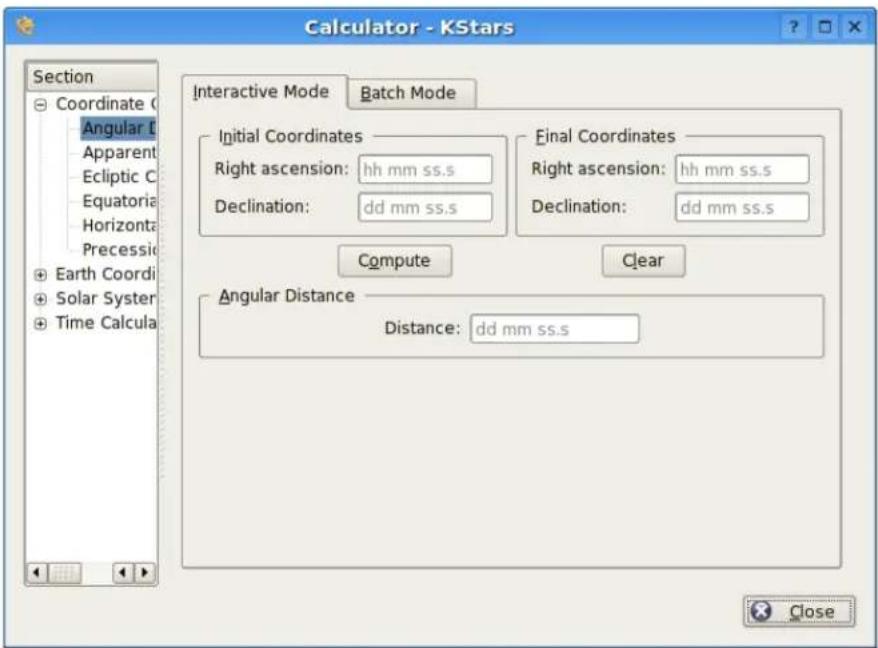
The AngularDistancetoolisusedtomeasuretheanglebetweenanytwopoints onthesky.YousimplyspecifytheEquatorialcoordinatesofthedesiredpair ofpoints,andthenpresstheComputebuttontoobtaintheanglebetweenthe twopoints.
ThereisalsoaBatchmodeforthismodule.Inbatchmode,youspecifyan inputfilenamewhichcontainsfournumbersperline:theRAandDecvalues forpairsofpoints.Alternatively,youcanspecifyingasinglevalueforanyofthese fourcoordinatesinthecalculatorpanel(thecorrespondingvaluesintheinput fileshouldbeskippediftheyarespecifiedinthecalculator).
Onceyouhavespecifiedtheinputfilenameandanoutputfilename,simply presstheRunbuttontogeneratetheoutputfile.
TheKStarsHandbook
6.2.2ApparentCoordinatesmodule
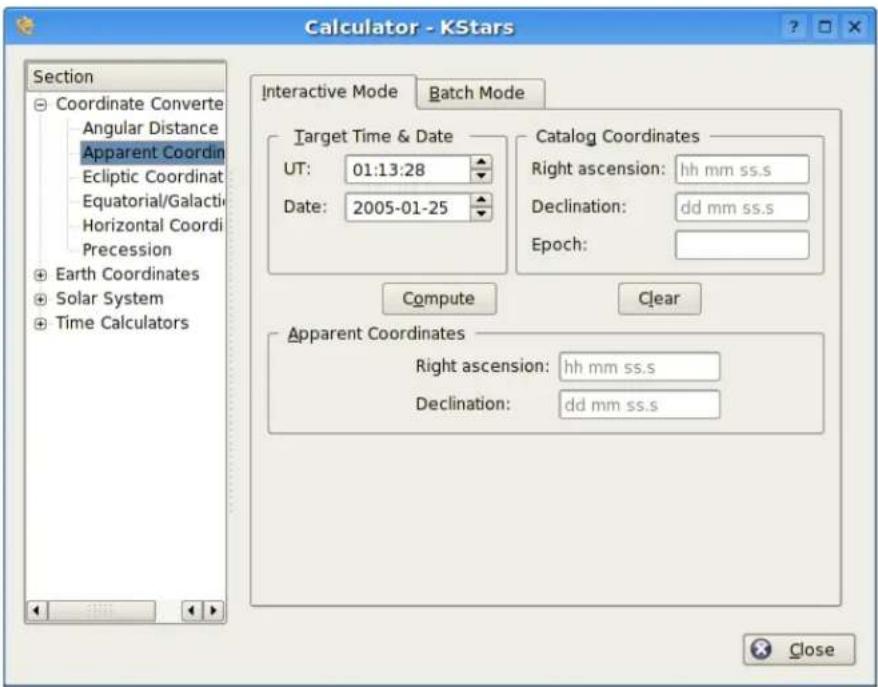
TheApparentCoordinatesmoduleconvertsthecatalogcoordinatesofapointin the sky to its apparent coordinates for any date. The coordinates of objects in the skyarenotfixed,becauseof precession,nutationandaberration.Thismodule takestheseeffectsintoaccount.
Tousethemodule,firstenterthedesiredtargetdateandtimeintheTarget Time/Datesection.Then,enterthecatalogcoordinatesintheCatalogCoordinatessection.Youcanalsospecifythecatalog'sepochhere(usually2000.0for modernobjectcatalogs).Finally,presstheComputebutton,andtheobject's coordinatesforthetargetdatewillbedisplayedintheApparentCoordinates section.
TheKStarsHandbook
6.2.3EclipticCoordinatesmodule
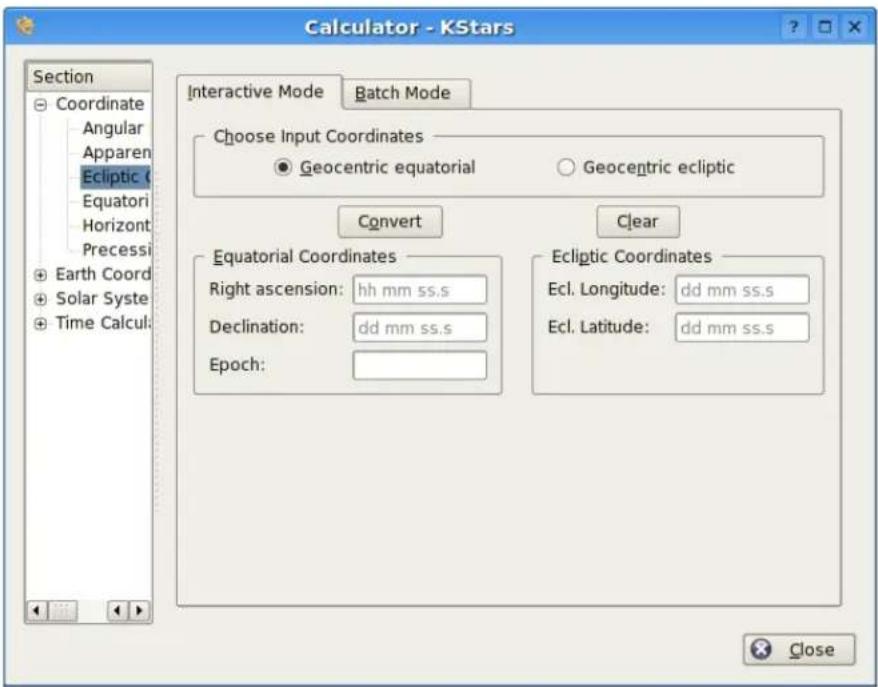
This module converts between Equatorial coordinates and Ecliptic coordinates. First, select which coordinates should be taken as input values in the Choose Input Coordinates section. Then, fill the corresponding coordinate values in either the Ecliptic coordinates or Equatorial coordinates section. Finally, press the Compute button, and the complementary coordinates will be filled in.
Themodulecontainsabatchmodeforconvertingseveralcoordinatepairsat once.Youmustconstructaninputfileinwhicheachlinecontainstwovalues:theinputcoordinatepairs(eitherEquatorialorEcliptic).Thenspecify whichcoordinatesyouareusingasinput,andidentifytheinputandoutput filenames.Finally,presstheRunbuttontogeneratetheoutputfile,whichwill containtheconvertedcoordinates(EquatorialorEcliptic;thecomplementof whatyouchoseastheinputvalues).
TheKStarsHandbook
6.2.4 Equatorial/Galactic Coordinates module
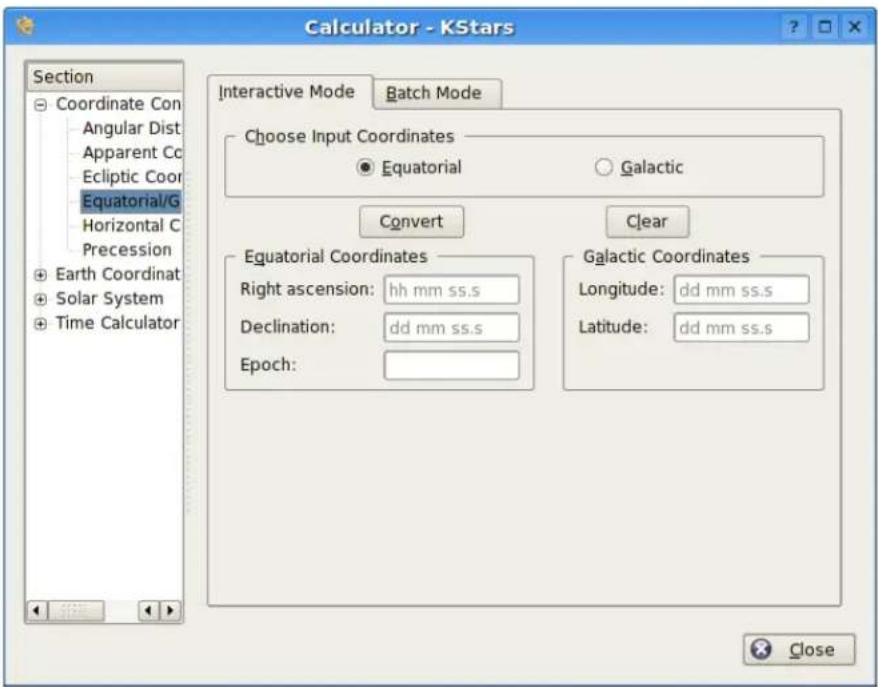
This module converts from Equatorial coordinates to Galactic coordinates, and vice versa. First, select which coordinates should be taken as input values in the Input Selection section. Then, fill the corresponding coordinate values in either the Galactic coordinates or Equatorial coordinates section. Finally, press the Compute button, and the complementary coordinates will be filled in.
TheKStarsHandbook
6.2.5 Horizontal Coordinates module
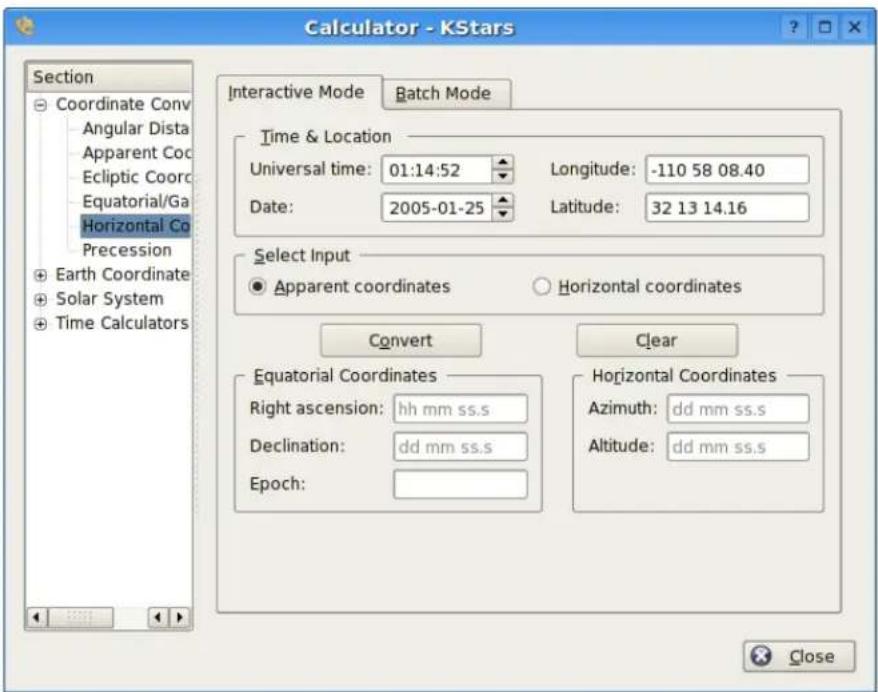
This module converts from Equatorial coordinates to Horizontal coordinates. First, select the date, time, and geographic coordinates for the calculation in the Input Dataset section. Then, fill the equatorial coordinate to be converted and their catalog epoch in the Equatorial Coordinates section. When you press the Compute button, the corresponding Horizontal coordinates will be presented in the Horizontal Coordinates section.
TheKStarsHandbook
6.2.6 Precessionmodule
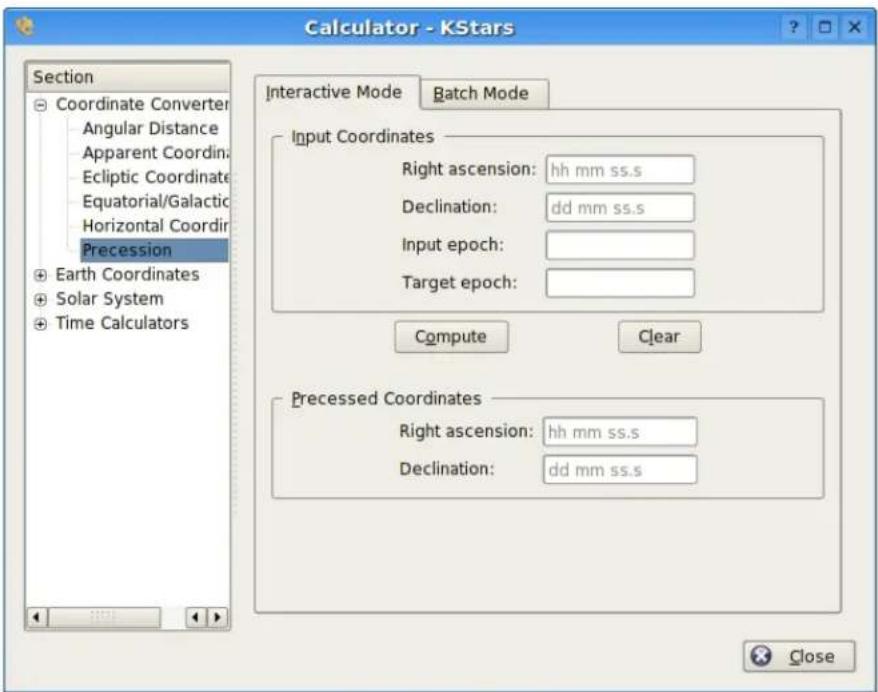
This module is similar to the Apparent Coordinates module, but it only applies the effect of precession, not of nutation or aberration.
Tousethemodule,firstentertheinputcoordinatesandtheirepochintheOriginalCoordinatessection.YoumustalsofillinthetargetepochinthePrecessedCoordinatessection.Then,presstheComputebutton,andtheobject'scoordinates,precessedtothetargetEpoch,arepresentedinthePrecessedCoordinatessection.
TheKStarsHandbook
6.2.7 Geodetic Coordinates module
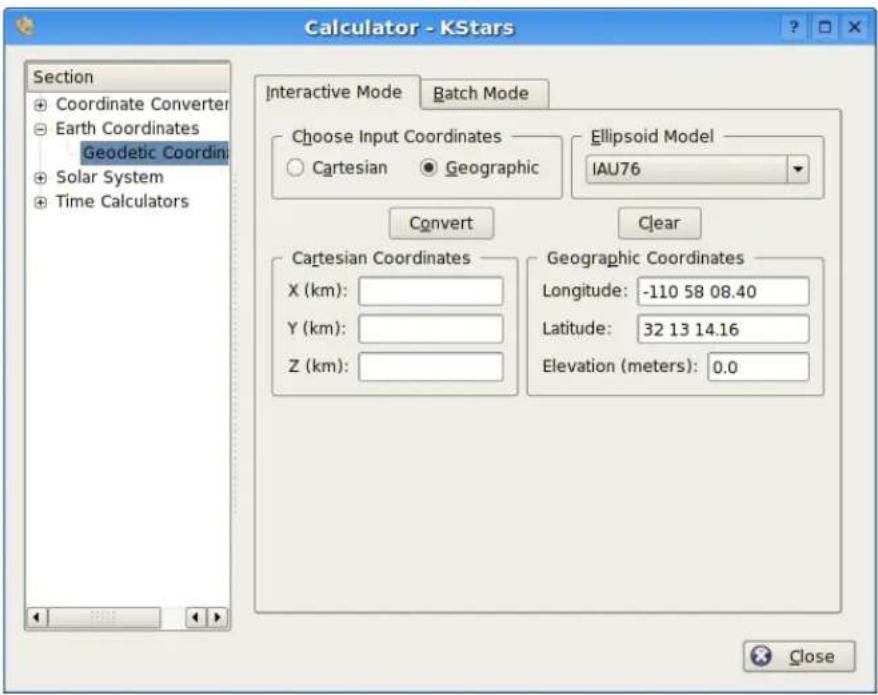
ThenormalgeographiccoordinatesystemassumesthattheEarthisaperfect sphere. This is nearly true, so from most purposes geographic coordinates are fine. If very high precision is required, then we must take the true shape of the Earth into account. The Earth is an ellipsoid; the distance around the equator is about 0.3% longer than a Great Circle that passes through the poles. The Geodetic Coordinates system takes this ellipsoidal shape into account, and expresses the position on the Earth's surface in Cartesian coordinates (X, Y, and Z).
Tousethemodule, firstselectwhichcoordinatesyouwilluseasinputintheInputSelectionsection. Then, fillintheinputcoordinatesineithertheCartesian CoordinatessectionortheGeographicCoordinatessection.Whenyoupress theComputebutton, thecorrespondingcoordinateswillbefilledin.
TheKStarsHandbook
6.2.8PlanetCoordinatesmodule
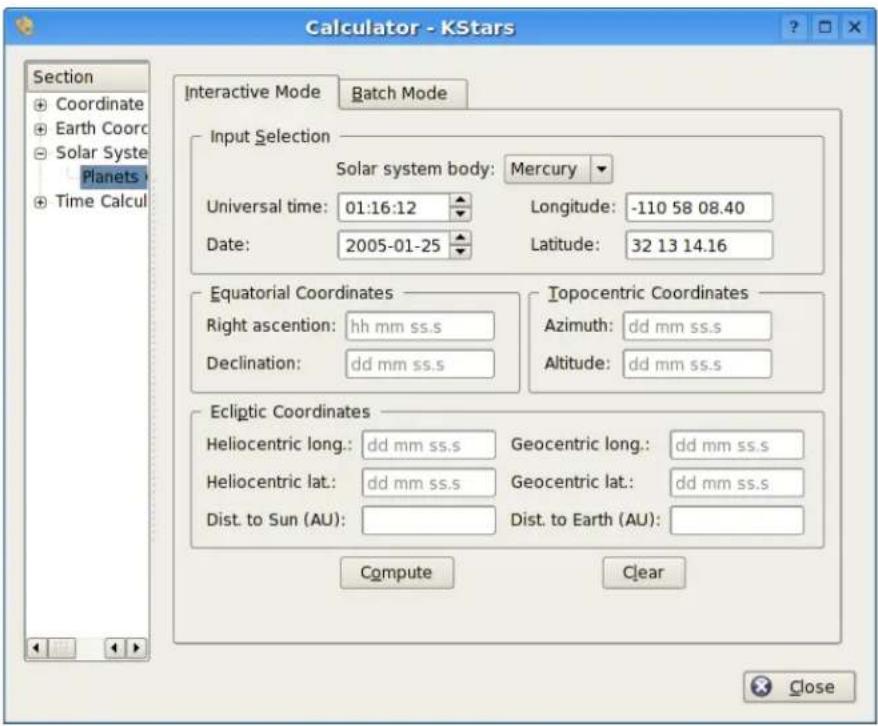
ThePlanetCoordinatesmodulecomputespositionaldataforanymajorsolar systembody,foranytimeanddateandanygeographiclocation.Simplyselectthesolarsystembodyfromthedrop-downlist,andspecifythedesired date,time,andgeographiccoordinates(thesevaluesarepresettothecurrent KStarssettings).ThenpresstheComputebuttontodeterminetheEquatorial, Horizontal,andEclipticcoordinatesofthebody.
Thereisabatchmodeforthismodule.Youumustconstructaninputfilein whicheachlinespecifiesvaluesfortheinputparameters(solarsystembody, date,time,longitude,andlatitude).Youumaychoosetospecifyaconstantvalue forsomeoftheparametersinthecalculatorwindow(theseparametersshould beskippedintheinputfile).Youumayalsospecifywhichoftheoutputparameters(Equatorial,Horizontal,andEclipticcoordinates)shouldbecalculated. Finally,specifytheinputandoutputfilenames,andpresstheRunbuttonto generatetheoutputfilewiththecomputedvalues.
TheKStarsHandbook
6.2.9DayDurationmodule
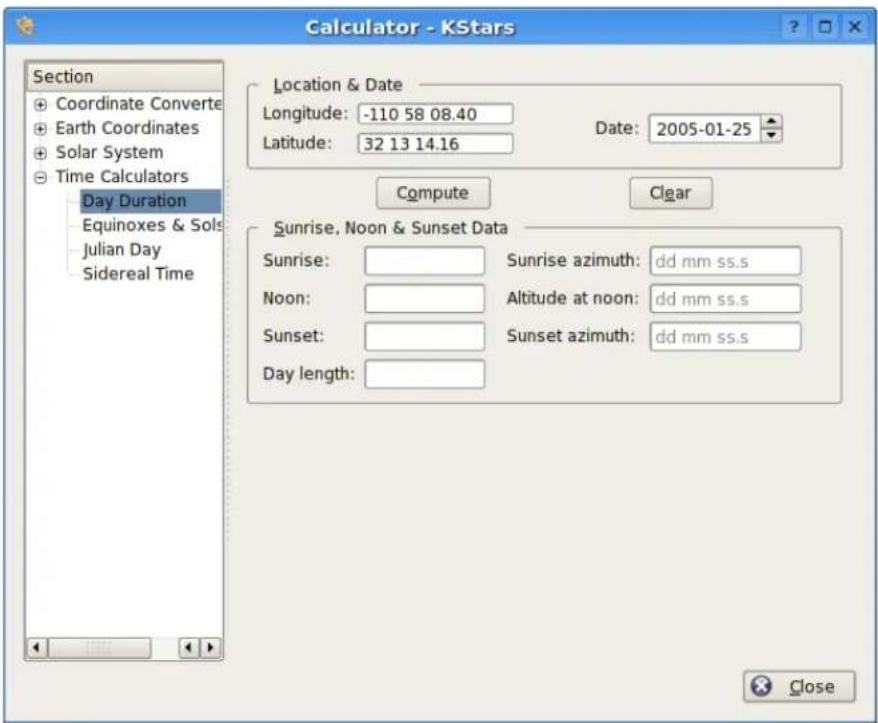
Thismodulecomputesthlengthofdayaswellassunrise,sun-transit(noon), andsunsettimesforanycalendardate,foranylocationonEarth.Firstfillin thedesiredgeographiccoordinatesanddate,thenpresstheComputebutton.
TheKStarsHandbook
6.2.10 Equinoxes and Solstices module
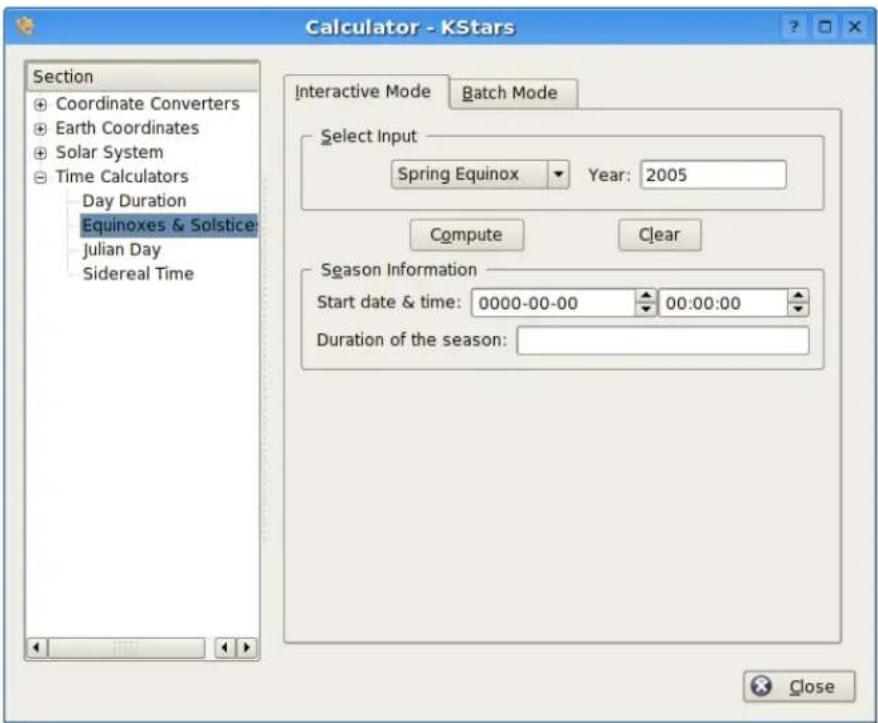
TheEquinoxesandSolsticesmodulecalculatesthdateandtimeofanequinoxorsolsticeforagivenyear.Youspecifywhichevent(SpringEquinox,SummerSolstice,AutumnEquinox,orWinterSolstice)shouldbeinvestigated,andthe year.ThenpresstheComputebuttontoobtainthedateandtimeoftheevent,andthelengthofthecorrespondingseason,indays.
Thereisabatchmodeforthismodule.Touseit,simplygenerateaninputfile whose lineseachcontainayearforwhichtheEquinoxandSolsticedatawill becomputed.Thenspecifytheinputandoutputfilenames,andpresstheRun buttontogeneratetheoutputfile.Eachlineintheoutputfilecontainstheinput year,thedateandtimeofeachevent,andthelengthofeachseason.
TheKStarsHandbook
6.2.11JulianDaymodule
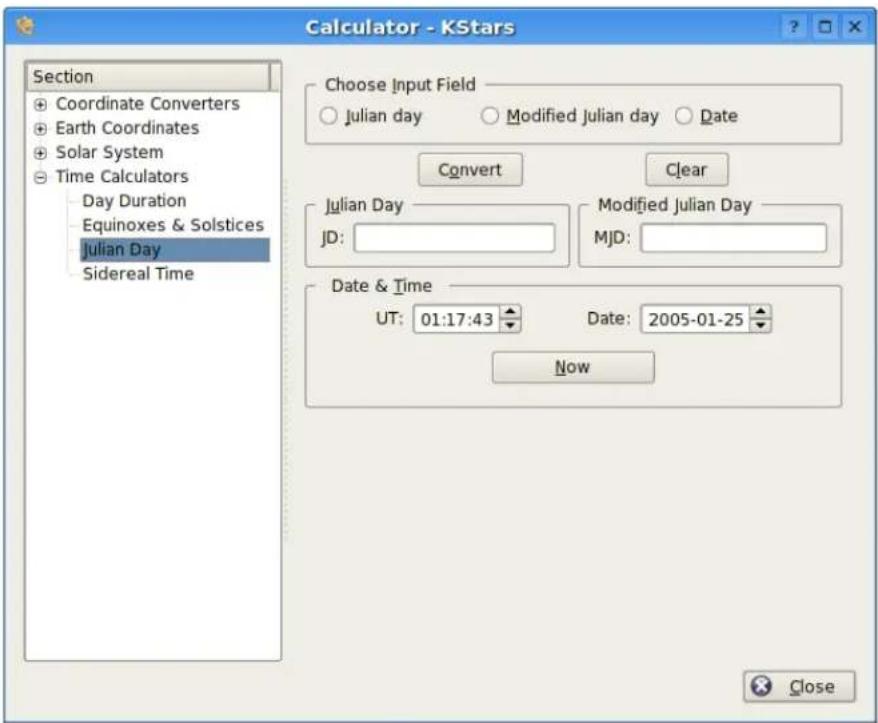
This module converts between the calendar date, the Julian Day, and the Modified Julian Day. The Modified Julian Day is simply equal to the Julian Day - 2,400,000.5.
Tousethemodule,selectwhichofthethreedateswillbetheinput,andthen fillinitsvalue.ThenpresstheComputebutton,andthecorrespondingvalues fortheothertwodatesystemswillbedisplayed.
TIP
Exercise:
WhatcalendardatedoesMJD=0.0correspondto?
TheKStarsHandbook
6.2.12 Sidereal Timemodule
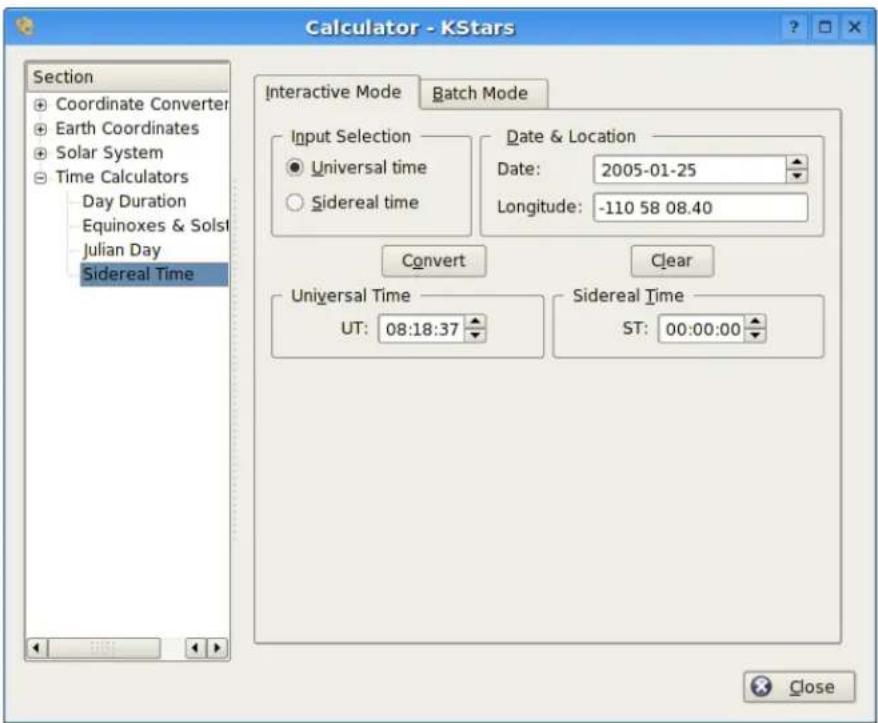
This module converts between Universal Time and Local Sidereal Time. First, select whether you will use UniversalTime or SiderealTime as an input value in the Input Selection section. You must also specify geographic longitude, and address for the calculation, in addition to either the UniversalTime or the SiderealTime value. When you press the Computebutton, the corresponding value for the other Timewill be displayed.
TheKStarsHandbook
6.3AAVSOLightCurves
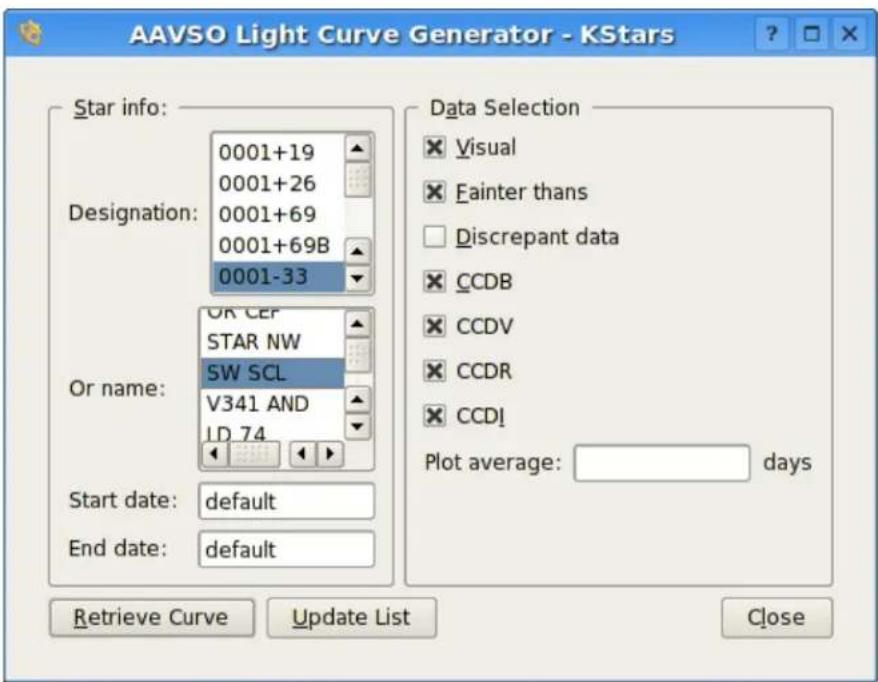
6.3.1 Introduction
KStarscandisplaylightcurvesforvariablestarsfromtheobservingprogram of the American Association of Variable Star Observers (AAVSO). This programmonitorsover6,000variablestarsandconsistsof10millionobservations goingbackalmostacentury.KStarsdownloadstheverylatestdatadirectly fromtheAAVSOdatabaseviatheInternet,soanetworkconnectionisrequired tousethistool.
Tousethetool,selectvariablestareitherbydesignationornameintheleft panel,andsetthestartandenddatestobeplotted.Intherightpanel,selectthetypeofdatathatshouldbeplotted(seebelow).Whenyouhavemadeyou selections,presstheRetrieveCurvebutton.KStarswillautomaticallyconnect totheAAVSOserver,whichwillgeneratethelightcurveplotandsenditto yourcomputerfordisplay.Asamplelightcurveplotisshownbelow:
TheKStarsHandbook
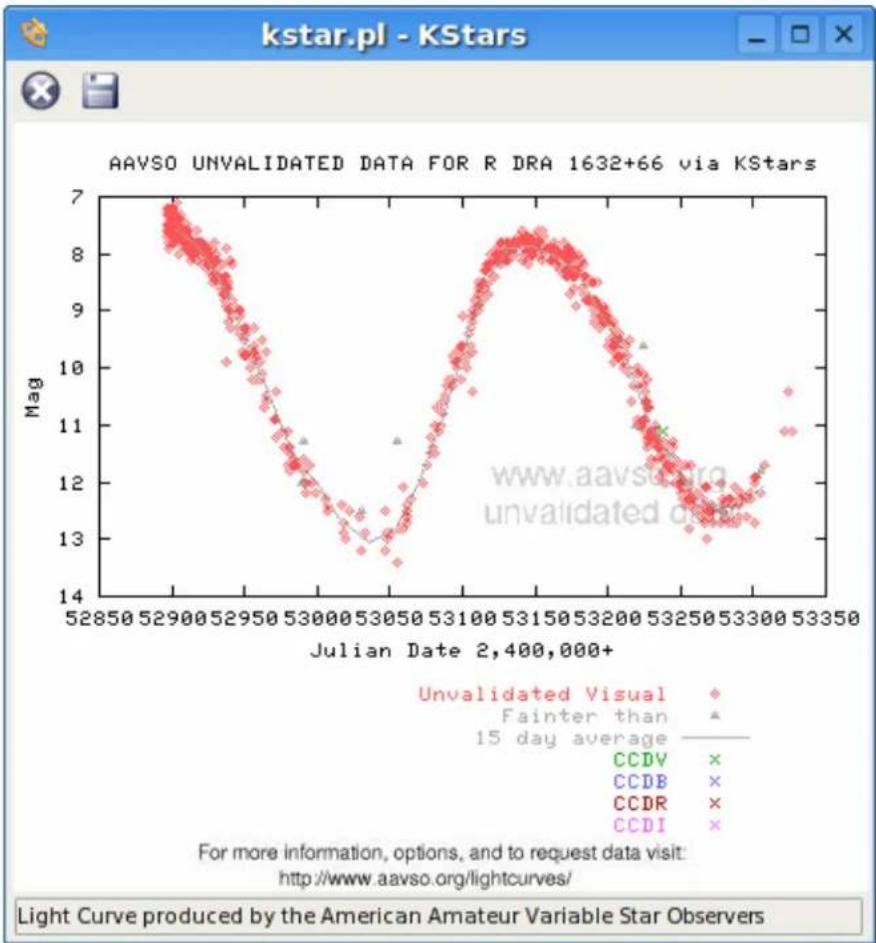
scatter
| Julian Date | Mag | Type | |-------------|-----|------------------| | 52850 | 7 | Unvalidated Visual | | 52900 | 6.5 | Unvalidated Visual | | 52950 | 6 | Unvalidated Visual | | 53000 | 5 | Unvalidated Visual | | 53050 | 4 | Unvalidated Visual | | 53100 | 3 | Unvalidated Visual | | 53150 | 2 | Unvalidated Visual | | 53200 | 1 | Unvalidated Visual | | 53250 | 0.5 | Unvalidated Visual | | 53300 | 1 | Unvalidated Visual | | 53350 | 2 | Unvalidated Visual | | 52850 | 7 | Fainter than | | 52900 | 6.5 | Fainter than | | 52950 | 6 | Fainter than | | 53000 | 5 | Fainter than | | 53050 | 4 | Fainter than | | 53100 | 3 | Fainter than | | 53150 | 2 | Fainter than | | 53200 | 1 | Fainter than | | 53250 | 0.5 | Fainter than | | 53300 | 1 | Fainter than | | 53350 | 2 | Fainter than | | 52850 | 7 | CCDV | | 52900 | 6.5 | CCDV | | 52950 | 6 | CCDV | | 53000 | 5 | CCDV | | 53050 | 4 | CCDV | | 53100 | 3 | CCDV | | 53150 | 2 | CCDV | | 53200 | 1 | CCDV | | 53250 | 0.5 | CCDV | | 53300 | 1 | CCDV | | 53350 | 2 | CCDV | | 52850 | 7 | CCDB | | 52900 | 6.5 | CCDB | | 52950 | 6 | CCDB | | 53000 | 5 | CCDB | | 53050 | 4 | CCDB | | 53100 | 3 | CCDB | | 53150 | 2 | CCDB | | 53200 | 1 | CCDB | | 53250 | 0.5 | CCDB | | 53300 | 1 | CCDB | | 53350 | 2 | CCDB | | 52850 | 7 | CCDR | | 52900 | 6.5 | CCDR | | 52950 | 6 | CCDR | | 53000 | 5 | CCDR | | 53050 | 4 | CCDR | | 53100 | 3 | CCDR | | 53150 | 2 | CCDR | | 53200 | 1 | CCDR | | 53250 | 0.5 | CCDR | | 53300 | 1 | CCDR | | 53350 | 2 | CCDR | | 52850 | 7 | CCDI | | 52900 | 6.5 | CCDI | | 52950 | 6 | CCDI | | 53000 | 5 | CCDI | | 53050 | 4 | CCDI | | 53100 | 3 | CCDI | | 53150 | 2 | CCDI | | 53200 | 1 | CCDI | | 53250 | 0.5 | CCDI | | 53300 | 1 | CCDI | | 53350 | 2 | CCDI | | 52850 | 7 | unvalidated data| | 52900 | 6.5 | unvalidated data| | 52950 | 6 | unvalidated data| | 53000 | 5 | unvalidated data| | 53050 | 4 | unvalidated data| | 53100 | 3 | unvalidated data| | 53150 | 2 | unvalidated data| | 53200 | 1 | unvalidated data| | 53250 | 0.5 | unvalidated data| | 53300 | 1 | unvalidated data| | 53350 | 2 | unvalidated data| For more information, options, and to request data visit http://www.aavso.org/lightcurves/ Light Curve produced by the American Amateur Variable Star ObserversPleasenottheselightcurvesshouldNEVERbeusedinresearch,papers,presentations,publications,etc..TheyareonlymeanttobeusedasasourceofinfoforKStars.TheyhavenotbeenvalidatedandpassedtheAAVSO'sstrictqualitycontrolmeasures.Wewillbegladtogiveyougoodrawdatasimplybyrequestingitathttp://www.aavso.org/adata/onlinedata/.
Specificquestionsaboutthedatainthelightcurvescanbesenttoaavso@aavso.org.
6.3.2 AboutVariableStars
Variable stars are stars that change in brightness. A light curve is a plot of a variablestar'sbrightnessovertime.Bylookingatalightcurveyoucansee howthestarhasbehavedinthepastandtrytopredicthowitwillbehavein thefuture.Astronomersalsousethisdatatomodelastrophysicalprocessesin thestar.Thisimportanttohelpusunderstandhowstarswork.
TheKStarsHandbook
6.3.3TheData
Hereisasummaryofthevarioustypesofdataavailableinthelightcurves:
- Visual Observation: This is an observation of a variable star by an observer witharegulartelescope.ItmeansthatanobserversawthestaratYbrightnessonXdateandtime.
- Fainter than: Sometimes the star is too faint to be seen by the observer. When that happens, the observer reports the faintest stars are in the field. These are called 'fainterthans' because the variable star was fainter than the brightness reported.
- Average: This is a computed running average of all the data reported. The binnumbertellsthecomputerhowmanydaystouseineachaveragecalculation.Thiswillneedtobeadjustedbasedonthefrequencyofobservations.Theerrorbarsrepresentthe1sigmastandarddeviationoferror.
- CCDV: These are observations reported using a CCD with a Johnson V filter. CCDVobservationstendtobemoreaccuratethanvisual(butnotalways).
- CCDB:CCDobservationswithaJohnsonBfilter.
- CCDI:CCDobservationswithaCousinsIcfilter.
-CCDR:CCDobservationswithaCousinsRfilter. - Discrepant Data: This is data that has been flagged by an AAVSO staff members being discrepant following HQ rules for data validation. Contact aavso@aavso.org form more information.
- Dates: The observational database the light curves are based on is updated every10minutessoyoucangetdatainnearreal-time.Rightnowlightcurve dataisonlyavailablebackto1961,butthiswilllikelybeexpandedfurther backintimeinthefuture.
6.3.4 Updating your local copy of Variable Stars
The AAVSO publishes the full list of variable stars in their monitoring program. This file is updated monthly with newly discovered variable stars. To sync thelistthatKStarsuseswiththeAAVSOmasterlist,clickontheUpdateList button in the AAVSO dialog. KStars will then attempt to connect to the AAVSO databaseanddownloadthelatestlist.
NOTE
ThecustomizeddatastreamprovidedbytheAAVSOwasimplementedforKStars byAaronPrice.Thankyou,Aaron!
TheKStarsHandbook
6.4 Altitude vs. Time Tool
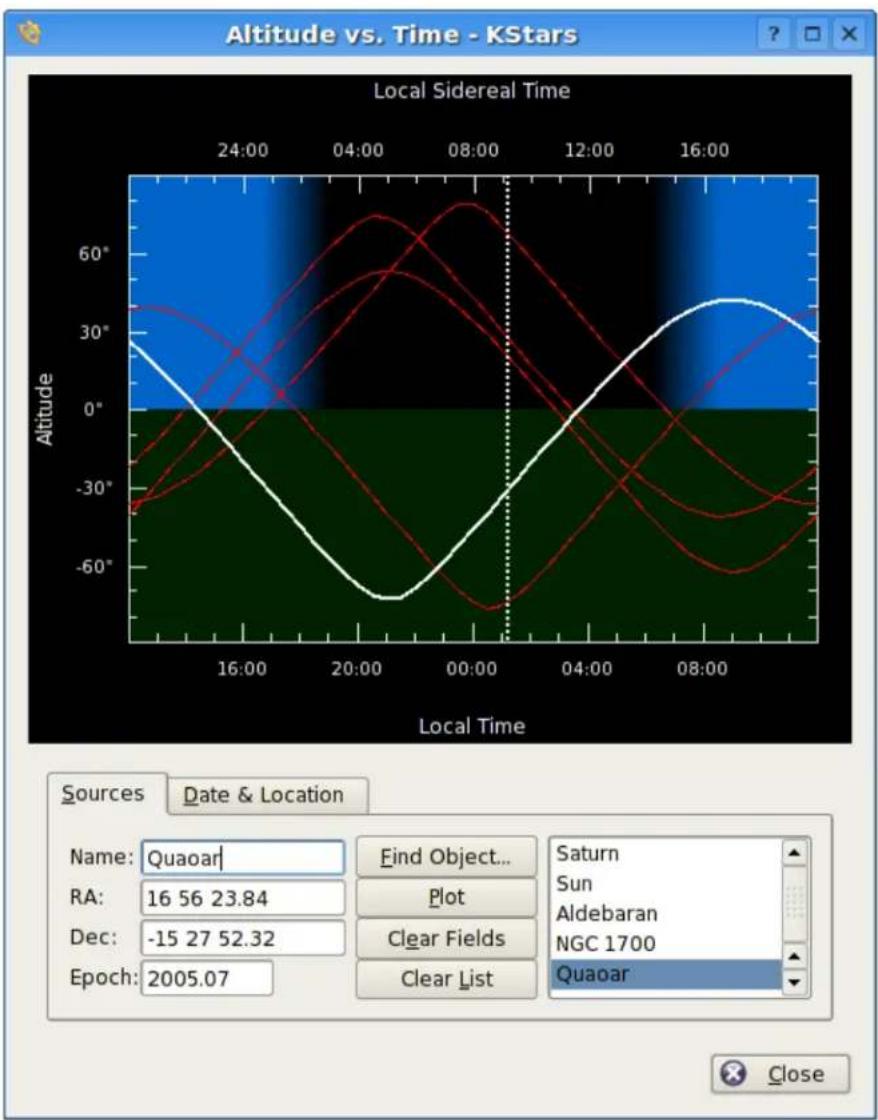
line
| Local Time | Altitude | | ---------- | -------- | | 16:00 | -30° | | 20:00 | -60° | | 00:00 | -30° | | 08:00 | 30° |Thisoolplotsthealtitudeofanyobjectsasafunctionoftime,foranydate andlocationonEarth. Thetopsectionisagraphicalplotofaltitudeangle on the vertical axis,andtimeonthe horizontal axis. Thetimeisshownbothas standard local time along the bottom, and sidereal time along the top. The bottomhalfofthegraphisshadedgreentoindicate thatpointsinthisregion are belowthehorizon.
Thereareafewwaystoaddcurvestotheplot.Thesimplestwaytoaddthe
TheKStarsHandbook
curveofanexistingobjectistosimplytypeitsnameintheNameinputfield, andpressEnter,orthePlotbutton.Ifthetextyouenterisfoundintheobjectdatabase,theobject'scurveisaddedtothegraph.YoucanalsopresstheBrowse button to open the Find Object Window to select an object from the list ofknownobjects.Ifyouwanttoaddapointthatdoesnotexistintheobject database,simplyenteranameforthepoint,andthenfillinthecoordinatesin theRAandDecinputfields.ThenpressthePlotbuttontontoaddthecurvefor yourcustomobjecttotheplot(notethatyouhavetopickanamethatdoesnot alreadyexistintheobjectdatabaseforthistowork).
Whenyouaddanobjecttotheplot,itsaltitudevs.timecurveisplottedwithathickwhiteline,anditsnameisaddedtothelistboxatthelowerright.Anyobjectsthatwerealreadypresentareplottedwithathinnerredcurve.Youcanchoosewhichobjectisplottedwiththethickwhitecurvebyhighlightingitsnameinthelistbox.
Thesecurvesshowtheobjects'Altitude(angleabovethe horizon)asafunction oftime.Whenacurvepassesfromthelowerhalftotheupperhalf,theobject hasrisen;whenitfallsbacktothelowerhalf,ithasset.Forexample,inthe screenshot,theminorplanetQuaoarissettingataround15:00localtime,andis risingatabout04:00localtime.
TheAltitudeofanobjectdependsonbothwhereyouareonEarth,andon theDate.Bydefault,theTooladoptstheLocationandDatefromthecurrent KStarssettings.YoucanchangetheseparametersintheDate&LocationTab.TochangetheLocation,youcanpresstheChooseCity...buttontoopenthe GeographicLocationWindow,orenterLongitudeandLatitudevaluesmanuallyintheinputfields,andpresstheUpdatebutton.TochangetheDate,use theDatepickerwidget,thenpressUpdate.NotethatanycurvesyouhadalreadyplottedwillbeautomaticallyupdatedwhenyouchangetheDateand/or Location.
TIP
Exercise:
PlottheSun'sAltitudecurve.Makesurethegeographiclocationisnotnearthe equator.ChangetheDatetosometimeinJune,andthenagaintosometimein January.Youcanseeeasilywhywehaveseasons;inthewinter,theSunisabove thehorizonforlesstime(thedaysareshorter),anditsaltitudeisneververyhigh.
TheKStarsHandbook
6.5What's Up Tonight? Tool
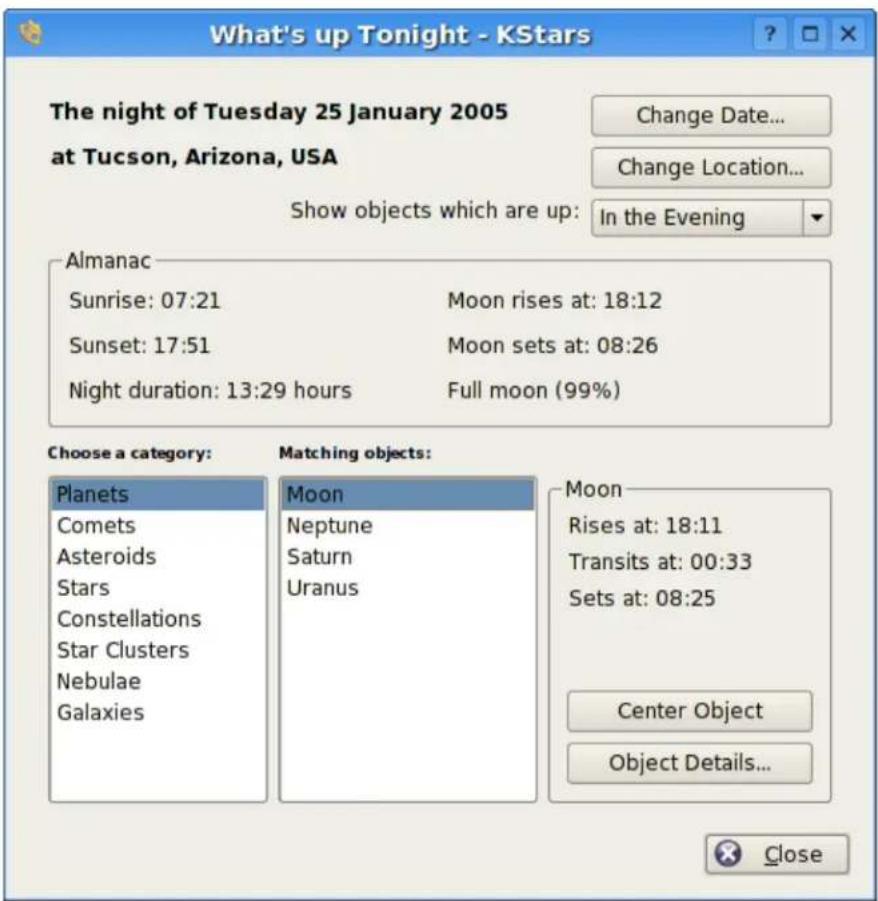
The 'What's Up Tonight?' (WUT) tool displays a list of objects that will be visible at night from any location, on any date. By default, the Date and Location are taken from the current settings in themain window, but you can change either value using the Change Date and Change Location buttons at the top of the WUT window.
TheWUTtoolalsodisplaysashortalmanacofdatafortheselecteddate:the riseandsettimesfortheSunandmoon,thedurationofthenight,andthe Moon'silluminationfraction.
Belowthealmanaciswheretheobjectinformationisdisplayed.Theobjects areorganizedintotypecategories.Selectanobjecttypeintheboxlabeled ChooseaCategory,andallobjectsofthattypewhichareabovethehorizon ontheselectednightwillbedisplayedintheboxlabeledMatchingObjects. Forexample,inthescreenshot,thePlanetscategoryhasbeenselected,and fourplanetswhichareupontheselectednightaredisplayed(Mars,Neptune,
TheKStarsHandbook
Pluto,andUranus).Whenanobjectinthelistisselected,itsrise,setandtransit timesaredisplayedinthelower-rightpanel.Inaddition,youcanpressthe ObjectDetails...buttontoopentheObjectDetailswindowforthatobject.
Bydefault,theWUTwilldisplayobjectsswhichareabovethehorizonbetween sunsetandmidnight(i.e.,'inthevening').Youcanchoosetoshowobjects whichareupbetweenmidnightanddawn('inthemorning'),orbetweendusk anddawn('anytimetonight')usingthecomboboxnearthetopofthewindow.
6.6TheScriptBuilderTool
KDE applications can be controlled externally from another program, from a console prompt, or from a shell script using the Inter-process communication protocol (DCOP). KStar stakes advantage of this feature to allow rather complex behavior to be scripted and played back at any time. This can be used, for example, to create a classroom demoto illustrate an astronomical concept.
TheproblemwithDBusscriptsis,writingthemisabitlikeprogramming,and canseemadauntingtasktothosewhodonothaveprogrammingexperience. TheScriptBuilderToolprovidesaGUIpoint-and-clickinterfaceforconstructingKStarsDCOPscripts,makingitveryeasytocreatecomplexscripts.
6.6.1 Introduction to the Script Builder
BeforeexplaininghowtousetheScriptBuilder,IprovideaverybriefintroductiontoalloftheGUIcomponents;formoreinformation,usethe"What'sThis?" function.
TheKStarsHandbook
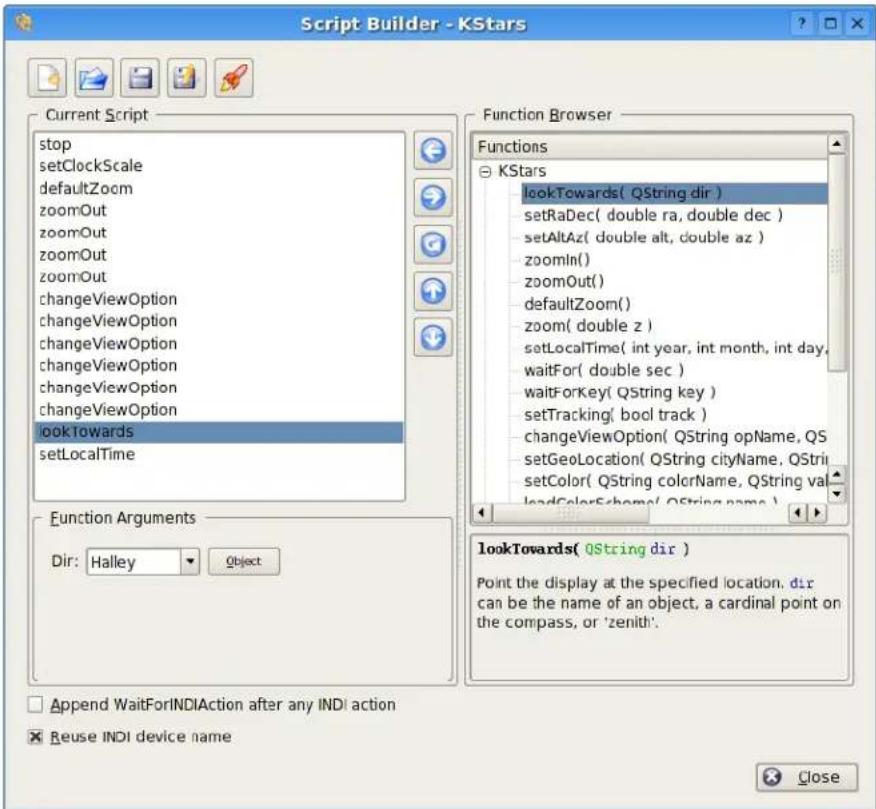
TheScriptBuilderisshownintheabovescreenshot.Theboxontheleftis theCurrentScriptbox;itshowsthelistofcommandsthatcomprisethecurrent workingscript.TheboxontherightistheFunctionBrowser;itdisplaysthelist ofallavailablescriptfunctions.BelowtheFunctionBrowser,thereisasmall panelwhichwilldisplayshortdocumentationaboutthescriptfunctionhigh-lightedintheFunctionBrowser.ThepanelbelowtheCurrentScriptboxisthe FunctionArgumentspanel;whenafunctionishhighlightedintheCurrentScript box,thispanelwillcontainitemsforspecifyingvaluesforanyargumentsthat thehighlightedfunctionrequires.
Alongthetopofthewindow,thereisarowofbuttonswhichoperateonthe scriptasawhole.Fromlefttoright,theyare:NewScript,OpenScript,Save Script,SaveScriptAs...,andTestScript.Thefunctionofthesebuttonsshould beobvious,exceptperhapsthelastbutton.PressingTestScriptwillattemptto runthecurrentscriptinthemainKStarswindow.YoushouldmovetheScript Builderwindowoutofthewaybeforepressingthis,soyoucanseetheresults.
In the center of the window, there is a column of buttons which operate on individual script functions. From toptobottom, they are: AddFunction, RemoveFunction, CopyFunction, MoveUp, and MoveDown. AddFunction addsthe currently - highlighted function in the Function Browser to the CurrentScriptbox (you can also add a function by double-clicking on it). Therest
TheKStarsHandbook
of the buttons operate on the function highlighted in the Current Script box, either removing it, duplicating it, or changing its position in the current script.
6.6.2 Using the Script Builder
InordertoillustrateusingtheScriptBuilder, we present asmalltutorialex-amplewherewemakeascript that tracks the Moon while the clock runs at an accelerated rate.
If we are going to track the Moon, we will need to point the display at first. The look Toward function is used to do this. Highlight this function in the Function Browser, and not the documentation displayed in the panel below the Browser. Presst the Add Function button to add this function to the Current Scriptbox. The Function Arguments panel will now contain a combobox labeled 'dir', short for direction. This is thedirection in which the display should be pointed. The combobox contains only the cardinal compass points, not the Moon or any other objects. You can either enter 'Moon' in the box manually, or presst the Object button to set the Find Object window to select the Moon from the list of named objects. Not that, as usual, centering on an object automatically engages object tracking mode, so there is noneed to add these Tracking function after looking toward.
NowthatwehavetakencareofpointingattheMoon,wenextwanttomake timepassatanacceleratedrate.UsethesetClockScalefunctionforthis.Add ittothescriptbydouble-clickingonitintheFunctionBrowser.TheFunction Argumentspanelcontainsatimestepspinboxforsettingthedesiredtimestep forthesimulationclock.Changethetimestepto3hours.
OK, we have pointed at the Moon and accelerated the clock. Now we just want the script to wait for several seconds while the display track on the Moon. Add the wait for function to the script, and use the Function Arguments panel to specify that it should wait for 20 seconds before continuing.
Tofinishup, let us reset the clock's timeste to then normal value of 1 second. Add another instance of set Clock Scale, and set its value to 1 sec.
Actually, we are not quitedoneyet. Weshould probably makes sure that the display is using Equatorial coordinates before the script track the Moon with an accelerated timestep. Otherwise, if the display is using Horizontal coordinates, it will rotate every quickly through large angles as the Moon rises and sets. This can be very confusing, and is avoided by setting the View Option Use Alt Az to 'false'. To change any View Option, use the changeView Option function. Add this function to the script, and examine the Function Arguments panel. There is a combobox which contains the list of all options which can be adjusted by changeView Option. Since we know we want the Use Alt Az option, we could simply select from the combobox. However, the list is quite long, and there is no explanation of what each item is for. It therefore may be easier to press the Browse Tree button, which will open a window containing a tree view of the available options, organized by topic. In addition, each item has an explanation of what the option does, and the at type of the option's value. We find Use Alt Az under the Skymap options category. Just highlight
TheKStarsHandbook
thisitemandpressOK, anditwillbeselectedinthecomboboxoftheFunction Argumentspanel. Finally, makeitsvalue'false'or'0'.
Onemorestep: changingUseAltAzattheendofthescriptdoesusnogood; weneedhistobechangedbeforeanythingelsehappens.So,makesurethis functionishhighlightedintheCurrentScriptbox,andpresstheMoveUpbutton untilisthefirstfunction.
Nowthatwehavefinishedthescript,weshouldsaveittodisk.PresstheSave Scriptbutton.Thiswillfirstopenawindowinwhichyoucanprovideaname forthescript,andfillinyournameastheauthor.Enter'TrackingtheMoon' foraname,andyournameastheauthor,andpressOK.Next,youwillseethe standardKDESaveFiledialog.SpecifyafilenameforthescriptandpressOK tosavethescript.Notethatifyourfilenamedoesnotendwith'.kstars',this suffixwillbeautomaticallyattached.Ifyouarecurious,youcanexaminethe scriptfilewithanytexteditor.
Nowthatwehaveacompletedscript,wecanrunitinacoupleofways.From aconsoleprompt,youcansimplyexecutethescriptaslongasaninstance ofKStarsiscurrentlyrunning.Alternatively,youcanexecutethescriptfrom withinKStarsusingtheRunScriptitemintheFilemenu.
TheKStarsHandbook
6.7 SolarSystemViewer
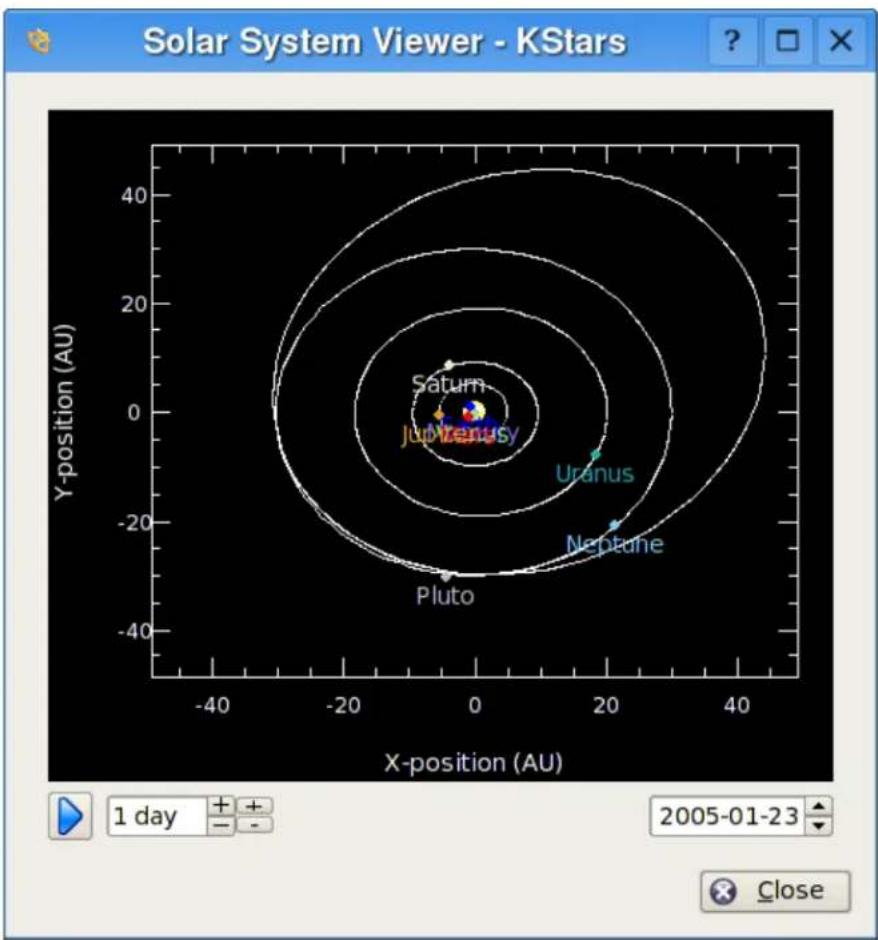
scatter
| Planet | X-position (AU) | Y-position (AU) | |------------|-----------------|-----------------| | Jupiterus | -5 | 0 | | Saturn | -5 | 10 | | Uranus | 20 | -10 | | Neptune | 20 | -20 | | Pluto | 0 | -30 |Thisooldisplaysamodelofoursolarsystemasseenfromabove. The Sun is drawn as yellow dot in the center of the plot, and the orbit of the planets are drawn as ellipses with the correct shapes and orientations. The current position of each planet along its orbit is drawn as a colored dot, along with a name label. The display can be zoomed in and out with the + and - keys, and the display can be centered with the arrow keys, or by double-clicking anywhere in the window with them mouse. You can also center on a planet with the 0–9 keys (0 is the Sun; 9 is Pluto). If you center on a planet, it will be tracked astimepasses in the tool.
TheSolarSystemViewerhasitsownclock, independentoftheclockinthe mainKStarswindow.Thereisatimestepcontrolwidgethere,similartothe oneinthemainwindow'stoulbar.However,thiscontroldefaultstoatimestep
TheKStarsHandbook
of1day(sothatthemotionsoftheplanetscanbeseen), anditstartsoutwith theclockpausedwhenthetoolisopened.
NOTE
ThecurrentmodelusedforPluto'sorbitisonlygoodfordateswithinabout100 yearsofthepresentdate.IfyoulettheSolarSystemclockadvancebeyondthis range,youwillseePlutobehaveverystrangely!Weareawareofthisissue,and willtrytoimprovePluto'sorbitmodelsoon.
TheKStarsHandbook
TheKStarsHandbook
6.8 JupiterMoonsTool
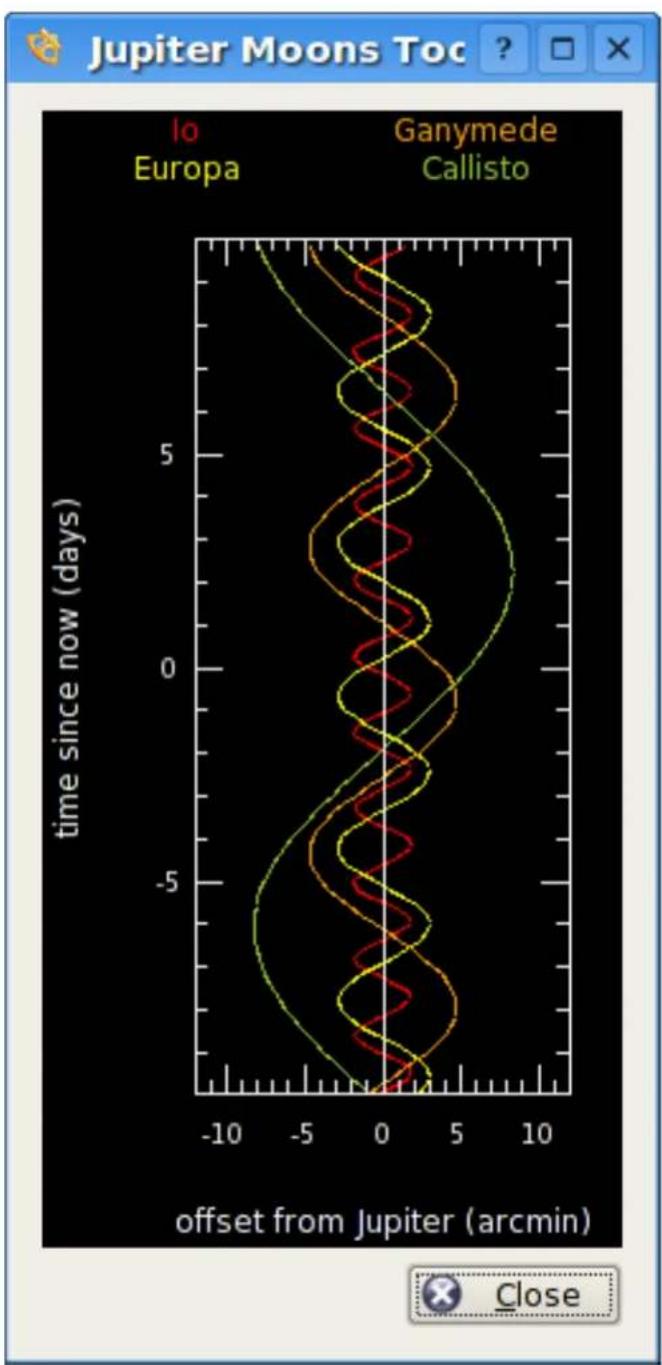
line
| offset from Jupiter (arcmin) | Europa | Ganymede Callisto | Callisto | | ---------------------------- | ------ | ----------------- | -------- | | -10 | 7.5 | 7.5 | 7.5 | | -5 | 6.0 | 6.0 | 6.0 | | 0 | 4.0 | 4.0 | 4.0 | | 5 | 2.0 | 2.0 | 2.0 | | 10 | 0.0 | 0.0 | 0.0 |TheKStarsHandbook
ThisooldisplaysthepositionsofJupiter'sfourlargestmoons(Io,Europa, Ganymede,andCallisto)relativetoJupiter,asafunctionoftime.Timeisplotted vertically;theunitsaredaysand'time=0.0'correspondstothecurrentsimulationtime.ThehorizontalaxisdisplaystheangularoffsetfromJupiter's position,inarcminutes.TheoffsetismeasuredalongthedirectionofJupiter's equator.Eachmoon'spositionasafunctionoftimetracesasinusoidalpathin theplot,asthemoonorbitsaroundJupiter.Eachtrackisassignedadifferent colorodistinguishitfromtheothers;thenamelabelsatthetopofthewindow indicatethecolorusedbyeachmoon.
The plot can be manipulated with the keyboard. The time axis can be expanded or compressed using the + and - keys. The time displayed at the center of the window can be changed with the [and] keys.
6.9 ObservingListTool
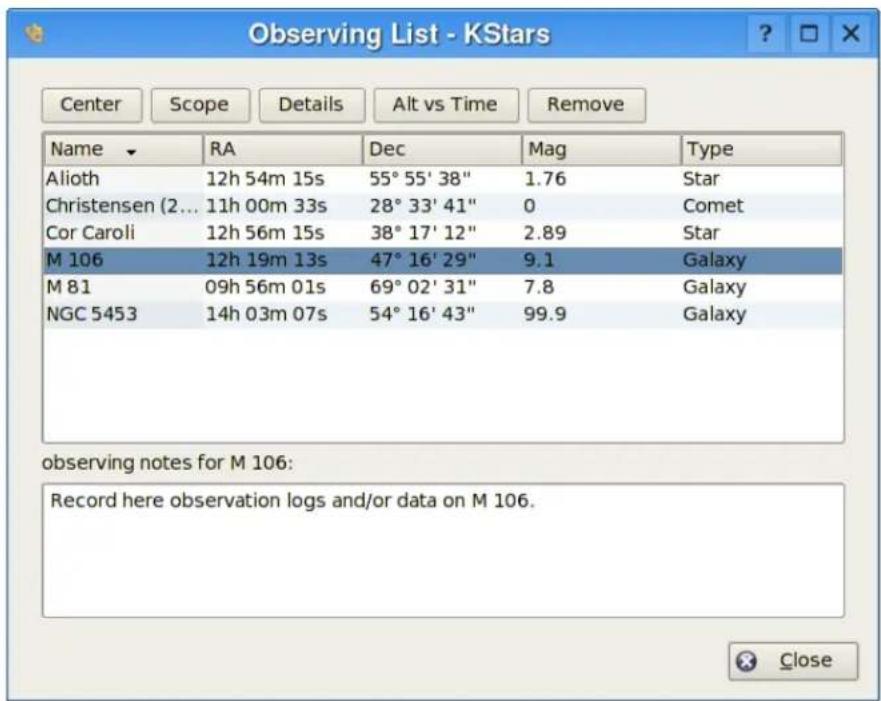
The purpose of the Observing List Toolist to provide convenient access to some common functions for listing objects chosen by you. Objects are added to the list by using the 'Addlist' action in the popup menu, or by simply pressing the Keyto add the currently-selected object.
Objectsinthelistcanbesortedbyanyofthedatacolumns(Name,RightAscension,Declination,Magnitude,andType).Toperformanactiononanobject,
TheKStarsHandbook
highlightitinthelist, and then press one of the Action buttons at the top of the window. Some actions can be performed while multiple objects are selected; otherwise operate when one object is selected. The available actions are:
CenterCenterthedisplayontheselectedobject,andbeginTrackingit.
ScopePointyourtelescopeattheselectedobject.
Alt vs. Time Open the Altitude vs. Time Tool, with the selected object(s) preloaded
Details Open the Detailed Information Window for the selected object.
RemoveRemovetheselectedobject(s)fromtheobservinglist.
NOTE
The Observing List tool is an new feature and is still under development. We are planning to add more features, such as adding object to the list by selecting a region in the sky, and the ability to save observing list to disk.
6.10 FITSViewerTool
TheFlexibleImageTransportSystem(FITS)isthestandardformatforrepresentingimagesanddatainAstronomy.
TheKStarsFITSViewertoolisintegratedwiththeINDIframeworkforseamlessdisplayandmanipulationofcapturedFITSimages.ToopenaFITSfile, selectOpenFITS...fromtheFilemenu,orpressCtrl+O.
FITSViewerfeatures:
•Supportfor8,16,32,IEEE-32,andIEEE-64bitsformats.
- Histogramwithlinear, logarithmic, and square-rootscales.
•Brightness/Contrastcontrols.
- PanandZoom.
- Autolevels.
•Statistics.
- FITSheaderquery.
- Undo/Redo.
TheKStarsHandbook
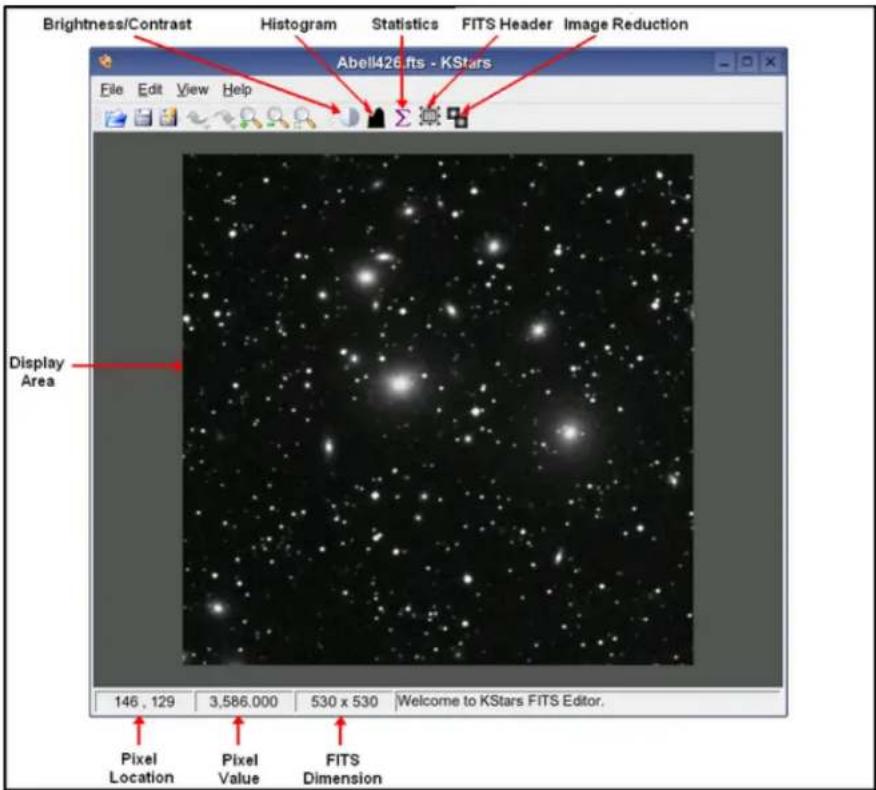
The abovediagramillustratestheFITSViewerworkareaandwindow. The toolprovidesbasicfunctionsforimagedisplay.FITSdatadepthispreserved throughoutallprocessing,open,andsavefunctions.Whilethetooladhereto theFITSstandard,itdoesnotsupportallpossibleFITSfeatures:
- Supportforonlyoneimageperfile.
- Supportforonly2Ddata.1Dand3Ddataarediscarded.
- NosupportforWCS(WorldCoordinateSystem).
The following is a brief description of the tool's functional units:
- Brightness/Contrast:Adjustsbrightnessandcontrast.Thefunctioncanbe CPUandmemoryintensiveforverylargeFITS.
- Histogram: Displaysone-channelFITShistogram. Theusercanrescale the imagebyoptionallydefininganupperandlowerlimitforthecutoffregion. Therescalingoperation(linear, logarithmic,orsquare-root)maythenbeap- pliedtotheregionenclosedbytheupperandlowerlimits.
TheKStarsHandbook
- Statistics: Providessimplestatisticsforminimumandmaximumpixelvaluesandthetheirrespectivelocations.FITSdepth,dimension,mean,and standarddeviation.
- FITSheader:DisplaysFITSheaderinformation.
Chapter7
Command-Linemodefor ImageGeneration
YoucanuseKStarstogenerateanimageoftheskywithoutactuallylaunching theGUIportionoftheprogram.Tousethisfeature,startKStarsfromacommandpromptusingargumentstospecifythefilenamefortheimage,aswell asthedesiredimagedimensions:
kstars --dump [--filename kstars.png] [--height 640] [--width 480] [--script myscript.kstars][--date "4July197612:30:00"]
Ifnofilenameeisspecified, itgeneratesafilenamedkstars.png. Itwillattempt to generate an imagethat match the extension of your filename. The following extensions are recognized: 'png', 'jpg', 'jpeg', 'gif', 'pnm', and 'bmp'. If the filename extension is not recognized, it default to the PNG image type.
Likewise, if the imagewidth and height are not specified, they default to 640 and 480, respectively.
Bydefault,KStarswillreadintheoptionsvaluesstoredinyourSKDEHOME/share/config/kstarsrcfiletodeterminewheretheimagewillbecentered, andhowitisrendered. ThismeansyouneedtorunKStarsinnormalGUI mode,andexittheprogramwhenitissetupwiththedesiredoptionsforthe generatedimages. Thisisnotveryflexible,sowealsoprovidetheabilityto executeaKStarsDCOPscripttosetthescenebeforegeneratingtheimage. The filenameyouspecifyasthescriptargumentsshouldbeavalidKStarsDCOP script,suchasonecreatedwiththe ScriptBuilderTool.Thescriptcanbeused tosetwheretheimageispointing,setthegeographiclocation,setthetimeand date,changetheZoomlevel,andadjustotherviewoptions.SomeoftheDCOP functionsmakenosenseinnon-GUImode(suchasWaitForKey());ifthese functionsareencounteredwhileparsingthescript,theyaresimplyignored.
Bydefault,KStarswillusethesystemCPUtimeanddateforgeneratingthe image.Alternatively,youmayspecifyatimeanddatewiththe'--date'argument.Youcanalsousethisargumentforspecifyingthestartupdateinnormal GUImode.
Chapter8
AstronomicalDeviceControl withINDI
KStarsprovidesaninterfacetoconfigureandcontrolastronomicalinstruments viatheINDIprotocol.
TheINDIprotocolsupportsaviarietyofastronomicalinstrumentssuchasCCD camerasandfocusers.Currently,KStarssupportsthefollowingdevices:
| TelescopeDevidedriver | |
| LX2008"-12"Classicindi_lx200classic | |
| Autostarbasedtelescopesindi_lx200autostar | |
| LX200GPS8"-16"indi_lx200gps | |
| LX200Classic16"indi_lx200_16 | |
| NexStarGPS,CGE,AS-GTindi_celestrongps | |
| NewGT,NexStar5i/8iindi_celestrongps | |
| TakahashiTemmaindi_temma | |
| Astro-ElectronicFS-2indi_lx200basic | |
| ArgoNavis | indi_lx200basic |
| LosmandyGemini | indi_lx200basic |
| MelBartelsControllers | indi_lx200basic |
| SkyCommander | indi_skycommander |
| Intelliscope/SkyWizard | indi_intelliscope |
| OrionAtlas | indi_orion_atlas |
Table8.2: Supported Telescopes
TheKStarsHandbook
| FocuserDevidedriver | |
| MeadeLX200GPSMicrofocuserindi_lx200gps | |
| Meade1206PrimaryMirror Focuser | indi_lx200basic |
| JMINGFSeriesindi_lx200basic | |
| JMIMOTOFOCUSindi_lx200basic | |
| FLIPrecisionFocuserindi_fli_pdf | |
| RoboFocusindi_robofocus | |
Table8.4: Supported Focusers
| CCDDevicedriver | |
| FingerLakesInstrumentsCCDsindi_fli_ccd | |
| SantaBarbaraInstrumentCCDsindi_sbig_ccd | |
| ApogeeCCDsindi_apogee_alta | |
Table8.6: SupportedCCDs
| FilterWheelDevidedriver | |
| FLIFilterWheelsindi_fli_wheel | |
| TrueTechnologyWheelindi_trutech_wheel | |
Table8.8: SupportedFilterWheels
| Webcam | Devidedriver |
| AnyVideo4Linuxcompatible device | indi_v4l_generic |
| Philipswebcam | indi_v4l_philips |
| MeadeLunarPlanetaryImager | indi_meade_lpi |
| SBIGSTV | indi_sbig_stv |
Table8.10: Supported Webcams
TheKStarsHandbook
8.1INDISetup
KStarscancontrollocalandremotedevicesseamlesslyviatheINDIserver/clientarchitecture.INDIdevicesmayberuninthreedifferentmodes:
- Local: The local mode is the most common and is used to control local device (i.e. a device attached to your machine).
2.Server:TheservermodeestablishesanINDIserverforaparticulardeviceandwaitsforconnectionsfromremoteclients.Youcannotoperate serverdevices,youcanonlystartandshutthemdown.
3.Client:TheclientmodeisusedtoconnecttoremotelNDIserversrunningINDIdevices.Youcancontrolremotedevicesseamlesslylikelocal devices.
You can run local device, establish IND servers, and connect to remote clients from the Device Manager in the Devices menu.
HereisascreenshotoftheDeviceManagerwindow:
TheKStarsHandbook
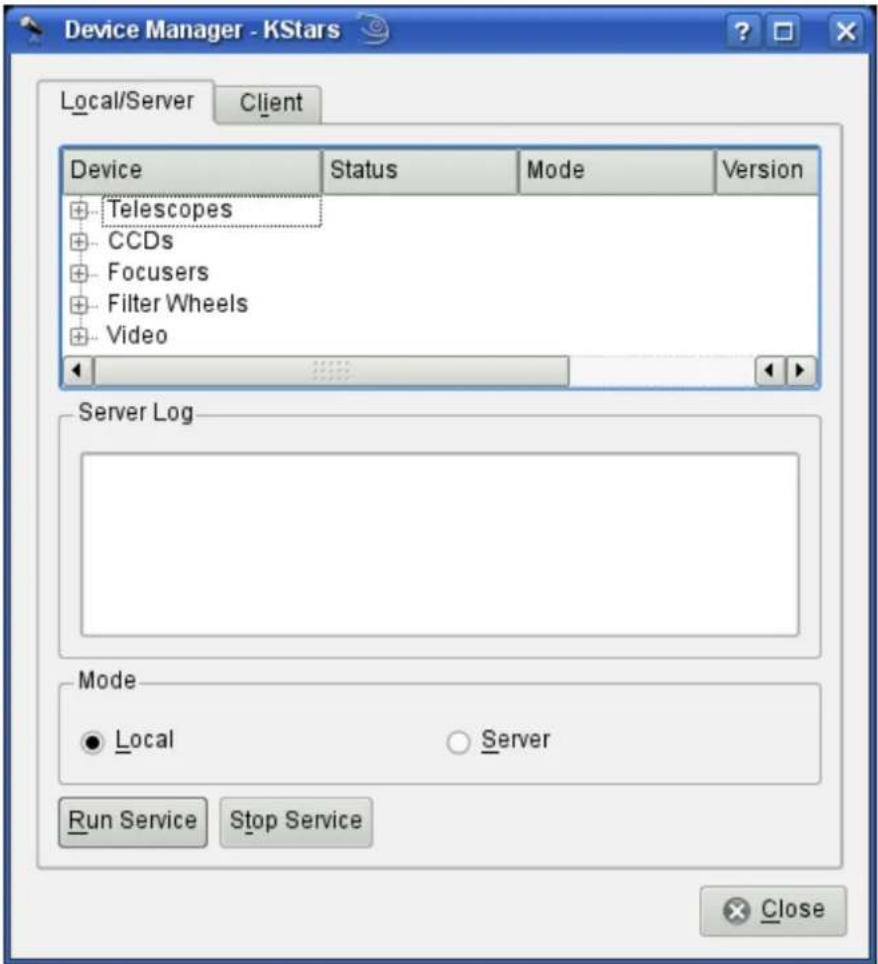
Youcanrundevicesbybrowsingthedevicetree,selectingaspecificdevice, andthenclickingontheRunServicebutton.Youcanselecttheoperation mode,eitherlocalorserverasdefinedabove.
Tocontrolremoveddevices, refertotheremotedevicecontrolsection.
8.2 Telescope Setup
MosttelescopesareequippedwithRS232interfaceforremotecontrol.Connect theRS232jackinyourtelescopetoyourcomputer'sSerial/USBport.Traditionally,theRS232connectstotheserialportofyourcomputer,butsincemany newlaptopsabandonedtheserialportinfavorofUSB/FireWireports,you mightneedtoobtainaSerialtoUSBadaptortousewithnewlaptops.
TheKStarsHandbook
AfterconnectingyourtelescopetotheSerial/USBport,turnyourtelescopeon. Itishlyrecommendedthatyoudownloadandinstallthelatestfirmwarefor yourtelescopecontroller.
Thetelescopeneedstobealignedbeforeitcanbeusedproperly.Alignyour telescope(oneortwostarsalignment)asillustratedinyourtelescopemanual.
KStarsneedstoverifytimeandlocationsettingsbeforeconnectingtothetelescope. Thisinsurespropertrackingandsynchronizationbetweenthelescope and KStars. The followingstepswillenableyoutoconnecttoadevicethatis connectedtoyourcomputer.Toconnectandcontrolremotedevices,please refer to remotedevicecontrolsection.
YoucanusetheTelescopeSetupWizardanditwillverifyalltherequiredinformationintheprocess.Itcanautomaticallyscanportsforattachedtelescopes. YoucanrunthewizardbyselectingTelescopeSetupWizardfromtheDevices menu.
Alternatively, you can connect to a local telescope by performing the following steps:
- Set your geographic allocation. Open the Geographic... window by selecting Geographic Location... from the Settings menu, or by pressing the Globe icon in the toolbar, or by pressing Ctrl+g.
- Set your local time and date. You can change to any time or date by selecting Sit Time... from the Timemenu, or by pressing the time icon in the toolbar. The Set Timewindow uses a standard KDEDatePicker widget, coupled with three spinboxes for setting the hours, minutes and seconds. If you ever need to reset the clock back to the current time, just select Set Timeto Now from the Timemenu.
- ClickontheDevicesmenuandselecttheDeviceManager.
- UndertheDevicecolumn, select yourtelescopemodel.
5.Right-clickonthedeviceandselectRunService.
6.ClickOktoclosetheDeviceManagerDialog.
FREQUENT SETTINGS
Youdonotneedtosetthegeographiclocationandtimeeverytimeyouconnecttoatelescope.Onlyadjustthesettingsasneeded.
Youarenowreadytousethedevicefeatures,KStarsconvenientlyprovides twointerchangeableGUIinterfacesforcontrollingtelescopes:
CONTROLLING YOUR TELESCOPE
- Sky map Control: For each device you run in the Device Manager, a corresponding entry will show up in popup menu that allows you to control
TheKStarsHandbook
thepropertiesofthedevice.YoucanissuecommandslikeSlew,Sync, andTrackdirectlyfromtheskymap.
HereisascreenshotofthepopupmenuwithanactiveLX200Classic device:
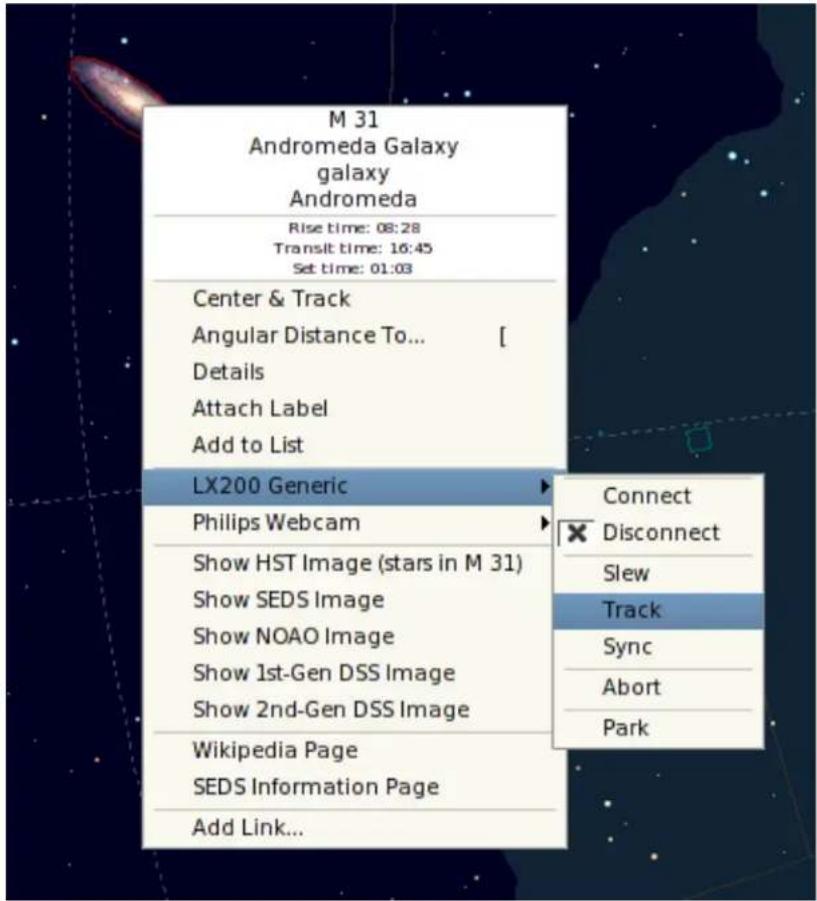
2.INDIControlPanel:Thepanelofferstheuserwithallthefeaturessupportedbyadevice.
Thepanelisdividedintothreemainsections:
- Devicetabs: Each additional active device occupies a tabin the INDI panel. Multiple devices can run simultaneously without affecting the operation of other devices.
- Propertyview: PropertiesarethekeyelementinINDIarchitecture. Eachdevicedefinesasetofpropertiestocommunicatewiththeclient. Thecurrentpositionofthetelescopeisanexampleofaproperty.Semanticallysimilarpropertiesareusuallycontainedinlogicalblocksor groupings.
TheKStarsHandbook
- Logviewers: Devicesreporttheirstatusandacknowledgecommands by sendingINDImessages. Each devicehasitsownlogview, and all devicesshareonegenericlogviewer. A deviceusuallysendsmessages to its devicedriveronly, but a device is permitted to sendageneric message when appropriate.
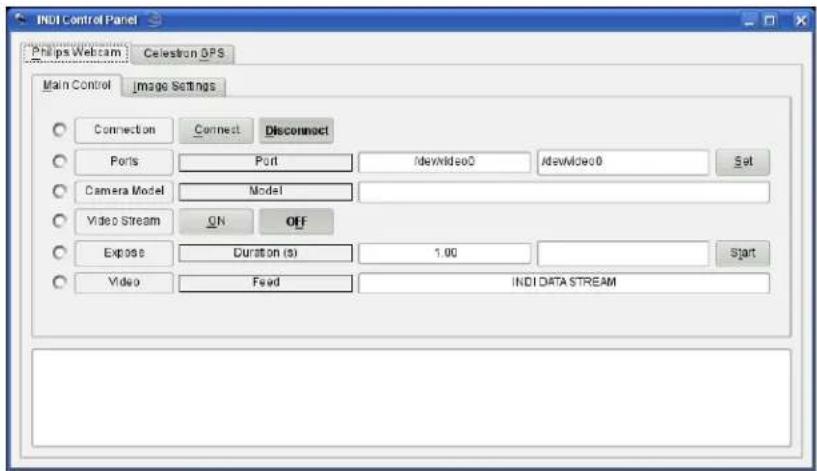
You are not restricted on using one interface over another, the can be both used simultaneously. Actions from the Skymap area automatically reflected in the INDIControl Panel and vice versa.
Toconnecttoyourtelescope,youcaneitherselectConnectfromyourdevice popupmenuoralternatively,youcanpressConnectunderyourdevicetabin theINDIControlPanel.
IMPORTANT
Bydefault,KStarswilltrytoconnecttothe/dev/ttyS0port.Tochangetheconnectionport,selectINDIControlPanelfromtheDevicesmenuandchangetheport underyourdevicetab.
KStarsautomaticallyupdatesthelescope'slongitude,latitude,andtimebasedoncurrentsettingsinKStars.Youcanenable/disabletheseupdatesfromConfigureINDIdialogundertheDevicesmenu.
IfKStarscommunicatessuccessfullywiththetelescope,itwillretrievethecurrentRAandDECfromthetelescopeandwilldisplayacrosshaironthesky mapindicatingthetelescopeposition.
TheKStarsHandbook
SYNCHRONIZINGYOURTELESCOPE
If you aligned your telescope and the last alignment star was, for example, Vega, thentecrosshair should be centered around Vega. If the crosshair was off target, then you can right-click Vega from the skym map and select Sync from your telescope menu. This action will instruct the telescope to synthesize its internal coordinates to match those of Vega, and the telescope's crosshair should now be centered around Vega.
Thisisit:yourtelescopeisreadytoexploretheheavens!
WARNING
Neverusethetelescopetolookatthesun.Lookingatthesunmightcauseirreversibledamagetoyoureyesandyourequipment.
8.3CCDandVideo-CaptureSetup
KStarssupportsthefollowingimagingdevices:
•FingerLakesinstrumentsCCDs
- SBIGCCDs:InordertouseSBIGCCDs,youmustdownloadandinstallthe UniversalSBIGDriverlibraryfromINDIwebsite.
- ApogeeCCDs: Only USB versions a resupported. You must havelibusb installed.
- Video4Linux compatible devices. Philips webcam extended features are supportedaswell.
YoucanrunCCDandVideoCapturedevicesfromtheDeviceManagerinthe Devicesmenu.LikeallINDldevices, someofthedevicecontrolswillbeaccessiblefromtheskymap. ThedevicecanbecontrolledfullyfromtheINDI ControlPanel.
ThestandardformatforimagecaptureisFITS.Onceanimageiscapturedand downloaded,itwillbeautomaticallydisplayedintheKStars FITSViewer.To captureasequenceofimages,usetheCaptureImageSequencetoolfromthe Devicesmenu.Thistoolisinactiveuntilyouestablishaconnectiontoanimage device.
IMPORTANT
Thefliandapogeedriversrequiresrootprivilegesinordertooperateproperly. Note thatrunningthedriverasrootisconsideredasecurityrisk.
TheKStarsHandbook
8.4 CaptureImageSequence
TheCaptureImageSequencetoolcanbeusedtoaquireimagesfromcameras andCCDsininteractiveandbatchmodes.Furthermore,youcanselectwhich filter,ifany,youwanttouseforyourimages.Thecapturetoolremainsdisableduntilyouestablishaconconnectiontoanimagingdevice.
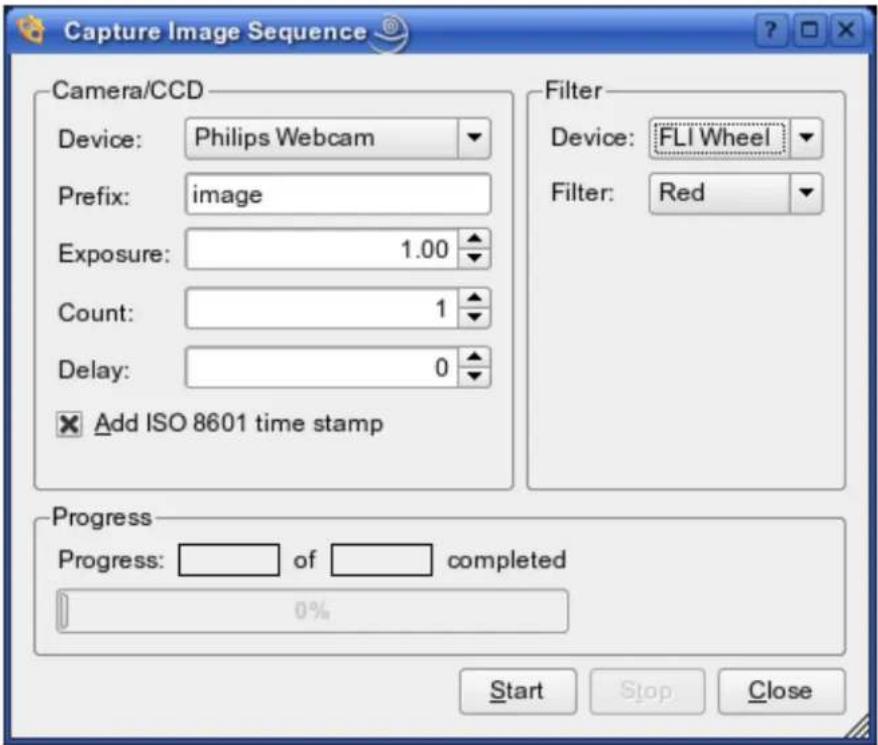
Theabovescreenshotdepictsasamplecapturesession. Thetoolprovidesthe followingoptions:
- Camera/CCD
-Device: Thedesiredimagingdevice.
- Prefix: The image prefix which will be prepended to each captured file-name.
-Exposure: Thenumberofsecondstoexposeeachframe.
-Count: Thenumberofimagestoaquire.
-Delay: Thedelayinsecondsbetweenconsecutiveimages.
- ISO 8601 time stamp: Append ISO 8601 time stamp to the filename. (e.g. image_01_20050427T09:48:05).
-Filter
TheKStarsHandbook
-Device: Thedesiredfilterdevice.
- Filter: The desired filter slot. You can assign color values to slot numbers using the ConfigureINDI window (e.g. Slot#1 = Red, Slot#2 = Blue..etc).
Afteryoufillinthedesiredoptions,youcanbeginthecaptureprocedureby pressingtheStartbutton.YoumaycancelatanytimeusingtheStopbutton. AllcapturedimageswillbesavedtothedefaultFITSdirectorywhichcanbe specifiedintheConfigureINDIwindow.
If you have more complex capturing requirements and condition to fulfil, it is recommended to create a script to meet your specific needs using the Script BuildertoolintheToolsmenu.
8.5ConfigureINDI
TheConfigureINDIwindowallowsyoutomodifyClientsideINDIspecific options. Thewindowisdividedintofourmaincategories:General,Automatic deviceupdates,Display,andFilterWheel:
- General
- Default FITS directory: Specify the directory where all captured FITS imageswillbesavedto.Ifnodirectoryisspecified,imageswillbestored in\$HOME.
-AutomaticDisplayofFITSuponcapture: When checked, KStars will display captured FITS in KStars FITS Viewer tool. If you use the Capture ImageSequencetool, all captured images will be saved to disk regardless of this option. - Telescope port: The default telescope port. When you connect to a local orremotetelescopeservice,KStarswillautomaticallyfillthetelescope's deviceportwiththespecifieddefaultport.
- Video port: The default video port. When you connect to a local or remotevideoservice,KStarswillautomaticallyfillthewebcam'sdeviceport withthespecifieddefaultport.
•Automaticdeviceupdates
- Time: Update the telescope's date and time, if supported, upon connection.
- Geographic location: Update the telescope's geographical location information(currentlongitudeandlatitude),ifsupported,uponconnection.
- Display
- Device target crosshair: When checked, KStars displays the telescope's targetcrosshairontheskymap. Thecrosshairisdisplayeduponasuccessfulconnectiontothetelescopeanditslocationisupdatedperiodically. Thetelescope'snameisdisplayednexttothecrosshair.KStarsdisplays
TheKStarsHandbook
onecrosshairpereachconnectedtelescope.Tochangethecolorofthe telescope'scrosshair,opentheConfigureKStarswindow.SelecttheColors tab, and then change the color of the Target Indicator item to the desired color.
-INDImessagesinstatusbar: Whenchecked, KStarsdisplaysINDIstatusmessagesintheKStarsstatusbar.
- FilterWheel: Assigncolorcodestothefilterwheelslots(e.g.Slot#0Red, Slot#1Blue..etc).Youcanassigncolorcodesforupto10filterslots(0to 9).Toassignacolorcode,selectaslotnumberfromthedropdowncombo box,andthentypethecorrespondingcolorcodeintheeditfield.Repeatthe processforalldesiredslotsandthenpressOK.
8.6INDIConcepts
ThemainkeyconceptinINDlisthatdeviceshavetheabilitytodescribethem-selves.ThisisaccomplishedbyusingXMLtodescribeagenerichierrarchythat canrepresentbothcanonicalandnon-canonicaldevices.InINDI,alldevices may contain one or more properties. Any property may contain one or more elements.TherearefourtypesofINDIproperties:
- Textproperty.
- Numberproperty.
- Switchproperty(RepresentedinGUIbybuttonsandcheckboxes).
•Lightproperty(RepresentedinGUIbycoloredLEDs).
Forexample, allINDI devices share the CONNECTION standards switch property. The CONNECTION property has two elements: CONNECT and DISCONNECT switches. KStars parse the generic XML description of properties and builds a GUI representations suitable for direct human interaction.
TheINDIcontrolpaneloffersmanydevicepropertiesnotaccessiblefromthe skymap.Thepropertiesoffereddifferfromonedevicetoanother.Nevertheless,allpropertiesharecommonfeaturesthatconstrainshowtheyaredisplayedandused:
- Permission: All properties can either be read-only, write-only, or read and write-enabled. An example of a read-write property is the telescope's Right Ascension. You can enter an new Right Ascension and the telescope, based on current settings, while othersleworsynctothenewinput. Furthermore, whenthelescopes lews, its Right Ascension gets updated and sent back to the client.
- State: Prefixedtoeachpropertyisastateindicator(roundLED).Eachpropertyhasastateandanassociatedcolorcode:
TheKStarsHandbook
| StateColorDescription | ||
| IdleGray | Deviceisperforming noactionwithrespect tothisproperty | |
| OkGreen | Lastoperation performedonthis propertywas successfulandactive | |
| BusyYellow | Thepropertyis performinganaction | |
| AlertRed | Thepropertyisin criticalconditionand needsimmediate attention |
Table8.12:INDIStatecolorcode
The device driver updates the property state in real-time when necessary. Forexample, if the telescope is in the process of slewing to a target, then the RA/DEC properties will be signaled as Busy. When the lew process is completed successfully, the properties will be signaled as Ok.
- Context: Numerical properties can accept and process numbers in two formats: decimal and sex agesimal. These agesimal format is convenient when expressing time equatorial/geographical coordinates. You can use any format at your convenience. Forexample, all the following numbers are equal:
--156.40
-156:24:00
--156:24
- Time: The standard time for all INDI-related communications is Universal Time UTC specified as YYYY-MM-DDTHH: MM: SSinaccord with ISO 8601. KStars communicate the correct UTC timewith device drivers automatically. You can enable/disable automatic time updates from the Configure INDI dialog under the Devices menu.
8.7 RemoteDeviceControl
KStarsprovidesasimpleyetpowerfullayerforremotedevicecontrol. A detailed description of the layer is described in the INDI whitepaper.
Youneedtoconfigureboththeserverandclientmachinesforremotecontrol:
TheKStarsHandbook
1.Server:Toprepareadeviceforremotecontrol,followthesamestepsin thelocal/serversetup.WhenyoustartadeviceserviceintheDevice Manager,aportnumberisdisplayedundertheListeningportcolumn. Inadditiontotheportnumber,youalsoneedthehostnameorIPaddress ofyourserver.
2.Client:SelecttheDeviceManagerfromtheDevicemenuandclickontheClienttab.Youcanadd,modify,ordeletehostsundertheClienttab.Add ahostbyclickingontheAddbutton.Enterthehostname/IPaddressof theserverintheHostfield,andentertheportnumberobtainedfromthe servermachineinstep1.
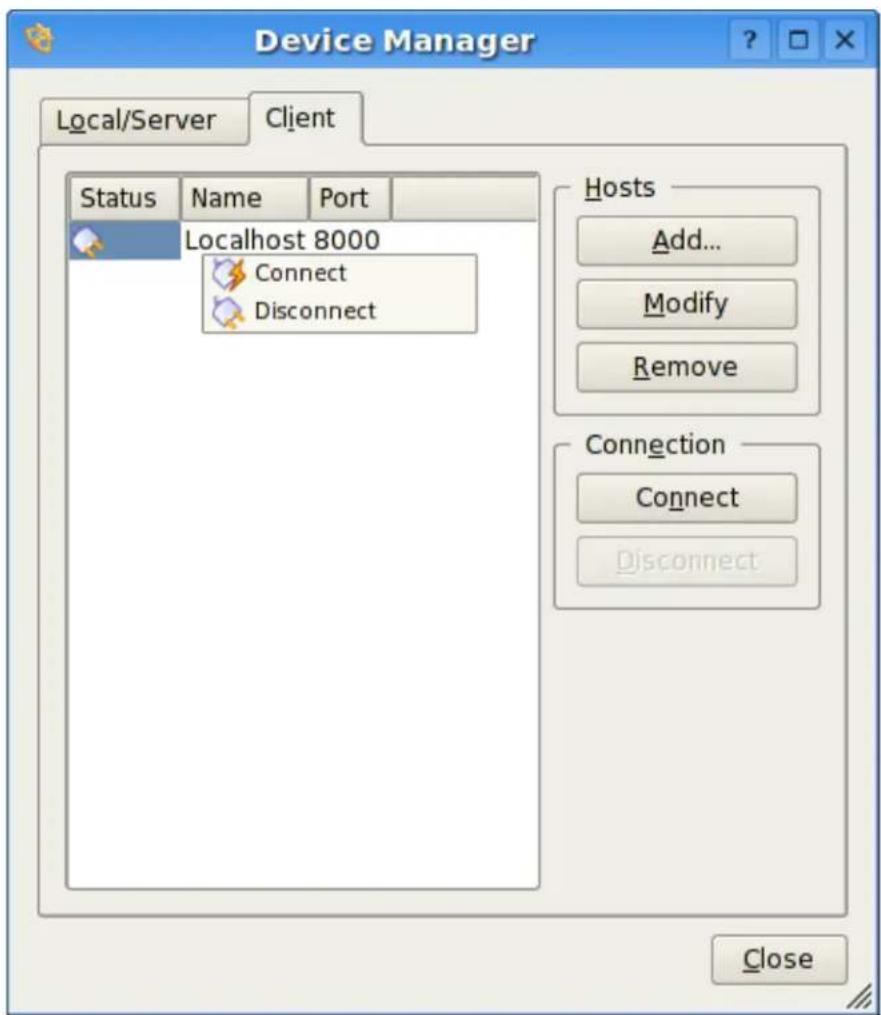
Afteryouaddahost,rightclickonthehosttoConnectorDisconnect.Ifa connectionisestablished,youcancontrolthetelescopefromtheSkymapor
TheKStarsHandbook
INDIControlPanelexactlyasdescribedinthelocal/serversection.Itisaseasy atthat.
8.7.1 RunninganINDI server from the command line
While KStarsallowsyoutoeasilydeployanINDIserver;youcanlaunchanINDIserverfromthecommandline.
SinceINDIsanindependentbackendcomponent,youcanrunanINDIserver onahostwithoutKStars.INDIcanbecompiledseparatelytorunonremote hosts.Furthermore,devicedriverslogmessagestostderrandthatcanbe helpfulinadebuggingsituation.ThesyNTAXforINDIserverisasfollowing:
\$indiserver[options][driver...]
Options:
-ld:logdrivermessagestod/YYYY-MM-DD.islog
-mm:killclientifgetsmorethanthismanyMBbehind,default10
-pp:alternateIPport,default7624
-v:showkeyevents,notraffic
-vv:-v+keymessagecontent
-vvv:-vv+completexml
driver:executableordevice@host[:port]
Forexample, if you want to start an NDI server running an LX200 GPS driver and listening to connection on port 8000, you would run the following command:
\$indiserver-p80001x200gps
8.7.2 Secure Remote Operation
SupposewewanttorunanindiserverwithINDIdriversonaremotehost, remote_host, and connect them to KStars running on the local machine.
Fromthelocalmachinelogontotheremotehost,remote_host,bytyping:
\$ ssh -L local_port:remote_host:remote_port
This binds the local_port on the local machine to the remote_port on the remote_host. Afterloggingin, runindiserverontheremotehost:
\$indiserver-premote_port[driver...]
Backonthelocalmachine,startKStarsthenopentheDeviceManagerandaddahostundertheClienttab.Thehostshouldbethelocalhost(usually127.0.0.1) andtheportnumbersshouldbethelocal_portusedinthestepsabove.Right-clickonthehostandselectConnectfromthepopupmenu.KStarswillconnect totheremoteINDIserversecurely.Thehostinformationwillbesavedfor futuresessions.
TheKStarsHandbook
8.8INDIFrequentlyAskedQuestions
Q:WhatisINDI?
A: INDI is the Instrument-Neutral-Distributed-Interface control protocol developed by Elwood C. Downey of ClearSky Institute. KStarsemploysdevicedriversthatarecompatible with the INDI protocol. INDI has many advantages including loose coupling between hardware devices and software drivers. Clients that used the device capabilities. In runtime, KStars communicates with the device drivers and builds a completely dynamical GUI based on services provided by the device. Therefore, new device drivers can be written or updated and KStars can take full advantage of them without any changes on the client side.
Q:Doyouplantosupportmoredevices?
A:Yes.WeplantosupportmajorCCDcamerasandfocusersandextendsupportformoretelescopes.IfyouwouldlikeINDItosupportaparticulardevice,please sendanemailto indi-devel@lists.sourceforge.net
Q: What operations does KStars provideto control the telescope?
A: It depends on the particular telescope you're running, but the minimum three operations are Slew, Track, and Sync, which you can issue directly from the sky map. Your telescope must be aligned for those operations to perform correctly. Some telescopes offer you more operations like it management, slew modes, focusing, parking, and more. You can access the telescopes extended features from the INDI Control Panel in the Devices Menu.
Q: What's the difference between Slew, Track, and Sync exactly?
A: The command Slew orders the telescope to move to a particular target, and oncethetelescopereachesitstarget,thetelescopekeepstrackingthatttargetat asiderealrate(i.e.therateatwhichstarsmoveacrossthesky).Thisworkswell forstars,Messierobjects,andabouteverythingoutsideoursolarsystem.But solarsystemobjectstraveldifferentlyacrosstheskyandsothetelescopemust Track the objects as they move. Therefore, you need to issue a track command ifyouwanttotrackanobjectwithnon-siderealmotion.Ontheotherhand, Syncisusedtosynchronizethetelescope'sinternalcoordinateswiththatofan objectyouselect.
Q: Can I control my telescoperemotely?
A: Yes. You can start an INDI server on the machine connected to your telescope and the server will list entire requests from KStars clients. Once you're connected, you can control your telescoped directly from the skymap. This procedure is described in detail in the Remoted device control section.
Q: When I try to Connect, K Stars reports that the telescope is not connected to the serial/USBport. What can I do?
A: This message is triggered when KStars cannot communicate with the telescope. Here are few things you can do:
TheKStarsHandbook
- Check that you have both reading and writing permission for the port you are trying to connect to.
- Check the connection cable, makes sure it is going good condition and test it with other applications.
- Check your telescope power, makes sure the power is on and that the telescope is getting enough power.
- SetthecorrectportintheINDIControlPanelundertheDevicesmenu. Thedefaultdeviceis/dev/ttyS0
5.RestartKStarsandretryagain.
Q: KStarsreportsthatthetelescopeisonlineandready, but I cannot find the telescope's crosshair, where is it?
A:KStarsretrievesthetelescopesRAandDECcoordinatesuponconnection. Ifyouralignmentwasperformedcorrectly,thenyoushouldseethecrosshair aroundyourtargetintheSkyMap.However,theRAandDECcoordinates providedbythetelescopemaybeincorrect(evenbelowthehorizon)andyou needtoSyncyourtelescopetoyourcurrenttarget.Youcanusetheright-click menutocenterandtrackthetelescopecrosshairintheskymap.
Q: Thetelescopeismovingerraticallyornotmovingatall.WhatcanIdo?
A: This behaviorismostly duetoincorrectsettings, please verify the following checklist:
- Isthetelescopealigned?
- Isthelescopealignmentmodecorrect? UseINDIControlPanel to check and chanthesesettings(Alt/Az, Polar, Land).
- Arethetelescope's time and datesettings correct?
- Arethetelescope's longitude and latitudesettingscorrect?
5.Isthetelescope's UTCoffsetcorrect? - Arethetelescope's RA and DEC axis locked firmly?
- Isthelescope'sN/Sswitch(whenapplicable)setupcorrectlyforyour hemisphere?
- Isthecable between the telescope and computing good condition?
If youthinkallsettings are correct but the telescope still moves erratically or not at all, then pleasesendareport to indi - devel lists.sourceforge.net
Chapter9
QuestionsandAnswers
Thisdocumentmayhavebeenupdatedsinceyourinstallation.Youcanfind the latest version at http://docs.kde.org/development/en/kdeedu/.
- WhatistheKStarsIcon?
TheKStarsIconisasextant,ahandheldtelescopewhichwasusedby navigatorsonsailingshipsbackwhenthestarswereimportantfornavigation.Bycarefullyreckoningthepositionsofthestars,thenavigator couldgetanaccurateestimateoftheship'scurrent longitudeandlatitude.
- What do the different symbols for deep-sky objects mean?
Thesymbolindicatestheobjecttype:
- dottedcircle:OpenCluster
•cross-in-circle:GlobularCluster -
box:GaseousNebula
•diamond:SupernovaRemnant
•circlewithouterlines:PlanetaryNebula
-ellipse:Galaxy -
What do the different colors of Deep-sky objects mean?
Generally, the different colors indicate to which catalog the object belongs (Messier, NGCorIC). However, some object have a different color which indicates that there are extra images available in the popup menu (the default 'extras' color is red).
- Why are theresom anymore U.S. cities than in other countries?
WhenwestartedKStars,wewereunabletofindalongitude/latitude databasethatcoveredtheglobeequitably.However,theKStarscommunityisrapidlyovercomingthisproblem!Wehavealreadyreceivedcitylistsfrommanyusersaroundtheworld. Ifyoucancontributetothis effort,pleasesendusyourlistofcitiesandcoordinates.
TheKStarsHandbook
- I have added custom location to KStar that Inolonger want. How do I remove it from the program?
Youwillhavetoeditthe/.kde/share/apps/kstars/mycities.datfile, andremovethelocation'slinefromthatfile.
- WhycanInotdisplaythegroundwhenusingEquatorialCoordinates?
Theshortansweris, this is atemporary limitation. There is a problem when constructing the filled polygon that represents the ground when in Equatorial mode. However, it does not make them such as to draw the ground inequatorial coordinates, which is why this fix has been given a low priority.
- WhydosomeobjectsdisappearwhenIamscrollingthedisplay?
Whenthedisplayisinmotion,KStarsmustrecomputethescreencoor-dinatesofeveryobjectinitsdatabase,whichinvolvessomeprettyheavy trigonometry.Whenscrollingthedisplay(eitherwiththearrowkeysor bydraggingwiththemouse),thedisplaymaybecomeslowandjerky,becausethecomputerishavingtroublekeepingup.Byexcludingmany of theobjects,thecomputationalloadisgreatlyreduced,whichallowsfor smootherscrolling.YoucanturnoffthisfeatureintheConfigureKStars window,andyoucanalsoconfigurewhichobjectsethidden.
8.IdonotunderstandallthetermsusedinKStars.WherecanIlearnmoreabout theastronomybehindtheprogram?
TheKStarsHandbookincludestheAstroInfoProject;aseriesofshort, hyperlinkedarticlesaboutastronomicaltopicsthatcanbeexploredand illustratedwithKStars.AstroInfoisacommunityeffort,likeGNUpedia orEverything2.Ifyou'dliketocontributetoAstroInfo,pleasejoinour mailinglist:kstars-info@lists.sourceforge.net.
9.IwantKStarstostartupwithatimeanddatedifferentfrommysystemCPU clock.Isthispossible?
Yes; tostartkstarswithadifferenttime/date, usethe'--date'argument, followedbyadatestringlike '4 July 197612:30:00'
10.IwantKStarstostartupwiththesimulationclockpaused.Isthispossible?
Yes; tostartkstarswiththeclockpaused, simplyaddthe'--paused'argumenttothecommandline.
11.Howaccurate/preciseisKStars?
KStarsisprettyaccurate,butitisnot(yet)aspreciseasitcanpossibly be.Theproblemwithhigh-precisioncalculationsisthatyoustarthaving todealwithalargenumberofcomplicatingfactors.Ifyouarenota professionalastronomer,youwillprobablyneverhaveaproblemwith itsaccuracyorprecision.Hereisalistofsomeofthecomplicatingfactors whichlimittheprogram'sprecision:
- Planetpositions are only accurate for dates within 4000 years or so of the current epoch. The planet positions are predicted using a Fourier-like analysis of their orbits, as observed over the past few centuries. We
TheKStarsHandbook
learntinschoolthatplanetsfollowsimpleellipticalorbitsaroundthe Sun,butthisisnotstrictlytrue.Itwouldbetrueonlyiftherewasonly oneplanetintheSolarsystem,andiftheSunandtheplanetwereboth pointmasses.Asitis,theplanetsareconstantlytuggingoneachother, perturbingtheorbitsslightly,andtidaleffectsalsoinduceprecessional wobbling.Infact,recentanalysissuggeststhattheplanets'orbitsmay notevenbestableinthelongterm(i.e.,millionsorbillionsofyears).As aruleofthumb,youcanexpectthepositionofaplanettobeaccurate toafewarcsecondsbetweenthedates-2000and6000. Plutoistheexceptiontothis;itspositionisperhapstentimeslessprecisethanthepositionsoftheotherplanets.Still,fordatesnearthe presentepoch,itspositioncanbetrustedtoaboutanarcsecond. Themoon'spositionisthemostdifficulttopredicttohighprecision. ThisisbecauseitsmotionisquiteperturbedbytheEarth.Also,since itissonearby,evenminuteeffectsthatwouldbeundetectableinmore distantbodiesareeasilyapparentinthemoon.
Theobjectswiththeworstlong-termprecisionintheprogramarethe cometsandasteroids.Weuseaverysimplisticorbitalmodelfortheminorplanetsthatdoesnotincludethird-bodyperturbations.Therefore, theirpositionscanonlybetrustedfordatesnearthepresentepoch. Evenforthepresentepoch,onecanexpectpositionalerrorsamongthe minorplanetsoforder10arcsecondsormore.
- WhydoIhavetodownloadanimprovedNGC/ICcatalogandMessierobject images? WhynotjustincludethemaspartoftheKStarsdistribution?
TheauthorofthedownloadableNGC/ICcataloghasreleaseditwiththe restrictionthatitmaynotbeusedcommercially.FormostKStarsusers, thisisnotaproblem.However,itistechnicallyagainsttheKStarslicense (theGPL)torestrictusageinthisway.WeremovedtheMessierobject imagesfromthestandarddistributionfortworeasons:tosimplyreduce thesizeofKStars,andalsobecauseofsimilarlicensingconcernswith acoupleoftheimages.Theinlineimagesaresignificantlycompressed toaverylowqualityfromtheiroriginalform,soIdoubtthereisareal copyrightconcern,butIdidobtainexplicitpermissionfromtheimages' authorstousethefewimagesforwhichtherewasanyquestionaboutit (seeREADME.images).Still,justtobeabsolutelysafe,Iremovedthemfromthestandarddistribution,andmarkedthedownloadarchiveasbeing "freefornon-commercialuse".
- I am really enjoying the beautiful images Ihaved downloaded through KStars! I would like to share them with the world; can I publish a calendar featuring these images (or are there any user restrictions on the images)?
Itdependsontheimage,butmanyoftheimagesrestrictagainstcommercialusage.TheImageViewer'sstatusbarwillusuallycontaininformationabouttheimage'scopyrightholder,andwhatusagerestrictions apply.Asaruleofthumb:anythingpublishedbyNASAisinthepublic domain(includingallHSTimages).Foreverthingelse,youcanpretty safelyassumethattheimagesmaynotbeusedcommerciallywithout permission. Whenindoubt,contacttheimage'scopyrightholderdirectly.
TheKStarsHandbook
14.CanIhelpcontributetofutureversionsofKStars?
Yes, definitely! Introduce your own our mailing list: kstars-devel@kde.org. If you want to help with the coding, download the latest CVS version of the code and diveright in. There are several README files in the distribution that explains some of the code 'ssubsystems. If you need ideas of what to work on, se the TODO file. You can submit patch the stars devel, and feel free topostany questions you have about the cod there as well. If you are not tintocoding, we can still use your help with 18n, docs, AstroInfo articles, URL links, bug reports, and feature requests.
Chapter10
CreditsandLicense
KStars
Programcopyright2001-2003TheKStarsTeamkstars@30doradus.org
TheKStarsTeam:
•JasonHarriskstars@30doradus.org
• JasemMutlaqmutlaqja@ku.edu
•PablodeVicentepvicentea@wanadoo.es
•HeikoEvermannheiko@evermann.de
•ThomasKabelmanntk78@gmx.de
•MarkHollomonmhh@mindspring.com
•CarstenNiehauscniehaus@gmx.de
DataSources:
- Object catalogs and planet position tables: NASA Astronomical Data Center
- DetailedcreditinformationforalloftheimagesusedintheprogramispresentedinthefileREADME.images
References:
•'PracticalAstronomyWithYourCalculator'byPeterDuffet-Smith
•'Astronomical Algorithms' by Jean Meeus
TheKStarsHandbook
Specialthanks:TotheKDEandQt ^TM developersforprovidingtheworldwith apeerlessetoffreeAPIlibraries.TotheKDevelopteam,fortheirexcellent IDE,whichmadedevelopingKStarssomucheasierandmorefun.Toeveryone ontheKDevelopmessageboard,theKDEmailinglists,andonirc.kde.org,for answeringourfrequentquestions.ThankyoutoAnne-MarieMahfouf,for invitingKStarstojointheKDE-Edumodule.Finally,thankstoeveryonewho hassubmittedbugreportsandotherfeedback.Thankyou,everyone.
Documentationcopyright2001-2003JasonHarrisandtheKStarsTeam kstars@30doradus.org
This documentation is licensed under the terms of the GNU Free Documentation License.
Thisprogramislicensedunderthetermsofthe GNUGeneralPublicLicense.
AppendixA
Installation
A.1 HowtoobtainKStars
KStarsisdistributedwithKDEaspartofthekdeedu"Edutainment"module.
Wealsooccasionallymakeanindependentrelease. Theseindependentreleaseswillbeavailableasagzippedtararchivefromthefollowingwebsite: http://prdownloads.sourceforge.net/kstars/.
Independentreleasesareannouncedthroughthekstars-announce@lists.sourceforge.net mailing list. Releases are also posted to the KStars home page, kde-apps.org, andfreshmeat.net.
KStarsisbeenpackagedbymanyLinux/BSDdistributions,includingRedhat,Suse,andMandrake.SomedistributionspackageKStarsasaseparateapplication,somejustprovideakdeedupackage,whichincludesKStars.
If you would likethelatest SVN development version of KStars, please follow these instructions.
A.2Requirements
InordertosuccessfullyrunKStars,youneedKDE>=4.0andQt ^TM >=4.3.
TocompileKStars,youwillalsohavetohavethefollowingpackagesinstalled:
- kdelibs-devel
- qt-devel
•zlib-devel
•fam-devel
TheKStarsHandbook
•png-devel
- jpeg-devel
- cmake
Onmysystem,KStarsusesabout60MBofsystemmemorywiththedefault settings.Mostofthisusageisduetotheloadobjectdatabases.Youcan dramaticallyreducethememoryfootprintbyreducingthefaintlimitforstars intheConfigurationWindow,oreliminatingcatalogsofobjects(NGC,IC, comets,asteroids,etc.).IfKStarsisidling,itusesverylittleCPU;butitwill useasmuchasyouhavegotwhenpanningorzooming.
A.3Compilation and Installation
InordertocompileandinstallKStarsonyoursystem, typethefollowinginthe basefolderoftheunpackedKStarsdistribution:
% ./configure --prefix=$KDEDIR
%make
% make install
Pleasedonotforgettheprefixargumenttoconfigure.IfyourKDEDIRvariable isnotset,setprefixtowhateverfolderKDEisinstalledin:thisisusuallyeither /usr,/opt/kde,or /opt/kde3. Also, make sure you do the last step as root.
KStars uses autoconf and automake, so you should not have trouble compiling it.ShouldyourunintoproblemspleasereportthemtotheKStarsmailinglistkstars-devel@kde.org.
A.4Configuration
Atthispoint, therearenospecialconfigurationoptionsorrequirements. If KStarscomplainsthattherearemissingdatafiles,becomerootandmanually copy all files in kstars/data/ to \$(KDEDIR)/apps/kstars/ (If you do not have root privileges, copy them to /.kde/share/apps/kstars/.)
AppendixB
Index
A
Altitude,seeHorizontalCoordinates
AnimatedSlewing,14
AstronomicalUnit,seeParallax
AtmosphericRefraction,14
Azimuth,seeHorizontalCoordinates
B
BlackbodyRadiation,seeStarColorsandTemperatures
C
Capture
Image,98
CCDVideoControl
Setup,97
CelestialCoordinateSystems
EclipticCoordinates,seeEcliptic
EquatorialCoordinates,seeCelestialEquator
GalacticCoordinates, 29
HorizontalCoordinates,seeHorizon
Overview,27
CelestialEquator,seeEquatorialCo-
ordinates
CelestialPoles,seeEquatorialCoor- dinates
CelestialSphere,seeCelestialCoordinateSystems
ColorSchemes
Customizing,14
Selecting,15
Commands
Keyboard,22
Menu,18
KeyboardShortcuts,23
Mouse,24
Configure
INDI,99
ConfigureKStarswindow,13
AdvancedTab,14
CatalogsTab,13
ColorsTab,14
GuidesTab,14
SolarSystemTab,14
D
DarkMatter,41
DateandTime
Extendedrangeofdates,13
Setting,12
Thesimulationclock,12
Declination,seeEquatorialCoordinates
E
Ecliptic,seeEclipticCoordinates
EllipticalGalaxies,47
Equinoxes,seeCelestialEquator
F
Field-of-ViewSymbols
Customizing,15
DefiningNew,17
Description,15
FindObjectTool,7
Flux,seeLuminosity
G
GeographicCoordinateSystem,32
GeographicLocationTool
Customlocations,12
Filtering,12
GreatCircles,seeCelestialSphere
H
TheKStarsHandbook
Horizon,seeHorizontalCoordinates
HourAngle,seeLocalMeridian
I
Image-dumpMode,89
INDI
Setup,92,93
INDIControl
Overview,90
InfoBoxes
Customizing, 15
Shading,15
I
JulianDay,35
L
Latitude, see Geographic Coordinate System
LeapYears,35
LocalMeridian,seeHourAngle
Longitude,seeGeographicCoordinateSystem
Luminosity,seeFlux
M
MagnitudeScale,seeFlux
Mainsequence,51
MilkyWay,29
N
NavigationControls
Basics, 4
Keyboard,22
Mouse,24
0
ObjectsintheSky
Centering,24
Details,56
FindingbyName,7
Hiding,15
Identifying,24
InternetLinks,seePopupMenu
Customizing,56
InvokingPopupMenu,24
KeyboardActions,9,23
Labeling
Automatic,15
Overview,5
Tracking,9
OrbitTrails
Attachedtocenteredobject,9
P
Parallax,45
Parsec,seeParallax
PopupMenu
Description,21
Example,5
Precession,34
R
RetrogradeMotion,46
RightAscension,seeEquatorialCo-ordinates
S
SetupWizard,4
SiderealTime,seeHourAngle
SpiralGalaxies,48
StarColorsandTemperatures,see BlackbodyRadiation
Stars,51
T
TelescopeControl
Concepts, 100
FAQ,104
RemoteDevices,101
TimeZones,38
Toolbars
Customizing, 15
Tools,55
AAVSOLightcurveGenerator, 71
Altitudevs.TimeTool,74
Astrocalculator,57
AngularDistancemodule,59
ApparentCoordinatesmodule,60
DayDurationmodule,67
EclipticCoordinatesmodule, 61
Equatorial/GalacticCoordinatesmodule,62
EquinoxesandSolsticesmodule,68
GeodeticCoordinatesmodule,65
HorizontalCoordinatesmodule,63
JulianDaymodule,69
PlanetCoordinatesmodule, 66
Precessionmodule,64
SiderealTimemodule,70
FITSViewer,86
JupiterMoonsTool,84
TheKStarsHandbook
ObjectDetailsWindow,56
ObservingListTool,85
ScriptBuilder,77
SolarSystemViewer,81
What's Up Tonight? Tool,76
U
UniversalTime,seeTimeZones
Z
Zenith, see Horizontal Coordinates
- Contents
- 1Introduction1
- 2AQuickTourofKStars3
- 3ConfiguringKStars11
- 4CommandReference
- TheKStarsHandbook
- 5TheAstroInfoProject26
- 6KStarsTools55
- 7Command-LinemodeforImageGeneration89
- 8AstronomicalDeviceControlwithINDI90
- 9QuestionsandAnswers 106
- 10CreditsandLicense 110
- AInstallation 112
- B Index 114
- ListofTables
- Abstract
- Chapter1
- Introduction
- Chapter2
- AQuickTourofKStars
- 2.1TheSetupWizard
- 2.2HaveaLookAround
- 2.3ObjectsintheSky
- ThePopupMenu
- 2.3.2FindingObjects
- Centering and Tracking
- NOTE
- KeyboardActions
- 2.4EndoftheTour
- Chapter3
- ConfiguringKStars
- Setting the Geographic Location
- 3.2SettingtheTime
- 3.3TheConfigureKStarsWindow
- Customizing the Display
- Chapter4
- CommandReference
- 4.1MenuCommands
- FileMenu
- TimeMenu
- 4.1.3PointingMenu
- 4.1.4ViewMenu
- DevicesMenu
- ToolsMenu
- SettingsMenu
- HelpMenu
- 4.1.9PopupMenu
- 4.2KeyboardCommands
- 4.2.1NavigationKeys
- 4.2.2MenuShortcuts
- ActionsfortheSelectedObject
- Tools Shortcuts
- 4.3MouseCommands
- Chapter5
- TheAstroInfoProject
- AstroInfo: TableofContents
- The Equatorial Coordinate System
- The Horizontal Coordinate System
- The Ecliptic Coordinate System
- The Galactic Coordinate System
- 5.3TheCelestialEquator
- 5.4TheCelestialPoles
- TIP
- Exercises:
- 5.5TheCelestialSphere
- 5.6TheEcliptic
- TheEquinoxes
- Geographic Coordinates
- Great Circles
- 5.10TheHorizon
- 5.11HourAngle
- 5.12TheLocalMeridian
- Precession
- Exercise:
- 5.14TheZenith
- 5.15JulianDay
- LeapYears
- SiderealTime
- 5.18TimeZones
- 5.19UniversalTime
- 5.20BlackbodyRadiation
- 5.21DarkMatter
- 5.22Flux
- 5.23Luminosity
- 5.24Parallax
- Retrograde Motion
- Elliptical Galaxies
- Spiral Galaxies
- MagnitudeScale
- 5.29Stars: An Introductory FAQ
- Whatarethestars?
- Isthe Sunastar?
- Whydostarsshine?
- The obvious next question is why are stars so hot?
- 5.Arestarsallthesame?
- WhatistheMainSequence?
- 7.Howlongdostarslast?
- 5.30StarColorsandTemperatures
- Chapter6
- KStarsTools
- 6.1ObjectDetailsWindow
- The Astrocalculator
- COORDINATECONVERTERS
- EARTHCOORDINATES
- SOLARSYSTEM
- TIMECALCULATORS
- AngularDistancemodule
- 6.2.2ApparentCoordinatesmodule
- 6.2.3EclipticCoordinatesmodule
- Equatorial/Galactic Coordinates module
- Horizontal Coordinates module
- Precessionmodule
- Geodetic Coordinates module
- 6.2.8PlanetCoordinatesmodule
- 6.2.9DayDurationmodule
- Equinoxes and Solstices module
- 6.2.11JulianDaymodule
- Sidereal Timemodule
- 6.3AAVSOLightCurves
- Introduction
- AboutVariableStars
- 6.3.3TheData
- Updating your local copy of Variable Stars
- 6.5What's Up Tonight? Tool
- 6.6TheScriptBuilderTool
- Introduction to the Script Builder
- Using the Script Builder
- SolarSystemViewer
- ObservingListTool
- FITSViewerTool
- Chapter7
- Command-Linemodefor ImageGeneration
- Chapter8
- AstronomicalDeviceControl withINDI
- 8.1INDISetup
- Telescope Setup
- FREQUENT SETTINGS
- CONTROLLING YOUR TELESCOPE
- IMPORTANT
- SYNCHRONIZINGYOURTELESCOPE
- WARNING
- 8.3CCDandVideo-CaptureSetup
- CaptureImageSequence
- 8.5ConfigureINDI
- - General
- •Automaticdeviceupdates
- - Display
- 8.6INDIConcepts
- Table8.12:INDIStatecolorcode
- RemoteDeviceControl
- RunninganINDI server from the command line
- Secure Remote Operation
- 8.8INDIFrequentlyAskedQuestions
- Q:WhatisINDI?
- Chapter9
- QuestionsandAnswers
- 14.CanIhelpcontributetofutureversionsofKStars?
- Chapter10
- CreditsandLicense
- KStars
- DataSources:
- References:
- AppendixA
- Installation
- A.1 HowtoobtainKStars
- A.2Requirements
- A.3Compilation and Installation
- A.4Configuration
- AppendixB
- Index
- A
- B
- C
- D
- E
- F
- G
- H
Brand : iOptron
Model : iMate HAE69B
Category : Camera tripod