
TT350 Classic - Turntable JBL - Free user manual and instructions
Find the device manual for free TT350 Classic JBL in PDF.


| Product Type | Belt-drive Turntable with Built-in Phono Preamp |
| Brand | JBL |
| Model | TT350 Classic |
| Drive System | Belt-drive |
| Speeds | 33 1/3 and 45 RPM |
| Turntable Platter | Aluminum die-cast |
| Motor | DC servo motor |
| Cartridge | Moving Magnet (MM) with replaceable stylus |
| Phono Preamp | Built-in, switchable (Line/Phono) |
| Outputs | RCA line level, USB (for PC recording) |
| Bluetooth | Yes, version 5.0 for wireless streaming |
| Power Supply | AC 100-240V, 50/60Hz, external adapter |
| Dimensions (W x D x H) | 420 x 340 x 120 mm |
| Weight | 4.5 kg |
| Accessories Included | Dust cover, slip mat, 45 RPM adapter, RCA cables, power adapter, user manual |
| Special Features | Auto-stop, adjustable anti-skating, adjustable tracking force, pitch control (±10%) |
| Maintenance | Clean stylus with brush; keep platter dust-free; replace stylus when worn |
| Safety | Use only supplied adapter; avoid moisture and liquids near unit |
| Spare Parts | Replacement stylus (JBL STY-350) available |
| Reparability | Stylus and belt user-replaceable; other repairs by qualified service |
Frequently Asked Questions - TT350 Classic JBL
User questions about TT350 Classic JBL
0 question about this device. Answer the ones you know or ask your own.
Ask a new question about this device
Download the instructions for your Turntable in PDF format for free! Find your manual TT350 Classic - JBL and take your electronic device back in hand. On this page are published all the documents necessary for the use of your device. TT350 Classic by JBL.
USER MANUAL TT350 Classic JBL
TT350 Classic - Turntable
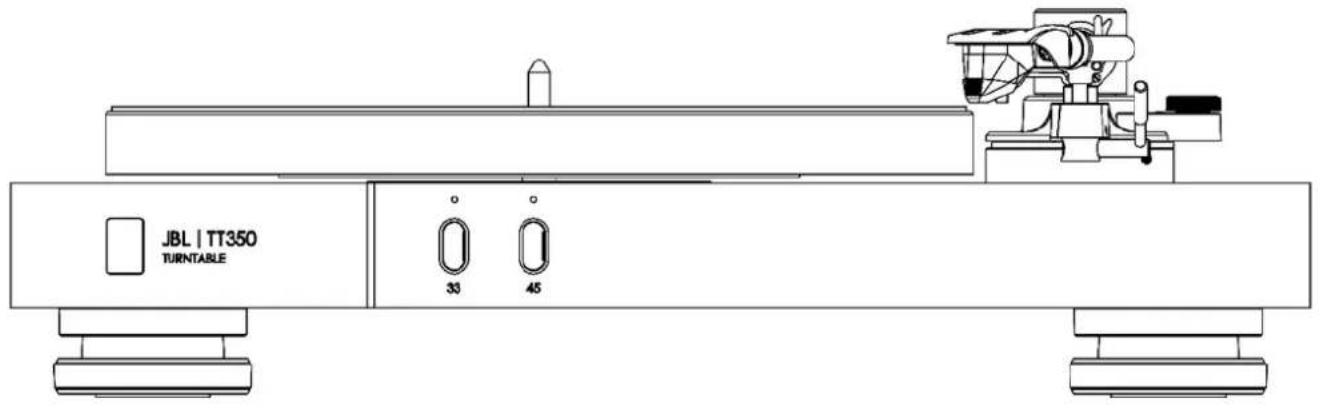
Pg 2 – Quick Start Guide – Turntable
Thank you for choosing JBL
For over 75 years, JBL has been creating best in class audio equipment for concerts, studios, theaters, and homes around the world. JBL is the trusted choice of leading recording artists and sound engineers.
The JBL TT350 is designed to provide you with reliable vinyl playback for decades to come, all with exceptional musicality so you get the most enjoyment from your music.
Please note, the stylus is a wearable part that requires care when handling. Over extended use and time, it will require replacement. If damaged, it should be replaced to avoid damage to vinyl records.
This handbook is a guide to installing and using the TT350 and includes information on its more advanced features.
In the unlikely event of any fault, or you require technical assistance, please contact our dedicated support teams by email using luxurysupport@harman.com, or by telephone using +44 1707 668012 or +1 888 691 4171. Or, if you simply require further information about JBL products, our network of dealers will be happy to help you. Further information can also be found on the JBL website at JBL.com.
Package Contents
JBL TT350 Turntable
Turntable Platter
Rubber Platter Matt
Counterweight
■ Headshell with MM Cartridge Fitted
2x Dust Cover Hinges
■ Region Specific Power Cords
Quick Start Guide
■ Safety and Compliance Document
Placing The Unit
Place the amplifier on a level, firm surface, avoiding direct sunlight and sources of heat or damp.
Do not place the TT350 on top of a power amplifier or other source of heat.
Do not place any other component or item on top of the turntable as this will damage the dust cover.
The normal function of the unit may be disturbed by strong electromagnetic interference. If this occurs, simply reset the unit with the power button, or move the unit to another location.
Assembly
natural_image
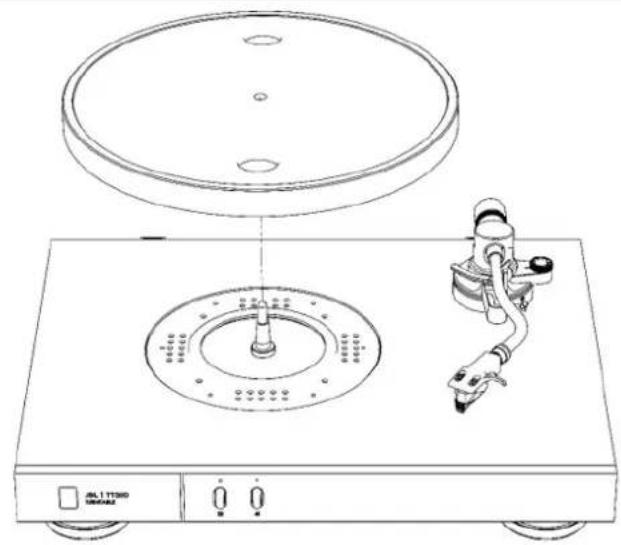
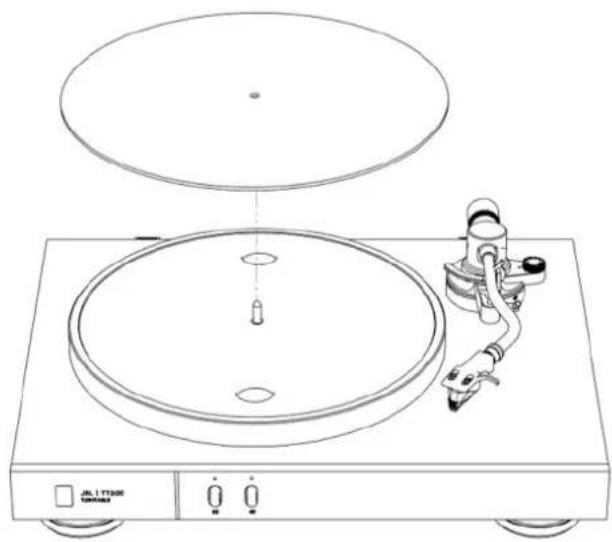
Line drawing of a CD or DVD disc with a rotary switch and top view (no text or symbols)- Fit the platter to the spindle. 2. Place the platter matt on the platter
natural_image
Line drawing of a CD or DVD disc with a speaker and receiver assembly (no text or symbols)
natural_image
Line drawing of a medical or laboratory procedure showing a tool inserted into a device with a red arrow indicating motion (no text or symbols present)- Fit the headshell and cartridge (the cartridge is supplied fitted to the headshell). Rotate the collar at the front end of the tonearm to tighten or loosen the fitting.

natural_image
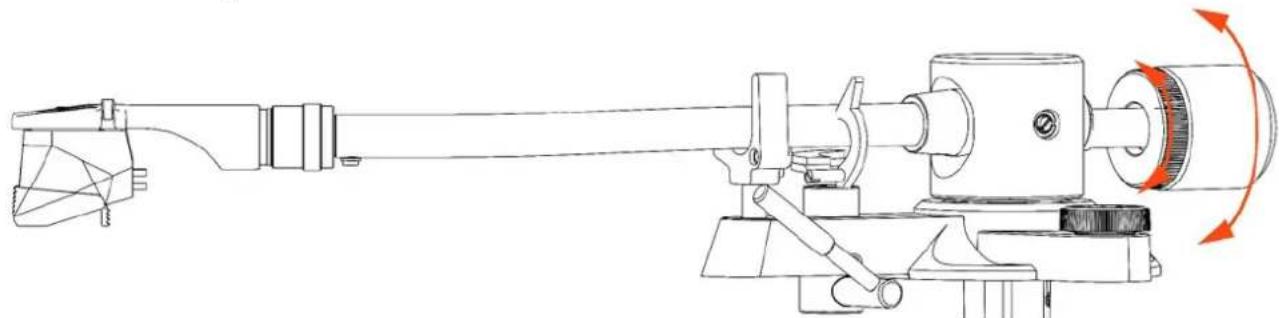
Technical line drawing of a mechanical assembly with a rotating component and a dial indicator (no text or symbols)- Fit the counterweight. Rotate the counterweight at the end of the tonearm to adjust its position. The numbers should be facing toward the front.
natural_image
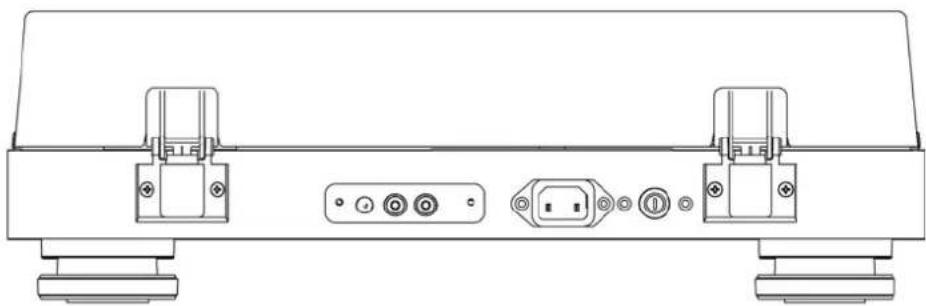
Technical line drawing of a device rear panel with labeled ports and connectors (no text or symbols)- Fit the hinges to the dust cover.
- Slot the hinges into the hinge brackets on the back of the plinth.
Balance the Tonearm
- To balance the tonearm, first fit the headshell with cartridge.
- Ensure the arm rest lever is down and the Anti-Skate is set to zero (0).
- Fit the counterweight all the way on the end of the tonearm.
- Release the arm lock

- Rotate the counterweight slowly clockwise so it moves towards the back
- As you rotate the counterweight, you will find a point at which the arm and cartridge begin to rise. Dial the counterweight back to where the arm does not rise or fall – it should float.
- With the arm floating, reseat it on the arm rest and close the arm lock.
natural_image
Technical line drawing of a mechanical device with rotating shaft and adjustment mechanism (no text or symbols)- Rotate the loading dial on the counterweight to show zero 0 at the top center.
- Now rotate the whole counterweight anti-clockwise until it shows 2 at the top of the loading dial. You have now applied a 2 gram tracking force to the cartridge.
- Set the Anti-Skate dial to 2.
Note: Other cartridges require a different tracking force. Check the documents supplied with any alternative cartridges used.
Connecting the turntable
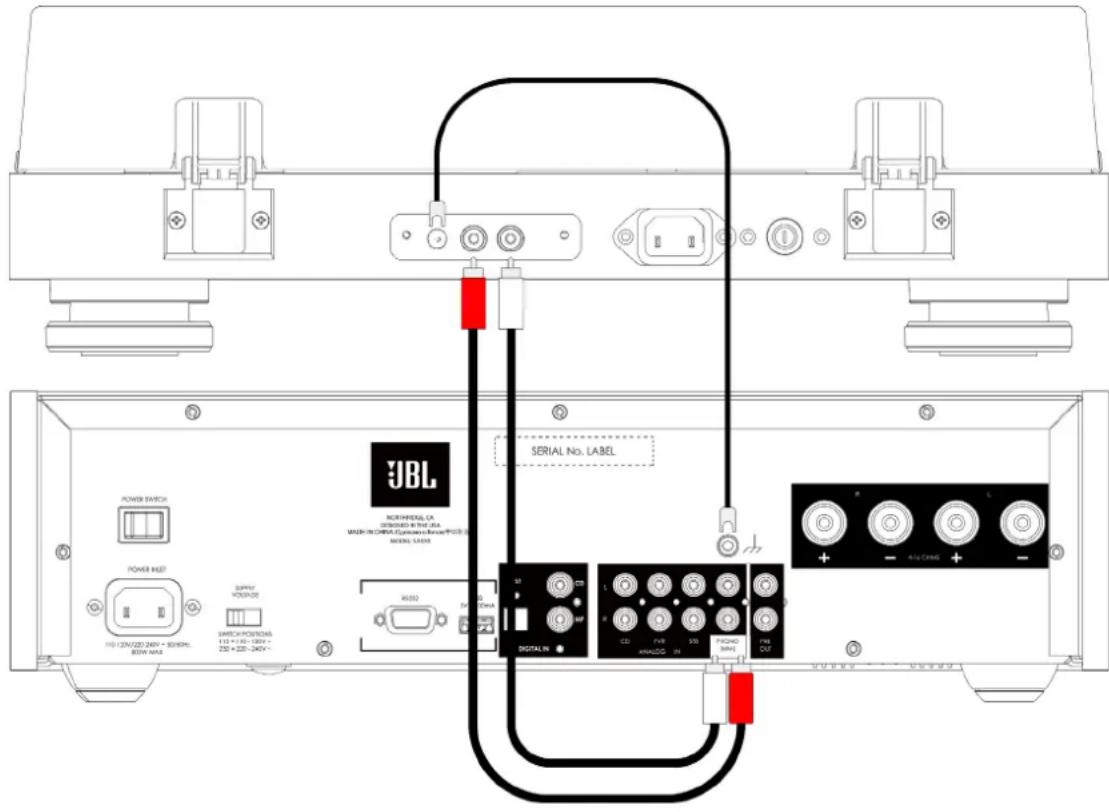
Connect the phono outputs to the Phono input on your amplifier.
Connect the ground cable between the turntable and your amplifier.
Consult your JBL dealer if your amplifier does not have a Phono input. You may require a separate Phono Stage.
Specifications
| Model: JBL TT350 | |
| Plinth Materials: Natural Walnut veneered | MDF with machined Aluminum front panel |
| Platter Materials: Damped Die-cast Aluminum | |
| Tonearm Materials: Aluminum | |
| Tonearm Features: Removeable Headshell | Adjustable CounterweightAdjustable Anti-SkateVertical Track Adjustment |
| Cartridge Fitted: Audio Technica VM95E | |
| Analog Outputs: 1x Stereo (RCA) pair | |
| Motor Type: Direct Drive | |
| Mains voltage AC IN 100V - 240V, ~50-60Hz | |
| Maximum power consumption 36W | |
| Standby power consumption <0.5W | |
| Max. operating temperature 45°C | |
| Dimensions (Including feet with dust cover on and down): | 6.0" H x 17.7" W x 14.0" D(150mm x 449mm x 355mm) |
| Weight (net) 11.1 lbs. (7.5 kg) | |
| Weight (gross) | 15.5 lbs. (10.7 kg) |
This equipment complies with European Commission Regulation (EC) No 1275/2008 and (EU) No 801/2013.
Standby: < 0.5 W Off: < 0.5 W
The power management function switches the equipment automatically into Standby mode in 20mins.

This equipment is a Class II or double insulated electrical appliance.

HARMAN International, Incorporated 8500 Balboa Boulevard, Northridge, CA 91329 USA
Danzigerkade 16G 1013 AP Amsterdam, Netherlands Ground Floor, Westside 2, London Road, Apsley, Hemel Hempstead, Hertfordshire, HP3 9TD, United Kingdom www.jbl.com
© 2023 HARMAN International Industries, Incorporated. All rights reserved. JBL is a trademarks of HARMAN International Industries, Incorporated, registered in the United States and/or other countries. Features, specifications, and appearance are subject to change without notice.


IMPORTANT SAFETY INSTRUCTIONS ....2
Class II Product....2
Thank you for choosing JBL....3
Package Contents .... 3
Placing The Unit .... 3
Front 4
Rear Panel 5
Connecting the turntable....5
Assembly....6
Balance the Tonearm....7
Playing Records 8
Troubleshooting....9
Specifications 9
IMPORTANT SAFETY INSTRUCTIONS
- Read these instructions.
- Keep these instructions.
- Heed all warnings.
- Follow all instructions.
- Clean only with a dry cloth.
- Install this apparatus in accordance with the manufacturer's instructions.
- Do not install this apparatus near any heat sources such as radiators, heat registers, stoves or other apparatus that produce heat.
- Do not defeat the safety purpose of the polarized or grounding-type plug. A polarized plug has two blades with one wider than the other. A grounding-type plug has two blades and a third grounding prong. The wide blade or the third prong is provided for your safety. If the provided plug does not fit into your outlet, consult an electrician for replacement of the obsolete outlet.
-
Protect the power cord from being walked on or pinched, particularly at plugs, convenience receptacles and the point where they exit from the apparatus.
-
Use only attachments/accessories specified by the manufacturer.
- Use only with the cart, stand, tripod, bracket,
or table specified by the manufacturer or sold with the apparatus. When a cart is used, use caution when moving the cart/ apparatus combination to avoid injury fro

-
Unplug this apparatus during lightning storms or when unused for long periods of time.
-
Refer all servicing to qualified service personnel. Servicing is required when the apparatus has been damaged in any way, such as when the power-supply cord or plug is damaged, liquid has been spilled or objects have fallen into the apparatus, or the apparatus has been exposed to rain or moisture, does not operate normally or has been dropped.
-
To disconnect this apparatus from the AC mains completely, disconnect the power-supply cord plug from the AC receptacle.
-
The mains plug of the power-supply cord shall remain readily operable.
-
This apparatus is intended to be used only with the power supply and/or charging cable provided by the manufacturer.
The following instructions may not apply to waterproof devices. Refer to your device user manual or quick start guide for more waterproof instruction if any.
- Do not use this apparatus near water.
- Do not expose this apparatus to dripping or splashing, and ensure that no objects filled with liquids, such as vases, are placed on the apparatus.
WARNING: TO REDUCE THE RISK OF FIRE OR ELECTRIC SHOCK, DO NOT EXPOSE THIS APPARATUS TO RAIN OR MOISTURE.
| CAUTION | |
| RISK OF ELECTRIC SHOCK. DO NOT OPEN. | |
 | THIS SYMBOL ON THE PRODUCT MEANS THERE IS UNINSULATED, DANGEROUS VOLTAGE WITHIN THE PRODUCT ENCLOSURE THAT MAY PRESENT A RISK OF ELECTRICAL SHOCK. |
 | THIS SYMBOL ON THE PRODUCT MEANS THERE ARE IMPORTANT OPERATING AND MAINTENANCE INSTRUCTIONS IN THIS GUIDE. |
Visit the product page at JBL.com and download the Safety Sheet for a full list of safety instructions.
Class II Product

This equipment is a Class II or double insulated electrical appliance. It has been designed in such a way that it does not require a safety connection to electrical earth ("ground" in the U.S.).
This equipment complies with European Commission Regulation (EC) No 1275/2008 and (EU) No 801/2013.
- Off: < 0.5 W
- Standby: < 0.5 W
The power management function switches the equipment automatically into Standby mode in 20mins.
Thank you for choosing JBL
For over 75 years, JBL has been creating best in class audio equipment for concerts, studios, theaters, and homes around the world. JBL is the trusted choice of leading recording artists and sound engineers.
The JBL TT350 is designed to provide you with reliable vinyl playback for decades to come, all with exceptional musicality so you get the most enjoyment from your music.
Please note, the stylus is a wearable part that requires care when handling. Over extended use and time, it will require replacement. If damaged, it should be replaced to avoid damage to vinyl records.
This handbook is a guide to installing and using the TT350 and includes information on its more advanced features.
In the unlikely event of any fault, or you require technical assistance, please contact our dedicated support teams by email using luxurysupport@harman.com, or by telephone using +44 1707 668012 or +1 888 691 4171. Or, if you simply require further information about JBL products, our network of dealers will be happy to help you. Further information can also be found on the JBL website at JBL.com.
Package Contents
JBL TT350 Turntable
Turntable Platter
Rubber Platter Matt
Counterweight
■ Headshell with MM Cartridge Fitted
2x Dust Cover Hinges
■ Region Specific Power Cords
Quick Start Guide
■ Safety and Compliance Document
Placing The Unit
Place the amplifier on a level, firm surface, avoiding direct sunlight and sources of heat or damp.
Do not place the TT350 on top of a power amplifier or other source of heat.
Do not place any other component or item on top of the turntable as this will damage the dust cover.
The normal function of the unit may be disturbed by strong electromagnetic interference. If this occurs, simply reset the unit with the power button, or move the unit to another location.
Front

Stylus Guard
The cartridge includes a stylus guard to protect the needle. On the supplied cartridge, it slides off towards the front. Take care to not contact the needle when fitting and removing this guard. Retain the stylus guard to protect the cartridge when cleaning the tunrable and otherwise not in use.
Rear Panel

Connecting the turntable

Connect the phono outputs to the Phono input on your amplifier.
Connect the ground cable between the turntable and your amplifier.
Consult your JBL dealer if your amplifier does not have a Phono input. You may require a separate Phono Stage.
Assembly
natural_image
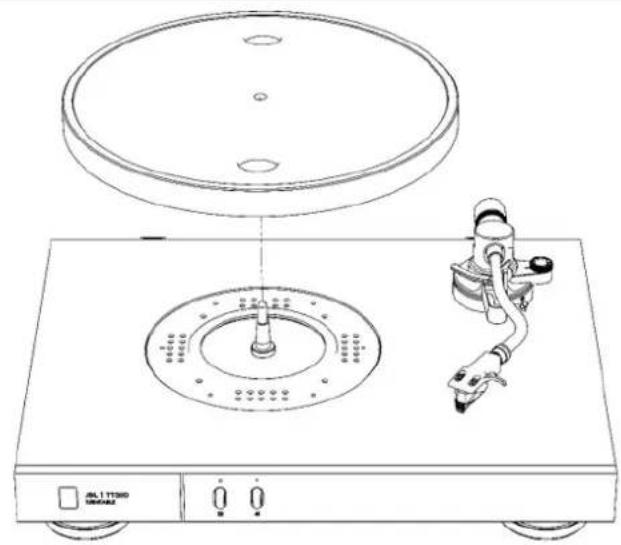
Line drawing of a CD or DVD disc with a rotary switch and top view (no text or symbols)- Fit the platter to the spindle. 2. Place the platter matt on the platter

natural_image
Line drawing of a CD or DVD disc with a speaker and receiver assembly (no text or symbols)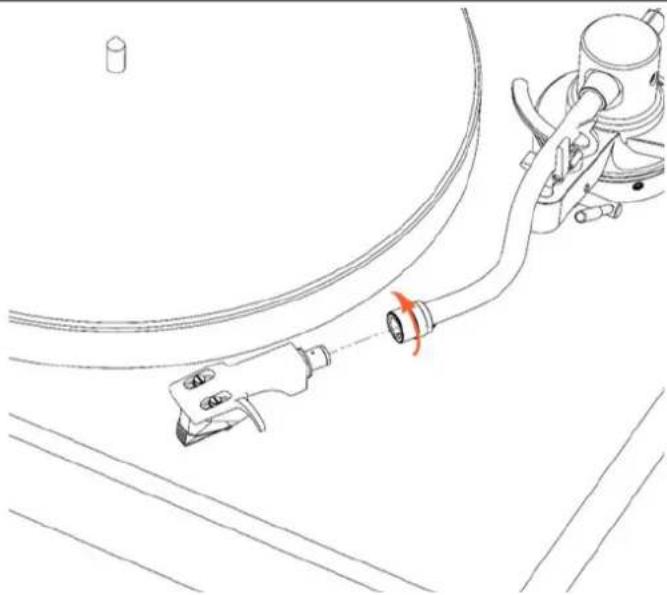
natural_image
Line drawing of a medical or laboratory procedure showing a tool inserted into a tube with an orange arrow indicating direction (no text or symbols present)- Fit the headshell and cartridge (the cartridge is supplied fitted to the headshell). Rotate the collar at the front end of the tonearm to tighten or loosen the fitting.

natural_image
Technical line drawing of a mechanical assembly with a rotating component and a dial indicator (no text or symbols)- Fit the counterweight. Rotate the counterweight at the end of the tonearm to adjust its position. The numbers should be facing toward the front.
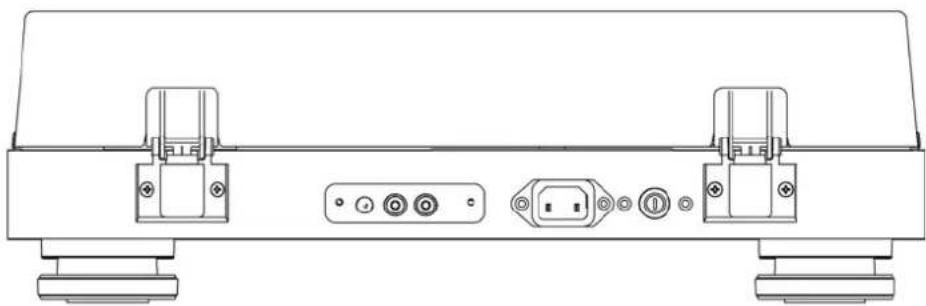
natural_image
Technical line drawing of a device rear panel with labeled ports and connectors (no text or symbols)- Fit the hinges to the dust cover.
- Slot the hinges into the hinge brackets on the back of the plinth.
Balance the Tonearm
- To balance the tonearm, first fit the headshell with cartridge.
- Ensure the arm rest lever is down and the Anti-Skate is set to zero (0).
- Fit the counterweight all the way on the end of the tonearm.
- Release the arm lock

- Rotate the counterweight slowly clockwise so it moves towards the back
- As you rotate the counterweight, you will find a point at which the arm and cartridge begin to rise. Dial the counterweight back to where the arm does not rise or fall – it should float.
- With the arm floating, reseat it on the arm rest and close the arm lock.

natural_image
Technical line drawing of a mechanical device with rotating shaft and adjustment mechanism (no text or symbols)- Rotate the loading dial on the counterweight to show zero 0 at the top center.
- Now rotate the whole counterweight anti-clockwise until it shows 2 at the top of the loading dial. You have now applied a 2 gram tracking force to the cartridge.
- Set the Anti-Skate dial to 2.
Note: Other cartridges require a different tracking force. Check the documents supplied with any alternative cartridges used.
Playing Records
- Remove your record from the sleeve and place it on the platter, locating it in place with the centre pin.
- Remove the stylus guard from the cartridge to reveal the needle.
- Ensure your amplifier is on and the Phono input is selected.
- Start the turntable with the 33 button. Raise the speed to 45 rpm if your record requires it.
- Unclip the Arm lock.
- Raise the arm lift to raise the tonearm.

- Cue the tonearm over the run in groove of the record (or the start of the track you wish to play).
- Lower the arm lift. The tonearm will slowly lower down onto the record.
At the end of the record, lift the tonearm with the arm lift, and return the arm to the rest. You can now stop the platter by pressing the 33 button, and change the record.
Troubleshooting
| Problem Check the following | |
| No sound Is the turntable correctly plugged in and switched on?Is the turntable correctly connected to your amplifier, with the correct input selected?Is the stylus making contact with the record?Is the platter turning?Is the amplifier muted? | |
| Sound is distorted Is the stylus free of dust?Is the stylus damaged?Is the correct tracking weight applied?Is the turntable connected to the correct input on the amplifier?Ensure the phonostage matches the cartridge type, either MM or MC. | |
| Sound includes a Hum Is the ground wire connected between the turntable and amplifier?Separate the turntable from other devices and power cables.Ensure all cables are making a good connection. | |
| The cartridge skips across the record Is the stylus free of dust?Is the stylus damaged?Is the correct tracking weight applied?Increase the Anti-skate force. | |
| The cartridge is worn or damaged Replace the stylus. The replacement stylus (needle) for the supplied cartridge is the AT-VMN95E. Follow instructions supplied with the stylus for changing the stylus. |
Specifications
| Model: JBL TT350 | |
| Plinth Materials: Natural Walnut veneered MDF with machined Aluminum front panel | |
| Platter Materials: Damped Die-cast Aluminum | |
| Tonearm Materials: Aluminum | |
| Tonearm Features: Removeable Headshell | Adjustable CounterweightAdjustable Anti-SkateVertical Track Adjustment |
| Cartridge Fitted: Audio Technica VM95E | |
| Analog Outputs: | 1x Stereo (RCA) pair |
| Motor Type: | Direct Drive |
| Mains voltage | AC IN 100V - 240V, ~50-60Hz |
| Maximum power consumption | 36W |
| Standby power consumption | <0.5W |
| Max. operating temperature | 45°C |
| Dimensions (Including feet with dust cover on and down): | 6.0" H x 17.7" W x 14.0" D(150mm x 449mm x 355mm) |
| Weight (net) | 11.1 lbs. (7.5 kg) |
| Weight (gross) | 15.5 lbs. (10.7 kg) |

HARMAN International, Incorporated 8500 Balboa Boulevard, Northridge, CA 91329 USA
Danzigerkade 16G 1013 AP Amsterdam, Netherlands Ground Floor, Westside 2, London Road, Apsley, Hemel Hempstead, Hertfordshire, HP3 9TD, United Kingdom www.jbl.com
© 2023 HARMAN International Industries, Incorporated. All rights reserved. JBL is a trademarks of HARMAN International Industries, Incorporated, registered in the United States and/or other countries. Features, specifications, and appearance are subject to change without notice.


www.jbl.com/specialtyaudio

Important Safety Instructions
ENGLISH
IMPORTANT SAFETY INSTRUCTIONS
For all products:
- Read these instructions.
- Keep these instructions.
- Heed all warnings.
- Follow all instructions.
- Clean only with a dry cloth
- Do not block any ventilation openings. Install this apparatus in accordance with the manufacturer's instructions.
- Do not install this apparatus near any heat sources such as radiators, heat registers, stoves or other apparatus (including amplifiers) that produce heat.
- Do not defeat the safety purpose of the polarized or grounding-type plug. A polarized plug has two blades with one wider than the other. A grounding-type plug has two blades and a third grounding prong. The wide blade or the third prong is provided for your safety. If the provided plug does not fit into your outlet, consult an electrician for replacement of the obsolete outlet.
- Protect the power cord from being walked on or pinched, particularly at plugs, convenience receptacles and the point where they exit from the apparatus.
- Use only attachments/accessories specified by the manufacturer.
- Use only with the cart, stand, tripod, bracket or table specified by the manufacturer or sold with the apparatus. When a cart is used, use caution when moving the cart/apparatus combination to avoid injury from tip-over.
- Unplug this apparatus during lightning storms or when unused for long periods of time.

- Refer all servicing to qualified service personnel. Servicing is required when the apparatus has been damaged in any way, such as when the power-supply cord or plug is damaged, liquid has been spilled or objects have fallen into the apparatus, or the apparatus has been exposed to rain or moisture, does not operate normally or has been dropped.
- To disconnect this apparatus from the AC mains completely, disconnect the power-supply cord plug from the AC receptacle.
- The mains plug of the power-supply cord shall remain readily operable.
- This apparatus is intended to be used only with the power supply and/or charging cable provided by the manufacturer.
The following instructions may not apply to waterproof devices. Refer to your device user manual or quick start guide for more waterproof instruction if any.
• Do not use this apparatus near water.
- Do not expose this apparatus to dripping or splashing, and ensure that no objects filled with liquids, such as vases, are placed on the apparatus.
WARNING: TO REDUCE THE RISK OF FIRE OR ELECTRIC SHOCK, DO NOT EXPOSE THIS APPARATUS TO RAIN OR MOISTURE.
CAUTION
RISK OF ELECTRIC SHOCK. DO NOT OPEN.

THIS SYMBOL ON THE PRODUCT MEANS THERE IS UNINSULATED, DANGEROUS VOLTAGE WITHIN THE PRODUCT ENCLOSURE THAT MAY PRESENT A RISK OF ELECTRICAL SHOCK.

THIS SYMBOL ON THE PRODUCT MEANS THERE ARE IMPORTANT OPERATING AND MAINTENANCE INSTRUCTIONS IN THIS GUIDE.
CAUTION FCC AND IC STATEMENT FOR USERS (USA AND CANADA ONLY)
This device complies with part 15 of the FCC Rules. Operation is subject to the following two conditions: (1) This device may not cause harmful interference, and (2) this device must accept any interference received, including interference that may cause undesired operation.
CAN ICES-003(B)/NMB-003(B)
FCC SDOC SUPPLIER'S DECLARATION OF CONFORMITY
HARMAN International hereby declares that this equipment is in compliance with the FCC Part 15 Subpart B.
The declaration of conformity may be consulted in the support section of our Web site, accessible from www.jbl.com/specialtyaudio
Federal Communication Commission Interference Statement
This equipment has been tested and found to comply with the limits for a Class B digital device, pursuant to Part 15 of the FCC Rules. These limits are designed to provide reasonable protection against harmful interference in a residential installation. This equipment generates, uses and can radiate radio frequency energy and, if not installed and used in accordance with the instructions, may cause harmful interference to radio communications. However, there is no guarantee that interference will not occur in a particular installation. If this equipment does cause harmful interference to radio or television reception, which can be determined by turning the equipment off and on, the user is encouraged to try to correct the interference by one or more of the following measures:
• Reorient or relocate the receiving antenna.
- Increase the separation between the equipment and receiver.
- Connect the equipment into an outlet on a circuit different from that to which the receiver is connected.
- Consult the dealer or an experienced radio/TV technician for help.
Caution: Changes or modifications not expressly approved by HARMAN could void the user's authority to operate the equipment.
For Products That Transmit RF Energy:
(I) FCC AND IC INFORMATION FOR USERS
This device complies with Part 15 of the FCC rules and Industry Canada license-exempt RSS standard(s). Operation is subject to the following two conditions: (1) This device may not cause harmful interference; and (2) this device must accept any interference received, including interference that may cause undesired operation.
(Ⅱ) FCC/IC Radiation Exposure Statement
This equipment complies with FCC and ISED radiation exposure limits set forth for an uncontrolled environment. This equipment should be installed and operated with minimum distance 20cm between the radiator & your body.
In case this equipment has to subject to FCC/IC SAR (Specific Absorption Rate) exposure test, this equipment is designed to meet the requirements for exposure to radio waves established by the FCC and ISED. These requirements set a SAR limit of 1.6 W/kg averaged over one gram of tissue. The highest SAR value reported under this standard during product certification for use when properly worn on the body or on the head, with no separation. To meet RF exposure guidelines and reduce exposure to RF energy during the operation, this equipment should be positioned at least this distance away from the body or the head.
For radio equipment operates in 5150-5850MHz FCC and IC Caution:
High power radars are allocated as primary users of the S.25 to S.35 GHz and S.65 to S.85 GHz bands. These radar stations can cause interference with and/or damage to LE LAN (Licence-Exempt Local Area Network) devices. No configuration controls are provided for this wireless equipment allowing any change in the frequency of operations outside the FCC grant of authorization for US operation according to Part 15:407 of the FCC rules.
IC Caution:
User should also be advised that:
(i) The device for operation in the band 5150 - 5250 MHz is only for indoor use to reduce the potential for harmful interference to co-channel mobile satellite systems; (ii) the maximum antenna gain permitted for devices in the bands 5250 - 5350 MHz and 5470 - 5725 MHz shall comply with the e.i.r.p. limit: and
(II) The maximum antenna gain permitted for devices in the band 5725 - 5825 MHz shall comply with the e.i.r.p. limits specified for point-to-point and non point-to-point operation as appropriate.
Use Restriction Attention in European Union, operation is limited to indoor use within the band 5150-5350 MHz.
Correct disposal of this product (Waste Electrical & Electronic Equipment)
This symbol means the product must not be discarded as household waste, and should be delivered to an appropriate collection facility for recycling. Proper disposal and recycling helps protect natural resources, human health and the environment. For more information on disposal and recycling of this product, contact your local disposal service, or the shop where you bought th
This product is RoHS compliant.
This product is in compliance with Directive 2011/65/EU and UK The Restriction of the Use of Certain Hazardous Substances in Electrical and Electronic Equipment Regulations 2012, and its amendments, on the restriction of the use of certain hazardous substances in electrical and electronic equipment.
REACH
REACH (Regulation No 1907/2006) addresses the production and use of chemical substances and their potential impacts on human health and the environment. Article 33(1) of BEACH Regulation requires suppliers to inform the recipients if an article contains more than 0.1% (per weight per article) of any substance(s) on the Substances of Very High Concern (SVHC) Candidate List. [REACH candidate list'). This product contains the substance "lead" (CAS-No. 7439-92-1) in a concentration of more than 0.1% per weight. At the time of release of this product, except for the lead substance, no other substances of REACH candidate list are contained in a concentration of more than 0.1% per weight in this product.
Note: On June 27, 2018, lead was added to the REACH candidate list. The inclusion of lead in the REACH candidate list does not mean that lead-containing materials pose an immediate risk or results in a restriction of permissibility of its use.
For devices with headphone jacks
WARNINGS/CAUTIONS

Do NOT use the headphones at a high volume for any extended period.
- To avoid hearing damage, use your headphones at a comfortable, moderate volume level.
- Turn the volume down on your device before placing the headphones on your ears, then turn the volume up gradually until you reach a comfortable listening level.
For Products That Include Batteries
Instructions for Users on Removal, Recycling and Disposal of Used Batteries
To remove the batteries from your equipment or remote control, reverse the procedure described in the owner's manual for inserting batteries. For products with a built-in battery that lasts for the lifetime of the product, removal may not be possible for the user. In this case, recycling or recovery centers handle the dismantling of the product and the removal of the battery. If, for any reason, it becomes necessary to replace such a battery, this procedure must be performed by authorized service centers. In the European Union and other locations, it is illegal to dispose of any battery with household trash. All batteries must be disposed of in an environmentally sound manner. Contact your local waste-management officials for information regarding the environmentally sound collection, recycling and disposal of used batteries.
WARNING: Danger of explosion if battery is incorrectly replaced. To reduce risk of fire, explosion or leakage of flammable liquid/gas, don't disassemble, crush, puncture, short external contacts, expose to temperature above 60°C (140°F), sunshine or like, expose to extremely low air pressure or dispose of in fire or water. Replace only with specified batteries. The symbol indicating 'separate collection' for all batteries and accumulators shall be the crossed-out wheeled bin shown below:

WARNING - For Products That Contain Coin/Button Cell Batteries
DO NOT INGEST BATTERY, CHEMICAL BURN HAZARD. This product contains a coin/button cell battery. If the coin/button cell battery is swallowed, it can cause severe internal burns in just 2 hours and can lead to death. Keep new and used batteries away from children. If the battery compartment does not close securely, stop using the product and keep it away from children. If you think batteries might have been swallowed or placed inside any part of the body, seek immediate medical attention.
For All Products with Wireless Operation:
HARMAN International hereby declares that this equipment is in compliance with the essential requirements and other relevant provisions of Directive 2014/S3/EU and UK Radio Equipment Regulations 2017. The declaration of conformity may be consulted in the support section of our Web site, accessible from www.jbl.com/specialtyaudio.
HARMAN International Industries, Incorporated. All rights reserved. JBL is a trademark of HARMAN International Industries, Incorporated, registered in the United States and/or other countries. Features, specifications and appearance are subject to change without notice.


www.jbl.com/specialtyaudio

Harman International Industries, Incorporated
8500 Balboa Blvd, Northridge, CA 91329, United States
European Representative:
Harman International Industries, Incorporated
EMEA Liaison Office, Danzigerlade 16, 1013 AP Amsterdam.
The Netherlands
UK Business Address:
Ground Floor, Westside 2, London Road, Apsley, Hemel
Hempstead,Hertfordshire,HP39TD,United Kingdom
SSL2021-001
- Thank you for choosing JBL
- Package Contents
- Placing The Unit
- Assembly
- Balance the Tonearm
- IMPORTANT SAFETY INSTRUCTIONS
- Class II Product
- Stylus Guard
- Playing Records
- ENGLISH
- For all products:
- CAUTION
- RISK OF ELECTRIC SHOCK. DO NOT OPEN.
- CAUTION FCC AND IC STATEMENT FOR USERS (USA AND CANADA ONLY)
- FCC SDOC SUPPLIER'S DECLARATION OF CONFORMITY
- Federal Communication Commission Interference Statement
- For Products That Transmit RF Energy:
- FCC AND IC INFORMATION FOR USERS
- (Ⅱ) FCC/IC Radiation Exposure Statement
- For radio equipment operates in 5150-5850MHz FCC and IC Caution:
- IC Caution:
- This product is RoHS compliant.
- REACH
- For devices with headphone jacks
- WARNINGS/CAUTIONS
- For Products That Include Batteries
- Instructions for Users on Removal, Recycling and Disposal of Used Batteries
- WARNING - For Products That Contain Coin/Button Cell Batteries
- For All Products with Wireless Operation:
- European Representative:
- UK Business Address:
Brand : JBL
Model : TT350 Classic
Category : Turntable