CS169-AF - Freezer Cosori - Free user manual and instructions
Find the device manual for free CS169-AF Cosori in PDF.


| Product Type | Chest Freezer |
| Brand | Cosori |
| Model | CS169-AF |
| Dimensions (H x W x D) | 85 x 55 x 55 cm |
| Weight | 30 kg |
| Electrical Supply | 115-120 V, 60 Hz (US) / 220-240 V, 50 Hz (EU) |
| Power Consumption | 100 W (approx.) |
| Refrigerant | R600a |
| Temperature Range | -24°C to -12°C |
| Capacity | 100 liters (approx.) |
| Functions | Fast freeze, adjustable thermostat, interior light |
| Maintenance | Manual defrost recommended; clean interior with mild detergent |
| Safety | Keep ventilation openings clear; do not store flammable materials |
| Spare Parts | Shelves, thermostat, door seal, light bulb |
| Repairability | User-replaceable door seal and light bulb; professional service for other parts |
| Energy Class | A+ (approx.) |
Frequently Asked Questions - CS169-AF Cosori
User questions about CS169-AF Cosori
0 question about this device. Answer the ones you know or ask your own.
Ask a new question about this device
Download the instructions for your Freezer in PDF format for free! Find your manual CS169-AF - Cosori and take your electronic device back in hand. On this page are published all the documents necessary for the use of your device. CS169-AF by Cosori.
USER MANUAL CS169-AF Cosori
(We hope you love your new air fryer as much as we do.)

join the Cosori Cooks Community on Facebook facebook.com/groups/cosoricooks

explore our recipe gallery www.cosori.com/recipes

enjoy weekly, featured recipes made exclusively by our in-house chefs

CONTACT OUR CHEFS
Our helpful, in-house chefs are ready to assist you with any questions you might have!
Email: recipes@cosori.com Toll-Free: (888) 402-1684 M-F, 9:00 am-5:00 pm PST/PDT
On behalf of all of us at Cosori,
Happy cooking!
Table of Contents
Package Contents 3
Specifications 3
Important. Salequards 4
· Key Safety Points 4
· General Safety 5
- While Air Frying 5
- Plug and Cord 5
Getting to Know Your Air Fryer 6
Display Diagram 7
Display Messages 8
Before First Use 9
- Setting Up 9
· Test Run 9
- Basket Tips 10
Using Your Air Fryer 11
· Preheating 11
· Air Frying 12
- Shaking Food 15
· Cooking Guide 16
- More Functions 17
Accessories 17
Care and Maintenance 18
Troubleshooting 19
Warranty Information 21
Customer Support 22
Package Contents
1 × 5.8 - Quart Air Fryer
1 x Recipe Book
1 x Quick Reference Guide
1 x User Manual
Specifications
| Power Supply AC 120V, 60Hz | |
| Rated Power L700W | |
| Capacity | 5.8 qt / 5.5 L(serves 3-5 people) |
| Temperature Range | 170° - 400°F /77° - 204°C |
| Time Range | 60 min |
| Dimensions | 11.8 x 13.8 x 12.6 in /30 x 35 x 32 cm |
| Weight | 12.3 lb / 5.6 kg |
IMPORTANT SAFEGUARDS
Follow basic safety precautions when using your air fryer. Read all instructions.
Key Safety Points
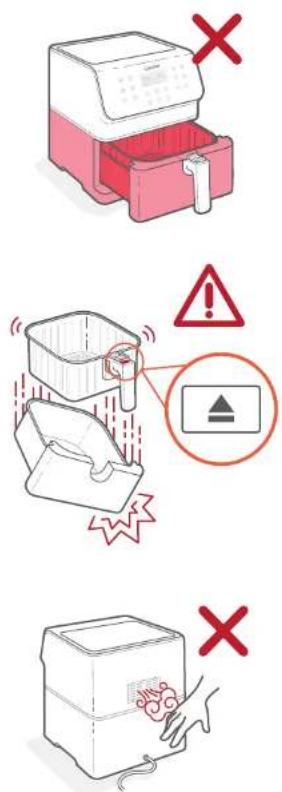
Do not touch hot surfaces. Use handle.
Only press the basket release button with the baskets resting flat on a counter or any level, heat-resistant surface.
The handle is attached to the inner basket, not the outer basket. When you press the basket release button, the outer basket will drop.
Do not block any ventilation openings. Hot steam is released through openings. Keep your hands and face clear of openings.
General Safety
- Do not immerse the air fryer housing or plug in water or liquid.
- Closely supervise children near your air tryer.
- Lymphing when not in use, and before cleaning. Allow to cool before putting on or taking off parts.
- Do not use your air fryer if it is damaged, not working, or if the cord or plug is damaged. Contact Customer Support (see page 22).
- Do not use third party replacement parts or accessories, as this may cause injuries.
- Do not use outdoors.
- Do not place the air fryer or any of its parts on a stove, near gas or electric burners, or in a heated oven.
- He extremely cautious when moving your air fryer (or removing the baskets) if it contains hot oil or other hot liquids.
- Do not clean with metal securing pads. Metal fragments can break off the pad and touch electrical parts, creating a risk of electric shock.
- Do not place anything on top of your air fryer Do not store anything inside your air fryer.
- Only use your air fryer as directed in this manual.
- Not for commercial use. Household use only
While Air Frying
• Art air fryer works with no air only. Never fill the baskets with oil or fat.
- Never use your air fryer without the baskets in place.
- Do not place oversized foods or metal utensils into your air fryer.
- Do not place paper, cardboard, non-hea-resistant plastic, or similar materials, into your air fryer. You may use parchment paper or foil.
- Never put baking or parchment paper into the air fryer without food on top. Air circulation can cause paper to lift and touch heating coils.
- Always use heat-safe containers. Be extremely cautious if using containers that are a metal or glass.
- Keep your air fryer away from flammable materials (curains, tablecoats, etc). Use on a flat, stable, heat-resistant surface away from heat sources or liquids.
- Immediately turn off and unplug your air tryer if you see dark smoke coming out. White smoke is normal, caused by hearing fat or food splashing, but dark smoke means that food is burning or there is a circuit problem. Wait for smoke to clear before pulling the baskets out. "If the cause was not burn, food, contact. Customer Support (see page 22).
- Do not leave your air fryer unattended while in use
Plug and Cord
- Your air fryer has a polarized plug (one strong is wider than the other, which fits into a polarized outlet on y one way. If the plug does not fit, reverse the plug. If it still does not fit, do not use the plug in that outlet. Do not alter the plug in any way.
- Do not let the power cord for any extension cord hang over the edge of a table or counter, or touch hot surfaces.
- Your air fryer should only be used with 120V, 60Hz electrical systems. Do not plug into another type of outlet:
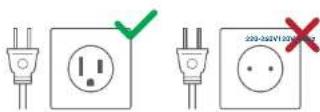
Note: This air fryer uses a short power supply cord to reduce the risk of entangling or tripping. Use extension cords with care. The marked electrical rating of the extension cord must be as great as the rating of the fryer (see page 3).
Electromagnetic Fields (EMF)
The Cosoti Air Fryer complies with all standards regarding electromagnetic fields (EMF). If handled properly and according to the instructions in this user manual, the appliance is safe to use based on scientific evidence available today.
SAVE THESE INSTRUCTIONS
GETTING TO KNOW YOUR AIR FRYER
Your Cosori Air Fryer uses rapid 560° air circulation technology to cook with little-to-no oil, for quick, crispy, delicious food with up to 85% fewer calories than deep fryers. With user friendly, one-touch controls, nonstick baskets, and an intuitive, safe design, the Cosori Air Fryer is the star of your kitchen.
Air Fryer Diagram
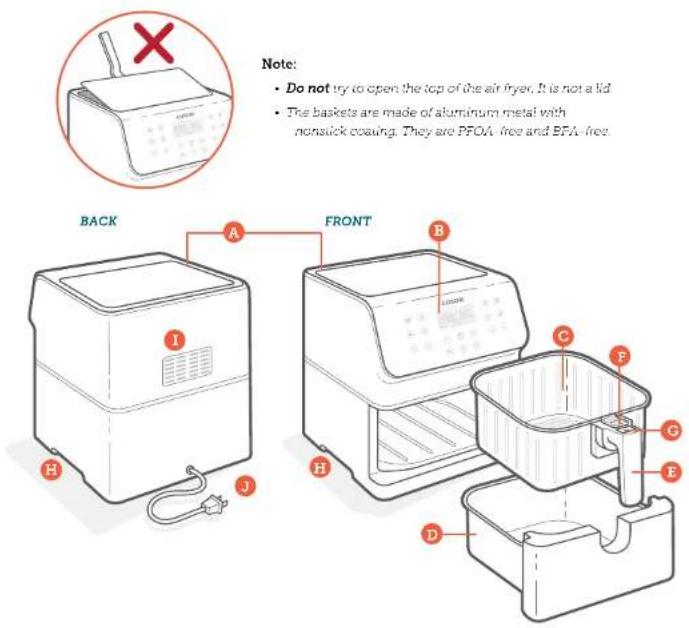
A. Air Inlet
B. Control Screen
C. Inner Basket
D. Outer Basket
E. Basket Handle
F. Sliding Button Guard
G. Basket Release Button
H. Housing Handles
- Air Outlet
J. Power Cord
m = 311
DISPLAY DIAGRAM
Note:
- When you press a button to use a function or program, it will turn blue to show that it's active. Pressing again will deselect the function or program and return to air frying manually. (Figure 1.1)
• To save or reset presets, see Preset Settings (page 14)

Figure 11
Presets
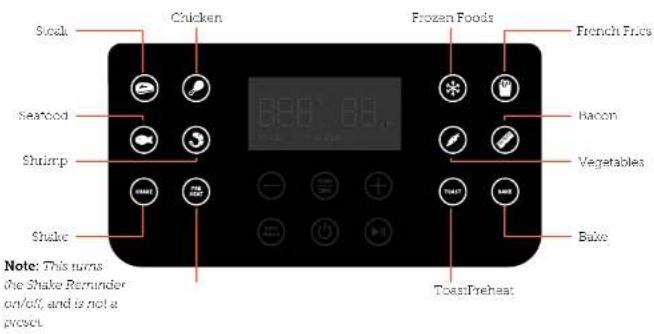
Control Panel
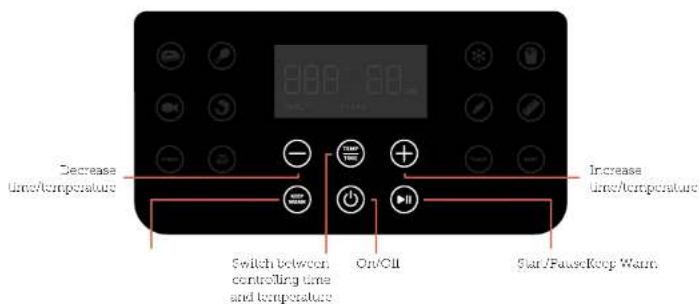
DISPLAY DIAGRAM (CONT.)
Display
Temperature display
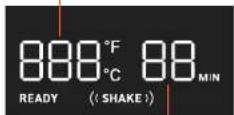
time display
DISPLAY MESSAGES
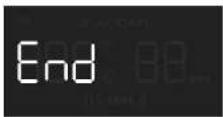
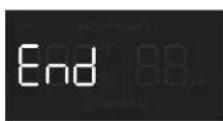
Cooking program has ended
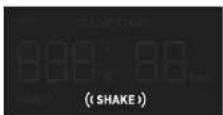
Reminder to shake or flip food.
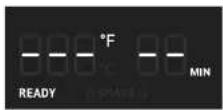
Air fryer is preheated and ready to start cooking.
BEFORE FIRST USE
Setting Up
- Remove all packaging from the air fryer, including any temporary stickers.
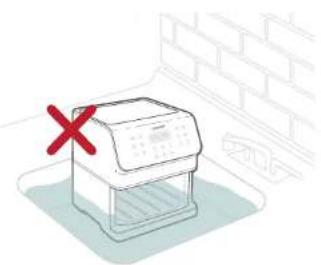
- Place the air fryer on a stable, level, heat-resistant surface. Keep away from areas that can be damaged by steam (such as walls or cupboards).
Note: Leave 5 in /13 cm of space behind and above the air fryer. (Figure 2.1) Leave enough room to remove the baskets
- Full the handle to remove the baskets. Remove all plastic from the baskets.
- Press the basket release button to separate the inner basket from the outer basket.
- Wash both baskets thoroughly, using either a dishwasher or a non-abrasive sponge.
- Wipe the inside and outside of the air fryer with a slightly moist cloth. Dry with a towel.
- Put the baskets back inside the air fryer.
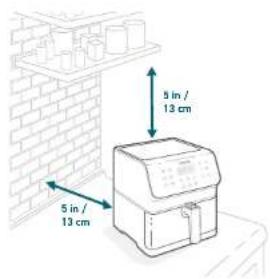
Figure 2.1
Test Run
A test run will help you become familiar with your air fryer, make sure it's working correctly, and clean it of possible residues in the process.
- Make sure the air fryer baskets are empty and plug in the air fryer.
- Press Preheat. The display will show '400°F' and '5 MIN'.
- Press ▶ to begin preheating. When preheating is done, the air fryer will beep.
- Pull out the baskets and let them cool for 5 minutes. Then place the empty baskets back in the air fryer.
- Press to select the Steak prese. The display will show '400°F' and '6 MIN'.
- Press Temp/Time twice. The time will blink on the display. Press the - button once to change the time to 5 minutes.
- Press ▶ to begin. When finished, the air fryer will beep.
- Pull out the baskets. This time, let the baskets cool completely for 10–30 minutes.
Basket Tips
- Only separate the baskets to clean or alter cooking
- The button guard protects the release button from being pressed accidentally. Slide the button guard forward to press the basket release button. [Figure 2.2]
- Never press the release button while carrying the baskets.
- Only press the basket release button with the baskets resting on a counter, or any level, heat-resistant surface.
- The handle is attached to the inner basket, not the outer basket. [Figure 2.3] When you press the release button, the outer basket will drop
Note:
- Do not untrow the basket handle from the baskets.
• To order accessories, please contact Customer Support (see page 22).
Rubber Stopper
- The inner basket contains a rubber stopper made of safe, FDA-approved material. This stopper prevents the inner basket from directly touching the outer basket and, in rare cases, damaging the non-slick coating on the baskets.
- The stopper can safely be removed based on user preference. For easy removal, start from the bottom of the inner basket and pull out one side of the stopper at a time. [Figure 2.4]
- If you want to place the rubber stopper back in the inner basket, first soak it in water. [Figure 2.5] Then push the stopper back in through the bottom of the basket. Push in one side of the stopper at
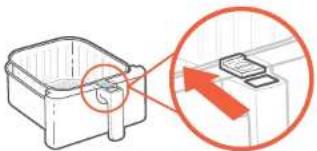
Figure 2.2
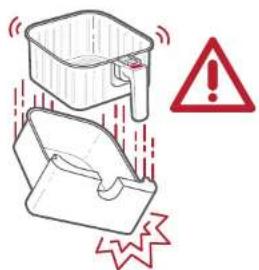
Figure 2.3
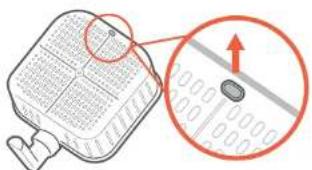
Figure 2.4
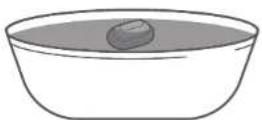
Figure 2.5
USING YOUR AIR FRYER
Preheating
We recommend preheating before placing food into the air fryer, unless your air fryer is already hot. Food will not cook thoroughly without preheating.
- Flug in. Press ⏻ to turn on the air fryer.
- Press Preheat The display will show '400°F' and '5 MIN'.
- Optionally, press the + or - buttons to change the temperature. The time will adjust automatically
| Temperature Time | |
| 400°F / 204°C 5 minutes | |
| 390°F / 199°C 5 minutes | |
| 380°F / 193°C 5 minutes | |
| 370°F / 188°C 4 minutes | |
| 360°F / 182°C 4 minutes | |
| 350°F / 177°C 4 minutes | |
| 340°F / 171°C 4 minutes | |
| 330°F / 166°C and below 3 minutes | |
- Press to begin preheating.
- When preheating is done, the air tryer will beep 3 times. The display will show the set: preheat temperature. [Figure 3.1]
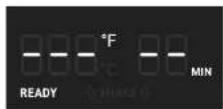
Figure 3.1
Note: If no buttons are pressed for 3 minutes, the air fryer will clear all settings and go into standby.
Air Frying
Note:
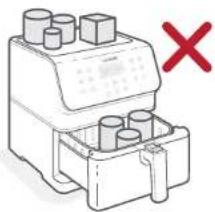
- Do not place anything on top of your air fryer. This will disrupt airflow and cause poor air frying results. (Figure 3.2)
- An air fryer is not a deep fryer. Do not fill the baskets with oil, frying fat, or any liquid.
- When taking the baskets out of the air fryer, be careful of hot steam, and do not press the basket release button
natural_image
Simple line drawing of a mechanical component with no text or symbols, featuring a red 'X' mark (no readable text or symbols)Figure 3.2
Air Frying
- Preheat your air fryer (see page 11).
- When your air fryer displays "READY", add food to the baskets.
- Select a preset cooking program (see page 14)
Note: Presets are programmed with an ideal time and temperature for cooking certain foods. You can also set a custom time and temperature without choosing a preset.
- Optionally, customize the temperature and time, and add a Shake Reminder. You can do this anytime during cooking.
a. Press Temp/Time to change temperature or time. The temperature or time will blink on the display.
b. Press line + or - buttons to change the temperature (1/0°-400°F / 77°-204°C) or time (1-50 minutes).
Note:
• To rapidly increase or decrease time or temperature, press and hold the + or - buttons
- If you do not press Temp/
Time, then pressing + or - will
automatically change temperature.
c. Press SHAKE to add or remove a Shake Reminder during cooking.
-
Press ▶ to begin air frying.
-
When the Shake Reminder is turned on, it will appear halfway through cooking time. The air fryer will beep 5 times, and ((SHAKE)) will blink on the display.
a. Take the baskets out of the air fryer, being careful of hot steam. The air fryer will pause cooking automatically, and the display will turn off until the baskets are replaced.
b. Snake or flip the food. Be careful not to press the basket release button.
c. Put the baskets back into the air fryer.
Note: See Shaking Food (page 15).
- The air fryer will beep 3 times when, finished. The display will show:
- Optionally, press Keep Warm. Press the + or - buttons to charge the time (1 - 60 minutes)
- Take the oaskets out of the air fryer, being careful of hot steam
- Remove the inner basket from the outer basket to serve food. When separating baskets
a. Make sure the baskets are resting on a flat surface.
b. Watch for hot oil or fat collected in the outer basket. To avoid splashing, drain oil before replacing inner basket. [Figure 3.3]
- Allow to cool before cleaning
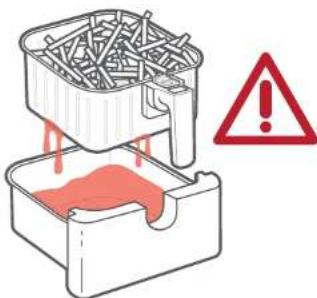
Figure 3.3
Preset Settings
Using a preset is the easiest way to air fry. Presets are programmed with an ideal time and temperature for cooking certain foods.
- You can customize a preset's time (1–60 minutes), temperature (170° 400°F / 77° 204°C), and Shake Reminder, unless noted
• To save a preset
-
Choose a preset and adjust the time and temperature. Optionally, add or remove the Shake Reminder by pressing SHAKE.
-
Press and hold the presel icon until the air fryer beeps 1 time.
| Preset Symbol | Default Temperature | Default Time Shake Reminder?* | ||
| Steak | 400°F / 204°C 6 minutes - | |||
| Chicken | 380°F / 193°C 23 minutes | |||
| Seafood | 350°F / 177°C | 8 minutes - | ||
| Shrimp | 370°F / 188°C | 6 minutes | ((SHAKE)) | |
| Bacon | 320°F / 160°C | 8 minutes | - | |
| Frozen Foods | 380°F / 193°C | 8 minutes | ((SHAKE)) | |
| French Fries** | 380°F / 193°C 25 minutes | ((SHAKE)) | ||
| Vegetables | 320°F / 160°C | 8 minutes | ((SHAKE)) | |
| Toast | 320°F / 160°C | 8 minutes | - | |
| Bake | 300°F / 149°C 35 minutes | |||
| Preheat | 400°F / 204°C | 5 minutes (auto adjust) | - | |
| Keep Warm | 170°F / 77°C | 5 minutes - | ||
* See Shaking Food (page 15).
** See Cooking Guide (page 16) for tips on air frying french fries.
Shaking Food
How to Shake What to Shake
- During cooking, take the baskets out of the air fryer and shake, mix, or flip the food.
A. To shake food:
- Hold the baskets just above a heat-resistant surface for safety purposes. Do not press the basket release button
- Shake the baskets.
B. If the baskets are too heavy to shake:
- Place the baskets on a heat-resistant holder or surface.
- Separate the baskets. Make sure no liquids are dripping from the inner basket.
- Carefully shake the inner basket.
Note: Do not use this method if there is a risk of hot liquids splashing.
C. If the baskets are too heavy to shake and there are hot liquids present:
- Place the baskets on a heat-resistant holder or surface.
-
Use longs to mix or flip the food
-
When you take the baskets out, the air fryer will pause cooking automatically. As a safety feature, the display will turn off until the baskets are replaced.
- When you replace the baskets, cooling will automatically resume.
-
Avoid shaking longer than 50 seconds, as the air fryer may start to cool down
-
Small foods that are stacked will usually need shaking, such as fries or nuggets.
- Without shaking, foods may not be crispy or evenly cooked.
- You can flip other foods, such as steak, to ensure even browning.
When to Shake
- Shake or flip food once halfway through cocking, or more if desired.
- The Shake Reminder is designed to remind you to check on your food. Tap SHAKE to turn on the Shake Reminder. Certain presets use the Shake Reminder automatically (see Preset Settings page 14).
Shake Reminder
- The Shake Reminder will alert you with 5 beeps, and '((SHAKE))' will blink on the display.
- If you do not remove the baskets, the Snake Reminder will beep again after 1 minute and the display will show a solid “(SHAKE)”.
• The Shake Reminder will go away once you take out the baskets.
Cooking Guide
Overfilling
- If the basket is overfilled, food will cook unevenly.
- Food should not be filled over the 'MAX' line of the inner basket. [Figure 3.4] Do not pack in food.
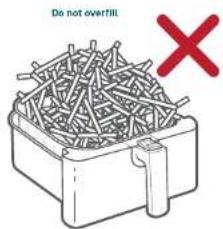
Figure 3.4
Using Oil
- Adding a small amount of oil to your food will make it crispier. Use no more than 2 US tbsp / 30 mL of oil.
- Oil sprays are excellent for applying small amounts of oil evenly to all food items.
Food Tips
- You can air fry any frozen foods or goods that can be baited in an oven.
• To make cakes, hand pies, or any food with filling or baller, place food in a heat-safe container before placing in the baskets.
• Air frying high-fat foods will cause fat to drip to the bottom of the baskets. To avoid excess smoke while cooking, pour out fat drippings after cooking. - Liquid marinated foods create splatter and excess smoke. Pat these foods dry before air frying.
French Fries
- Add ½–1 US tosp / 8–15 mL of. for crispiness.
- When making fries from raw potatoes, soak uncooked fries in water for 15 minutes to remove starch prior to frying. Fat dry with a towel before adding oil.
- Cut uncooked fries smaller for crispier results. Try cutting fries into 1/4 by 3 inch / 0.6 by 7.6 cm strips.
Note: For more from the Cosori Kitchen, check out our Recipe Book and Tips from the Chef
More Functions
Switching Temperature Units
- Press and hold Temp/Time for 3 seconds.
- The air fryer will beep once, and the temperature unit will change from Fahrenheit to Celsius.
- Repeat to switch back to Fahrenheit.
Pausing
- Press ▶ to pause cooking. The air fryer will stop heating, and ▶ will blink until you press ▶ to resume cooking.
• After 30 minutes of inactivity, the air fryer will turn off. - This function allows you to pause the cooking program without removing the baskets from the air fryer.
Automatically Resume Cooking
- If you pull out the baskets, the air fryer will pause cooking automatically. The display will turn off temporarily as a safety feature.
- When you return the baskets, the air fryer will automatically resume cooking based on your previous settings.
Automatic Shutoff
- If the air fryer has no active cooking programs, the air fryer will clear all settings and turn off after 3 minutes of inactivity
Overheat Protection
- If the air fryer overheats, it will automatically shut down as a safety feature.
- Let the air fryer cool down completely before using it again.
ACCESSORIES
You can purchase more accessories for your air fryer from Cosori's online store. Go to cosori.com for more information.
If you have any questions, please contact Customer Support (see page 22).
CARE AND MAINTENANCE
Note:
• Always clean the air fryer baskets and interior after every use.
- Lining the outer basket with foil may make cleanup easier
- Turn off and unplug the air fryer. Allow it to cool completely before clearing. Full out the baskets for faster cooling.
- Wipe the outside of the air fryer with a moist cloth, if necessary.
- The baskets are dishwasher sale. You can also wash the baskets with hot, soapy water and a non-abrasive sponge. Soalt if necessary.
Note: The baskets have a nonslick coating.
Avoid using metal utensils and abrasive cleaning materials.
4. For stubborn grease
a. In a small bowl, mix 2 US tbsp / 30 mL of baking soda and 1 US tbsp / 15 mL of water to form a spreadable paste.
b. Use a sponge to spread the paste on the baskets and scrub. Let the baskets sit for 15 minutes before rinsing.
c. Wash baskets with soap and water before using.
-
Clean the inside of the air layer with a slightly moist, non-abrasive sponge or cloth. Do not immerse in water. Figure 4.1: If needed, clean the heating coil to remove food debris.
-
Dry before using.
Note: Make sure the heating coil is completely dry before turning on the air fryer.
natural_image
Illustration of a printer with a red X mark and a brick wall background (no text or symbols)Figure 4.1
TROUBLESHOOTING
| Problem Possible | Solution |
| The air fryer will not turn on. | Make sure the air fryer's plugged in. |
| Push the baskets securely into the air fryer. | |
| Foods are not completely cooked. | Place smaller batches of food items into the inner basket. If the basket is overstuffed, then foods will be undercooked. |
| Increase cooking temperature or time. | |
| Foods are cooked unevenly. | Foods that are stacked on top of each other or close to each other need to be shaken or flipped during cooking (see Shaking Food, page 15). |
| Foods are not crispy after air frying. | Spraying or brushing a small amount of oil on foods can increase crispness (see Cooking Guide, page 16). |
| French fries are not cooked correctly. | See French Fries, page 16. |
| Baskets will not slide into the air fryer securely. | Make sure the inner basket is not overfilled with food. |
| Make sure the inner basket is securely inside the outer basket. | |
| White smoke or steam is coming out of the air fryer. | The air fryer may produce some white smoke or steam when you use it for the first time or during cooking. This is normal. |
| Make sure the baskets and the inside of the air fryer are cleaned properly and not greasy. | |
| Cooking greasy foods will cause oil to leak into the outer basket. This oil will produce white smoke, and the baskets may be hotter than usual. This is normal, and should not affect cooking. Handle bases with care. |
TROUBLESHOOTING
| Problem Possible Solution | |
| Dark smoke is coming out of the air fryer. | Immediately unplug your air fryer. Dark smoke means that food is burning or there is a circuit problem. Wait for smoke to clear before pulling the baskets out. If the cause was not burnt food, contact Customer Support (see page 22) |
| The air fryer has a plastic smell. | Any air fryer may have a plastic smell from the manufacturing process. This is normal. Follow the instructions for a Test Run (page 9; to get rid of the plastic smell. If a plastic smell is still present, please contact Customer Support (see page 22) |
| Display shows Error Code "E1". | There is an open circuit in the temperature monitor. Contact Customer Support (see page 22) |
| Display shows Error Code "E2". | There is a short circuit in the temperature monitor. Contact Customer Support (see page 22) |
| Display shows Error Code "E3". | The air fryer's overheat protection has activated. Turn off and unplug the air fryer and allow it to cool completely. If the display continues to show 'E3', contact Customer Support (see page 22) |
| Display shows Error Code "E4". | The air fryer has been plugged into a 220-240V outlet. Unplug the air fryer. Only use the air fryer with 120V, 60Hz outliers. |
If your problem is not listed, please contact Customer Support (see page 22).
WARRANTY INFORMATION
| Product Name | Premium 18-H-Court Air-Inergy |
| Model CT358-AF Series | |
| For your own reference, we strongly recommend that you record your order ID and date of purchase. | |
| Date of Purchase | |
| Order ID | |
TERMS & POLICY
Arovas Corporation ("Arovas") warrants this product to the original purchaser to be free from defects in material and workmanship, under normal use and conditions, for a period of one year from the date of original purchase.
Arovas agrees, at our option during the warranty period, to repair any defect in material or workmanship or furnish an equal product in exchange without charge, subject to verification of the defect or malfunction and proof of the date of purchase.
There is no other express warranty. This warranty does not apply:
- If the product has been modified from its original condition;
- If the product has not been used in accordance with directions and instructions in the user manual;
• To damages or defects caused by accident, abuse, misuse or improper or inadequate maintenance,
• To damages or defects caused by service or repair of the product performed by an unauthorized service provider or by anyone other than Arovasu. - To damages or defects occurring during commercial use, rental use, or any use for which the product is not intended.
• To damages or defects exceeding the cost of the product
Arovast will not be liable for indirect, incidental, or consequential damages in connection with the use of the product covered by this warranty.
This warranty exter is only to the original consumer purchaser of the product and is not transferable to any subsequent owner of the product regardless of whether the product is transferred during the specified term of the warranty.
This warranty does not extend to products purchased from unauthorized sellers. Arovast's warranty extends only to products purchased from authorized sellers that are subject to Arovast's quality controls and have agreed to follow its quality controls.
ALL IMPLIED WARRANTIES ARE LIMITED TO THE PERIOD OF THIS LIMITED WARRANTY.
This warranty gives you specific legal rights and you may also have other rights which vary from state to state. Some states do not allow the exclusion or limitation of incidental or consequential damages, so the above limitation or exclusion may not apply to you.
If you discover that your product is defective within the specified warranty period, please contact Customer Support via support@coson.com. DO NOT dispose of your product before contacting us. Once our Customer Support, Team has approved your request, please return the product with a copy of the invoice and order ID.
Extend Your Warranty by 1 Year
Register your product within 14 days of purchase at www.coscn.com/warranty to extend your 1-year warranty by an additional year.
This warranty is made by.
Arovas Corporation, 1232 N. Miller St. Suite A Anaheim, CA 93805
CUSTOMER SUPPORT
If you have any questions or concerns about your new product, please contact our helpful Customer Support Team.
Arovast Corporation
1202 N. Miller St., Suite A
Anaheim, CA 92806
Support Hours
Mon–Fri, 9:00 am–5:00 pm PST/PDT
Email: support@cosori.com
Toll-Free: (888) 402-1684
*Please have your invoice and order ID ready before contacting Customer Support.
SHOW US WHAT YOU'RE MAKING
We hope this manual has been helpful. We can't wait to see your beautiful results, and we think you'll want to share glam shots. Our community awaits your uploads—just pick your platform of choice below. Snap, tag, and hashtag away, Cosori chef!
#iCookCosori

@cosoricooks

Cosori Appliances
Considering what to cook? Many recipe ideas are available, both from us and the Cosori community.
MORE COSORI PRODUCTS
If you're happy with this air fryer, the line doesn't stop here. Check out www.cosori.com for a line of all our beautiful and thoughtfully designed cookware. They might be right at none in your kitchen, too!
COSORI
Questions or Concerns?
Mon–Fri, 9:00 am–5:00 pm PST/PDT
support@cosori.com | (888) 402-1684
- CONTACT OUR CHEFS
- Table of Contents
- Package Contents
- Specifications
- IMPORTANT SAFEGUARDS
- General Safety
- While Air Frying
- Plug and Cord
- Electromagnetic Fields (EMF)
- SAVE THESE INSTRUCTIONS
- GETTING TO KNOW YOUR AIR FRYER
- DISPLAY DIAGRAM
- Note:
- DISPLAY DIAGRAM (CONT.)
- Display
- DISPLAY MESSAGES
- BEFORE FIRST USE
- Setting Up
- Test Run
- Basket Tips
- Rubber Stopper
- USING YOUR AIR FRYER
- Preheating
- Air Frying
- Preset Settings
- Shaking Food
- How to Shake What to Shake
- When to Shake
- Shake Reminder
- Cooking Guide
- Overfilling
- Using Oil
- Food Tips
- French Fries
- More Functions
- Switching Temperature Units
- Pausing
- Automatically Resume Cooking
- Automatic Shutoff
- Overheat Protection
- ACCESSORIES
- CARE AND MAINTENANCE
- TROUBLESHOOTING
- WARRANTY INFORMATION
- TERMS & POLICY
- There is no other express warranty. This warranty does not apply:
- ALL IMPLIED WARRANTIES ARE LIMITED TO THE PERIOD OF THIS LIMITED WARRANTY.
- Extend Your Warranty by 1 Year
- CUSTOMER SUPPORT
- Arovast Corporation
- Support Hours
- SHOW US WHAT YOU'RE MAKING
- #iCookCosori
- @cosoricooks
- Cosori Appliances
- MORE COSORI PRODUCTS
- COSORI
Brand : Cosori
Model : CS169-AF
Category : Freezer