
ISC-EDA0002 - Detector Dahua Technology - Free user manual and instructions
Find the device manual for free ISC-EDA0002 Dahua Technology in PDF.


| Product Type | Digital Deactivator |
| Brand | Dahua Technology |
| Model | ISC-EDA0002 |
| Working Frequency | 58 kHz ±2% |
| Deactivation Height | ≤5 cm |
| Deactivation Speed | 120 pcs/min |
| Power Input | 220–240 VAC, 47–63 Hz |
| Power Output | 18 VAC, 1660 mA |
| Working Temperature | -5 °C to +50 °C |
| Relative Humidity | 0%–90% (RH, non-condensing) |
| Indicators | LED (red for power, green for deactivation) and buzzer |
| Usage Environment | Indoor only |
| Installation | Plug and play; connect to power supply |
| Safety | Use only provided power adapter; strict grounding; avoid water ingress |
| Maintenance | Keep ventilated, do not cover, protect from sunlight and moisture |
Frequently Asked Questions - ISC-EDA0002 Dahua Technology
User questions about ISC-EDA0002 Dahua Technology
0 question about this device. Answer the ones you know or ask your own.
Ask a new question about this device
Download the instructions for your Detector in PDF format for free! Find your manual ISC-EDA0002 - Dahua Technology and take your electronic device back in hand. On this page are published all the documents necessary for the use of your device. ISC-EDA0002 by Dahua Technology.
USER MANUAL ISC-EDA0002 Dahua Technology
natural_image
Abstract geometric composition with gray and red color blocks (no text or symbols)ZHEJIANG DAHUA VISION TECHNOLOGY CO., LTD.
V1.0.0
Foreword
Models
DHI-ISC-EDA0002
Safety Instructions
The following signal words might appear in the manual.
| Signal Words Meaning | |
 DANGER DANGER | Indicates a high potential hazard which, if not avoided, will result in death or serious injury. |
 WARNING WARNING | Indicates a medium or low potential hazard which, if not avoided, could result in slight or moderate injury. |
 CAUTION CAUTION | Indicates a potential risk which, if not avoided, could result in property damage, data loss, reductions in performance, or unpredictable results. |
 TIPS TIPS | Provides methods to help you solve a problem or save time. |
 NOTE NOTE | Provides additional information as a supplement to the text. |
Revision History
| Version | Revision Content | Release Time |
| V1.0.0 | First release. | August 2021 |
Privacy Protection Notice
As the device user or data controller, you might collect the personal data of others such as their face, fingerprints, and car plate number. You need to be in compliance with your local privacy protection laws and regulations to protect the legitimate rights and interests of other people by implementing measures which include but are not limited: Providing clear and visible identification to inform people of the existence of the surveillance area and provide required contact information.
About the Manual
The manual is for reference only. Slight differences might be found between the manual and the product.
We are not liable for losses incurred due to operating the product in ways that are not in compliance with the manual.
The manual will be updated according to the latest laws and regulations of related jurisdictions. For detailed information, see the paper user's manual, use our CD-ROM, scan the QR code or visit our official website. The manual is for reference only. Slight differences might be found between the electronic version and the paper version.
All designs and software are subject to change without prior written notice. Product updates might result in some differences appearing between the actual product and the manual. Please contact customer service for the latest program and supplementary documentation.
There might be errors in the print or deviations in the description of the functions, operations and technical data. If there is any doubt or dispute, we reserve the right of final explanation.
Upgrade the reader software or try other mainstream reader software if the manual (in PDF format) cannot be opened.
All trademarks, registered trademarks and company names in the manual are properties of their respective owners.
Please visit our website, contact the supplier or customer service if any problems occur while using the device.
If there is any uncertainty or controversy, we reserve the right of final explanation.
Important Safeguards and Warnings
This section introduces the proper way of using the device, danger and property damage preventions. Before using the device, read this manual carefully. Follow the instructions and keep this manual properly for future reference.
Operating Requirements
- Place the products with labels as close as possible to the laser scanner or deactivator board, so as not to miss the decoding.
• Install the deactivator at a distance of more than 1 meter from the Acousto-Magnetic antennas. - If the deactivator encounters a crash, turn it off and restart it.
- If there is abnormal decoding, check carefully whether the wiring is correct.
- If some labels or tags that cannot be decoded, handle them according to the specific situation.
- Do not flow water into the deactivator because it contains a circuit board.
- Do not put any metal objects under the deactivator, or its decoding height will be affected.
- Only put the products that need to be decoded on the deactivator board when it is working, no other items (especially metal or tin foil) can be placed on the panel.
- The deactivator is only suitable for inactivating and degaussing of labels.
Power Requirements
- Only use the wire assembly (power cable) recommended in this area and use it within its rated specifications.
- Only use the standard power adapter of the device, or the user will be responsible for personnel injury or device damage.
- Use a power supply that meets the requirements of SELV (Safety Extra Low Voltage) and supply power in accordance with the rated voltage of (IEC60065) or (IEC60950-1 compliant with Limited Power Source). The specific power supply requirements are subject to the device label.
- Strictly grounded and powered independently.
Table of Contents
Foreword.... I
Important Safeguards and Warnings.... III
1 Overview....5
1.1 Introduction....5
1.2 Features .... 5
1.3 Appearance....5
2 Installation and Usage 6
2.1 Cautions....6
2.2 Packing list....6
2.3 Parameters....6
2.4 Installation instructions....6
Appendix 1 Cybersecurity Recommendations....7
1 Overview
1.1 Introduction
The digital deactivator is used to inactivate labels with a frequency of 58 KHz, so that commodities authorized by the cash register can pass through the Acousto-Magnetic antennas smoothly.
1.2 Features
The digital deactivator can generate a detection area within 5 CM over the deactivator board. When a label entered this area, the deactivator can detect and deactivate the label fastly with buzzer alarm and visual LED alert.
1.3 Appearance
The digital deactivator is small, very easy to install and use.
Figure 1-1 Appearance
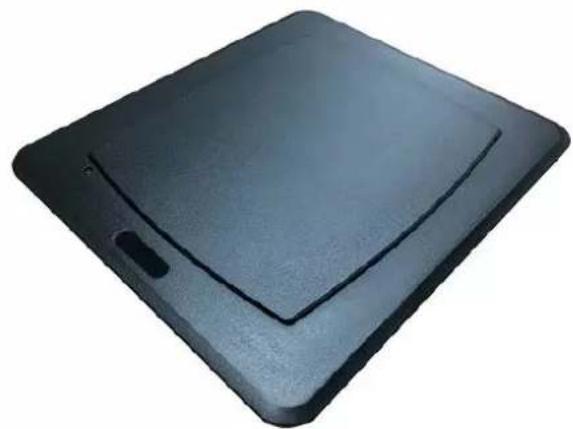
natural_image
Black rectangular electronic device with a flat top and side button (no visible text or symbols)2 Installation and Usage
2.1 Cautions

- Indoor using only.
- Do not cover the device and keep it ventilated.
- Pay attention to sunlight protection, waterproof and moisture-proof.
• Could only be installed by professionals and strictly enforce safety regulations. - Strictly grounded and powered independently.
2.2 Packing list
Table 2-1 Packing list
| Name | Image | Package size |
| Deactivator | 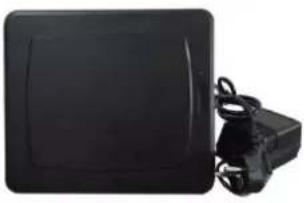 | 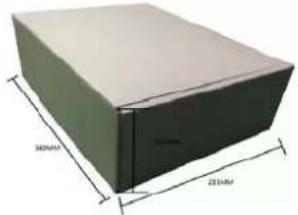 |
2.3 Parameters
Table 2-2 Parameters
| Parameters | Description | |
| Frequency | 58 KHz ± 2% | |
| Deactivating height | ≤ 5 CM | |
| Deactivating speed | 120 pcs/min | |
| Power | Input | 220–240 VAC, 47–63 Hz |
| Output | 18 VAC, 1660 mA | |
| Working environment | Working temperature | -5 °C to +50 °C |
| Relative humidity | 0%–90% (RH, non-condensing) | |
2.4 Installation instructions
- The digital deactivator is small, very easy to install. Just need to insert the power plug into the required power supply (220–240 VAC, 47–63 Hz) to make it work normally.
- After the deactivator is powered on, the built-in light-emitting diode (LED) of the deactivator board will emit red light, indicating that the power supply of the deactivator is normal.
- When a label entered the decoding area, light-emitting diode (LED) will emit green light and the buzzer will alarm to indicate that the label has been successfully deactivated.
Appendix 1 Cybersecurity Recommendations
Cybersecurity is more than just a buzzword: it's something that pertains to every device that is connected to the internet. IP video surveillance is not immune to cyber risks, but taking basic steps toward protecting and strengthening networks and networked appliances will make them less susceptible to attacks. Below are some tips and recommendations on how to create a more secured security system.
Mandatory actions to be taken for basic device network security:
1. Use Strong Passwords
Please refer to the following suggestions to set passwords:
• The length should not be less than 8 characters;
- Include at least two types of characters; character types include upper and lower case letters, numbers and symbols;
- Do not contain the account name or the account name in reverse order;
• Do not use continuous characters, such as 123, abc, etc.;
- Do not use overlapped characters, such as 111, aaa, etc.;
2. Update Firmware and Client Software in Time
- According to the standard procedure in Tech-industry, we recommend to keep your device (such as NVR, DVR, IP camera, etc.) firmware up-to-date to ensure the system is equipped with the latest security patches and fixes. When the device is connected to the public network, it is recommended to enable the "auto-check for updates" function to obtain timely information of firmware updates released by the manufacturer.
• We suggest that you download and use the latest version of client software.
"Nice to have" recommendations to improve your device network security:
1. Physical Protection
We suggest that you perform physical protection to device, especially storage devices. For example, place the device in a special computer room and cabinet, and implement well-done access control permission and key management to prevent unauthorized personnel from carrying out physical contacts such as damaging hardware, unauthorized connection of removable device (such as USB flash disk, serial port), etc.
2. Change Passwords Regularly
We suggest that you change passwords regularly to reduce the risk of being guessed or cracked.
3. Set and Update Passwords Reset Information Timely
The device supports password reset function. Please set up related information for password reset in time, including the end user's mailbox and password protection questions. If the information changes, please modify it in time. When setting password protection questions, it is suggested not to use those that can be easily guessed.
4. Enable Account Lock
The account lock feature is enabled by default, and we recommend you to keep it on to guarantee the account security. If an attacker attempts to log in with the wrong password several times, the corresponding account and the source IP address will be locked.
5. Change Default HTTP and Other Service Ports
We suggest you to change default HTTP and other service ports into any set of numbers between 1024\~65535, reducing the risk of outsiders being able to guess which ports you are using.
6. Enable HTTPS
We suggest you to enable HTTPS, so that you visit Web service through a secure communication channel.
7. MAC Address Binding
We recommend you to bind the IP and MAC address of the gateway to the device, thus reducing the risk of ARP spoofing.
8. Assign Accounts and Privileges Reasonably
According to business and management requirements, reasonably add users and assign a minimum set of permissions to them.
9. Disable Unnecessary Services and Choose Secure Modes
If not needed, it is recommended to turn off some services such as SNMP, SMTP, UPnP, etc., to reduce risks.
If necessary, it is highly recommended that you use safe modes, including but not limited to the following services:
- SNMP: Choose SNMP v3, and set up strong encryption passwords and authentication passwords.
- SMTP: Choose TLS to access mailbox server.
- FTP: Choose SFTP, and set up strong passwords.
● AP hotspot: Choose WPA2-PSK encryption mode, and set up strong passwords.
10. Audio and Video Encrypted Transmission
If your audio and video data contents are very important or sensitive, we recommend that you use encrypted transmission function, to reduce the risk of audio and video data being stolen during transmission.
Reminder: encrypted transmission will cause some loss in transmission efficiency.
11. Secure Auditing
- Check online users: we suggest that you check online users regularly to see if the device is logged in without authorization.
- Check device log: By viewing the logs, you can know the IP addresses that were used to log in to your devices and their key operations.
12. Network Log
Due to the limited storage capacity of the device, the stored log is limited. If you need to save the log for a long time, it is recommended that you enable the network log function to ensure that the critical logs are synchronized to the network log server for tracing.
13. Construct a Safe Network Environment
In order to better ensure the safety of device and reduce potential cyber risks, we recommend:
- Disable the port mapping function of the router to avoid direct access to the intranet devices from external network.
- The network should be partitioned and isolated according to the actual network needs. If there are no communication requirements between two sub networks, it is suggested to use VLAN, network GAP and other technologies to partition the network, so as to achieve the network isolation effect.
- Establish the 802.1x access authentication system to reduce the risk of unauthorized access to private networks.
- Enable IP/MAC address filtering function to limit the range of hosts allowed to access the device.
ENABLING A SAFER SOCIETY AND SMARTER LIVING
- Foreword
- Models
- Safety Instructions
- Revision History
- Privacy Protection Notice
- About the Manual
- Important Safeguards and Warnings
- Operating Requirements
- Power Requirements
- Table of Contents
- Foreword.... I
- Important Safeguards and Warnings.... III
- Overview....5
- Installation and Usage 6
- Appendix 1 Cybersecurity Recommendations....7
- Overview
- Introduction
- Features
- Appearance
- Installation and Usage
- Cautions
- Packing list
- Parameters
- Installation instructions
- Appendix 1 Cybersecurity Recommendations
- Mandatory actions to be taken for basic device network security:
- Use Strong Passwords
- Update Firmware and Client Software in Time
- "Nice to have" recommendations to improve your device network security:
- Physical Protection
- Change Passwords Regularly
- Set and Update Passwords Reset Information Timely
- Enable Account Lock
- Change Default HTTP and Other Service Ports
- Enable HTTPS
- MAC Address Binding
- Assign Accounts and Privileges Reasonably
- Disable Unnecessary Services and Choose Secure Modes
- Audio and Video Encrypted Transmission
- Secure Auditing
- Network Log
- Construct a Safe Network Environment
Brand : Dahua Technology
Model : ISC-EDA0002
Category : Detector