
Smart Plug - Wall socket ECOFLOW - Free user manual and instructions
Find the device manual for free Smart Plug ECOFLOW in PDF.


| Product Type | Smart Plug |
| Brand | EcoFlow |
| Model | Smart Plug |
| Dimensions (Approx.) | 4.5 x 4.5 x 3.5 cm (1.77 x 1.77 x 1.38 in) |
| Weight (Approx.) | 50 g (1.76 oz) |
| Power Input | 100-240 V, 50/60 Hz, 10 A (max) |
| Wireless Connectivity | Wi-Fi 2.4 GHz (802.11 b/g/n) |
| Control Method | EcoFlow App (iOS/Android), Voice Control (Amazon Alexa, Google Assistant) |
| Key Functions | Remote on/off, scheduling, timer, energy monitoring, scene automation |
| Energy Monitoring | Real-time power consumption (W), daily/monthly usage history |
| Max Load | 2400 W (resistive), 10 A |
| Housing Material | Fire-resistant polycarbonate, UL94 V-0 rated |
| Safety Protection | Overload protection, overheat protection, surge protection |
| Operating Temperature | 0°C to 40°C (32°F to 104°F) |
| Humidity Range | 5% to 95% (non-condensing) |
| Compatibility | EcoFlow portable power stations, home outlets (US/EU/UK plug types available) |
| Installation | Plug into wall outlet, pair via EcoFlow app |
| Cleaning & Maintenance | Wipe with dry, soft cloth; avoid water and abrasive cleaners |
| Spare Parts & Repairability | No user-serviceable parts; contact EcoFlow support for warranty |
| Warranty | 1 year (subject to local regulations) |
| Certifications | FCC, CE, RoHS, UL (depending on region) |
Frequently Asked Questions - Smart Plug ECOFLOW
User questions about Smart Plug ECOFLOW
0 question about this device. Answer the ones you know or ask your own.
Ask a new question about this device
Download the instructions for your Wall socket in PDF format for free! Find your manual Smart Plug - ECOFLOW and take your electronic device back in hand. On this page are published all the documents necessary for the use of your device. Smart Plug by ECOFLOW.
USER MANUAL Smart Plug ECOFLOW
EcoFlow Inc.
Plant A202, Founder Technology Industrial Park, Shiyan Sub-district, Bao'an District Shenzhen, Guangdong 518000 China
Disclaimer
Read this user manual carefully before using the product to ensure that you completely understand the product and can correctly use it. After reading this user manual, keep it properly for future reference. Improper use of this product may cause serious injury to yourself or others, or cause product damage and property loss. Once you use this product, it is deemed that you understand, approve and accept all the terms and content in this document. EcoFlow is not liable for any loss caused by the user's failure to use this product in compliance with this user manual.
In compliance with laws and regulations, EcoFlow reserves the right to final interpretation of this document and all documents related to this product. This document is subject to changes (updates, revisions, or termination) without prior notice. Please visit EcoFlow's official website to obtain the latest product information.

Use indoor only

Hereby, EcoFlow Inc. declares that EcoFlow Smart Plug is in compliance with Directive 2014/53/EU. The full text of the EU declaration of conformity is available at the following internet address: http://www.ecoflow.com/eu/eu-compliance http://www.ecoflow.com/de/eu-compliance http://www.ecoflow.com/fr/eu-compliance

Hereby, EcoFlow Inc. declares that EcoFlow Smart Plug is in compliance with Radio Equipment Regulations 2017. The full text of the UKCA declaration of conformity is available at the following internet address: http://www.ecoflow.com/uk/eu-compliance

The crossed-out wheeled bin indicates that the electrical and electronic (EE) product should not be discarded as unsorted waste but must be sent to separate collection facilities for recovery and recycling.

Bluetooth®
The Bluetooth ® word mark and logos are registered trademarks owned by Bluetooth SIG, Inc. and any use of such marks by EcoFlow Inc. is under license. Other trademarks and trade names are those of their respective owners.
Safety Instruction
- Before using this product, please read and fully understand this document and all related documents of this product. Failure to properly operate this product could cause serious injury to yourself or others, or damage to this product and other property.
- Please make sure the input rating of the device you connected does not exceed the rating of this device.
- The plug of this device shall connect to the grounding receptacle which is easily accessible.
- Do not use two or more of these devices in a series.
- Do not repair this device by yourself. For cleaning, wipe with a dry cloth.
Product Overview
LED indicator

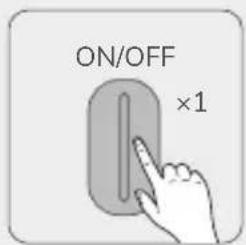
Press once to turn on or off the smart plug.

- Press and hold to switch to the pairing mode.
- Press for 10s to reset pairing.
LED Indicator
| Color Status | Explanation | |
| Green | Breathing | The smart plug is working, and there are electricity from the PowerStream microinverter. |
| Solid | The smart plug is working, but no electricity from the PowerStream microinverter. | |
| Blue Blinking | In the pairing mode. | |
| Red Solid Error | ||
| Purple Blinking | Updating the firmware. |
Pairing with EcoFlow App
01
Download the EcoFlow app.


EcoFlow App

02
Plug in the smart plug.

03
Press once to turn it on. The indicator will turn green.

04
indicator blinks blue. The smart plug switch to the pairing mode.

05
Complete pairing in the EcoFlow app. Press and

Pairing with the Matter System
You can integrate it into any Matter ecosystems for easy control.
- Open the Matter-supported smart home app, such as Apple Home and Alexa.
- Press and hold the button until the indicator blinks blue. The smart plug switch to the pairing mode.
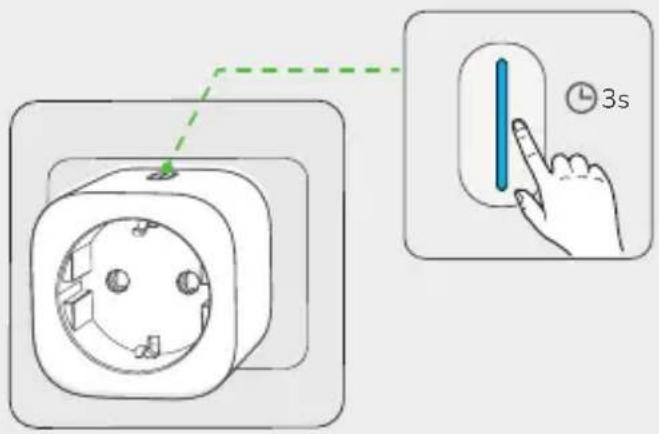
- Scan the Matter code, a dedicated label, on the smart plug with the smart home app. Follow the instructions in the app to complete pairing.
NOTICE
For pairing, it is better to select the same Wi-Fi when using the EcoFlow app and Matter code.


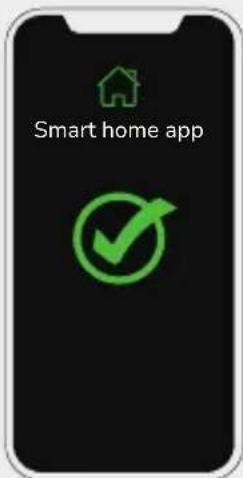
Turn on or off the smart plug in the app, or control it with your voice (depending on the feature of the smart home app).
Factory Reset
Press and hold the button for 10s to reset the smart plug.
Page of your Smart Plug in the EcoFlow App
NOTICE
The figures are for reference only, please refer to the actual app interface.

Firmware update
On the page of your Smart Plug, tap 📋 > "System setting" > "Firmware" to check the firmware version or update the firmware.
Relay Function
The smart plug has a relay function that sends a signal to another smart plug, thus enhancing the signal propagation. Each smart plug can only be relayed once.
Specifications
| Operating temperature -10 °C to 40 °C (14 °F to 104 °F) | |
| Humidity 10 % to 90% RH (non-condensing) | |
| Altitude ≤2000 m | |
| Overvoltage category II | |
| AC Input 110V-250V 50Hz | |
| Pollution degree 2 | |
| Minimum displayed power 1 W | |
| Wi-Fi (2.4G) | Frequency range:20M: 2412 - 2472 MHz /40M: 2422 - 2462 MHzMaximum output power: ≤20 dBm |
| Bluetooth® | Frequency range: 2402-2480MHzMaximum output power: ≤20 dBm |
For updated parameters, please go to our website to download the latest user manual.


Brand : ECOFLOW
Model : Smart Plug
Category : Wall socket