UH1800 - Humidifier N'oveen - Free user manual and instructions
Find the device manual for free UH1800 N'oveen in PDF.


| Product Type | Ultrasonic Humidifier |
| Brand | N'oveen |
| Model | UH1800 |
| Power Supply | 220-240V, 50/60Hz |
| Total Power Consumption | 110W (Heating 80W, Humidifying 30W) |
| Water Tank Capacity | 5 L |
| Evaporation Rate | ≥300 ml/h |
| Noise Level | ≤35 dB(A) |
| Mist Output Levels | 3 adjustable levels |
| Heating Function | Warm mist after 10-15 minutes |
| Plasma Function | Ionization and tank lighting |
| Timer | 1 to 12 hours |
| Humidity Control Range | 25% to 75% RH |
| Auto Mode | Automatically adjusts humidity based on temperature |
| Auto Shut-Off | When water level is low or humidity ≥90% |
| Filter | Ion exchange resin (UHF-21/UHF-18) |
| Display | LED showing temperature, humidity, and settings |
| Control | Touch panel |
| Recommended Humidity | 45-65% RH for comfort |
| Cleaning | Weekly cleaning of transducer, water tank, and basin |
Frequently Asked Questions - UH1800 N'oveen
User questions about UH1800 N'oveen
0 question about this device. Answer the ones you know or ask your own.
Ask a new question about this device
Download the instructions for your Humidifier in PDF format for free! Find your manual UH1800 - N'oveen and take your electronic device back in hand. On this page are published all the documents necessary for the use of your device. UH1800 by N'oveen.
USER MANUAL UH1800 N'oveen
natural_image
White N'OVEEN air fryer with digital display and control buttons (no visible text or symbols on device body)POLSKI STR 2
ENGLISH ...... page 11
natural_image
Close-up of a mechanical component with no visible text or symbolsZdj. 1
natural_image
Close-up of a mechanical component with a red arrow pointing to a circular feature (no visible text or symbols)zdj.2
natural_image
Close-up of mechanical components with a red arrow pointing to a spiral component (no visible text or symbols)zdj.1
Thank you for purchasing your new Ultrasonic Humidifier.
The humidifier helps you to restore and keep an appropriate level of humidity (suggested level between 40 – 60%) and eliminate the discomfort associated with dry air. Ultrasonic humidifier uses ultrasound to break down water molecules and generate mist.
Read all the safety instructions carefully before use and keep this instruction manual for future reference:
- Never disassemble the base unit without consulting qualified personnel.
- If the supply cord is damaged, it must be replaced by the manufacturer, its service agent or similarly qualified persons in order to avoid a hazard.
- Do not add detergents, chemical solutions which are not provided by our company (in the form of dedicated fragrance oils) into the unit.
- Unplug appliance during filling, cleaning and maintenance.
- Keep detergents and chemical solutions away from children.
- Do not change attachment without definitive permission from our company otherwise you might cause a hazard and warranty loss.
- If any abnormal smell occurs during normal operation, please switch off and disconnect power supply and have qualified personnel amend.
- During cleaning when water, detergents & chemical solutions splash into mouth & eyes, consult a doctor to refrain from serious hazard.
- Never touch water in the water basin & components in the water when the unit is in function.
- Never switch on the appliance when there is no water in the water basin.
- Never scrape Transducer cpl on your own.
- Never clean Transducer cpl with detergents or chemical solutions.
- Never let water splash into inner base unit to avoid components damage.
- Care should be taken when using the appliance due to emission of hot water vapor.
- Before cleaning and maintenance, the appliance must be disconnected from the power supply.
- The device should be operated by adults or children over 8 years old under supervision.
- Indoor use only.
DEVICE DESCRIPTION
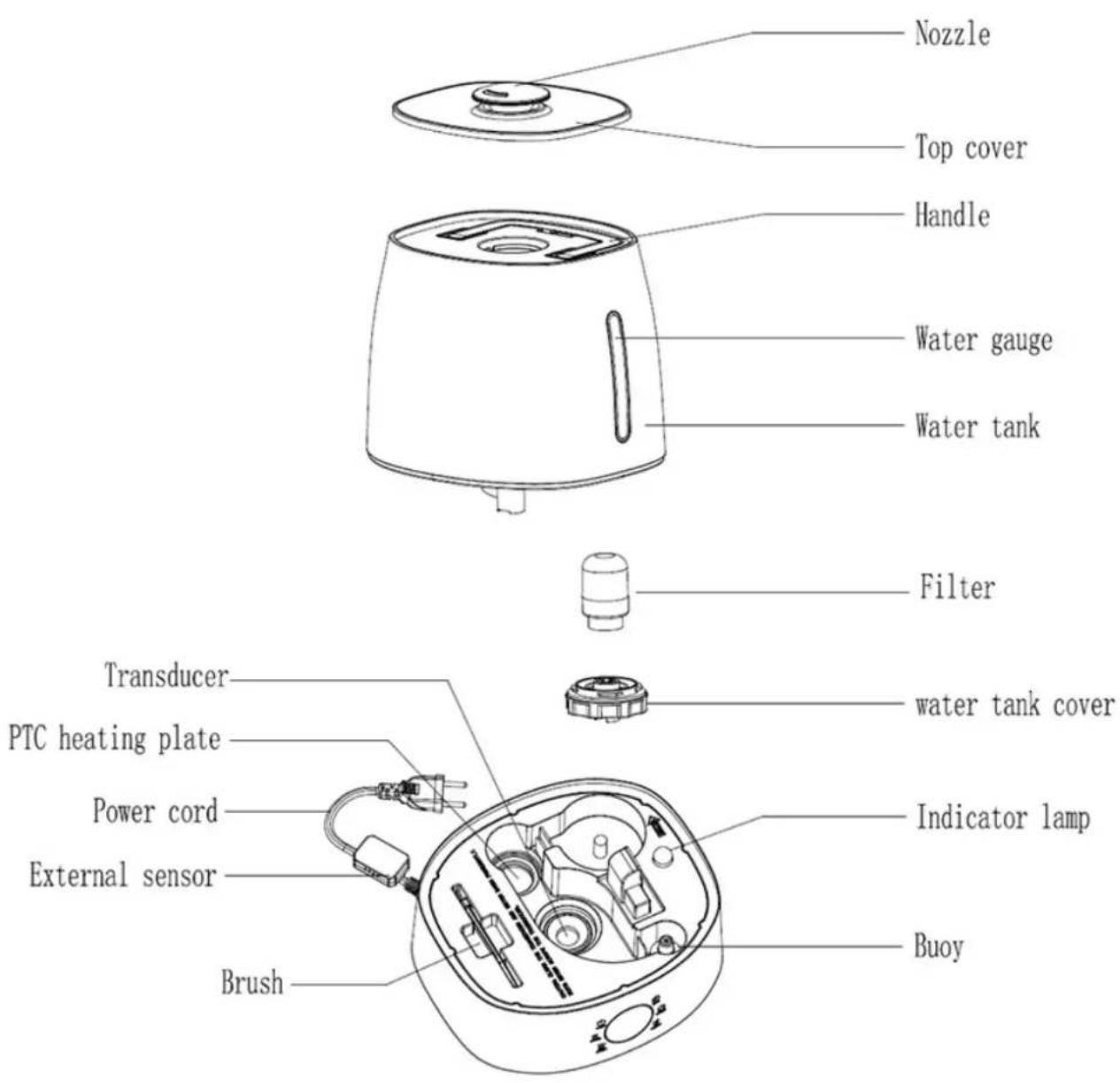
*Working Principle: Ultrasonic Humidifier uses the ultrasonic high-frequency oscillator to break up water into tiny water particles with the diameter of about 1-5um. The ventilation system blows out this water into the dry air where they evaporate to give the required humidity. The clearly visible smooth and even mist can be seen out of the unit.
\*Features:
- High efficient in humidification with large output.
- Low energy consumption, save 85-90 percent of electricity than normal stream humidifier.
- Automatic control of humidity level.
- Heating function - you can choose whether the mist produced by the device is cold or the humidifier has to heat it.
- Plasma function - improved ionization function.
\*Correct Humidity Level:
What exactly is relative humidity: Relative humidity is the amount of water vapor in the air, expressed as a percentage of the maximum amount that the air could hold at the given temperature. We normally mark it with %RH, like 45% RH. Atomospheric air always contains water vapor, the percentage of which depends on the meteorological conditions. The higher the temperature is the more the air keeps water vapor. Therefore, we use the concept of ‘relative humidity’. When the cold air is heated up to the comfort temperature in winter, the relative percentage of the water vapor falls which means the relative humidity drops. In order to keep a comfortable and health environment at home, we need some artificial addition of water or water vapor to the room air - that’s air humidification.
\*Ideal relative humidity levels:
The most comfortable RH for human being: 45-65% RH
Ideal RH for prophylactic and curative purpose: 40-55% RH
Computer and telecom apparatuses: 45-60% RH
Furniture and musical instruments: 40-60% RH
Library art gallery and museums: 40-60% RH
\* FUNCTIONS
Water filter:
The filter with ion exchange resin can soften hard water and eliminate bacteria.
Before the first use, place the device at room temperature for half hour before commissioning. It is recommended to use the device at 20 °C, relative humidity below 80% RH. Use clean water at temperature of no more than 40^ C.
Check the water container, make sure it is clean and that it has no cracks, which may affect the operation of the device.
Filter replacement (filter color depends on its model)
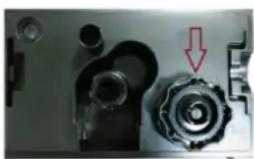
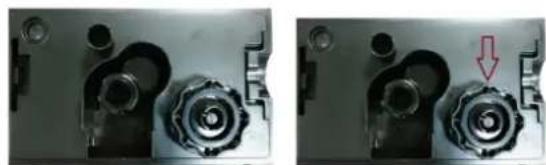
To change the UHF-21/UHF-18 filter, make sure that the water tank is empty or level water is low enough to allow safe replacement. Before replacing the filter you should also turn the unit off. Turn the tank with the water inlet facing upwards (Fig.1). Then unscrew the filler cap (Fig. 2).
natural_image
Close-up of two mechanical components with a red arrow pointing to a spiral component (no text or symbols visible)Fig. 1 Fig. 2
Unscrew the filter attached to the plug securing the water inlet to the container, then remove the old filter from the cap and screw in the new filter (Fig. 3, 3.1 and 3.2).
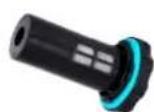
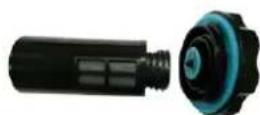
Fill the tank with water, close the cap with filter on the tank and put the tank on the device, secure - the device is ready for use.
INSTRUCTIONS FOR USAGE:
- Put the machine on a flat surface.
- Take out of the water tank using handle.
- Fill the water into the water tank, and then tighten the tank cover.
- Put the water tank on the main base.
-
Check if the rated voltage meets the input voltage, and plug into the socket. Then display shows the current temperature and humidity.
-
Touch the POWER symbol 📁 in the unit. The unit will begin to work in AUTO mode. Display shows AUTO symbol. The device determines the optimal humidity by the formula in auto mode and starts to achieve it at maximum power. When the humidity arrived, the machine will be working on minimal power. The device checks the accordance of the temperature level and the humidity level every 1 minute.
| Temperature of the air, degrees Celsius Humidity, % | |
| ≤19 65 | |
| 20 60 | |
| 21 58 | |
| 22 57 | |
| 23 55 | |
| 24 53 | |
| 25 50 | |
| 26 48 | |
| 27 45 | |
| 28 43 | |
| 29 40 | |
| 30 38 | |
| 31 36 | |
| 32 35 | |
| 33 34 | |
| 34 32 | |
| 35 31 | |
| 36 30 | |
| 37 and higher 25 |
-
Touch the HEATING symbol, the warm mist will come out after 10\~15 minutes. On the LED display, it shows the same symbol Touch again to stop the function. Mist will become cool.
-
Press the MAX-MIN symbol ☐ the AUTO mode will be canceled and the mist is produced at a minimum level. You can choose 3 desired levels of mist. Touch the symbol again to select the AUTO mode.
-
Timer setting: There are 12 timer setting: 1,2,3,4,5,6,7,8,9,10,11,12 hours. Touch the TIMER symbol, the LED display will show the desired setting timer. The timer shows the rest operation time and decreases by 1 hours, i.e., if the timer is set at 12 hours, LED display shows 11 after one hour. To know what time have been set, just to touch TIMER symbol. Touch till "Co" display on the LED, timer setting is cancelled.
- Touch the PLASMA symbol, the Plasma generator works. On the LED display, it shows the PLASMA symbol. Touch again to stop the function.
- Press and hold the PLASMA symbol to control switching on or off tank lighting.
- Constant humidity: Before you touch the HUMIDITY symbol, LED display shows the current humidity. You may set the humidity arranged from 25% RH to 75% RH. Touch once, %RH will increase by 5% RH. When it reaches 75% RH, touch again, it will show “Co” and flash for 3 seconds to exit humidity setting function. After you set the expected humidity, the machine will keep the memory and confirm after 5 seconds. 5 seconds later, LED display shows the current humidity. Touch again, it shows the expected humidity setting. If the expected humidity is less than the current humidity, the machine will be in sleeping state. But if the expected humidity is higher than the current humidity, the humidify function will work.
- Auto Shut-Off: Once the water in the tank is too little to keep the machine working, the machine will automatically stop working. LED shows "NO WATER". Refill the water, and the machine will restart. If don't refill water within 15 minutes, the machine will automatically power off.
- In any working mode, when the environment humidity reaches 90%, the machine will be in sleeping state. When the environment humidity is under 85%, the machine will work again.
- In any working mode, if no any operation in about 15 seconds, the display will turn dim.
Operation steps:
Take the water tank out of the unit, open the water tank cover and fill the tank with clear water. Close the cover and put the tank onto the base carefully. Put the nozzle into the socket on top of the water tank. Connect the power supply, switch on the unit (NEVER RUN THE UNIT WHEN THERE IS NO WATER IN WATER BASIN). The unit will begin working.
Filling the tank:
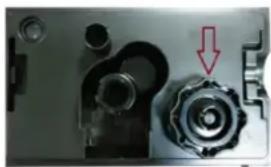
To fill the tank with water turn the device off. Pull out the tank, using handle, turn over bottom up, unscrew the filter plug (Fig. 1). Pour water in the place where the filter is placed in the tank. Close the plug, put the tank on the device, secure the tank (Fig.1)
- device is ready for use.
natural_image
Close-up of a mechanical component with a red arrow pointing to a spiral feature (no text or symbols visible)Fig. 1
TECHNICAL DATA
Power supply: 220-240V 50/60Hz
Heating power: 80 W
Humidify power: 30 W
Total power: 110 W
Water tank capacity: 5 L
Evaporation Rate: ≥300ml/H
Noise level: ≤35dB(A)
\*Maintenance:
In a case the water is hard which means water contains too much calcium and magnesium, it can cause a “white powder” problem and leave heavy scales on the surface of water basin, transducer, and inner surface of the water tank. Scales on the surface of transducer will unable the unit to work properly.
\*Trouble shooting Guide
If any trouble is found in normal operation, please kindly refer to the following points:
| Trouble Possible reasons | Solution | |
| Power lamp off, does not work | No power supply Connect | power supply, switch on |
| Power lamp on, no mist outlet with wind | No water in water tank Fill | water into water tank |
| Security switch is too loose | Tighten the switch | |
| Abnormal smell mist New | unit Take out water tank, open | cover, let it stay 12 hours in cool position |
| Dirty water or water sitting too long | Clean water tank, fill with clear water | |
| Power lamp on, unit doesn't work | Too much water in the water basin | Pull out same water from the water basin, close the cover of water tank tightly |
| Mist fog is too low Too much | ch scale in the water basin | Clean transducer |
| Water is too dirty or water kept too long in the tank | Clean water tank, change to fresh clear water | |
| Abnormal noise Resonant | in water tank when water is too low | Fill water into water tank |
| Unit is on a unstable surface | Move the unit to a stable flat surface | |
| Mist fog coming out from around nozzle | There are apertures between the nozzle and water tank | Dip the nozzle in water for a while and then fix it to the socket on water tank |
We recommend:
1) Use cold boiled water or distilled water.
2) Clean the transducer, water tank and basin unit every week.
3) Change the water in water tank more often to keep it fresh.
4) Make sure to pull out the water from the water tank and dry the water basin before you store the unit unused for a long period of time.
5) Clean the whole unit and make sure that all parts of the unit are dried completely before unused for longer period of time.
How to clean the transducer:
1) Put 5-10 drops of cleaning abluent on the surface of the transducer, wait for 2-5 min.
2) Brush off the scale from the surface.
3) Rinse the transducer with clean water.
How to clean the basin unit:
1) Clean the water basin with soft cloth and the cleaning abluent if there is scale in it.
2) If the scale is covered on the security switch, drop the cleaning abluent on the scale and clean it out with the brush.
3) Rinse the water basin with clean water.
KARTA GWARANCYJNA
IMPORTER / GWARANT :
- Thank you for purchasing your new Ultrasonic Humidifier.
- Read all the safety instructions carefully before use and keep this instruction manual for future reference:
- \*Features:
- \*Correct Humidity Level:
- \*Ideal relative humidity levels:
- \* FUNCTIONS
- Water filter:
- Filter replacement (filter color depends on its model)
- INSTRUCTIONS FOR USAGE:
- Operation steps:
- Filling the tank:
- TECHNICAL DATA
- \*Maintenance:
- \*Trouble shooting Guide
- We recommend:
- How to clean the transducer:
- How to clean the basin unit:
- KARTA GWARANCYJNA
- IMPORTER / GWARANT :
Brand : N'oveen
Model : UH1800
Category : Humidifier