
TR5000-SC110 - Treadmills LifeSpan - Free user manual and instructions
Find the device manual for free TR5000-SC110 LifeSpan in PDF.


| Brand | LifeSpan |
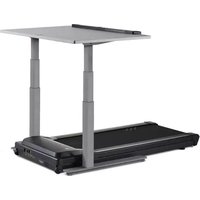
| Model | TR5000-SC110 (DT3 Console + TR5000B Base) |
| Product Type | Under-desk Treadmill |
| Speed Range | 0.4 – 4.0 mph (0.6 – 6.4 kph) |
| Walking Belt Size | 20" x 50" (51 cm x 127 cm) |
| Roller Size (Front/Rear) | Tapered Front 2.4" (6 cm), Rear 2.0" (5 cm) |
| Deck Thickness | 1" (2.5 cm) Phenolic |
| Deck Suspension | 6 Independent Compression Shocks |
| Drive Motor | 3.0 HP Continuous Duty DC |
| Maximum User Weight | 400 lbs (182 kg) |
| Console Display | LED, shows Time, Steps, Calories, Distance, Speed |
| Intelli-Step™ | Built-in step counting sensor on belt |
| Intelli-Guard™ | Auto-pause after 20 seconds of inactivity (adjustable) |
| Personal Settings | Max speed (2 or 4 mph), Intelli-Guard on/off, resume speed, beep, metric/imperial |
| Safety Key | Magnetic safety key included; console shows "----" if not engaged |
| Power Supply | Standard household outlet (e.g., 120V AC in North America) |
| Power Cord | Do not use extension cords or GFI outlets |
| Warranty – Frame | Lifetime |
| Warranty – Motor | 3 Years |
| Warranty – Parts | 2 Years |
| Warranty – Labor | 1 Year |
| Lubrication Interval | Every 50 hours or 3 months with 100% silicone (non-aerosol) |
| Cleaning | Daily wipe-down; monthly motor compartment cleaning |
| Console Dimensions | 12.5" W x 3" D x 2" H (32 cm x 7.6 cm x 5.1 cm) |
Frequently Asked Questions - TR5000-SC110 LifeSpan
User questions about TR5000-SC110 LifeSpan
0 question about this device. Answer the ones you know or ask your own.
Ask a new question about this device
Download the instructions for your Treadmills in PDF format for free! Find your manual TR5000-SC110 - LifeSpan and take your electronic device back in hand. On this page are published all the documents necessary for the use of your device. TR5000-SC110 by LifeSpan.
USER MANUAL TR5000-SC110 LifeSpan
Console Owner's Manual
DT3
Treadmill Base Owner's Manual
TR800B, TR1200B, TR5000B
Table of Contents
Welcome
Getting Started
Welcome 4
Warranty
Safety
Treadmill Base
Specifications
Unique Features
Maintenance and Tips
Assembly Instructions
Treadmill Desk Console Operations
Console Power Buttons
Starting the Treadmill
Innovative Features
Troubleshooting
Personal Settings
Display Detail
Welcome
Congratulations on choosing the LifeSpan Workplace™ line of products. These products give you the opportunity to remain productive while taking care of yourself as you integrate movement with normally sedentary tasks.
The average American now spends eleven hours, five days a week, sitting, and burns one-hundred fewer calories each day than they did a few decades ago. Sitting for long periods slows your metabolism, reduces calories burned, and increases your risk for heart disease and diabetes.
Whether you plan on placing this product in a TV room, replace your desk at home or are adding another workspace in the office, LifeSpan Workplace™ products are a great way to add movement to an otherwise sedentary activity.
Before you assemble or operate your product, please read this manual thoroughly. Important information, including safety precautions, ongoing product maintenance, assembly instructions, and information on proper operation are included.
If you need to contact LifeSpan customer service, visit our website at www.LifeSpanFitness.com and select customer service. Complete the information requested and we will respond to your inquiry within one business day. In the United States and Canada you can also call (877) 654-3837 and choose option 4.
Neither LifeSpan Fitness nor its representatives can accept responsibility for any damages or injury incurred as a result of information presented in this manual except under the terms of the product warranty.
Your LifeSpan under-desk treadmill comes with the following limited warranty valid in North America. If you are outside of these areas contact your local distributor for warranty information or visit www.LifeSpanFitness.com.
| Warranty | DT3 | ||
| Parts | 2 Years | ||
| Warranty – Treadmill | TR800B | TR1200B | TR5000B |
| Treadmill Frame | Lifetime | Lifetime | Lifetime |
| Motor | 3 Years | 3 Years | 3 Years |
| Parts | 1 Year | 2 Years | 2 Years |
| Labor | 1 Year | 1 Year | 1 Year |
LifeSpan warrants the equipment it manufactures is free from defects in materials and workmanship under normal use and services. The periods above are based on the date of purchase. During these periods, LifeSpan will repair or replace any defective part. Free labor is included on all parts that are not normally assembled or replaced by the customer within the labor period.
If within the time frames specified above, any part fails to operate properly, login to our website at www.LifeSpanFitness.com, click on "Customer Service" and complete the form to request assistance or call 877.654.3837 option 4 for a Customer Service Agent (please note that certain kinds of service should only be performed by a qualified service technician).
LifeSpan reserves the right to make changes and improvements to our products without incurring any obligations to similarly alter any product purchased. In order to insure our product warranty and to ensure the safe and efficient operation of your LifeSpan product, only authorized parts can be used. The warranty is void if any parts other than those provided by LifeSpan are used.
Exclusions and Limitations:
- This warranty does not apply to any defects caused by negligence, misuse, improper assembly, or maintenance, accident, or "act of God."
- This warranty does not apply to discoloration of paints or plastics.
- LifeSpan shall not be responsible for incidental or consequential damages.
- This warranty is non-transferable form the original owner.
Safety First
Proper Grounding
LifeSpan equipment must be grounded. Improper connection of the equipment's grounding conductor can result in the risk of electric shock. Check with a qualified electrician or service person if you are in doubt as to whether the outlet is properly grounded. Do not modify the plug provided with the product or use a ground plug adapter to adapt to a non-grounded outlet. If the plug will not fit in the outlet, have the proper outlet installed by a qualified electrician.
Power Cord Options
This treadmill should only be used with the proper power cord and power outlet. Several power cord options (shown below) are available from LifeSpan. We do our best to include the correct power cord with the treadmill for your area. In the event that the correct power cord is not included in the packaging please contact your local distributor.
Treadmill Outlet Power Cord Options


Do not use extension cords between the treadmill and power outlet.

Do not plug into a GFI outlet or circuit as it may trip the breaker.
When using your under-desk treadmill, basic precautions should always be followed, including:
- Never drop or insert any object into any opening. If an object falls into an opening, turn the power off and unplug the power cord from the outlet. Remove the object or call customer service at 877.654.3837 option 4.
- Never operate this treadmill if it has been damaged or partially submersed in water.
- To reduce the risk of electric shock, unplug the treadmill from the wall outlet when not in use, before performing any maintenance, or before moving the treadmill.
- Do not use outdoors or in areas of high humidity or extreme temperature changes.
- Do not operate where aerosol spray products are being used or where oxygen is being administered.
- Never place the power cord under carpeting or place any object on top of the cord, this may pinch or damage the cord causing fire damage or personal injury.
- Use this product for its intended use as described in this Owner's Manual. Do not use attachments that are not recommended by LifeSpan.
- Do not leave your treadmill running while not in use.
Children and Pets
- Keep children from playing on your treadmill at all times.
- When in use children and pets should be kept at least 10 feet (3m) away.
- This treadmill can be used by children ages 12 years and above and persons with reduced physical, sensory or lack of experience and knowledge if they have been given supervision or instruction concerning use of the appliance in a safe way and understand the hazards involved.
- Cleaning and user maintenance shall not be made by children without supervision.
Safety First
Safety Tips While in Use
• Always consult a physician before beginning an exercise program. • If you experience chest pains, nausea, dizziness or shortness of breath, stop exercising immediately and consult your physician before continuing. Do not wear clothing or jewelry that might catch on any part of the treadmill.
- Wear shoes with high traction rubber soles. Do not wear shoes with heels, leather soles, cleats or spikes.
- Do not walk or run backwards on the treadmill, always face forward.
- Allow the running belt to fully stop prior to getting off the treadmill.
• Make sure the area behind the treadmill remains completely clear during use. A minimum of 3 feet (1m) of clearance is required for safety reasons.

NOTE: Read all instructions and save for future reference.
Treadmill Base
TR800B, TR1200B, TR5000B
Treadmill Base
Specifications
TR800B
| Speed Range 0.4 - 4.0 mph (0.6 - 6.4 kph) |
| Walking Belt Size 18" x 45" (45.7 cm x 111.7 cm) |
| Roller Size 2.0 (5 cm) Tapered |
| Deck 3/4" (1.9 cm) Phenolic Deck |
| Deck Suspension 6 Independent Compression Shocks |
| Drive Motor 2.0 HP Continuous Duty DC |
| Max User Weight 200 lbs. (136 kg) |
TR1200B
| Speed Range 0.4 - 4.0 mph (0.6 - 6.4 kph) |
| Walking Belt Size 20" x 50" (51 cm x 127 cm) |
| Roller Size Tapered Front 2.4" (6 cm), Rear 2.0" (5 cm) |
| Deck 3/4" (1.9 cm) Phenolic Deck |
| Deck Suspension 6 Independent Compression Shocks |
| Drive Motor 2.25 HP Continuous Duty DC |
| Max User Weight 350 lbs. (159 kg) |
TR5000B
| Speed Range 0.4 - 4.0 mph (0.6 - 6.4 kph) |
| Walking Belt Size 20" x 50" (51 cm x 127 cm) |
| Roller Size Tapered Front 2.4" (6 cm), Rear 2.0" (5 cm) |
| Deck 1" (2.5 cm) Phenolic Deck |
| Deck Suspension 6 Independent Compression Shocks |
| Drive Motor 3.0 HP Continuous Duty DC |
| Max User Weight 400 lbs. (182 kg) |
Unique Features
As a leader in active workstations, LifeSpan has developed a number of unique features in our treadmills making them more engaging, safer and easier to use. Learn more about how to use these features in the Personal Settings sections of this Owner's Manual.

Intelli-Guard™
Walk confidently knowing your safety is assured with Intelli-Guard™. Step away from your treadmill for more than twenty seconds and your treadmill's belt will automatically glide to a smooth stop.

Intelli-Step™
Never miss a stride with Intelli-Step™. Your steps are automatically calculated with meticulous precision, displaying immediate feedback.
Maintenance and Tips
Daily Cleaning
It is recommended to wipe the treadmill down after each use to keep the treadmill clean and dry. A mild detergent may be used at times to help remove all dirt and salt from the belt, painted parts and the display.
Monthly Cleaning
This cleaning includes removing the motor cover and cleaning around the motor and electronics. It is recommended to clean the motor compartment if the treadmill is in an area where there might be plush carpet fibers that could get pulled up into the motor compartment. It is a good idea at this time to tighten all assembly hardware and check power cord for damage, or anything else that would indicate the need for service.
Safety and Integrity
The safety and integrity designed into the machine can only be maintained when the treadmill is regularly examined for damage and repaired. Worn or damaged components shall be replaced immediately or the treadmill be removed from service until the repair is made. Pay special attention to components most susceptible to wear.

WARNING: Keep treadmill stable on flat ground.

WARNING: Unplug the power cord before removing the motor cover.

IMPORTANT: If service is required, turn the power off and remove the power cord to ensure the unit cannot be used. Let all other users know the treadmill needs service.

CAUTION: Acidic cleaning detergents may damage painted or powder coated surfaces and should not be used. Such cleaners may void the LifeSpan warranty.
Belt Lubrication
Use only 100% silicone and avoid using aerosol silicone sprays which include additives and petroleum distillates. One ounce of silicone should be used for each application. LifeSpan offers 100% silicone lubricant that can be ordered at www.LifeSpanFitness.com.
The walking belt should be lubricated every 50 hours of use or three months.
To lubricate, unplug your treadmill.
- Start toward the front of the treadmill, slide your hand under the belt and lift it away from the deck.
- Slide tube under the belt as close to the center as possible.
- Apply controlled pressure to the squeeze bottle as you slowly pull back the tube towards the belt edge.
- Repeat on opposite side. (Use 1/2 oz. per side)
- Use treadmill for 3-5 minutes to disperse lube.
NOTE: When lubricating the belt, make sure the treadmill is on a surface that can be easily cleaned. After lubricating clean any excess silicone off the walking surface of the belt and side rails.

Maintenance and Tips
Belt Tensioning
If the belt begins to slip and needs to be tensioned, tension bolts are accessible from the back of the treadmill. Before tensioning the belt, start the treadmill and set the speed to 3 mph (5 kph).
A. Using a 6 mm Allen wrench, included in your hardware bag, turn the right and left tension bolts 1/2 turn clockwise.
B. Test to see if the slipping is eliminated. If the belt slips repeat step A and test again.
NOTE: Adjusting one side more than the other will cause the belt to drift to the side of the treadmill and will require belt alignment. Check to be sure the running belt is still aligned. If belt alignment is off as shown below, refer to Belt Alignment section.


CAUTION: DO NOT tighten more than 2 full turns on each side. Over tensioning the belt can cause unnecessary friction and wear and tear on the belt, motor and electronics.
Belt Alignment
A. Press Start, then increase the treadmill speed to 3 mph (5 kph).
B. Stand behind the treadmill to see which way the belt is drifting.
C. If the belt drifts to the left, turn the left adjustment bolt 1/4 turn clockwise and the right adjustment bolt 1/4 turn counter-clockwise. (See FIG. 1)
D. If the belt drifts to the right, turn the left adjustment bolt 1/4 turn counter-clockwise and the right adjustment bolt 1/4 turn clockwise. (See FIG. 2)
E. Observe the alignment for two minutes. Repeat steps A-D as needed.
Belt Alignment (continued)


Visit www.LifeSpanFitness.com for a full video demonstration on the aligning your treadmill belt.
Moving the Treadmill Base
- Make sure the ON/OFF switch is turned OFF and the power cord is unplugged from the wall.
- Make sure nothing is on or near your treadmill which might spill, be knocked off, or prevent the treadmill from moving.
- Place both hands under the support bar located under the back of the walking belt to make sure you have a solid lifting point.
- Lift the back of the treadmill and roll to the desired location.

natural_image
Illustration of a person pushing a long black roller or ramp (no text or symbols)
CAUTION: When lifting, use proper safety precautions and lifting techniques. Bend your knees and elbows, keep your back straight and lift evenly with both arms.
Assembly Instructions
After assembling the treadmill, roll it to the desired location. Plug the console connector into the connector coming from the front of the treadmill. Be sure to screw the two connectors together with the attached thumb screws.

NOTE:
Do not plug the power cord into the equipment until the console is connected.
Safety Key
When using the DT-3 with a treadmill use Safety Key (F).

F
Console Operations
Treadmill Desk Console Operations

Console Power Buttons
- Start/On: If the console is in sleep mode, press and hold this button for three seconds to turn the console on. Once the console is turned on press to start the treadmill.
- Enter/Mode: Press to switch display readings (time, steps, calories, distance, and speed). Press and holding the Enter/Mode button for one second starts a scan mode that rotates between display readouts every five seconds. Press the button again to exit the scan mode.
- Stop/Pause: Press to pause your workout. This will maintain your current workout data. To reset the console and current workout data, press and hold the Stop/Pause button for three seconds.
- Press to change treadmill speed.
| CONSOLE | TREADMILL DESK |
| Readouts | Time, Steps, Calories, Distance, Speed |
| Display | LED |
| Buttons | On/Start, Stop/Reset, Speed Up/Down, Enter Mode |
| MECHANICS & PERFORMANCE | TREADMILL DESK |
| Speed Range | 0.4 - 4.0 mph*0.6 - 6.4 kph |
| Dimensions | 12.5" W x 3"D x 2"H32cm W x 7.6cm D x 5.1cm H |
* Can be changed to max speed of 2.0 mph/3.2 kph in personal setting
Starting the Treadmill
- Turn the power switch on. It is located on the front right corner of the treadmill.
- The current user weight will be flashing on the display panel. Adjust your weight to obtain accurate calorie calculations.
- Make sure the safety key is engaged in the console.
NOTE: The display will show "----" if the Safety Key is not engaged.
-
Press the Start button to start the treadmill belt. The console will start counting up from 0:00.
-
Press the buttons to adjust speed.
NOTE:
The steps are counted normally from 1 to 9,999 steps. After 9,999 steps, the display format changes to accommodate more than four digits. Take the number shown in the display and add a zero to the right for the correct number of steps.
Below are examples of what the display will read and what those numbers mean:
1001 = 10,010 steps
1005 = 10,050 steps 1100
= 11,000 steps
Console Overview
Innovative Features
Intelli-Step™ – LifeSpan treadmill desks come with Intelli-Step our exclusive step counting feature that senses each time your foot lands on the walking belt and counts your step total on the display console. If you're in the habit of counting daily steps or want to incorporate a daily or weekly step count goal this feature will provide more accurate step counting than using a smartwatch or other wearable step counting device on your wrist. Accuracy does require that the treadmill desk is able to detect your steps and will be less accurate for those who walk lightly including those individuals under a 100 pounds (45.5 KG).
Intelli-Guard™ - This unique safety feature is engaged when the treadmill belt speed reaches 1.0 mph (1.6 kph) or faster and automatically pauses the belt 20 seconds after you stop walking, ensuring that no one else steps on the treadmill desk without noticing that its already running. When Intelli-Guard senses that the treadmill is no longer being used, after 20 seconds the audible beep will first notify you that the treadmill belt is going to pause. This feature can be controlled in Personal Settings.
Personal Settings – there are several features that can be set using our Personal Settings feature to tailor LifeSpan treadmill desks to your specific preferences. These include:
• Maximum Speed: Select 2.0 mph (3.2 kph) or 4.0 mph (6.4 kph) maximum speed options.
• Intelli-Guard Selection: On / Off setting
- Resume Speed: after pressing pause and returning to the treadmill desk the default belt speed will be 0.4 mph (0.6 kph) which is the normal starting speed. The resume starting speed can be modified to default to return to the previous speed.
In addition, the following features are applicable.
- Audible Safety Beep: On / Off setting. Each time the control buttons on the console are depressed an audible beep is used as an alert that a change was made. This is designed to prevent accidental speed adjustments being made without users being aware that they may be accidentally depressing a button.
- Metric versus Standard Readouts: Change the display readouts for speed and distance to Metric or back to standard readouts.
- Charging Port: This port can be used to charge your wireless mobile devices.
NOTE: You will not be able to save your workout data to a USB via this port; it is used for charging purposes only.
Troubleshooting
The LifeSpan Treadmill Desk is designed and manufactured to be reliable and easy to use. However, if you have a problem, these troubleshooting steps may help you find the cause.
Problem: The console is erratic or not lighting up.
Solution: Check to make sure the treadmill is properly plugged in. Turn the power switch off and make sure the safety key is in place. Make sure the console wire connector is properly plugged in. Disconnect the connections between the treadmill and console. Then plug them back together and turn the power back on. If the problem persists contact LifeSpan customer service.
Problem: The treadmill motor seems strained or E1 comes up after several minutes of use.
Solution: The silicone lubricant that is applied to the belt is wearing down and the belt needs to be lubricated with 100% silicone lubricant (non-aerosol).
Problem: The treadmill automatically pauses during a workout.
Solution: The treadmill is not picking up the step count. Go into the Personal Settings section to turn the Intelli-Guard feature off.
Problem: The treadmill speed doesn't feel right (either too fast or too slow).
Solution: Go into the Personal Settings section and check if you are in Metric or English mode. If you are in the correct mode, contact LifeSpan customer service.
Problem: "UART" or " "dc-6" appears in the display.
Solution: Turn the treadmill power switch off. Unplug and re-plug the console connector to the treadmill. Make sure the thumb screws are properly tightened. Turn the treadmill power switch back on and check to see if it functions properly. Also make sure the treadmill is plugged into the wall socket and not into an extension cord or power strip.
Problem: The treadmill belt is beginning to slip and needs to be tensioned.
Solution: Read about Belt Tensioning in the Maintenance and Tips section.
Problem: The treadmill belt is beginning to drift to the left or right and needs to be aligned.
Solution: Refer to the owner's manual included with the treadmill base.
To Enter Personal Settings Mode
Press and hold "STOP" and "^" for three seconds to enter Settings Mode.
Press the / or arrows to move through the various settings. F001-F019.
Press ENTER to choose a setting to change.
Press the ∧ or ↗ arrows to move through the various choices for that setting.
Press ENTER to select a choice. This takes you back to settings mode, where you can move through the other settings.
Remove the Safety Key to exit Personal Settings. Engage the Safety Key to resume operations.
Personal Setting Options
Intelli-Guard — Intelli-Guard ON/OFF.
Unit of Measure — Changes readout from English (EN) to Metric (SI)
Beep — Turns off the normal treadmill beep that happens at every keypress.
Speed Limit — The max speed setting of the treadmill. 2mph(3.2kph)–4mph(6.4kph).
Speed Reset — Controls whether, after a Pause, the treadmill resumes the most recent walking speed, or resets to 0.4 mph. If ON, the speed resets to 0.5 mph.
Display Detail
| Setting | Setting Displayed | Choice 1 (Default) | Choice 2 |
| INTELLI-GUARD | F012 | ON OFF | |
| UNIT OF MEASURE | F014 | EN SI | |
| BEEP | F015 | ON OFF | |
| SPEED LIMIT | F018 | 2.0 mph / 3.2 kph 4 | 0 mph / 6.4 kph |
| SPEED RESET | F019 | 0 Resumes at 0.4 | 1 Resumes at last set speed |
- Console Owner's Manual
- Treadmill Base Owner's Manual
- Table of Contents
- Welcome
- Getting Started
- Treadmill Base
- Treadmill Desk Console Operations
- Exclusions and Limitations:
- Safety First
- Proper Grounding
- Power Cord Options
- Children and Pets
- Safety Tips While in Use
- Specifications
- Unique Features
- Intelli-Guard™
- Intelli-Step™
- Maintenance and Tips
- Daily Cleaning
- Monthly Cleaning
- Safety and Integrity
- Belt Lubrication
- Belt Tensioning
- Belt Alignment
- Belt Alignment (continued)
- Moving the Treadmill Base
- Assembly Instructions
- NOTE:
- Safety Key
- Console Operations
- Console Power Buttons
- Starting the Treadmill
- Console Overview
- Innovative Features
- Troubleshooting
- Problem: The console is erratic or not lighting up.
- Problem: The treadmill motor seems strained or E1 comes up after several minutes of use.
- Problem: The treadmill automatically pauses during a workout.
- Problem: The treadmill speed doesn't feel right (either too fast or too slow).
- Problem: "UART" or " "dc-6" appears in the display.
- Problem: The treadmill belt is beginning to slip and needs to be tensioned.
- Problem: The treadmill belt is beginning to drift to the left or right and needs to be aligned.
- To Enter Personal Settings Mode
- Personal Setting Options
Brand : LifeSpan
Model : TR5000-SC110
Category : Treadmills