
NuQ-10 - Loudspeaker Turbosound - Free user manual and instructions
Find the device manual for free NuQ-10 Turbosound in PDF.


| Product Type | Passive PA Loudspeaker |
| Woofer Size | 10" (254 mm) |
| Tweeter Size | 1" (25 mm) compression driver |
| Power Handling (Continuous) | 300 W |
| Power Handling (Peak) | 1200 W |
| Impedance | 8 Ω |
| Frequency Response | 65 Hz – 20 kHz (±3 dB) |
| Sensitivity (1W/1m) | 96 dB |
| Maximum SPL | 126 dB (peak) |
| Coverage Angle | 90° H x 60° V |
| Connectors | 2 x Neutrik speakON NL4 |
| Enclosure Material | 15 mm plywood with black semi-matt finish |
| Grille | 1.5 mm perforated steel with acoustic foam |
| Rigging Points | 8 x M8 threaded inserts, 2 x 35 mm pole mount |
| Dimensions (H x W x D) | 500 x 330 x 300 mm |
| Weight | 15 kg |
| Power Supply | Passive (no built-in amp) |
| Cleaning | Wipe with dry cloth; avoid solvents |
| Safety | Ensure stable mounting; use rated cables |
| Spare Parts / Repairability | Contact Turbosound for approved parts |
| General Information | High-performance PA speaker for portable and installed applications |
Frequently Asked Questions - NuQ-10 Turbosound
User questions about NuQ-10 Turbosound
0 question about this device. Answer the ones you know or ask your own.
Ask a new question about this device
Download the instructions for your Loudspeaker in PDF format for free! Find your manual NuQ-10 - Turbosound and take your electronic device back in hand. On this page are published all the documents necessary for the use of your device. NuQ-10 by Turbosound.
USER MANUAL NuQ-10 Turbosound
Models covered by this Quickstart Guide
NuQ-6, NuQ-8/DP, NuQ-10/DP, NuQ-12/DP, NuQ-15/DP, B-12DP, B-15/DP, B-18/DP.
Thank you for choosing a TURBOSOUND loudspeaker product for your application. If you would like further information about this or any other TURBOSOUND product, please contact us on +44 (0)1403 711447. A detailed user manual on this product range is available on our website at http://www.turbosound.com
Unpacking the Loudspeaker
After unpacking the unit please check carefully for damage. If damage is found, please notify your supplier at once. You, the consignee, must instigate any claim. Please retain all packaging in case of future re-shipment.
System Requirements – Passive and Bi-amped Loudspeakers
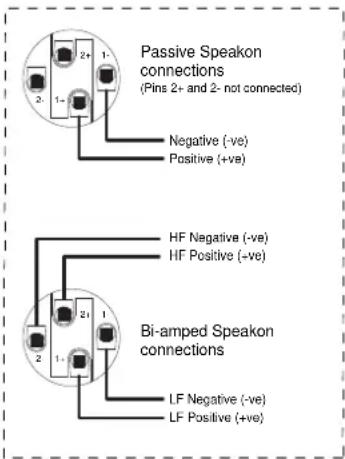
The NuQ-6, NuQ-8, and NuQ-10 two-way loudspeakers are passive systems and require only one amplifier channel for correct operation, the frequency splitting between the LF driver and the HF driver being accomplished by the internal passive crossover network built into each enclosure. They are equipped with two Neutrik Speakon NL4MP connectors wired in parallel, serving as both input and loop-out connections to additional speakers. The Speakon wiring details are shown at the right. The NuQ-12 and NuQ-15 two-way loudspeakers are switchable passive/bi-amped systems and require two amplifier channels when used in bi-amped mode. To avoid wasting amplifier power you should use heavy-duty speaker cable with a minimum wire size of 12 gauge (1.5mm 2 ), and preferably 10 gauge (2.5mm 2 ) for longer runs. Always observe the correct polarity as shown.
Amplifier considerations
NuQ series speaker enclosures should be driven by high quality power amplifiers designed for true professional use. Amplifiers should be capable of delivering long term broadband power equal to the loudspeaker's program power rating at its stated nominal impedance. The use of under-powered amplifiers must be avoided as heavily clipped signals can cause permanent loudspeaker damage.
| Model NuQ-6 | NuQ-8 | NuQ-10 | NuQ-12 | NuQ-15 | B-15 | B-18 | |
| Impedance | 8Ω | 8Ω | 8Ω | Passive: 8ΩLF: 8Ω, HF: 6Ω | Passive: 8ΩLF: 8Ω, HF: 6Ω | 8Ω | 8 Ω |
RECOMMENDED AMPLIFIER POWER RATING
The amplifier's rated r.m.s. continuous power output (20Hz - 20kHz, each channel) should be equal to the loudspeaker's program power handling at its nominal impedance.
System Controllers and Bi-amplified systems
NuQ systems must be used with Turbosound LMS-D24 or LMS-D26 controllers, since these provide vital operating and system security features. If you do not have a controller, DO NOT USE the loudspeaker without one; please contact your Turbosound dealer for further details.
Turbosound LMS-D2X controllers provide factory presets for all NuQ systems, downloadable from the Turbosound website, as well as additional user program slots.
- Power up the controller(s) and associated power amplifiers.
- Press RECALL to select the appropriate program from the preset menu using the 'A' ROTARY ENCODER.
- Press RECALL again to accept the preset. The controller will un-mute and is then ready for use.
Use as Monitor Wedges
NuQ 2-way systems double effectively as wedge monitors. The NuQ-6 provides both 33° and 45° wedge angles while all other models feature a symmetrical 45° side angle.
Self-powered Loudspeakers
Powered NuQ loudspeakers feature very efficient integrated Class D amplifiers and control electronics modules, providing a completely self-contained professional sound system. The XLR inputs are electronically balanced and are wired pin 2 hot, pin 3 cold, and pin 1 ground. Amplifiers will operate over a range of mains input voltages from 100V to 240V AC without adjustment.
- Connect the mains power using the supplied Powercon mains lead. Check that the mains lead is suitable for use in your area before connecting.
- Connect the signal input from a professional mixing console to the signal in XLR, and link out to additional powered loudspeakers if required
• Power up the loudspeaker. It will un-mute after a short self-test routine; the loudspeaker is now ready for use
The B-12DP features an on-board amplifier configured to drive NuQ-6 or other satellite loudspeakers, as well as its own internal 12" LF driver. The amplifier is also equipped with four factory presets with differing band gains which allow for different configurations of satellite speakers. These are selectable via a push switch that toggles around the four available presets, and these are listed below. Presets 2 to 4 are user editable using TurboDrive software.
| Preset number Function User editable? | |
| Preset #1 B-12DP plus 2 x NuQ-6 satellite loudspeakers No - factory default | |
| Preset #2 B-12DP plus up to 6 x NuQ-8 satellite loudspeakers Yes | |
| Preset #3 B-12DP plus 2 x NuQ-8 satellite loudspeakers Yes | |
| Preset #4 B-12DP plus 2 x any passive satellite loudspeakers Yes |
Networking Capability
NuQ systems are designed to offer control and monitoring of system parameters over a BvNet network in real time using a PC and TurboDrive™ software. LMS-D2X controllers are equipped with network cards and are pre-configured with factory programs for all NuQ series models. Self-powered NuQ loudspeakers have built-in network functionality.
- Download the TurboDrive™ software from the supplied CD or from www.turbosound.com and follow the installation instructions
- Install the drivers. If connecting via RS232 there is no need to install drivers. If connecting via USB install the USB drivers which can be found on the CD that came with your Linea Research USB interface
- Networking multiple devices to a PC: BvNet is the method of connecting multiple devices – these can be controllers and/or powered NuQ loudspeakers – and this is done with the Linea Research USB & RS232 Interface (available from Turbosound). The interface enables devices to be connected to a PC either using RS232 or using USB. RS485 is the
network protocol among the networked devices and is carried over CAT5-type cables. Minimum system requirements are: PC with Pentium processor, Windows NT, 2000, XP, or Vista, CD ROM drive or internet access, RS232 or USB port
- RS232: Connect your computer to the BvNet interface using a standard 9-pin serial cable. External power is required for RS232 operation and this should be supplied by the Linea Research Accessory Power Supply
- USB: Connect your computer to the BvNet interface using a USB Type A to USB Type B cable. External power is not required when using USB
- Connect networked devices via RJ45 CAT5 cables
- Launch the TurboDrive™ software
• Application Authorisation: TurboDrive™ prompts for an Authorisation Code on the first launch which is PJLUWZ
• Select the COM port from Network > Com Port - Click the Online toolbar button
- Click on one of the devices that appear in the tree view to Launch the panel
- When the progress bar indicates ready, adjust the controls as required
Please refer to the TurboDrive™ User Guide for further information on networking.
Mounting and Fixing
NuQ series two-way cabinets are equipped with pole mount sockets for portable use on 35mm speaker stands or poles. Bass cabinets are equipped with pole mount receptacles that allow two-way cabinets to be mounted at the correct height.
NuQ series cabinets can be suspended in permanent installations using optional shoulder eyebolts coupled to the internal rigging points provided. To install using eyebolts, remove the appropriate countersunk screws and replace them with eyebolts, which must have a thread length of at least 18mm. Use the rear rigging point to angle the cabinet for optimum room coverage. Cabinets may be hung upside down if required.
Turbosound wall and ceiling brackets are optionally available for installing non-powered NuQ series cabinets. They are also compatible with OmniMount ™ wall and ceiling brackets. Some examples are shown below.
| Model Wall Mount Flying Yokes | Swivel | brackets | Swivel extenders | OmniMountTM | Eyebolts |
| NuQ-6 | n/a | NuQ-FY6 | NuQ-$B6 n/a | n/a | M8 |
| NuQ-8 | WB-20BPB-55 | NuQ-FY8 | NuQ-SB8 | NuQ-SBE8 | 20.5 Series M10 |
| NuQ-10 | WB-20BPB-55 | NuQ-FY10 | NuQ-SB10 | NuQ-SBE10 | 60 Series M10 |
| NuQ-12 | WB-55BPB-55 | NuQ-FY12 | n/a | n/a | 60 Series M10 |
| NuQ-15 | WB-55BPB-55 | NuQ-FY15 | n/a | n/a | 120 Series M10 |
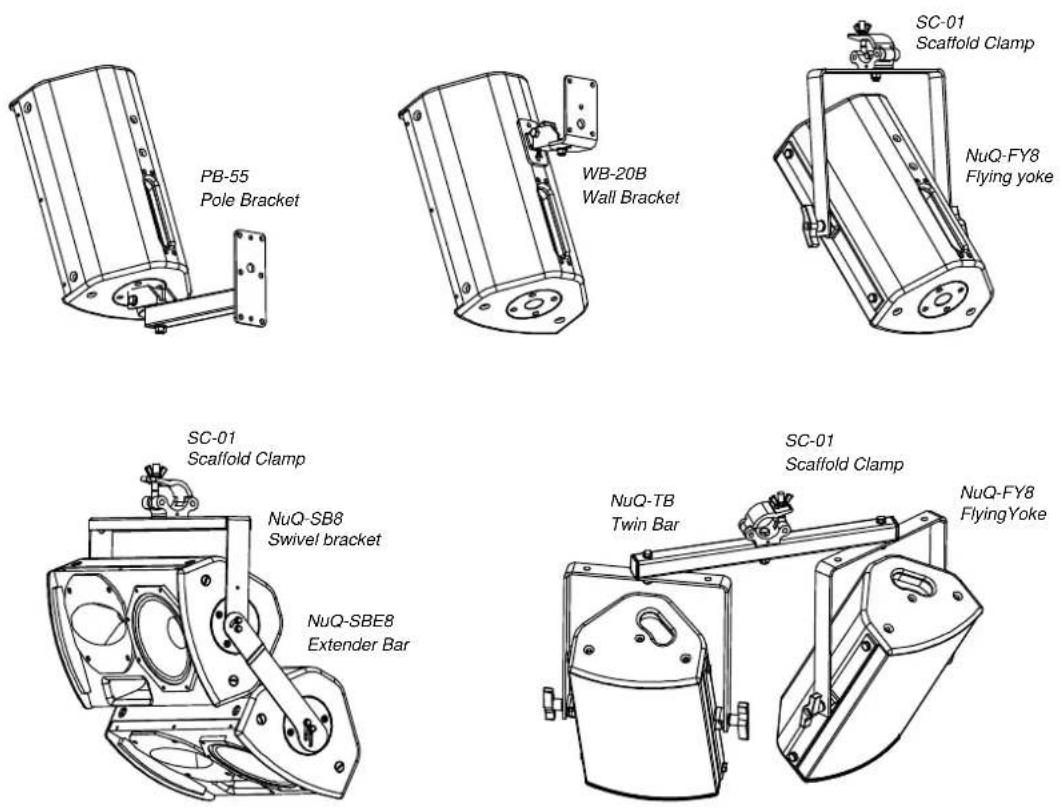
To install a loudspeaker using Turbosound brackets, first separate the brackets into their wall/ceiling plate and speaker plate component parts. Remove the two countersunk M10 bolts on the rear panel of the cabinet. Attach the speaker plate to the cabinet with the M8 bolts supplied. Fix the wall/ceiling plate in the venue using appropriate fixings (not supplied). Lift the loudspeaker on to the wall plate and re-assemble the bracket parts, adjust the vertical angle and tighten all bolts.
IMPORTANT NOTE: The rigging of a flown sound system may be dangerous unless undertaken by qualified personnel with the required experience and certification to perform the necessary tasks.
Spares and Accessories
CD-115 / RD-115 Compression driver / diaphragm for NuQ-6, NuQ-8, NuQ-10
CD-213.2/RD-213.2 Compression driver / diaphragm for NuQ-12, NuQ-15
LS-6509 / RD-6509 6.5" low frequency loudspeaker / recone kit for NuQ-6
LS-8093 / RC-8093 8" low frequency loudspeaker / recone kit for NuQ-8/DP
LS-1024 / RC-1024 10" low frequency loudspeaker / recone kit for NuQ-10/DP
LS-1221 / RC-1221 12" low frequency loudspeaker / recone kit for NuQ-12/DP
LS-1220 / RC-1220 12" low frequency loudspeaker / recone kit for B-12DP
LS-1528/ RC-1528 15" low frequency loudspeaker / recone kit for NuQ-15/DP
LS-1526 / RC-1526 15" low frequency loudspeaker / recone kit for B15/DP, B215/DP
LS-1814 / RC-1814 18" low frequency loudspeaker / recone kit for B18/DP
NuQ series self-powered products comply with the following European Community standards: EN60065:2003 (Safety), EN66103-1:1996 and EN55103-2:1996. All products are CE marked in accordance with the relevant statutory requirements.
Turbosound Ltd, Star Road, West Sussex RH13 8RY, UK
tel: +44(0)1403 711447 fax: +44(0)1403 710155 www.turbosound.com April 2011

- MODELS COVERED BY THIS QUICKSTART GUIDE
- UNPACKING THE LOUDSPEAKER
- SYSTEM REQUIREMENTS – PASSIVE AND BI-AMPED LOUDSPEAKERS
- AMPLIFIER CONSIDERATIONS
- RECOMMENDED AMPLIFIER POWER RATING
- SYSTEM CONTROLLERS AND BI-AMPLIFIED SYSTEMS
- USE AS MONITOR WEDGES
- SELF-POWERED LOUDSPEAKERS
- NETWORKING CAPABILITY
- MOUNTING AND FIXING
- SPARES AND ACCESSORIES
Brand : Turbosound
Model : NuQ-10
Category : Loudspeaker