
DOD191 - Coffee grinder LIVOO - Free user manual and instructions
Find the device manual for free DOD191 LIVOO in PDF.


| Product Type | Coffee Grinder (Electric) |
| Model | DOD191 |
| Brand | Livoo |
| Material | Stainless Steel Blades, Plastic Body |
| Dimensions (LxWxH) | Approx. 15 x 10 x 18 cm |
| Weight | Approx. 0.6 kg |
| Power Supply | 220-240V ~ 50/60Hz |
| Power Consumption | 150 W |
| Capacity | Up to 75 g of Coffee Beans |
| Grinding Settings | Pulse or Continuous Operation |
| Blade Type | Stainless Steel (2 Blades) |
| Cord Length | Approx. 80 cm |
| Safety Features | Lid Safety Switch, Non-Slip Base |
| Cleaning | Wipe with Damp Cloth; Not Dishwasher Safe |
| Warranty | 1 Year |
| Spare Parts Availability | Contact Livoo Customer Service |
Frequently Asked Questions - DOD191 LIVOO
User questions about DOD191 LIVOO
0 question about this device. Answer the ones you know or ask your own.
Ask a new question about this device
Download the instructions for your Coffee grinder in PDF format for free! Find your manual DOD191 - LIVOO and take your electronic device back in hand. On this page are published all the documents necessary for the use of your device. DOD191 by LIVOO.
USER MANUAL DOD191 LIVOO
natural_image
Livoo coffee maker with digital display and coffee cup, no visible text or symbols on main bodyReference : DOD191
Version: 1.4
Language : English
Livoo
Feel good moments
User manual
You have purchased a product LIVOO brand and we thank you. We take great care in design, ergonomics and ease of use of our products. We hope that this product will give you complete satisfaction
SAFETY INSTRUCTIONS
PLEASE, TAKE TIME TO READ WELL THE INSTRUCTIONS FOR USE PARTICULARLY BEFORE THE FIRST USE.
A misuse of the appliance can damage it or hurt the user.
Assure that you use the appliance for the use for which it is designed, we refuse any responsibilities as for the damages by an incorrect use or a bad manipulation.
- This appliance shall not be used by children. Keep the appliance and its cord out of reach of children.
- Appliances can be used by persons with reduced physical, sensory or mental capabilities or lack of experience and knowledge if they have been given supervision or instruction concerning use of the appliance in a safe way and if they understand the hazards involved.
- Children shall not play with the appliance.
- This appliance is intended to be used in household and similar applications such as8
- staff kitchen areas in shops, offices and other working environments
- farm houses
• by clients in hotels, motels and other
Livoo
Feel good moments
User manual
residential type environments
• bed and breakfast type environments
- Check that your main voltage corresponds to that stated on the appliance. Multiple plug is misadvised.
- Do not use the appliance if your hands are damp or with naked foot.
- In case the appliance accidentally bad work, disconnect it immediately.
- Never unplug the appliance by pulling the cord. Make sure the cord cannot get caught in any way.
- Never leave the appliance unsupervised when in use.
- Never move the appliance when in use.
- Protect the appliance of the froze and humidity.
- If the supply cord is damaged, it must be replaced by the manufacturer, its service agent or similarly qualified persons in order to avoid a hazard (*)
- Always disconnect the appliance from the supply if it is left unattended and before assembling, disassembling or cleaning.
- Switch off the appliance and disconnect from supply before changing accessories or approaching parts that move in use.
- Do not touch the blades and do not insert any object (knives, forks, spoons, etc.) into the bowl while the product is underway
Livoo
Feel good moments
User manual
- All appliances are submit to serious quality control. Some tries are doing at random, so that may have tracks of use.
- Keep the appliance, the cord or main unit at a distance from hot objects, wet surface and sharp angle.
- The appliance must be used with his supplied lid and main unit only.
- Never immerse the base of your appliance, the cord or plug in water or any other liquid for any reason whatsoever. Never place it into the dishwasher.
- The guarantee covers the manufacturing defects and the domestic use only. Any breakage or deterioration resulting from failure to respect the instruction of use does not enter within the framework of the guarantee.
- Do not use wire brush or any abrasive items or liquids.
- Do not fill over the maximum level, nor below the minimum level.
- The appliance is not intended to be operated by means of external timer or separate remote control system.
- Never disassemble the appliance yourself.
- It is absolutely necessary to keep this appliance clean at all times as it comes into direct contact with food.
- Regarding the instructions for cleaning surfaces in contact with food or oil, thanks to refer to the below paragraph "cleaning" in manual.
- Regarding the instructions for the use of accessories, operation times and speed settings, thanks to refer to the below paragraphs.
Livoo
Feel good moments
User manual
- Care shall be taken when handling the sharp cutting blades, emptying the bowl and during cleaning.
- There is potential injury from misuse.
- Accessories, other than those supplied with the appliance, shall include instructions for their safety use.
(*) Competent qualified electrician: after sales department of the producer or importer or any person who is qualified, approved and competent to perform this kind of repairs in order to avoid all danger. In any case you should return the appliance to this electrician.
This instruction manual is available too on our website www.livoo.fr
SPECIFICS MEASURES
Warning :
- Never touch blades when the machine is connected.
- Take away fingers, clothes, hair and utensils of the device hanging the mixture to decrease the risks of grave physical wounds or damage in the device.
- Use the appliance no more than 10 seconds at the same time, a little let it rest before the next use to avoid any overheating.
TECHNICAL SPECIFICATIONS
Voltage: 220-240V\~ 50-60Hz
Power: 180W
KB: 25 seconds with rest periods of 1 min, 2 cycles (maximum time of continuous functioning)
Livoo
Feel good moments
User manual
ABOUT GRINGDING COFFEE
The proper grind gives the most flavorful cup of coffee. The grind size and amount depend on the method by which the coffee is to be brewed. Generally, the finer the grind the more quickly the coffee should be prepared. That is why coffee ground for an espresso machine extraction is much finer than coffee to be brewed in a drip system.
Coffee that is ground too fine for a particular brewing process - (For example, fine espresso grind used in a filter drip coffee machine) will result in over-extraction and bitter, pungent tasting coffee. Conversely, coffee that is too coarse for a particular brew method will result in under-extraction and weak, watery coffee. If the correct grind is used, adding more coffee simply makes a brew stronger without making it bitter.
In addition to providing a range of grind settings, coffee grinders provide a consistent grind. This is important to ensure the extraction is consistent across all of the ground coffee particles.
DESCRIPTION

A. Bean box lid
B. Bean box
C. Removable upper conical burr
D. Ground coffee fineness ring
E. Housing
F. "START/STOP" button
G. “-” button
H. "+" button
I. "SET" button
J. 51mm portafilter support
K. 58mm portafilter support
L. Brush
M. Powder box lid
N. Coffee powder jar
Caution :
Power saving mode: If without operation over 3 minutes, the unit enters Power saving mode automatically, press any button it restarts.
Livoo
Feel good moments
User manual
BEFORE FIRST USE
Before using the coffee grinder, wipe the housing and Coffee bean box with a clean damp cloth. Wash the coffee powder jar and the coffee powder jar lid in hot soapy water, then rinse and dry.
SET THE COFFEE BEAN BOX
To remove the Coffee bean box
- Make certain the coffee grinder is unplugged.
- Hold down the Coffee bean box release lever located at the opposite of the grinding size markings.
- With your other hand, turn the Coffee bean box counter-clockwise until the unlock icon is aligned with the arrow and lift it up.
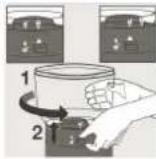


To set back the Coffee bean box
- Make certain the top part of the conical burr is clear of coffee grind residues. If not, you can use the brush provided to clean around the top part of the burr.
- Align the unlock icon on the base with the arrow on the Coffee bean box,
- Hold down the Coffee bean box release lever located at the opposite of the grinding size markings
- With your other hand, turn the Coffee bean box clockwise until the lock icon vs aligned with the arrow.


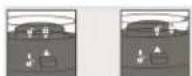
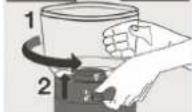


NOTE8 If the coffee bean box is not set properly the coffee grinder won't turn on.
NOTE8 The coffee bean box is designed with a trap door system to allow you to secure the coffee beans inside and allow you to remove the Coffee bean box from the grinder body without the mess.
Livoo
Feel good moments
User manual
SET COFFEE +RIND SIZE
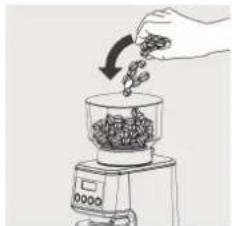
- Fit the coffee powder jar and its lid in their correct positions. Check that the assembly is correctly positioned in the body.
- Open the lid of the coffee bean box and fill the coffee bean box with desired whole coffee beans. Close the lid, you can now adjust the coffee grind size.
- Your coffee grinder has 31 grind size options. To adjust the grind size, rotate the coffee bean box and adjust from fine to coarse depending of the type of coffee you are brewing,
NOTE: If the tank is already filled with beans, the coarseness should be set at running motor. If there are no beans in the tank or grinding block, the coarseness can be set without running motor.
natural_image
Hand pouring seeds into a glass container on a digital scale (no text or symbols visible)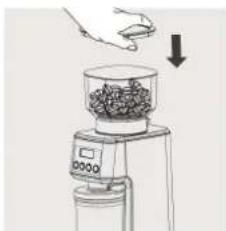
natural_image
Illustration of a hand using a digital kitchen grater to press food into a bowl (no text or symbols visible)
natural_image
Hand holding a digital scale measuring a quantity of granular material (no text or symbols visible)See chart below8
+RIND SIZE SETTIN+ RECOMMENDATIONS
| Coffee Type | Cezve Espresso Siphon Drip Coffee Pour Over | French Press | ||||
 |  | 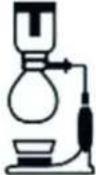 |  |  |  | |
| +rind Size Fine | Middle Fine Middle Middle | Middle Coarse | Coarse | |||
| +rind Setting 1-2 | 3-5 6-10 11-20 17-25 26-31 | |||||
OPERATION INSTRUCTIONS
Livoo
Feel good moments
User manual

- Add right amount of coffee beans into the bean holder.
- Select appropriate coffee bean grinding fineness by rotating the grinding setting ring.
- Connect the unit with supply power, once power is turned on, the buzzer sounds one time and the LED display shows "01", which means entering "Cup mode" and it ready to prepare one cup coffee grinding powder. Press + "or — button each time to choice cup, it shows 01.02.03.04....10. After selecting the number of cups you like, press " " button to start grinding beans. Each cup default setting grinding time is 3 seconds.
a. If you want to stop grinding during operation, press "1 button one more time.
b. With memory function, when you restart the machine, the display is your last setting if don't unplug the power cord. E.g. "05" is setting down for this time, and when you start the machine in next time the display is "05".
- Setting Single Cup +rinding Mode
1) After setting down the cups, press longer “” to choose the grinding setting, when display shows “5.0” and flashes which means entering “Singe Cup +rinding Mode”, and the default setting range is “3.0-5.0”.
2) Press “+、—” button each time to add or subtract 0.1 seconds, and after 3 times flashes the “Singe Cup +rinding Mode” setting down. E.g., setting 4.0 seconds for single cup, 2 cups total grinding time is 8 seconds, 10 cups total grinding time is 40 seconds.
- Connect the portafilter support, the buzzer sounds one time and the LED display shows "8.0", which means entering "portafilter mode" and "8.0" means grinding time is 8 seconds, press "+、—" button each time to choice second. Default setting range is "5.0-20.0", and each time add or subtract 0.1 seconds. After selecting the seconds of grinding you like, press " ▷" button to start grinding beans.
a. If you want to stop grinding during operation, press "▷II" button one more time.
b. With memory function, when you restart the machine, the display is your last setting if you don't unplug the power cord. E.g. "10.0" is setting down for this time, and when you start the machine in next time the display is "10.0".
- Start/Stop button.
a. After setting grinding mode, press " ” button to grinding coffee beans,
b. If you want to stop grinding during operation, press "D" button to stop grinding.
CLEANIN+ CONICAL BURRS
Regular cleaning helps the burrs achieve consistent grinding results which is especially important.
Livoo
Feel good moments
User manual
 |  |  |  | 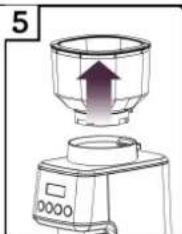 | 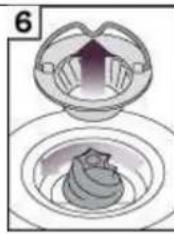 |  |
| Unlock Bean Box | Remove Beans Lock Bean Box Run +rinder Util empty | Remove Bean Box | Remove Upper Burr | Clean Upper Burr with Cleaning Brush | ||
 | 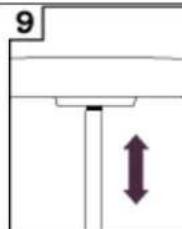 | 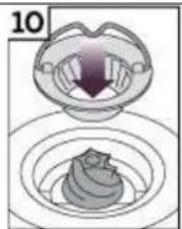 | 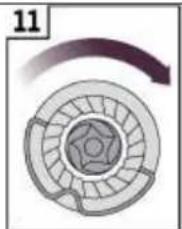 |  |  | |
| Clean Lower Burr with Cleaning Brush | Clean +rind Outlet with Brush | Push Upper Burr Firmly into Position | Lock Upper Burr Align | Bean Box into Position | Lock Bean Box | |
IMPORTANT!
For your appliance to run correctly, make certain that:
■ The lid to the coffee bean box is correctly closed.
■ The coffee powder jar and its lid are correctly placed in the body of the appliance.
This appliance is equipped with an overheat protective device. If the appliance overheats, it will switch off automatically. In this case let it cool down for 30 minutes then restart.
MAINTENANCE
■ To keep all your coffee's aroma and to avoid a degradation of the ground coffee, empty the ground coffee container after each use.
■ Always unplug from the power outlet before cleaning.
■ Never place the grinder, power supply cord or plug in water or under running water.
■ Do not use strong detergents or abrasive pads to clean the appliance.
■ Clean the lids and the ground coffee holder in warm, soapy water.
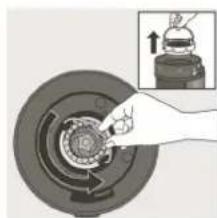
■ To remove the upper burr, hold of the upper mill and turn counter clockwise, then raise it vertically to remove.
■ Clean the upper burr with the cleaning brush (k).
■ Carefully clean the inside of the coffee bean box with a damp cloth.
■ To replace the upper burr, insert the burr and turn it once in the clockwise direction. For proper alignment, residual coffee and coffee grounds in the lower burr will need to be cleared,
natural_image
Hand turning a mechanical component with a magnified inset showing the action (no text or symbols visible)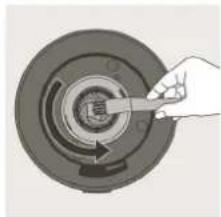
natural_image
Hand holding a tool interacting with a circular mechanical component (no text or symbols visible)
natural_image
Illustration of a hand turning a circular mechanical component with a knob, shown in two views (no text or symbols)Livoo
Feel good moments
User manual
TROUBLESHOOTIN+ +UIDE
| Code in display | Trouble description | Trouble solution |
| E1 | No bean holder or bean holder is not connected tightly. | Assembly the bean holder or tighten the bean holder until the micro switch is closed, once bean holder is close then error code E1 in display disappears. |
| E2 | Total operating is 5 cycles, it turns off automatically to protect the unit. | Unplug power cord, waiting for it cooling down, then restart. |
| Motor is overheating. | Waiting for motor cooling down over 30 minutes and restart. |
Livoo
Feel good moments
User manual
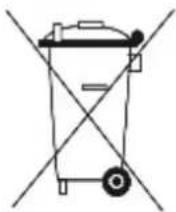

Correct disposal of the unit
3Electrical and Electronic Equipment)
(Applicable in the European Union and the rest of Europe that have adopted separate collection systems countries)
The European Directive 2012/19/EU on Waste Electrical and Electronic Equipment (WEEE), requires that old household electrical appliances must not be disposed of in the normal household waste stream. Old appliances must be collected separately in order to optimize the recovery and recycling of the materials they contain and reduce the impact on human health and the environment.
The symbol of the crossed out dustbin is marked on all products to remind the obligations of separate collection. Consumers should contact their local authority or retailer for information concerning the correct disposal of their product.
CE

• Photo no contractual
- Worried about the quality of his products the manufacturer reserves the right to make modifications without advance notice


- Livoo
- User manual
- SAFETY INSTRUCTIONS
- SPECIFICS MEASURES
- Warning :
- TECHNICAL SPECIFICATIONS
- ABOUT GRINGDING COFFEE
- DESCRIPTION
- Caution :
- BEFORE FIRST USE
- SET THE COFFEE BEAN BOX
- To remove the Coffee bean box
- To set back the Coffee bean box
- SET COFFEE +RIND SIZE
- OPERATION INSTRUCTIONS
- CLEANIN+ CONICAL BURRS
- IMPORTANT!
- MAINTENANCE
- TROUBLESHOOTIN+ +UIDE
- Correct disposal of the unit
- 3Electrical and Electronic Equipment)
Brand : LIVOO
Model : DOD191
Category : Coffee grinder