
LE - Photo/Video Software CAKEWALK - Free user manual and instructions
Find the device manual for free LE CAKEWALK in PDF.


| Product Type | Photo/Video Editing Software |
| Brand | Cakewalk |
| Model | LE |
| Platform | Windows 7/8/10/11 (64-bit) |
| Minimum RAM | 4 GB |
| Minimum Storage | 2 GB free hard drive space |
| Processor Requirement | Intel Core i3 or equivalent |
| Primary Functions | Photo editing, video editing, effects, transitions, export |
| Supported Image Formats | JPEG, PNG, BMP, TIFF, RAW (select cameras) |
| Supported Video Formats | MP4, AVI, MOV, WMV, MKV |
| Export Resolution | Up to 4K Ultra HD |
| Audio Editing | Yes, basic audio tracks |
| Layer Support | Yes, for images and video |
| Effects Library | Over 100 filters and effects |
| Language Support | English, French, German, Spanish, Italian, Japanese |
| Installation Type | Download and activation key |
| Customer Support | Online knowledge base, email support |
| Updates | Free minor updates |
| Trial Version | 30-day fully functional trial |
Frequently Asked Questions - LE CAKEWALK
User questions about LE CAKEWALK
0 question about this device. Answer the ones you know or ask your own.
Ask a new question about this device
Download the instructions for your Photo/Video Software in PDF format for free! Find your manual LE - CAKEWALK and take your electronic device back in hand. On this page are published all the documents necessary for the use of your device. LE by CAKEWALK.
USER MANUAL LE CAKEWALK
SONAR LE Quick Start Guide
We do not support TASCAM Professional Software SONAR LE. If you need customer support, we ask for your consideration of upgrading to SONAR X3 series.
For how to use, refer to the help menu of SONAR LE.
Contents
Notations in this manual....1
About trademarks....1
How to install....2
Downloading SONAR LE 2
How to register....3
How to record ....3
Recording 5
Mix-down 6
Notations in this manual
In this manual, we use the following conventions:
- Words that appear on the computer display are shown in quotation marks like this: "OK"
• Additional information is provided as necessary as tips, notes and cautions.
Tip
Describes a tip such as how the device can be used.
Note
Gives a supplementary explanation, an explanation of special cases, etc.
Caution
Described when failure to follow the instruction may cause injury to a person, damage to the device, or a data loss.
About trademarks
• TASCAM is a trademark of TEAC CORPORATION, registered in the U.S. and other countries.
• Microsoft, Windows, Windows 7, Windows 8 and Windows Media are either registered trademarks or trademarks of Microsoft Corporation in the United States and/or other countries.
• Cakewalk is a registered trademark or trademark and SONAR LE is a trademark of Cakewalk, Inc.
• ASIO is a trademark and software of Steinberg Media Technologies GmbH. VST is a trademark of Steinberg Media Technologies GmbH.
- Other company names, product names and logos in this document are the trademarks or registered trademarks of their respective owners.
SONAR LE


SONAR LE Quick Start Guide
How to install
To get SONAR LE, you need to download it from the website of Cakewalk. The software is provided by downloading so that you can always use the latest version.
Downloading SONAR LE
- Access the following URL and set the language to English.
http://www.cakewalk.com/redeem/?promo=SONARX3LE&kl=16

- Enter the names, e-mail address, and redemption code and then click "Redeem". The redemption code is described in the license card included in the audio interface.


- Click "SONAR LE" to download and save an installer. A serial number of SONAR LE is displayed at the same time. An e-mail is sent to the registered address. Carefully record the serial number by taking a note or in another way.

- Double-click the installer to start up.
- Set the language to English in language selection. Check each field and click "Next" to proceed.
- Enter the user name, the company name, and the serial number acquired in 3, and then click "Next".
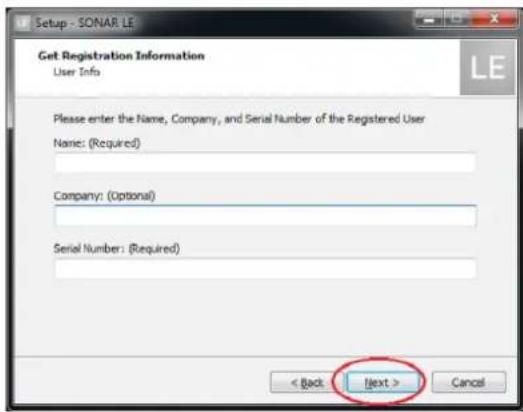
- Click the Install button to start installation of SONAR.

- When the installation is completed, a pop-up screen is displayed. Click OK to finish the installation.
SONAR LE Quick Start Guide
How to register
We request you to register for SONAR LE to distinguish authorized users. The software cannot be used without registration.
Registering SONAR LE
- When launching SONAR LE, you are prompted to enter a registration code.
Click "Register".

- You will be connected to the user registration site. Follow instructions on the screen to get a registration code.
Now the registration has been completed and the software is ready for use.
How to record
Settings of SONAR LE are common to Windows 7 and Windows 8. The following images are examples of screens where a US-200 is used on Windows 7.
Preparation (enabling the device)
- Launch SONAR LE. If the Quick Start window is displayed, click "CLOSE".
Note
Selecting "Getting Started" will launch a web browser and open an online tutorial. We recommend you to refer it.

[Quick Start window]
- From the "Edit" menu, select "Preferences...".

- Click "Devices" on the left side of the "Preferences" screen and select "US-200" in the "Input Drivers" and "Output Drivers" fields on the right side. Select "US-200" in each of the "Input Drivers" and "Output Drivers" fields.
Multiple items may be selectable depending on the audio interface. In this case, select all items having the name of the corresponding audio interface.

Note
"Generic Low Latency ASIO Driver" may be selected by default. Since only one device can be enabled in SONAR LE, if "Generic Low Latency ASIO Driver" is selected, you cannot select an external audio interface.
In this case, remove the checkmark from "Generic Low Latency ASIO Driver" and then select the audio interface.
SONAR LE Quick Start Guide
- After selecting, click "Apply". Necessary adjustments will be automatically carried out.
- Click "Devices" on the left side of the "Preferences" screen and check that "US-200" is selected in the "Playback Timing Master" and "Record Timing Master" fields on the right side. Multiple items may be selectable depending on the audio interface. In this case, select all items having the name of the corresponding audio interface.

- Now the device settings have been completed. Click "CLOSE" to close the screen.
Next, create a project for recording sounds.
Note
Click "ASIO Panel" to open the driver screen for the audio interface.
- From the "File" menu, select "New".

- The "New Project File" window is displayed. Enter an arbitrary project name in the "Name" field. Select "Normal" in the Template field and click "OK".
Note
It is useful if the name is after the title of the music, etc. If there is no appropriate name because the production has not started yet, give a name such as "test".
Tip
If you select "16 Track Audio" in the "Template" field, a project which has 16 audio tracks from the start is created. It is useful for recording audio.
If you are producing a music using a MIDI keyboard or a plug-in synthesizer, "16 Channel MIDI" is useful.

- The project opens. In the "Inspector" section on the left side of the screen, the two tracks "Audio" and "Master" are displayed.
"IN/OUT" indicates the input source and output destination of each track. Check that the output destination of "Master" track is "US-200 out 1". If another item is selected, select "US-200 out 1".
![SONAR LE - [Best* - Track] File Edit Views Insert Process Project Utilities Window Select Select Mode Drop Address SNAR LE View Options 1:01:000 Audio Clips 2 MIDI Clips A Master B Metronone C Preview Modules Strips None --- US-200 US-200 cut 1 US-200 US-200 cut 3 Set All Bus Outputs New Stereo Bus Audio CLM U.S.000U2000 IN /OUT IN /OUT CLM U.S.000U2000 Master Audio Master A](/content/2026/05/1006582/images/7d37f88075bc8b297ac071e93d6ed05c986deba218a3f53445c27fede026253f.jpg)
Now sounds of SONAR LE can be output to the US-200.
Tip
"US-200 out 1" indicates the first output terminal (Output 1). Though output sounds are stereo, Output 2 is not displayed. If you select "US-200 out 3", sounds of SONAR LE will be output to 3 and 4 of the US-200 (Output 3/4).
SONAR LE Quick Start Guide
Recording
- Select a track to be recorded and then select an input bus (signal path of input source) in the "Inspector" section on the left side of the screen. If the US-200 is connected, select "Left US-200 US-200 in 1".
Now sounds from the input terminal 1 of the US-200 can be input into the track.
![SONAR LE - [rest] - Track File Edit Views Insert Process Project Utilities Window Help SPECTR OUTPUT WORKS LIST PROCES PROJECT Utilities Window Help SONAR LE View Options Tracks Clips 1:01:000 Audio Bags MCH A Master B Macrocrisea C Dipower Modules Ferr 3% C Fan 3% C Fan 3% C Pan 3% C Pan 3% C U.S.200 (1 in, 2 out) None Selected Track Input Series... Selected Track Inputs... US-200 (1 in, 2 out) Left US-200 US-200 in 1 Fight US-200 US-200 in 1 Stereo US-200 US-200 in 1](/content/2026/05/1006582/images/a275ec43b02f38d5a8112f96873b7a17a2774067d9cb67706a018678a6a42017.jpg)
Turning on the input monitor button at this time allows you to listen input sounds at all times.

- Click the "Arm" button for the track to turn on (light up in red).

- Click the "Record" button in the "Control bar" section on the top side of the screen to start recording.

- After the playing is finished, click the "Stop" button and then click the "Arm" button to turn off (light out). Perform other operations such as rewinding as necessary.
- Repeat the above 1. to 4. steps to mix sounds.
Tip
When recording a vocal or acoustic guitar sound with one microphone, use the mono track. When recording a piano sound with two microphones or a keyboard sound via stereo line input, use the stereo track.
Clicking "Interleave" button in the "Inspector" section switches between mono and stereo.

Mix-down
Mix-down is a process of combining sounds of a project recorded and produced in multiple tracks into a stereo file.
- First, select a range to be mixed down. Move the cursor to the starting point and click "Set Thru = Now" of the "Transport Bar".

- Move the cursor to the ending point in the same way and click "Set Thru = Now".
- From the "File" menu, select "Export" and then "Audio".
![SONAR LE - [test2* - Track] File Edit Views Insert Process Project Utilities New... Open... Ctrl+O Revert... Close Save Ctrl+S Save As... Import Export Print... Ctrl+F Print Preview Print Setup... Recent File Exit Audio... Video... MIDI Groove Clip... Track Template...](/content/2026/05/1006582/images/a055307b639f4d85e8b5089697b372d84a1bf3085eb7741db37f5a978151e6ed.jpg)
- Set each field of the "Export Audio" window and click the "Export" button.
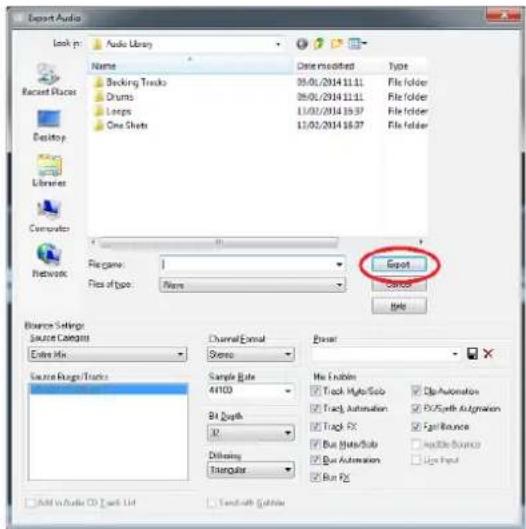
On this screen, set the name of the file to be exported, save location, file format, sampling rate (sampling frequency), bit depth (bit rate), and others.
- When the export is completed, the mix-down process is also completed.
Brand : CAKEWALK
Model : LE
Category : Photo/Video Software