
BTS-63C - Station de charge / station d'accueil DENVER - Free user manual and instructions
Find the device manual for free BTS-63C DENVER in PDF.


| Product Type | Charging Station / Docking Station |
| Brand | Denver |
| Model | BTS-63C |
| Dimensions | 200 x 120 x 60 mm |
| Weight | 320 g |
| Power Supply | DC 5V, 2A via micro USB |
| Number of Charging Slots | 3 |
| Compatible Devices | Smartphones, tablets, and other USB devices |
| Charging Technology | Smart detection with overcharge protection |
| LED Indicators | Yes, charging status per slot |
| Material | ABS plastic |
| Color | Black |
| Cable Length | 1.0 m |
| Main Functions | Simultaneous charging of multiple devices, compact desk organization |
| Care and Cleaning | Disconnect from power, wipe with a soft dry cloth; do not use liquids |
| Safety Features | Overcurrent, short-circuit, and overvoltage protection |
| Spare Parts and Repairability | No user-serviceable parts; contact Denver support for issues |
| General Information | For indoor use only; operating temperature 0–40°C |
Frequently Asked Questions - BTS-63C DENVER
User questions about BTS-63C DENVER
0 question about this device. Answer the ones you know or ask your own.
Ask a new question about this device
Download the instructions for your Station de charge / station d'accueil in PDF format for free! Find your manual BTS-63C - DENVER and take your electronic device back in hand. On this page are published all the documents necessary for the use of your device. BTS-63C by DENVER.
USER MANUAL BTS-63C DENVER
natural_image
Black portable electronic device with textured backrest and black handle (no visible text or symbols)DENVER BTS-63 - Bluetooth Speaker INSTRUCTION MANUAL
WWW.DENVER-ELECTRONICS.COM
Please read this instruction manual carefully before start using the product.
Power:
- Works on internal rechargeable lithium battery. Please charge your speaker fully before first use. To charge the battery:
Using a micro USB cable (included), insert the jack into the "Charging" hole and then plug the USB connector into the USB port on a computer for charging.
● A red light will indicate the charging situation. When battery is full, the red light will turn off automatically.
Bluetooth Speaker Operation:
- Turn on the unit by pushing the switch to ON position. A blue light aside will start blinking to indicate the speaker is in paring mode and searching for your Bluetooth mobile device.
- Open the Bluetooth function on your device and search the speaker named "BTS-63". After selecting this speaker, your device will pair without a password. (If required, enter the password "0000" to finalize the paring). The blue light will begin to flashing slowly after pair is complete.
● Start playing music on your device. Keep your device within 33 feet (10 meter) of your speaker. - Adjust the volume of your device to a comfortable level.
- Turn off the unit when not in used.
Universal Speaker Operation
- For other music devices without Bluetooth, use Auxiliary input cable. Connect the included Auxiliary cable into the speaker's Auxiliary port and plug the other end into your device aux-in.
● The device will switch to auxiliary mode automatically.
● All controls and functions are operated through your mobile device. - Disconnect the Auxiliary cable when not in used.
Caution:
● This is not a toy. Please keep away from small children.
- Please keep away from water / heat.
● Low power may cause poor connection even no working of Bluetooth.
- Do not over-charge the battery.
● Battery pack shall not be exposed to excessive heat such as sunshine, fire or the like.
DENVER®
www.denver-electronics.com

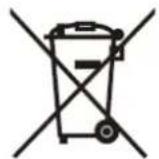

Electric and electronic equipment and included batteries contains materials, components and substances that can be hazardous to your health and the environment, if the waste material (discarded electric and electronic equipment and batteries) is not handled correctly.
Electric and electronic equipment and batteries is marked with the crossed out trash can symbol, seen below. This symbol signifies that electric and electronic equipment and batteries should not be disposed of with other household waste, but should be disposed of separately.
As the end user it is important that you submit your used batteries to the appropriate and designated facility. In this manner you make sure that the batteries are recycled in accordance with legislature and will not harm the environment.
All cities have established collection points, where electric and electronic equipment and batteries can either be submitted free of charge at recycling stations and other collection sites, or be collected from the households. Additional information is available at the technical department of your city.
Hereby, Inter Sales A/S, declares that this product BTS-63 is in compliance with the essential requirements and other relevant provisions of Directive 2014/53/EU. A copy of the Declaration of conformity may be obtained at:
Inter Sales A/S
Omega 5A, Soeften
DK-8382 Hinnerup
Denmark
Imported by:
DENVER ELECTRONICS A/S
Omega 5A, Soeften
DK-8382 Hinnerup
Denmark
www.facebook.com/denverelectronics
Brand : DENVER
Model : BTS-63C
Category : Station de charge / station d'accueil