
Ninebot Mini Scooter - Electric scooter Xiaomi - Free user manual and instructions
Find the device manual for free Ninebot Mini Scooter Xiaomi in PDF.


| Type of Product | Self-balancing Electric Scooter |
| Brand | Xiaomi |
| Model | Ninebot Mini |
| Dimensions (Unfolded) | Approx. 54 x 28 x 45 cm |
| Weight | 12.8 kg |
| Maximum Load | 100 kg |
| Maximum Speed | 16 km/h (10 mph) |
| Range per Charge | Up to 22 km (13.7 miles) |
| Battery Type | Lithium-ion 54.8V, 17.5Ah |
| Charging Time | About 3-4 hours |
| Charger | 100-240V AC input, 54.8V DC output |
| Tire Size | 10.5-inch pneumatic tires |
| Motor | Dual 350W motors (total 700W) |
| Climbing Angle | Up to 15 degrees |
| Braking System | Electric regenerative brake + foot brake |
| Lighting | LED headlight and taillight |
| Riding Modes | Beginner, Standard, Sport |
| Safety Standards | CE, FCC certified |
| Maintenance | Regular tire pressure check, battery care, firmware updates via app |
| Warranty | 1 year limited warranty |
Frequently Asked Questions - Ninebot Mini Scooter Xiaomi
User questions about Ninebot Mini Scooter Xiaomi
0 question about this device. Answer the ones you know or ask your own.
Ask a new question about this device
Download the instructions for your Electric scooter in PDF format for free! Find your manual Ninebot Mini Scooter - Xiaomi and take your electronic device back in hand. On this page are published all the documents necessary for the use of your device. Ninebot Mini Scooter by Xiaomi.
USER MANUAL Ninebot Mini Scooter Xiaomi
natural_image
Line drawing of a wheeled robot with wheels and sensor waves (no text or symbols)
For your safety, after switching-on the updated segway Mi Ninebot Scooter you will hear a continuous beep,
but its speed and sensitivity level are very low, so it can not be used immediately.
You must install on your smartphone user application Ninebot (APP) and activate it using manual application.
Systems Android / iOS
natural_image
Line drawing of a hand holding a smartphone with a screen (no text or symbols visible)Scan QR-code to download App
Scan QR-code to download the App, open instructions Ninebot Mi Scooter page 5, and follow the instructions to activate the device.
XIAOMI-MI.COM
Safety recommendations
When riding on Ninebot Mi Scooter, there is a risk of falling and injury, so do not forget to wear protective gear and helmet. (see picture)


If you are going to experience a Segway for the first time, do this in open space, and use help of another person to get on or get off the Segway.
Note: getting up / getting off from segway must only be done from the back side.
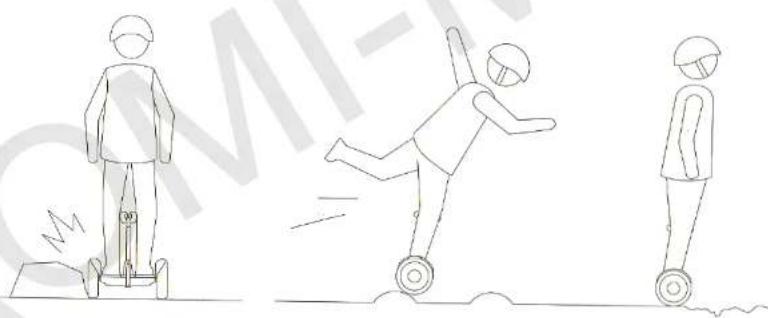
Avoid collision or hitting wheels on various obstacles, otherwise it may cause damage to wheels and lose of control of the device.
If on your way there are «sleeping policemen», threshold of the elevator, potholes or other obstacles, it is not recommended to pass through them at too fast or too slow speed, otherwise it could lead to slip or locking of Segway wheels.
natural_image
Three line drawings of a person in different poses: standing, mid-jump, and standing with wheels (no text or symbols)If you are riding on a rough road, you need to stick to a low speed (3-10km/h), and you can slightly bend your knees, it will help you to better adapt and adjust to the uneven road.
When using segway pay particular attention to the above safety recommendations.
Even more information on this subject can be found on page 6-11 in the instruction Ninebot Mi Scooter.

Brand : Xiaomi
Model : Ninebot Mini Scooter
Category : Electric scooter