
W350i - Mobile Phone SONY ERICSSON - Free user manual and instructions
Find the device manual for free W350i SONY ERICSSON in PDF.


| Product Type | Mobile Phone |
| Brand | Sony Ericsson |
| Model | W350i |
| Form Factor | Clamshell |
| Dimensions | 102 x 45 x 17 mm |
| Weight | 85 g |
| Display | 1.9 inch TFT, 176x220 pixels, 262K colors |
| Memory | Internal 20 MB, microSD slot |
| Camera | 2 MP, 1600x1200 pixels, video recording |
| Battery | Li-Ion 900 mAh (BST-38), talk time up to 7h, standby up to 300h |
| Connectivity | Bluetooth 2.0, USB 2.0 |
| Music Features | Walkman player, FM radio with RDS, external music keys |
| Network | GSM 850/900/1800/1900 |
| Messaging | SMS, MMS, Email |
| Audio Jack | 3.5 mm headphone jack |
| Maintenance | Clean with a dry soft cloth. Avoid liquids. |
| Security | Keypad lock, PIN lock |
| Spare Parts | Battery, charger, headphones |
| Repairability | Battery cover removable. SIM and memory card accessible. |
| General | Sony Ericsson W350i user manual available in PDF |
Frequently Asked Questions - W350i SONY ERICSSON
User questions about W350i SONY ERICSSON
0 question about this device. Answer the ones you know or ask your own.
Ask a new question about this device
Download the instructions for your Mobile Phone in PDF format for free! Find your manual W350i - SONY ERICSSON and take your electronic device back in hand. On this page are published all the documents necessary for the use of your device. W350i by SONY ERICSSON.
USER MANUAL W350i SONY ERICSSON
Thank you for purchasing a Sony Ericsson W350i. Enjoy your music wherever you go.
For additional phone content, go to www.sonyericsson.com/fun.
Register now to get a suite of tools, free online storage, special offers, news and competitions at www.sonyericsson.com/myphone.
For product support, go to www.sonyericsson.com/support.
This is the Internet version of the User guide. © Print only for private use.
Accessories – More for your phone
Portable Speakers MPS-70
Small yet powerful speakers that fit in your pocket
Stereo Portable Handsfree HPM-83
Street-style neck band headset with superior audio performance
Stereo Bluetooth™ Headset HBH-DS200
Enjoy wireless music without missing a call

natural_image
Two red audio/video speakers connected by a cable against a solid purple background (no text or symbols visible)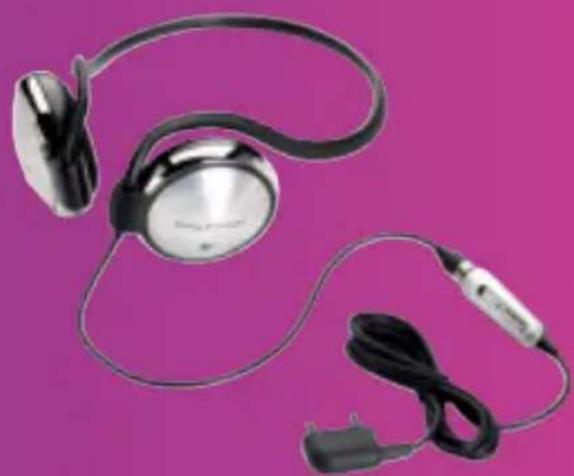
natural_image
Two electronic earchairs with black and silver colors against a solid magenta background (no text or symbols visible)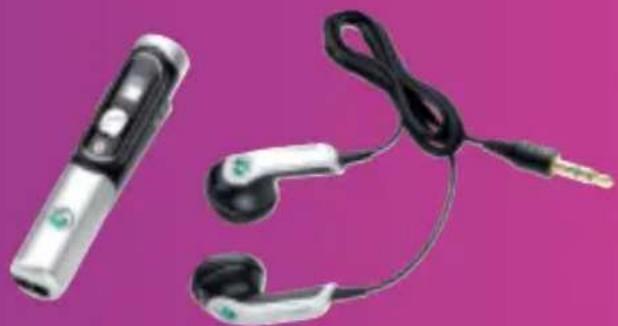
natural_image
Product photo of a handheld electronic device with earbuds and black cables against a solid magenta background (no text or symbols visible)These accessories can be purchased separately but may not be available in every market. To view the full range go to www.sonyericsson.com/accessories.
This is the Internet version of the User guide. © Print only for private use.
Contents
Getting started 5
Assembly 5
Turning on the phone 6
Help in your phone 8
Charging the battery 8
Phone overview 9
Menu overview 11
Status bar icons 12
Navigation 13
Shortcuts 15
File manager 15
Phone language 17
Entering text 17
Walkman® and music ..... 18
Transferring content to and from a computer 18
Walkman® player 19
PlayNow™ 22
TrackID™ 22
Calling 23
Making and receiving calls 23
Emergency calls 24
Contacts 24
Groups 26
Call list 27
Speed dial 27
Voicemail 27
Diverting calls 28
More than one call 28
Handling two voice calls 29
Conference calls 29
My numbers 30
Accept calls 30
Restricted dialling 30
Fixed dialling 31
Call time and cost 31
Business cards 31
Messaging 32
Text messages 32
Picture messages 33
Templates 35
Voice messages 36
Email 36
My friends 38
Area and cell information 40
Imaging 40
Camera 40
Transferring pictures 42
Pictures 42
Entertainment 43
Radio 43
Ringtones and melodies 44
MusicDJ™ 45
Sound recorder 45
Video player 46
Games 46
Applications 46
Connectivity 47
Settings 47
Using Internet 48
RSS reader 49
Bluetooth™ wireless technology .. 50
Using the USB cable 52
Synchronizing 53
Update service 55
More features 56
Alarms 56
Calendar 56
Tasks 58
Notes 58
Timer, stopwatch and calculator .. 59
Code memo 59
Profiles 60
Time and date 61
Themes 61
Locks 61
IMEI number 62
Troubleshooting 63
Common questions 63
Error messages 65
Important information ..... 66
Guidelines for Safe and
Efficient Use 68
Limited Warranty 72
FCC Statement 75
Declaration of Conformity
for W350i 76
Index 77
2 Contents
This is the Internet version of the User guide. © Print only for private use.
Sony Ericsson W350i
GSM 900/1800/1900
This User guide is published by Sony Ericsson Mobile Communications AB or its local affiliated company, without any warranty. Improvements and changes to this User guide necessitated by typographical errors, inaccuracies of current information, or improvements to programs and/or equipment, may be made by Sony Ericsson Mobile
Communications AB or its local affiliated company at any time and without notice. Such changes will, however, be incorporated into new editions of this User guide.
All rights reserved.
©Sony Ericsson Mobile Communications AB, 2008
Publication number: 1206-7111.2
Please note:
Some of the services in this User guide are not supported by all networks. This also applies to the GSM International Emergency Number 112.
Please contact your network operator or service provider if you are in doubt whether you can use a particular service or not.
Please read the Important information chapters before you use your mobile phone.
Your mobile phone has the capability to download, store and forward additional content, e.g. ringtones. The use of such content may be restricted or prohibited by rights of third parties, including but not limited to restriction under applicable copyright laws. You, and not Sony Ericsson, are entirely responsible for additional content that you download to or forward from your mobile phone. Prior to your use of any additional content, please verify that your intended use is properly licensed or is otherwise authorized. Sony Ericsson does not guarantee the accuracy, integrity or quality of any additional content or any other third party content. Under no circumstances will Sony Ericsson be liable in any way for your improper use of additional content or other third party content.
Bluetooth is a trademark or registered trademark of Bluetooth SIG Inc. and any use of such mark by Sony Ericsson is under license.
The Liquid Identity logo, PlayNow, TrackID and MusicDJ are trademarks or registered trademarks of Sony Ericsson Mobile Communications AB.
Sony, Memory Stick Micro, M2, WALKMAN and the WALKMAN logo are trademarks or registered trademarks of Sony Corporation.
Ericsson is a trademark or registered trademark of Telefonaktiebolaget LM Ericsson.
Adobe and Photoshop are trademarks or registered trademarks of Adobe Systems Incorporated in the United States and/or other countries.
TrackID is powered by Gracenote Mobile MusicID™. Gracenote and Gracenote Mobile MusicID are trademarks or registered trademarks of Gracenote, Inc.
Microsoft, Windows, Outlook and Vista are trademarks or registered trademarks of Microsoft Corporation in the United States and/or other countries.
T9™ Text Input is a trademark or a registered trademark of Tegic Communications. T9™ Text Input is licensed under one or more of the following: U.S. Pat. Nos. 5,818,437, 5,953,541, 5,187,480, 5,945,928, and 6,011,554; Canadian Pat. No. 1,331,057, United Kingdom Pat. No. 2238414B; Hong Kong Standard Pat. No. HK0940329; Republic of Singapore Pat. No. 51383; Euro.Pat. No. 0 842 463(96927260.8) DE/DK, FI, FR, IT, NL, PT, ES, SE, GB; and additional patents are pending worldwide.
Java and all Java based trademarks and logos are trademarks or registered trademarks of Sun Microsystems, Inc. in the U.S. and other countries.
End-user license agreement for Sun ^TM Java ^TM J2ME ^TM .
Restrictions: Software is confidential copyrighted information of Sun and title to all copies is retained by Sun and/or its licensors. Customer shall not modify, decompile, disassemble, decrypt, extract, or otherwise reverse engineer Software. Software may not be leased, assigned, or sublicensed, in whole or in part.
Export Regulations: Software, including technical data, is subject to U.S. export control laws, including the U.S. Export Administration Act and its associated regulations, and may be subject to export or import regulations in other countries. Customer agrees to comply strictly with all such regulations and acknowledges that it has the responsibility to obtain licenses to export, re-export, or import Software.
Software may not be downloaded, or otherwise exported or re-exported (i) into, or to a national or resident of, Cuba, Iraq, Iran, North Korea, Libya, Sudan, Syria (as such listing may be revised from time to time) or any country to which the U.S. has embargoed goods; or (ii) to anyone on the U.S.
Treasury Department's list of Specially Designated Nations or the U.S. Commerce Department's Table of Denial Orders.
Restricted Rights: Use, duplication or disclosure by the United States government is subject to the restrictions as set forth in the Rights in Technical Data and Computer Software Clauses in DFARS 252.227-7013(c) (1) (ii) and FAR 52.227-19(c) (2) as applicable.
Other product and company names mentioned herein may be the trademarks of their respective owners.
Any rights not expressly granted herein are reserved. All illustrations are for illustration only and may not accurately depict the actual phone.
Instruction symbols
The following appear in the User guide.

Note
Tip
Warning
A service or function is network-or subscription-dependent.
Contact your network operator for details.
Use a selection or navigation key to scroll and select. See Navigation on page 13.

Press the navigation key centre.

Press the navigation key up.

Press the navigation key down.

Press the navigation key left.

Press the navigation key right.
Getting started
Assembly
Before you start using your phone, you need to insert a SIM card and the battery.
! The battery must be removed before the SIM card is inserted or removed.
To insert the SIM card
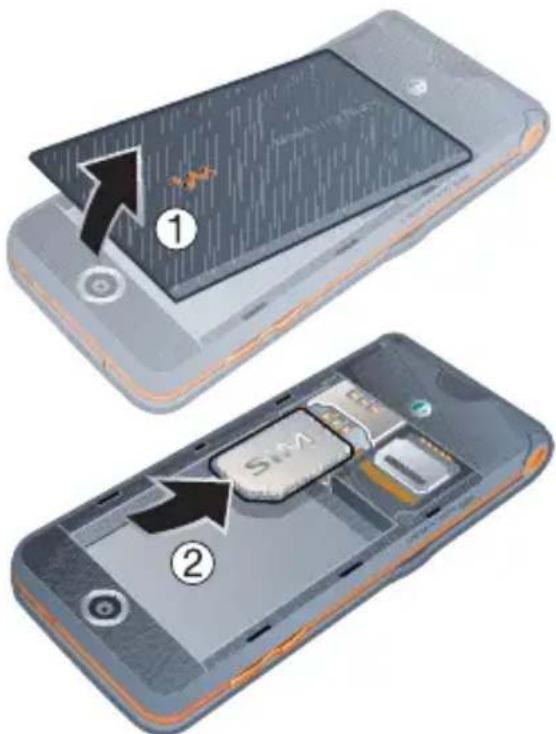
1 Remove the battery cover.
2 Slide the SIM card into its holder with the contacts facing down.
To insert the battery

1 Insert the battery with the label side up and the connectors facing each other.
2 Replace the battery cover.
To remove the battery
1 Remove the battery cover.
2 Insert your fingernail in the indentation.
3 Remove the battery.

Turning on the phone
To turn on the phone

1 Press and hold down C_0
2 Select a mode:
- Normal – full functionality.
- Flight mode – limited functionality.
3 Enter your SIM card PIN, if requested.
4 Select a language.
5 Select Yes to use the setup wizard.
! If you want to correct mistake when you enter your PIN, press .C _0
6 Getting started
This is the Internet version of the User guide. © Print only for private use.
SIM card
The SIM (Subscriber Identity Module) card, which you get from your network operator, contains information about your subscription. Always turn off your phone and detach the charger and the battery before you insert or remove the SIM card.
You can save contacts on the SIM card before you remove it from your phone. See To copy names and numbers to the SIM card on page 25.
PIN
You may need a PIN (Personal Identification Number) to activate the services in your phone. Your PIN is supplied by your network operator. Each PIN digit appears as *, unless it starts with emergency number digits, for example, 112 or 911. You can see and call an emergency number without entering a PIN.
To delete numbers from the display
- Press C _0
! If you enter the wrong PIN three times in a row, PIN blocked appears. To unblock it, you need to enter your PUK (Personal Unblocking Key). See SIM card lock on page 61.
Flight mode
In Flight mode the network and radio transceivers are turned off to prevent disturbance to sensitive equipment.
You can use the Bluetooth™ function in Flight mode.
Start-up screen
The start-up screen appears when you turn your phone on. See Using pictures on page 42.
Standby
After you have turned your phone on and entered your PIN, the name of the network operator appears on the screen. This is called standby.
Help in your phone
Help and information is available in your phone at any time. See Navigation on page 13.
To use the setup wizard
1 From standby select Menu > Settings > the General tab > Setup wizard.
2 Select an option.
To view information about functions
- Scroll to a function and select Info, if available. In some cases, Info appears under More.
To view the phone demonstration
- From standby select Menu > Entertainment > Demo tour.
Settings download
You can download settings to your phone. These settings let you use functionality that require Internet accounts, for example, picture messaging and email.
To download settings
- From standby select Menu > Settings > the General tab > Setup wizard > Settings download.
! Contact your network operator or service provider for more information.
Charging the battery
The phone battery is partly charged when you buy it.
To charge the battery
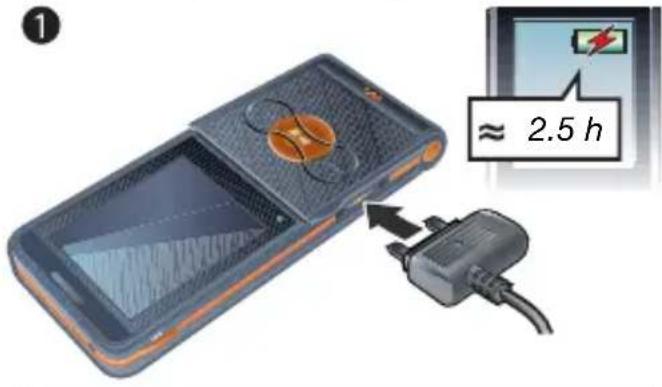

natural_image
Illustration of a smartphone with an attached cable and plug, showing internal components (no text or symbols)1 Connect the charger to the phone. It takes approximately 2.5 hours to fully charge the battery.
2 Remove the charger by tilting the plug upwards.
You can use your phone while it is charging. You can charge the battery at any time and for more or less than 2.5 hours. You can interrupt the charging without damaging the battery.
8 Getting started
This is the Internet version of the User guide. © Print only for private use.
Phone overview
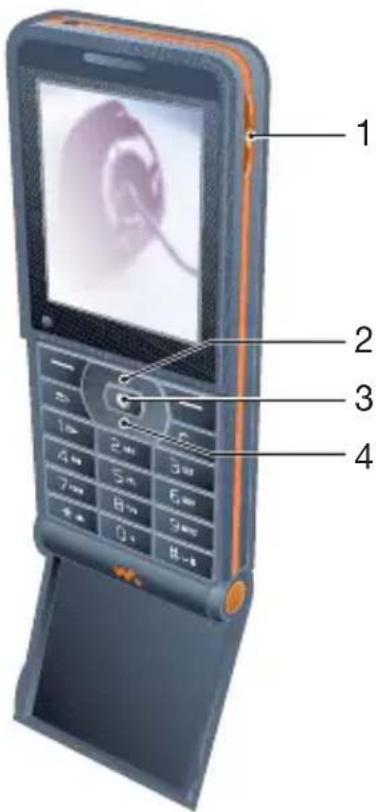
1 Music key lock
2 Walkman® player control
3 Screen
4 Selection key
5 Back key
6 Connector for charger, handsfree and USB cable
7 Clear key
On/off key
8 Navigation key
9 Silent key
10 Fast forward (music key)
11 Play/Pause/Stop (music key)
12 Rewind (music key)
13 The flip

9Getti
14 Camera lens
15 Volume, adjust brightness buttons
16 Loudspeaker
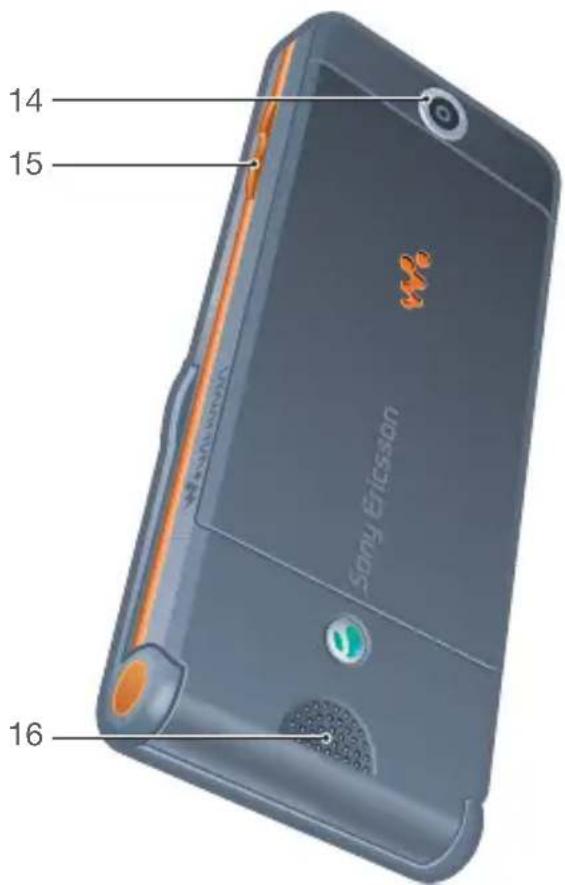
10 Getting started
This is the Internet version of the User guide. © Print only for private use.
Menu overview

PlayNow™* Internet* Entertainment


Online services*
Games
TrackID™
Video player
MusicDJ™
Record sound
Demo tour

Camera Messaging WALKMAN


Write new
Inbox
RSS reader
Drafts
Outbox
Sent messages
Saved messages
My friends*
Call voicemail
Templates
Settings

File manager** Contacts


Radio

Calls** Organizer


All Answered Dialled Missed


Alarms
Applications
Calendar
Tasks
Notes
Synchronization
Timer
Stopwatch
Calculator
Code memo

Settings\*\*

General
Profiles
Time & date
Language
Update service
New events
Shortcuts
Flight mode
Security
Setup wizard
Phone status
Master reset

Sounds & alerts
Ring volume
Ringtone
Silent mode
Increasing ring
Vibrating alert
Message alert
Key sound

Display
Wallpaper
Themes
Start-up screen
Screen saver
Brightness
Edit line names*

Calls
Speed dial
Divert calls
Switch to line 2*
Manage calls
Time & cost*
Show/hide my no.
Handsfree
Open to answer

Connectivity
Bluetooth
USB connection
Synchronization
Device mgmt.
Mobile networks
Data comm.
Internet settings
Accessories
* Some menus are operator-, network- and subscription-dependent.
** You can use the navigation key to scroll between tabs in submenus. For more information, see Navigation on page 13.
Status bar icons
Some of these icons may appear on the screen to show status and new events.
Icon Description

GSM network signal strength

Battery status

Battery charging, appears with battery status icon

Missed incoming call

Text message received

Email message received

Picture message received

Voice message received

Ongoing call

Handsfree is connected

Radio playing in the background

Calendar reminder

Task reminder
12 Getting started
This is the Internet version of the User guide. © Print only for private use.
Navigation
The main menus are shown as icons. Some submenus include tabs.
To navigate the phone menus
1 From standby select Menu.
2 Use the navigation key to move through the menus.
To scroll between the tabs
- Scroll to a tab by pressing the navigation key left or right.
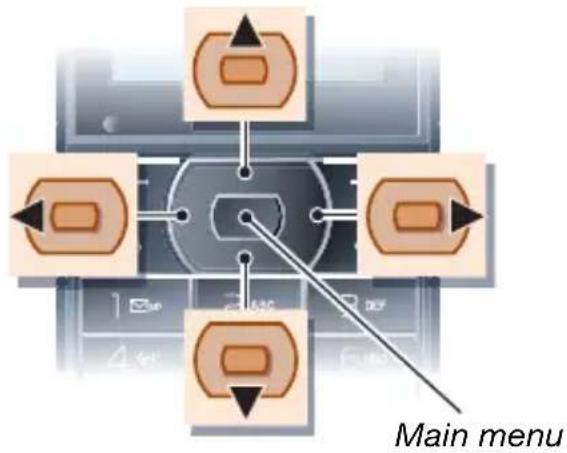
flowchart
graph TD
    A["Main menu"] --> B["Top Left"]
    A --> C["Top Right"]
    A --> D["Top Left"]
    A --> E["Top Right"]
    A --> F["Bottom Left"]
    A --> G["Bottom Right"]
    style A fill:#f9f,stroke:#333
    style B fill:#ccf,stroke:#333
    style C fill:#ccf,stroke:#333
    style D fill:#ccf,stroke:#333
    style E fill:#ccf,stroke:#333
    style F fill:#ccf,stroke:#333
    style G fill:#ccf,stroke:#333
Key
| Go to the main menus or select items | |
| Scroll between the menus and tabs | |
| Select options shown immediately above these keys on the screen. | |
| Go back one level in the menus.Press and hold down to return to standby or end a function. | |
| Delete items, such as pictures, sounds and contacts.Press and hold down to mute the microphone during a call.Turn the phone on/off. | |
| Open the Walkman® player.Press to move between the Walkman® player and the music files. | |
| Press and hold down to call your voicemail service (if set). |
2 - Press and hold down a number key to reach a contact beginning with a specific letter.
| 12-9 | Press a number key and select Call to speed dial. |
| Press to turn off the ringtone when you receive a call.Press and hold down to set the phone to silent. The alarm signals even if your phone is set to silent. | |
| Press to change letter case when writing a message.Press and hold to toggle T9TM Text Input on and off when writing a message. | |
| On the flip:Stop, pause and play (music key).When you close the flip you turn on the Walkman® player.Press to automatically search for radio channels.Press up or down to search for preset channels. | |
| On the flip:Skip to the previous track when using the Walkman® player.Search for radio channels. | |
| On the flip:Skip to the next track when using the Walkman® player.Search for radio channels. | |
| On the side of the phone.View status information in standby.Increase the volume during a call, or when you use the Walkman® player.Increase brightness when you use the camera.Press twice to reject a call.In standby, press once to mute an incoming call. | |
| On the side of the phone:Decrease the volume during a call, or when you use the Walkman® player.Decrease brightness when you use the camera |
14 Getting started
This is the Internet version of the User guide. © Print only for private use.
Shortcuts
You can use keypad shortcuts to go directly to a menu. Menu numbering starts from the top left icon and moves across and then down row by row.
To go directly to the seventh menu
- From standby select Menu and press 7.
To use navigation key shortcuts
- From standby press 🔒, or to go directly to a function.
To edit a navigation key shortcut
1 From standby select Menu > Settings > the General tab > Shortcuts.
2 Scroll to an option and select Edit.
3 Scroll to a menu option and select Shortcut.
File manager
You can use the file manager to handle items saved in the phone memory or on a memory card.
You may have to purchase a memory card separately.
Memory card
Your phone supports Memory Stick Micro™ (M2™) memory card adding more storage space to your phone. It can also be used as a portable memory card with other compatible devices.
To insert a memory card

1 Open the memory card holder.
2 Insert the memory card with the gold-coloured contacts facing down.
3 Close the memory card holder.
4 Slide the memory card holder to lock it.
5 Replace the battery cover.
To view memory card options
1 From standby select Menu > File manager > the On Memory Stick tab.
2 Select More.
Handling files
You can move and copy files between your phone, a computer and a memory card. Files are saved on the memory card first and then in the phone memory. Unrecognized files are saved in the Other folder.
You can create subfolders to move or copy files to. When you handle files, you can select more than one or all the files in a folder at the same time for all items except Games and Applications.
If the memory is full, delete some content to create space.
File manager tabs
The file manager is divided into three tabs, and icons indicate where the files are saved.
- All files – all content in the phone memory and on a memory card.
- On Memory Stick – all content on a memory card.
- In phone – all content in the phone memory.
To view information about files
1 From standby select Menu > File manager.
2 Scroll to a folder and select Open.
3 Scroll to a file and select More > Information.
To move a file in the file manager
1 From standby select Menu > File manager.
2 Scroll to a folder and select Open.
3 Scroll to a file and select More > Manage file > Move.
4 Select an option.
To select more than one file in a folder
1 From standby select Menu > File manager.
2 Scroll to a folder and select Open.
3 Select More > Mark > Mark several.
4 Select Mark to mark the files.
To delete a file from the file manager
1 From standby select Menu > File manager.
2 Find the file and press C_
Phone language
You can select a language to use in your phone.
To change the phone language
1 From standby select Menu > Settings > the General tab > Language > Phone language.
2 Select an option.
Entering text
You can use multitap text input or T9 ^TM Text Input to enter text. The T9 Text Input method uses a built-in dictionary.
To change text input method
- When you enter text, press and hold down ※_a/1A .
To shift between capitals and lower-case letters
- When you enter text, press *a/a
To enter numbers
- When you enter text, press and hold down 0 + 9 - .
To enter full stops and commas
- When you enter text, press 📄
To enter text using T9 ^TM Text Input
1 From standby select, for example, Menu > Messaging > Write new > Text message.
2 If is not displayed, press and hold down to change to T9 Text Input.
3 Press each key only once, even if the letter you want is not the first letter on the key. For example, if you want to write the word "Jane", press 5 2, 6 Write the whole word before looking at the suggestions.
4 Use or to view suggestions.
5 Press to accept a suggestion.
To enter text using multitap
1 From standby select, for example, Menu > Messaging > Write new > Text message.
2 If is displayed, press and hold down to change to multitap text input.
3 Press -2 repeatedly until the desired letter appears.
4 When a word is written, press to add a space.
To add words to the built-in dictionary
1 When you enter text using T9 Text Input, select More > Spell word.
2 Write the word using multitap input and select Insert.
Walkman® and music
Listen to music, audio books and podcasts. Use Sony Ericsson Media Manager to transfer content to your phone.
Transferring content to and from a computer
Using a USB cable and Sony Ericsson Media Manager, you can transfer content from CDs, your computer or the phone.

Sony Ericsson Media Manager software is included on the CD that comes with your phone and available for download at www.sonyericsson.com/support.
Required operating systems
You need one of these operating systems on your computer to use the software included on the CD:
- Microsoft® Windows Vista™ (32 bit and 64 bit versions of: Ultimate, Enterprise, Business, Home Premium, Home Basic)
- Microsoft Windows® XP (Pro or Home), Service Pack 2 or higher
To install Media Manager
1 Turn on your computer and insert the CD. The CD starts automatically and the installation window opens.
2 Select a language and click OK.
3 Click Install Sony Ericsson Media Manager and follow the instructions.
To transfer content using Media Manager
1 Connect the phone to a computer with the USB cable that came with the phone.
2 Computer: Start/Programs/
Sony Ericsson/Media Manager. Wait for
Media Manager to start.
3 Phone: Select File transfer. The phone turns off and prepares to transfer files.
Do not remove the USB cable from your phone or computer during transfer, as this may corrupt the memory card or the phone memory.
4 Computer: Wait until the phone appears in Media Manager.
5 Move files between your phone and the computer in Media Manager.
6 For safe disconnection of the USB cable in file transfer mode, right-click the removable disk icon in Windows Explorer and select Eject.

For details on transferring music, refer to Media Manager Help. Click 📂 the top-right corner of the Media Manager window.
Stereo portable handsfree

natural_image
Illustration of a portable electronic device with earphones and cables, no text or symbols presentTo use the handsfree
- Connect the portable handsfree. Music stops when you receive a call and resumes when the call has ended.
Walkman® player
To play music
1 From standby select Menu > WALKMAN.
2 Scroll to a title and select Play.
Walkman® player controls
You can control the Walkman® player with the phone open.
To stop playing music
- Press
To resume playing music
- From standby press and select Play.
To fast forward and rewind
- When you listen to music, press and hold down 📄 or .
To move between tracks
- When you listen to music, press or 🏠.
To access the music files
- Press to switch between the Walkman® player and the music files.
To change the volume
- Press ▲ or
Music keys
The music keys are used to control the Walkman® player with the flip closed.
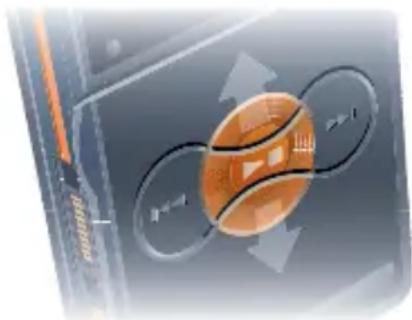
natural_image
Illustration of a basketball with directional arrows and motion lines, no readable text or symbolsTo start playing music
- Press

To stop playing music
- Press

To fast forward and rewind
When you listen to music, press and hold down OK.
To access the tracks currently playing
- When you listen to music, press up or down.

To move between tracks
- When you listen to music, press or ▶▶▶.

Music key lock
When the phone is closed you can use the music key lock to lock and unlock the music keys.
To lock and unlock the music keys
- Slide the music key lock switch.
Browsing files
Music files are saved and categorized.
- Artists – list tracks you have transferred using Media Manager.
- Albums – list tracks by album.
- Tracks – list all music tracks in your phone and on a memory card.
- Playlists – your own lists of tracks.
Playlists
You can create playlists to organize files in File manager. Files can be added to more than one playlist.
Deleting a playlist, or a file from a playlist, does not delete the file from the memory, just the reference to the file.
To create a playlist
1 From standby select Menu > WALKMAN > More > My music.
2 Scroll to Playlists and select Open.
3 Scroll to New playlist and select Add.
4 Enter a name and select OK.
5 Scroll to a track and select Mark.
6 Select Add to add the track to the playlist.
To add files to a playlist
1 From standby select Menu > WALKMAN > More > My music.
2 Scroll to Playlists and select Open.
3 Scroll to the playlist and select Open.
4 Select More > Add media.
5 Scroll to a track and select Mark.
6 Select Add to add the track to the playlist.
To remove tracks from a playlist
1 From standby select Menu > WALKMAN > More > My music.
2 Scroll to a playlist and select Open.
3 Scroll to the track and press C_0
To delete a playlist
1 From standby select Menu > WALKMAN > More > My music > Playlists.
2 Scroll to a playlist and press C_0
To view information about a track
- Scroll to a track and select More > Information.
Sending and receiving music
You can send and receive music in a picture message, an email or using Bluetooth.
To send music
1 From standby select Menu > WALKMAN.
2 Scroll to a title and select More > File > Send.
3 Select a transfer method.
! Make sure the receiving device supports the transfer method you select.
To receive music
- Follow the instructions that appear.
Music key lock
When the phone is closed you can use the music key lock to lock and unlock the music keys.
To lock and unlock the music keys
- Slide the music key lock switch.

PlayNow™
Connect to PlayNow™ to download ringtones, games, music, themes and wallpaper. You can preview of listen to content before you purchase and download it to your phone.
This service is not available in all countries. Contact your network operator for more information.
Before you use PlayNow™
You must have the required Internet connection settings in your phone. See Settings on page 47.
To listen to PlayNow™ music
1 From standby select Menu > PlayNow™.
2 Scroll the PlayNow™ Web site and follow the instructions to preview and purchase content.
Downloading from PlayNow™
The price appears when you select to download and save a music file. Your phone bill or prepay card is debited when a purchase is accepted.
To download a music file
1 When you have listened to a music file preview, you can agree to accept the conditions.
2 Select Yes to download.
TrackID™
TrackID™ is a music recognition service. You can search for song titles, artists and album names.
To search for song information
1 When you hear a song through a loudspeaker, from standby select Menu > Entertainment > TrackID™ > Start.
2 When the radio is playing select More > TrackID™.
Calling
Making and receiving calls
You need to turn on your phone and be within range of a network.
Do not cover the bottom of your phone when it is in use, as this affects call quality.
To make a call
1 From standby enter a phone number (with international country code and area code, if applicable).
2 Select Call.
You can call numbers from the contacts and call list. See Contacts on page 24, and Call list on page 27.
To make international calls
1 From standby press and hold down 0+ until a “+” sign appears.
2 Enter the country code, area code (without the first zero) and phone number.
3 Select Call.
To re-dial a number
- When Retry? appears select Yes.
Do not hold your phone to your ear when waiting. When the call connects, your phone gives a loud signal.
To answer a call
- Select Answer.
- Open the flip.
To reject a call
- Select Busy.
To change the ear speaker volume during a call
- Press ▲ or
To mute the microphone during a call
1 Press and hold down C_3 2 Press and hold down again to resume.
To turn the loudspeaker on during a call
- Select More > Turn on speaker.
Do not hold your phone to your ear when using the loudspeaker. This could damage your hearing.
Emergency calls
Your phone supports international emergency numbers, for example, 112 and 911. These numbers can normally be used to make emergency calls in any country, with or without the SIM card inserted, if a network is within range.
In some countries, other emergency numbers may also be promoted. Your network operator may therefore have saved additional local emergency numbers on the SIM card.
To make an emergency call
- From standby enter 112 (the international emergency number) and select Call.
To view your local emergency numbers
1 From standby select Menu > Contacts.
2 Scroll to New contact.
3 Select Options > Special numbers > Emergency nos.
Contacts
You can save names, phone numbers and personal information in Contacts. Information can be saved in the phone memory or on the SIM card.
Default contact
You can choose which contact information – Phone contacts or SIM contacts – is shown as default.
If Phone contacts is selected as default, your contacts show all the information saved in Contacts. If you select SIM contacts as default, your contacts show names and numbers saved on the SIM card.
To select default contacts
1 From standby select Menu > Contacts.
2 Scroll to New contact and select Options > Advanced > Default contacts.
3 Select an option.
Phone contacts
Phone contacts can contain names, phone numbers and personal information. They are saved in the phone memory.
To add a phone contact
1 From standby select Menu > Contacts.
2 Scroll to New contact and select Add.
3 Enter the name and select OK.
4 Enter the number and select OK.
5 Select a number option.
6 Scroll between tabs and select the fields to add information.
7 Select Save.
To add an item to a phone contact
1 From standby select Menu > Contacts.
2 Scroll to a contact and select More > Edit contact.
3 Scroll between the tabs and select Add.
4 Select an option and an item to add.
5 Select Save.

If your subscription supports Calling Line Identification (CLI) service, you can assign personal ringtones to contacts.
To copy names and numbers to the SIM card
1 From standby select Menu > Contacts.
2 Select More > Options > Advanced > Copy to SIM.
3 Select an option.

When you copy all contacts from your phone to the SIM card, all existing SIM card information is replaced.
To call a phone contact
1 From standby select Menu > Contacts.
2 Scroll to a contact and select Call.

To go directly to a contact, from standby press 2. See Speed dial on page 27.
To call a SIM contact from phone contacts
1 From standby select Menu > Contacts > More > Options > SIM contacts.
2 Scroll to a contact and select Call.
To automatically save names and phone numbers on the SIM card
1 From standby select Menu > Contacts.
2 Select More > Options > Advanced > Auto save on SIM.
3 Select an option.
SIM contacts
SIM contacts can contain names and numbers only. They are saved on the SIM card.
To add a SIM contact
1 From standby select Menu > Contacts.
2 Scroll to New contact and select Add.
3 Enter the name and select OK.
4 Enter the number and select OK.
5 Select a number option and add more information, if available.
6 Select Save.
To copy names and numbers to phone contacts
1 From standby select Menu > Contacts.
2 Select More > Options > Advanced > Copy from SIM.
3 Select an option.
To call a SIM contact
1 From standby select Menu > Contacts.
2 Scroll to a contact and select Call.
Deleting contacts
To delete a contact
1 From standby select Menu > Contacts.
2 Scroll to a contact and press C_a
To delete all phone contacts
1 From standby select Menu > Contacts.
2 Select More > Options > Advanced > Delete all contacts.
Sending contacts
To send a contact
1 From standby select Menu > Contacts.
2 Scroll to a contact and select More > Send contact.
3 Select a transfer method.
! Make sure the receiving device supports the transfer method you select.
Memory status
The number of contacts you can save in your phone or on the SIM card depends on available memory.
To view memory status
1 From standby select Menu > Contacts.
2 Select More > Options > Advanced > Memory status.
To save contacts on a memory card
1 From standby select Menu > Contacts.
2 Select More > Options > Advanced > Back up to M.S.
Synchronizing contacts
Contacts can be synchronized with your computer and some Web applications. For more information, see Synchronizing on page 53.
Groups
You can create a group of phone numbers and email addresses to send messages to. See Messaging on page 32. You can also use groups (with phone numbers) when you create accepted callers lists. See Accept calls on page 30.
To create a group of numbers and email addresses
1 From standby select Menu > Contacts > Options > Groups > New group.
2 Enter a name for the group and select Continue.
3 Select New to find and select a contact phone number or email address.
4 Repeat step 3 to add more phone numbers or email addresses.
5 Select Done.
Call list
You can view information about most recent calls.
To call a number from the call list
1 From standby select Calls and scroll to a tab.
2 Scroll to a name or a number and select Call.
To add a call list number to contacts
1 From standby select Calls and scroll to a tab.
2 Scroll to the number and select More > Save number.
3 Select New contact to create a new contact or select an existing contact to add the number to.
To clear the call list
- From standby select Calls > the All tab > More > Delete all.
Speed dial
Speed dialling lets you select nine contacts that you can dial quickly. The contacts can be saved in positions 1-9.
To add contacts to speed dial numbers
1 From standby select Menu > Contacts.
2 Select Options > Speed dial.
3 Scroll to a position number and select Add.
4 Select a contact.
To speed dial
- From standby enter the position number and select Call.
Voicemail
If your subscription includes an answering service, callers can leave a voicemail message when you cannot answer a call.
To enter your voicemail number
1 From standby select Menu > Messaging > Settings > Voicemail number.
2 Enter the number and select OK.
To call your voicemail service
- From standby press and hold down 1.
To edit your voicemail number
1 From standby select Menu > Messaging > Settings > Voicemail number.
2 Edit the number and select OK.

Diverting calls
You can divert calls, for example, to an answering service.
When Restrict calls is used, some divert call options are not available. See Restricted dialling on page 30.
Divert call options
Standard options are:
- Divert always – divert all your calls
- When busy – if a call is ongoing
- Not reachable – if turned off or unreachable
- No reply – if not answered in a specified time
To divert calls
1 From standby select Menu > Settings > the Calls tab > Divert calls.
2 Scroll to a call type and divert option and select Activate.
3 Enter the number to divert calls to and select OK.

More than one call
You can handle more than one call at the same time. For example, you can put an ongoing call on hold, while you make or answer a second call. You can also switch between the two calls. You cannot answer a third call without ending one of the first two calls.
Call waiting
When call waiting is used, you hear a beep if you receive a second call.
To activate call waiting
- From standby select Menu > Settings > the Calls tab > Manage calls > Call waiting > Activate.
To make a second call
1 During the call, select More > Hold. This puts the ongoing call on hold.
2 Enter the number to call and select More > Call.
To answer a second call
- During the call, select Answer. This puts the ongoing call on hold.
To reject a second call
- During the call, select Busy and continue with the ongoing call.
To end an ongoing call and answer a second call
- During the call, select Replace active call.

Handling two voice calls
You can have calls ongoing and on hold at the same time.
To switch between two calls
- During the call, select More > Switch.
To join two calls
- During the call, select More > Join calls.
To connect two calls
- During the call, select More > Transfer call. You are disconnected from both calls.
To end an ongoing call and return to the call on hold
- Select End call > Yes.
To end both calls
- Select End call > No.
Receiving a third voice call
You cannot answer a third call without ending one of the first two calls or joining them into a conference call.

Conference calls
With a conference call, you can have a joint conversation with up to five people.
To join the two calls
- During the call, select More > Join calls.
To add a new participant
1 During the call, select More > Hold. This puts the joined calls on hold.
2 Select More > Add call.
3 Enter the number to call and select Call.
4 Select More > Join calls to add the new participant.
5 Repeat this task to add more participants.
To release a participant
1 Select More > Release part.
2 Select the participant to release.
To have a private conversation
1 During the call, select More > Talk to and select the participant to talk to.
2 To resume the conference call, select More > Join calls.

If your subscription supports Alternate Line Service (ALS), you can make separate calls with different phone numbers.
My numbers
You can view, add and edit your own phone numbers.
To check your phone numbers
1 From standby select Menu > Contacts > Options > Special numbers > My numbers.
2 Select an option.
Accept calls
You can choose to receive calls from certain phone numbers only.
To add numbers to the accepted callers list
1 From standby select Menu > Settings > the Calls tab > Manage calls > Accept calls > Only from list > New.
2 Scroll to a contact or select Groups. See Groups on page 26.
To accept all calls
- From standby select Menu > Settings > the Calls tab > Manage calls > Accept calls > All callers.
Restricted dialling
You can restrict outgoing and incoming calls. A password from your service provider is required.
! If you divert incoming calls, you cannot use some restrict calls options.
Restrict calls options
Standard options are:
- All outgoing – all outgoing calls
- Outgoing intl – all outgoing international calls
- Outg. intl roam. – all outgoing international calls except to your home country
- All incoming – all incoming calls
- Inc. when roaming – all incoming calls when you are abroad
To restrict calls
1 From standby select Menu > Settings > the Calls tab > Manage calls > Restrict calls.
2 Select an option.
3 Enter your password and select OK.

Fixed dialling
Fixed dialling allows calls to be made only to certain numbers saved on the SIM card. The fixed numbers are protected by your PIN2.
When fixed dialling is used, you can still call the international emergency number, 112.
Partial numbers can be saved.
For example, saving 0123456 allows calls to be made to all numbers starting with 0123456.
When fixed dialling is used, you cannot view or manage any phone numbers saved on the SIM card.
To use fixed dialling
1 From standby select Menu > Contacts.
2 Select More > Options > Special numbers > Fixed dialling > Activate.
3 Enter your PIN2 and select OK.
4 Select OK again to confirm.
To save a fixed number
1 From standby select Menu > Contacts.
2 Select More > Options > Special numbers > Fixed dialling > Fixed numbers > New number.
3 Enter the information and select Save.

Call time and cost
During a call, the duration of the call is shown. You can check the duration of your last call, outgoing calls and the total time of your calls.
To check the call time
- From standby select Menu > Settings > the Calls tab > Time & cost > Call timers.
Business cards
To add your own business card
1 From standby select Menu > Contacts.
2 Select More > Options > My business card.
3 Scroll between tabs and select the fields to add information. To enter a symbol select More > Add symbol > Insert.
4 Enter the information and select Save.
To send your business card
1 From standby select Menu > Contacts.
2 Select More > Options > My business card > Send my card.
3 Select a transfer method.
! Make sure the receiving device supports the transfer method you select.
Messaging
Text messages
Text messages can contain simple pictures, sound effects, animations, and melodies.
Before you use messaging
You must have a service centre number. The number is supplied by your service provider and is usually saved on the SIM card. If the number to your service centre is not saved on your SIM card, you must enter the number yourself.
To enter a service centre number
1 From standby select Menu > Messaging > Settings > Text message > Service centre. The number is shown if it is saved on the SIM card.
2 If there is no number shown, select Edit > New ServiceCentre and enter the number, including the international “+” sign and country code.
3 Select Save.
Sending messages
For information about entering letters, see Entering text on page 17.
To write and send a text message
1 From standby select Menu > Messaging > Write new > Text message.
2 Write the message and select Continue > Contacts look-up.
3 Select a recipient and select Send.
! If you send a text message to a group, you will be charged for each member. See Groups on page 26.
To select more than one text message
1 From standby select Menu > Messaging and select a folder.
2 Scroll to a message and select More > Mark several.
3 Select Mark to mark the messages.
To add an item to a text message
1 When you write the message, select More > Add item.
2 Select an option and then an item.
Receiving text messages
You are notified when you receive a message. Received messages are saved in the inbox.
To view a text message from the inbox
1 From standby select Menu > Messaging > Inbox.
2 Scroll to the message and select View.
To close a text message
- Press
To call a number in a text message
- When you view the message, scroll to the phone number and select Call.
Saving and deleting text messages
Received text messages are saved in the phone memory. When the phone memory is full, you can delete messages or move them to the SIM card.
To save a text message on the SIM card
1 From standby select Menu > Messaging and select a folder.
2 Scroll to the message and select More > Save message > Saved messages.
To save an item in a text message
1 When you view the message, select the item.
2 Select More > Use.
3 Select an option.
To delete a text message
1 From standby select Menu > Messaging and select a folder.
2 Scroll to the message and press .C _0
Picture messages
Picture messages can contain text, pictures, slides, sound recordings, signatures and attachments. You can send picture messages to a mobile phone or an email address.
Before you use picture messaging
You must set an Internet profile and the address of your message server. If no Internet profile or message server exists, you can receive all the settings automatically from your network operator or at www.sonyericsson.com/support.
To select an Internet profile
1 From standby select Menu > Messaging > Settings > Picture message > MMS profile.
2 Select a profile.
To set the message server address
1 From standby select Menu > Messaging > Settings > Picture message > MMS profile.
2 Scroll to a profile and select More > Edit > Message server.
3 Select Edit and enter the address.
Sending messages
For information about entering letters, see Entering text on page 17.
To create and send a picture message
1 From standby select Menu > Messaging > Write new > Picture msg.
2 Enter the text and press to add items to the message.
3 Select Continue > Contacts look-up.
4 Select a recipient and select Send.
Receiving picture messages
You can select how to download your picture messages. Standard options when you download picture messages are:
- Always – automatic download.
- Ask in roaming – ask to download when not in home network.
- Not in roaming – do not download when not in home network.
- Always ask – ask to download.
- Off – new messages appear in the Inbox.
To set automatic download
1 From standby select Menu > Messaging > Settings > Picture message > Auto download.
2 Select an option.
To view a picture message from the inbox
1 From standby select Menu > Messaging > Inbox.
2 Scroll to the message and select View.
To close a picture message
- Press
To save an item in a picture message
- When you view a picture message select More > Save items and select an item.
To delete a message
1 From standby select Menu > Messaging and select a folder.
2 Scroll to the message and press .C _a
Message options
You can set standard options for all messages or choose specific settings each time you send a message.
To set text message options
1 From standby select Menu > Messaging > Settings > Text message.
2 Scroll to an option and select Edit.
To set picture message options
1 From standby select Menu > Messaging > Settings > Picture message.
2 Scroll to an option and select Edit.
Send options
You can request a delivery report, a read report, and set a priority for a specific message. You can also add more recipients to the message.
To set send options
1 When the message is ready and a recipient is selected, select More > Advanced.
2 Scroll to an option and select Edit.
Templates
If you often use the same phrases and pictures in a message, you can save the message as a template.
To use a text message template
1 From standby select Menu > Messaging > Templates.
2 Scroll to a template and select Use > Text message.
3 Add text and select Continue and select a recipient.
To use a picture message template
1 From standby select Menu > Messaging > Templates.
2 Scroll to a template and select Use.
3 When the message is ready, select Continue and select a recipient.
To add a text message template
1 From standby select Menu > Messaging > Templates > New template > Text.
2 Insert text or select More to add items. Select OK.
3 Enter a title and select OK.
To add a picture message template
1 From standby select Menu > Messaging > Templates > New template > Picture msg.
2 Enter the text and press to add items to the message.
3 Select Save, enter a title and select OK.
To edit a template
1 From standby select Menu > Messaging > Templates.
2 Scroll to a template and select More > Edit template > Save.
To save a message as a template
1 From standby select Menu > Messaging > Inbox.
2 Scroll to the message and select More > Save message > Templates.

Voice messages
You can send and receive a sound recording as a voice message.

The sender and recipient must have a subscription supporting picture messaging.
To record and send a voice message
1 From standby select Menu > Messaging > Write new > Voice message.
2 Record the message and select Stop > Send > Contacts look-up.
3 Select a recipient and select Send.

You can use standard email functions and your computer email address in your phone.
Before you use email
Email settings must be entered in your phone. You can have these settings sent directly to your phone from the Sony Ericsson support site, or you can enter them manually.
Email settings using Internet
You can receive settings at www.sonyericsson.com/support.
Entering email settings manually
You can also enter the email settings manually. To do this, you need to ask your email provider for the settings information:
| Settings types | Examples |
| Connection type | POP3 or IMAP4 |
| Email address | joe.smith@example.com |
| Incoming server | mail.example.com |
| Username | jsmith |
| Password | zX123 |
| Outgoing server | mail.example.com |
An email provider could be the company that supplied your email address, for example, your IT administrator at work or an Internet provider.
You may find settings information in your computer email program settings, or in a document from your email provider.
There are many different email providers. Their terminology and required information may differ. Not all service providers allow email access.
To enter email settings
1 From standby select Menu > Messaging > Email > Settings.
2 Enter the settings.
Help appears as you enter settings.

For more information, contact your email provider or go to www.sonyericsson.com/support.
To write and send an email message
1 From standby select Menu > Messaging > Email > Write new.
2 Select Add > Enter email addr. Enter the email address and select OK.
3 To enter more recipients, select Edit. Scroll to an option and select Add > Enter email addr. Enter the email address and select OK. When you are ready, select Done.
4 Press 🔒 to scroll to Subject:. Select Edit and enter a subject.
5 Press 🔒 to scroll to Text:. Select Edit and enter the text.
6 Press 🔒 to scroll to Attachments:.
Select Add and select a file to attach.
7 Select Continue > Send.
To receive and read an email message
1 From standby select Menu > Messaging > Email > Inbox > Send&rec.
2 Scroll to the message and select View.
To save an email message
1 From standby select Menu > Messaging > Email > Inbox.
2 Scroll to the message and select More > Save message > Saved email.
To reply to an email message
1 From standby select Menu > Messaging > Email > Inbox.
2 Scroll to the message and select More > Reply.
3 Write the reply and select OK.
4 Select Continue > Send.
To view an attachment in an email message
- When you view the message, select More > Attachments > View.
To save an attachment in an email message
- When you view the message, select More > Attachments > View > Save.
Active email account
If you have several email accounts, you can change which one is active.
To change the active email account
1 From standby select Menu > Messaging > Email > Settings.
2 Select an account.
To delete an email message (POP3)
1 From standby select Menu > Messaging > Email > Inbox.
2 Scroll to the message and select More > Mark for deletion > Yes.
! Marked messages will be deleted when you next connect to your server.
To delete an email message (IMAP4)
1 From standby select Menu > Messaging > Email > Inbox.
2 Scroll to the message and select More > Mark for deletion > Yes.
3 Select More > Clear inbox.
! Marked messages will be deleted in the phone and on the server.
Push email
You can receive notification in your phone from your email server that you have new email.
To turn on push email notification
1 From standby select Menu > Messaging > Email > Settings.
2 Scroll to an account to edit and select More > Edit account > Advanced settings > Push email.
3 Select an option.
My friends
You can connect and log in to the My friends server to communicate online with chat messages.
Before you use My friends
If no settings exist in your phone, you need to enter server settings. Standard settings information supplied by your service provider is:
- username
- password
- server address
- Internet profile
To enter My friends server settings
1 From standby select Menu > Messaging > My friends > Configure.
2 Select Add and enter the settings.
To edit My friends settings
1 From standby select Menu > Messaging > My friends.
2 Select More > Settings.
3 Scroll to the setting and press Select.
To log in to the My friends server
- From standby select Menu > Messaging > My friends > Log in.
To log out of the My friends server
- Select More > Log out.
To add a chat contact
1 From standby select Menu > Messaging > My friends > the Contacts tab.
2 Select More > Add contact.
To send a chat message
1 From standby select Menu > Messaging > My friends > the Contacts tab.
2 Scroll to a contact and select Chat.
3 Write the message and select Send.
Status
You can show your status, for example, Happy or Busy, to your contacts only. You can also show your status to all users on the My friends server.
To show my status
1 From standby select Menu > Messaging > My friends > More > Settings > Show my status.
2 Select an option.
To update your own status
1 From standby select Menu > Messaging > My friends > the My status tab.
2 Scroll between tabs and select the fields to add information.
Chat group
A chat group can be started by your service provider, by an individual My friends user or by yourself. You can save chat groups by saving a chat invitation or by searching for a specific chat group.
To create a chat group
1 From standby select Menu > Messaging > My friends > the Chat groups tab.
2 Select More > Add chat group > New chat group.
3 Select who to invite from your contacts list and select Continue.
4 Enter a short invitation text and select Continue > Send.
To add a chat group
1 From standby select Menu > Messaging > My friends > the Chat groups tab > More > Add chat group.
2 Select an option.
! Conversation history is saved between log out and when you log in again to let you return to chat messages from previous conversations.
To save a conversation
1 From standby select Menu > Messaging > My friends > the Conversations tab.
2 Enter a conversation.
3 Select More > Advanced > Save conv.
To view a saved conversation
1 From standby select Menu > Messaging > My friends > the Conversations tab.
2 Select More > Saved conv.

Area and cell information
Area and cell information are text messages, for example, local traffic reports that are sent to subscribers within a certain network area.
! Contact your service provider for more information.
To turn area information on
1 From standby select Menu > Messaging > Settings > Area info.
2 Scroll to Reception and select Edit > On.
Imaging
Camera
You can take pictures to view, save or send.
1 Adjust brightness
2 Zoom in
3 Take pictures
4 Zoom out
40 Imaging
This is the Internet version of the User guide. © Print only for private use.
To activate the camera
- From standby select Menu > Camera.
To take a picture
1 Activate the camera.
2 Select Capture to take a picture.
3 Press to take another picture.
4 Press and hold down to stop the camera.
To use zoom
Your phone has a digital zoom. Depending on the selected picture size, the following zoom levels are available:
• Picture size 1 MP - no zoom
• Picture size VGA (640x480) - 2x zoom
• Picture size QVGA (320x240) - 4x zoom
To use the zoom
- Press ⬆ or .
To adjust brightness
- Press ▲ or
To save and delete pictures
1 From standby select Menu > File manager > Camera album.
2 Scroll to an item and select More.
To view pictures
1 From standby select Menu > File manager > Camera album.
2 Scroll to an item and select View.
To search camera pictures by time line
1 From standby select Menu > File manager > Camera album.
2 To browse camera pictures sorted by date, select More > Timeline view.
To delete pictures
1 From standby select Menu > File manager > Camera album.
2 Scroll to an item and press .C _0
Camera settings
You can select different settings before you take a picture.
To view settings
- When the camera is activated, select More.
To view information about settings
- Scroll to a setting and select Info.
Camera shortcuts
Key Shortcut
| 1 | Shoot mode |
| 2 | Picture size |
| 3 | Night mode |
| 0+ | Key guide |
Transferring pictures
Transfer to and from your computer You can use Bluetooth technology and picture messages to transfer pictures to your computer. You can also use the USB cable to drag and drop camera pictures. See Bluetooth™ wireless technology and Using the USB cable on page 52.
You can view, enhance and organize your pictures on your computer by installing Adobe™ Photoshop™ Album Starter Edition or the Sony Ericsson Media Manager. These are included on the CD that comes with your phone and are available for download at www.sonyericsson.com/support.
Picture blog
A picture blog is a personal Web page. If your subscription supports this service, you can send pictures to a blog.
! Web services may require a separate license agreement between you and the service provider. Additional regulations and/or charges may apply. Contact your service provider.
To send camera pictures to a blog
1 From standby select Menu > File manager > Camera album.
2 Scroll to a picture and select More > Send > To blog.
3 Add title and text.
4 Select OK > Publish.
To go to a blog address from contacts
1 From standby select Menu > Contacts.
2 Scroll to a contact.
3 Scroll to a Web address and select Go to.
Pictures
You can view, add, copy or delete pictures in File manager. File types supported are, for example, GIF, JPEG, BMP and PNG.
Using pictures
You can add a picture to a contact, use it during phone start-up, as a wallpaper in standby or as a screen saver.
To view pictures
1 From standby select Menu > File manager > Pictures.
2 Scroll to a picture and select View.
To use pictures
1 From standby select Menu > File manager > Pictures.
2 Scroll to a picture and select More > Use as.
3 Select an option.
To view pictures in a slide show
1 From standby select Menu > File manager > Pictures.
2 Scroll to a picture and select View > More > Slide show.
Sending and receiving
You can send and receive pictures as a picture message, an email or using Bluetooth.
To send a picture
1 From standby select Menu > File manager > Pictures.
2 Scroll to a picture and select More > Send.
3 Select a transfer method.
! Make sure the receiving device supports the transfer method you select.
To receive a picture
- Follow the instructions that appear.
Entertainment
Radio
! Do not use your phone as a radio in places where this is prohibited.
To listen to the radio
1 Connect the handsfree to the phone.
2 From standby select Menu > Radio.
To change the volume
- When the radio is playing, press ▲ or ▼.
To automatically search for radio channels
- When the radio is playing, select Search.
You can also press to automatically search for radio channels.
To manually search for radio channels
- When the radio is playing, press or ▶.
You can also press 📄 to search for radio channels.
To search for preset channels
- When the radio is playing, press 🙏 or ⚡️.

Press up or down to search for preset channels.
Saving radio channels
You can save up to 20 preset channels.
To save radio channels
1 From standby select Menu > Radio.
2 Select Search to find a radio channel.
3 Select More > Save.
4 Scroll to a position and select Insert.
To select saved radio channels
1 From standby select Menu > Radio > More > Channels.
2 Select a radio channel.
To save radio channels in positions 1 to 10
- When you have found a radio channel, press and hold down ⑧ + ⑨
To select radio channels saved in positions 1 to 10
- When the radio is playing, press 0+ - 9.
To view radio options
- When the radio is playing, select More.
Ringtones and melodies
To set a ringtone
1 From standby select Menu > Settings > the Sounds & alerts tab > Ringtone.
2 Select an option.
To set the ringtone volume
1 From standby select Menu > Settings > the Sounds & alerts tab > Ring volume.
2 Press or to change the volume.
3 Select Save.
To turn the ringtone off
- From standby press and hold down (#—#). All signals except the alarm signal are affected.
To set the vibrating alert
1 From standby select Menu > Settings > the Sounds & alerts tab > Vibrating alert.
2 Select an option.
To send a ringtone
1 From standby select Menu > File manager > Music > Ringtones.
2 Scroll to a ringtone and select More > Send.
3 Select a transfer method.
44 Entertainment
This is the Internet version of the User guide. © Print only for private use.
! Make sure the receiving device supports the transfer method you select.
To receive a ringtone
- Follow the instructions that appear.
You are not allowed to exchange some copyright-protected material. A protected file has a key symbol.
MusicDJ™
You can compose and edit your own melodies to use as ringtones. A melody consists of four types of tracks – Drums, Basses, Chords, and Accents. A track contains a number of music blocks. The blocks consist of pre-arranged sounds with different characteristics. The blocks are grouped into Intro, Verse, Chorus, and Break. You compose a melody by adding music blocks to the tracks.
To compose a melody
1 From standby select Menu > Entertainment > MusicDJ™.
2 Select to Insert, Copy or Paste blocks.
3 Use 🔒, 🔑, 🔒 or to scroll the blocks.
4 Select More > Save melody.
To send a melody
1 From standby select Menu > File manager.
2 Scroll to Music and select Open.
3 Scroll to a melody and select More > Send.
4 Select a transfer method.
! Make sure the receiving device supports the transfer method you select.
To receive a melody
- Follow the instructions that appear.
You cannot send a polyphonic melody or MP3 file in a text message.
Sound recorder
You can record a voice memo. Recorded sounds can also be set as ringtones.
To record a sound
- From standby select Menu > Entertainment > Record sound.
To listen to a recording
1 From standby select Menu > File between manager > Music.
2 Scroll to a recording and Play.
Video player
To play videos
1 From standby select Menu > Entertainment > Video player.
2 Scroll to a title and select Play.
Video controls
To stop playing videos
- Press □.
To resume playing videos
- Press □.
To go to the next or previous clip
- When playing video clips, press or 🏠.
To fast forward or rewind
- When playing video clips, press and hold down or .
To change the volume
- Press ▲ ur
Games
Your phone contains preloaded games. You can also download games. Help texts are available for most games.
To start a game
1 From standby select Menu > Entertainment > Games.
2 Select game.
To end a game
- Press and hold down .
Applications
Before you use Java ^TM applications If settings are not already entered in your phone, see Settings on page 47.
You can download and run Java applications. You can also view information or set different permissions.
To select a Java application
1 From standby select Menu > File manager > Applications.
2 Select an application.
To view information about a Java application
1 From standby select Menu > File manager > Applications.
2 Scroll to an application and select More > Information.
To set permissions for a Java application
1 From standby select Menu > File manager > Applications.
2 Scroll to an application and select More > Permissions.
To set the screen size for a Java application
1 From standby select Menu > File manager > Applications.
2 Scroll to an application and select More > Screen size.
3 Select an option.
Internet profiles for Java applications Some Java applications need to connect to the Internet to receive information.
To select an Internet profile for Java applications
1 From standby select Menu > Settings > the Connectivity tab > Internet settings > Settings for Java.
2 Select an option.
Connectivity
Settings
Before you use Internet, PlayNow™, My friends, Java, remote synchronization, picture messaging, email and picture blog you need to have settings in your phone.
If settings are not already entered, make sure your phone supports data transfer. You can download settings using the setup wizard or from www.sonyericsson.com/support.
To download settings using the Setup wizard
1 From standby select Menu > Settings > the General tab > Setup wizard > Settings download.
2 Follow the instructions on the screen.
To download settings using a computer
1 Go to www.sonyericsson.com/support.
2 Follow the instructions on the screen.
Using Internet
You can use the Internet to access online services.
! If your connections to the Internet do not work, see Settings on page 47, or contact your operator.
To start browsing
- From standby select Menu > Internet.
To exit the browser
- When you browse the Internet, select More > Exit browser.
To view options
- When you browse the Internet, select More.
When you browse the Internet
You can make a call or send a link when you browse the Internet.
To make a call
- When you browse the Internet, select More >Tools > Make a call.
To send a link
1 When you browse the Internet, select More > Tools > Send link.
2 Select an option.
Using bookmarks
You can create and edit bookmarks as quick links to your favourite Web pages.
To create a bookmark
1 From standby select Menu > Internet > More > Go to > Bookmarks.
2 Scroll to New bookmark and select Add.
3 Enter the information and select Save.
To select a bookmark
1 From standby select Menu > Internet > More > Go to > Bookmarks.
2 Scroll to a bookmark and select Go to.
Internet keypad shortcuts
You can use the keypad to go directly to an Internet browser function.
To select Internet keypad shortcuts
- From standby select Menu > Internet > More > Options > the Browsing tab > Keypad mode > Shortcuts.
Key Shortcut
| 1 | Bookmarks |
| 2 | Enter address |
| 3 | Search Internet |
| 4 | History |
| 5 | Refresh page |
| 6 | Forward |
| 7 | Page up |
| 9 | Page down |
| *a/A | Fullscreen or Normal screen. |
| 0+ | Zoom |
| #-为 | Shortcuts |
Downloading
You can download files, for example, pictures, themes, games and ringtones from Web pages.
To download from a Web page
1 When you browse the Internet, select a file to download.
2 Follow the instructions on the screen.
Internet profiles
You can select another Internet profile if you have more than one.
To select an Internet profile for the Internet browser
1 From standby select Menu > Settings > the Connectivity tab > Internet settings > Internet profiles.
2 Select an option.
Internet security and certificates
Your phone supports secure browsing. Certain Internet services, such as banking, require certificates in your phone. Your phone may already contain certificates when you buy it or you can download new certificates.
To view certificates in the phone
- From standby select Menu > Settings > the General tab > Security > Certificates.
RSS reader
You can receive frequently updated content, such as news headlines, as feeds, using Really Simple Syndication (RSS).
To add new feeds for a Web page
- When you browse the Internet, select More > RSS feeds.
To create a new feed
1 From standby select Menu > Messaging > RSS reader > More > New feed.
2 Enter the RSS specific Web address (for example http://rss.cnn.com/rss/cnn_topstories.rss) and select Go to.
To set and use RSS reader options
1 From standby select Menu > Messaging > RSS reader > More.
2 Select an option.
Bluetooth™ wireless technology
The Bluetooth function makes wireless connection to other Bluetooth devices possible. You can, for example:
- Connect to handsfree devices.
- Connect to stereo headsets.
- Connect to more than one device at the same time.
- Connect to computers and access the Internet.
- Synchronize information with computers.
- Use media viewer accessories.
- Exchange items and play multiplayer games.
We recommend a range within 10 metres (33 feet), with no solid objects in between, for Bluetooth communication.
Before you use Bluetooth wireless technology
You must turn on the Bluetooth function to communicate with other devices. You must also pair your phone with other Bluetooth devices.
To turn the Bluetooth function on
- From standby select Menu > Settings > the Connectivity tab > Bluetooth > Turn on.
! Make sure that the device you want to pair your phone with has the Bluetooth function activated and is made visible.
To pair the phone with a device
1 From standby select Menu > Settings > the Connectivity tab > Bluetooth > My devices > New device to search for available devices.
2 Select a device.
3 Enter a passcode, if required.
To allow connection to the phone
1 From standby select Menu > Settings > the Connectivity tab > Bluetooth > My devices.
2 Select a device from the list.
3 Select More > Allow connection.
To pair the phone with a Bluetooth handsfree for the first time
1 From standby select Menu > Settings > the Connectivity tab > Bluetooth > Handsfree.
2 Select Yes.
3 Enter a passcode, if required.
To pair the phone with more than one Bluetooth handsfree
1 From standby select Menu > Settings > the Connectivity tab > Bluetooth > Handsfree > My handsfree > New handsfree.
2 Scroll to a device and select Add.
Power save
You can save battery power with this function. You can only connect with a single Bluetooth device. You must turn this function off if you want to connect with more than one Bluetooth device at the same time.
To turn powersave on
- From standby select Menu > Settings > the Connectivity tab > Bluetooth > Powersave > On.
Phone name
You can enter a name for your phone to be shown when other devices find it.
To enter a phone name
1 From standby select Menu > Settings > the Connectivity tab > Bluetooth > Phone name.
2 Enter the phone name and select OK.
Visibility
If you want other Bluetooth devices to be able to discover your phone, you can choose to make your phone visible.
To show your phone
- From standby select Menu > Settings > the Connectivity tab > Bluetooth > Visibility > Show phone.
Exchanging items
Send or receive items using Bluetooth wireless technology as the transfer method. Choose a device from the list of found devices.
To send a contact
1 From standby select Menu > Contacts.
2 Scroll to a contact and select More > Send contact > Via Bluetooth.
3 Select the device to send the item to.
To receive an item
1 From standby select Menu > Settings > the Connectivity tab > Bluetooth > Turn on.
2 Select Visibility > Show phone.
3 When you receive an item, follow the instructions on the screen.
Transferring sound to and from a Bluetooth handsfree
You can transfer the sound to and from a Bluetooth handsfree using a phone key or the handsfree key.
To transfer sound
1 From standby select Menu > Settings > the Connectivity tab > Bluetooth > Handsfree > Incoming call.
2 Select an option. In phone transfers sound to the phone. In handsfree transfers sound to the handsfree.
File transfer
You can synchronize and transfer files using Bluetooth wireless technology. See Synchronization using a computer on page 53.
Using the USB cable
You can connect your phone to a computer with the USB cable to transfer files using File transfer. You can also synchronize, transfer files and use your phone as a modem using Phone mode. For more information go to the Getting started section at www.sonyericsson.com/support.

natural_image
Illustration of a handheld electronic device connected to a CD and USB cable via a computer (no text or symbols present)Before you use the USB cable
• See Required operating systems on page 18.
Only use a USB cable supported by your phone. Do not remove the USB cable from your phone or computer during file transfer as this may corrupt the phone memory or the memory card.
To disconnect the USB cable safely
1 Right-click the removable disk icon in Windows Explorer.
2 Select Eject.
3 Disconnect the USB cable when the following message is shown in the phone: USB connections ended. It is now safe to remove the USB cable.
52 Connectivity
This is the Internet version of the User guide. © Print only for private use.
Drag and drop media files
You can drag and drop media files between your phone or memory card and a computer in Microsoft Windows Explorer.
To drag and drop media files
1 Connect your phone to a computer with the USB cable.
2 Phone: Select File transfer. The phone will remain activated during file transfer.
3 Computer: Wait until the phone memory and memory card appear as external disks in Windows Explorer.
4 Drag and drop selected files between the phone and the computer.
Synchronizing
You can synchronize in two different ways:
- You can use the USB cable or Bluetooth wireless technology to synchronize phone contacts, appointments, tasks and notes with a computer program such as Microsoft Outlook®.
- You can also synchronize with an Internet service. For more information go to the Getting started section at www.sonyericsson.com/support.

Use only one of the synchronization methods at a time with your phone.
Synchronization using a computer Before synchronizing you need to install the Sony Ericsson PC Suite.

Sony Ericsson PC Suite is included on the CD with your phone and available for download at www.sonyericsson.com/support.
See Required operating systems on page 18.
To install the Sony Ericsson PC Suite
1 Turn on your computer and insert the CD. The CD starts automatically and the installation window opens.
If the CD does not start click Start/Run... and type D:start.exe and click OK.
2 Select a language and click OK.
3 Click Install Sony Ericsson PC Suite and follow the instructions on the screen.
To synchronize using the PC Suite
1 Computer: Start PC Suite from Start/Programs/Sony Ericsson/PC Suite.
2 Follow the instructions in the PC Suite for how to connect.
3 Phone: Select Phone mode.

4 Computer: When you are notified that the Sony Ericsson PC Suite has found your phone, you can start using the phone mode applications.

For usage details, see the Sony Ericsson PC Suite Help section once the software has been installed on your computer.
Synchronization using an Internet service
You can synchronize online using an Internet service with your phone. If Internet settings are not in your phone, see Settings on page 47.
Before you start to synchronize using an Internet service
You must enter settings for remote synchronization and register a synchronization account online with a service provider. Settings that are required are:
- Server address – server URL.
- Username – account username.
- Password – account password.
- Connection – select an Internet profile.
-
Applications – mark applications to synchronize.
-
App. settings – select an application and enter a database name, and if required, username and password.
- Sync. interval – set how often to synchronize.
- Remote initiation – select an option to use when you start synchronization from a service.
- Remote security – enter a server ID and a server password.
To enter settings for remote synchronization
1 From standby select Menu > Organizer > Synchronization.
2 Scroll to New account and select Add.
3 Enter a name for the new account and select Continue.
4 Enter the settings and select Save.
To delete an account
1 From standby select Menu > Organizer > Synchronization.
2 Scroll to an account and select More > Delete.
To start remote synchronization
1 From standby select Menu > Organizer > Synchronization.
2 Scroll to an account and select Start.
54 Connectivity
This is the Internet version of the User guide. © Print only for private use.

Update service
You can update your phone with the latest software. You do not lose personal or phone information.
There are two ways to update your phone:
• Over the air using your phone
• Using the provided USB cable and an Internet-connected computer
! The update service requires data access (GPRS).
Before you use the Update service If settings are not in your phone, see Settings on page 47.
To view the current software in the phone
1 From standby select Menu > Settings > the General tab > Update service.
2 Select Software version.
To use Update service using the phone
1 From standby select Menu > Settings > the General tab > Update service.
2 Select Search for update and follow the instructions on the screen.
To use Update service using a USB cable
1 Go to www.sonyericsson.com/support or click the Sony Ericsson Update service in the PC Suite software if installed on your computer. See To install the Sony Ericsson PC Suite on page 53.
2 Select a region and country.
3 Follow the instructions on the screen.
To set a reminder to use Update service
1 From standby select Menu > Settings > the General tab > Update service > Reminder.
2 Select an option.
More features
Alarms
You can set a sound or the radio as an alarm signal. The alarm sounds even if the phone is set to silent or turned off. When the alarm sounds you can silence it for 9 minutes or turn it off.
To set the alarm
1 From standby select Menu > Organizer > Alarms.
2 Scroll to an alarm and select Edit.
3 Scroll to Time: and select Edit.
4 Enter a time and select OK > Save.
To set the recurrent alarm
1 From standby select Menu > Organizer > Alarms.
2 Scroll to an alarm and select Edit.
3 Scroll to Recurrent: and select Edit.
4 Scroll to a day and select Mark.
5 Select Done > Save.
To set the alarm signal
1 From standby select Menu > Organizer > Alarms.
2 Scroll to an alarm and select Edit.
3 Scroll to Alarm signal: and select Edit.
4 Scroll to an option and select Save.
To silence the alarm
- When the alarm sounds, press any key.
- When the alarm sounds, select Snooze.
To silence the radio alarm
To turn off an alarm
- When the alarm sounds, select Turn off.
To cancel the alarm
1 From standby select Menu > Organizer > Alarms.
2 Scroll to an alarm and select Turn off.
Calendar
The calendar can be synchronized with a computer calendar or with a calendar on the Web. See Synchronizing on page 53.
Appointments
You can add new appointments or reuse existing appointments.
To add an appointment
1 From standby select Menu > Organizer > Calendar.
2 Select a date.
3 Scroll to New appointm. and select Add.
4 Enter the information and confirm each entry.
5 Select Save.
To view an appointment
1 From standby select Menu > Organizer > Calendar.
2 Select a date.
3 Scroll to an appointment and select View.
To reuse an existing appointment
1 From standby select Menu > Organizer > Calendar.
2 Select a date.
3 Scroll to an appointment and select View.
4 Select More > Edit.
5 Edit the appointment and confirm each entry.
6 Select Save.
To send an appointment
1 From standby select Menu > Organizer > Calendar.
2 Select a date.
3 Scroll to an appointment and select More > Send.
4 Select a transfer method.
! Make sure the receiving device supports the transfer method you select.
To view a calendar week
1 From standby select Menu > Organizer > Calendar.
2 Select a date.
3 Select More > View week.
To set when reminders should sound
1 From standby select Menu > Organizer > Calendar.
2 Select a date.
3 Select More > Advanced > Reminders.
4 Select an option.
A reminders option set in calendar affects a reminders option set in tasks.
Navigating your calendar
You can use the navigation key to move between days or weeks. In the monthly view, you can use keypad shortcuts.
Key Shortcut
| 1 | Back a week |
| 4 | Back a month |
| 7 | Back a year |
| C0 | Today's date |
| 3 | Next week |
| 6 | Next month |
| 9 | Next year |
Calendar settings
To view calendar options
1 From standby select Menu > Organizer > Calendar.
2 Select More.
Tasks
You can add new tasks or reuse existing tasks.
To add a task
1 From standby select Menu > Organizer > Tasks.
2 Select New task > Add.
3 Select an option.
4 Enter details and confirm each entry.
To view a task
1 From standby select Menu > Organizer > Tasks.
2 Scroll to a task and select View.
To reuse an existing task
1 From standby select Menu > Organizer > Tasks.
2 Scroll to a task and select View.
3 Select More > Edit.
4 Edit the task and select Continue.
5 Choose to set a reminder.
To send a task
1 From standby select Menu > Organizer > Tasks.
2 Scroll to a task and select More > Send.
3 Select a transfer method.
! Make sure the receiving device supports the transfer method you select.
To set when reminders should sound
1 From standby select Menu > Organizer > Tasks.
2 Scroll to a task and select More > Reminders.
3 Select an option.
A reminders option set in tasks affects a reminders option set in calendar.
Notes
You can make notes and save them. You can also show a note in standby.
To add a note
1 From standby select Menu > Organizer > Notes.
2 Select New note > Add.
3 Write a note and select Save.
To show a note in standby
1 From standby select Menu > Organizer > Notes.
2 Scroll to a note and select More > Show in standby.
To edit a note
1 From standby select Menu > Organizer > Notes.
2 Scroll to a note and select More > Edit.
3 Edit the note and select Save.
To send a note
1 From standby select Menu > Organizer > Notes.
2 Scroll to a note and select More > Send.
3 Select a transfer method.
! Make sure the receiving device supports the transfer method you select.
Timer, stopwatch and calculator
To use the timer
1 From standby select Menu > Organizer > Timer.
2 Enter the hours, minutes and seconds.
3 Select Start.
To use the stopwatch
1 From standby select Menu > Organizer > Stopwatch > Start.
2 To view a new lap time, select New lap.
To use the calculator
1 From standby select Menu > Organizer > Calculator.
2 Press or to select ÷ x - + . % =.
Code memo
You can save security codes, for example, for credit cards. You must set a passcode to open the code memo.
Checkword
The checkword confirms that you have entered the correct passcode. If the passcode is correct, the correct codes are shown. If the passcode is incorrect, the checkword and the codes shown are also incorrect.
To open code memo for the first time
1 From standby select Menu > Organizer > Code memo.
2 Follow the instructions on the screen and select Continue.
3 Enter a passcode and select Continue.
4 Confirm the passcode and select Continue.
5 Enter a checkword and select Done.
To add a code
1 From standby select Menu > Organizer > Code memo.
2 Enter a passcode and select New code > Add.
3 Enter a name associated with the code and select Continue.
4 Enter the code and select Done.
To change a passcode
1 From standby select Menu > Organizer > Code memo.
2 Enter your passcode and select More > Change passcode.
3 Enter your new passcode and select Continue.
4 Re-enter the new passcode and select Continue.
5 Enter a checkword and select Done.
Forget your passcode?
If you forget your passcode, you must reset the code memo. This means that all entries in the code memo are deleted. The next time you enter the code memo, you must proceed as if you are opening it for the first time. See To open code memo for the first time on page 59.
To reset code memo
1 From standby select Menu > Organizer > Code memo.
2 Enter any passcode to access the code memo. The checkword and codes that are then shown are incorrect.
3 Select More > Reset.
4 Reset code memo? appears.
5 Select Yes.
Profiles
Profiles automatically adapt your phone to different situations, for example, while in a meeting or when driving. Some profiles settings, for example, ring volume may be adjusted automatically to suit a certain area or accessory. You can reset all profile settings to how they were set when you bought your phone.
To select a profile
1 From standby select Menu > Settings > the General tab > Profiles.
2 Select a profile.
To view and edit a profile
1 From standby select Menu > Settings > the General tab > Profiles.
2 Scroll to a profile and select More > View and edit.
You cannot rename the Normal profile.
To reset all profiles
1 From standby select Menu > Settings > the General tab > Profiles.
2 Scroll to a profile and select More > Reset profiles.
Time and date
To set the time
1 From standby select Menu > Settings > the General tab > Time & date > Time.
2 Enter the time and select Save.
To set the date
1 From standby select Menu > Settings > the General tab > Time & date > Date.
2 Enter the date and select Save.
Themes
You can change the appearance of the screen through items such as colours and wallpaper. You can also create new themes and download them. For more information, go to www.sonyericsson.com/support.
To set a theme
1 From standby select Menu > File manager > Themes.
2 Scroll to a theme and select Set.
Locks
SIM card lock
This lock only protects your subscription. Your phone will work with a new SIM card. If the lock is on, you have to enter a PIN (Personal Identity Number).
If you enter your PIN incorrectly three times in a row, the SIM card is blocked and you need to enter your PUK (Personal Unblocking Key). Your PIN and PUK are supplied by your network operator.
To unblock the SIM card
1 When PIN blocked appears, enter your PUK and select OK.
2 Enter a new four-to-eight-digit PIN and select OK.
3 Re-enter the new PIN and select OK.
To edit the PIN
1 From standby select Menu > Settings > the General tab > Security > Locks > SIM protection > Change PIN.
2 Enter your PIN and select OK.
3 Enter a new four-to-eight-digit PIN and select OK.
4 Re-enter the new PIN and select OK.
! If Codes do not match appears, you entered the new PIN incorrectly. If Wrong PIN appears, followed by Old PIN:, you entered your old PIN incorrectly.
To use the SIM card lock
1 From standby select Menu > Settings > the General tab > Security > Locks > SIM protection > Protection.
2 Select an option.
3 Enter your PIN and select OK.
Phone lock
You can stop unauthorized use of your phone. Change the phone lock code (0000) to any four-to-eight-digit personal code.
It is important that you remember your new code. If you forget it, you have to take your phone to your local Sony Ericsson retailer.
To use the phone lock
1 From standby select Menu > Settings > the General tab > Security > Locks > Phone protection > Protection.
2 Select an option.
3 Enter the phone lock code and select OK.
To change the phone lock code
1 From standby select Menu > Settings > the General tab > Security > Locks > Phone protection > Change code.
2 Enter the old code and select OK.
3 Enter the new code and select OK.
4 Repeat the code and select OK.
IMEI number
Keep a copy of your IMEI (International Mobile Equipment Identity) number in case your phone should be stolen.
To view your IMEI number
- From standby press, ^a,q #—方 0+ 6, #—方.
Troubleshooting
Why doesn't the phone work the way I want it to?
Some problems will require you to call your network operator.
What do I do if the flip comes off?

The flip is capable of being detached.
1 When you re-attach the flip it is important that the flip's angle is correct.
2 Place the flip's left hinge around the peg.
3 Gently pull the flip's right hinge in place.
When the flip has been successfully replaced it snaps when you close it.
For more support go to www.sonyericsson.com/support.
Common questions
I have problems with memory capacity or the phone is working slowly
Restart your phone every day to free memory or do a Master reset.
Master reset
If you select Reset settings, the changes that you have made to settings will be deleted.
If you select Reset all, in addition to your changes to settings, all contacts, messages, personal data, and content that you have downloaded, received or edited will also be deleted.
To reset the phone
1 From standby select Menu > Settings > the General tab > Master reset > Reset settings.
2 Follow the instructions on the screen and select Continue.
I cannot charge the phone or battery capacity is low
The charger is not properly connected or the battery connection is poor.
Remove the battery and clean the connectors.
The battery is worn out and needs to be replaced. See Charging the battery on page 8.
No battery icon appears when I start charging the phone
It may take a few minutes before the battery icon appears on the screen.
Some menu options appear in grey A service is not activated. Contact your network operator.
I cannot use SMS/text messages on my phone
Settings are missing or incorrect. Contact your network operator to find out the correct SMS service centre setting. See Text messages on page 32.
I cannot use picture messages on my phone
Your subscription does not include data capability. Settings are missing or incorrect. Please contact your network operator.
See Help in your phone on page 8 or go to www.sonyericsson.com/support to order settings and follow the instructions on the screen. See Settings on page 47.
How do I turn on and off T9 text input when writing a text message?
When you enter text, press and hold down *You will see "T9" at the top of the text message when T9 is activated.
How do I change phone language?
1 From standby select Menu > Settings > the General tab > Language > Phone language.
2 Select an option.
I cannot use the Internet
Your subscription does not include data capability. Internet settings are missing or incorrect. Please contact your network operator.
See Help in your phone on page 8 or go to www.sonyericsson.com/support to order Internet settings and follow the instructions on the screen.
See Settings on page 47.
The phone cannot be detected by other devices using Bluetooth wireless technology
You have not turned the Bluetooth function on.
Make sure that the visibility is set to show phone. See To receive an item on page 51.
I cannot synchronize or transfer data between my phone and my computer when using the USB cable.
The cable or software that came with your phone has not been properly installed. Go to
www.sonyericsson.com/support, to read Getting started guides which contain detailed installation instructions and troubleshooting guides.
Error messages
Insert SIM
There is no SIM card in your phone or you may have inserted it incorrectly.
See Charging the battery on page 8.
The SIM card connectors need cleaning. If the card is damaged, contact your network operator.
Insert correct SIM card
Your phone is set to work only with certain SIM cards. Check if you are using the correct operator SIM card.
Wrong PIN/Wrong PIN2
You have entered your PIN or PIN2 incorrectly.
Enter the correct PIN or PIN2 and select Yes. See To insert the SIM card on page 5.
PIN blocked/PIN2 blocked
You have entered your PIN or PIN2 code incorrectly three times in a row.
To unblock, see SIM card lock on page 61.
Codes do not match
Codes that you have entered do not match. When you want to change a security code, for example your PIN, you have to confirm the new code. See SIM card lock on page 61.
No netw. coverage
Your phone is in flight mode.
See Flight mode on page 7.
Your phone is not receiving any radio signal, or the received signal is too weak. Contact your network operator and make sure that the network has coverage where you are.
The SIM card is not working properly. Insert your SIM card in another phone. If this works, it is probably your phone that is causing the problem. Please contact the nearest Sony Ericsson service location.
Emerg. calls only
You are within range of a network, but you are not allowed to use it.
However, in an emergency, some
network operators allow you to call the international emergency number 112. See Emergency calls on page 24.
PUK blocked. Contact operator.
You entered your personal unblocking key code (PUK) incorrectly 10 times in a row.
Charging, alien battery
The battery that you are using is not a Sony Ericsson-approved battery. See Battery on page 69.
Important information
Sony Ericsson Consumer Web site
On www.sonyericsson.com/support there is a support section where help and tips are only a few clicks away. Here you will find the latest computer software updates and tips on how to use your product more efficiently.
Service and support
You have access to a portfolio of exclusive service advantages such as:
- Global and local Web sites providing support
• A global network of Call Centers - An extensive network of Sony Ericsson service partners
- A warranty period. Learn more about the warranty conditions in this User guide
On www.sonyericsson.com, you will find the latest support tools and information. For operator-specific services and features, please contact your network operator.
You can also contact our Call Centers. If your country/region is not represented in the list below, please contact your local dealer. (Calls are charged according to national rates, including local taxes, unless the phone number is a toll-free number.)
If your product needs service, please contact the dealer from whom it was purchased, or one of our service partners.
For warranty claims, save proof of purchase.
Support
Argentina 800-333-7427 questions.AR@support.sonyericsson.com
Australia 1-300650-600 questions.AU@support.sonyericsson.com
Belgique/België 02-7451611 questions.BE@support.sonyericsson.com
Brasil 4001-04444 questions.BR@support.sonyericsson.com
Canada 1-866-766-9374 questions.CA@support.sonyericsson.com
Central Africa +27 112589023 questions.CF@support.sonyericsson.com
Chile 123-0020-0656 questions.CL@support.sonyericsson.com
Colombia 18009122135 questions.CO@support.sonyericsson.com
Česká republika 844550 055 questions.CZ@support.sonyericsson.com
Danmark 33 31 28 28 questions.DK@support.sonyericsson.com
Deutschland 0180 534 2020 questions.DE@support.sonyericsson.com
Ελλάδα 801-11-810-810 questions.GR@support.sonyericsson.com
210-89 91 919
España 902 180 576 questions.ES@support.sonyericsson.com
France 0 825 383 383 questions.FR@support.sonyericsson.com
Hong Kong/香港 8203 8863 questions.HK@support.sonyericsson.com
Hrvatska 062 000 000 questions.HR@support.sonyericsson.com
India/39011111 questions.IN@support.sonyericsson.com
Indonesia 021-2701388 questions.ID@support.sonyericsson.com
Ireland 1850 545 888 questions.IE@support.sonyericsson.com
Italia 06 48895206 questions.IT@support.sonyericsson.com
Lietuva 870055030 questions.LT@support.sonyericsson.com
Magyarország +36 1 880 4747 questions.HU@support.sonyericsson.com
Malaysia 1-800-889900 questions.MY@support.sonyericsson.com
México 01 800 000 4722 questions.MX@support.sonyericsson.com
Nederland 0900 899 8318 questions.NL@support.sonyericsson.com
New Zealand 0800-100150 questions.NZ@support.sonyericsson.com
Norge 815 00 840 questions.NO@support.sonyericsson.com
Österreich 0810 200245 questions.AT@support.sonyericsson.com
Pakistan 111 22 55 73 questions.PK@support.sonyericsson.com
(92-21) 111 22 55 73
Philippines/Pilipinas 02-6351860 questions.PH@support.sonyericsson.com
Polska 0 (prefiks) 22 6916200 questions.PL@support.sonyericsson.com
Portugal 808 204 466 questions.PT@support.sonyericsson.com
România (+4021) 401 0401 questions.RO@support.sonyericsson.com
Россия 8 (495) 787 0986 questions.RU@support.sonyericsson.com
Schweiz/Suisse/Svizzera 0848 824 040 questions.CH@support.sonyericsson.com
Singapore 67440733 questions.SG@support.sonyericsson.com
Slovensko 02-5443 6443 questions.SK@support.sonyericsson.com
South Africa 0861 6322222 questions.ZA@support.sonyericsson.com
Suomi 09-299 2000 questions.FI@support.sonyericsson.com
Sverige 013-24 45 00 questions.SE@support.sonyericsson.com
| Türkiye | 0212 473 77 71 | questions.TR@support.sonyericsson.com |
| Україна | (+0380) 44 590 1515 | questions.UA@support.sonyericsson.com |
| United Kingdom | 08705 23 7237 | questions.GB@support.sonyericsson.com |
| United States | 1-866-7669347 | questions.US@support.sonyericsson.com |
Venezuela 0-800-100-2250

中国
台灣
ไทย
questions.VE@support.sonyericsson.com
43 919880 questions.AE@support.sonyericsson.com
4008100000 questions.CN@support.sonyericsson.com
02-25625511 questions.TW@support.sonyericsson.com
02-2483030 questions.TH@support.sonyericsson.com
Guidelines for Safe and Efficient Use
Please follow these guidelines. Failure to do so might entail a potential health risk or product malfunction. If in doubt as to its proper function, have the product checked by a certified service partner before charging or using it.

Recommendations for safe use of our products
- Handle with care and keep in a clean and dust-free place.
- Warning! May explode if disposed of in fire.
- Do not expose your product to liquid or moisture or excess humidity.
- Do not expose to extreme temperatures. Do not expose the battery to temperatures above +60^ (+140^) .

- Do not expose to flames or lit tobacco products.
- Do not drop, throw or try to bend your product.
- Do not paint or attempt to disassemble or modify your product. Only Sony Ericsson authorized personnel should perform service.
- Consult with authorized medical staff and the instructions of the medical device manufacturer before using your product near pacemakers or other medical devices or equipment.
- Discontinue use of electronic devices or disable the radio transmitting functionality of the device where required or requested to do so.
- Do not use where a potentially explosive atmosphere exists.
- Do not place your product or install wireless equipment in the area above an air bag in your car.
- Caution: Cracked or broken displays may create sharp edges or splinters that could be harmful upon contact.


- Do not use your Bluetooth Headset in positions where it is uncomfortable or will be subject to pressure.
CHILDREN
Warning! Keep out of the reach of children. Do not allow children to play with mobile phones or accessories. They could hurt themselves or others. Products may contain small parts that could become detached and create a choking hazard.

Power supply (Charger)
Connect the charger to power sources as marked on the product. Do not use outdoors or in damp areas. Do not alter or subject the cord to damage or stress. Unplug the unit before cleaning it. Never alter the plug. If it does not fit into the outlet, have a proper outlet installed by an electrician. When power supply is connected there is a small drain of power. To avoid this small energy waste, disconnect the power supply when the product is fully charged. Use of charging devices that are not Sony Ericsson branded may impose increased safety risks.
Battery
New or idle batteries can have short-term reduced capacity. Fully charge the battery before initial use. Use for intended purpose only. Charge the battery in temperatures between +5°C (+41°F) and +45°C (+113°F). Do not put the battery into your mouth. Do not let the battery contacts touch another metal object. Turn off the product before removing the battery. Performance depends on temperatures, signal strength, usage patterns, features selected and voice or data transmissions. Only Sony Ericsson service partners should remove or replace built-in batteries. Use of batteries that are not Sony Ericsson branded may pose increased safety risks.
Personal medical devices
Mobile phones may affect implanted medical equipment. Reduce risk of interference by keeping a minimum distance of 15 cm (6 inches) between the phone and the device. Use the phone at your right ear. Do not carry the phone in your breast pocket. Turn off the phone if you suspect interference. For all medical devices, consult a physician and the manufacturer.
Driving
Some vehicle manufacturers forbid the use of phones in their vehicles unless a handsfree kit with an external antenna supports the installation. Check with your vehicle manufacturer's representative to be sure that your mobile phone or Bluetooth handsfree will not affect the electronic systems in your vehicle. Full attention should be given to driving at all times and local laws and regulations restricting the use of wireless devices while driving must be observed.
GPS/Location based functions
Some products provide GPS/Location based functions. Location determining functionality is provided "As is" and "With all faults".
Sony Ericsson does not make any representation or warranty as to the accuracy of such location information.
Use of location-based information by the device may not be uninterrupted or error free and may additionally be dependent on network service availability. Please note that functionality may be reduced or prevented in certain environments such as building interiors or areas adjacent to buildings.
Caution: Do not use GPS functionality in a manner which causes distraction from driving.
Emergency calls
Calls cannot be guaranteed under all conditions. Never rely solely upon mobile phones for essential communications. Calls may not be possible in all areas, on all networks, or when certain network services and/or phone features are used.
Antenna
Use of antenna devices not marketed by Sony Ericsson could damage your phone, reduce performance, and produce SAR levels above the established limits. Do not cover the antenna with your hand as this affects call quality, power levels and can shorten talk and standby times.
Efficient use
Hold your mobile phone as you would any other phone. Do not cover the top of the phone when it is in use, as this affects call quality and may cause the phone to operate at a higher power level than needed, thus shortening talk and standby times.
Radio frequency (RF) exposure and Specific Absorption Rate (SAR)
When your phone or Bluetooth handsfree is turned on, it emits low levels of radio frequency energy. International safety guidelines have been developed through periodic and thorough evaluation of scientific studies. These guidelines establish permitted levels of radio wave exposure. The guidelines include a safety margin designed to assure the safety of all persons and to account for any variations in measurements.
Specific Absorption Rate (SAR) is used to measure radio frequency energy absorbed by the body when using a mobile phone. The SAR value is determined at the highest certified power level in laboratory conditions, but because the phone is designed to use the minimum power necessary to access the chosen network, the actual SAR level can be well below this value. There is no proof of difference in safety based on difference in SAR value.
Products with radio transmitters sold in the US must be certified by the Federal Communications Commission (FCC). When required, tests are performed when the phone is placed at the ear and when worn on the body. For body-worn operation, the phone has been tested when positioned a minimum of 15 mm from the body without any metal parts in the vicinity of the phone or when properly used with an appropriate Sony Ericsson accessory and worn on the body.
For more information about SAR and radio frequency exposure go to: www.sonyericsson.com/health.
Malware
Malware (short for malicious software) is software that can harm your mobile phone or other computers. Malware or harmful applications can include viruses, worms, spyware, and other unwanted programs. While your device does employ security measures to resist such efforts, Sony Ericsson does not warrant or represent that your device will be impervious to introduction of malware. You can however reduce the risk of malware attacks by using care when downloading content or accepting applications, refraining from opening or responding to messages from unknown sources, using trustworthy services to access the Internet, and only downloading content to your mobile phone from known, reliable sources.
Accessories
Use only Sony Ericsson branded original accessories and certified service partners. Sony Ericsson does not test third-party accessories. Accessories may influence RF Exposure, radio performance, sound loudness,
electric safety and other areas. Third-party accessories and parts may pose a risk to your health or safety or decrease performance.
Accessible Solutions/Special Needs
In the US, compatible Sony Ericsson phones may offer compatibility with TTY terminals (with use of necessary accessory). For more information call the Sony Ericsson Special Needs Center on 877 878 1996 (TTY) or 877 207 2056 (voice), or go to www.sonyericsson-snc.com.
Disposal of old electrical and electronic equipment
Electronic equipment and batteries should not be included as household waste but should be left at an appropriate collection point for recycling. This helps prevent potential negative consequences for the environment and human health. Check local regulations by contacting your local city office, your household waste disposal service, the shop where you purchased the product or calling a Sony Ericsson Call Center.
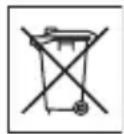
Disposing of the battery
Check local regulations or call a Sony Ericsson Call Center for information. Never use municipal waste.

Memory card
If your product comes complete with a removable memory card, it is generally compatible with the mobile phone purchased but may not be compatible with other devices or the capabilities of their memory cards. Check other devices for compatibility before purchase or use. If your product is equipped with a memory card reader, check memory card compatibility before purchase or use.
Memory cards are generally formatted prior to shipping. To reformat the memory card, use a compatible device. Do not use the standard operating system format when formatting the memory card on a PC. For details, refer to the operating instructions of the device or contact customer support.
WARNING:
If your device requires an adapter for insertion into the mobile phone or another device, do not insert the card directly without the required adapter.
Precautions on Memory Card Use
- Do not expose the memory card to moisture.
- Do not touch terminal connections with your hand or any metal object.
- Do not strike, bend, or drop the memory card.
- Do not attempt to disassemble or modify the memory card.
- Do not use or store the memory card in humid or corrosive locations or in excessive heat such as a closed car in summer, in direct sunlight or near a heater, etc.
- Do not press or bend the end of the memory card adapter with excessive force.
- Do not let dust or foreign objects get into the insert port of any memory card adapter.
- Check you have inserted the memory card correctly.
- Insert the memory card as far as it will go into any memory card adapter needed. The memory card may not operate properly unless fully inserted.
- We recommend that you make a backup copy of important data. We are not responsible for any loss or damage to content you store on the memory card.
- Recorded data may be damaged or lost when you remove the memory card or memory card adapter, or turn off the power while formatting, reading or writing data, or when you use the memory card in locations subject to static electricity or high electrical field emissions.
Protection of personal information
Erase personal data before disposing of the product. To delete data, perform a master reset. Deleting data from the phone memory does not ensure that it cannot be recovered. Sony Ericsson does not warrant against recovery of information and does not assume responsibility for disclosure of any information even after a master reset.
Accessories
Sony Ericsson recommends use of Sony Ericsson original accessories for safe and efficient use of its products. Use of third-party accessories may decrease performance or pose a risk to your health or safety.
LOUDNESS WARNING:
Avoid volume levels that may be harmful to your hearing.
End User Licence Agreement
Software delivered with this device and its media is owned by Sony Ericsson Mobile Communications AB, and/or its affiliated companies and its suppliers and licensors.
Sony Ericsson grants you a non-exclusive limited license to use the Software solely in conjunction with the Device on which it is installed or delivered. Ownership of the Software is not sold, transferred or otherwise conveyed.
Do not use any means to discover the source code or any component of the Software, reproduce and distribute the Software, or modify the Software. You are entitled to transfer rights and obligations to the Software to a third party, solely together with the Device with which you received the Software, provided the third party agrees in writing to be bound by the terms of this License.
This license exists throughout the useful life of this Device. It can be terminated by transferring your rights to the Device to a third party in writing.
Failure to comply with any of these terms and conditions will terminate the license immediately.
Sony Ericsson and its third party suppliers and licensors retain all rights, title and interest in and to the Software. Sony Ericsson, and, to the extent that the Software contains material or code of a third party, such third party, shall be entitled third party beneficiaries of these terms.
This license is governed by the laws of Sweden. When applicable, the foregoing applies to statutory consumer rights.
In the event Software accompanying or provided in conjunction with your device is provided with additional terms and conditions, such provisions shall also govern your possession and usage of the Software.
Limited Warranty
Sony Ericsson Mobile Communications AB, SE-221 88 Lund, Sweden, (Sony Ericsson) or its local affiliated company, provides this Limited Warranty for your mobile phone, original accessory delivered with your mobile phone, and/or your mobile computing product (hereinafter referred to as "Product").
Should your Product need warranty service, please return it to the dealer from whom it was purchased, or contact your local Sony Ericsson Call Center (national rates may apply) or visit www.sonyericsson.com for further information.
Our warranty
Subject to the conditions of this Limited Warranty, Sony Ericsson warrants this Product to be free from defects in design, material and workmanship at the time of its original purchase by a consumer. This Limited Warranty will last for a period of two (2) years as from the original date of purchase of the Product for your mobile phone, and for a period of one (1) year following the original purchase date of the Product for all original accessories (such as the battery, charger or handsfree kit) which may be delivered with your mobile phone.
What we will do
If, during the warranty period, this Product fails to operate under normal use and service, due to defects in design, materials or workmanship, Sony Ericsson authorized distributors or service partners, in the country/region* where you purchased the Product, will, at their option, either repair or replace the Product in accordance with the terms and conditions stipulated herein.
Sony Ericsson and its service partners reserve the right to charge a handling fee if a returned Product is found not to be under warranty according to the conditions below.
Please note that some of your personal settings, downloads and other information may be lost when your Sony Ericsson Product is repaired or replaced. At present Sony Ericsson may be prevented by applicable law, other regulations or technical restrictions from making a backup copy of certain downloads. Sony Ericsson does not take any responsibility for any lost information of any kind and will not reimburse you for any such loss. You should always make backup copies of all the information stored on your Sony Ericsson Product such as downloads, calendar and contacts before handing in your Sony Ericsson Product for repair or replacement.
Conditions
1 This Limited Warranty is valid only if the original proof of purchase for this Product issued by a Sony Ericsson authorized dealer specifying the date of purchase and serial number**, is presented with the Product to be repaired or replaced. Sony Ericsson reserves the right to refuse warranty service if this information has been removed or changed after the original purchase of the Product from the dealer.
2 If Sony Ericsson repairs or replaces the Product, the repair for the defect concerned, or the replaced Product shall be warranted for the remaining time of the original warranty period or for ninety (90) days from the date of repair, whichever is longer. Repair or replacement may involve the use of functionally equivalent reconditioned units. Replaced parts or components will become the property of Sony Ericsson.
3 This warranty does not cover any failure of the Product due to normal tear and wear, or due to misuse, including but not limited to use in other than the normal and customary manner, in accordance with the Sony Ericsson instructions for use and maintenance of the Product. Nor does this warranty cover any failure of the Product due to accident, software or hardware modification or adjustment, acts of God or damage resulting from liquid.
A rechargeable battery can be charged and discharged more than a hundred times. However, it will eventually wear out – this is not a defect and corresponds to normal wear and tear. When the talk time or standby time is noticeably shorter, it is time to replace your battery. Sony Ericsson recommends that you use only batteries and chargers approved by Sony Ericsson.
Minor variations in display brightness and color may occur between the phones. There may be small, bright or dark dots on the display. These are called defective pixels and occur when individual dots have malfunctioned and cannot be adjusted. Two defective pixels are deemed acceptable.
Minor variations in camera image appearance may occur between phones. This is not uncommon and is not regarded as a defective camera module.
4 Since the cellular system on which the Product is to operate is provided by a carrier independent from Sony Ericsson, Sony Ericsson will not be responsible for the operation, availability, coverage, services or range of that system.
5 This warranty does not cover Product failures caused by installations, modifications, or repair or opening of the Product performed by a non-Sony Ericsson authorised person.
6 The warranty does not cover Product failures which have been caused by use of accessories or other peripheral devices which are not Sony Ericsson branded original accessories intended for use with the Product.
Sony Ericsson disclaims any and all warranties, whether express or implied, for failures caused to the Product or peripheral devices as a result of viruses, trojans horses, spyware, or other malicious software. Sony Ericsson strongly recommends that you install appropriate virus protection software on your Product and any peripheral devices connected to it, as available, and update it regularly, to better protect your device. It is understood, however, that such software will never fully protect your Product or its peripheral devices and Sony Ericsson disclaims all warranties, whether express or implied, in case of failure by such antivirus software to fulfill its intended purpose.
7 Tampering with any of the seals on the Product will void the warranty.
8 THERE ARE NO EXPRESS WARRANTIES, WHETHER WRITTEN OR ORAL, OTHER THAN THIS PRINTED LIMITED WARRANTY. ALL IMPLIED WARRANTIES, INCLUDING WITHOUT LIMITATION THE IMPLIED WARRANTIES OF MERCHANTABILITY OR FITNESS FOR A PARTICULAR PURPOSE, ARE LIMITED TO THE DURATION OF THIS LIMITED WARRANTY. IN NO EVENT SHALL SONY ERICSSON OR ITS LICENSORS BE LIABLE FOR INCIDENTAL OR CONSEQUENTIAL DAMAGES OF ANY NATURE WHATSOEVER, INCLUDING BUT NOT LIMITED TO LOST PROFITS OR COMMERCIAL LOSS; TO THE FULL EXTENT THOSE DAMAGES CAN BE DISCLAIMED BY LAW.
Some countries/states do not allow the exclusion or limitation of incidental or consequential damages, or limitation of the duration of implied warranties, so the preceding limitations or exclusions may not apply to you.
The warranty provided does not affect the consumer's statutory rights under applicable legislation in force, nor the consumer's rights against the dealer arising from their sales / purchase contract.
\* GEOGRAPHICAL SCOPE OF THE WARRANTY
If you have purchased your Product in a country member of the European Economic Area (EEA) or in Switzerland or the Republic of Turkey, and such Product was intended for sale in the EEA or in Switzerland or in Turkey, you can have your Product serviced in any EEA country or in Switzerland or in Turkey, under the warranty conditions prevailing in the country in which you require servicing of the Product, provided that an identical Product is sold in such country by an authorised Sony Ericsson distributor. To find out if your Product is sold in the country you are in, please call the local Sony Ericsson Call Center.
74 Important information
This is the Internet version of the User guide. © Print only for private use.
Please observe that certain services may not be possible elsewhere than in the country of original purchase due, for example, to the fact that your Product may have an interior or exterior which is different from equivalent models sold in other countries. In addition, please note that it may sometimes not be possible to repair SIM-locked Products.
** In some countries/regions additional information (such as a valid warranty card) may be requested.
FCC Statement
This device complies with Part 15 of the FCC rules. Operation is subject to the following two conditions:

(1) This device may not cause harmful interference, and
(2) This device must accept any interference received, including interference that may cause undesired operation.
Any change or modification not expressly approved by Sony Ericsson may void the user's authority to operate the equipment.
This equipment has been tested and found to comply with the limits for a Class B digital device, pursuant to Part 15 of the FCC Rules. These limits are designed to provide reasonable protection against harmful interference in a residential installation. This equipment generates, uses and can radiate radio frequency energy and, if not installed and used in accordance with the instructions, may cause harmful interference to radio communications. However, there is no guarantee that interference will not occur in a particular installation.
If this equipment does cause harmful interference to radio or television reception, which can be determined by turning the equipment off and on,
the user is encouraged to try to correct the interference by one or more of the following measures:
- Reorient or relocate the receiving antenna.
- Increase the separation between the equipment and receiver.
- Connect the equipment into an outlet on a circuit different from that to which the receiver is connected.
- Consult the dealer or an experienced radio/TV technician for help.
Industry Canada Statement
This device complies with RSS-210 of Industry Canada.
Operation is subject to the following two conditions: (1) this device may not cause interference, and (2) this device must accept any interference, including interference that may cause undesired operation of the device.
This Class B digital apparatus complies with Canadian ICES-003.
Declaration of Conformity for W350i
We, Sony Ericsson Mobile Communications AB of Nya Vattentornet
SE-221 88 Lund, Sweden
declare under our sole responsibility that our product
Sony Ericsson type AAB-1022121-BV
and in combination with our accessories, to which this declaration relates is in conformity with the appropriate standards EN 301511:V9.0.2,
EN 301489-7:V1.3.1, EN 301489-17:V1.2.1,
EN 300328:V1.7.1 and EN 60950-1:2006, following the provisions of, Radio Equipment and
Telecommunication Terminal Equipment directive 99/5/EC.
Lund, January 2008
CE0682

Shoji Nemoto,
Head of Product Business Group GSM/UMTS
We fulfil the requirements of the R&TTE Directive (99/5/EC).
Index
A
alarms 56
answering service 27
applications 46
appointments 56
assembly 5
automatic redialling 23
B
battery
charging 8
inserting 5
use and care 69
Bluetooth™ wireless technology ..... 50
business cards 31
buttons 9, 13
C
calculator 59
calendar 56
call divert 28
call list 27
call numbers in message 33
call time 31
caller-specific ringtones 25
calls
accepting 30
answering 23
handling two calls 29
international 23
making 23
putting on hold 28
re-dialling 23
rejecting 23
camera
overview 40
settings 41
code memo 59
conference calls 29
contacts
adding phone contacts 24
default contacts 24
groups of 26
synchronizing 53
D
date 61
declaration of conformity 76
downloading files 49
E
email 36
emergency calls 24
entering text multitap 17
T9™ Text Input 17
error messages 65
F
file manager 15
fixed dialling 31
flight mode 7
G
games 46
groups 26
H
handsfree 18, 19
Bluetooth™ technology 50
help 8
|
IMEI number 62
Internet
bookmarks 48
profiles 49
security and certificates 49
settings 47
J
Java ^TM 46
K
keys 9,13
L
lock phone ....62
SIM card 61
M
master reset 63
Media Manager 18
memory card 15
memory status 26
menu overview ......11
menus 13
message templates ......35
messages 32
area and cell information ....40
email 36
picture message ....33
templates 35
text message 32
voice 36
microphone 23
music
transferring ....18
music files .....20
music key lock 9,22
music keys 20
music player 18
MusicDJ™ 45
My friends 38
my numbers 30
N
navigating menus 13
notes 58
P
phone language .... 17 lock .... 62
phone overview 9
picture message 33
pictures 42
PIN code changing 62
playlists 20
PlayNow™ 22
profiles 60
PUK 61
push email 38
R
radio 43
restricted calls 30
ringtones 44
RSS reader 49
S
safety guidelines 68
sending
business cards 31
melodies and ringtones 45
music 21
pictures 43
settings
Internet 47
Java™ 47
shortcuts 15
SIM card
copying from 26
copying to 25
inserting 5
lock and unblock 61
sound recorder 45
speed dialling 27
standby 7
start-up screen 7
stopwatch 59
submenus 13
synchronizing 53
T
tasks 58
text 17
text message 32
themes 61
time 61
timer 59
TrackID™ 22
transfer method Bluetooth™ technology .... 50 USB .... 52
transferring files .... 52 music .... 18
transferring pictures .... 42 troubleshooting .... 63 turn on the phone .... 6
turning on/off phone lock 62 SIM lock protection 62
U unblock SIM card .... 61 update service .... 55
V vibrating alert ....44
video player ....46 voice messages ....36 voicemail ....27
volume ear speaker ....23 ringtone ....44
W Walkman® player ....18 warranty ....72
Z zoom ....41

- Accessories – More for your phone
- Portable Speakers MPS-70
- Stereo Portable Handsfree HPM-83
- Stereo Bluetooth™ Headset HBH-DS200
- Contents
- Getting started 5
- Walkman® and music ..... 18
- Calling 23
- Messaging 32
- Imaging 40
- Entertainment 43
- Connectivity 47
- More features 56
- Troubleshooting 63
- Important information ..... 66
- Index 77
- Contents
- Sony Ericsson W350i
- Instruction symbols
- Getting started
- Assembly
- To remove the battery
- Turning on the phone
- Getting started
- SIM card
- PIN
- To delete numbers from the display
- Flight mode
- Start-up screen
- Standby
- Help in your phone
- To use the setup wizard
- To view information about functions
- To view the phone demonstration
- Settings download
- To download settings
- Charging the battery
- Getting started
- Phone overview
- Getting started
- Menu overview
- Settings\*\*
- Status bar icons
- Icon Description
- Getting started
- Navigation
- To navigate the phone menus
- To scroll between the tabs
- Shortcuts
- To edit a navigation key shortcut
- File manager
- Memory card
- To view memory card options
- Handling files
- File manager tabs
- To view information about files
- To move a file in the file manager
- To select more than one file in a folder
- To delete a file from the file manager
- Phone language
- To change the phone language
- Entering text
- To change text input method
- To shift between capitals and lower-case letters
- To enter numbers
- To enter full stops and commas
- To enter text using T9 TM Text Input
- To enter text using multitap
- To add words to the built-in dictionary
- Walkman® and music
- Transferring content to and from a computer
- Required operating systems
- To install Media Manager
- To transfer content using Media Manager
- To use the handsfree
- Walkman® player
- To play music
- Music keys
- Music key lock
- Browsing files
- Playlists
- To create a playlist
- To add files to a playlist
- To remove tracks from a playlist
- To delete a playlist
- To view information about a track
- Sending and receiving music
- To send music
- To receive music
- To lock and unlock the music keys
- PlayNow™
- Before you use PlayNow™
- To listen to PlayNow™ music
- Downloading from PlayNow™
- To download a music file
- TrackID™
- To search for song information
- Calling
- Making and receiving calls
- To make a call
- To make international calls
- To re-dial a number
- To answer a call
- To reject a call
- To change the ear speaker volume during a call
- To mute the microphone during a call
- To turn the loudspeaker on during a call
- Emergency calls
- To make an emergency call
- To view your local emergency numbers
- Contacts
- Default contact
- To select default contacts
- Phone contacts
- To add a phone contact
- To add an item to a phone contact
- To copy names and numbers to the SIM card
- To call a phone contact
- To call a SIM contact from phone contacts
- To automatically save names and phone numbers on the SIM card
- SIM contacts
- To add a SIM contact
- To copy names and numbers to phone contacts
- To call a SIM contact
- Deleting contacts
- To delete a contact
- To delete all phone contacts
- Sending contacts
- To send a contact
- Memory status
- To view memory status
- To save contacts on a memory card
- Synchronizing contacts
- Groups
- To create a group of numbers and email addresses
- Call list
- To call a number from the call list
- To add a call list number to contacts
- To clear the call list
- Speed dial
- To add contacts to speed dial numbers
- To speed dial
- Voicemail
- To enter your voicemail number
- To call your voicemail service
- To edit your voicemail number
- Diverting calls
- Divert call options
- To divert calls
- More than one call
- Call waiting
- To activate call waiting
- To make a second call
- To answer a second call
- To reject a second call
- Handling two voice calls
- Conference calls
- My numbers
- To check your phone numbers
- Accept calls
- To add numbers to the accepted callers list
- To accept all calls
- Restricted dialling
- Restrict calls options
- To restrict calls
- Fixed dialling
- To use fixed dialling
- To save a fixed number
- Call time and cost
- To check the call time
- Business cards
- To add your own business card
- To send your business card
- Messaging
- Text messages
- Before you use messaging
- To enter a service centre number
- Sending messages
- To write and send a text message
- To select more than one text message
- To add an item to a text message
- Receiving text messages
- To view a text message from the inbox
- To close a text message
- To call a number in a text message
- Saving and deleting text messages
- To save a text message on the SIM card
- To save an item in a text message
- To delete a text message
- Picture messages
- Before you use picture messaging
- To select an Internet profile
- To set the message server address
- To create and send a picture message
- Receiving picture messages
- To set automatic download
- To view a picture message from the inbox
- To close a picture message
- To save an item in a picture message
- To delete a message
- Message options
- To set text message options
- To set picture message options
- Send options
- To set send options
- Templates
- To use a text message template
- To use a picture message template
- To add a text message template
- To add a picture message template
- To edit a template
- To save a message as a template
- Voice messages
- To record and send a voice message
- Before you use email
- Email settings using Internet
- Entering email settings manually
- To enter email settings
- To write and send an email message
- To receive and read an email message
- To save an email message
- To reply to an email message
- To view an attachment in an email message
- To save an attachment in an email message
- Active email account
- To change the active email account
- To delete an email message (POP3)
- To delete an email message (IMAP4)
- Push email
- To turn on push email notification
- My friends
- Before you use My friends
- To enter My friends server settings
- To edit My friends settings
- To log in to the My friends server
- To log out of the My friends server
- To add a chat contact
- To send a chat message
- Status
- To show my status
- To update your own status
- Chat group
- To create a chat group
- To add a chat group
- To save a conversation
- To view a saved conversation
- Area and cell information
- To turn area information on
- Imaging
- Camera
- Imaging
- To activate the camera
- To take a picture
- To use zoom
- To use the zoom
- To adjust brightness
- To save and delete pictures
- To view pictures
- To search camera pictures by time line
- To delete pictures
- Camera settings
- To view settings
- To view information about settings
- Camera shortcuts
- Transferring pictures
- Picture blog
- To send camera pictures to a blog
- To go to a blog address from contacts
- Pictures
- Using pictures
- To use pictures
- To view pictures in a slide show
- Sending and receiving
- To send a picture
- To receive a picture
- Entertainment
- Radio
- To listen to the radio
- To change the volume
- To automatically search for radio channels
- To manually search for radio channels
- To search for preset channels
- Saving radio channels
- To save radio channels
- To select saved radio channels
- To save radio channels in positions 1 to 10
- To select radio channels saved in positions 1 to 10
- To view radio options
- Ringtones and melodies
- To set a ringtone
- To set the ringtone volume
- To turn the ringtone off
- To set the vibrating alert
- To send a ringtone
- Entertainment
- To receive a ringtone
- MusicDJ™
- To compose a melody
- To send a melody
- To receive a melody
- Sound recorder
- To record a sound
- To listen to a recording
- Video player
- To play videos
- Video controls
- To stop playing videos
- To resume playing videos
- To go to the next or previous clip
- To fast forward or rewind
- Games
- To start a game
- To end a game
- Applications
- To select a Java application
- To view information about a Java application
- To set permissions for a Java application
- To set the screen size for a Java application
- To select an Internet profile for Java applications
- Connectivity
- Settings
- To download settings using the Setup wizard
- To download settings using a computer
- Using Internet
- To start browsing
- To exit the browser
- To view options
- When you browse the Internet
- To send a link
- Using bookmarks
- To create a bookmark
- To select a bookmark
- Internet keypad shortcuts
- To select Internet keypad shortcuts
- Downloading
- To download from a Web page
- Internet profiles
- To select an Internet profile for the Internet browser
- Internet security and certificates
- To view certificates in the phone
- RSS reader
- To add new feeds for a Web page
- To create a new feed
- To set and use RSS reader options
- Bluetooth™ wireless technology
- Before you use Bluetooth wireless technology
- To turn the Bluetooth function on
- To pair the phone with a device
- To allow connection to the phone
- To pair the phone with a Bluetooth handsfree for the first time
- To pair the phone with more than one Bluetooth handsfree
- Power save
- To turn powersave on
- Phone name
- To enter a phone name
- Visibility
- To show your phone
- Exchanging items
- To receive an item
- Transferring sound to and from a Bluetooth handsfree
- To transfer sound
- File transfer
- Using the USB cable
- Before you use the USB cable
- To disconnect the USB cable safely
- Connectivity
- Drag and drop media files
- To drag and drop media files
- Synchronizing
- Synchronization using an Internet service
- Before you start to synchronize using an Internet service
- To enter settings for remote synchronization
- To delete an account
- To start remote synchronization
- Connectivity
- Update service
- To use Update service using the phone
- To use Update service using a USB cable
- To set a reminder to use Update service
- More features
- Alarms
- To set the alarm
- To set the recurrent alarm
- To set the alarm signal
- To silence the alarm
- To silence the radio alarm
- To turn off an alarm
- To cancel the alarm
- Calendar
- Appointments
- To add an appointment
- To view an appointment
- To reuse an existing appointment
- To send an appointment
- To view a calendar week
- To set when reminders should sound
- Navigating your calendar
- Calendar settings
- To view calendar options
- Tasks
- To add a task
- To view a task
- To reuse an existing task
- To send a task
- Notes
- To add a note
- To show a note in standby
- To edit a note
- To send a note
- Timer, stopwatch and calculator
- To use the timer
- To use the stopwatch
- To use the calculator
- Code memo
- Checkword
- To open code memo for the first time
- To add a code
- To change a passcode
- Forget your passcode?
- To reset code memo
- Profiles
- To select a profile
- To view and edit a profile
- To reset all profiles
- Time and date
- To set the time
- To set the date
- Themes
- To set a theme
- Locks
- SIM card lock
- To unblock the SIM card
- To edit the PIN
- To use the SIM card lock
- Phone lock
- To use the phone lock
- To change the phone lock code
- IMEI number
- To view your IMEI number
- Troubleshooting
- Common questions
- Master reset
- To reset the phone
- No battery icon appears when I start charging the phone
- I cannot use SMS/text messages on my phone
- I cannot use picture messages on my phone
- How do I turn on and off T9 text input when writing a text message?
- How do I change phone language?
- I cannot use the Internet
- The phone cannot be detected by other devices using Bluetooth wireless technology
- Error messages
- Insert SIM
- Insert correct SIM card
- Wrong PIN/Wrong PIN2
- PIN blocked/PIN2 blocked
- Codes do not match
- No netw. coverage
- Emerg. calls only
- PUK blocked. Contact operator.
- Charging, alien battery
- Important information
- Sony Ericsson Consumer Web site
- Service and support
- Support
- Guidelines for Safe and Efficient Use
- Recommendations for safe use of our products
- CHILDREN
- Power supply (Charger)
- Battery
- Personal medical devices
- Driving
- GPS/Location based functions
- Antenna
- Efficient use
- Radio frequency (RF) exposure and Specific Absorption Rate (SAR)
- Malware
- Accessories
- Accessible Solutions/Special Needs
- Disposal of old electrical and electronic equipment
- Disposing of the battery
- WARNING:
- Precautions on Memory Card Use
- Protection of personal information
- LOUDNESS WARNING:
- End User Licence Agreement
- Limited Warranty
- Our warranty
- What we will do
- Conditions
- \* GEOGRAPHICAL SCOPE OF THE WARRANTY
- Important information
- FCC Statement
- Industry Canada Statement
- Declaration of Conformity for W350i
- Index
- A
- B
- C
- calls
- D
- E
- F
- G
- H
- |
- J
- K
- L
- M
- N
- P
- R
- S
- sending
- T
Brand : SONY ERICSSON
Model : W350i
Category : Mobile Phone