
HeartStart FR2+ M3861A - Defibrillator PHILIPS - Free user manual and instructions
Find the device manual for free HeartStart FR2+ M3861A PHILIPS in PDF.


| Product Type | Automated External Defibrillator (AED) |
| Brand | Philips |
| Model | HeartStart FR2+ M3861A |
| Dimensions (H x W x D) | Approx. 24 cm x 19 cm x 5 cm |
| Weight (with battery) | Approx. 1.5 kg |
| Power Source | Rechargeable Lithium-Ion battery (9 V) |
| Battery Capacity | Approx. 200 shocks or 4 hours of monitoring |
| Charging Time | Fully charged in 4 hours (typical) |
| Waveform | Biphasic (SMART Biphasic) |
| Energy Delivery | Escalating: 150 J, 200 J, 200 J max |
| ECG Analysis | Automated, with voice and text prompts |
| Language Support | Multiple languages (voice and text) |
| Operating Temperature | 0°C to 50°C (32°F to 122°F) |
| Storage Temperature | -40°C to 70°C (-40°F to 158°F) |
| Shelf Life (standby) | Battery: 2 years typical |
| Self-Test | Automatic daily, weekly, and monthly |
| Electrode Pad Type | Adult SMART Pads II |
| Pad Expiration | 2 years from manufacture date |
| Cleaning | Wipe with a soft, damp cloth; no solvents |
| Warranty | 5 years for device, 2 years for battery |
Frequently Asked Questions - HeartStart FR2+ M3861A PHILIPS
User questions about HeartStart FR2+ M3861A PHILIPS
0 question about this device. Answer the ones you know or ask your own.
Ask a new question about this device
Download the instructions for your Defibrillator in PDF format for free! Find your manual HeartStart FR2+ M3861A - PHILIPS and take your electronic device back in hand. On this page are published all the documents necessary for the use of your device. HeartStart FR2+ M3861A by PHILIPS.
USER MANUAL HeartStart FR2+ M3861A PHILIPS
The HeartStart FR2+ Defibrillator
A Battery. Standard long-life or rechargeable battery used to power the FR2+.
B On/Off button. Turns on the FR2+ and starts voice and text prompts. Second press turns off the FR2+.
Status Indicator. Shows you the readiness status of the FR2+.
D Display screen. Displays text prompts and incident data. The FR2+ M3860A screen also displays the patient's ECG.
E Option buttons. Adjust the contrast of the screen display and control special functions.
F Beeper port. Broadcasts alert beeps when required. It is located under the right edge of the FR2+.
G Infrared (IR) communications port. A special lens, or "eye," used to transfer data directly to or from another device.
H Data card port. Receptacle for data card tray.
① Data card (optional). Used to store and review information about an incident, including ECG and optional voice recording.
Data card tray. Special sleeve that holds the data card and fits into the data card port to help seal the FR2+ against fluids. The tray should be kept installed in the FR2+ even if no data card is used.
K Microphone. Used optionally to record surrounding audio during an incident. It is located under the right edge of the FR2+.
L Shock button. Controls shock delivery. The button flashes when the HeartStart FR2+ is ready to deliver a shock.
M Speaker. Amplifies voice prompts during use of the FR2+.
N Pads placement diagram. Illustrates correct placement of adult pads. Diagrams are also shown on the defibrillator pads.
Defibrillator pads connector socket. Receptacle for connector of the defibrillator pads cable. An adjacent LED light flashes to show socket location and is covered when connector is inserted.
P Defibrillator pads. Self-adhesive pads with attached cable and connector. (Adult pads shown.)
HeartStart FR2+ Defibrillator
QUICK REFERENCE CARD
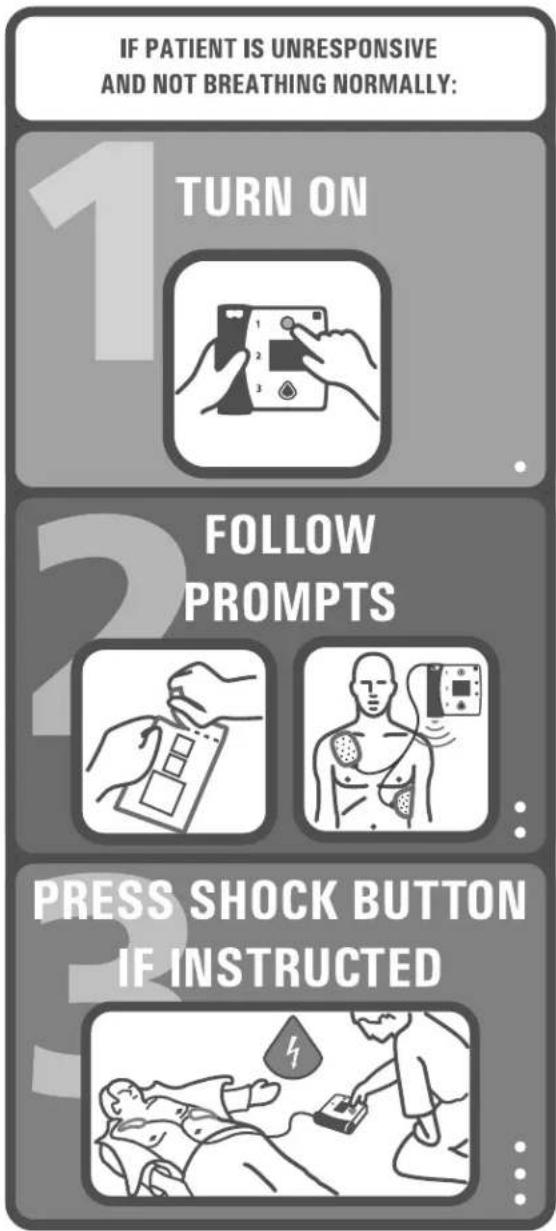
Intentionally blank.
PHILIPS
HeartStart FR2+
M3860A/M3861A
Automated External Defibrillator
INSTRUCTIONS FOR USE
Edition 15
IMPORTANT NOTE:
It is important to understand that survival rates for sudden cardiac arrest are directly related to how soon victims receive treatment. For every minute of delay, the chance of survival declines by 7% to 10%.
Defibrillation cannot assure survival. In some patients, the underlying problem causing the cardiac arrest is simply not survivable despite any available care.
About this edition
The information in this guide applies to the model M3860A/M3861A HeartStart FR2+ Defibrillator. This information is subject to change. Please contact Philips at www.medical.philips.com/heartstart or your local Philips representative for information on revisions.
Edition history
Edition 15
Publication date: April 2008
Publication number: 011120-0015
Printed in the U.S.A.
Copyright
© 2008 Philips Electronics North America Corp.
No part of this publication may be reproduced, transmitted, transcribed, stored in a retrieval system or translated into any human or computer language in any form by any means without the consent of the copyright holder.
Unauthorized copying of this publication may not only infringe copyright but also reduce the ability of Philips Medical Systems to provide accurate and up-to-date information to users and operators alike.
Authorized EU Representative
CAUTION: Federal law (USA) restricts this device to sale by or on the order of a physician.
The HeartStart FR2+ is designed to be used only with Philips-approved accessories. The HeartStart FR2+ may perform improperly if non-approved accessories are used.
Device Tracking
This device is subject to tracking requirements by the manufacturer and distributors. If the defibrillator has been sold, donated, lost, stolen, exported, or destroyed, notify Philips Medical Systems or your distributor.
Device Manufacturer
The HeartStart FR2+ Defibrillator is manufactured by Philips Medical Systems, Seattle, Washington, USA.
Patents
This product is manufactured and sold under one or more of the following United States patents: U.S. Pat. No US6047212, US6317635, US5892046, US5891049, US6356785, US5650750, US6553257, US5902249, US6287328, US6662056, US5617853, US5951598, US6272385, US6234816, US6346014, US6230054, US6299574, US5607454, US5803927, US5735879, US5749905, US5601612, US6441582, US5889388, US5773961, US6016059, US6075369, US5904707, US5868792, US5899926, US5879374, US5632280, US5800460, US6185458, US5611815, US6556864, and other patents pending.
CONTENTS
I INTRODUCTION TO THE HEARTSTART FR2+
Device description ...... I-I
Indications for use .... I-I
Principles of operation 1-2
2GETTING STARTED
Package contents 2-1
Setup overview 2-1
Installing the data card 2-1
Installing the battery and setting the clock 2-2
Running the Battery Insertion Test 2-3
Placing and securing the HeartStart FR2+ 2-3
Treating infants and children 3-1
Step 1: Preparation 3-2
Step 2: ECG analysis and CPR interval 3-3
Step 3: Shock delivery 3-4
CPR Interval 3-4
ECG display for ongoing observation 3-5
4MAINTAINING, TESTING, AND TROUBLESHOOTING
Maintenance 4-1
Suggested maintenance schedule 4-1
After using the HeartStart FR2+ 4-2
Cleaning the HeartStart FR2+ 4-3
Operator's checklist 4-4
Testing 4-5
Battery insertion selftest 4-5
Device history 4-8
Battery History 4-8
Troubleshooting Guide 4-9
Status indicator summary 4-9
Recommended action during an emergency 4-9
Troubleshooting during patient use 4-10
General troubleshooting 4-12
5SAFETY CONSIDERATIONS
General dangers, warnings, and cautions 5-1
Defibrillation warnings and cautions 5-3
Monitoring cautions 5-4
Maintenance cautions 5-4
6CONFIGURATION, SETUP, AND ADVANCED MODE FEATURES
Configuration 6-1
Non-protocol parameters 6-1
Automatic protocol parameters 6-2
Manual override parameters 6-5
Using setup features 6-6
Reviewing current setup 6-7
Revising setup 6-7
Receiving setup 6-8
Reading setup 6-9
Sending and receiving clock settings 6-9
Using advanced mode features 6-10
Using the manual analyze feature 6-11
Using the manual charge feature (M3860A only) 6-12
iii
7DATA MANAGEMENT AND REVIEW
Overview 7-1
Recording incident data 7-1
Recording data in internal memory 7-1
Recording data on a data card 7-1
Reviewing Incident Data 7-2
Reviewing data from internal memory 7-2
Reviewing data from a data card 7-3
iv
APPENDICES
AAccessories for the HeartStart FR2+
BTechnical Specifications
CGlossary of symbols and controls
DGlossary of terms
ECPR First Configuration
FAdditional technical data required for European conformity Index
Device description
The HeartStart FR2+ Defibrillator ("FR2+") is a compact, lightweight, portable, and battery powered automated external defibrillator designed for use by a trained responder to treat ventricular fibrillation (VF), the most common cause of sudden cardiac arrest (SCA).
The FR2+ has a Status Indicator that is always active, so you can tell at a glance if it has passed its last selftest. The front panel of the FR2+ has an On/Off button at the top and a Shock button at the bottom. A display screen in the center of the panel provides text prompts and incident information. Voice prompts are provided through a speaker located at the base of the FR2+. See the diagram on the inside front cover for details.
The FR2+ is available in two models, the M3860A and the M3861A. They share a set of basic features, detailed in Chapter 6. The principle differences between the two models are identified below:
Model M3860A Model M3861A
Configurable ECG display on screen Text prompt display on screen, no ECG display
Configurable manual charge in advanced mode (See Chapter 6)
No manual charge in advanced mode (See Chapter 6)
NOTE: The FR2+ comes with a factory default setup that can be modified. (See Chapter 6, "Configuration, Setup, and Advanced Mode Features," for a description of setup defaults and options.)
Indications for use
The HeartStart FR2+ is intended to be used with disposable defibrillator pads applied to victims of sudden cardiac arrest exhibiting the following symptoms:
- Unresponsiveness
• Absence of normal breathing
If in doubt, apply the pads.
To use the FR2+ on children under 8 years or 55 pounds (25 kg), apply FR2 Infant/child reduced-energy defibrillator pads, if available. Otherwise, apply the standard pads.
WARNING: Performance of the SMART CPR AUTO1 and AUTO2 settings has not been established in patients under 8 years or 55 lb. (25 kg). See Appendix E for more information.
The FR2+ is intended for use by responders who have been trained in its operation. The user should be qualified by training in Basic Life Support (BLS), in Advanced Life Support (ALS), or another physician-authorized emergency medical response program.
At the discretion of emergency care personnel, the FR2+ M3860A can also be used with the FR2+ ECG assessment module to provide non-diagnostic display and evaluation of the heart rhythm of a responsive or breathing patient, regardless of age, for attended patient monitoring. While connected to the FR2+ ECG assessment module, the FR2+ M3860A disables its shock capability.
Principles of operation
The HeartStart FR2+ Defibrillator is designed to provide external defibrillation therapy to someone experiencing sudden cardiac arrest caused by ventricular fibrillation (VF), the most common cause of SCA. The only effective treatment for VF is defibrillation. The FR2+ treats VF by sending a shock across the heart, so it can start beating regularly again.
The FR2+ is extremely easy to use. When connected to defibrillator pads that are properly applied to the patient's bare chest, the FR2+:
I. prompts you to take specific actions,
2. automatically analyzes the patient's heart rhythm and advises you whether or not the rhythm is shockable, and
3. arms the Shock button, if appropriate, and instructs you to press it to deliver a biphasic electric pulse designed to defibrillate the heart.
Detailed instructions for use are provided in Chapter 3.
2Getting Started
Package contents
The HeartStart FR2+ Defibrillator is supplied with a standard long-life battery, two sets of adult defibrillator pads with integrated cable and connector, and a data card tray. Other accessories, including FR2 infant/child reduced-energy defibrillator pads, an FR2+ rechargeable battery, and (for M3860A only, with ECG display enabled) a three-wire FR2+ ECG assessment module, are available. See Appendix A for a list of accessories and other recommended supplies.
Setup overview
Setting up the HeartStart FR2+ for use is quick and simple.
• Install a data card. (optional)
- Install a battery.
- Set the clock in the FR2+. (optional)
- Run the battery insertion selftest.
- Place the FR2+ with recommended accessories in a convenient location.
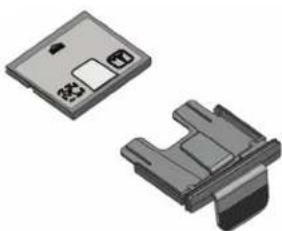
Installing the data card
The HeartStart FR2+ comes with a data card tray, which should be kept in the data card port even if no data card is used. If a data card is to be used, install it as follows:
- Load the data card face up into the data card tray, with the tray's "tongue" fitting over the matching yellow area on the data card.
- Press the On/Off button to turn off the HeartStart FR2+ if it is on.
- Hold the loaded data card tray by its handle and gently insert the tray all the way into the defibrillator's data card port until only the tab remains outside the case.
natural_image
Two electronic component packages shown from different angles (no text or symbols visible)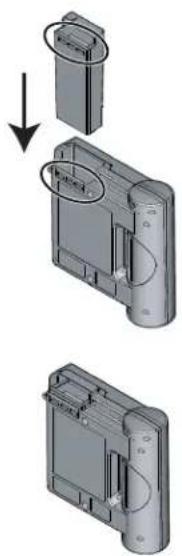
The data card will automatically record incident data the next time the HeartStart FR2+ is turned on.
Installing the battery and setting the clock
The HeartStart FR2+ Defibrillator is shipped with an M3863A standard, long-life battery. The battery is enclosed in a gray plastic case with a yellow latch at one end, designed to hold the battery in place when it is correctly installed. (The optional M3848A FR2+ rechargeable battery case is blue, and it also has a yellow latch. Except where otherwise noted, the following information applies to both battery types.) To install the battery:
- Hold the battery by the latch end and slide it into the battery compartment at the top of the HeartStart FR2+.
- Slide the battery all the way into the opening, until the latch clicks into place.
CAUTION: Follow all instructions supplied with the battery. Install the battery before the install-by date shown on the battery.
When the battery is installed, the FR2+ automatically turns on. The Status Indicator displays a flashing black hourglass. The Shock button light and the indicator light for the defibrillator pads connector socket turn on briefly. The display screen brings up the main menu.
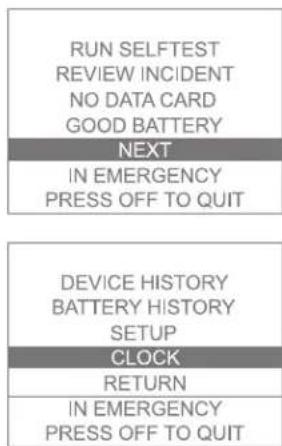
It is recommended that you set the FR2+'s internal clock to the correct date and local time at this point.
- Within 10 seconds of installing the battery, press the lower Option button to move the highlight bar on the displayed main menu to NEXT.
- Press the upper Option button to select NEXT to bring up the second menu screen.
- Press the lower Option button to move the highlight bar to CLOCK.
- Press the upper Option button to bring up the CLOCK menu.
- To receive clock settings from another FR2+, see directions provided in Chapter 6. To manually set the time and date, follow the remaining steps.
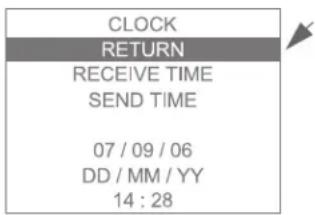
- Press the lower Option button to move the highlight bar to the date or time field to be changed.
- Using the upper Option button, scroll through the available settings to the desired value.
- Use the lower Option button to move to any other date or time field to be changed, and repeat step 6.
- When all selections have been made, use the lower Option button to move the highlight bar to RETURN, then press the upper Option button to return to the second menu.
- After ten seconds, the HeartStart FR2+ automatically starts the battery insertion selftest.*
If you choose not to set the clock at this point, the HeartStart FR2+ automatically starts the battery insertion selftest within ten seconds of battery insertion. You can remove and reinsert the battery at any time to review or adjust the clock settings.
Running the Battery Insertion Test
The battery insertion selftest has two parts, an automatic part, during which the screen displays a bar that fills in as the test continues, followed by an interactive part. Follow the defibrillator's prompts during the interactive part of the test. When the FR2+ has passed the battery insertion selftest, it turns off and goes to standby mode to be ready for use. Standby mode is indicated by the flashing black hourglass status indicator.
NOTE: If the battery is removed from the FR2+ for more than two hours, the clock settings will be lost and must be reset.
Placing and securing the HeartStart FR2+
Place the HeartStart FR2+ Defibrillator in an accessible area with the Status Indicator easily visible. The defibrillator can be secured in a carrying case suitable for use with a wallmount bracket or defibrillator cabinet. Useful accessories for
storage with the HeartStart FR2+ include a spare battery, spare pads, spare data card (if used), and a Fast Response Kit containing a pocket mask, a disposable razor, 2 pairs of gloves, a pair of paramedics scissors, and an absorbent wipe. See Appendix A for a list of accessories.
NOTE: Be careful not to overpack the carrying case, to avoid placing inadvertent pressure on the control buttons. Do not store the FR2+ with the defibrillator pads attached. Do not open the pads package until ready for use.
With the battery installed and the FR2+ stored in appropriate environmental conditions, ^* the FR2+ performs detailed daily, weekly, and monthly selftests to check its readiness for use. These periodic selftests are described in Chapter 4.
While the FR2+ is in the standby mode, the Status Indicator shows the flashing black hourglass unless the periodic selftest detects a problem. If a problem is detected, the Status Indicator will show a flashing red X or a solid red X and the FR2+ will chirp to alert you. Chapter 4 contains instructions for troubleshooting.
3Using the HeartStart FR2+
Overview
This chapter describes how to use the HeartStart FR2+ Defibrillator in an emergency. Some general things to remember are:
- Try to relax and stay calm. The HeartStart FR2+ automatically provides voice and text prompts to guide you through each step of its use.
- The defibrillator pads must have good contact with the patient's skin. The pads have a layer of sticky, conductive gel beneath the protective backing.
- It may be necessary to dry the patient's skin or to clip or shave excessive chest hair to provide good contact between the defibrillator pads and the patient's skin.
Be sure to read the Warnings and Cautions on the last page of this chapter.
Detailed directions for use based on default configuration are provided on the following pages.
NOTE: These directions apply to both the model M3860A and the model M3861A FR2+, except where otherwise noted.
Treating infants and children
WARNING: Most cardiac arrests in children are not caused by heart problems. When responding to cardiac arrest in an infant or child:
- Provide infant/child CPR while a bystander calls EMS and brings the FR2+.
- If no bystander is available, provide 1-2 minutes of CPR before calling EMS and retrieving the FR2+.
- If you witnessed the child's collapse, call EMS immediately and then get the FR2+.
Alternatively, follow your local protocol.
Step I: Preparation
Press the On/Off button to turn on the HeartStart FR2+ Defibrillator. Follow the instructions provided by the FR2+ voice and text prompts.
- Remove clothing from the patient's upper body. If needed, wipe moisture from the patient's skin and clip or shave excessive ch
- If the patient appears to be under eight years of age or 55 lb. (25 Kg), use M3870A FR2 infant/child reduced-energy defibrillator pads, if available. If the infant/child pads are not available, or if the child appears older/larger, use adult defibrillator pads. DO NOT DELAY TREATMENT TO DETERMINE THE CHILD'S EXACT AGE/WEIGHT.
- Open the defibrillator pads package. Pull off the protective backing from the defibrillator pads.
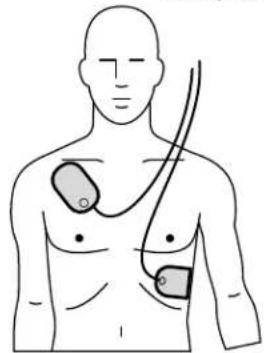
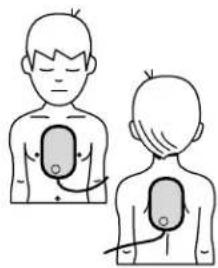
- Place the sticky side of each pad on the patient's bare skin, exactly as shown on the drawing on each pad.
Pad placement for adults and children 8 years old or 55 pounds or more.
natural_image
Line drawing of a human torso with two medical electrodes inserted, no text or symbols present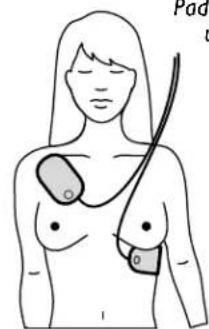
Pad placement for infants and children under 8 years old or 55 pounds.
natural_image
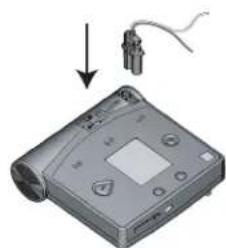
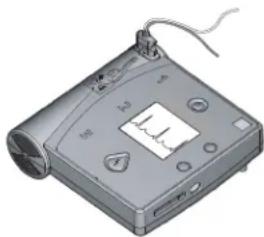
Illustration of a person with two views showing internal anatomical structures (no text or symbols)- Insert the defibrillator pads connector firmly into the defibrillator's connector socket, indicated by a flashing light at the top left of the FR2+.
natural_image
Illustration of a CD or DVD device with a cable and indicator lights, no text or symbols present.Step 2: ECG analysis and CPR interval
Follow the instructions provided by the FR2+ Defibrillator's voice and text prompts.
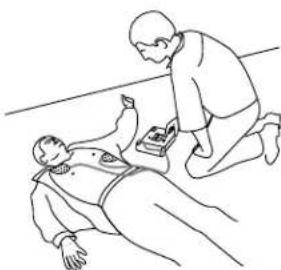
As soon as the FR2+ detects that the defibrillator pads are connected properly, it automatically begins analyzing the patient's heart rhythm. Do not touch the patient during rhythm analysis.
If no shock is advised, the HeartStart FR2+ provides voice and text prompts to tell you so and provides a CPR interval with a prompt to perform CPR, if
natural_image
Illustration of a medical device with a digital display and attached cable (no visible text or symbols)needed. The duration of the CPR interval is determined by CPR Timer setting.
Following the CPR interval, the FR2+ reanalyzes the patient's heart rhythm. If no shock is again advised, the device goes into a patient care interval, during which you can perform CPR if needed or otherwise tend to the patient. The duration of the patient care interval is determined by the NSA Action setting.
NOTE:CPR may interfere with background heart rhythm monitoring by the FR2+ in monitoring mode. During CPR, periodically pause for 15 seconds to reassess the patient and allow the FR2+ to analyze the patient's heart rhythm without possible interference from CPR artifact.
If a shock is advised, the HeartStart FR2+ charges to prepare for shock delivery. It gives the voice and text prompts to tell you that a shock is advised.
natural_image
Line drawing of a person performing CPR on another person lying on the ground (no text or symbols)Step 3: Shock delivery
First, make sure that no one is touching the patient or the pads. While the FR2+ is charging, it continues to analyze the patient's heart rhythm. If the rhythm changes and a shock is no longer appropriate, the FR2+ disarms. Voice and text prompts advise you what action to take.
There are four ways you can tell that the defibrillator is ready to deliver a shock:
- you hear a voice prompt telling you to deliver a shock,
- you see the Shock button flashing,
• you hear a steady tone, and/or - you see a text prompt telling you to press the orange (Shock) button.
Press the Shock button to deliver the shock.
IMPORTANT: You must press the button for a shock to be delivered. The HeartStart FR2+ Defibrillator will not automatically deliver a shock. This safety feature allows you to verify that the patient is clear before a shock is delivered.

NOTE: If you do not press the Shock button within 30 seconds of being prompted, the HeartStart FR2+ will disarm itself and provide a pause. It will resume analyzing heart rhythm after 30 seconds or when the Resume Analyzing key is pressed.
After you press the Shock button, a voice prompt tells you the shock was delivered. Then the FR2+ pauses to allow you to perform CPR. The duration of this CPR interval is determined by the CPR Timer setting.
CPR Interval
After telling you that it has paused, the FR2+ gives no more voice prompts during the CPR interval, so that you can provide uninterrupted patient care. During the CPR interval, the FR2+ screen shows a bar that fills in as the CPR interval is used up. The HeartStart FR2+ M3860A also displays the ECG, if enabled, during this period.
NOTE: It is important to perform CPR for the entire duration of the CPR interval, until you hear the voice prompt telling you to stop CPR.
ECG display for ongoing observation
At the discretion of emergency care personnel, the HeartStart FR2+ M3860A with ECG display enabled can also be used with the M3873A/M3874A FR2+ ECG assessment module to provide a non-diagnostic ECG display of the patient's heart rhythm for attended patient monitoring. The system is intended for use on a conscious or breathing patient, regardless of age. While connected to the FR2+ ECG assessment module, the FR2+'s shock capability is disabled, but the FR2+ continues to evaluate the patient's ECG. There are no known contraindications to use of the FR2+ ECG assessment module.
The module is designed for connection to ECG electrodes per AAMI (M3873A) or IEC (M3874A) color convention. The module's colored leadwires are connected to ECG electrodes, which are then placed on the patient's bare chest, and the module's device connector is inserted in the FR2+'s connector socket.
NOTE: It is not necessary to turn the FR2+ Defibrillator off prior to connecting the ECG assessment module.
Once connected, the HeartStart FR2+ displays and evaluates the patient's ECG (Lead II). Follow all prompts from the defibrillator. If a data card is used when the ECG assessment module is connected, all recorded events can be viewed using one of the Event Review data management software products.
Check the patient if:
• indicated by the observed ECG display,
- the patient becomes unresponsive or stops breathing, or
- the FR2+ prompts IF NEEDED, ATTACH DEFIBRILLATION PADS.
If appropriate, unplug the ECG assessment module from the FR2+, attach the defibrillator pads to the patient, and connect the defibrillator pads to the FR2+. Verify that the defibrillator pads are at least one (1) inch (2.5 cm) away from the ECG electrodes.
WARNING: During defibrillation, air pockets between the skin and defibrillator pads can cause patient skin burns. To help prevent air pockets, make sure defibrillator pads completely adhere to the skin.
WARNING: Do not let the defibrillator pads touch each other or other ECG electrodes, lead wires, dressings, transdermal patches, etc. Such contact can cause electrical arcing and patient skin burns during defibrillation and may divert defibrillating current away from the heart.
WARNING: Handling or transporting the patient during heart rhythm analysis can cause an incorrect or delayed diagnosis. If the FR2+ gives a SHOCK ADVISED prompt, keep the patient as still as possible for at least 15 seconds so the HeartStart FR2+ can reconfirm the rhythm analysis before a shock is delivered.
WARNING:CPR rates significantly above 100 compressions per minute can cause incorrect or delayed analysis by the FR2+. Under certain circumstances, this may result in a prompt to stop all movement so that the device can confirm rhythm analysis.
WARNING: Defibrillation current can cause operator or bystander injury. Do not touch the patient during defibrillation. Do not allow the defibrillator pads to touch any metal surfaces. Disconnect the pads connector from the FR2+ before using any other defibrillator.
CAUTION: Aggressive handling of the pads in storage or prior to use can damage the pads. Discard the defibrillator pads if they become damaged.
CAUTION: Do not place the pads directly over an implanted pacemaker or defibrillator. A noticeable lump with a surgical scar should indicate its position.
4Maintaining, Testing, and Troubleshooting
Maintenance
Maintenance of the FR2+ is very simple, but it is a very important factor in its dependability. When in standby mode (with the battery installed), the FR2+ performs many maintenance activities itself. These include daily and weekly selftests to verify readiness for use and more detailed monthly selftests that also verify the shock waveform delivery system. In addition, each time the FR2+ is first turned on, it executes a selftest. Further, a detailed battery insertion selftest is run whenever a battery is installed in the FR2+.
The FR2+ requires no calibration or verification of energy delivery. The FR2+ has no user-serviceable parts.
CAUTION: Improper maintenance may damage the FR2+ or cause it to function improperly. Maintain the FR2+ only as described in these Instructions for Use or as designated by your program's Medical Director.
CAUTION: Electrical shock hazard. Dangerous high voltages and currents are present. Do not open the FR2+, remove its covers, or attempt repair. There are no user-serviceable components in the FR2+. The FR2+ should be returned to Philips for repair.
Suggested maintenance schedule
The following table presents a sample maintenance schedule for the FR2+. Different frequency intervals may be appropriate, depending upon the environment in which the FR2+ is used. The required maintenance frequency is at the discretion of your program's Medical Director.
daily monthly maintenance task/response
√ Check the Status Indicator.
If you see the flashing black hourglass: The FR2+ is ready to use. No action required.
If you see anything other than a flashing black hourglass, remove and reinstall the battery to run the selftest.
- If the selftest passes and the Status Indicator shows the flashing black hourglass, the FR2+ is ready to use.
- If the selftest fails, install a new battery and run the selftest. If the selftest passes, the FR2+ is ready to use. If the selftest fails, contact Philips Medical Systems.
- If the selftest does not run, check to be sure that there is no pads connector installed in the FR2+.
√ Check supplies, accessories, and spares for damage and expiration dating.
Do not use damaged or expired accessories. Replace them immediately.
If a LOW BATTERY or REPLACE BATTERY message is displayed: Replace the battery and run the selftest.
- Do not attempt to charge the M3863A FR2 standard battery. It is not rechargeable.
- The M3848A FR2+ battery is rechargeable. Recharge it, using the M3849A Charger only.
√ Check the outside of the FR2+ and the connector socket for cracks or other signs of damage.
If you see signs of damage: Contact Philips for technical support.
After using the HeartStart FR2+
After each use of the FR2+, in addition to the maintenance tasks described in the table above, perform the following post-use checks before returning the FR2+ to service:
- Check the operation of the FR2+ by removing and reinstalling the battery and running the battery insertion selftest.
-
Check the outside of the FR2+ and the connector socket for signs of dirt or contamination. If the FR2+ is dirty or contaminated, clean it according to the guidelines provided in this manual.
-
Check the data card if one has been used. If the data card has been used to record incident data, remove and replace it with a blank data card. Deliver the recorded data card to appropriate personnel according to your local guidelines and medical protocol.
- Check the connector socket to make sure that defibrillator pads are disconnected from the FR2+ when it is not in use.
- Check to make sure the data card tray is installed, even if a data card is not being used.
Cleaning the HeartStart FR2+
The outside of the FR2+, including the defibrillator pads connector socket, can be cleaned with a soft cloth dampened in one of several appropriate cleaning agents (see list below). The following guidelines include some important reminders:
- Do not immerse the FR2+ in fluids.
- Make sure a battery (or the M3864A Training & Administration Pack) and a data card tray are installed when cleaning the FR2+, to keep fluids out of the device.
- Do not use abrasive materials, cleaners, strong solvents such as acetone or acetone-based cleaners, or enzymatic cleaners.
- Clean the FR2+ and the connector socket with a soft cloth dampened with one of the cleaning agents listed below.
— Isopropyl alcohol (70% solution)
— So a p y w a t e r
— Chlorine bleach (30 ml/l water)
— Ammonia-based cleaners
— Glutaraldehyde-based cleaners
— Hydrogen peroxide
CAUTION: Do not immerse any portion of the FR2+ in water or other fluids. Do not allow fluids to enter the FR2+. Avoid spilling any fluids on the FR2+ or accessories. Spilling fluids into the FR2+ may damage it or present a fire or shock hazard. Do not sterilize the FR2+ or accessories.
Operator's checklist
The following checklist is for your reference. You may want to photocopy it or use it as the basis for creating your own checklist.
| Date | |||||||
| Scheduled frequency | |||||||
| HeartStart FR2+Clean, no dirt or contamination; no signs of damage | |||||||
| Supplies available• Two sets defibrillator pads, sealed, undamaged, within expiration date• Ancillary supplies (hand towel, scissors, razor, pocket mask, gloves)• Spare M3863A battery, within “Install Before” date• Data cards, undamaged, and spare data card tray | |||||||
| Status indicatorShows alternating hourglass/square; selftest passed. | |||||||
| Inspected by Signature or initials of operator completing the maintenance inspection | |||||||
| Remarks, problems, corrective actions |
Testing
The HeartStart FR2+ Defibrillator has several ways of testing itself and alerting you if it finds a problem. In addition to the selftest performed each time it is turned on and each time a battery is installed, the FR2+ also automatically performs periodic selftests daily.
NOTE: The FR2+ selftests are designed to check that the FR2+ is ready for use. However, in the event that the FR2+ has been dropped or mishandled, it is recommended that the battery be removed and reinstalled to initiate a selftest. If the FR2+ has visible signs of damage, contact Philips for technical support.
Battery insertion selftest
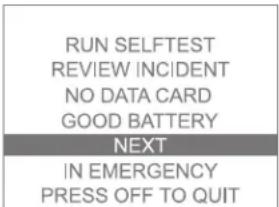
Before running the battery insertion selftest, be sure that neither the defibrillator pads nor the FR2+ ECG assessment module are connected to the device. When you insert the battery, the main menu is displayed and a two-part selftest will run unless you make another selection from the menu ^* within 10 seconds. The selftest includes an automatic part and an interactive part.
NOTE: The menu screen will not appear when a battery is inserted if:
- the defibrillator pads are attached to a patient, indicating that the FR2+ is in use,
- the FR2+ ECG assessment module is connected to the FR2+, or
• the battery is completely depleted.
If less than five minutes have passed since the FR2+ was last used, the menu screen will be displayed, but after 10 seconds the FR2+ will go to standby mode if you make no selection.
| RUN SELFTEST |
| REVIEW INCIDENT CARD TIME LEFT XX.XH GOOD BATTERY NEXT |
| IN EMERGENCY PRESS OFF TO QUIT |
To run the battery insertion selftest, remove and reinstall the battery. The screen tells you whether or not a data card is installed. If it is, a screen message displays how much recording time is left until the data card is full.
* To move around the menus displayed, use the Option buttons as follows:
- Press the lower Option button to move the highlight bar from one item to another on the menu.
- Press the upper Option button to select the highlighted item or to scroll through the settings for that item.
- Press the lower Option button to move the highlight bar from one item to another on the menu.
- Press the upper Option button to select the highlighted item or to scroll through the settings for that item.
* To move around the menus displayed, use the Option buttons as follows:
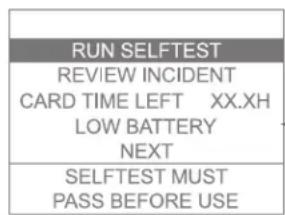
NOTE: The data card is typically capable of storing a number of incidents. However, it is recommended that it be cleared or replaced after every use. In the unlikely event that the card fills up during an incident, no further data can be recorded, so it is important for you to monitor the CARD TIME LEFT information on this screen.
Text prompts tell you if the battery power is low. If so, replace the battery. If a previous selftest has failed, the screen displays a message that the FR2+ must pass a selftest before being used.
It is a best practice to always have a spare battery available. However, if you do not have a spare battery when a screen display prompts you to replace the battery or the Status Indicator shows a flashing red X, you can continue to use the FR2+ until the battery is completely depleted. This may be necessary in an emergency.
NOTE: The M3848A FR2+ rechargeable battery should not be used as a spare or backup battery.
NOTE: If you connect defibrillator pads (that are applied to the patient) or the FR2+ ECG assessment module to the FR2+ during a battery insertion selftest, the selftest will stop and the FR2+ will go to its standby mode to be ready for use.
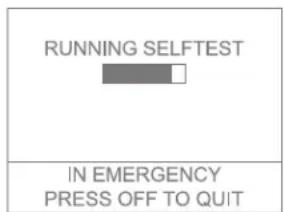
During the automatic part of the selftest, the screen displays a bar that fills in as the test continues. When that part of the test is finished, the FR2+ beeps. If a data card was inserted in the FR2+ prior to installing the battery, the results of the selftest are automatically recorded on the data card.
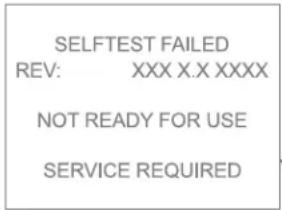
If the automatic part of the selftest detects a problem:
- The screen displays a message that the selftest has failed. After a short time, an error code is displayed. Write down the error code and serial number.
- The Status Indicator shows a flashing or solid red X .
Replace the battery with a new battery and repeat the test. If the second selftest fails, contact Philips for technical support.
| SELFTEST PASSEDREV: XXX X.X XXXXNO DATA CARDSN 000000001 |
| IN EMERGENCYPRESS OFF TO QUIT |

If the automatic part of the selftest passes:
- The screen displays a message that the selftest passed, then begins the interactive part of the test.
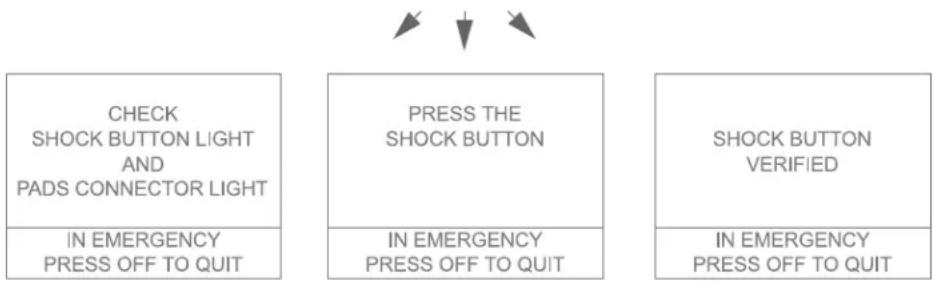
The interactive part of the selftest requires you to respond to prompts in order to make sure the display, buttons, lights, and speaker on the FR2+ are working properly.
Text prompts guide you through a series of steps in the interactive part of the selftest. Some ask you to observe that a feature of the FR2+ works properly.
Others ask you to take certain actions — for example, to press a button. The screen then displays a message showing that the button's operation has been verified. If you do not press the button, or if you do but the button is not working, the screen displays a message that the button's function is not verified.
flowchart
graph TD
    A["CHECK SHOCK BUTTON LIGHT AND PADS CONNECTOR LIGHT"] --> B["IN EMERGENCY PRESS OFF TO QUIT"]
    C["PRESS THE SHOCK BUTTON"] --> D["IN EMERGENCY PRESS OFF TO QUIT"]
    E["SHOCK BUTTON VERIFIED"] --> F["IN EMERGENCY PRESS OFF TO QUIT"]
If something does not work correctly — for example, if lights do not come on or you do not hear beeps when expected — make a note of the problem and contact Philips for technical support.
NOTE: Do not use the FR2+ if any parts of the interactive selftest indicate a problem. Be sure to note and report any problems you find.
When the interactive part of the battery insertion selftest is complete, the FR2+ turns off and goes to standby mode to be ready for use.
If it detects a problem during any selftest, the FR2+ beeps and displays a flashing red X or a solid red X on the Status Indicator.
| DEVICE HISTORY |
| BATTERY HISTORY |
| SETUP |
| CLOCK |
| RETURN |
| IN EMERGENCY |
| PRESS OFF TO QUIT |
| DEVICE HISTORY | ||
| RETURN | ||
| USES: | 12 | 19 |
| SHOCKS: | 17 | |
| TRAINING: | 25 | 456 |
| TESTS: | 156 | 22 |
| 5 | 1 | |
| REV: | 01E 1.6 ABA1 | |
| DEVICE HISTORY |
| BATTERY HISTORY |
| SETUP |
| CLOCK |
| RETURN |
| IN EMERGENCY |
| PRESS OFF TO QUIT |
| BATTERY HISTORY | |
| RETURN | |
| USE MINUTES: | 519 |
| CHARGES: | 40 |
| GOOD BATTERY | |
| STATUS: 29 | 00000000 |
| BATTERY HISTORY | |
| RETURN | |
| USE MINUTES: | 519 |
| CHARGES: | 40 |
| 0% | 100% |
| STATUS: | 00000000 |
Device history
The FR2+ stores key information about its history in internal memory. To review the history of your FR2+, select NEXT from the main menu screen displayed when you insert the battery, then select DEVICE HISTORY from the next menu displayed.
The device history information includes:
- USES — how many times the FR2+ has been used (shown in the left column of numbers) and the total time in minutes it has been used (shown in the right column of numbers);
• SHOCKS — the total number of shocks it has delivered; - TRAINING — how many times it has been used with the Training & Administration Pack for training (left column) and the total time in minutes it has been used for training (right column); and
- TESTS — how many tests have been run. Four figures are shown: daily (upper left), weekly (upper right), and monthly (lower left) periodic selftests, and battery insertion selftests (lower right).
• REV — device model, software version and language.
Battery History
Information about use of the battery currently installed in your FR2+ is also available. To review the history of the battery, select NEXT from the menu screen displayed when you insert the battery, then select BATTERY HISTORY from the next menu displayed.
The battery history information is read from the internal memory of the battery. It includes:
- USE MINUTES — the total operating time (in minutes), including selftest time, for this battery;
- CHARGES — the total number of full defibrillation charges that have been provided by this battery, including selftest charges;
- BATTERY READINESS — a GOOD BATTERY message (M3863A) or a fuel gauge display (M3848A) showing 25%, 50%, 75% or 100%, or a LOW BATTERY or REPLACE BATTERY message, as appropriate.
- STATUS — the current status of the M3863A battery. Make a note of this code if technical service is needed.
Troubleshooting Guide
Status indicator summary
| status indicator meaning | |
| Flashing black hourglass | The FR2+ passed the battery insertion selftest or the last periodic selftest and is therefore ready for use. |
| Flashing red X accompanied by a chirping sound. | A selftest error has occurred or the battery power is low. |
| Solid red X | The battery is completely depleted or a selftest failure occurred. |
Recommended action during an emergency
If the status indicator displays the flashing black hourglass, follow all voice and text prompts.
The HeartStart FR2+ Defibrillator is designed to deliver therapy even if the status indicator displays a flashing red X, although the device may not perform to all of its specifications. Voice and text prompts should be followed whenever they are given. If for any reason you cannot hear voice prompts during use of the defibrillator, periodically check the device screen for text prompts.
NOTE: After completing emergency use of the FR2+, if you are unable to clear the problem as described in this Troubleshooting section, and the Status Indicator does not show the flashing black hourglass, contact Philips for technical support.
In the unlikely event that the device becomes unresponsive during use:
- cycle power (press the On/Off button once, wait one second, then press it again), or
- remove and reinstall the battery (use a new M3863A FR2 standard battery, if available, or a charged M3848A FR2+ rechargeable battery).
If neither of these actions clears the problem, do not use the FR2+. Attend to the patient, providing CPR if needed, until emergency medical personnel arrive.
NOTE: Perform CPR (if needed) any time there is a delay before or an interruption in use of the FR2+.
Troubleshooting during patient use
| symptom possible cause recommended action | ||
| STATUS INDICATOR: FLASHING RED X | ||
| Screen and voice prompts: LOW BATTERYScreen and voice prompts: REPLACE BATTERY NOW | The energy remaining in the battery is low but sufficient to deliver a shock.The energy in the battery is nearly depleted. The FR2+ will turn off if a new battery is not installed. | Replace the battery with a new M3863A FR2 standard or a charged M3848A FR2+ rechargeable battery as soon as possible. |
| STATUS INDICATOR: FLASHING BLACK HOURGLASS | ||
| Screen and voice prompts: APPLY PADSPRESS PADS FIRMLYorPLUG IN CONNECTOROr voice prompts: INSERT CONNECTOR FIRMLYorPRESS PADS FIRMLY TO PATIENT'S BARE CHEST orPOOR PADS CONTACTVoice and text prompts: REPLACE PADS | The defibrillator pads are not properly applied to the patient, orThe pads are not making good contact with the patient's bare chest because of moisture or excessive hair, orThe pads are touching each other, orThe defibrillator pads connector is not firmly inserted in the connector socket.The defibrillator pads, cable, or connector may be damaged.The FR2+ has detected a possible problem with the defibrillator pads or pads cable. | Make sure that the defibrillator pads are sticking completely to the patient's skin.If the pads are not sticking, dry the patient's chest and shave or clip any excessive chest hair.Reposition the pads.Make sure the pads connector is completely inserted in the connector socket.If the prompt continues after you do these things, replace the pads.Replace the defibrillator pads with new defibrillator pads. |
| symptom possible cause recommended action | ||
| Voice prompts:ANALYZING INTERRUPTED orSTOP ALL MOTION orCANNOT ANALYZE | The patient is being moved or jostled.Radio or electrical sources are interfering with ECG analysis.The environment is dry and movement around the patient is causing static electricity to interfere with ECG analysis. | Stop CPR; do not touch the patient.Minimize patient motion. If the patient is being transported, stop the vehicle if needed.Check for possible causes of radio and electrical interference and remove them from the area.Responders and bystanders should minimize motion, particularly in dry environments that can generate static electricity. |
| Voice and text prompts:NO SHOCK DELIVERED | The patient impedance is not within the specifications for the FR2+ to deliver a shock. | Make sure the defibrillator pads are correctly positioned on the patient according to the diagram on the back of the pads.Make sure the defibrillator pads connector is completely inserted in the connector socket.Press the defibrillator pads firmly to the patient's chest.Replace the defibrillator pads if necessary. |
| Voice prompt:SHOCK BUTTON NOT PRESSED | Shock has been advised but not delivered within 30 seconds. (FR2+ has been disarmed.) | When next prompted, press the Shock button to deliver shock. |
General troubleshooting
| symptom possible cause recommended action | ||
| Status Indicator:FLASHING RED XAudio signal:CHIRPING | The energy remaining in the battery is low. (Nine shocks remain when the flashing red X first appears.)The FR2+ has been stored outside the recommended temperature range.An error has been detected as part of the selftest.The FR2+ has been unable to perform its daily selftests. | Replace battery with a new M3863A FR2 standard or a charged M3848A FR2+ rechargeable battery as soon as possible.Remove and reinstall the battery and run a battery insertion selftest. A text prompt will tell you if the FR2+ has been stored outside the recommended temperature range. (See Appendix B for recommended range.)Remove and reinstall the battery and perform the battery insertion selftest. If it fails, install a new battery and repeat the test. If it fails again, do not use the FR2+.Make sure defibrillator pads are not attached to the FR2+. |
| Status Indicator:FLASHING OR SOLID RED XAudio signal:CHIRPINGText prompt (displayed for 10 seconds at the end of a BIT, before FR2+ turns off):NOT READY FOR USE or SELFTEST FAILED | A test revealed a failure or error. The FR2+ performs selftests every time it is turned on, when a battery is inserted, and periodically while it is in standby mode. | Unplug the pads connector from the FR2+, if connected.Remove and reinstall the battery and check the results of the battery insertion selftest. If it fails, install a new M3863A FR2 standard battery or a charged M3848A FR2+ rechargeable battery and repeat the test. If it fails again, do not use the FR2+.NOTE: You can stop the tests and use the FR2+ as soon as you see the Status Indicator change to the flashing black hourglass.Simply press the On/Off button to stop the test and put the FR2+ into standby mode. The FR2+ is then ready for use. |
| Status Indicator:SOLID RED XAudio signal:NONE | The battery is missing or completely depleted.The Training & Administration Pack is being used in the administration function (the solid red X is normal in this case) or has been left in the FR2+ by mistake.A selftest detected a failure. | Install a new M3863A FR2 standard battery or a charged M3848A FR2+ rechargeable battery in the FR2+ and perform the battery insertion test (BIT).Remove the Training & Administration Pack and install a battery.Remove and reinstall the battery and perform the battery insertion selftest. If it fails, install a new M3863A FR2 standard battery or a charged M3848A FR2+ rechargeable battery and repeat the test. If it fails again, do not use the FR2+. |
| Status Indicator:SOLID RED XAudio signal:CHIRPING | The Training & Administration Pack is being used in the ADMINISTRATION function and more than 10 minutes have passed without user interaction (button press or pads change).The Training & Administration Pack is being used in the TRAINING function and more than 30 minutes have passed without user interaction (button press or pads change). | To continue using the Training & Administration Pack, press any button (except On/Off).To return the FR2+ to standby mode, remove the Pack and install a battery. |
| Status Indicator:NONE | The FR2+ has been physically damaged. Check for visible damage. Do not use the FR2+ if it appears to be damaged.Remove and reinstall the battery to perform the battery insertion selftest. If it fails, install a new M3863A FR2 standard battery or a charged M3848A FR2+ rechargeable battery and repeat the test. If it fails again, do not use the FR2+. | |
Notes
PHILIPS MEDICAL SYSTEMS
5Safety Considerations
You should be aware of the safety concerns listed here when you use the HeartStart FR2+. Read them carefully. You will also see some of these messages in other parts of this manual. The messages are labeled Danger, Warning, or Caution.
- DANGER— immediate hazards that will result in personal injury or death.
- WARNING—conditions, hazards, or unsafe practices that can result in serious personal injury or death.
- CAUTION — conditions, hazards, or unsafe practices that can result in minor personal injury, damage to the HeartStart FR2+, or loss of data stored in the device.
These safety considerations are divided into four groups: safety concerns about the HeartStart FR2+ in general use, defibrillation, monitoring, and maintenance activities. Unless otherwise noted, the dangers, warnings, and cautions listed in the following tables apply to the FR2+ M3860A and M3861A.
General dangers, warnings, and cautions
safety level possible shock or fire hazard, or explosion
DANGER THERE IS A POSSIBILITY OF EXPLOSION IF THE HEARTSTART FR2+ IS USED IN THE PRESENCE OF FLAMMABLE ANESTHETICS OR CONCENTRATED OXYGEN. MOVE SUPPLEMENTAL OXYGEN AND OXYGEN DELIVERY DEVICES AWAY FROM THE DEFIBRILLATION PADS. HOWEVER, IT IS SAFE TO USE THE FR2+ ON SOMEONE WEARING AN OXYGEN MASK.
DANGER THE HEARTSTART FR2+ HAS NOT BEEN EVALUATED OR APPROVED FOR USE IN HAZARDOUS LOCATIONS AS DEFINED IN THE NATIONAL ELECTRICAL CODE (ARTICLES 500-503). IN ACCORDANCE WITH THE IEC CLASSIFICATIONS (SECTION 5.5.), THE HEARTSTART FR2+ IS NOT TO BE USED IN THE PRESENCE OF FLAMMABLE SUBSTANCE/AIR MIXTURES.
DANGER DO NOT RECHARGE THE M3863A FR2 STANDARD BATTERY.
WARNING Use the HeartStart FR2+ only as described in this manual. Improper use of the HeartStart FR2+ can cause death or injury. Do not press the Shock button if the defibrillator pads are touching each other or are open and exposed.
| safety level possible shock or fire hazard, or explosion | |
| CAUTION Hazardous electrical output. The HeartStart FR2+ is for use only by qualified personnel. | |
| CAUTION Do not immerse any portion of the HeartStart FR2+ in water or other fluids. Do not allow fluids to enter the HeartStart FR2+. Avoid spilling any fluids on the HeartStart FR2+ or accessories. Spilling fluids into the HeartStart FR2+ may damage it or present a fire or shock hazard. Do not sterilize the HeartStart FR2+ or accessories. | |
| safety level possible improper device performance | |
| WARNING Prolonged or aggressive CPR to a patient with defibrillator pads attached can damage the pads. Replace the defibrillator pads if they are damaged during use or handling. | |
| WARNING Using damaged or expired equipment or accessories may cause the HeartStart FR2+ to perform improperly, and/or injure the patient or the user. | |
| WARNING CPR rates significantly above 100 compressions per minute can cause incorrect or delayed analysis by the HeartStart FR2+. Under certain circumstances, this may result in a prompt to stop all movement so that the device can confirm rhythm analysis. | |
| WARNING Poor electrode pad-to-patient contact may result in a related defibrillator prompt or other indication. Check all electrical and patient connections. | |
| CAUTION The HeartStart FR2+ is designed to be used only with Philips-approved accessories. The HeartStart FR2+ may perform improperly if non-approved accessories are used. | |
| CAUTION Follow all instructions supplied with the HeartStart defibrillator pads. Use the defibrillator pads before the expiration date shown on the package. Do not reuse the defibrillator pads. Discard them after use. | |
| CAUTION Aggressive handling of the defibrillator pads in storage or prior to use can damage the pads. Discard the defibrillator pads if they become damaged. | |
| CAUTION Follow all instructions supplied with the M3863A FR2 standard battery. Install the battery before the “Install by” date shown on the battery. | |
| CAUTION Follow all instructions supplied with the M3848A FR2+ rechargeable battery. Recharge using the M3849A charger only. | |
| CAUTION Do not use the M3849A charger on aircraft. | |
| CAUTION The HeartStart FR2+ was designed to be sturdy and reliable for many different field use conditions. However, excessively rough handling can result in damage to the HeartStart FR2+ or its accessories. Inspect the unit and accessories periodically according to instructions. | |
| safety level possible improper device performance | |
| CAUTION Alteration of the factory default setup of the FR2+ can affect its performance and should be performed under the authorization of your Medical Director. Modifications to device operation resulting from changes to the default settings should be specifically covered in user training. | |
| CAUTION Use only Philips-approved data cards. The HeartStart FR2+ may record improperly if a non-approved data card is used. Install empty data card after each use to avoid loss of data. | |
| safety level possible electrical interference with ECG monitoring | |
| WARNING Radio-frequency (RF) interference from devices such as cellular phones and two-way radios can cause improper HeartStart FR2+ operation. The HeartStart FR2+ should be used at least 6 feet (2 meters) away from RF devices, as stated in accordance with EN 61000-4-3:2002. | |
| Defibrillation warnings and cautions | |
| safety level possible shock hazard | |
| WARNING Defibrillation current can cause operator or bystander injury. Do not touch the patient during defibrillation. Do not allow the defibrillator pads to touch any metal surfaces. Disconnect the pads connector from the HeartStart FR2+ before using any other defibrillator. | |
| WARNING Before delivering a shock, it is important to disconnect the patient from other medical electrical equipment, such as blood-flow meters, that may not incorporate defibrillation protections. In addition, make sure the pads are not in contact with metal objects such as a bedframe or stretcher. | |
| safety levels possible ECG misinterpretation | |
| WARNING For patient safety reasons, some very low-amplitude or low-frequency heart rhythms may not be interpreted by the HeartStart FR2+ as shockable VF rhythms. Also, some VT rhythms may not be interpreted as shockable rhythms. | |
| WARNING Handling or transporting the patient during heart rhythm analysis can cause an incorrect or delayed diagnosis. If the HeartStart FR2+ gives a shock advised prompt, keep the patient as still as possible for at least 15 seconds so the HeartStart FR2+ can reconfirm the rhythm analysis before a shock is delivered.safety levels possible burns and ineffective energy | |
| WARNING Do not allow the defibrillator pads to touch each other or other ECG electrodes, lead wires, dressings, transdermal patches, etc. Such contact can cause electrical arcing and patient skin burns during defibrillation and may also divert the defibrillation current away from the heart.WARNING During defibrillation, air pockets between the skin and defibrillator pads can cause patient skin burns. To help prevent air pockets, make sure defibrillator pads completely adhere to the skin. Do not use dried out pads. | |
| safety level possible patient injury | |
| CAUTION | The HeartStart FR2+ advanced mode's manual charge feature is intended for use only by authorized operators who have been specifically trained in cardiac rhythm recognition and in defibrillation therapy using manual charge and shock delivery.Monitoring cautions |
| safety level possible misinterpretation of ECG recordings | |
| CAUTION The LCD screen on the HeartStart FR2+ model M3860A is intended only for basic ECG rhythm identification. The frequency response of the monitor screen is not intended to provide the resolution needed for diagnostic and ST segment interpretation. | |
| Maintenance cautions | |
| safety level possible fire or shock hazard | |
| CAUTION Electrical shock hazard. Dangerous high voltages and currents are present. Do not open the HeartStart FR2+, remove its covers, or attempt repair. There are no user-serviceable components in the HeartStart FR2+. The HeartStart FR2+ should be returned to Philips for repair. | |
| CAUTION Improper maintenance may damage the HeartStart FR2+ or cause it to function improperly. Maintain the HeartStart FR2+ only as described in these Instructions for Use or as designated by your program's Medical Director. | |
6Configuration, Setup, and Advanced Mode Features
Configuration
The FR2+ comes with a factory default configuration designed to meet the needs of most users. If desired, your Medical Director can revise the setup. Some setup parameters govern specific features that are not related to the patient care protocol, some are used to define the automatic patient care protocol used by the FR2+, and some provide options for manual override of the protocol.
NOTE: The configuration features discussed in this manual are for FR2 software version 1.7. Certain functions of this software are new or differ from previous software versions. Contact Philips for information on how to upgrade your FR2 or FR2+ to the latest software version.
In addition, the configuration settings information provided in Edition 5 or earlier of the Training & Administration Pack Instructions for Use is superseded by the information in this chapter. Other directions for use of the Training & Administration Pack provided in its Instructions for Use remain unchanged.
Non-protocol parameters
The following table presents parameters that do not affect the treatment protocol.
parameter settings default description
| speaker volume 1, 2, 3, 4,5, 6, 7, 8 | 8 Sets volume of the FR2+'s speaker. 1 is lowest; 8 highest. The speaker is used for voice prompts and the armed-for-shock tone. | ||
| record voice yes, no no Enables or disables the audio recording during incident. Voice recording requires use of a data card. | |||
| ECG display | on, off | on | Enables (ON) or disables (OFF) ECG display on the screen of the M3860A only. FR2+ rhythm analysis does not require ECG display to be on. (ECG display cannot be changed from the default, OFF, for M3861A.) |
| ECG Out | on, off | off | Enables (ON) or disables (OFF) ECG data transmission from the infrared communications port of the FR2+. ECG data can be sent even if ECG display is disabled or (M3861A) unavailable.NOTE: If ECG out is set to ON, autosend PST is automatically set to OFF. |
| parameter settings default description | ||
| autosend PST | N/A | on No longer configurable. Transmission of the results of the FR2+'s periodic selftests (PST) from its infrared communications port is always on. |
| Automatic protocol parametersThe HeartStart FR2+ is designed to follow an automatic patient care protocol defined by the parameters in the following table. Many of these parameters interact with each other, so it is very important to understand how each parameter affects the protocol. The description of each parameter identifies any interacting parameters in boldface type. | ||
| parameter settings default description | ||
| shock series 1, | 2, 3, 4 | Sets the number of shocks that must be delivered to activate an automatic CPR interval.A new Shock Series begins when a shock is delivered:after the FR2+ is turned onafter the automatic CPR interval, orafter the Pause Key (if enabled) has been pressed, or(with shock series set to a non-default value) if the time since the previous shock exceeds the protocol timeout setting. | |
| protocol timeout(minutes) | 0.5, 1.0,1.5, 2.0,2.5, 3.0,3.5,∞(infinite) | 1.0 Sets the time interval used to determine if a delivered shock should be counted as part of the current shock series. This parameter is relevant only when the shock series is set to a non-default value. |
| CPR timer(minutes) | 0.5, 1.0,1.5, 2.0,2.5, 3.0 | 2.0 Sets the length of the CPR Interval as well as CPR First and manually initiated pauses.After the CPR Interval, the FR2+ returns to automatic rhythm analysis.NOTE: The actual CPR Interval may be up to 10 seconds longer than the selected setting, to allow time for initial voice prompting. |
| NSA action(No ShockAdvised action)(minutes) | monitor,0.5, 1.0,1.5, 2.0,2.5, 3.0 | 2.0 Sets how the FR2+ behaves during ongoing care of patients not in a shockable rhythm.MONITOR — provides continuous background analysis of the non-shockable rhythm. However, if the ECG changes, the FR2+ automatically leaves monitoring mode and begins rhythm analysis to determine if a shock is needed. When the ECG display is enabled or the user puts the device into the advanced mode, the patient's heart rate is displayed during background monitoring.NOTE: CPR may interfere with background heart rhythm monitoring by the FR2+ in monitoring mode. during CPR, periodically pause for 15 seconds to reassess the patient and allow the FR2+ to analyze the patient's heart rhythm without possible interference from CPR artifact.TIME SETTING — provides patient care pause intervals of the selected duration, alternating with rhythm analysis.NOTE: If a shock series is set to a non-default value and an NSA decision occurs within a partially complete shock series, the CPR timer setting overrides the NSA Action. |
| CPR First no, auto1, auto2, user | no | Enables a Medical Director to configure the FR2+ to provide the opportunity for an interval of uninterrupted CPR prior to defibrillation.This parameter has been developed in response to research findings that some SCA patients — especially those presenting in fine VF (typical of long down time) — are not likely to experience a return to spontaneous circulation following an immediate shock. The SMART CPR AUTO1 and AUTO2 settings automate the decision of whether to provide CPR first or deliver a shock first, based on characteristics of the presenting arrhythmia.NOTE: Refer to Appendix E for detailed guidance on choosing a setting.NO (default) — CPR First option is disabled; FR2+ will not provide an initial CPR interval.SMART CPR AUTO1 — Provides immediate defibrillation for more than 90% of shockable patients who are likely to achieve ROSC (less than 10% receive CPR first). Of those shockable patients who are unlikely to achieve ROSC, more than 50% will receive CPR first.SMART CPR AUTO2 — Provides immediate defibrillation for more than 80% of shockable patients who are likely to achieve ROSC (less than 20% receive CPR first). Of those shockable patients who are unlikely to achieve ROSC, more than 60% will receive CPR first.USER (User-initiated CPR Interval) — This setting provides a protocol under which responders decide whether to perform CPR first. If so, the responder presses the CPR Pause key to initiate a CPR interval.The FR2+ will continue with rhythm analysis unless the CPR Pause key is pressed.The duration of the CPR First interval for AUTO1 and AUTO2 and USER is determined by the CPR Timer parameter. |
| CPR prompt long, short short Sets the level of detail provided in the CPR reminder voice promptsprovided at the start of a CPR interval or CPR First interval (User setting).LONG — prompts the user to assess the patient before beginning CPR.SHORT — simply directs user to begin CPR. | ||
| monitor prompt interval (minutes) | 1.0, 1.5, 2.0, 2.5, 3.0,∞(infinite) | 1.0 Sets the interval for patient care prompts provided during FR2+ monitoring of the patient's ECG following an NSA decision. Selection of∞(infinite) means that no repeat prompting will be provided during ECG monitoring. This parameter only applies when the NSA action is set to monitor. |
Manual override parameters
The parameters in the following table are used to enable different kinds of manual override.
parameter settings default description
| advanced off, | analyze,charge | off Enables or disables advanced mode entry for ALS or tiered-response systems.OFF — disables advanced mode features.ANALYZE — enables user-initiated rhythm analysis and disarm, and (M3860A only) automatically turns on ECG display when advanced mode is entered.CHARGE (M3860A only) — in addition to enabling the analyze feature, enables user-initiated charging and disarming. |
| pause key on, | off off Enables (ON) or | disables (OFF) a user-initiated CPR interval in the automatic protocol. The interval length is defined by theCPR timer setting. The pause key is disabled when an advanced mode feature (analyze or charge) is enabled and accessed, and during Monitoring. If either theCPR timeror theNSA actionsetting is programmed to 2.5 minutes or longer, the Resume Key setting is automatically enabled (on). The Resume Key is always automatically enabled for anyCPR Firstinterval.OFF — disables availability of user-initiated pause.ON — enables user-initiated pause by pressing the lower Option button indicated by an arrow on the FR2+display, at any time except when the device is monitoring or is already paused.If enabled, the pause is initiated by pressing the lower Option button indicated by an arrow on the FR2+display, as shown in the sample screen. |
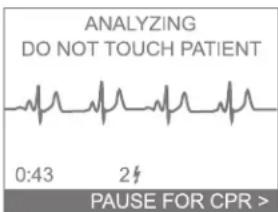
parameter settings default description
resume key on, off off Enables (ON) or disables (OFF) user-initiated interruption of CPR and
patient care intervals and return to analyzing, by pressing the lower Option button indicated by an arrow on the FR2+ display. If either the CPR timer or the NSA action setting is programmed to 2.5 minutes or longer, the Resume Key setting is automatically enabled (ON). The Resume Key is always automatically enabled for any CPR First interval.
If enabled, analysis is initiated by pressing the lower Option button indicated by an arrow on the FR2+ display, as shown in the sample screen:
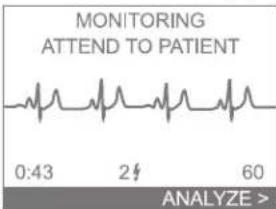
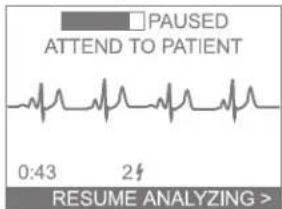
advanced use prompt interval (minutes)
0.5, 1.0, 1.5, 2.0, 2.5, 3.0
0.5 Sets the interval for patient care prompts provided during advanced mode operation.
Using setup features
NOTE: To move around the menus displayed, use the Option buttons as follows:
- Press the LOWER Option button to move the highlight bar from one item to another on the menu.
- Press the UPPER Option button to select the highlighted item or to scroll through the settings for that item.
The FR2+ comes with a factory default setup designed to meet the needs of most users. The setup feature of the FR2+ lets you review the current setup of your HeartStart FR2+ or install a revised setup if appropriate. To go to the SETUP menu:
I. Remove and reinstall the battery to bring up the first menu on the screen.
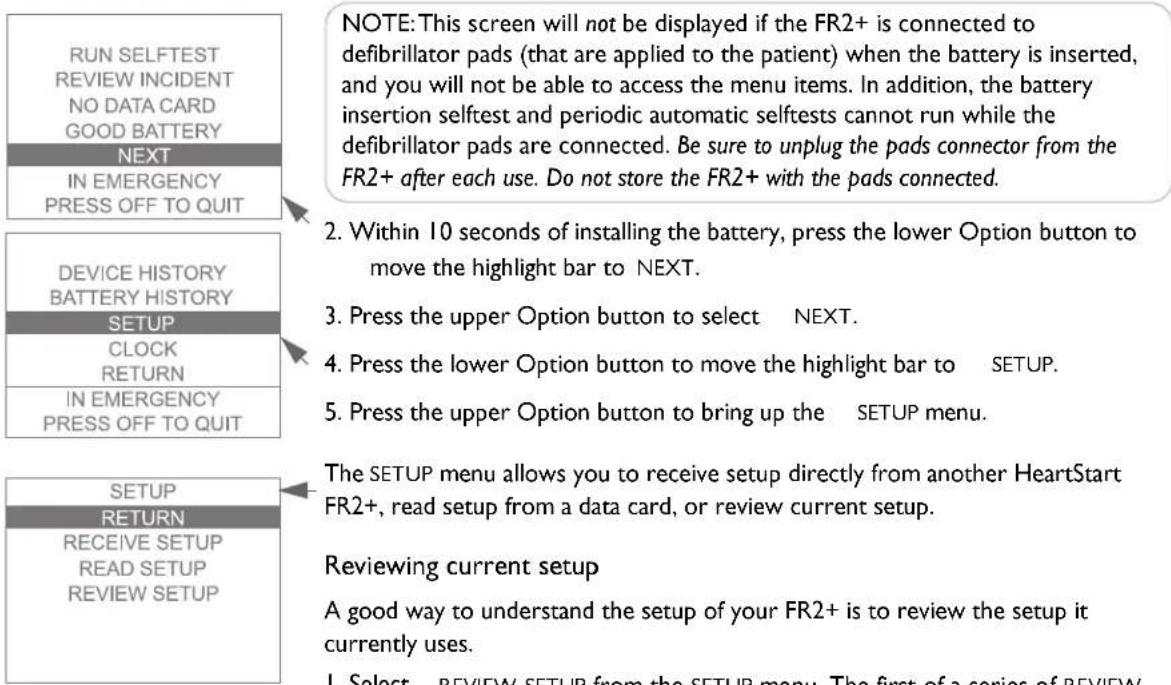
NOTE: This screen will not be displayed if the FR2+ is connected to defibrillator pads (that are applied to the patient) when the battery is inserted, and you will not be able to access the menu items. In addition, the battery insertion selftest and periodic automatic selftests cannot run while the defibrillator pads are connected. Be sure to unplug the pads connector from the FR2+ after each use. Do not store the FR2+ with the pads connected.
- Within 10 seconds of installing the battery, press the lower Option button to move the highlight bar to NEXT.
- Press the upper Option button to select NEXT.
- Press the lower Option button to move the highlight bar to SETUP.
- Press the upper Option button to bring up the SETUP menu.
The SETUP menu allows you to receive setup directly from another HeartStart FR2+, read setup from a data card, or review current setup.
Reviewing current setup
A good way to understand the setup of your FR2+ is to review the setup it currently uses.
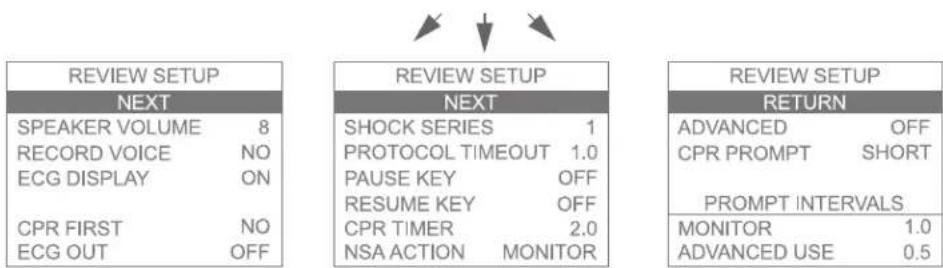
I. Select REVIEW SETUP from the SETUP menu. The first of a series of REVIEW SETUP screens is displayed.
2. After reviewing the screen contents, press the upper Option button to select NEXT and move to the next screen.
3. The last screen allows you to select RETURN and go back to the SETUP menu.
Revising setup
There are several ways to change the setup of your HeartStart FR2+. All of them require use of products or accessories available separately from Philips Medical Systems.
- Use the M3864A Training & Administration Pack to enable software within the FR2+ to modify its setup. (Instructions are provided with the Pack.)
- Read a revised setup from a data card containing the setup. (Instructions are provided later in this chapter.)
- Use the infrared communications feature of the FR2+ to receive the revised setup from another FR2+. (Instructions are provided later in this chapter.)
CAUTION: Alteration of the factory default setup of the FR2+ can affect its performance and should be performed under the authorization of your Medical Director. Modifications to device operation resulting from changes to the default settings should be specifically covered in user training.
See the tables describing the various setup parameters at the beginning of this chapter and Appendix D for definitions of setup items.
Receiving setup
This method uses the infrared communications feature of the HeartStart FR2+ to receive setup directly from one HeartStart FR2+ (which must have the Training & Administration Pack installed in it) to another. To receive setup from another FR2+, follow these steps:
I. Locate the infrared communications port on each HeartStart FR2+ and line them up with one another, so that the infrared "eye" in each one has an uninterrupted view of the "eye" in the other. (See the diagram on the inside front cover.) The two devices should be no more than 1 meter apart.
2. Make sure the "sending" FR2+ has the Training & Administration Pack installed and is ready to send. (See the M3864A Training & Administration Pack Instructions for Use for directions.)
3. Select RECEIVE SETUP from the setup menu:
4. A new screen comes up. Until the two HeartStart FR2+ devices are properly positioned, the screen displays READY TO RECEIVE and prompts you to check the sending FR2+.
| SETUP |
| RETURN |
| RECEIVE SETUP |
| READ SETUP |
| REVIEW SETUP |
| RECEIVE SETUP |
| EXIT |
| READY TO RECEIVE |
| CHECK SENDER |
| RETURN RECEIVE SETUP |
| READ SETUP |
| REVIEW SETUP |
- Setup data are automatically transferred as soon as the infrared ports are correctly aligned.
- If you select EXIT before the transfer is complete, the revised setup will not be received. When the transfer is complete, the screen on the "receiving" FR2+ displays a SETUP COMPLETE message. Your HeartStart FR2+ immediately uses the new setup.
Reading setup
This method copies setup data from a data card to your HeartStart FR2+. To read the setup, follow these steps:
I. Insert the data card in the data card tray and install the loaded tray into the data card slot in the FR2+, then insert the battery.
2. Select READ SETUP from the setup menu.
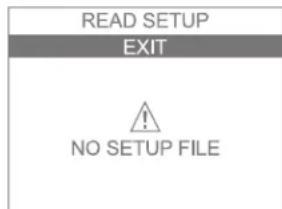
3. A new screen comes up. If the FR2+ cannot read the data card or cannot find a valid setup on the data card, the screen displays a NO SETUP FILE error message. Otherwise, the FR2+ begins reading the setup information from the data card immediately.
4. If you select EXIT before the transfer is complete or if the data card is not fully inserted into the FR2+, the revised setup will not be copied. When the transfer is finished, the screen displays a SETUP COMPLETE message. Your FR2+ immediately uses the revised setup.
Sending and receiving clock settings
To synchronize the clock settings of your HeartStart FR2+ with the clock of another FR2+, you can use the infrared communications feature.
To transfer clock settings from one FR2+ to another:
I. Remove and reinstall the battery of both FR2+ devices to bring up the first menu screen.
2. Select NEXT to go to the second menu screen.
3. Select CLOCK from the second menu screen. The CLOCK screen then comes up.
| CLOCK |
| RETURN |
| RECEIVE TIME |
| SEND TIME |
| 07 / 09 / 06 |
| DD / MM / YY |
| 14 : 28 |
flowchart
graph TD
    A["RECEIVE TIME"] --> B["EXIT"]
    B --> C["READY TO RECEIVE"]
    C --> D["CHECK SENDER"]
- Locate the infrared communications port on each FR2+ and line them up with one another, so that the infrared "eye" in each one has an uninterrupted view of the "eye" in the other. (See the diagram on the inside front cover.) The two devices should be no more than 1 meter apart.
- Select SEND TIME from the CLOCK screen on the "sending" HeartStart FR2+.
- Select RECEIVE TIME from the CLOCK screen of the "receiving" FR2+.
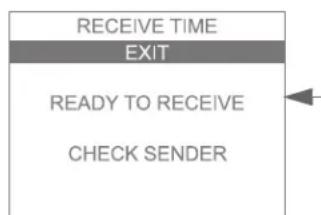
- A new screen comes up. Until the two FR2+ devices are properly positioned, the screen on the receiving FR2+ displays READY TO RECEIVE and prompts you to check the sending FR2+. The screen on the sending FR2+ displays READY TO SEND and prompts you to check the receiving FR2+.
- Clock settings are automatically transferred as soon as the infrared ports are correctly aligned.
Using advanced mode features
The HeartStart FR2+ provides an advanced mode that allows responders who are appropriately trained to override the programmed FR2+ protocol and take responsibility for certain aspects of the operating sequence used by the FR2+ to treat the patient.
As described earlier in this chapter, the factory default setup of the FR2+ must be modified to provide access to advanced mode features. This requires use of the administration function of the M3864A Training & Administration Pack.
If you are an expert user authorized by your Medical Director to modify setup, hold down both the Option buttons while installing the Training & Administration Pack in the FR2+, then select SETUP. Then select MODIFY SETUP from the SETUP menu. Select ADVANCED from the third menu of the MODIFY SETUP menu.
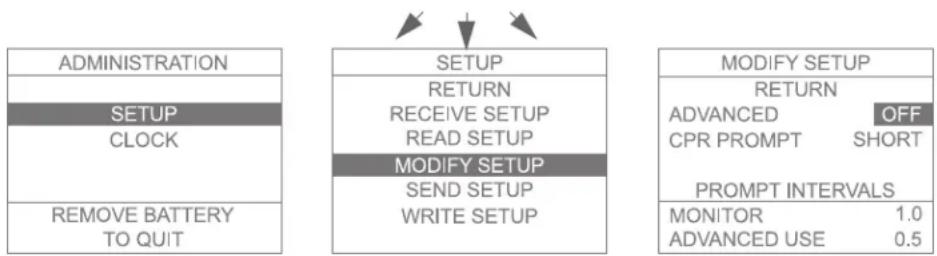
flowchart
graph TD
    A["ADMINISTRATION"] --> B["SETUP"]
    B --> C["CLOCK"]
    B --> D["REMOVE BATTERY TO QUIT"]
    E["RETURN"] --> F["RECEIVE SETUP"]
    F --> G["READ SETUP"]
    G --> H["MODIFY SETUP"]
    H --> I["SEND SETUP"]
    I --> J["WRITE SETUP"]
    K["MODIFY SETUP"] --> L["RETURN"]
    L --> M["ADVANCED OFF"]
    L --> N["CPR PROMPT SHORT"]
    O["PROMPT INTERVALS"] --> P["MONITOR 1.0"]
    O --> Q["ADVANCED USE 0.5"]
Using the upper Option button, scroll through the available settings for ADVANCED. The advanced mode options available are based on the FR2+ model used. For the M3860A, the user can select ANALYZE, CHARGE, or OFF. For the M3861A the user can select only ANALYZE or OFF. (Detailed directions for use are supplied with the Training & Administration Pack.)
CAUTION: Alteration of the factory default setup of the FR2+ can affect its performance and should be performed under the authorization of your Medical Director. Modifications to device operation resulting from changes to the default settings should be specifically covered in user training.
CAUTION:The HeartStart FR2+ advanced mode's manual charge feature is intended for use only by authorized operators who have been specifically trained in cardiac rhythm recognition and in defibrillation therapy using manual charge and shock delivery.
The analyze feature is particularly useful for organizations that include responders who have Basic Life Support (BLS) training as well as more highly trained responders who may be certified in Advanced Life Support (ALS). In such situations, the Medical Director may set up a “tiered-response” system. The HeartStart FR2+ is specifically designed to provide different product features appropriate to each tier of responder.
In a scenario where a BLS responder is the first on the scene of an incident, he or she is trained to treat the patient immediately — for example, to check for breathing and responsiveness; to apply the defibrillator pads and connect them to the HeartStart FR2+; and to follow the voice and text prompts provided by the HeartStart FR2+ in its automated (AED) mode. When an ALS-trained responder arrives, the BLS responder “hands off” the patient’s care to the more highly trained responder.
Because these second-tier responders have advanced training and developed clinical skills, they may be authorized to access the advanced mode features of the HeartStart FR2+. These include user-initiated analysis as well as manual charge and disarm control.
Using the manual analyze feature
The manual analyze feature is available in both the M3860A and the M3861A models, when enabled in setup.
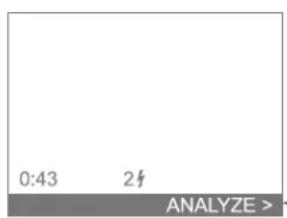
To enter the advanced mode during use of an FR2+ that has this feature enabled, make sure pads are attached to the patient, then press both Option buttons simultaneously. This brings up a screen that includes a highlighted line at the bottom, labeled ANALYZE, with an arrowhead pointing to the lower Option button.
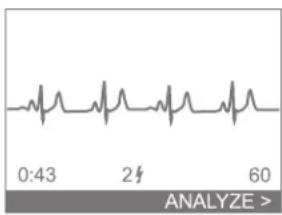
line
| Time | Value | |------|-------| | 0:43 | ~0.5 | | 2 | ~0.5 | | 60 | ~0.5 |In the M3861A HeartStart FR2+, the patient's ECG is not displayed; in the M3860A, the display includes the patient's ECG and heart rate.
Press the lower Option button (ANALYZE) to initiate rhythm analysis by the FR2+. If a shock is advised, the FR2+ automatically charges, and prompts you to press the Shock button.
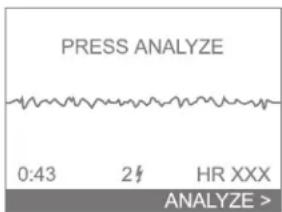
After shock delivery, the HeartStart FR2+ returns to the advanced mode display and monitors the patient's heart rhythm. If a potentially shockable rhythm is detected, the text and voice prompts advise you to PRESS ANALYZE.
NOTE: If you do not press the lower Option button (labeled ANALYZE) to initiate rhythm analysis when prompted, the HeartStart FR2+ does not analyze and prompt if a shock is advised. It is important that you understand that entering the advanced mode entails taking responsibility for these functions.
If the rhythm analysis results in a Shock Advised decision, the FR2+ begins charging, prompts you to press the Shock button, and displays a MANUAL DISARM option at the top of the screen. If for any reason you want to cancel the shock, press the upper Option button to disarm the FR2+.
To return to non-manual, AED mode operation, turn the FR2+ off by pressing the On/Off button. Then turn the FR2+ on by pressing the On/Off button again.
Using the manual charge feature (M3860A only)
The manual charge feature is available only in the M3860A, when enabled in setup.
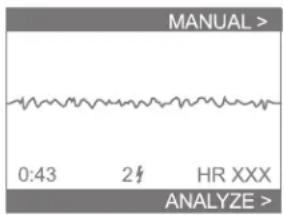
To enter the advanced mode during use of an FR2+ that has this feature enabled, make sure pads are attached to the patient, then press both Option buttons simultaneously. This brings up a screen that includes a highlighted line at the top, labeled MANUAL, with an arrowhead pointing to the upper Option button, and another at the bottom, labeled ANALYZE, with an arrowhead pointing to the lower Option button.
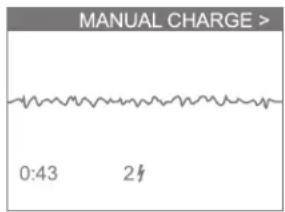
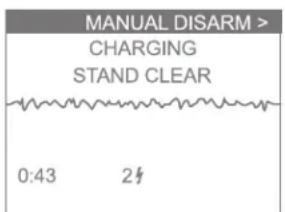
When the advanced mode is entered, display of the patient's ECG and heart rate is automatically initiated.
Pressing the lower Option button (ANALYZE) provides user-initiated rhythm analysis as described above. Pressing the upper Option button (MANUAL) brings up a new screen.
The highlighted top line is labeled MANUAL CHARGE, with an arrowhead pointing to the upper Option button.
If the ECG display shows that, in your expert clinical judgment, the patient has a shockable rhythm, press the upper Option button (MANUAL CHARGE). The HeartStart FR2+ will immediately charge for shock delivery.
As soon as charging begins, the screen message changes to CHARGING, STAND CLEAR, and the label for the arrowhead pointing to the upper Option button changes to MANUAL DISARM.
The FR2+ beeps while it is charging. When the beeping changes to a continuous tone and the Shock button light flashes, press the Shock button to deliver a shock. However, if the ECG display shows that the patient's rhythm has changed to a non-shockable rhythm, press the upper Option button to disarm the HeartStart FR2+.
After shock delivery, the HeartStart FR2+ returns to the initial advanced mode screen. To return to non-manual, AED mode operation, turn the FR2+ off by pressing the On/Off button. Then turn the FR2+ on by pressing the On/Off button again.
Notes
PHILIPS MEDICAL SYSTEMS
7Data Management and Review
Overview
The HeartStart FR2+ is designed to make it easy to manage incident data. Some information is automatically stored in the internal memory of the HeartStart FR2+. More detailed data can be stored on a data card if desired. The incident information stored in the HeartStart FR2+'s internal memory, or a summary of the information recorded on the data card, can then be displayed on the HeartStart FR2+ screen for review. In addition, HeartStart Event Review software can be used on a personal computer to store and review the detailed recorded information from a data card.
Recording incident data
The HeartStart FR2+ has two ways of recording information about an emergency incident so that it can be reviewed after the incident: in internal memory and on an optional data card.
Recording data in internal memory
Summary data for an incident is automatically recorded in internal memory by the FR2+ while you are using it.
Recording data on a data card
The M3854A data card can be used to store several hours of detailed incident data, including events, ECG, and, optionally, audio.
IMPORTANT NOTE: To record incident data on a data card, the data card must be installed before you turn on the FR2+.
CAUTION:The FR2+ is designed to be used only with Philips-approved accessories. The FR2+ may perform improperly if non-approved accessories are used.
Directions for installing a data card are provided in Chapter 2. To remove or replace a data card after use, be sure to turn off the FR2+ in order to ensure that no incident data are lost. Pull the data card tray out of the port in the FR2+ and
remove the card. Give it to the appropriate person in your organization. Either load a new data card into the tray or insert the empty data card tray into the port.
NOTE: Because it helps seal the FR2+ against moisture, the data card tray should always be reinserted into the port of the FR2+.
To avoid running out of data card space during an incident, it is recommended that each data card be used to record the information for only one incident and that it be replaced, or erased and reinstalled, after each use of the FR2+.
If you record information from more than one incident on a data card, it is important to review how much time is left on the used data card before recording a new incident. To do this, load the data card into the data card tray, insert the tray in the FR2+, then remove and reinstall the battery. The first screen displayed shows how much recording time remains on the card.
NOTE: During an incident, if for any reason you turn off the FR2+ for less than five minutes, the FR2+ considers this to be a “continued use” situation, and:
- the information stored about the incident is saved,
• additional events recorded after the device is turned back on will be treated as part of the same incident, and - the selftest will not automatically run if the battery is replaced.
IMPORTANT: Do not remove the battery while incident data are being recorded to a data card. To ensure that no incident data are lost, turn the FR2+ off (return it to standby mode) before replacing the battery.
Reviewing Incident Data
Reviewing data from internal memory
Summary information from the last incident that is stored in the internal memory of the HeartStart FR2+ can be displayed on its screen for review. To review this information:
I. Remove the data card if one is installed and unplug the pads connector.
2. Remove and reinstall the battery. (Make sure you are using the gray M3863A FR2 standard battery or the blue M3848A rechargeable battery, not the yellow Training & Administration Pack.)
3. Select REVIEW INCIDENT from the menu. A new screen comes up.
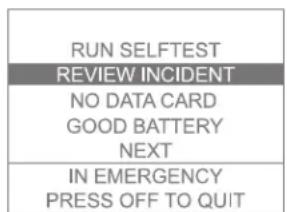
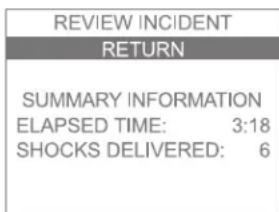
- Observe and record, if desired, the summary information displayed on the screen:
• how long the incident recorded by the FR2+ lasted, and
• how many shocks were delivered during the incident.
This information remains in the FR2+'s memory and can be displayed for review until the next time the FR2+ is used. At that time, the data from the new incident will be displayed. Summary data for the most recent use is always saved in the FR2+ memory until the FR2+ is used again.
Reviewing data from a data card
If a data card is installed when the HeartStart FR2+ is turned on for use during an incident, the HeartStart FR2+ automatically records detailed information on the data card. To review this information on the HeartStart FR2+ screen:
I. Make sure the Training & Administration Pack is not installed.
2. Make sure the data card is installed. Unplug the pads connector.
3. Remove and reinstall the battery.
- Select REVIEW INCIDENT from the menu. A new screen comes up. This screen displays:
• ELAPSED TIME — how long the incident recorded by the FR2+ lasted, ^*
- SHOCKS DELIVERED — how many shocks were delivered during the incident, and
- FIRST SHOCKS AT — the times at which the first three shocks were delivered.
NOTE: If the data card does not contain event data, only the summary information from FR2+ internal memory will be displayed when REVIEW INCIDENT is selected.
- To review the events that occurred during the incident, select REVIEW EVENTS. A new screen comes up. This and following screens, accessed by
| REVIEW EVENTS | |
| RETURN | |
| NEXT EVENTS | |
| POWER ON | 0:00 |
| PADS ON | 0:04 |
| SHOCK ADVISED | 0:13 |
| ARMED | 0:18 |
| SHOCKED | 0.22 |
selecting NEXT EVENTS, display elapsed time information for critical activities in using the FR2+. These include:
• POWER ON — when the FR2+ was turned on,
• PADS ON — when the defibrillator pads were connected,
• SHOCK ADVISED — when a shock was advised,
• ARMED — when the FR2+ is fully charged for shock delivery,
- SHOCKED — when a shock was delivered,
• PAUSE FOR CPR — when a pause occurred
• POWER OFF — when the FR2+ was turned off
Additional information may be displayed if your FR2+ is using a revised setup allowing advanced mode operation.
| REVIEW EVENTS | REVIEW EVENTS | REVIEW EVENTS | |||
| RETURN | RETURN | RETURN | |||
| NEXT EVENTS | NEXT EVENTS | ||||
| NO SHOCK ADVSD | 0:31 | MANUAL CHARGE | 1:30 | POWER OFF | 2:25 |
| PAUSE FOR CPR | 0:40 | DISARMED | 1:35 | ||
| RESUME ANALYZE | 1:00 | SHOCK ABORTED | 1:40 | ||
| MAN OVERRIDE | 1:10 | ADVANCED USE | 2:00 | ||
| MANUAL ANALYZE | 1:15 | PADS OFF | 2:20 | ||
| REVIEW INCIDENT |
| RETURN |
| REVIEW EVENTS |
| REVIEW ECG |
| ELAPSED TIME: 3:18 |
| SHOCKS DELIVERED: 6 |
| FIRST SHOCKS AT: |
| 00:18 01:10 01:49 |
-
To review the first six seconds of the recorded ECG for the incident, select REVIEW ECG. A new screen comes up. This screen displays a three-second segment of the presenting ECG from the incident.
-
Select NEXT ECG SEGMENT to review the second three-second segment of the presenting ECG.
| REVIEW ECG |
| RETURN |
| NEXT ECG SEGMENT |
Data cards can be reused if desired. Using a personal computer running HeartStart Event Review software and an appropriate card reader for your computer, you can copy the information from a data card, then erase the card and reuse it in the FR2+.
AAccessories for the HeartStart FR2+
NOTE: The HeartStart FR2+ is an enhanced version of the defibrillator previously sold as the Heartstream FR2. The FR2+ has all the features of the FR2. All accessories compatible with the FR2 are compatible with the FR2+. However, the FR2+ can be used with certain accessories (labeled FR2+) that are not compatible with the FR2.
Accessories ^* for the HeartStart FR2+ available separately from Philips Medical Systems include the following:
•Batteries
•Spare FR2 standard battery (recommended) [REF: M3863A]
•FR2+ rechargeable battery † [REF: M3848A]
- Charger, for the M3848A FR2+ rechargeable battery only; includes power cord [REF: M3849A]
•FR2 battery for aviation applications [REF: 989803136291]
• Pads
•Adult defibrillator pads [REF: DP2/DP6]
•FR2 infant/child reduced-energy defibrillator pads [REF: M3870A]
- Carry cases
•Fabric carrying case [REF: M3868A]
•Vinyl carrying case [REF: M3869A]
•Hardshell waterproof carrying case [REF: YC]
•Temperature-control carrying case [REF: 989803133171]
•Data cards and tray
•Spare data card tray [REF: M3853A]
•Data card and tray [REF: M3854A]
•Cabinets and mounts
•Wall mount bracket [REF: M3857A]
•Defibrillator cabinet, semi-recessed [REF: PFE7023D]
•Defibrillator cabinet, wall surface mount [REF: PFE7024D]
•Defibrillator cabinet, basic [REF: 989803136531]
* Certain accessories require a prescription in the United States.
† The M3848A FR2+ rechargeable battery is designed for environments in which the FR2+ Defibrillator is expected to see frequent use. This battery is not designed for use in aircraft. It is recommended that this battery not be used as a spare or backup battery and, due to its shorter standby life, that it not be used as the primary or spare battery in applications where the FR2+ Defibrillator is infrequently used.
- Fast Response Kit (pouch containing a pocket mask, a disposable razor, 2 pairs of gloves, a pair of paramedics scissors, and an absorbent wipe) [REF: 68-PCHAT]
- FR2+ ECG Assessment Module, for use only with an M3860A FR2+, for connection to ECG electrodes per AAMI (M3873A) or IEC (M3874A) convention [REF: M3873A/M3874A]
•Data Management Software
•HeartStart Review Express Connect [REF: 861311 option A01]
•HeartStart Event Review, single PC license [REF: M3834A]
•HeartStart Event Review, organization-wide license [REF: 989803141811]
•HeartStart Event Review Pro, single PC license [REF: 861276 option A01]
•HeartStart Event Review Pro, 3-PC license [REF: 861276 option A02]
•HeartStart Event Review Pro, organization-wide license [REF: 861276 option A03]
•CompactFlash card reader [REF: M3524A]
- Training
•Training & Administration Pack [REF: M3864A]
- Charger, for the Training & Administration Pack only; includes power cord [REF: M3855A]
- HeartStart HSI and FR2+ Instructor's Training Toolkit, NTSC [REF: M5066-89100] or PAL [REF: M5066-89101]
•AED Trainer 2 [REF: 3752A]
- Remote control for AED Trainer 2 [REF: M3753A]
- Programming Kit for AED Trainer 2 [REF: M3754A]
•Adult training pads [REF: 07-10900]
•Pediatric training pads [REF: M3871A]
Suggested additional items
It may be useful to keep some additional items with your HeartStart FR2+ for use if needed when an incident occurs. Some suggested supplies include:
- a pair of paramedic's shears or scissors
- a disposable razor designed for removing chest hair
•a pocket mask or face shield - disposable gloves
•a towel or antiseptic wipes *
•a source of oxygen
Your Medical Director may have other requirements for supplies.
BTechnical Specifications
The specifications for the HeartStart FR2+ provided in this chapter apply to both the M3860A and M3861A, unless otherwise noted. Additional information can be found in the Technical Reference Manual for HeartStart Defibrillators, located online at www.medical.philips.com/heartstart.
HeartStart FR2+ Defibrillator specifications
Physical
| category nominal specifications | |
| size 2.6" high x 8.6" wide x 8.6" deep (6.6 cm x 21.8 cm x 21.8 cm). | |
| weight 4.7 lbs (2.1 kg) with M3863A FR2 standard battery installed.4.5 lbs (2 kg) with optional M3848A FR2+ rechargeable battery installed. | |
| Environmental | |
| category nominal specifications | |
| temperature and relative humidity | Operating (battery installed, pads connected): 32° to 122° F (0° to 50° C);0% to 95% relative humidity (non-condensing).Standby (battery installed and stored with defibrillator pads): 32° to 109° F(0° to 43°C); 0% to 75% relative humidity (non-condensing).Storage/shipping: -4° to 140° F (-20° to 60°C); 85% relative humidity(non-condensing) |
| altitude | Meets MIL-810E 500.3, Procedure II (-500 feet to 15,000 feet). |
| shock/drop abuse tolerance | Meets MIL-810E 516.4, Procedure IV (after a 1 meter drop to any edge, corner,or surface, in standby mode). |
| vibration | Meets MIL-810E 514.4-16 and 514.4-17. |
| sealing | With data card tray and battery installed, meets IEC 529 class IP54. |
| ESD/EMI | See Appendix F. |
| aircraft: method | Meets RTCA/DO-160D:1997 Section 21 (Category M - Charging). |
Defibrillator
category nominal specifications
waveform parameters Biphasic truncated exponential. Waveform parameters are automatically
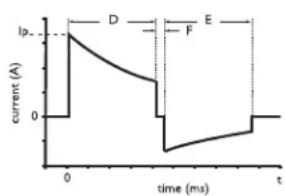
line
| time (ms) | current (A) | | --------- | ----------- | | 0 | 1 | | 1 | 0 | | 2 | -1 | | 3 | -2 | | 4 | -3 | | 5 | -4 | | 6 | -5 | | 7 | -4 | | 8 | -3 | | 9 | -2 | | 10 | -1 | | 11 | 0 | | 12 | 0 |adjusted as a function of patient defibrillation impedance. In the diagram at left, D is the duration of phase I and E is the duration of phase 2 of the waveform, F is the interphase delay (400 s), and Ip is the peak current.
The HeartStart FR2+ delivers shocks to load impedances from 25 to 180 ohms. The duration of each phase of the waveform is dynamically adjusted based on delivered charge, in order to compensate for patient impedance variations, as shown below:
adult defibrillation
load phase 1 phase 2 peak delivered resistance ( ) duration (ms) duration (ms) current (A) energy (J)
25 2.8 2.8 60 140
50 4.1 4.1 33 150
75 5.8 or 7.2 3.8 or 4.8 23 153
| 100 | 9.0 6.0 17 157 | |
| 125 | 12.0 | 8.0 14 161 |
| 150 | 12.0 | 8.0 12 157 |
| 175 | 12.0 | 8.0 10 151 |
pediatric defibrillation
(using M3870A FR2 infant/child reduced-energy defibrillator pads) load phase 1 phase 2 peak delivered
resistance (Ω) duration (ms) duration (ms) current (A) energy (J)
| 25 4.1 4.1 22 | 35 | |
| 50 5.8 3.8 17 | 48 | |
| 75 5.8 3.8 14 | 53 | |
| 100 | 7.2 4.8 11 | 55 |
| 125 | 7.2 4.8 10 | 54 |
| 150 | 9.0 6.0 | 9 |
| 175 | 9.0 6.0 | 8 |
NOTE: The values given are nominal. The actual phase durations for a given load resistance on the pediatric table above could be those of an adjacent row.
| category nominal specifications | |
| energy Using adult defibrillator pads: 150 J nominal (±15%) into a 50 ohm load. Using infant/child reduced-energy defibrillator pads: 50 J nominal (±15%) into a 50 ohm load. Sample pediatric energy doses:age energy dosenewborn 14 J/kg1 year 5 J/kg2 - 3 years 4 J/kg4 - 5 years 3 J/kg6 - 8 years 2 J/kgDoses indicated are based on CDC growth charts for the 50th percentile weights for boys.** National Center for Health Statistics in collaboration with the National Center for Chronic Disease Prevention and Health Promotion. CDC growth charts: weight-for-age percentiles, revised and corrected November 28, 2000. Atlanta, GA: Centers for Disease Control and Prevention © 2000. | |
| charge control Controlled by Patient Analysis System for automated operation. Can be programmed for manual initiation using advanced mode of the M3860A. | |
| charge time < 10 seconds, including confirming analysisfrom “shock advised”NOTE: Charge time increases near end of battery service life. | |
| manual mode charge time < 5 seconds. | |
| Quick Shock End of “Stop CPR” prompt to armed time: < 10 seconds. | |
| “charge complete” indicatorShock button flashes, audio tone sounds. | |
| disarm (AED mode) Once charged, the HeartStart FR2+ will disarm if:patient’s heart rhythm changes to non-shockable rhythm,a shock is not delivered within 30 seconds after the FR2+ is armed,the Pause button (if enabled) is pressed,the On/Off button is pressed to turn off the FR2+, orthe defibrillator pads are removed from the patient or the pads connector is disconnected from the FR2+. | |
| disarm (advanced mode) Once charged, the HeartStart FR2+ will disarm if:in advanced mode ANALYZEthe manual disarm button is pressed,a patient's heart rhythm changes to non-shockable rhythm,a shock is not delivered within 30 seconds after the FR2+ is armed,the On/Off button is pressed to turn off the FR2+,the defibrillator pads are removed from the patient, orthe pads connector is disconnected from the FR2+.in advanced mode CHARGE (M3860A only)the manual disarm button is pressed,a shock is not delivered within 30 s after charging,the On/Off button is pressed to turn off the FR2+,the defibrillator pads are removed from the patient, orthe pads connector is disconnected from the FR2+. | |
| shock delivery vector Via adult defibrillator pads placed in the anterior-anterior (Lead II) position or via FR2 infant/child reduced-energy defibrillator pads placed in the anterior-posterior position. | |
| ECG Analysis System | |
| category nominal specifications | |
| function Evaluates impedance of defibrillator pads for proper contact with patient skin, and evaluates the ECG rhythm and signal quality to determine if a shock is appropriate. | |
| protocols Follows pre-programmed settings to match local EMS guidelines or medical protocols. The settings can be modified using the setup options. | |
| shockable rhythms Ventricular fibrillation (VF) and certain ventricular tachycardias, including ventricular flutter and polymorphic ventricular tachycardia (VT). The HeartStart FR2+ uses multiple parameters to determine if a rhythm is shockable.NOTE: For patient safety reasons, some very low-amplitude or low-frequency rhythms may not be interpreted as shockable VF rhythms. Also, some VT rhythms may not be interpreted as shockable rhythms. CPR rates significantly above 100 compressions per minute can cause incorrect or delayed analysis by the HeartStart FR2+. | |
| asystole On detection of asystole, provides CPR prompt at programmed interval. |
category nominal specifications
pacemaker detection On detection of a pacemaker (in advanced mode or with M3873A/M3874A FR2+ ECG assessment module), provides screen display of PACEMAKER DETECTED alert. M3860A includes pacemaker artifact in ECG display. In both models, pacemaker artifact is removed from the signal for rhythm analysis.
ECG analysis performance (based on default configuration)
| rhythm class | ECG test samplea size | meets AHA recommendationsb for adult defibrillation | |
| observed 90% one-sided performance lower confidence limit | |||
| shockable rhythm — ventricular fibrillation | 300 sensitivity >90% (meets AAMI DF80 requirement) | (87%) | |
| shockable rhythm — ventricular tachycardia | 100 sensitivity >75% (meets AAMI DF80 requirement) | (67%) | |
| non-shockable rhythm — normal sinus rhythm | 300 specificity >99% (meets AAMI DF80 requirement) | (97%) | |
| non-shockable rhythm — asystole | 100 specificity >95% (meets AAMI DF80 requirement) | (92%) | |
| non-shockable rhythm — all other non-shockable rhythms^c | 450 specificity >95% (meets AAMI DF80 requirement) | (88%) | |
a. From Philips Medical Systems Heartstream ECG rhythm databases.
b. American Heart Association (AHA) AED Task Force, Subcommittee on AED Safety & Efficacy. Automatic External Defibrillators for Public Access Use: Recommendations for Specifying and Reporting Arrhythmia Analysis Algorithm Performance, Incorporation of New Waveforms, and Enhancing Safety. Circulation 1997;95:1677-1682.
c. Supraventricular tachycardia (SVT) is specifically included in the non-shockable rhythm class, in accordance with AHA recommendations ^b and the AAMI standard DF80.
Display
| category nominal specifications | |
| monitored ECG lead | ECG information is received from adult defibrillator pads in anterior-anterior (Lead II) position or from FR2 infant/child reduced-energy defibrillator pads in anterior-posterior position. (Displayed on M3860A only.) ECG information can also be displayed in the M3860A using the FR2+ ECG assessment module. NOTE: The ECG display provided by the FR2+ Defibrillator is not intended to provide diagnostic or ST segment interpretation. |
| display range (M3860A only) | Differential: ±2 mV full scale, nominal. |
| screen type | High-resolution liquid crystal display (LCD) with backlight. |
| screen dimensions | 2.8" wide × 2.3" high (70 mm × 58 mm). |
| sweep speed (M3860A only) | 23 mm/s nominal. |
| ECG display | 3 second-segments displayed (M3860A only). |
| frequency response (bandwidth) | Nondiagnostic rhythm monitor 1 Hz to 20 Hz (-3 dB), nominal. |
| sensitivity | 1.16 cm/mV, nominal. |
| heart rate displayed (normal sinus rhythm) | 30 to 300 bpm, updated each analysis period. Displayed (M3860A only) during monitoring and advanced modes. |
| Controls and indicators | |
| category nominal specifications | |
| LCD screen | High-resolution, backlighted LCD screen, displays text messages and (model M3860A only) ECG. |
| controls | On/Off buttonShock buttonOption buttons |
| LED indicators | Connector socket LED, flashes to indicate socket location. LED is covered when defibrillator pad connector is properly inserted. Shock button LED flashes when defibrillator is armed. |
| audio speaker Provides voice prompts (volume is adjustable via setup screen). | |
| beeper Chirps when a selftest has failed. Provides various warning beeps during normal use. | |
| status indicator Status indicator LCD displays device readiness for use. | |
| low battery detection Automatic during daily periodic selftesting and during use. | |
| low battery indicator Solid or flashing red X Status Indicator on front panel; screen display LOW BATTERY or REPLACE BATTERY warning, as appropriate. | |
| Accessories specificationsM3863A FR2 battery and 989803136291 TSO certified battery* | |
| category nominal specifications | |
| battery type I2 VDC, 4.2 Ah, lithium manganese dioxide. Disposable, long-life primary cell. | |
| capacity When new, a minimum of 300 shocks or 12 hours of operating time at 77° F (25°C). | |
| shelf life (prior to installation) Typically, 5 years from date of manufacture when stored under standby environmental conditions in original packaging. | |
| standby life (after installation) Typically, 5 years. >4 years when stored under standby environmental conditions (battery installed, FR2+ unused). | |
| status indicators Good battery: flashing black hourglass on the front panel of the FR2+.Low battery: flashing red X on the front panel of the FR2+.Dead battery: solid red X on the front panel of the FR2+. | |
| storage/transport temperature 32° to 109° F (0° to 43°C). | |
| battery limitations Never charge, short circuit, puncture, deform, incinerate, heat above 60°C, or expose contents to water. Remove the battery when discharged. | |
* The conditions and tests required for TSO approval of this battery are minimum performance standards. It is the responsibility of those desiring to install this battery in a specific class of aircraft to determine that the aircraft installation conditions are within the TSO standards. Lithium battery safety concerns include the possibility of fire, venting violently, and venting of toxic gases.
| category nominal specifications | |
| maintenance and calibration requirements for continued airworthiness (989803136291 only) | There are no periodic maintenance or calibration requirements that are necessary for continued airworthiness of the 989803136291 battery. For battery maintenance with respect to performance within the AED, please see Chapter 4. There are no user-serviceable parts in the battery. |
| environmental qualification Meets the applicable requirements of RTCA/DO-227, Section 2.3. | |
| (Optional) M3848A FR2+ rechargeable battery | |
| category nominal specifications | |
| battery type I2 VDC, 2.2 Ah, lithium ion. Rechargeable cell using the M3849A charger. | |
| capacity When freshly charged and used at 77°F (25°C), provides a minimum of 80 shocks (typically 100 shocks), or 3.5 hours (typically 5 hours) of ECG display time only, before recharging is indicated. | |
| standby life (after installation) | 6 months when installed fully charged in a defibrillator labeled FR2+. |
| status indicators Good battery: bar graph on display screen indicating remaining power level.Low battery: flashing red X on the front panel of the FR2+ (When low battery indicator appears, there is still enough energy to deliver 9 shocks plus 15 minutes of ECG display time).Dead battery: solid red X on the front panel of the FR2+. | |
| storage/transport temperature | 32° to 109°F (0° to 43°C). |
| (Optional) M3849A charger | |
| category nominal specifications | |
| application For use with M3848A FR2+ rechargeable battery only. | |
| power requirements 100 to 240 VAC, 47 to 63 Hz, 30 Watts | |
| storage/transport temperature | 32° to 122°F (0° to 50°C). |
| conformance testing International: EN60335-1:1994 Class I.North America: UL 1310 Class 2. | |
M3870A and DP2/DP6 defibrillator pads
| category nominal specifications | |
| pads, cable, and connector | Disposable and self-adhesive. DP2/DP6 adult defibrillator pads and M3870A FR2 infant/child reduced-energy defibrillator pads have a minimum active surface area of 85 cm ^2 each and are provided in a sealed package with an integrated 122 cm (48 inch), typical, cable and connector. The M3870A connector incorporates attenuating electronics. |
| storage/transport temperature | 32° to 110° F (0° to 43°C). |
| defibrillator pad requirements | Use only DP2/DP6, M3870A, M3713A, and M3716A defibrillator pads with the HeartStart FR2+. Place the pads on the patient as illustrated on each pad. |
| (Optional) M3854A data card | |
| category nominal specifications | |
| capacity 8 hours of event and ECG data, or 60 minutes with voice recording. | |
| (Optional) M3864A training & administration pack | |
| category nominal specifications | |
| battery type I2 V, I.I Ah, nickel metal hydride. Disposable, rechargeable cell using the M3855A charger. | |
| capacity Provides 4 hours of operating time at 77 °F (25 °C). | |
| status indicators | Low battery: flashing red X on the front panel of the FR2+. Dead battery: solid red X on the front panel of the FR2+. |
| storage/transport temperature | 50° to 104° F (10° to 40°C). |
| (Optional) M3855A charger | |
| category nominal specifications | |
| application For use with M3864A Training & Administration Pack only. | |
| power requirements With appropriate power cord, any AC mains power input or inverter-type power sources. | |
| storage/transport temperature | 32° to 113° F (0° to 45°C). |
| conformance testing International: EN60335-1:1994 Class I North America: UL 1310 Class 2 | |
| (Optional) M3873A/M3874A FR2+ ECG assessment module | |
| category nominal specifications | |
| application For use with the FR2+ M3860A with ECG display enabled and running version 1.5 software or higher (denoted by FR2+ on the front panel or rear label). | |
| length and weight 100 inches (182 cm); 1 lb. (2.2 kg). | |
| operating temperature 32° to 122° F (0° to 50°C). | |
| storage/transport temperature | 32° to 109° F (0° to 43°C). |
| patient lead wire designation M3873A (AAMI): M3874A (IEC): positive lead — red positive lead — green negative lead — white negative lead — red reference lead — black reference lead — yellow | |
| typical (lead II) connection Lead II vectors: positive — left leg negative — right arm reference — left arm Other limb vectors can be obtained by different electrode positions. | |
| battery type 3 V, I Ah, poly-carbonmonofluoride lithium (LiCFx). Non-replaceable disposable primary cell. | |
| service life Typically, 5 years. | |
| performance with FR2+ defibrillator | Meets environmental specifications cited for FR2+ Defibrillator on page B-I through B-2. |
CGlossary of symbols and controls
The following table explains the symbols used on the HeartStart FR2+ Defibrillator, its accessories, and their packaging.
| symbol description | |
| On/Off button. Turns the HeartStart FR2+ on or off;disarms HeartStart FR2+, stops automatic selftest. Whenthe optional Training & Administration Pack is being usedin the Training function, this button is used to select andexit training scripts. | |
| Shock button. Delivers shock to patient when theHeartStart FR2+ is charged. | |
| Upper and lower Option buttons. Allow you to movearound in and select an item from a display menu, provideadjustment of display screen contrast. Permit access toadvanced mode, if so configured. | |
| Defibrillation protection. Defibrillation protected, typeBF patient connection. | |
| High voltage. | |
| IP54 With data card tray and battery installed, meets IEC 529class IP54. | |
| HR XXX Heart rate. | |
| XX | Number of shocks delivered. |
| XX:XX Time (minutes:seconds). How much time has passedsince the HeartStart FR2+ was turned on. | |
| TEMPERATURE | Temperature. Recommended storage temperature rangehas been exceeded since the last battery insertionselftest. |

| symbol description | |
| SETUP | Setup. Setup has been lost from memory; factory default setup is being used. Contact Medical Director for revised setup. |
| REV: XXX X.XXXXX | Software. The version of software used in your HeartStart FR2+. |
| Flashing black hourglass. Ready for use. | |
| Solid red X. Not ready for use. (See Chapter 4, “Maintaining, Testing, and Troubleshooting.”) | |
| Flashing red X. Troubleshooting required. (See Chapter 4, “Maintaining, Testing, and Troubleshooting.”) | |
| CE0123 | Meets the requirements of the European medical device directives 93/42/EEC. |
| CE | Meets the requirements of the applicable European directive. |
| This product has passed relevant safety tests by CSA, a nationally recognized test lab. | |
| This product has been certified by the Australian Communication Authority. | |
| Refer to operating instructions. | |
| Printed on recycled paper. | |
| These pads are disposable and are for single patient use only. | |
symbol description
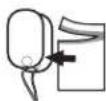
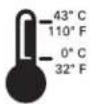
NON-STERILE
LATEX
LOT
USE BEFORE
Rx only
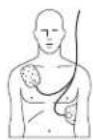
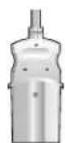

Pouch contents: one pair of defibrillator pads.
Store the pads at temperatures between 0° and 43°C (32° and 110°F).
Non-sterile.
This product does not contain natural rubber latex.
Lot number.
Use the pads before the date shown. Date format is MM-YYYY.
CAUTION: Federal law (USA) restricts this device to sale by or on the order of a physician.
Pad placement for adults. (DP2/DP6)
For use with Philips Heartstream/HeartStart and Laerdal HeartStart ForeRunner, FR, and FR2 AEDs.
Not for use with Laerdal HeartStart models 911, 1000, 2000, 3000. (DP2/DP6)
symbol description
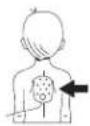
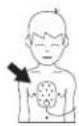

Pad placement for infants and children younger than 8 years or lighter than 55 pounds (25 Kg). (M3870A)
Box contents = 1 pouch. (M3870A)
Box contents = 2 pouches. (DP2)
Box contents = 6 pouches. (DP6)
This side up.
Handle with care.
Protect from moisture.
Do not crush.
Do not expose to high heat or open flames. Do not incinerate.
Do not mutilate or open.


symbol description

TSO C-142
Install before the date shown on this label. Date format is MM-YYYY.
Lithium manganese dioxide battery chemistry (M3863A and 989803136291)
Lithium ion battery chemistry (M3848A)
Nickel metal hydride battery chemistry (Training & Administration Pack).
12 volts direct current output.
FAA TSO C-142 authorized battery (989803136291 only).




Date of manufacture.
Insert into FR2+ in this direction.
Class 9 miscellaneous dangerous goods. (Symbol required on outer packaging by freight carrier regulations to identify shipments containing lithium batteries.)
Contains one battery.
On/Off indicator.
Charger status indicator.
Electrical input.


| symbol description | |
 | Electrical output. |
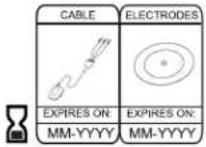 | Use the cable and electrodes before the respective dates shown on this label. |
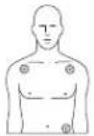 | Place the ECG electrodes as shown. |
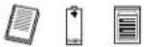 | Kit contains Training & Administration Pack, Instructions for Use, and set of training pads. |
 | Transportation requirements (refer to associated thermometer symbol). |
 | Storage requirements (refer to associated thermometer symbol). |
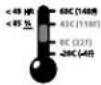 | Environmental (temperature and relative humidity) requirements. |
 | Dispose of in accordance with your country's requirements. |
| 2005 GUIDELINES | Indicates that this device is optimized for Guidelines 2005. |
DGlossary of terms
The terms listed in this Glossary are defined in the context of the HeartStart FR2+ and its use.
advanced mode A programmable treatment mode that permits an authorized user to control when the FR2+ starts rhythm analysis and (model M3860A only) when to begin defibrillator charging for shock delivery.
AED Automated external defibrillator.
AED mode The standard FR2+ treatment mode, with voice and text prompts guiding the responder through connecting the defibrillator pads, waiting for rhythm analysis, and delivering a shock if needed. In this mode, heart rhythm analysis and monitoring, and shock decision and charging for shock delivery are automatically performed by the FR2+.
ALS Advanced Life Support.
analysis See "SMART analysis."
arrhythmia An unhealthy, often irregular, beating of the heart.
background analysis/Analysis for potentially shockable rhythms during monitoring mode. monitoring
battery See "standard battery" and "rechargeable battery."
BLS Basic Life Support.
configuration The settings for all operating options of the FR2+, including treatment protocol. The factory default configuration can be modified by authorized personnel using a Training & Administration Pack.
continued use A condition in which use of the HeartStart FR2+ is interrupted for less than five minutes (e.g., for battery replacement). When the battery is reinserted or the unit is turned on again, the information stored about the interrupted incident is saved, any additional events recorded after the battery is reinstalled are treated as part of the same incident, and the selftest does not automatically run when the battery is reinstalled.
CPR First A configurable protocol parameter that, either automatically or by manual selection, enables a CPR interval before rhythm analysis and shock decision for patients with a shockable rhythm.
CPR timer A programmable period provided by the HeartStart FR2+ during which the responder can administer CPR.
defibrillation Termination of cardiac fibrillation by applying electrical energy
defibrillation charge Electrical energy stored in the capacitor of the HeartStart FR2+ as it arms for shock delivery.
defibrillation shock See "SMART biphasic waveform."
defibrillator pads The self-adhesive electrode pads applied to the adult patient's bare chest or pediatric (under 8 years of age or less than 55 lb./25 kg) patient's bare chest and back, and used to detect the patient's heart rhythm and transfer the defibrillation shock.
ECG Electrocardiogram, the electrical rhythm of the heart as detected through defibrillator pads.
event An action recognized or performed by the HeartStart FR2+ as a step in the sequence of using the device in an incident. Examples include: applying the pads and connecting them to the HeartStart FR2+, analyzing heart rhythm, delivering a shock, etc.
fibrillation A disturbance of the normal heart rhythm that results in chaotic, disorganized activity that cannot effectively pump blood. Ventricular fibrillation (fibrillation in the lower chambers of the heart) is associated with sudden cardiac arrest.
heart rhythm A system used by the FR2+ to determine if the patient's heart rhythm is shockable (ECG) analysis — ventricular fibrillation (VF) or certain ventricular tachycardias (VTs). See "SMART analysis."
HeartStart Event Review A suite of data management software applications for use by trained personnel to review and analyze FR2+ Defibrillator use on a patient. Information is available from Philips on the internet at http://www.medical.philips.com/goto/eventreview.
impedance Electrically, this is the total opposition offered by the body to the flow of the electrical shock waveform delivered by the HeartStart FR2+. The FR2+ automatically monitors the electrical impedance between the defibrillator pads placed on the patient's bare skin, and adjusts the shock waveform appropriately.
incident The series of events involved in treating a patient with the HeartStart FR2+.
infrared communications A method of sending information using a special part of the light spectrum. It is used to transmit information to and from the HeartStart FR2+ and another FR2+ or a computer running HeartStart Event Review software.
manual charge A feature of the advanced mode used by an authorized ALS-certified responder that allows the user to arm the HeartStart FR2+ for shock delivery.
manual disarm A feature of the advanced mode used by an authorized ALS-certified responder that allows the user to dump the HeartStart FR2+ charge internally.
monitoring mode A mode of background analysis to determine if patient rhythm has changed to a shockable rhythm.
non-shockable rhythm A heart rhythm that the HeartStart FR2+ determines is not appropriate for shock delivery.
NSA No Shock Advised decision, made by the HeartStart FR2+ based on analysis of the patient's heart rhythm.
pacemaker External or implanted cardiac pulse generator that stimulates the heart electronically.
pads See "defibrillator pads."
pause A defined period during which the HeartStart FR2+ does not perform rhythm analysis.
pediatric defibrillation Defibrillation of a child under eight years of age or 55 lbs. (25 Kg). It is recommended that FR2 infant/child reduced-energy defibrillator pads be used for pediatric patients.
periodic selftests Daily, weekly, and monthly tests automatically conducted by the FR2+ when it is in the standby mode. The tests monitor many key functions and parameters of the FR2+, including battery capacity and the state of its internal circuitry.
presenting ECG The heart rhythm seen by the HeartStart FR2+ when it is first connected to the patient (via the defibrillator pads) and begins rhythm analysis.
prompts The voice commands and screen text used to guide the responder through use of the HeartStart FR2+ to treat the patient.
protocol A sequence of operations performed by the HeartStart FR2+ to direct patient care in the AED mode.
protocol timeout A programmable interval used by the HeartStart FR2+ to decide if the shocks are part of the same shock series.
Quick Shock A feature of the FR2+ that provides a patient care pause-to-shock time of less than 10 seconds, typical, from end of a patient care pause to shock delivery.
read (data) A feature of the HeartStart FR2+ that allows it to read setup data from a M3854A data card.
receive (data) A feature of the HeartStart FR2+ that allows use of its infrared (IR) communications port to receive revised setup and clock settings directly from another device.
rechargeable battery The M3848A FR2+ rechargeable battery, used with the M3849A charger only.
record voice An optional feature of the HeartStart FR2+ that allows sound recording to a data card during use of the device in an incident. Activation of this feature requires revision of the HeartStart FR2+'s default configuration settings.
rhythm analysis See "SMART analysis."
send (data) A feature of the HeartStart FR2+ that allows use of its infrared (IR) communications port to send data directly to another FR2+ or a computer running HeartStart Event Review software.
sensitivity A measure of the ability of the HeartStart FR2+ to reliably detect and identify shockable heart rhythms.
setup The settings of all programmable operating parameters of the HeartStart FR2+. The factory default setup can be modified using the M3864A Training & Administration Pack.
shock series One or more shocks, each separated by no more than a preset interval (programmed Protocol Timeout). After completion of a shock series, the HeartStart FR2+ automatically pauses for CPR.
shockable rhythm Ventricular fibrillation and certain ventricular tachycardias associated with sudden cardiac arrest.
shock waveform See "SMART biphasic waveform."
SMART analysis The proprietary algorithm used by the FR2+ to analyze the patient's heart rhythm and determine whether a shock is advised.
SMART biphasic waveform The patented, low-energy defibrillation shock waveform used by the FR2+. It is an impedance-compensated biphasic waveform with 150 Joules, nominal, delivered to a 50 ohm load. When delivered via FR2 infant/child reduced-energy defibrillator pads, the energy is attenuated to 50 Joules, nominal.
specificity A measure of the ability of the HeartStart FR2+ to reliably detect and identify non-shockable heart rhythms.
D-5
standard battery The M3863A battery, 12 VDC, 4.2 Ah, lithium manganese dioxide, disposable, long-life primary cell.
standby mode The operating mode of the HeartStart FR2+ when a battery has been installed, and the unit is turned off and ready for use when needed. Shown by flashing black hourglass on the Status Indicator.
status indicator This is a special window in the upper right-hand corner of the front panel of the HeartStart FR2+ that lets you know the status of the device.
sudden cardiac arrest (SCA) The sudden cessation of the heart's pumping rhythm.
Training & Administration Pack An optional accessory for the FR2+ that enables training and administrative functions. The integral battery should be charged only using the M3855A charger.
waveform See "SMART biphasic waveform."
write (data) A feature of the HeartStart FR2+ that allows it to record setup information on a data card.
Notes
PHILIPS MEDICAL SYSTEMS
ECPR First Configuration
The CPR First parameter provides a tool for Medical Directors and Administrators to implement existing or emerging protocols. Currently, some emergency response protocols incorporate a CPR interval prior to applying the AED. Although this provides for initial CPR treatment, since the device is not attached to the patient it cannot collect data or provide the responder with prompts or an initial CPR interval. Note that previous versions of the FR2+ could be attached for data collection during initial CPR, via an enabled Pause key.
Research has shown that some SCA patients – particularly those presenting with low-amplitude, low-frequency VF rhythms typical of long down times – may not benefit from an initial shock, and for these patients an interval of CPR prior to defibrillation may improve outcome. ^1-3
Accordingly, some Medical Directors may wish to configure the FR2+ to be able to provide an initial CPR interval prior to defibrillation. Before making that decision, the Medical Director should consider the overall impact the selected setting would have on the SCA emergency response system, and train responders accordingly. If a system-wide change is desirable, software upgrades for existing FR2/FR2+ defibrillators are available from Philips. Other factors to be considered include:
• Emergency system response times
- Responder skill level
- Prevailing protocols and time and cost for training
• Expected changes in response protocols
Based on a consideration of these factors, the Medical Director can configure the FR2+ to any of four CPR First settings: NO, SMART CPR AUTO1, SMART CPR AUTO2, and USER. These are defined in greater detail below.
NO setting
The NO setting means the FR2+ will not provide an initial CPR interval prior to defibrillation of a shockable rhythm. Thus, once the FR2+ is attached, it will advise an immediate shock for all SCA patients presenting with a shockable rhythm — even those who may benefit from CPR first— before it provides a CPR interval. This setting represents the historical behavior of AEDs, including the ForeRunner and FR2+. It is therefore the default setting for CPR First.
SMART CPR AUTO1 and AUTO2 settings
It is often not possible for the responder to know whether an individual patient might benefit from CPR first or defibrillation first. When set to AUTO1 or AUTO2, the FR2+ analyzes the patient's initial rhythm and automates the decision as to whether an individual patient will receive an initial shock or CPR first. Based on a database of ECG recordings of actual resuscitation attempts, * the SMART CPR algorithm evaluates the initial ECG's amplitude and frequency characteristics — both known predictors of shock success — and calculates the likelihood of the return of spontaneous circulation (ROSC) following a defibrillation shock. If the likelihood is low, the FR2+ will provide a CPR interval prior to defibrillation. If high, the device will advise immediate defibrillation. In either case, the device adjusts its voice and text prompts appropriately.
WARNING: Performance of the SMART CPR AUTO1 and AUTO2 settings has not been established in patients under 8 years or 55 lb. (25 kg).
SMART CPR AUTO1. Provides immediate defibrillation for more than 90% ^ of shockable patients who are likely to achieve ROSC (less than 10% receive CPR first). Of those shockable patients who are unlikely to achieve ROSC, more than 50% will receive CPR first.
SMART CPR AUTO2. Provides immediate defibrillation for more than 80% ^ of shockable patients who are likely to achieve ROSC (less than 20% receive CPR first). Of those shockable patients who are unlikely to achieve ROSC, more than 60% will receive CPR first.
* Data collected from multi-center, multi-national out-of-hospital and in-hospital adult sudden cardiac arrest rhythms. The SMART CPR algorithm was developed based on VF, polymorphic VT, and ventricular flutter rhythms.
^ Based on observed performance. ROSC was determined by several parameters, including patient assessment, ECG analysis, and/or patient impedance cardiography.
USER setting
The USER setting provides the responder with a means to manually initiate a CPR interval, based on either a patient assessment protocol or standing orders from the Medical Director. The FR2+ can thus be applied immediately to the patient, enabling the device to collect data and provide reminder text prompts that the CPR Pause key is available. The responder presses the CPR Pause key to start a CPR interval. The FR2+ will continue with rhythm analysis unless the CPR Pause key is pressed.
With the FR2+ CPR First setting set to USER, the FR2+ provides an opportunity for the responder to initiate a CPR interval for all patients — even those who may benefit from immediate defibrillation.
Notes
PHILIPS MEDICAL SYSTEMS
FAdditional technical data required for European conformity
Environmental considerations
product information
defibrillator The defibrillator contains electronic components. Dispose of it at an appropriate recycling facility in accordance with local regulations.
battery The battery cells contain chemicals. Recycle the battery at an appropriate recycling facility in accordance with local regulations.
pads The used pads may be contaminated with body tissue, fluid, or blood. Cut them off and dispose of them as infectious waste. Recycle the remaining cartridge components at an appropriate recycling facility in accordance with local regulations.
Important warnings and reminders
- Do not allow the pads to contact other electrodes or metal parts that are in contact with the patient.
- Before delivering a shock, it is important to disconnect the patient from other medical electrical equipment, such as blood-flow meters, that may not incorporate defibrillation protections. In addition, make sure the pads are not in contact with metal objects such as a bedframe or stretcher.
- Check supplies, accessories, packaging, and spares for damage and expiration dating.
Electromagnetic conformity
Guidance and manufacturer's declaration: The HeartStart FR2+ is intended for use in the electromagnetic environment specified in the tables below. The customer or user of the HeartStart FR2+ should assure that it is used in such an environment.
Electromagnetic emissions
| emissions test compliance electromagnetic environment – guidance | ||
| RFCISPR | | | Group |Class B | The FR2+ uses RF energy only for its internal function.Therefore, its RF emissions are very low and are not likely to cause any interference in nearby electronic equipment.The FR2+ is suitable for use in all establishments, including domestic establishments and those directly connected to the public low-voltage power supply network that supplies buildings used for domestic purposes. |
Electromagnetic immunity
| immunity test IEC 60601 | |||
| test level | compliance level electromagnetic environment - guidance | ||
| electrostatic discharge (ESD)IEC 61000-4-2 | ±6 kV contact±8 kV air | ±6 kV contact±8 kV air | There are no special requirements with respect to electrostatic discharge. a |
| power frequency (50/60 Hz) magnetic fieldIEC 61000-4-8 | 3 A/m 3 A/m Power frequency magnetic fields shouldbe at levels characteristic of a typical location in a typical commercial/hospital environment.There are no special requirements for non-commercial/non-hospital environments. | ||
| radiated RFIEC 61000-4-3 | 10 V/m80 MHz to2.5 GHz | 20 V/m Portable and mobile RFcommunications equipment should be used no closer to any part of the HeartStart FR2+, including cables, than is absolutely necessary. b,c The recommended separation distances for various transmitters and the AED are shown in the following table.Interference may occur in the vicinity of equipment marked with the following symbol: [IMAGE] | |
NOTE 1. At 80 MHz and 800 MHz, the higher frequency range applies.
NOTE 2. These guidelines may not apply in all situations. Electromagnetic propagation is affected by absorption and reflection from structures, objects and people.
a. Generally, AEDs are sometimes susceptible to interference generated by patient and/or responder motion in environments in which a high static electric field is present (e.g., low humidity, synthetic carpets, etc.). As a safety measure, Philips AEDs incorporate a patented method to sense possible corruption of the ECG signal by such interference and to respond by directing the user to stop all motion. In these cases, it is important to minimize movement in the vicinity of the patient during rhythm analysis in order to ensure that the signal being analyzed accurately reflects the patient's underlying heart rhythm.
b. The ISM (industrial, scientific and medical) bands between 150 kHz and 80 MHz are 6,765 MHz to 6,795 MHz; 13,553 MHz to 13,567 MHz; 26,957 MHz to 27,283 MHz; and 40,660 MHz to 40,700 MHz.
c. Field strengths from fixed transmitters, such as base stations for radio (cellular/cordless) telephones and land mobile radios, amateur radio, AM and FM radio broadcast, and TV broadcast cannot be predicted theoretically with accuracy. To assess the electromagnetic environment due to fixed RF transmitters, an electromagnetic site survey should be considered. If the measured field strength in the location in which the HeartStart FR2+ is used exceeds the applicable RF compliance level above, the HeartStart FR2+ should be observed to verify normal operation. If abnormal performance is observed, additional measures may be necessary, such as re-orienting or relocating the HeartStart.
Recommended separation distances between portable and mobile RF communications equipment and the HeartStart FR2+ Defibrillator
The HeartStart FR2+ Defibrillator is intended for use in an electromagnetic environment in which radiated RF disturbances are controlled. The customer or the user of the FR2+ can help prevent electromagnetic interference by maintaining a minimum distance between portable and mobile RF communications equipment (transmitters) and the FR2+ as recommended below, according to the maximum output power of the communications equipment.
| rated maximum output power of transmitter (W) | separation distance according to frequency of transmitter (m) | |
| 80 MHz to 800 MHz d = 0.6 | 800 MHz to 2.5 GHz d = 1.15 | |
| 0.01 0.06 0.115 | ||
| 0.1 0.19 0.36 | ||
| 1 0.6 1.15 | ||
| 10 1.9 3.64 | ||
| 100 6.0 11.5 | ||
For transmitters rated at a maximum output power not listed above, the recommended separation distance d in meters (m) can be determined using the equation applicable to the frequency of the transmitter, where P is the maximum output power rating of the transmitter in watts (W) according to the transmitter manufacturer.
NOTE I. At 80 MHz and 800 MHz, the separation distance for the higher frequency range applies.
NOTE 2. The ISM (industrial, scientific and medial) bands between 150 kHz and 80 MHz are 6,765 MHz to 6,795 MHz; 13,553 MHz to 13,567 MHz; 26,957 MHz to 27,283 MHz; and 40,660 MHz to 40,700 MHz.
NOTE 3. An additional factor of 10/3 is used in calculating the recommended separation distance for transmitters in the ISM frequency bands between 150 kHz and 80 MHz and in the frequency range 80 MHz to 2.5 GHz to decrease the likelihood that mobile/portable communications equipment could cause interference if it is inadvertently brought into patient areas.
NOTE 4. These guidelines may not apply in all situations. Electromagnetic propagation is affected by absorption and reflection from structures, objects and people.
NOTE 5. Transmitters/antenna of this power-level are most likely mounted on an emergency vehicle chassis. The distances cited here are for open field. For an external antenna, the separation distance is most likely shorter.
Shock cycle timing
The HeartStart FR2+'s Quick Shock feature allows it to deliver a shock within 10 seconds, typical, following the prompt ending a CPR interval. From shock to shock, the FR2+ takes <20 seconds, typical, including analysis. After 15 shocks, the FR2+ takes <30 seconds from analyzing to ready-to-shock. After 200 shocks, the FR2+ takes <40 seconds from initial power-on to ready-to-shock.
Index
A
accessories
additional, recommended A-2
adult defibrillator pads A-1
available to order A-1
charger for M3848A rechargeable
battery A-I
charger for Training &
Administration pack A-2
data card A-1
data card tray A-I
fabric carrying case A-I
Fast Response Kit A-2
FR2+ ECG assessment module A-2
infant/child defibrillator pads A-1
rechargeable battery A-I
standard battery A-1
Training & Administration pack A-2
vinyl carrying case A-I
wall mount bracket A-I
advanced mode
definition 6-5 ,D-1
features 6-10
manual analyze 6-11
manual charge 6-12,6-13,D-3
manual disarm 6-13 ,D-3
programmable settings 6-5
tiered-response features 6-10
user qualifications 6-10
AED mode, definition D-I
AED, definition D-1
ALS, definition D-I
arrhythmia, definition D-1
asystole detection B-4
autosend PST
definition 6-2
programmable settings 6-2
B
battery
battery insertion selftest 2-3
description 2-2 ,D-I
replacing during use 4-5,7-2,7-3
battery history
description of data 4-8
reviewing 4-8
battery insertion selftest
failure 4-12
interactive 4-7
recording test results 4-6
BLS, definition D-1
C
calibration 4-1
cautions, warnings, and dangers 5-1
charge
disarming B-3 ,B-4
time from Shock Advised B-3
chirping 4-9
cleaning
agents to use 4-3
FR2+ ECG assessment module 3-6
guidelines 4-3
clock
receiving settings 6-9
sending settings 6-9
setting 2-2
continued use 4-5,7-2,7-3,D-1
controls and indicators specifications B-6
controls and symbols definitions C-I
CPR First definition D-1 programmable settings 6-4
CPR interval, description 3-4
CPR prompt definition 6-4 programmable settings 6-4
CPR timer definition 6-2, D-2 programmable settings 6-2
D
dangers, warnings, and cautions 5-1
data card reading setup 6-9 recommended use 4-6 recording time available 4-5
defibrillation charge D-2
defibrillation therapy 1-2
defibrillation, definition D-2
defibrillator specifications B-2
defibrillator pads applying to adult patient 3-2 applying to child patient 3-2 checking before use 3-2 connecting to the FR2+ 3-2 damage during CPR 3-6 description D-2 positioning correctly 3-2 specifications B-9
device history description of data 4-8 reviewing 4-8
disarming the FR2+ in advanced mode B-4 in AED mode B-3 manual 6-13, B-4
display screen specifications B-6
E
ECG analysis see SMART analysis
ECG analysis system description D-2
ECG assessment module 3-5
ECG display definition 6-1 programmable settings 6-1 specifications B-6
ECG, definition D-2
event, definition D-2
F
fibrillation, definition D-2
flashing red X see status indicator
G
glossary of terms D-1 of symbols and controls C-1
H
heart rhythms non-shockable B-5 shockable B-4,B-5
hourglass status indicator C-2
how to install the battery 2-2
how to review battery history 4-8
Index-3
how to review device history 4-8
how to review the presenting ECG 7-4
how to run the battery insertion selftest 2-3
how to use the advanced mode 6-10
how to use the M3873A/M3874A ECG assessment module 3-5
|
impedance
automatic adjustment of shock waveform B-2
definition D-2
troubleshooting 4-11
incident data
definition of data on data card 7-3
definition of internal memory data 7-2
reviewing from data card 7-3
reviewing from internal memory 7-2
incident, definition D-2
indications 1-1
infrared communications
description D-2
receiving setup 6-8
installing the battery 2-2
installing the data card 2-1
L
LCD display
see display screen
M
M3848A FR2+ rechargeable battery A-1, B-8
M3849A charger for M3848A
rechargeable battery A-1, B-8
M3854A data card A-1, B-9
M3855A charger for M3864A Training & Administration Pack A-2, B-9
M3857A wall mount bracket A-1
M3860A and M3861A FR2+, description I-I
M3863A battery A-1, B-7
M3864A Training & Administration pack A-2
M3868A carrying case A-1
M3870A FR2 infant/child reduced-energy defibrillator pads A-1, B-9
M3873A/M3874A ECG assessment module 3-5,A-2,B-10
main menu 2-2
maintenance
after using the FR2+ 4-2
cleaning 4-3
daily selftests 4-1
monthly selftests 4-1
operator's checklist 4-3
recommended schedule 4-1
manual mode
see advanced mode
monitoring, description D-3
N
non-shockable rhythms B-5,D-3
NSA action
definition 6-3
programmable settings 6-3
NSA, definition D-3
O
On/Off button, description of uses C-I
operating temperature B-1
Option buttons
description of uses C-I
P
pacemaker
definition D-3
detection B-5
pads placement, adult and pediatric 3-2
patient impedance B-2
pause key
definition 6-5
programmable settings 6-5
pause, definition D-3
pause, time indication 3-4
pediatric defibrillation
choosing defibrillator pads 3-2
providing CPR 3-1
periodic selftests
definition D-3
frequency 4-1
status indicator alerts 4-7
presenting ECG
definition D-3
description 7-4
prompt interval
advanced use settings 6-6
definition 6-6
monitor settings 6-6
prompts, definition D-3
protocol timeout
definition 6-2 ,D-3
programmable settings 6-2
protocol, definition D-3
Q
Quick Shock
definition B-3
R
record voice
definition 6-1, D-4
programmable settings 6-1
recording incident data 7-1
replacing battery during use 7-2,7-3
responder
qualifications and training I-2
resume key
definition 6-6
programmable settings 6-6
reviewing incident data
from data card 7-3
from internal memory 7-2
rhythm analysis
see SMART analysis
S
selftests
battery insertion 2-3
daily 4-1
monthly 4-1
periodic 2-4,4-1
sensitivity, definition D-4
setting the clock 2-2
setup
definition D-4
reading setup 6-9
receiving setup 6-8
shock
see SMART Biphasic waveform
Shock button, description of use C-I
shock series
Index-5
definition 6-2,D-4
programmable settings 6-2
shockable rhythms B-5, D-4
SMART analysis
definition D-4
during CPR 3-6
specifications B-4
SMART Biphasic waveform
definition D-4
energy delivered B-3
shock waveform B-2
specification B-2
SMART biphasic waveform
shock delivery vector B-4
solid red X
see status indicator
speaker volume
definition 6-1
programmable settings 6-1
specifications
controls and indicators B-6
defibrillator B-2
defibrillator pads B-9
display screen B-6
ECG analysis performance B-6
ECG analysis system B-4
environmental B-1
non-shockable rhythm
specificity B-5
physical B-1
shockable rhythm sensitivity B-5
specificity, definition D-4
standby mode, definition D-5
standby temperature B-1
status indicator
description D-5
flashing black hourglass C-2
flashing red X 4-10 ,C-2
in standby mode 2-4
solid red X C-2
storage conditions B-1
sudden cardiac arrest, definition D-5
symbols and controls
definitions C-I
T
temperature
operating B-I
standby B-1
tiered-response features 6-10
Training & Administration pack
charger A-2
description D-5
troubleshooting 4-9
U
user, qualifications and training I-2
W
warnings, cautions, and dangers 5-1
waveform
see SMART Biphasic waveform
X
X status indicator
flashing or solid 4-9
solid 4-9
Notes
Intentionally left blank.
Intentionally left blank.
Intentionally left blank.
PHILIPS
Philips Medical Systems is part of
Royal Philips Electronics
Philips Medical Systems
United States
Philips Medical Systems
2301 Fifth Avenue, Suite 200
Seattle, WA 98|21, USA
(800) 263-3342
Canada
Philips Medical Systems
281 Hillmount Road
Markham, Ontario
L6C 2S3
(800) 291-6743
Europe, Middle East, and Africa
Cardiac and Monitoring Systems
Hewlett-Packard Strasse 2
71034 Boeblingen, Germany
(+49) 7031 463-2254
Latin America
Philips Medical Systems
1550 Sawgrass Corporate Parkway, Suite 300
Sunrise, FL 33323, USA
(954) 835-2660
Asia Pacific
Philips Electronics Hong Kong Ltd.
30th Floor, Hopewell Centre,
17, Kennedy Road, Wanchai,
Hong Kong
(852) 2821 5888
- HeartStart FR2+ Defibrillator
- QUICK REFERENCE CARD
- PHILIPS
- HeartStart FR2+
- M3860A/M3861A
- Automated External Defibrillator
- IMPORTANT NOTE:
- About this edition
- Edition history
- Copyright
- Authorized EU Representative
- Device Tracking
- Device Manufacturer
- Patents
- CONTENTS
- I INTRODUCTION TO THE HEARTSTART FR2+
- 2GETTING STARTED
- 4MAINTAINING, TESTING, AND TROUBLESHOOTING
- 5SAFETY CONSIDERATIONS
- 6CONFIGURATION, SETUP, AND ADVANCED MODE FEATURES
- 7DATA MANAGEMENT AND REVIEW
- APPENDICES
- Device description
- Model M3860A Model M3861A
- Indications for use
- Principles of operation
- Package contents
- Setup overview
- Installing the data card
- Installing the battery and setting the clock
- Running the Battery Insertion Test
- Placing and securing the HeartStart FR2+
- 3Using the HeartStart FR2+
- Overview
- Treating infants and children
- Step I: Preparation
- Step 2: ECG analysis and CPR interval
- Step 3: Shock delivery
- CPR Interval
- ECG display for ongoing observation
- Check the patient if:
- Maintenance
- Suggested maintenance schedule
- daily monthly maintenance task/response
- After using the HeartStart FR2+
- Cleaning the HeartStart FR2+
- Operator's checklist
- Testing
- Battery insertion selftest
- Device history
- Battery History
- Troubleshooting Guide
- Recommended action during an emergency
- Troubleshooting during patient use
- General dangers, warnings, and cautions
- Configuration
- Non-protocol parameters
- Manual override parameters
- parameter settings default description
- Using setup features
- Reviewing current setup
- Revising setup
- Receiving setup
- Reading setup
- Sending and receiving clock settings
- Using advanced mode features
- Recording incident data
- Reviewing Incident Data
- Reviewing data from a data card
- AAccessories for the HeartStart FR2+
- Suggested additional items
- BTechnical Specifications
- Defibrillator
- category nominal specifications
- adult defibrillation
- pediatric defibrillation
- CGlossary of symbols and controls
- symbol description
- NON-STERILE
- LATEX
- LOT
- USE BEFORE
- Rx only
- DGlossary of terms
- ECPR First Configuration
- NO setting
- SMART CPR AUTO1 and AUTO2 settings
- USER setting
- FAdditional technical data required for European conformity
- Environmental considerations
- Important warnings and reminders
- Electromagnetic conformity
- Recommended separation distances between portable and mobile RF communications equipment and the HeartStart FR2+ Defibrillator
- Shock cycle timing
- Index
- A
- B
- C
- D
- E
- F
- G
- H
- |
- L
- M
- N
- O
- P
- Q
- R
- S
- T
- U
- W
- X
Brand : PHILIPS
Model : HeartStart FR2+ M3861A
Category : Defibrillator