
E12 air2U - Loudspeaker AIPTEK - Free user manual and instructions
Find the device manual for free E12 air2U AIPTEK in PDF.


| Brand | AIPTEK |
| Model | E12 air2U |
| Product Type | Portable Bluetooth Speaker |
| Dimensions | 6.5 x 6.5 x 6.5 cm |
| Weight | 190 g |
| Power Supply | Built-in rechargeable lithium-ion battery, 3.7V / 500mAh |
| Charging | Micro USB, 5V / 1A |
| Battery Life | Up to 6 hours at 50% volume |
| Bluetooth Version | 4.2 |
| Bluetooth Range | 10 meters (33 ft) |
| Speaker Driver | 40 mm full-range |
| Output Power | 3W RMS |
| Frequency Response | 100 Hz – 20 kHz |
| Water Resistance | IPX5 (splash-proof) |
| Material | ABS plastic with fabric covering |
| Controls | Power, Volume +/-, Play/Pause, Bluetooth pairing button |
| Indicator Lights | LED for power and Bluetooth status |
| Compatibility | Smartphones, tablets, laptops, and any Bluetooth-enabled device |
| Box Contents | 1× AIPTEK E12 air2U Speaker, 1× Micro USB charging cable, 1× User manual |
| Warranty | 1 year limited warranty |
| Manual | Included in package and available online at notice-facile.com |
Frequently Asked Questions - E12 air2U AIPTEK
User questions about E12 air2U AIPTEK
0 question about this device. Answer the ones you know or ask your own.
Ask a new question about this device
Download the instructions for your Loudspeaker in PDF format for free! Find your manual E12 air2U - AIPTEK and take your electronic device back in hand. On this page are published all the documents necessary for the use of your device. E12 air2U by AIPTEK.
USER MANUAL E12 air2U AIPTEK
Music Speaker E12
Quick Start Guide


English/Deutsch/Français/Italiano/Rysckia Cven/繁體中文/العربية
Charging your speaker
Before using your speaker, fully charge it for optimal performance.
Charge / Battery Indicator LED
| Status Indicator | |
| Low battery Beeps every 20 seconds | |
| Battery charging | Red LED is steady on |
| Battery fully charged | Green LED is steady on |
Product Overview
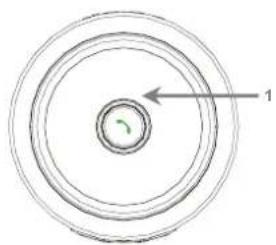
Top view Bottom View

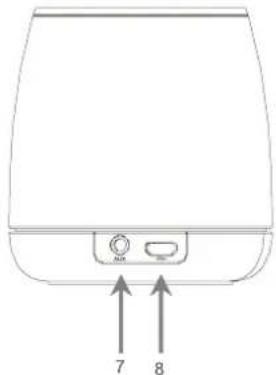
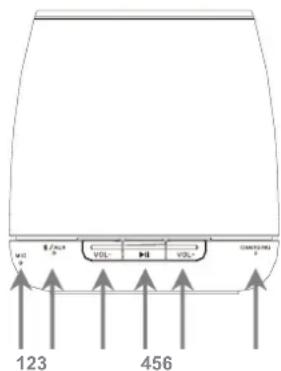
Front View Rear View

- Hand free button
-
Power Switch
-
Microphone
- Bluetooth / Aux indicator
- Volume Down
- Play/Pause
- Volume up
- Charge indicator
- Aux jack (3.5mm)
- Charging jack(micro USB)
Pairing the speaker with your Bluetooth Device
- Turn on the speaker, the Blue LED flashes quickly (pairing mode).
- Turn on the Bluetooth function of your device and search for Bluetooth devices. Please refer to the manual of your device about how to enable your Bluetooth function.
- Select "the model name of your speaker" and select CONFIRM to pair with the speaker. After the speaker is successfully paired, the Blue LED flashes slowly.
Note: The password is "0000", if your device requires a password.
Bluetooth / Aux Indicator LED
| Status Indicator | |
| Bluetooth pairing | Blue LED flashes quickly |
| Paired Blue LED flashes | slowly |
| Aux-in mode Red LED is steady on | |
| Power on Blue LED flashes 3 times | |
| Power off LED is off | |
Hand-free function
- Press to answer incoming calls, streaming music will be paused.
- Press again to end calls, streaming music will be resumed.
Audio Input
- You can play music via connecting the 3.5 mm audio cable to AUX IN port on the speaker and to an audio output sources at AUX mode.
- You can adjust the volume and switch PLAY/Pause from your audio sources.
Note: The AUX mode LED on the speaker is steady on.
Importance Notice
- Do not let the speaker fall down, and do not damage or detach the product; otherwise your warranty will be void.
-
Avoid any contact of the device with water and dry your hands before using the device.
-
Do not expose the speaker to high temperatures and direct sunlight.
- Handle the product with care. Avoid contact with sharp or device off from metallic objects.
- For your own safety, do not use the speaker frame during thunderstorms or lightning.
- Only use accessories recommended from the manufacturer.
- Keep the speaker out of reach from children.
- Keep the product away from all sources of fire such as candles and do not put them in the vicinity of the device.
If the life time of the product ends, try to recycle all components, if possible. Batteries and rechargeable batteries must not be disposed with household waste!
Please dispose them at a local recycling center. Together we all contribute to the protection of our environment.



Vorderansicht

Rückansicht


Veduta anteriore

Veduta posteriore


Вид спереди
Вид снизу

Вид сзади


Brand : AIPTEK
Model : E12 air2U
Category : Loudspeaker