
NC-700 - Headphones Kogan - Free user manual and instructions
Find the device manual for free NC-700 Kogan in PDF.


| Product Type | Wireless Over-Ear Headphones |
| Model | NC-700 |
| Brand | Kogan |
| Driver Size | 40 mm |
| Frequency Response | 20 Hz - 20 kHz |
| Impedance | 32 Ω |
| Sensitivity | 98 dB |
| Wireless Connectivity | Bluetooth 5.0 |
| Noise Cancellation | Active Noise Cancellation (ANC) |
| Battery Life | Up to 20 hours (ANC on), 30 hours (ANC off) |
| Charging Port | USB-C |
| Charging Time | Approximately 2 hours |
| Weight | 250 g |
| Dimensions (folded) | 180 x 150 x 50 mm |
| Controls | On-ear controls: power/pair, volume, ANC, voice assistant |
| Microphone | Built-in microphone for calls |
| Audio Codec Support | SBC, AAC |
| Included Accessories | USB-C charging cable, audio cable (3.5 mm), carry pouch |
| Cleaning and Care | Wipe with a soft dry cloth. Do not use harsh chemicals. |
| Safety | Keep away from moisture. Do not expose to extreme temperatures. |
| Repairability | Earpads replaceable; battery replacement by qualified technician. |
Frequently Asked Questions - NC-700 Kogan
User questions about NC-700 Kogan
0 question about this device. Answer the ones you know or ask your own.
Ask a new question about this device
Download the instructions for your Headphones in PDF format for free! Find your manual NC-700 - Kogan and take your electronic device back in hand. On this page are published all the documents necessary for the use of your device. NC-700 by Kogan.
USER MANUAL NC-700 Kogan
natural_image
Black and white photo of a modern black and silver headband with microphone grille (no text or symbols visible)NC-700 WIRELESS ACTIVE NOISE CANCELLING HEADPHONES
KAANCHP700A
OVERVIEW
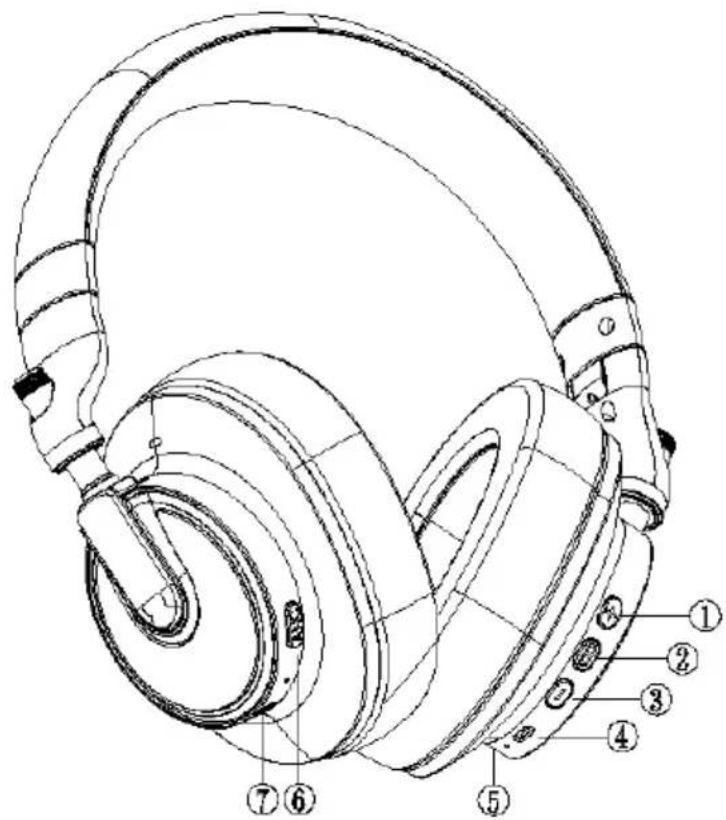
| 1 | Volume+/Next Track Press | for volume up. Press and hold to skip to next track. |
| 2 | Multifunction Button | Power On/Off: Press and hold for 2 seconds to power on, press and hold for 4 seconds to power off. Once powered on, pairing mode begins automatically after 10 seconds. |
| Phone Call Control: Press to answer/hang up. Press and hold to refuse. Press two times to redial last outbound phone number. Double click to start Siri. | ||
| 3 | Volume-/Previous Track | Press to volume down/press and hold to play previous track. |
| 4 | Type-C USB | Insert the charging cable; the indicator will illuminate red and will turn blue as the headphones charge. Do not use the headphones whilst charging. |
| 5 | Mic Microphone for calling. | |
| 6 | Active Noise Cancellation Control | Press and hold 2 seconds to turn the ANC function on/off. |
| 7 | 3.5mm Earphone Jack | When plugged in, Bluetooth turns off automatically and microphone and battery functions are disabled. |
INSTRUCTIONS
Connection
- Press and hold the multifunction button for 2 seconds until the headphones power on; they will enter pairing mode automatically after 10 seconds. The LED indicator flashes blue and red alternately. The headphones will power off after 5 minutes if no Bluetooth device is connected.
- Activate Bluetooth on the audio device and set it to search for new devices.
iPhone Settings > Bluetooth > On
Android Settings > Bluetooth: On > Scan for devices
Note:
Menus may vary by device
- Select "M6" If necessary, enter four zeros (0000) for the passcode and accept the connection. Once successfully paired, the headphone LED indicator flashes blue.
Dual device connection
The headphones can be paired with two devices simultaneously. After connecting the first audio device, turn off the headphones and Bluetooth on the device. Restart the headphones and pair with the second device and maintain the connection. Finally, open Bluetooth on Phone A and select "M6" in the menu.
Note:
The headphones can only play music from one device, even if two devices are successfully connected at the same time.
Wired connection
Use the included audio cable to connect. Bluetooth turns off automatically and microphone and battery functions are disabled when using a wired connection
Active Noise Cancellation (ANC)
- Press and hold the ANC button for 2 seconds to activate the active noise cancelling function. The LED will illuminate in green.
- Press and hold for 2 seconds to turn off the ANC function and LED.
Charging
Plug the Type-C USB cable into the headphone charging port and connect the other side with a USB wall charging adapter or computer. The LED indicator turns red while charging and turns blue when fully charged. The headphones will alert the user every 15 minutes when the battery power is below 10%.
CLEANING & CARE
Maintenance
- Do not use non-original accessories to avoid performance degradation or electrical short circuiting.
- Do not attempt to disassemble or repair the device.
- Keep the headphones away from dusty or humid environments.
- Do not allow children less than 3 years of age to play with or use the device.
- Do not place the product in an overheated or super-cooled environment.
- Clean the headphones with a clean, soft, and dry cloth.
- Place the headphones in the original package, or in a secure location when not in use.
Battery maintenance
- Do not attempt to remove or replace the battery. Contact Kogan.com if battery maintenance is required.
- The charging temperature of the battery is between 10 and 45^ .
- Charge the headphones at least once a month if not in use for an extended period.
- Battery usage time and standby time are related to usage conditions and are provided only for reference.
Notes
- Most Bluetooth devices will automatically save the "M6" device information after the first-time connection. If there are issues reconnecting, remove "M6" from the paired device list, then search for and reconnect to M6 again.
- When the headphones cannot be powered on, the battery will likely be short of charge. Charge the headphones to continue use.
- Ensure that the headphones are not used at an excessive volume for an extended period to avoid hearing damage.
- Do not attempt to disassemble or repair the headphones. Contact Kogan.com for any maintenance requirements.
- Do not place strong pressure or heavy objects on the product.
Tips
- Active Noise Cancelling Technology can effectively reduce background noise in a busy environment, such as traffic or heavy vehicle sounds (low-frequency waves, 150-450Hz).
- Human voice (high-frequency waves) and part of the medium frequency band cannot be eliminated.
SPECIFICATION
Bluetooth version V5.0 Talking time 50H
Speaker
32Ω 40mm
20-20KHz
Music playback time 50H
Standby time 90 days ANC playback time 25H
Frequency 2400MHz-2480MHz Charge current <1A
Microphone
Sensitivity: -42 ±3dB
Frequency: 100-10KHz
Charge voltage 5V
ANC function Yes Charging time 2-3H
Protocol supported
HSP HFP A2DP AVRCP
Battery capacity
1050mAh
Bluetooth distance 10m
TROUBLESHOOTING
| Problem Remedy | |
| The indicator blinks red quickly or continuously | Battery is low - charge the headphones as soon as possible. |
| Headphones will not power on | Ensure that the battery is charged. |
| No indicator when charging | There may be no indication when charging for the first few minutes. If the battery is completely exhausted or charged for the first time after not being used for a long period, the indicator glows red to indicate the charging state after short time. |
| No audio during Bluetooth connection | Ensure the headphones are switched on.Ensure the music sound output on the device is set to the headphones (M6).Ensure the Bluetooth headphones and the audio device are paired and connected successfully.Ensure the distance between the headphones and audio device is less than 10 meters/32.8ft.Ensure the audio device is not connected to other Bluetooth headphones or speakers. |
| No audio during wired connection | Ensure the correct 3.5mm audio cable is used and connected securely. Note that the headphone buttons and microphone do not work when using a wired connection.Make sure the audio device is in normal working condition and without damage. |
| Bluetooth connection is not successful | Ensure both the headphone and audio device's Bluetooth connections are open.Ensure the headphone enters Bluetooth pairing mode (LED indicator blinks blue)Try to ignore the previously connected Bluetooth devices and empty the Bluetooth device list. Search for the headphones again. |
Need more information?
We hope that this user guide has given you the assistance needed for a simple set-up.
For the most up-to-date guide for your product, as well as any additional assistance you may require, head online to help.kogan.com
kogan
Brand : Kogan
Model : NC-700
Category : Headphones