
Hook Up SCCPMD2-CH - Other Kitchen Appliances Crock-Pot - Free user manual and instructions
Find the device manual for free Hook Up SCCPMD2-CH Crock-Pot in PDF.


| Product Type | Slow Cooker |
| Brand | Crock-Pot |
| Model | Hook Up SCCPMD2-CH |
| Capacity | 6 Quarts |
| Dimensions (L x W x H) | 16.5 x 12.5 x 10.5 inches |
| Weight | 10.5 lbs |
| Power Rating | 240 Watts |
| Voltage | 120 V AC, 60 Hz |
| Temperature Settings | Low, High, Warm |
| Timer | Programmable up to 20 hours |
| Display Type | Digital LED |
| Material | Stainless steel exterior, removable stoneware insert |
| Dishwasher Safe Parts | Stoneware insert and glass lid |
| Auto Shut-off | Yes, after cooking time elapses, switches to Warm |
| Safety Features | Cool-touch handles, locking lid for transport |
| Spare Parts Available | Replacement stoneware, lid, and sealing gasket |
| Repairability | Modular design; replaceable components |
| Warranty | 1 Year Limited Warranty |
| Usage | Ideal for soups, stews, roasts, and slow-cooked meals |
Frequently Asked Questions - Hook Up SCCPMD2-CH Crock-Pot
User questions about Hook Up SCCPMD2-CH Crock-Pot
0 question about this device. Answer the ones you know or ask your own.
Ask a new question about this device
Download the instructions for your Other Kitchen Appliances in PDF format for free! Find your manual Hook Up SCCPMD2-CH - Crock-Pot and take your electronic device back in hand. On this page are published all the documents necessary for the use of your device. Hook Up SCCPMD2-CH by Crock-Pot.
USER MANUAL Hook Up SCCPMD2-CH Crock-Pot

natural_image
Black and white photo of a three-wheeled cooking appliance with multiple ovens (no visible text or symbols)Owner's Manual*
HOOK UP™
connectable entertaining system
*For use with 2x1-Qt Double, 2-Qt Round and 3.5-Qt Oval units as part of the Hook Up™ Connectable Entertaining System
When using electrical appliances, basic safety precautions should always be followed, including the following:
I. READ ALL INSTRUCTIONS BEFORE USING.
2. Do not touch hot surfaces. Use handles or knobs.
3. To protect against electrical shock, do not immerse cord, plug, or heating base in water or other liquid.
4. Close supervision is necessary when any appliance is used by or near children.
5. Unplug from outlet when not in use and before cleaning. Use oven mitts or allow to cool before putting on or taking off parts.
6. Do not operate any appliance with a damaged cord or plug or after the appliance malfunctions or has been damaged in any manner. Return appliance to the manufacturer (see warranty) for examination, repair, or adjustment.
7. Do not use outdoors.
8. Do not let cord hang over edge of table or counter or touch heated surfaces.
9. Do not place on or near a hot gas or electric burner or in a heated oven.
10. Extreme caution must be used when moving an appliance containing hot oil or other hot liquids. Always use oven mitts when moving your heated unit.
II. Do not use appliance for other than intended use.
12. Avoid sudden temperature changes, such as adding refrigerated foods or cold liquids into a heated pot.
13. To disconnect, press/switch OFF then remove plug from wall outlet or connecting units.
14. The use of accessory attachments not recommended by the manufacturer may cause injuries.
15. Keep 6 inches clear from the wall and 6 inches clear on all sides.
16. CAUTION: To prevent damage or shock hazard, do not cook directly in the heating base. Cook only in the stoneware provided.
This appliance is for HOUSEHOLD USE ONLY.
There are no user-serviceable parts inside. Do not attempt to service this product. A retractable power-supply cord is provided to reduce the hazards resulting from entanglement or tripping over a longer cord.
AN EXTENSION CORD MAY BE USED WITH CARE; HOWEVER, THE MARKED ELECTRICAL RATING SHOULD BE AT LEAST AS GREAT AS THE ELECTRICAL RATING OF THE UNIT. The extension cord should not be allowed to drape over the counter or tabletop where it can be pulled on by children or tripped over unintentionally.
POLARIZED PLUG
This appliance has a polarized plug (one blade is wider than the other). To reduce the risk of electric shock, this plug is intended to fit into a polarized outlet only one way. If the plug does not fit fully into the outlet, reverse the plug. If it still does not fit, contact a qualified electrician. Do not attempt to modify the plug in any way. If the plug fits loosely into the AC or if the AC outlet feels warm do not use that

natural_image
Technical line drawing of a mechanical assembly with a spring-loaded component (no text or symbols)IMPORTANT NOTE: This appliance has a unique Patent Pending plug design that will only allow it to work when used as a single unit and plugged into a wall outlet or when using with other units in the Crock-Pot ® Hook Up ™ Connectable Entertaining System. For your safety, do not attempt to alter the product or plug in any other electrical products not sold with this system.
IMPORTANT NOTE: Some countertop and table surfaces are not designed to withstand the prolonged heat generated by certain appliances. Do not set the heated unit on a finished wood table. We recommend placing a hot pad or trivet under your unit to prevent possible damage to the surface.
NOTE: During initial use of this appliance, some slight smoke and/or odor may be detected. This is normal with many heating appliances and will not recur after a few uses.
NOTE: Please use caution when placing your stoneware on a ceramic or smooth glass cook top stove, countertop, table, or other surface. Due to the nature of the stoneware, the rough bottom surface may scratch some surfaces if caution is not used. Always place protective padding under stoneware before setting on table or countertop.
Nothing creates a stronger connection than socializing with friends and family. With the Crock-Pot® Hook Up™ Connectable Entertaining System, hosting everything from intimate gatherings to large dinner parties (and everything in-between) is easier than ever. You and your guests will be connected in no time!
Up to six units can hook up using a single outlet, and you're ready to prepare - and elegantly serve - soups, stews, dips, and desserts for any occasion.
CROCK·POT®
HOOK UP
connectable entertaining system
Important Safeguards | Page 2
Contents | Page 5
Product Diagrams | Page 6
Using Your Hook Up™ Entertaining system | Page 9
Caring For Your Hook Up™ Entertaining system | Page 19
FAQs | Page 22
Troubleshooting | Page 24
Warranty | Page 26

natural_image
Two abstract icons: a gray rectangular shape and an orange gradient rectangle with three vertical bars (no text or symbols)Welcome to the future of "entertaining crocking" - it's a whole new way to connect™.
Product Diagram
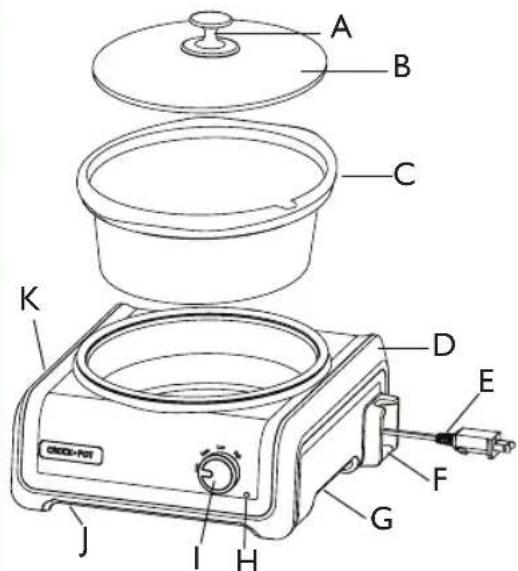
NOTE: The instructions in this manual apply to all three models included in the Crock-Pot® Hook Up™ Connectable Entertaining System, models SCCPMD1, SCCPMD2 and SCCPMD3. Please refer to below diagrams for individual unit components.
Unit Components

SCCPMDI / 2-1 Qt Ovals

SCCPMD2 / 2 Qt Round
SCCPMD3 / 3.5 Qt Oval
A. Lid Handle
B. Removable Glass Lids
C. Removable Stoneware
D. Heating Base
E. Manual Retractable Cord
F. Cord Release Latch (See View C)
G. Integrated Handle
H. Indicator Light
I. Temperature Control Knob
J. Resettable Circuit Breaker (See View A)
K. Plug Connection Outlet (See View B)
Resettable Circuit Breaker (View A)

Plug Connection (View B)

Cord Release Latch (View C)

Refer to the icon to the left of the power cord (example shown in View C) to see how many units each unit in your system represents.

natural_image
Interior of a dining setting with a woman in a blue dress and two men conversing, surrounded by guests and tableware (no visible text or symbols)CROCK·POT® HOOK UP™
connectable entertaining system
Using Your Connectable Entertaining System
Preparing your Crock-Pot® Hook Up™ Connectable Entertaining System for use:
I. Before you use your units, remove all packaging components and wash the lid and stoneware with warm, soapy water and dry thoroughly.
2. Check that the Temperature Control Knob is in the OFF position.
3. Place the unit(s) in the desired serving area prior to turning the units on. There are integrated handles located on the bottom of both sides of each unit for easy handling.
WARNING: Do not attempt to lift multiple units at one time when they are connected together or stacked.
Assembly:
I. Place Stoneware into the Heating Base.
2. Lower the Glass Lid(s) horizontally down onto the Stoneware.
How to use:
I. Place the Removable Stoneware into the Heating Base, add your ingredients, and cover with the Glass Lid(s).
2. Plug in your unit and select the temperature setting from the three setting options. Refer to your specific recipe for more precise cook times.
NOTE: Your unit is equipped with a WARM setting. WARM is only for keeping already-cooked food warm. Do not cook on the WARM setting.
NOTE: We do not recommend using the WARM setting for more than four (4) hours.
- When heating or cooking is done, unplug your unit and allow it to cool before cleaning.
- Once the unit has cooled, store the cord by slowly feeding the cord back into the base until it clicks into place.
Usage notes:
- If you suspect that the power has gone out during the day, the food may be unsafe to eat. If you are unaware of how long the power was out, we suggest you discard the food inside.
- For recipes that require a range of times, select the time closest to the setting on your unit.
- To avoid over or under-cooking, always fill the Stoneware 12 to 34 full to conform to recommended cook times (with the exception of certain cakes and custards, and as guided otherwise in our slow cooker recipes).
- Do not overfill Stoneware. To prevent spillover, do not fill Stoneware higher than 34 full.
- Always cook, with the Glass Lid(s) on, for the recommended time. Do not remove the lid during the first two hours of cooking.
- Always wear oven mitts when handling the Glass Lid(s) or Stoneware.
- Unplug when cooking is done and before cleaning.
- Removable Stoneware is ovenproof and microwave-safe. Do not use Removable Stoneware on gas or electric burner or under broiler. (Refer to chart on page 20.)
For use as a single unit:
I. Press down on the red Cord-Release Latch on the right-hand side of the unit.
2. Pull out the Retractable Power Cord and plug the cord into a standard electrical outlet.
3. Add your ingredients to the Stoneware and cover with Glass Lid(s).
4. Select the temperature setting (HIGH, LOW or WARM) based on your recipe. The Indicator Light will illuminate, indicating that your unit is on.
5. When finished, turn your unit OFF, then unplug the Power Cord and allow unit to cool down prior to cleaning.
For use with multiple units:
The Crock-Pot ® Hook Up TM Connectable Entertaining System has a unique Patent Pending electrical connector that will only allow units in the Hook Up TM system to be able to connect and draw power from each other.
NOTE: To prevent damage or shock hazards, DO NOT alter the units in anyway to allow other appliances to be able to connect to it.
I. Select the unit you would like to be plugged into the wall outlet (Unit A). Press down on the red Cord-Release Latch on the right-hand side of that unit.
2. Pull out the Retractable Power Cord for Unit A and plug the cord into a standard electrical outlet.
3. Line up the Plug Connection outlet of Unit A with the Retractable Cord of Unit B, as shown:

NOTE: Recommended maximum number of units to plug into one outlet is six (6) units. This may vary depending on circuit.
- Push Unit A and Unit B together until you hear them 'click' into place.
NOTE: When using with multiple units side by side, make sure the plug in Unit A is securely in place prior to connecting units together. To ensure the units are connected properly, you can turn the temperature dial to HIGH, LOW or WARM for each of the units and the LED indicators should illuminate when they are firmly connected.
- Connect other units as needed in any combination up to the recommended total number of six (6) by adding up the "Unit" count (see page 6, View C for example). Refer to the icon located to the left of the power cord to determine your unit count. (See Figure A).


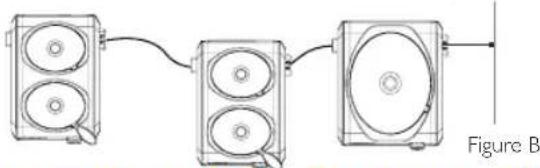
NOTE: Units do not have to be clicked tightly together to function. As long as the male end is plugged into the female end, the units will be powered on. (See Figure B)
natural_image
Diagram of three connected speaker units with a cable, labeled Figure B (no text or symbols on devices)WARNING: Your system was designed to connect only with other Hook Up™ units. Do not attempt to plug in any other appliances other than those that are sold within this system.
-
To add additional units, repeat steps 3-5 on previous page.
-
Add your ingredients to the Stoneware of each unit and cover with the Glass Lid(s).
-
Select the temperature setting (HIGH, LOW or WARM) for each unit based on your recipe. The Indicator Light on each unit will illuminate, indicating that your units are on.
NOTE: WARM is only for keeping already-cooked food warm. Do not cook on the WARM setting.
- When finished using, turn off and unplug the first unit that is plugged into the electrical outlet and allow units to cool down prior to cleaning.
WARNING: Do not attempt to lift multiple units at one time when they are connected together.
-
Once the units have cooled down, separate and pull the system apart using the integrated handles on the bottom left and right-hand sides of each unit.
-
Once the unit has cooled, store the cord by slowly feeding the cord back into the base until it clicks into place.
For all the ways you connect, hook up your system, your way.


14 www.CrockPot.com
The Crock-Pot ® Hook Up ™ Connectable Entertaining System can grow or adapt as your needs change. \*Other units are required.

natural_image
Group of five people enjoying a meal at a dining table, with wine glasses and fruit in the background (no visible text or symbols)
Mix & match!

natural_image
Collage of four diverse outdoor dining scenes: a couple in a casual kitchen, a group dining at a table, a woman enjoying wine, and a family enjoying meals (no visible text or symbols)NOTE: Recommended maximum number of units to plug in to one outlet is six (6). This may vary depending on circuit.
Fuse/Overload Protection:
Your system is designed to prevent connecting more than the recommended number of units (six) to each other. When using multiple units together, and when necessary, any unit that overloaded the system will turn itself off.
- Depending on the circuit, you may need to remove one or more units from your system so the circuit does not trip again from overload.
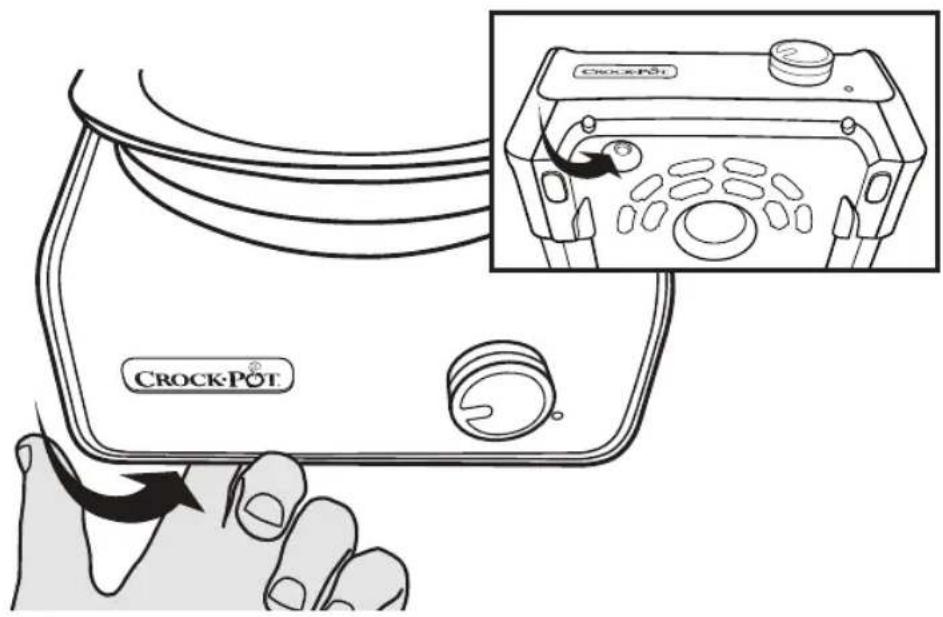
- If this happens, simply reset the built in Resettable Circuit Breaker on the unit that is plugged directly into the wall. To reset the unit, push the resettable button with your index finger as shown:
Additionally, you may have to reset all the subsequent units that are connected after the tripped unit that overloaded the system.
- You will notice which units have turned themselves off, as the Indicator Light will no longer be illuminated on these units.
Your system is designed to stack for easier storage.
To stack your system:
I. Turn the Glass Lid(s) of each unit in your system upside down and nest it inside the Stoneware (See Figure A).

natural_image
Illustration of a two-tiered cooktop appliance with a downward arrow indicating cooling (no text or symbols)Figure A
- Stack each unit on top of one another by placing the base of Unit A on top of the base of Unit B (See Figure B).

Figure B
NOTE: If the 2 x 1 Qt model/models (model SCCPMD1) are a part of your system, they will always need to be at the bottom or base of the stack (See Figure B for reference to size).
Care and cleaning:
• Always turn your unit(s) off, unplug from the electrical outlet, and allow to cool down prior to cleaning.
- The Glass Lid(s) and Stoneware can be washed in the dishwasher, or with hot, soapy water. Do not use abrasive cleaning compounds or scouring pads. A cloth, sponge or rubber spatula will usually remove residue. To remove water spots and other stains, use a non-abrasive cleaner or vinegar.
- As with any fine ceramic, the Stoneware and Glass Lid(s) will not withstand any sudden temperature changes. Do not wash the Stoneware and Lid(s) with cold water when they are hot.
- The outside of the Heating Base may be cleaned with a soft cloth and warm, soapy water. Wipe dry. Do not use abrasive cleaners.
CAUTION: Never immerse the Heating Base in water or other liquids. No other servicing should be performed.
CROCK·POT®
HOOK UP
connectable entertaining system
Safety Chart: Uses
| Dishwasher Safe | Oven Safe | Microwave Safe | Stovetop Safe | |
 Glass Lid Glass Lid | yes | nonono | ||
 Stoneware Stoneware | yesyesyes,but not with the broiler. | no | ||
CROCK·POT® HOOK UP™
connectable entertaining system
FAQ's and Troubleshooting
21(800) 323-951
How do I release the cord from the unit?
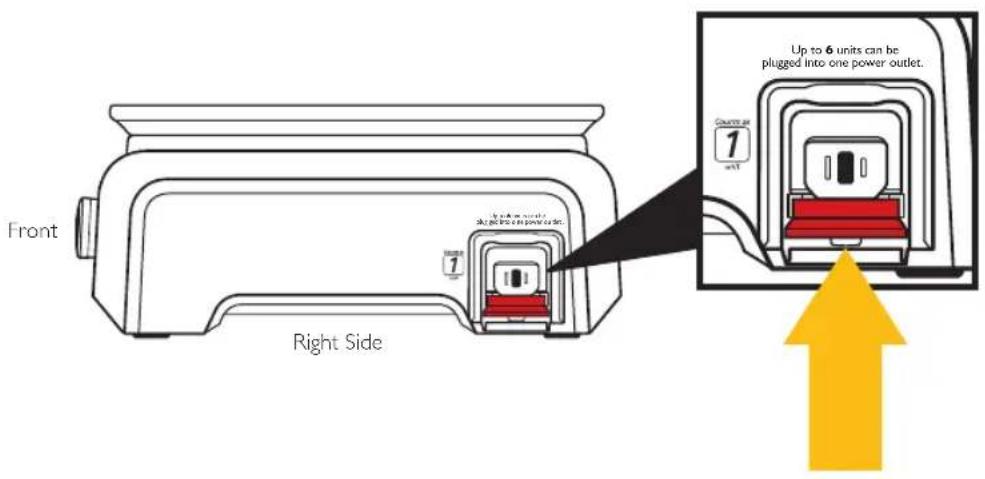
Press down on the red Cord-Release Latch on the right-hand side of the unit, as shown:
How many units can I hook up together using only one outlet?
The recommended maximum number of units to plug in to one outlet is six (6) units. This may vary depending on the circuit and other appliances drawing current off the circuit.

NOTE: Please make note of the icon on the side of your unit so as to avoid overloading your circuit. Ensure that the total number the icons add up to does not exceed six (6).
Can I plug other electrical products into the Hook Up™ system?
No. For your satisfaction and safety, only units sold in the Hook Up™ system can be connected together. The plug has a special, Patent Pending design that will not allow other electrical products to be plugged in.

How do I stack my system?
- Turn the Glass Lid(s) of each unit in your system upside down and nest it inside the Stoneware (See Figure A).
- Stack each unit on top of one another by placing the base of Unit A on top of the base of Unit B (See Figure B).

natural_image
Line drawing of a toaster with two ovens and a power plug, showing a yellow downward arrow (no text or symbols)Figure A Figure B

natural_image
Illustration of a refrigerator with three orange server racks and decorative items on the door (no text or symbols)NOTE: If the 2 x 1 Qt model/models (model SCCPMDI) are a part of your system, they will always need to be at the bottom or base of the stack (See Figure B for reference to size).
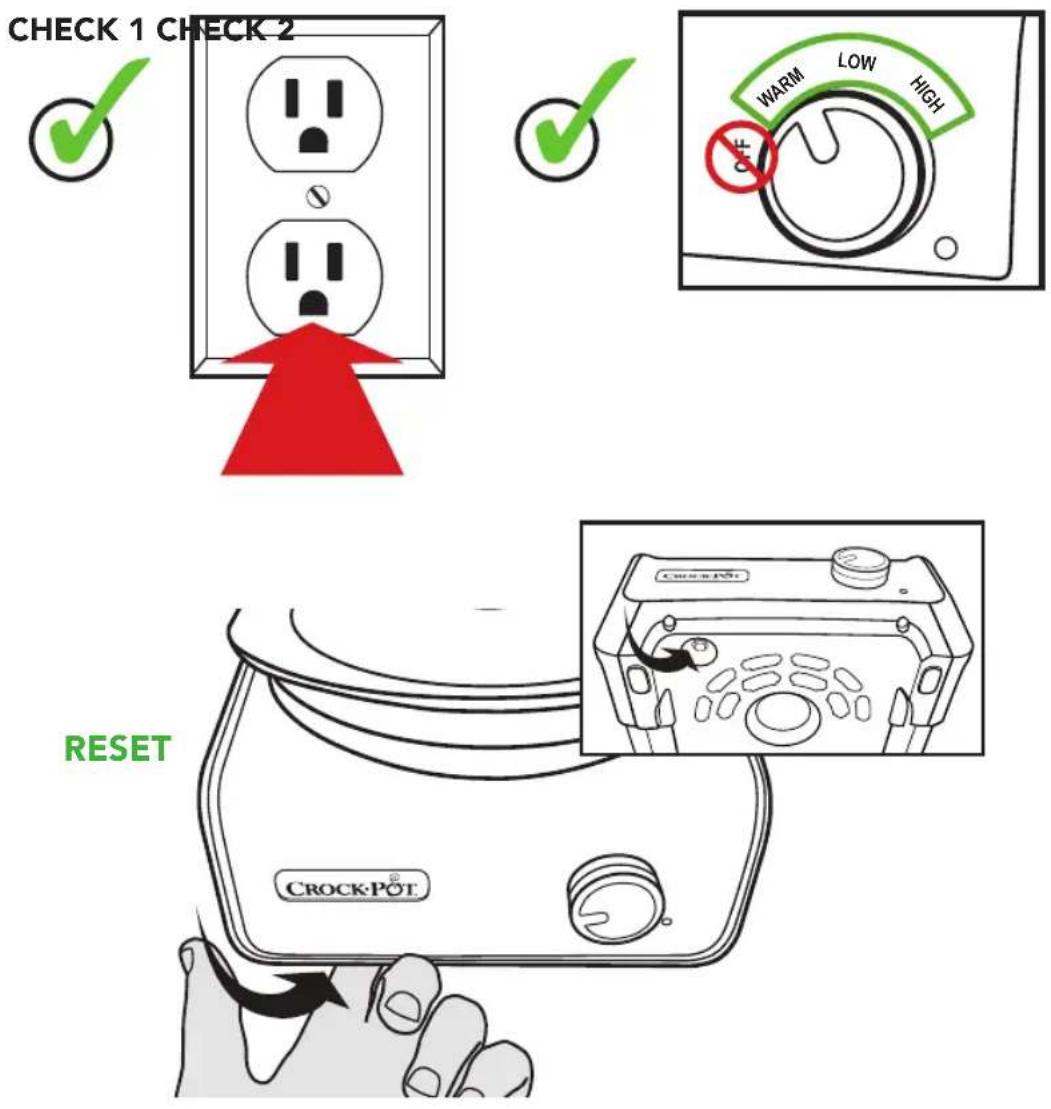
I. Unit isn't turning on.
• Make sure unit is plugged into power outlet.
- Make sure Control Knob is turned to any position other than Off.
- If both items above are met, press the Reset button and turn the unit on.
2. When connecting multiple units, the entire system shut Off and stopped working.
- There are too many units connected together in one outlet. Make sure you haven't exceeded the recommended maximum number of connected units to use in one outlet (6). Remove one or more units from the system as necessary. Once the unit(s) have been removed, reset the first unit that is plugged directly into the wall by pushing the Resettable Circuit Breaker button shown below. You may also need to reset each unit that is connected to the first unit if the indicator light does not illuminate.


Sunbeam Products, Inc. doing business as Jarden Consumer Solutions or if in Canada, Sunbeam Corporation (Canada) Limited doing business as Jarden Consumer Solutions (collectively "JCS") warrants that for a period of one year from the date of purchase, this product will be free from defects in material and workmanship. JCS, at its option, will repair or replace this product or any component of the product found to be defective during the warranty period. Replacement will be made with a new or remanufactured product or component. If the product is no longer available, replacement may be made with a similar product of equal or greater value. This is your exclusive warranty. Do NOT attempt to repair or adjust any electrical or mechanical functions on this product. Doing so will void this warranty.
This warranty is valid for the original retail purchaser from the date of initial retail purchase and is not transferable. Keep the original sales receipt. Proof of purchase is required to obtain warranty performance. JCS dealers, service centers, or retail stores selling JCS products do not have the right to alter, modify or any way change the terms and conditions of this warranty.
This warranty does not cover normal wear of parts or damage resulting from any of the following: negligent use or misuse of the product, use on improper voltage or current, use contrary to the operating instructions, disassembly, repair or alteration by anyone other than JCS or an authorized JCS service center. Further, the warranty does not cover: Acts of God, such as fire, flood, hurricanes and tornadoes.
What are the limits on JCS's Liability?
JCS shall not be liable for any incidental or consequential damages caused by the breach of any express, implied or statutory warranty or condition. Except to the extent prohibited by applicable law, any implied warranty or condition of merchantability or fitness for a particular purpose is limited in duration to the duration of the above warranty. JCS disclaims all other warranties, conditions or representations, express, implied, statutory or otherwise. JCS shall not be liable for any damages of any kind resulting from the purchase, use or misuse of, or inability to use the product including incidental, special, consequential or similar damages or loss of profits, or for any breach of contract, fundamental or otherwise, or for any claim brought against purchaser by any other party. Some provinces, states or jurisdictions do not allow the exclusion or limitation of incidental or consequential damages or limitations on how long an implied warranty lasts, so the above limitations or exclusion may not apply to you. This warranty gives you specific legal rights, and you may also have other rights that vary from province to province, state to state or jurisdiction to jurisdiction.
How to Obtain Warranty Service In the U.S.A.
If you have any questions regarding this warranty or would like to obtain warranty service, please call 1-800-323-9519 and a convenient service center address will be provided to you.
In Canada
If you have any questions regarding this warranty or would like to obtain warranty service, please call 1-800-323-9519 and a convenient service center address will be provided to you.
In the U.S.A., this warranty is offered by Sunbeam Products, Inc. doing business as Jarden Consumer Solutions located in Boca Raton, Florida 33431. In Canada, this warranty is offered by Sunbeam Corporation (Canada) Limited doing business as Jarden Consumer Solutions, located at 20 B Hereford Street, Brampton, Ontario L6Y 0M1. If you have any other problem or claim in connection with this product, please write our Consumer Service Department.
PLEASE DO NOT RETURN THIS PRODUCT TO ANY OF THESE ADDRESSES OR TO THE PLACE OF PURCHASE.
To register your product, please visit us online at www.crockpot.com.
© 2013 Sunbeam Products, Inc. doing business as Jarden Consumer Solutions. All rights reserved. Distributed by Sunbeam Products, Inc. doing business as Jarden Consumer Solutions, Boca Raton, Florida 33431.
Website: www.crockpot.com.
Owner's Manual
Notes
27(800) 323-951

natural_image
Abstract orange background with white interlocking ring shapes (no text or symbols)www.Crock-Pot.com facebook.com/crockpot
© 2013 Sunbeam Products, Inc. doing business as Jarden Consumer Solutions. All rights reserved. Distributed by Sunbeam Products, Inc. doing business as Jarden Consumer Solutions, Boca Raton, Florida 33431.


- When using electrical appliances, basic safety precautions should always be followed, including the following:
- This appliance is for HOUSEHOLD USE ONLY.
- POLARIZED PLUG
- CROCK·POT®
- HOOK UP
- CROCK·POT® HOOK UP™
- Preparing your Crock-Pot® Hook Up™ Connectable Entertaining System for use:
- Assembly:
- How to use:
- Usage notes:
- For use as a single unit:
- For use with multiple units:
- The Crock-Pot ® Hook Up ™ Connectable Entertaining System can grow or adapt as your needs change. \*Other units are required.
- Mix & match!
- Fuse/Overload Protection:
- Your system is designed to stack for easier storage.
- To stack your system:
- Care and cleaning:
- How do I release the cord from the unit?
- How many units can I hook up together using only one outlet?
- Can I plug other electrical products into the Hook Up™ system?
- How do I stack my system?
- Unit isn't turning on.
- When connecting multiple units, the entire system shut Off and stopped working.
- What are the limits on JCS's Liability?
- How to Obtain Warranty Service In the U.S.A.
- In Canada
- PLEASE DO NOT RETURN THIS PRODUCT TO ANY OF THESE ADDRESSES OR TO THE PLACE OF PURCHASE.
Brand : Crock-Pot
Model : Hook Up SCCPMD2-CH
Category : Other Kitchen Appliances