Steren TER-100 - Weather Station

TER-100 - Weather Station Steren - Free user manual and instructions

Find the device manual for free TER-100 Steren in PDF.

📄 1 pages English EN Download 💬 AI Question 11 questions ⚙️ Specs
Notice Steren TER-100 - page 1
Pick your language and provide your email: we'll send you a specifically translated version.
Product Type Weather Station
Brand Steren
Model TER-100
Dimensions (Main Unit) 120 x 80 x 20 mm
Weight (Main Unit) 150 g
Power Source 2 x AAA batteries (not included) or USB power cable (5V)
Display Type LCD with backlight
Temperature Range (Indoor) 0°C to 50°C (32°F to 122°F)
Temperature Range (Outdoor) -20°C to 60°C (-4°F to 140°F)
Humidity Range 20% to 95% RH
Barometric Pressure Range 700 to 1100 hPa
Wireless Range Up to 100 meters (open area)
Number of Outdoor Sensors Up to 3 (sold separately)
Functions Indoor/outdoor temperature and humidity, barometric pressure trend, weather forecast, time/date, alarm
Maintenance Clean with a soft, dry cloth. Avoid using water or cleaning agents.
Safety Instructions Keep away from direct sunlight and moisture. Do not immerse in water.
Spare Parts Outdoor sensors (model TER-100S) available separately
Repairability Not user-repairable. Contact Steren support for service.

Frequently Asked Questions - TER-100 Steren

How do I set up the TER-100 weather station?
Insert 2 AAA batteries into the main unit (or connect via USB). Install batteries in the outdoor sensor. The units will synchronize automatically within a few minutes. Set the time and date using the buttons on the back.
What does the weather forecast icon mean?
The station uses barometric pressure changes to predict weather. Icons include sunny, partly cloudy, cloudy, rainy, and stormy. It is a general trend and may not reflect immediate conditions.
How do I replace the batteries?
Open the battery compartment on the back of the main unit and outdoor sensor. Replace with 2 new AAA batteries each. The outdoor sensor battery life is about 12 months.
Why is the outdoor temperature not showing?
Check that the outdoor sensor is within wireless range (up to 100m open area) and batteries are fresh. Press and hold the 'CH' button on the main unit to search for the sensor.
Can I connect multiple outdoor sensors?
Yes, up to 3 sensors can be paired. Press and hold the 'CH' button to cycle through channels 1, 2, 3. Each sensor must be set to a different channel.
How accurate is the temperature reading?
Accuracy is ±1°C for indoor and ±2°C for outdoor temperature. Humidity accuracy is ±5% RH. For best results, place sensors away from direct sunlight and heat sources.
What does the barometric pressure trend arrow indicate?
An upward arrow means pressure is rising (improving weather). Downward arrow means falling (deteriorating weather). Steady arrow indicates no change.
How do I set the alarm?
Press the 'ALARM' button. Use the '+' and '-' buttons to set the hour and minute. Press 'ALARM' again to confirm. The alarm icon will appear on the display.
Is the TER-100 weather station waterproof?
The main unit is for indoor use only. The outdoor sensor is weather-resistant but not waterproof. Place it under an eave or sheltered area.
Where can I download the full manual?
The full manual is available as a free PDF download on the product page at notice-facile.com or the Steren website. Search for 'TER-100 manual'.

User questions about TER-100 Steren

1 question about this device. Answer the ones you know or ask your own.

Ask a new question about this device

The email remains private: it is only used to notify you if someone responds to your question.

Can I use this weather station in a refrigerator to monitor the storage temperature of medications?
Frequently Asked Questions - 28/05/2026
Response Notice-Facile

The TER-100 is not designed to operate in a refrigerator. Steren weather stations like the TER-100 are standard household devices with limited operating temperature ranges (typically 0-50°C). The interior of a refrigerator exposes the device to extremely high humidity and significant condensation that may damage the electronic components.

Technical reasons:

  • Excessive humidity that can cause short circuits
  • Condensation on sensors and circuit boards
  • Temperatures potentially outside the normal operating range
  • Risk of corrosion of electrical contacts

To monitor the temperature of a medication storage area, prefer a specialized and waterproof thermal sensor designed for humid environments, or place the TER-100 nearby (door) with a dedicated sensor inside.

Respond (be the first)

Download the instructions for your Weather Station in PDF format for free! Find your manual TER-100 - Steren and take your electronic device back in hand. On this page are published all the documents necessary for the use of your device. TER-100 by Steren.

USER MANUAL TER-100 Steren

& outdoor thermometer

Manual de instrucciones Instruction Manual
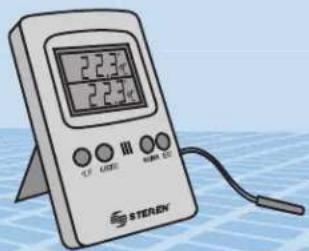
2.2.3℃ 2.2.3℃ CF LIME III MIN CO STERAN

0814c

Before using your new Steren's product, please read this instruction manual to prevent any damage.

IMPORTANTE / IMPORTANT
Steren TER-100 - IMPORTANTE / IMPORTANT - 1

The instructions of this manual are for reference about the product. There may be differences due to updates. Please check our website (www.steren.com) to obtain the latest version of the instruction manual.

PRECAUCIONES / CAUTIONS

- Do not expose to extreme temperatures.

  • Do not use or store the equipment nearwetordampplaces.Itmaycause malfunction or shock hazard.
  • Clean only with a soft, dry cloth.

CARACTERISTICAS / HIGHLIGHTS

Your new digital thermometer has 1 screen divided in two, in order to visualize 2 different temperatures: the internal temperature and the external temperature.

The external and internal temperatures can be adjusted, so the thermometer willemitanaudiblealarmifthedetected temperature higher than fixed on the bottomscreenorwillsoundif the temperature is less than a fixed temperature in the superior screen.

CONTROLES / CONTROLS
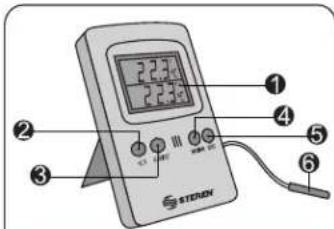
2.2.3 2.2.3 ① ② ③ ④ ⑤ ⑥ STERON

VISTA FRONTAL / FRONT VIEW

Steren TER-100 - CONTROLES / CONTROLS - 2

natural_image Illustration of a printer with a paper roll and label pointing to the paper (no text or symbols present)

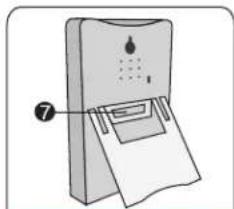
VISTA TRASERA / REAR VIEW

  1. Pantalla de LCD
  2. Grados
  3. Alerta / Ajuste (Alert / Set)
  4. Máximo / Mínimo (Max / Min)
  5. Reinicio (Reset)
  6. Sensor externo
  7. Compartimento de batería

  8. LCD screen

  9. Grades
  10. Alert
  11. Maximum / Minimum (Max/Min)
  12. Reset
  13. External sensor
  14. Battery compartment

MODO DE USO / HOW TO USE

To start using your new digital thermometer, follow these steps:

  1. Place a new battery type AAA into the battery compartment paying attention to polarity
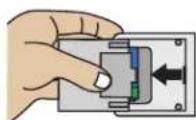
Steren TER-100 - MODO DE USO / HOW TO USE - 1

  1. Place the external sensor in an outside area.
  2. Now your thermometer starts to measure the temperature. On the top screen appears the internal temperature measure. On the bottom screen you can see the external temperature.
  3. If you want to change from °C Celsius to
    °F Fahrenheit press Grades button.

Usethisfunctiontosetminimum
temperature value and maximum temperature value, in order to obtain an audible alert when the temperature surpass this limits.
1. PressandholdAlertbuttonforfew seconds.
2. The numbers on the inferior screen starts to blink. Press the Grades button to set the temperature value (-50-70 °C).
3. Press Alert button once again, the numbers on the bottom screen starts to blink. Press Grades button constantly to change the minimum temperature value (-20-70 °C).
4. Press the Alert button once to store the changes.
5. When the temperature exceeds the maximum level the alarm will sound.

If you want to activate the alert, press Alert button until the message Ale On appears on screen.

To deactivate the alarm, press Alert button once again until the message Ale Off appears on the screen.

TEMPERATURA MÁXIMA Y MÍNIMA / MAXIMUM AND MINIMUM TEMPERATURE

  1. Press the Max button once to visualize the last stored maximum temperature value.
    On screen appears the word MAX and the last measure of the maximum temperature.

  2. Press Min button once to visualize the last stored minimum temperature value. The message MIN appears on the screen and the last measure of the minimum temperature.

  3. Press Max/Min button once again to back to normal display.

REINICIAR AJUSTES DE TEMPERATURA / RESET

If you want to delete all the stored information about maximum and minimum temperature values and the Alert settings, press Reset button.

Whole information will be deleted and you can re-make the required settings followingtheinstructions mentioned before.

ESPECIFICACIONES / SPECIFICATIONS

Temperature accuracy: ± 1.8 °F

Sensor cable length: 6 ft

Dimensions: 4.3 x 2.75 x 0.78 in

Display: 1.18 x 1.57 in

Digit height: 0.5 in

Manual assistant
Powered by Anthropic
Waiting for your message
Product information

Brand : Steren

Model : TER-100

Category : Weather Station