
Dapper Dark - Guitar amplifier Valeton - Free user manual and instructions
Find the device manual for free Dapper Dark Valeton in PDF.


| Product Type | Guitar Amplifier |
| Brand | Valeton |
| Model | Dapper Dark |
| Dimensions (Approx.) | 250 x 150 x 200 mm |
| Weight (Approx.) | 2.5 kg |
| Power Output | 15W (RMS) |
| Power Supply | DC 9V 500mA (center negative) or 6x AA batteries |
| Inputs | 1/4" instrument input |
| Outputs | 1/8" headphone output |
| Controls | Volume, Gain, Bass, Treble |
| Additional Features | Aux input for external audio |
| Cabinet Material | Wood composite with black vinyl covering |
| Speaker | 6.5" custom speaker |
| Recommended Use | Practice, home recording, small gigs |
| Maintenance | Wipe with dry cloth. Do not use solvents. |
| Safety | Do not expose to rain or moisture. Unplug when not in use. |
| Repairability | Contact authorized service center for repairs. |
| Included Accessories | Power adapter, user manual |
Frequently Asked Questions - Dapper Dark Valeton
User questions about Dapper Dark Valeton
0 question about this device. Answer the ones you know or ask your own.
Ask a new question about this device
Download the instructions for your Guitar amplifier in PDF format for free! Find your manual Dapper Dark - Valeton and take your electronic device back in hand. On this page are published all the documents necessary for the use of your device. Dapper Dark by Valeton.
USER MANUAL Dapper Dark Valeton
Dapper Dark is your ally from the dark side. This all-in-one monster has everything you need. Please look over this manual to help you get the most out of Dapper Dark.
CONNECTIONS
Getting started with Dapper Dark is easy! Plug your guitar cable into the INPUT jack and run another cable from the OUTPUT jack to your amp/mixer/computer interface. Here's how to use the I/O panel:

natural_image
Pure electrical circuit lines without any symbols

natural_image
Patterned fabric with dot texture and decorative symbols (no text or symbols)
♦ SIGNAL PATH
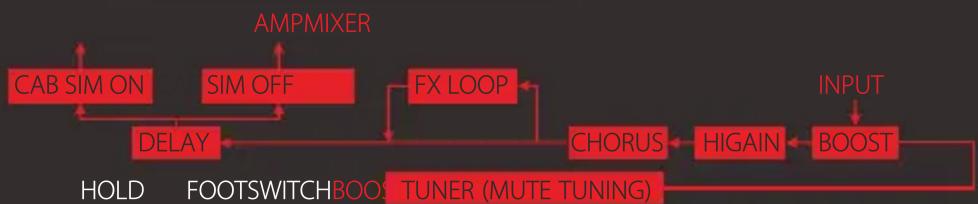
flowchart
graph TD
    A["CAB SIM ON"] --> B["DELAY"]
    C["SIM OFF"] --> B
    B --> D["FOOTSWITCH BOOS TUNER (MUTE TUNING)"]
    E["AMPMIXER"] --> F["FX LOOP"]
    G["HOLD"] --> B
    H["INPUT"] --> I["BOOST"]
    I --> J["HIGAIN"]
    J --> K["CHORUS"]
    K --> L["FOOTSWITCH BOOS TUNER (MUTE TUNING)"]
    M["CAB SIM ON"] --> N["DELAY"]
    O["SIM OFF"] --> N
    P["FX LOOP"] --> Q["HOOD"]
    R["HIGAIN"] --> S["BOOST"]
♦ MODULES (IN ORDER OF SIGNAL FLOW)
TUNER
First in line is a big, bright, fast and accurate tuner so you can play confidently in tune. Hold the BOOST module ON/OFF switch to enable the TUNER.
When this module is activated, Dapper Dark will be MUTED; tap any footswitch to deactivate this module.
The note name appears on the screen (the dot on the bottom right of the screen stands for "sharp"), and the pitch accuracy is indicated by the LEDs.


BOOST
Use the one-knob BOOST to kick your sound up to the next level. You get up to +12dB of gain with some extra highs and digging-in lows.
Controls:
GAIN: Controls the gain

natural_image
3D rendered image of a black industrial control panel with multiple switches and red buttons (no visible text or symbols)
CHORUS
Plunge into the lush CHORUS module to take your sound to a brave new world. Fine tune the onboard rate and depth knobs to beef up your cleans or give some extra body to your heavy riffing. This will make your solos sound huge.
Controls:
RATE: Controls the chorus rate
DEPTH: Controls the chorus depth
MORE FUNCTIONS

FX LOOP
Dapper Dark's SEND and RETURN jacks let you expand your board with other pedals, so you can make Dapper Dark the core of your rig, however big it gets! The FX LOOP point is positioned between the CHORUS and the DELAY modules (see the Signal Path graphic above).

HIGAIN
HIGAIN is heart of this monster. Featuring definitive lows, edgy highs, massive gain and sweet definition, this hi gain distortion module is deliberately brutal. A 3-band EQ makes it flexible, and a built-in noise gate keeps hum away.
Controls:
NR: Controls the noise reduction threshold
VOL: Controls the output volume
BASS/MID/TREBLE: Controls the low/mid/high EQ parameters
GAIN: Controls the amount of gain
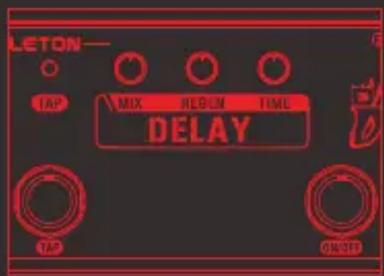
DELAY
Use the analog-voiced DELAY module to thicken your riffs and solos with warm, clear repeats.
This delay module is fitted with a TAP footswitch.
Tap to the rhythm of the song you're playing, and the
TAP LED will pulse to indicate the delay time you set.
The max delay time is 1000ms.
Controls:
MIX: Controls the dry/wet signal ratio
REGEN: Controls the delay feedback (repeats)
TIME: Controls the delay time
CAB SIM
Switch the CAB SIM ON to get an amp cabinet sound, so you can run Dapper Dark right to the PA and sound like you're playing through a stack.
The cab simulator is also useful for direct recording.
Switch the CAB SIM OFF for running Dapper Dark straight to your amp.
◆ SPECIFICATIONS
Power Requirement: 9V DC center negative
Current Consumption: 112mA
Dimensions: 320mm(D) × 65mm(W) × 42mm(H)
Weight: 650g

Brand : Valeton
Model : Dapper Dark
Category : Guitar amplifier