
NB-605 - Inverter Steren - Free user manual and instructions
Find the device manual for free NB-605 Steren in PDF.


| Product Type | DC-AC Power Inverter |
| Brand | Steren |
| Model | NB-605 |
| Input Voltage | 12V DC (typical for car or battery) |
| Output Voltage | 120V AC or 230V AC (region dependent) |
| Output Power (Continuous) | 600W |
| Output Power (Peak/Surge) | 1200W |
| Output Waveform | Modified Sine Wave |
| USB Output | Yes, 5V/2.1A (for charging devices) |
| Dimensions (L x W x H) | Approx. 25 x 15 x 7 cm |
| Weight | Approx. 1.2 kg |
| Cooling | Built-in fan (temperature controlled) |
| Protection Features | Overload, short circuit, over-temperature, low voltage alarm & shutdown |
| Indicators | LED power and fault indicators |
| Material | Aluminum housing for heat dissipation |
| Safety Certification | CE, RoHS compliant |
| Included Accessories | Battery cables with alligator clips, user manual |
| Warranty | 1 year limited warranty |
Frequently Asked Questions - NB-605 Steren
User questions about NB-605 Steren
0 question about this device. Answer the ones you know or ask your own.
Ask a new question about this device
Download the instructions for your Inverter in PDF format for free! Find your manual NB-605 - Steren and take your electronic device back in hand. On this page are published all the documents necessary for the use of your device. NB-605 by Steren.
USER MANUAL NB-605 Steren
Instrucciones
Especificaciones
STEREN PRODUCTO EMPACADO S.A. DE C.V.
natural_image
Line drawing of a desktop computer tower with ventilation slots and buttons (no text or symbols)Read this instruction manual carefully to avoid any malfunction.
The information shown in this manual is for product reference only.
• This device is not intended for use by people (including children), whose physical, sensory or mental abilities are different or reduced, or who lack experience or knowledge.
• Children should be supervised to ensure they do not use the device as a toy.
• The no-break is manufactured especially for use with computer equipment. Do not use it with scanners, laser printers, equipment that includes resistors, electric motors, etcetera.
- Do not use or store the no-break in places where there are leaks or splashes
- Do not try to open the no-break. It may cause a malfunction and void the warranty.
- If the power cord is damaged, contact an authorized dealer for replacement.
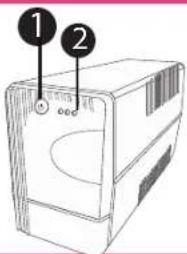
Controls
- Power button
- Activity LED indicators:
- Green: stays on when the electrical power is on
- Yellow: indicates the status of the battery, flashes when it is charging and stays on when it is fully charged.
- Red: stays on when the No break is in backup mode.
- Reset button
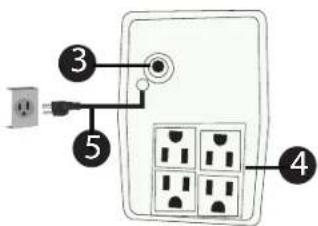
- Polarized contacts
- Power cable.
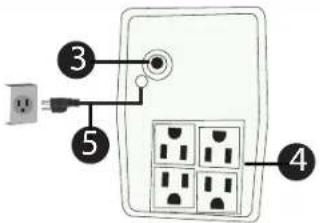
Instructions
Before using the UPS,
Connect it for 24 hours to charge
The battery and extend its life time.
After the first time, the battery
Will be charged at 90% in 8 hours. If you
leave the Not functioning for 3 months or
More, it must be charged for 12 hours
Before using it again,
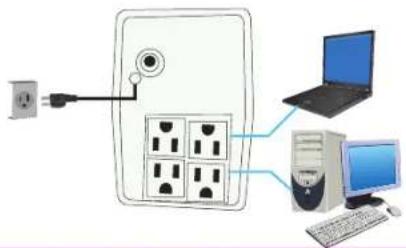
- Connect the no-break to an electrical outlet.
- Connect your computer equipment to the polarized contacts.
- Press the power button. If the voltage is normal, the green indicator will light.
- In case of electrical failure, the red indicator will light and an alarm
will be issued every 9 seconds.
The connected equipment will be backed up for 20 minutes, depending on the amount of energy they require.
Specifications
Input: 120 V \~ ± 10 %
Input frequency: 60 Hz ± 5%
Power output: 300 W (600 VA)
Output: 120 V\~ ± 10 % to 15 %
120 V\~ ± 10 % (with batteries)
Output frequency: 60 Hz ± 1% (sine wave)
Transfer time: < 10 ms
Battery type: 12 V / 7 Ah lead-acid
Backup time: ≥ 5 minutes
Charging time: < 12 hours (90 %)
Operating temperature: 0 to 40 °C
Storing temperature: -15 to 45 °C
RH: 10 to 95 %
Warranty

STEREN
Product: 600 VA UPS
Part number: NB-605
Brand: Steren
WARRANTY
This Steren product is warranted under normal usage against defects in workmanship and materials to the original purchaser for three months on the battery and one year on the other parts from the date of purchase.
CONDITIONS
- This warranty card with all the required information, invoice or purchase ticket, product box or package, and product, must be presented when warranty service is required.
- If the product is in the warranty time, the company will repair it free of charge.
- The repairing time will not exceed 30 natural days, from the day the claim was received.
- Steren sell parts, components, consumables and accessories to customer, as well as w
- October sell parts, components, consumables and accessories to customers, as well as warranty service, at any of the addresses mentioned later.
THIS WARRANTY IS VOID IN THE NEXT CASES:
If the product has been damaged by an accident, acts of God, mishandling, leaky batteries, failure to follow enclosed instructions, improper repair by unauthorized personnel, improper safe keeping, among others.
a) The consumer can also claim the warranty service in the purchase establishment.
b) If you lose the warranty card, we can reissue it, if you show the invoice or purchase ticket.
RETAILER INFORMATION
Name of the retailer
Address
Product
Brand
Serial number
Date of delivery
In case your product fails or have questions, please contact your nearest dealer. If you are in Mexico, please call to our Call Center.
01 800 500 9000
Brand : Steren
Model : NB-605
Category : Inverter