
USM-8D - AV Extender Steren - Free user manual and instructions
Find the device manual for free USM-8D Steren in PDF.


| Product Type | AV Extender |
| Brand | Steren |
| Model | USM-8D |
| Category | AV Extender |
| Dimensions (approx.) | 10 x 5 x 2.5 cm |
| Weight (approx.) | 150 g |
| Power Supply | 5V DC via USB or adapter (not included) |
| Power Consumption | < 2.5 W |
| Input Interface | HDMI (Type A female) or VGA (depending on model) |
| Output Interface | HDMI (Type A female) or VGA |
| Max Resolution | 1080p (Full HD) at 60Hz |
| Supported Audio | Stereo PCM, up to 48 kHz |
| Transmission Distance | Up to 50 meters over Cat5e/6 cable |
| Cable Type | Cat5e/6 (not included) |
| Enclosure Material | Metal |
| Operating Temperature | 0°C to 50°C |
| Storage Temperature | -20°C to 60°C |
| Humidity | 10% to 85% (non-condensing) |
| LED Indicators | Power and Link status |
| Maintenance | Wipe with a dry cloth; avoid liquids |
| Safety | Use only with the specified power supply; do not expose to moisture |
| Spare Parts / Reparability | No user-serviceable parts; contact qualified service |
| Warranty | 1 year limited (check local terms) |
Frequently Asked Questions - USM-8D Steren
User questions about USM-8D Steren
0 question about this device. Answer the ones you know or ask your own.
Ask a new question about this device
Download the instructions for your AV Extender in PDF format for free! Find your manual USM-8D - Steren and take your electronic device back in hand. On this page are published all the documents necessary for the use of your device. USM-8D by Steren.
USER MANUAL USM-8D Steren
Installation and Operation Manual
USM-8D
UHF Consumer Agile Audio-Video Modulator
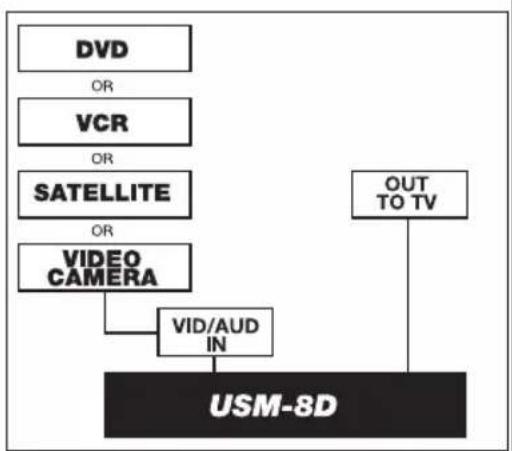
flowchart
graph TD
    A["DVD"] -->|OR| B["VCR"]
    B -->|OR| C["SATELLITE"]
    C -->|OR| D["VIDEO CAMERA"]
    D --> E["VID/AUD IN"]
    E --> F["USM-8D"]
    G["OUT TO TV"] --> F
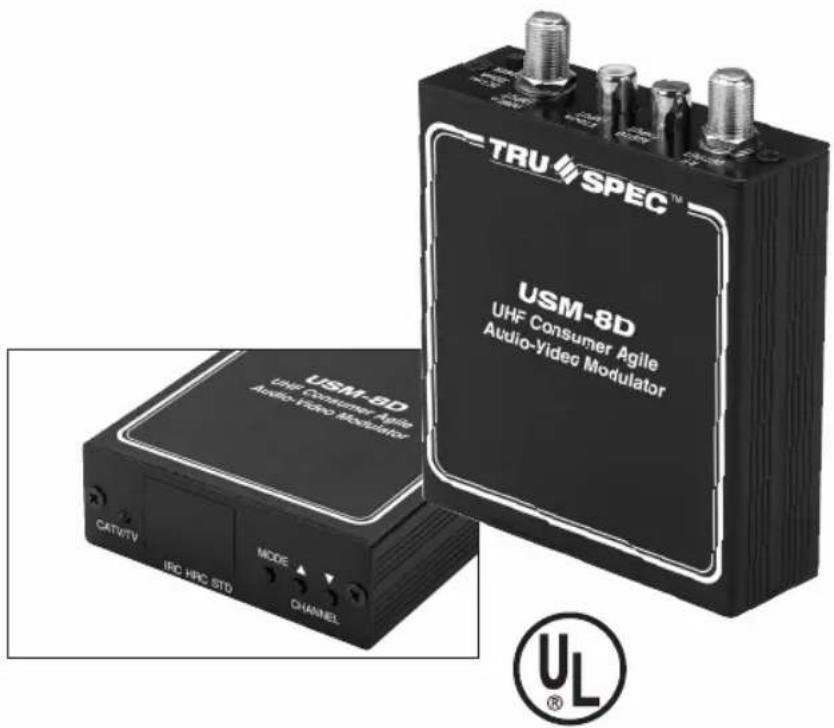
USM-8D
UHF Consumer Agile Audio-Video Modulator
Low-cost UHF A/V Agile Modulator adds Satellite, VCR, or Security Video channels to home distribution network over ultra-band and UHF band NTSC TV channels 14-83, CATV channels 65-139 - Double Vestigial Sideband Output 7dBmV minimum, 10dBmV typical - Low Spurious Distortion - Frequency Stability Video/250KHz, Audio +3KHz - F-type RF Connectors - RCA type A/V Baseband Connectors - LED Digital Display - PLL Microprocessor-Control Front Panel Push-Button Channel Selection - External UL Power Adapter Input 120V 60Hz 9W - Output 15VDC 300mA - Dimensions 3^3/8 (L) x 1^1/8 (D) x 3^3/4 (H) - Weight 0.5 lbs
USM-8D
UHF Consumer Agile Audio-Video Modulator
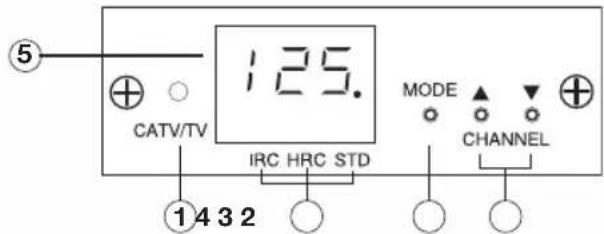
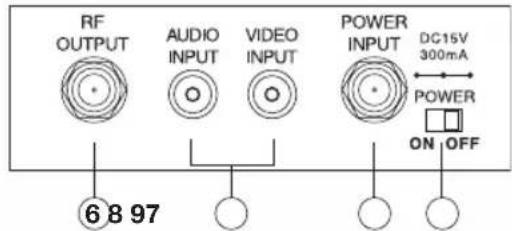
Controls
- Band Indicator: When the LED is lit the CATV band is on. When it is off the UHF band is on.
- Channel Up/Down Selection: UHF: Channels 14 – 83. Ultra: Channels 65 – 139
- Mode Switch: Selects UHF: Channels 14 – 83, Ultra: Channels 65-139 and STD, HRC and IRC formats.
- Mode Indicator: Indicates STD, HRC or IRC format.
- Channel Display: Displays channel number and offset format.
- RF Out: Connect this port to the UHF input of a TV set or cable converter.
- Audio and Video Inputs: Connect audio and video source to the appropriate input.
- Power In: Connect an 18Vdc-300mA DC adaptor to this jack.
- Power Switch: Power on/off switch
Installation
- Plug in DC power adaptor and connect a cable between adaptor and the USM-8D power jack.
- Verify the band Indicator located at left of front panel is correctly lit for desired band output.
- Use UP and DOWN key to select the desired output channel.
- Connect patch cable between USM-8D video input and your video device source.
- Connect patch cable between USM-8D audio input and your audio device source.
- Connect RF OUT to input connection of TV.
Channel Selection
CATV MODE TO TV MODE:
- Push "MODE" button. Channel number disappears
- Push channel down button 3 times and red dot will disappear.
- Push "MODE" button and UHF channel will appear.
- Push channel up/down buttons for channel of choice.
TV MODE TO CATV MODE:
- Push "MODE" button.
- Push channel up/down button and red dot will appear over "STD"
- Push "MODE" button and CATV channel will appear.
- Push channel up/down buttons for channel of choice.
OFFSETS AND STANDARD CATV FORMATS:
- Push "MODE". Channel number disappears.
- Use channel up/down buttons to change offset formats.
Ordering Information
USM-8D - UHF Consumer Agile Audio-Video Modulator
Note: When making channel selection, it is required that a channel higher or lower be skipped from any existing active channels. This is to avoid co-channel interference.
USM-8D

Pico Macom One-Year Limited Warranty
Pico Macom warrants to the original purchaser a full 1-year warranty period on all new products. Pico Macom will repair or, at its discretion, replace without cost to the original purchaser, the product which, upon inspection by Pico Macom, appears to be defective or not conforming to the Factory Specifications. Pico Macom will cover the cost of parts, labor, and return freight from factory.
Warranty Limitations
This warranty excludes coverage of damage or inoperability resulting from (1) use or installation other than in strict accordance with Pico Digital's written instructions, (2) disassembly or repair by someone other than Pico Digital or a Pico Digital authorized repair center, (3) misuse, misapplication or abuse, (4) alteration, (5) lack of reasonable care or (6) wind, ice, snow, rain, lightning, power surges, excessive heat, or any other weather conditions or acts of God. Pico Digital's warranty with respect to third-party proprietary sub-assembly modules and/or private-label products are limited to the duration and terms of third-party vendors' warranty. Pico Digital shall in no event and under no circumstances be liable or responsible for any consequential, indirect, incidental, punitive, direct or special damages based upon breach of warranty, breach of contract, negligence, strict tort liability or otherwise or any other legal theory, arising directly or indirectly from the sale, use, installation or failure of any product acquired by buyer from Pico Digital. This limited warranty extends to the original purchaser and cannot be assigned or transferred to any other party without the prior express written permission of Pico Digital, which permission Pico Digital may withhold for any reason or for no reason at all. Pico Digital reserves the right to modify or discontinue this warranty at Pico Digital's sole discretion without notification. No other warranties are expressed or implied.
Damage or Shortage Claims
Our shipping staff carefully packs and ships your orders in compliance with common carriers' requirements. Please make note of any obvious damage or shortage on the freight bill or carrier's receipt next to your signature. The carrier's agent must also sign acknowledging the loss. Failure to do so may result in the carrier's refusal to honor the claim. Please open your order immediately upon receipt to check for concealed damage and compare the packing list to the items shipped. If damaged, keep the original shipping cartons for possible inspection by the carrier. You must report claims for loss or damage within 3 days of delivery, while claims for erroneous charges or price corrections must be presented within 30 days of invoice date.
Returning Shipped Items
To return any shipped items, including those shipped for warranty repairs or credit, call our Customer Service desk to request a Return Merchandise Authorization (RMA) number. Please reference the original invoice number and purchase date, and product serial number (if any). Be certain to mark the RMA number on the package boldly and legibly. Unless we specify a different carrier, please ship your returned items to us via UPS freight prepaid and fully insured. If returned for credit, we will promptly process your request upon receipt of your return order.
Our Return Policy: Your Satisfaction Guaranteed
Our goal is your complete satisfaction. If for any reason, our products were not quite what you anticipated, simply call your customer service rep and we will be happy to assist you in replacing or returning the order. You may return current, non-discontinued items for full credit for up to 30 days from invoice date. Our requirements are simple: Excepting defective items, the products must be returned in their original packaging and in re-salable condition. Re-certification fees of 10% to 50% of original purchase price may otherwise apply beyond this period or if products are not returned in their original condition. Please contact your customer service rep for more information.
- Installation and Operation Manual
- USM-8D
- Controls
- Installation
- Channel Selection
- CATV MODE TO TV MODE:
- TV MODE TO CATV MODE:
- OFFSETS AND STANDARD CATV FORMATS:
- Ordering Information
- Pico Macom One-Year Limited Warranty
- Warranty Limitations
- Damage or Shortage Claims
- Returning Shipped Items
- Our Return Policy: Your Satisfaction Guaranteed
Brand : Steren
Model : USM-8D
Category : AV Extender