
Vision 3 Pro - Handy INFOCUS - Kostenlose Bedienungsanleitung
Finden Sie kostenlos die Bedienungsanleitung des Geräts Vision 3 Pro INFOCUS als PDF.


| Produkttyp | Smartphone |
| Abmessungen (H×B×T) | 165,3 × 76,8 × 8,9 mm |
| Gewicht | 198 g |
| Bildschirmdiagonale | 6,5 Zoll |
| Bildschirmauflösung | 1080 × 2400 Pixel (Full HD+) |
| Prozessor | Mediatek Helio G95, Octa-Core |
| Arbeitsspeicher (RAM) | 4 GB |
| Interner Speicher | 64 GB |
| Erweiterbarer Speicher | Ja, microSD bis 256 GB |
| Akkukapazität | 4000 mAh (fest verbaut) |
| Betriebssystem | Android 11 (aktuell) |
| Rückkamera (Haupt) | 48 MP (f/1.8) + 8 MP (Ultraweitwinkel) + 2 MP (Tiefe) |
| Frontkamera | 16 MP (f/2.0) |
| SIM-Karte | Dual-SIM (Nano-SIM, Dual Standby) |
| Mobilfunknetz | 4G LTE, 3G, 2G |
| WLAN | 802.11 a/b/g/n/ac (2,4 + 5 GHz) |
| Bluetooth | 5.0 |
| GPS | Ja (A-GPS, GLONASS, Beidou) |
| NFC | Ja |
| Fingerabdrucksensor | Ja (seitlich) |
| Anschlüsse | USB-C (OTG), 3,5 mm Klinke |
| Farbe | Schwarz, Blau |
| Lieferumfang | Netzteil, USB-Kabel, SIM-Werkzeug, Kurzanleitung |
Häufig gestellte Fragen - Vision 3 Pro INFOCUS
Benutzerfragen zu Vision 3 Pro INFOCUS
0 Frage zu diesem Gerät. Beantworten Sie die, die Sie kennen, oder stellen Sie Ihre eigene.
Eine neue Frage zu diesem Gerät stellen
Laden Sie die Anleitung für Ihr Handy kostenlos im PDF-Format! Finden Sie Ihr Handbuch Vision 3 Pro - INFOCUS und nehmen Sie Ihr elektronisches Gerät wieder in die Hand. Auf dieser Seite sind alle Dokumente veröffentlicht, die für die Verwendung Ihres Geräts notwendig sind. Vision 3 Pro von der Marke INFOCUS.
BEDIENUNGSANLEITUNG Vision 3 Pro INFOCUS
InFocus
VISION 3 PRO
(Model: IF9029)
Quick Start Guide
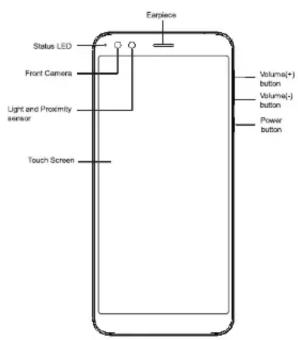
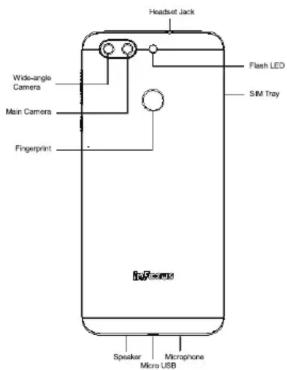
Installing SIM Card and Memory Card
- Put the thimble tool into the hole near SIM card tray, then push until card tray pop up, and then pull out the card with hand.
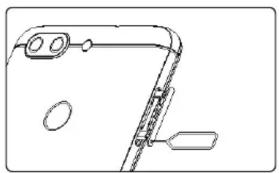
natural_image
Line drawing of a smartphone rear panel with lens and scroll (no text or symbols)- Put the SIM1/SD into the card slot or put the SIM1/SIM2 into the card slot as below picture: Then push the tray into the phone card slot.
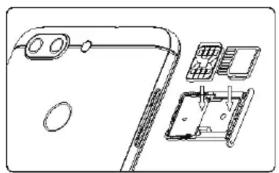
natural_image
Technical line drawing of a mechanical assembly with no visible text or symbols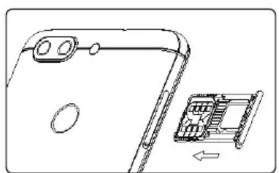
natural_image
Diagram of a smartphone rear panel with an internal circuit board and directional arrow (no text or symbols)Charging the Battery
Before using the phone, it is recommended to fully charge the battery first.
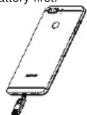
- Connect the smaller end of the USB cable to the USB port of the device.
- Connect the other end of the cable to the AC adapter or other USB port with power source (for example, laptop).
- Plug the AC adapter to a wall outlet to start charging.
SAR Information
This mobile device meets guidelines for exposure to radio waves. Your mobile device is a radio transmitter and receiver. It is designed not to exceed the limits for exposure to radio waves recommended by international guidelines. These guidelines were developed by the independent scientific organization ICNIRP and include safety margins designed to assure the protection of all persons, regardless of age and health.
The exposure guidelines for mobile devices employ a unit of measurement known as the Specific Absorption Rate or SAR. The SAR limit stated in the ICNIRP guidelines is 1.6W / kg averaged over 1 grams of tissue. Tests for SAR are conducted using standard operating positions with the device transmitting at its highest certified power level in all tested frequency bands. The actual SAR level of an operating device can be below the maximum value because the device is designed to use only the power required to reach the network. That amount changes depending on a number of factors such as how close you are to a network base station. The highest SAR value under the ICNIRP guidelines for use of the device at the head is 0.245W / kg and at the body is 1.034W / kg (The measure distance of 5mm ). Use of device accessories and enhancements may result in different SAR values. SAR values may vary depending on national reporting and testing requirements and the network band.
Important Safety Information
Use a wireless hands-free system (headphone, headset) with a low power Bluetooth emitter.
- Make sure the cell phone has a low SAR.
- Keep your calls short or send a text message (SMS) instead. This advice applies especially to children, adolescents and pregnant women.
- Use cell-phone when the signal quality is good.
• People having active medical implants should preferably keep the cell phone at least 15 cm away from the implant.
RoHS Compliance
This product is in compliance with DIRECTIVE 2011/65/EU OF THE EUROPEAN PARLIAMENT AND OF THE COUNCIL of 8 June 2011, on the restriction of the use of certain hazardous substances in electrical and electronic equipment and its amendments.
E-Waste
Products are in conformity with the requirements of the reduction of hazardous substances of the E-Waste rules 2016.
For the purpose of recycling to facilitate effective utilization of resources, please return this product to a nearby authorized Collection Centre, registered Dismantler or Recycler, or Service Centre for disposing of this product.
To know more about safe and secure recycling and proper disposal of end-of-life electrical and Electronic Products Customer can contact our recycling partner on toll-free numbers region wise at:
North India-1800-102-8632
South India- 1800-843-3303
East India- 1800-843-3301
West India-1800-843-3302
Email – info@3rrecycler.com
For more detailed information, see the User Guide. www.infocusindia.co.in
Warning
- Charge only indoors and in dry environments.
- For safety, the overheat protection will be active during charging. If the system temperature reaches above the maximum level, the device will automatically stop charging. The device will only resume charging when normal operating temperature is reached.
- If there is no response after you press the power button or touch the panel, press and hold the 'power button and volume (+) key' for 10 seconds, phone will restart, and if you hold the 'power button' for 10 seconds, it will restart too.
• InFocus standard for water ingression criteria.
(1) Water ingression label become red color or contaminated. (2) Water marks or corrosions on device PCB or components. - Please make sure the temperature for adapter will not be higher than 40°C
- Do not store your phone in temperatures higher than 60°C - The operating temperature for this device is from -10°C to 50°C WEEE Notice
The WEEE logo on the product or on its box indicates that this product must not be disposed of or dumped with your other household waste. You are liable to dispose of all your electronic or electrical waste equipment by relocating over to the specified collection point for recycling of such hazardous waste. Isolated collection and proper recovery of your electronic and electrical waste equipment at the time of disposal will allow us to help conserve natural resources. Moreover, proper recycling of the electronic and electrical waste equipment will ensure safety of human health and environment. For more information about electronic and electrical waste equipment disposal, recovery, and collection points, please contact your local city center, household waste disposal service, shop from where you purchased the equipment, or manufacturer of the equipment. Do dispose according to the local laws and regulations of your region.
Languages & Input
Click on Settings—Languages & Input—Keyboard (Virtual)—Manage Keyboards (Choose the keyboard Mkey) --- Open New message window --- Select keyboard and choose the Mkey --- Click on Globe icon to choose preferred language for Input.
Mobile phone supports all the below mentioned Indian Official Languages for readability test as per IS 16333(Part-3):2017 ASSAMESE, BANGLA, BODO, DOGRI, GUJARATI, HINDI, KANNADA, KASHMIRI, KONKANI, MAITHILI, MALAYALAM, MANIPURI (BENGALI), MANIPURI (MEETEI MAYEK), MARATHI, NEPALI, ODIA(ORIYA), PANJABI(PUNJABI), SANTHALI (OI CHIKI), SANTHALI (DEVANAGRI), SANSKRIT, SINDHI(DEVANAGARI), TAMIL, TELUGU, URDU, ENGLISH This mobile supports inputting for below mentioned Indian Official Language as per IS 16333(Part-3):2017 HINDI , ENGLISH , BANGLA
For Product Support
Customer Care No: 1800 2588 110
(Timing: Monday to Saturday between 10:00AM-7:00PM) Customer care Email ID:
customersupport@infocusindia.co.in Website: www.infocusindia.co.in
Marke : INFOCUS
Modell : Vision 3 Pro
Kategorie : Handy