
RS4507 - Autoradio Manta - Kostenlose Bedienungsanleitung
Finden Sie kostenlos die Bedienungsanleitung des Geräts RS4507 Manta als PDF.


| Produkttyp | Autoradio |
| Marke | Manta |
| Modell | RS4507 |
| Abmessungen (B x H x T) | ca. 180 x 50 x 110 mm (1-DIN) |
| Gewicht | ca. 0,8 kg |
| Stromversorgung | 12 V Gleichstrom (Fahrzeugbordnetz) |
| Maximale Ausgangsleistung | 4 x 50 Watt |
| RMS-Leistung | 4 x 25 Watt |
| Radiofunktionen | FM/AM-Tuner, RDS, 30 Stationsspeicher |
| Wiedergabemöglichkeiten | USB, SD-Karte, AUX-Eingang |
| Bluetooth | Freisprecheinrichtung und Audio-Streaming |
| Display | LCD mit Hintergrundbeleuchtung |
| Bedienelemente | Drehregler, Tasten, Fernbedienung (optional) |
| Audio-Einstellungen | Equalizer (voreingestellt + manuell), Loudness |
| Anschlüsse | ISO-Stecker, Antenneneingang, USB, SD, AUX, Cinch-Ausgänge |
| Kompatible Medienformate | MP3, WMA, WAV, FLAC über USB/SD |
| Sprache der Bedienung | Mehrsprachig (u. a. Deutsch, Englisch) |
| Reinigung | Staubwischen mit weichem, trockenem Tuch; keine aggressiven Reinigungsmittel |
| Sicherheitshinweise | Nur in 12-V-Fahrzeugen verwenden, vor Feuchtigkeit schützen |
| Lieferumfang | Autoradio, Einbaurahmen, Montagematerial, Bedienungsanleitung |
Häufig gestellte Fragen - RS4507 Manta
Benutzerfragen zu RS4507 Manta
0 Frage zu diesem Gerät. Beantworten Sie die, die Sie kennen, oder stellen Sie Ihre eigene.
Eine neue Frage zu diesem Gerät stellen
Laden Sie die Anleitung für Ihr Autoradio kostenlos im PDF-Format! Finden Sie Ihr Handbuch RS4507 - Manta und nehmen Sie Ihr elektronisches Gerät wieder in die Hand. Auf dieser Seite sind alle Dokumente veröffentlicht, die für die Verwendung Ihres Geräts notwendig sind. RS4507 von der Marke Manta.
BEDIENUNGSANLEITUNG RS4507 Manta

natural_image
Abstract black-and-white circular logo with interlocking curved shapes (no text or symbols)MANTA
CAR RADIO BLUETOOTH
RADIO SAMOCHODOWE Z BLUETOOTH

PL INSTRUKCJA OBSŁUGI
EN INSTRUCTION MANUAL
PT MANUAL DO USUÁRIO
Instrukcją oryginalną jest instrukcja angielska.
Pozostałe języki są tłumaczone z wersji oryginalnej.
WSKAZÓWKI DOTYCZĄCE BEZPIECZEŃSTWA
Urządzenie wyprodukowane zostało zgodnie z aktualnymi standardami rozwoju techniki i ogólnie uznanymi zaadami bezpieczeństwa. Mimo to nieprzestrzeganie zawartych w niniejszej instrukcji wskazówek dotyczących bezpieczeństwa wiąze się z różnego rodzaju zagrożeniami.
Instrukcja zawiera istotne informacje na temat latwego i bezpiecznego montażu racia samochodowego oraz jego obsługi.
- Przed rozpoczęciem użytkowania radia samochodowego należy dokładnie przeczytać całą instrukcję
- Przechowuj instrukcję w takim miejscu, aby w każdej chwili była dostępna dla wszystkich użytkowników.
• W przypadku przekazania radia samochodowego osobom trzecim, należy dołączyć niniejszą instrukcję.
Oprócz tego uwzględnict instrukcje innych urządzeń, których użytkowanie ma związek z radiem samochodowym.
BEZPIECZENSTWO W RUCHU DROGOWYM
Nalezy przestrzegać poniższych wskazówek dotyczących bezpieczeństwa w ruchu drogowym:
- Uzytkowanie urządzenia nie powinno zakłócać bezpiecznej jazdy. W razie wątpiłości należy zatrzymać się w bezpiecznym miejscu aby obsługiwać urządzenie w czasie postoju.
- Zawize należy nastawiąć umiarkowaną głośność, aby chronić słuch i móc odbierać akustyczne sygnały ostrzegawcze (np. policję). Jeśli dźwięk jest wyłączony (np. przy zmianie źródła dźwięku), zmiana głośności nie jest słyszalna. Nie zwiększać poziomu głośność, gdy dźwięk jest wyłączony.
OGÓLNEWSKAZÓWNI DOTYCZĄCE BEZPIECZEŃSTWA
Przestrzegać poniższych wskazówek, aby chronić się przed obrażeniami ciała:
- Nie wolno otwierać ani modyfikować urządzenia.
- Nie zwiększać poziomu głośności, gdy dźwięk jest wyłączony, np. przy zmianie źródła dźwięku. Zmiana głośności podczas wyciszenia dźwięku nie będzie słyszalna.
- Urządzenie przeznaczone jest do montażu i pracy z 12 V napięciem pokładowym pojazdu i należy je zamontować w kieszeni zgodnej z normą DIN. Należy przestrzegać wartości granicznych mocy podanych w danych technicznych. Naprawy oraz ewentualny montaż ziecić fachowcowi.
- Do czyszczenia radia samochodowego używać wyłącznie suchej lub lekko zwilzonej ściereczki
WSKAZÓWKI MONTAŻOWE
Urządzenie można zamontować samodzleśnie tylko w przypadku dysponowania doświadczeniem w zakresie w montażu radla samochodowego ze znajomością zagadnieri elektryki samochodowej. W tym celu należy przestrzegać instrukcji montażu zamieszczonej na końicu tej instrukcji.
SAFETY INSTRUCTIONS
The device has been manufactured in accordance with the latest standards of technological development and generally recognized safety rules. Nevertheless, non-compliance with the safety instructions in this manual may involve various dangers.
The instructions contain important information on how to easily and safely install and operate the car sound system.
• Before using the car radio for the first time, read the manual carefully.
- Keep the manual in such a place that it is always accessible to all users.
- If you pass the car sound system on to third parties, be sure to include these instructions.
In addition, observe the instructions for other devices that are related to the use of the car sound system.
SAFETY IN ROAD TRAFFIC
Observe the following safety instructions:
- Using the device should not affect safe driving. If in doubt, stop in a safe place to operate the device when the vehicle is parked.
• Always use the volume at a moderate level to protect your hearing and be able to receive acoustic warning signals (eg from the police). If the sound is muted (e.g. when changing the audio source), changing the volume is not audible. Do not turn up the volume when the sound is muted.
GENERAL SAFETY INSTRUCTIONS
Observe the following tips to protect yourself from personal injury:
- Do not open or modify the device.
- Do not increase the volume when the sound is muted, such as when changing the audio source. You will not hear the volume change while you mute the sound.
- The device is designed to be installed and operated with the vehicle's 12V on-board voltage and must be installed in a DIN compliant pocket. The performance limits in the technical data must be adhered to. Repairs and possible assembly should be performed by a specialist.
- Use only a dry or slightly damp cloth to clean the car sound system
ASSEMBLY INSTRUCTIONS
You can install the device yourself only if you have experience in the installation of car radio and knowledge of car electrics. For this purpose, observe the installation instructions at the end of these instructions.
INSTRUÇÕES DE SEGURANÇA
O dispositivo foi fabricado de acordo com os mais recentes padrões de desenvolvimento tecnológico e regras de segurança geralmente reconhecidas. No entanto, o não cumprimento das instruções de segurança contidas neste manual pode envolver vários perigos.
As instruções contêm informações importantes sobre como instalar e operar o auto-rádio de forma fácil e segura
- Antes de utilizar o auto-rádio pela primeira vez, leia atentamente todo o manual.
- Mantenha o manual em um local que esteja sempre acessível a todos os usuários.
- Se entregar o auto-rádio a terceiros, certifique-se de que inclui estas instruções.
Além disso, observe as instruções para outros dispositivos relacionados ao uso do auto-rádio.
SEGURANÇA NA ESTRADA
Observe as seguintes instruções de segurança rodoviária:
- O uso do dispositivo não deve interferir na condução segura. Em caso de dúvida, pare em um local seguro para operar o dispositivo quando o veículo estiver estacionado.
- Sempre use o volume em um nível moderado para proteger sua audição e poder receber sinais de aviso acústicos (por exemplo, da polícia). Se o som estiver mudo (por exemplo, ao alterar a fonte de áudio), a alteração do volume não é audível. Não aumente o volume quando o som estiver mudo.
INSTRUÇÕES GERAIS DE SEGURANÇA
Observe as seguintes dicas para se proteger de ferimentos pessoais:
- Não abra ou modifique o dispositivo.
- Não aumente o volume quando o som estiver mudo, como ao mudar a fonte de áudio. Você não ouvirá a mudança de volume enquanto silencia o som.
- O dispositivo foi projetado para ser instalado e operado com a tensão de bordo de 12 V do veículo e deve ser instalado em um compartimento compatível com DIN.
Os limites de desempenho nos dados técnicos devem ser respeitados. Reparos e possíveis montagens devem ser realizados por um especialista.
- Use apenas um paro seco ou levemente úmido para limpar o sistema de som do carro
INSTRUÇÕES DE MONTAGEM
Você pode instalar o dispositivo sozinho apenas se tiver experiência na instalação de rádios automotivos e conhecimento em elétrica automotiva. Para isso, observe as instruções de instalação no final destas instruções.
RS4507
PODSTAWOWE FUNKCJE/BASIC OPERATION HAUPTFUNKTIONEN/ÁMBITO BÁSICO DE FUNCIONAMIENT FUNZIONAMENTO BASE DEL DISPOSITIVO
1. POWER ON/OFF
Wciśnięcie włącza urządzenie, dłuższe wciśnięcie wyłącza. Przy włączonym urządzeniu, wciskanie zmienia tryby: FM-USB-SD-AUX-BT.
Press the switch to power on, long press the switch to power off. When powered, pressing change modes: FM-USB-SD-AUX-BT.
Premendo si accende il dispositivo, tenendo premuto si provoca lo spegnimento. Quando il dispositivo è acceso premendo si possono effettuare cambiamenti di modalità : FM-USB-SD-AUX-BT. Ingresso aggiuntivo per dispositivi.
2. VOL
Głośność należy regulować korzystając z pokrętła VOL.
Adjust the volume by rotating the VOL knob.
Il volume deve essere regolato utilizzando la manopola VOL sul pannello. /
3.2/INT
W trybie radiowym krótkie przyciśnięcie powoduje wybór stacji ustawionej jako nr 2, długie przyciśnięcie spowoduje zapisanie aktualnej częstotliwości na przycisku 2. W trybie USB/SD włącza funkcję INTRO.
In radio mode, short press button to select the station set as No. 2, long press will save the current frequency on the button 2. In the USB / SD activates the INTRO.
In modalità radio, premere brevemente il tasto per selezionare la stazione impostato come numero 2, lungo premendo salverà la frequenza corrente il tasto 2.
4.1/Pause
W trybie radiowym krótkie przyciśnięcie powoduje wybór stacji ustawionej jako nr 4, dłuższe przyciśnięcie spowoduje zapisanie aktualnej częstotliwości na przycisku nr 4. W trybach USB/SD, krótkie przyciśnięcie wstrzymuje lub ponownie rozpoczyna odtwarzanie.
In radio mode, short press button select the station set as No. 1, long press save the current frequency on the button No. 1. In modes USB / SD, short press pause or re-starts playback.
In modalità radio premendo il tasto si seleziona la stazione impostata come nr 1, tenendo premuto si imposta l'attuale frequenza sulla stazione nr 1: Nelle modalità USB/SD premendo brevemente si ferma o si fa ripartire la riproduzione.
RS4507
5. CLOCK/MUTE (ZEGAR/WYCISZENIE)
Krótkie przyciśnięcie spowoduje wyświetlenie się zegara. Po 10 sekundach wyświetlacz wróci do zwykłego trybu wyświetlania. Dłuższe przyciśnięcie spowoduje przejście do trybu ustawiania zegara. Ustawienie godzin i minut możliwe jest poprzez przekręcanie pokrętła VOL na panelu podczas gdy migają odpowiednie ikonki. Jeśli nie zostaną podjęte takie działania, po 5 sekundach tryb ustawiania zegara wyłączyć się. Krótkie wciśnięcie przycisku powoduje wyciszenie urządzenia lub ponowne włączenie głosu.
Short press will display the clock. After 10 seconds, the display will return to normal mode. Long press move to the clock setting mode. Set the hours and minutes is possible by turning the VOL knob on the panel while flashing the relevant icon. If not taken any action, after 5 seconds, the clock setting mode turns off. Short press the button to mute the device or resume voice.
Premendo brevemente si illumina l'orologio. Dopo 10 secondi lo schermo torna alla sua solita modalità d'illuminazione. Tenendo premuto più a lungo si passa alla modalità d'impostazione dell'orologio. L'impostazione delle ore e dei minuti è possibile tramite l'utilizzo della manopola VOL sul pannello o premendo le appropriate icone lampeggiano. Se non viene fatto nulla di tutto ciò, dopo 5 secondi la modalità d'impostazione dell'orologio si spegne. Premendo brevemente si mette in modalità muta il dispositivo o si riattiva il volume.
6./7.+10/-10
W trybie radiowym, krótkie wciśnięcie powoduje wywołanie stacji nr 5 lub nr 6, dłuższe przyciśnięcie spowoduje ustawienie aktualnej częstotliwości na stacji nr 5 lub nr 6: W trybach USB/SD krótkie wciśnięcie umożliwia odtworzenie następnych 10 piosenek.
In radio mode, short press set station No. 5 or No. 6, long press will set the frequency of the current station to button No. 5 or No. 6. In modes USB / SD short press allows you to play the next or previous 10 songs.
In modalità radio premendo brevemente si passa alle stazioni nr 5 o nr 6, tenendo premuto si imposta l'attuale frequenza sulle stazioni nr 5 o nr 6. Nelle modalità USB/ SD premendo brevemente di attiva la riproduzione delle 10 canzoni successive.
8. Band Button (Przycisk Pasma)
W trybie radiowym, krótkie wciśnięcie powoduje wybór pomiędzy FM1-FM2-FM3, dłuższe przyciśnięcie spowoduje wyszukanie stacji o silnym sygnale i rozpoczęcie odtwarzania pierwszej z nich.
In radio mode, short press to choose between FM1-FM2-FM3, long press will search for a station with a strong signal and start playing the first one.
In modalità radio premendo brevemente si sceglie tra FM1-FM-2-FM3, tenendo premuto si cercano stazioni con segale forte e si inizia la riproduzione della prima di esse.
RS4507
9. 4/Przycisk RDM
W trybie radiowym, należy krótko przycisnąć, aby odtwarzać stację ustawioną na nr 4, dłuższe naciśnięcie spowoduje ustawienie aktualnej częstotliwości na stacji nr 4. W trybie USB/SD, należy nacisnąć, aby odtwarzać utwory losowo lub według kolejności.
In radio mode, short press to play a station set at No. 4, long press will set the current frequency on the button No. 4. In the mode, USB / SD, press to play songs randomly or in the order.
In modalità radio è necessario premere brevemente per riprodurre le stazioni impostate sul nr. 4, tenendo premuto si imposta l'attuale frequenza sulla stazione nr. 4. In modalità USB/SD è necessario premere per riprodurre i pezzi casualmente o secondo il proprio ordine.
10. 3/Przycisk RPT
W trybie radiowym, należy krótko przycisnąć, aby odtwarzać stację ustawioną na nr.3, dłuższe naciśnięcie spowoduje ustawienie aktualnej częstotliwości na stacji nr.3. W trybie USB/SD, należy wciskać, aby powtórzyć jedną lub wszystkie utwory.
In radio mode, short press to play a station set to No.3, long press will set the current frequency on the button No.3. In mode USB / SD, you press to repeat one or all tracks.
In modalità radio è necessario premere brevemente per riprodurre la stazione impostata sul nr. 3, tenendo premuto si imposta l'attuale frequenza sulla stazione nr. 3. In modalità USB/SD bisogna premere per ripetere uno o tutti i pezzi.
11. Wejście USB
USB Slot
USB Eingang
Ingresso USB
12. Wejście kart SD
SD slot
Ingresso SD
SD port
13. Przycisk LOUD/EQ
Umożliwia zmianę trybów FLAT-CLAS-POP-ROCK-JAZZ-EQOF.
Change the mode FLAT-CLAS-POP-ROCK-JAZZ-EQOF.
Premendo il tasto LOUD/EQ si possono cambiare le modalità FLAT-CLAS-POP-ROCK-JAZZ-EQOF.
14./15.
W trybie radiowym, należy krótko przycisnąć przycisk, aby zwiększyć lub zmniejszyć częstotliwość o 0,1 MHz (EUR FM), przytrzymać dłużej, aby wyszukać następną stację na wyższej lub niższej częstotliwości i ją odtwarzać. W trybie USB/SD/AUX nacisnąć, aby odtworzyć następny utwór.
RS4507
In radio mode, briefly press the button to increase or decrease the frequency of 0.1 MHz (EUR FM), hold down to search for the next station on the higher or lower frequency, and play it back. In mode USB / SD / AUX, press to play the next track.
In modalità radio bisogna premere brevemente per aumentare o abbassare la frequenza di 0,1 MHz(EUR FM), tenere premuto per cercare la stazione successiva con frequenza più alta o più bassa per poi riprodurla. In modalità USB/SD/AUX premere riprodurre il pezzo successivo.
16. AUX IN
17. Wyświetlacz
Display
Schermo
18. Bluetooth
POŁĄCZENIE/PAIRING/CONEXÃO
Włącz radio, aktywuj model Bluetooth (kilkakrotnie naciśnij przycisk MOD, aby wybrać odpowiedni tryb), aktywuj tryb Bluetooth na smartfonie. Wkrótce zostaną wykryte dwa urządzenia Bluetooth o nazwach „RS4507”. Połącz się z urządzeniem o nazwie „RS4507”.
Turn on the car receiver, active the Bluetooth model (press the MOD button several times to select the appropriate mode), active the Bluetooth mode on the smartphone. Soon, two Bluetooth device with "RS4507" names will be discovered. Connect to the device named "RS4507".
Ligue o rádio, ative o modelo Bluetooth (pressão repetidamente o botão MOD para selecionar o modo correspondente), ative o modo Bluetooth em seu smartphone. Dois dispositivos Bluetooth chamados "RS4507" serão descobertos em breve. Conecte ao dispositivo chamado "RS4507".
RS4507
BASIC OPERATIONS Display of radio station names
The radio data system, or radio station name display refers to digital data transmitted over the fm radio frequencies and allows listeners to see the name of the station being listened, to continue listening to a station while on the move, or control for seconds to access the radio station name display options, then use the volume dial to adjust the settings.
Odbieranie rozmów oraz sterowanie muzyki w trybie Bluetooth Bluetooth CALL&ANSWER&Bluetooth music play Receber chamadas e controlar música no modo Bluetooth
Po udanym parowaniu, gdy zadzwonisz pod numer przez telefon, na wyświetlaczu pojawi się CALL i naciśnij długo przycisk CALL na panelu, możesz ponownie wybrać ostatni wybrany numer. Kiedy odbierasz połączenie przychodzące na wyświetlaczu radia pojawi się informacja. Utwory w telefonie mogą być odtwarzane przez samochodowy odtwarzacz w trybie BT. Naciśnij przycisk 1, aby odtwarzać muzykę Bluetooth lub naciśnij go ponownie, aby zatrzymać odtwarzanie.
RS4507
After a successful pairing, when you call out number by phone, it will show CALL on display and long press CALL button on panel, you can redial the last number you called out. And when you answer incoming call. It will show incoming on screen. Phone songs in music software can be played through car mp3 on BT mode. Press button 1 to play Bluetooth music or press it again to stop playing.
Após o emparelhamento bem-sucedido, quando você ligar para o número no telefone, o display mostrará CALL e pressione longamente o botão CALL no painel, você pode rediscar o último número discado. Quando você atender uma chamada, uma mensagem aparecerá no display do rádio. As músicas do telefone podem ser reproduzidas pelo som do carro no modo BT. Pressione o botão 1 para reproduzir música Bluetooth ou pressione-o novamente para interromper a reprodução.
Sterowanie radiem samochodowym za pomocą aplikacji mobilnej Control your car receiver with mobile App Controle de rádio do carro via aplicativo móvel
INSTALACJA APLIKACJI / APPLICATION INSTALLATION / INSTALAÇÃO DE APLICATIVO Aby zainstalować aplikację na urządzeniu z systemem Android, otwórz Google Play i znajdź w nim aplikację EwayLink lub zeskanuj kod QR.
Po pomyślnym sparowaniu uruchom aplikację Ewaylink. To install the application on an android device, open Google Play and find the EwayLink application in it, or scan the QR code.
After a successful pairing, please launch the Ewaylink app. Para instalar o aplicativo em um dispositivo Android, abra o Google Play e encontre o aplicativo EwayLink nele ou digitalize o código QR.

RS4507
Sterowanie głosowe poprzez Siri / Siri Voice Control / Valdymas balsu per „Siri”
Po podłączeniu telefonu w trybie Bluetooth z radiem samochodowego, naciśnij przycisk 2 w radiu, aby aktywować SIRI i wydaj instrukcje głosowe. Na przykład możesz powiedzieć, dokąd chcesz się udać, a automatycznie przeszuka mapę. Funkcja ta dotyczy wyłącznie urządzeń mobilnych, które posiadają oprogramowanie SIRI.
After connecting mobile Bluetooth with car radio, pls press button 2 in car radio to active SIRI and give voice instruction. For example, u can say where u like to go, and it will search the map for u automatically. This function only applies to mobile devices that have the SIRI software.
Depois de conectar o Bluetooth móvel ao rádio do carro, por favor, pressione o botão 2 para ativar o SIRI e dar instruções de voz. Por exemplo, você pode dizer para onde gostaria de ir, e ele irá procurar você automaticamente no mapa. Este recurso se aplica apenas a dispositivos móveis que possuem o software SIRI.
EN
BASIC OPERATIONS Display of radio station names
The radio data system, or radio station name display refers to digital data transmitted over the fm radio frequencies and allows listeners to see the name of the station being listened, to continue listening to a station while on the move, or control for seconds to access the radio station name display options, then use the volume dial to adjust the settings.
1.AFOFF-AFON
The car radio automatically tunes to the station's strongest frequency.
2. REG function
In any mode once the unit is turned on, press the "VOL/SEL/PTV" button to enter "REG OF", then select with the volume dial where the regional selection function should be enabled.
3. TA function
In any mode after the unit is turned on, press the "VOL/SEL/PTY" button to enter "TA OFF", then select with the volume dial whether "TAON" (automatic traffic information playback) should be enabled.
4.EON function
In any mode once the unit is turned on, press the "VOL/SEL/PTY" button to enter "EON", then select with the volume dial whether the information for one radio stations should be displayed.
5. listened to. SELECT PTY
the PTY function allows you to directly select stations broadcasting a certain type of programme:
-news (short reports on current news)
-affairs (local programmes with detailed information)
-Info(global information)
RS4507
-sport(sports programmes)
-educa(teaching)
-drama(dramatic info)
-culture (culture,philosophy,languages etc...)
-schied(scientific or technical broadcasts)
PL
OPERACJE PODSTAWOWE Wyświetlanie nazw stacji radiowych Radio Data System (RDS), czyli wyświetlanie nazwy stacji radiowej, odnosi się do cyfrowych danych przesyłanych na częstotliwościach radiofonicznych FM, co pozwala słuchaczom zobaczyć nazwę aktualnie słuchanej stacji, kontynuować słuchanie stacji w trakcie podróży lub kontrolować opcje wyświetlania nazwy stacji radiowej, a następnie używać pokrętła głośności do dostosowania ustawień.
- AFOFF-AFON Radio samochodowe automatycznie dostosowuje się do najsilniejszej częstotliwości stacji.
- Funkcja REG W dowolnym trybie, po włączeniu urządzenia, naciśnij przycisk "VOL/SEL/PTV", aby wejść w tryb "REG OF", a następnie wybierz pokrętem głośności, gdzie funkcja wyboru regionu powinna być włączona.
- Funkcja TA W dowolnym trybie, po włączeniu urządzenia, naciśnij przycisk "VOL/SEL/PTY", aby wejść w tryb "TA OFF", a następnie wybierz pokrętłem głośności, czy "TAON" (automatyczne odtwarzanie informacji o ruchu drogowym) powinno być włączone.
-
Funkcja EON W dowolnym trybie, po włączeniu urządzenia, naciśnij przycisk "VOL/SEL/PTY", aby wejść w tryb "EON", a następnie wybierz pokrętłem głośności, czy informacje o jednej stacji radiowej powinny być wyświetlane.
-
SELECT PTY Funkcja PTY pozwala bezpośrednio wybierać stacje nadające określony rodzaj programu:
-
news (krótkie raporty o bieżących wydarzeniach)
- affairs (lokalne programy z szczegółowymi informacjami)
• Info (globalne informacje) - sport (programy sportowe)
• educa (nauczanie)
• drama (informacje dramatyczne)
• culture (kultura, filozofia, języki itp.)
• scied (naukowe lub techniczne audycje)
PT
OPERAÇÕES BÁSICAS Exibição de nomes de estações de rádio O Sistema de Dados de Rádio (RDS), ou seja, o sistema de dados de rádio, refere-se a dados digitais transmitidos nas frequências de rádio FM e permite aos ouvintes ver o nome da estação que estão ouvindo, continuar ouvindo uma estação enquanto estão em movimento ou controlar por alguns segundos para acessar as opções de exibição do nome da estação de rádio e, em seguida, usar o botão de volume para ajustar as configurações.
- AFOFF-AFON O rádio do carro ajusta automaticamente para a frequência mais forte da estação.
RS4507
- Função REG Em qualquer modo, uma vez que a unidade está ligada, pressione o botão "VOL/SEL/PTV" para entrar em "REG OF", depois selecione com o botão de volume onde a função de seleção regional deve ser ativada.
- Função TA Em qualquer modo, após a unidade ser ligada, pressione o botão "VOL/SEL/PTY" para entrar em "TA OFF", depois selecione com o botão de volume se "TAON" (reprodução automática de informações de trânsito) deve ser ativado.
- Função EON Em qualquer modo, uma vez que a unidade está ligada, pressione o botão "VOL/SEL/PTY" para entrar em "EON", depois selecione com o botão de volume se as informações de uma estação de rádio devem ser exibidas.
-
SELECT PTY A função PTY permite selecionar diretamente estações que transmitem um determinado tipo de programa:
-
news (breves relatos de notícias atuais)
- affairs (programas locais com informações detalhadas)
- Info (informação global)
- sport (programas esportivos)
• educa (ensino)
• drama (informação dramática)
• culture (cultura, filosofia, línguas etc.)
• scied (transmissões científicas ou técnicas)
PRZYGOTOWANIE DO MONTAŻU I DEMONTAŻU SET UP AND REMOVE PREPARAZIONE AL MONTAGGIO ALLO SMONTAGGIO
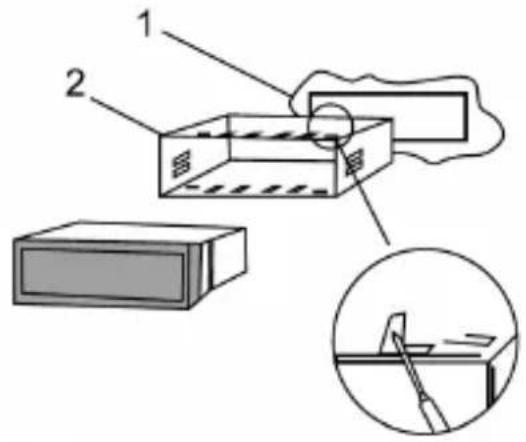
1. Umieść urządzenie w otworze lub kasecie.
Put radio in mounting hole.
Mettere la radio in foro di montaggio. / Dát rádio v montážním otvoru.
2. Odegnij prawą zakładkę aby dopasować do otworu montażowego.
Bend the right tabs to fit cover to the thickness of panel.
Piegare le linguette destro in funzione della copertura allo spessore del pannello.
3. Aby wyjąć radio włóż kucze do otworów po bokach radia aż do odblokowania. Następnie wyjmij radio.
To remove the radio insert the accesory keys into the holes on the sides of the radio until unlocked.
Then remove the radio.

natural_image
Line drawing of a device with labeled component 2 (no text or symbols beyond basic labels)Per rimuovere la radio inserire le chiavi accessorie nei fori sui lati della radio fino sbloccato. Quindi rimuovere la radio.
RS4507
RS4507
- PODŁACZENIE PRZEWODÓW
- WIRING CONNECTIONS
- COLLEGAMENTOCAVI
Antenna - antenna / antenna
RCA output – wyjście RCA / uscita RCA
White - biały / bianco
Red - czerwony / rosso
Front – przód / parte anteriore
Black - czarny / nero
Rear -tyl / retro
Green - zielony/ verde
Yellow - żółty / giallo
ACC ignition control cable – kabel ACC kontroli
zapłonu / cavo ACC controllo
Grey - szary / grigio
Purple – fioletowy / vio

flowchart
graph TD
    A["4-SPEAKER SYSTEM"] --> B["ISO CONNECTOR"]
    B --> C["FUSE ($A)"]
    C --> D["1 RCA (Left)"]
    C --> E["2 RCA (Right)"]
    C --> F["3 RCA (Left)"]
    C --> G["4 RCA (Right)"]
    C --> H["5 Radio antenna"]
    I["Green/Black"] --> J["Rear Left Speaker"]
    K["Green"] --> J
    L["White/Black"] --> M["Rear Left Speaker"]
    N["White"] --> M
    O["Gray/Black"] --> P["Rear Left Speaker"]
    Q["Gray"] --> P
    R["Violet/Black"] --> S["Rear Right Speaker"]
    T["Violet"] --> S
    J --> U["+12V Power Supply B+ (Yellow)"]
    M --> V["Auto Antenna (Blue)"]
    P --> W["Ground GND (Black)"]
    S --> X["Ignition Switch ACC (Red)"]
    style A fill:#f9f,stroke:#333
    style B fill:#ccf,stroke:#333
    style C fill:#cfc,stroke:#333
    style D fill:#fcc,stroke:#333
    style E fill:#fcc,stroke:#333
    style F fill:#fcc,stroke:#333
    style G fill:#fcc,stroke:#333
    style H fill:#fcc,stroke:#333
    style I fill:#fff,stroke:#333
    style J fill:#fff,stroke:#333
    style K fill:#fff,stroke:#333
    style L fill:#fff,stroke:#333
    style M fill:#fff,stroke:#333
    style N fill:#fff,stroke:#333
    style O fill:#fff,stroke:#333
    style P fill:#fff,stroke:#333
    style Q fill:#fff,stroke:#333
    style R fill:#fff,stroke:#333
    style S fill:#fff,stroke:#333

MANTA
INFOLINIA SERWISOWA
tel: +48 22 123 96 60 lub e-mail: serwis@manta.com.pl od ponieważku do piątku w godz. 900-1700
Producent zastrzega sobie możliwość wprowadzenia zmian w specyfikację produkłu bez uprzedzenia.
SERVICE INFOLINE
tel: +48 22 123 96 60 or e-mail: serwis@manta.com.pl from Monday to Friday, 9:00-17:00
The manufacturer reserves the right to make changes to product specifications without notice.

natural_image
Symbol of a trash bin crossed with no text or numbers, accompanied by a black rectangular block below (no text or symbols present)Prawidłowa utylizacja urządzenia.
To oznaczenie informuje, że produktu nie należy utylizować wraz z odpadami z gospodarstw domowych w całej Unii Europejskiej. Aby uniknąć ewentualnych szkód dla środowiska i człowieka spowodowanych niekontrolowaną utylizacją odpadów, należy poddawać je odpowiedzialnemu odzyskowi w celu zadbania o zrównoważone ponowne wykorzystanie surowców materiałowych. Aby zwrócić wykorzystane urządzenie, należy skorzystać z odpowiednich systemów zwrotu i zbiórki odpadów lub skontaktować się ze sprzedawcą urządzenia. W takim punkcie istnieje możliwość poddania wyrobu odzyskowi w sposób bezpieczny dla środowiska.
Uwaga!
Konstrukcja produktu i parametry techniczne mogą ulec zmianie bez wcześniejszego powiadomienia. Dotyczy to przede wszystkim parametrów technicznych, oprogramowania, zdjęć oraz podręcznika użytkownika. Niniejszy podręcznik użytkownika służy ogólnej orientacji dotyczącej obsługi produktu. Producent i dystrybutor nie ponoszą żadnej odpowiedzialności tytułem odszkodowania za jakiekolwiek nieścisłości wynikające z błędów w opisach występujących w niniejszej instrukcji użytkownika.
MANTA S.A. niniejszym oświadcza, że urządzenie RS4507 jest zgodne z dyrektywami RED 2014/53/EU oraz ROHS 2011/65/EU. Pełny tekst deklaracji zgodności jest dostępny pod adresem:
www.manta.com.pl
MANTA S.A. hereby declares that the device RS4507 is in compliant with the RED 2014/53 / EU and ROHS 2011/65 / EU directives. The full text of the declaration of conformity is available at:
www.manta.com.pl

Made in P.R.C.
for Manta S.A.


- MANTA
- CAR RADIO BLUETOOTH
- RADIO SAMOCHODOWE Z BLUETOOTH
- WSKAZÓWKI DOTYCZĄCE BEZPIECZEŃSTWA
- SAFETY INSTRUCTIONS
- INSTRUÇÕES DE SEGURANÇA
- RS4507
- PODSTAWOWE FUNKCJE/BASIC OPERATION HAUPTFUNKTIONEN/ÁMBITO BÁSICO DE FUNCIONAMIENT FUNZIONAMENTO BASE DEL DISPOSITIVO
- POWER ON/OFF
- VOL
- 3.2/INT
- 4.1/Pause
- CLOCK/MUTE (ZEGAR/WYCISZENIE)
- 6./7.+10/-10
- Band Button (Przycisk Pasma)
- 4/Przycisk RDM
- 3/Przycisk RPT
- Wejście USB
- Wejście kart SD
- Przycisk LOUD/EQ
- 14./15.
- AUX IN
- Wyświetlacz
- Bluetooth
- POŁĄCZENIE/PAIRING/CONEXÃO
- BASIC OPERATIONS Display of radio station names
- Odbieranie rozmów oraz sterowanie muzyki w trybie Bluetooth Bluetooth CALL&ANSWER&Bluetooth music play Receber chamadas e controlar música no modo Bluetooth
- Sterowanie radiem samochodowym za pomocą aplikacji mobilnej Control your car receiver with mobile App Controle de rádio do carro via aplicativo móvel
- Sterowanie głosowe poprzez Siri / Siri Voice Control / Valdymas balsu per „Siri”
- EN
- 1.AFOFF-AFON
- REG function
- TA function
- 4.EON function
- listened to. SELECT PTY
- PL
- PT
- PRZYGOTOWANIE DO MONTAŻU I DEMONTAŻU SET UP AND REMOVE PREPARAZIONE AL MONTAGGIO ALLO SMONTAGGIO
- Umieść urządzenie w otworze lub kasecie.
- Odegnij prawą zakładkę aby dopasować do otworu montażowego.
- Aby wyjąć radio włóż kucze do otworów po bokach radia aż do odblokowania. Następnie wyjmij radio.
- INFOLINIA SERWISOWA
- SERVICE INFOLINE
- Prawidłowa utylizacja urządzenia.
- Uwaga!
Marke : Manta
Modell : RS4507
Kategorie : Autoradio