Echelon ASKBT3WC - Tastatur Alogic - Kostenlose Bedienungsanleitung
Finden Sie kostenlos die Bedienungsanleitung des Geräts Echelon ASKBT3WC Alogic als PDF.


| Produkttyp | Kabellose Tastatur |
| Modell | Echelon ASKBT3WC |
| Marke | Alogic |
| Konnektivität | 2,4 GHz (USB-A-Dongle) und Bluetooth |
| Reichweite | Bis zu 10 m |
| Stromversorgung | Wiederaufladbarer Akku über USB-C-Kabel |
| Kompatible Systeme | Windows, macOS, Chrome OS, iOS, Android |
| Tastaturlayout | QWERTY (Windows) |
| Funktionstasten | Multimedia- und Windows-Schnellzugriffe |
| Abmessungen (ca.) | 440 × 130 × 25 mm |
| Gewicht (ca.) | 450 g |
| Garantie | 2 Jahre |
| Farbe | Schwarz (Standard) |
| Lieferumfang | Tastatur, 2,4-GHz-USB-A-Dongle, USB-C-Ladekabel |
| Zertifizierungen | FCC, CE |
| Reinigung | Mit einem weichen, leicht feuchten Tuch abwischen; keine aggressiven Reiniger |
| Reparatur | Keine reparaturfreundlichen Komponenten; bei Defekt Gerät ersetzen |
| Entsorgung | Elektroschrott gemäß lokalen Vorschriften entsorgen |
Häufig gestellte Fragen - Echelon ASKBT3WC Alogic
Benutzerfragen zu Echelon ASKBT3WC Alogic
0 Frage zu diesem Gerät. Beantworten Sie die, die Sie kennen, oder stellen Sie Ihre eigene.
Eine neue Frage zu diesem Gerät stellen
Laden Sie die Anleitung für Ihr Tastatur kostenlos im PDF-Format! Finden Sie Ihr Handbuch Echelon ASKBT3WC - Alogic und nehmen Sie Ihr elektronisches Gerät wieder in die Hand. Auf dieser Seite sind alle Dokumente veröffentlicht, die für die Verwendung Ihres Geräts notwendig sind. Echelon ASKBT3WC von der Marke Alogic.
BEDIENUNGSANLEITUNG Echelon ASKBT3WC Alogic

ALOGIC
Echelon
Wireless Keyboard for Windows
User Manual

①
②

③
Package Contents
| ○ | Wireless Keyboard |
| ○ | 2.4GHz Wireless Dongle (USB-A) |
| ○ | USB-C Charging Cable |

Specifications
| Model ASKBT3W-UK (Windows) | |
| Device Compatibility | Windows, macOS, Chromebook, iOS, Android |
| Connection | Bluetooth (3.0 and 5.0),2.4GHz WirelessMax Range: 10m |
| Warranty 2 Years | |

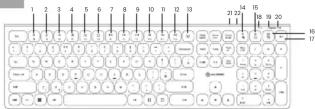
Windows Shortcuts
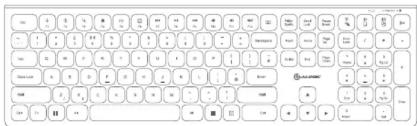
| 1 | Decrease Brightness |
| 2 | Increase Brightness |
| 3 | Windows Search |
| 4 | Home |
| 5 | |
| 6 | Calculator |
| 7 | Previous Track |
| 8 | Play/Pause |
| 5 | Next Track |
| 12 | Mute |
| 18 | Volume Down |
| 32 | Volume Up |
| 13 | Lock/Power Options |
| 34 | Select All | 2.4Ghz Connection |
| 15 | Copy | Bluetooth 1 |
| 36 | Paste | Bluetooth 2 |
Connecting via the Dongle
-
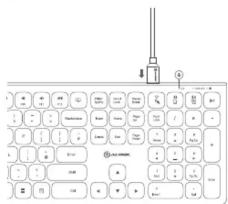
Remove the USB dongie from the underside of your mouse and plug it into your computer
-
Turn on your keyboard.
-
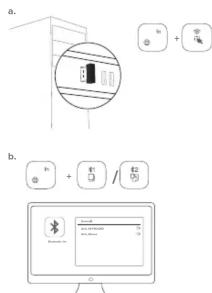
Hold the "FN" and "B" down for a few seconds until the connection light begins
seconds until the connection light begins flashing. Once it stops flashing, your
keyboard is connected.
- If it doesn't stop flashing after 10 seconds, remove the LIFB clone from your device.
Remove the USB dongie from your device and plug it back in. They keyboard should
now connect.
Connecting via Bluetooth
- Press and hold FN + the (#)1 or (#)2 keys
until t
- From your device's Bluetooth menu, pair
with ALG_KEYBOARD.
广力云智慧零售收银系统
(2)
①
13 Battery Indicator
(2) 本章(如:)
Caps Lock Indica
20 Connection Indic
(2)
②
②
1
2
FCC Compliance Statement
This device complies with Part 15 of the FCC Rules. Operation is subject to the following two conditions:
(f) this device may not cause harmful interference, and
(2) this device must accept any interference received, including interference that may cause undesired operation.
NOTE: Changes or modifications not expressly approved by the party responsible for compliance could void the user's authority to operate the
equipment.
Declaración de Cumplimiento FCC
Este dispositivo cumple con la Parte 15 de las reglas de la FCC. El funcionamiento está sujeto a las dos condiciones siguientes:
(f) Este dispositivo puede no causar interferencias perjudiciales y
(2) Este dispositivo debe aceptar cualquier interferencia recibida, incluidas las interferencias que puedan causar un funcionamiento no deseado.
NOTA: Cambios o modificaciones no aprobados expresamente por la parte responsable del cumplimiento pueden invalidar la autoridad del usuario
para operar el equipo.
Responsible Party - U.S. Contact Information
(1)根据《证券法》、《上市公司收购管理办法》等法律法规的规定,公司股票在交易所上市后六个月内不得转让。
ALOGIC USA LLC 27524 Moctor RF
37524 Marstrom DR Newark CA 94560 USA
(1)本报告书(以下简称“本报告”)
EU Declaration of Conformity
Hereby, ALOGIC Corporation declares that this product is in compliance with Directive 2014/53/EU. The full text of the EU declaration of conformity is
available at the following Internet address by clicking on the Compliance Documentation link: www.bioglc.co

ALOGIC
ed in Australia. Manufactured in China
Marke : Alogic
Modell : Echelon ASKBT3WC
Kategorie : Tastatur