
CS6124-11 - Telefon VTECH - Kostenlose Bedienungsanleitung
Finden Sie kostenlos die Bedienungsanleitung des Geräts CS6124-11 VTECH als PDF.


| Produkttyp | Schnurloses Telefon |
| Marke | VTech |
| Modell | CS6124-11 |
| Farbe | Schwarz |
| Abmessungen (Basis) | ca. 120 x 100 x 60 mm |
| Abmessungen (Handgerät) | ca. 170 x 45 x 25 mm |
| Gewicht (Basis) | ca. 100 g |
| Gewicht (Handgerät) | ca. 120 g (mit Akku) |
| Stromversorgung Basis | AC 100-240 V, 50/60 Hz |
| Stromversorgung Handgerät | 2 x AAA NiMH-Akkus |
| Akkukapazität | 400 mAh |
| Gesprächszeit | bis zu 10 Stunden |
| Standby-Zeit | bis zu 7 Tage |
| Reichweite | bis zu 50 m (innen), 300 m (außen) |
| Display | LCD mit Hintergrundbeleuchtung |
| Tastatur | Hinterleuchtet |
| Anrufbeantworter | Ja, bis zu 14 Minuten Aufnahme |
| Anrufer-ID | Ja |
| Freisprechfunktion | Ja |
| Telefonbuch | bis zu 50 Einträge |
| Wahlwiederholung | Ja |
| Stummschaltung | Ja |
| Tastensperre | Ja |
| Hörgerätekompatibel | Ja |
| Entsorgung | Elektrogeräte nicht im Hausmüll |
| Reparatur | Ersatzteile über Kundendienst |
Häufig gestellte Fragen - CS6124-11 VTECH
Benutzerfragen zu CS6124-11 VTECH
0 Frage zu diesem Gerät. Beantworten Sie die, die Sie kennen, oder stellen Sie Ihre eigene.
Eine neue Frage zu diesem Gerät stellen
Laden Sie die Anleitung für Ihr Telefon kostenlos im PDF-Format! Finden Sie Ihr Handbuch CS6124-11 - VTECH und nehmen Sie Ihr elektronisches Gerät wieder in die Hand. Auf dieser Seite sind alle Dokumente veröffentlicht, die für die Verwendung Ihres Geräts notwendig sind. CS6124-11 von der Marke VTECH.
BEDIENUNGSANLEITUNG CS6124-11 VTECH
vtech®
Quick start guide (Canada version) CS6124/CS6124-11/CS6124-2/ CS6124-21/CS6124-31
Introduction
This quick start guide provides you with the basic installation instructions. A limited set of features are described in abbreviated form. Please refer to the online user's manual for complete installation and operation instructions.
Telephone base and charger installation
Install the telephone base and charger as shown below.
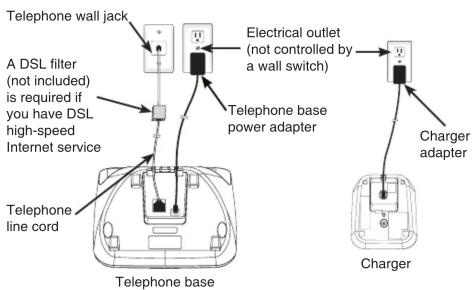
note
Use only the power adapters and batteries supplied with this product.
Battery installation and charging
Install the battery as shown below. Once you have installed the battery, you may be able to make and receive short calls. For best performance, charge the handset battery continuously for at least 16 hours.

Plug the battery connector securely into the socket.

Place the battery with the wires inside the battery compartment.
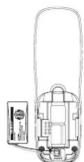

Slide the battery compartment cover towards the center of the handset until it clicks into place.


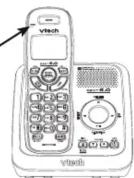
Charge the handset in the telephone base or charger.

CHARGE light remains on when charging.
Enter the handset menu
- Press MENU when the phone is not in use.
- Press ▼CID or ▲ until the screen displays the desired feature menu.
- Press SELECT to enter that menu.
- To return to the previous menu, press CANCEL.
• To return to idle mode, press and hold CANCEL.
Set date and time
- Press MENU when the handset is not in use.
- Scroll to Settings then press SELECT.
- Scroll to Get date/time then press SELECT.
- Use the dialing keys (0-9) to enter the current month, date and year. Then press SELECT.
- Use the dialing keys (0-9) to enter the hour and minute. Then press CID or to select AM or PM.
- Press SELECT to save.
Set number of rings
You can set the answering system to answer an incoming call after 2, 3, 4, 5 or 6 rings; or toll saver. If you choose toll saver, the answering system answers a call after 2 rings when you have new messages, or after 4 rings when you have no new messages.
- Press MENU when the handset is not in use.
- Scroll to Answering sys then press SELECT.
- Scroll to 🧑Ans sys setup then press SELECT.
- Scroll to # of rings then press SELECT
- Press ▼CID or ▲ to choose 6, 5, 4, 3, 2 or Toll saver and then press SELECT to save.
Record your own announcement
You can use the preset announcement to answer calls, or replace it with your own recorded announcement. The announcement can be up to 90 seconds in length.
- Press MENU when the handset is not in use.
- Scroll to Answering Sys then press SELECT twice.
- Press 7 to record.
- After the handset announces, "Record after the tone. Press 5 when you are done," speak towards the handset microphone.
- Press 5 when done.
- Press 2 to play the recorded announcement; or 7 to record again if desired. Press 3 to delete the recorded announcement. Press 5 to stop the playback at any time.
IMPORTANT!
Refer to the online user's manual for a full set of installation and operation instructions. For manual download or customer service, visit our website at www.vtechcanada.com or call 1 (800) 267-7377.
Copyright © 2012 for VTECH TELECOMMUNICATIONS LTD.
All rights reserved. Printed in China.
96-008393-020-100
Marke : VTECH
Modell : CS6124-11
Kategorie : Telefon