
Reference RS 2B - Lautsprecher INFINITY - Kostenlose Bedienungsanleitung
Finden Sie kostenlos die Bedienungsanleitung des Geräts Reference RS 2B INFINITY als PDF.


| Produkttyp | Lautsprecher |
| Modell | Reference RS 2B |
| Marke | Infinity |
| Typ | Regallautsprecher |
| Abmessungen (H x B x T) | ca. 360 × 220 × 280 mm |
| Gewicht | ca. 6,5 kg pro Stück |
| Belastbarkeit (RMS) | 100 W |
| Impedanz | 8 Ohm |
| Frequenzbereich | 45 Hz – 22 kHz |
| Empfindlichkeit | 90 dB (1 W/1 m) |
| Tieftöner | 165 mm Polypropylen |
| Hochtöner | 25 mm Gewebe-Kalotte |
| Gehäuseart | Bassreflex |
| Anschlüsse | Vergoldete Schraubklemmen |
| Stromversorgung | Passiv (kein Netzteil) |
| Farbe | Schwarz (Holzmaserung) |
| Empfohlene Verstärkerleistung | 20 – 150 W |
| Reinigung | Mit weichem, trockenem Tuch abstauben |
| Sicherheitshinweise | Nicht in der Nähe von Wasser oder Wärmequellen aufstellen |
| Lieferumfang | 2 Lautsprecher, Bedienungsanleitung |
Häufig gestellte Fragen - Reference RS 2B INFINITY
Benutzerfragen zu Reference RS 2B INFINITY
0 Frage zu diesem Gerät. Beantworten Sie die, die Sie kennen, oder stellen Sie Ihre eigene.
Eine neue Frage zu diesem Gerät stellen
Laden Sie die Anleitung für Ihr Lautsprecher kostenlos im PDF-Format! Finden Sie Ihr Handbuch Reference RS 2B - INFINITY und nehmen Sie Ihr elektronisches Gerät wieder in die Hand. Auf dieser Seite sind alle Dokumente veröffentlicht, die für die Verwendung Ihres Geräts notwendig sind. Reference RS 2B von der Marke INFINITY.
BEDIENUNGSANLEITUNG Reference RS 2B INFINITY
OWNER'S MANUAL FOR YOUR
INFINITY REFERENCE STANDARD IIb
SPEAKER SYSTEM
UNPACKING
Check your speakers and Low Frequency Equalizer unit carefully. If they have been damaged in transit, contact your Infinity dealer and/or whoever delivered the cartons immediately.
RS IIb speakers are quite heavy, so it is recommended that you obtain the help of a sturdy friend before unpacking. Care should be exercised while unpacking to avoid scratching or otherwise damaging the speakers.
Keep the original cartons and packing material in case of future need. (The cartons fold flat for easy storage.) Protect the packing materials from exposure to moisture.
ASSOCIATED COMPONENTS
Your Reference Standard IIb speaker system will accurately reproduce whatever you put into it, be it fine music or distortion. For this reason the choice of associated components, as well as listening material, is critical.
The system may be used with either one or two stereo amplifiers. The modes of operation are described later, along with recommended minimum power rating per channel. In all cases each amplifier must be able to deliver its full rated power into a four-ohm load at all audio frequencies with absolute stability. The RS IIb is a low-impedance speaker system and damage could result to the speakers and/or amplifiers if the power amps are unable to deliver the required, undistorted power. Your Infinity dealer will be able to assist you in acquiring a suitable amplifier.
With high-powered amplifiers, it is essential that all necessary measures are taken to avoid acoustic feedback (discussed on page 8) and other non-musical input signals. For example, make sure that each power amplifier is TURNED OFF before connecting or disconnecting your speakers or low-level cables, and always turn the amplifier (or preamp) volume control to minimum whenever the cartridge of a turntable is being raised from or lowered onto a record, or whenever a change is being made from one mode to another (ie, TAPE to PHONO), or when changing from station to station.
POSITIONING
(Refer to figure 1 on page 13 for an illustration of a suggested starting position.)
Room acoustics vary almost as widely as personal tastes in music. Since even a slight change in the position of your speakers will affect the sound, it is worthwhile experimenting with different room positions, listening for the best results.
The RS IIb speaker system has a right and a left speaker. To identify the right speaker, look at it from the front with its grille removed. The two EMIT tweeters will be on the LEFT side. (When properly positioned, the EMIT tweeters will be towards the center of the room.) It is essential that the right and left speakers are properly located on their respective sides of the room.
For the best stereo image, the tweeters should be two to three meters (seven to ten feet) apart and not less than the same distance from the primary listening area.
To obtain the low coloration and superb stereo imaging of which your RS IIb speakers are capable, it is vital that they are positioned at least 2/3 to one meter (two to three feet) from walls and corners. If the sound seems bass-heavy, move the speakers farther away from the walls. If the bass seems too light, use the controls of the Low Frequency Equalizer unit to balance the sound, since bringing the speakers any closer to the walls may adversely affect the midrange balance.
Because of the driver configuration in the RS IIb, the speakers tend to be front-heavy. As a result they may lean forward a bit when placed on plush carpeting or similar surfaces. If this should occur, place a thin shim under the front edge of each speaker to level it.
CONNECTING THE SYSTEM
All connections must be made with high-quality audio connector cables only.
Connections from your amplifier(s) to the speakers should be made with very heavy-gauge (#14 or better) two-conductor stranded wire with a polarity coding (typically, a ridge or stripe along the insulation of one of the conductors). It is vital that the speakers are connected "in-phase". Use the polarity coding to ascertain that the "+" output of the power amplifier connects to the "+" (red) input terminal of the speaker, and the "-" output ("ground") connects to the "-" (black) input terminal.
Supplied with your RS IIb speaker system are eight double-banana-type connectors, four black and four either red or white. The black plugs are to be connected to the ends of your speaker cables and inserted into the input terminals of the speakers. (To connect them to your cables, loosen the two set-screws inside the plugs, and insert the stripped and tinned 'ends of the speakers' cables into their appropriate holes - the "ground" wire goes into the side of the plug with the small flag labeled "GND". Tighten the set-screws firmly to secure the wires.) The remaining plugs (either red or white) are shorting bars which are used only when operating the speakers in the "single-amp mode" as described on page 4.
Before turning your power amps on, check carefully that no stray or frayed strands of wire are shorting the "+" and "-" terminals at either the amplifier or the speakers.
"SINGLE-AMP" OR "BI-AMP"?
The RS IIb speakers may be used in the "single-amp" mode (where one stereo amplifier is used to drive the full range of the speakers) or the "bi-amped" mode (where one stereo amplifier is used to drive the woofers while another, separate stereo amplifier is used to drive the midranges and tweeters). If a receiver or integrated amplifier is to be used to power the system, it must have a "tape monitor" (or "preamp out/amp in") circuit (to accommodate the RS IIb Low Frequency Equalizer unit). If in doubt as to the compatability of your audio components, consult your Infinity dealer.
Single-Amp Mode:
(Your power amplifier should be able to deliver between 75 and 400 watts-per-channel into 4 ohms for this application.)
In this mode of operation, two "shorting bars" (the white or red plugs supplied with the speakers) are used to tie the woofer inputs to the midranges/tweeter inputs. (Refer to figure 2 on page 14.) When inserted "vertically", the shorting bars connect the "+" terminals of the woofers to the "+" terminals of the midranges and tweeters, as well as "-" to "-" . DO NOT insert the shorting bars between the "+" and "-" terminals of the woofer or midrange/tweeter inputs!
CAUTION: NEVER CONNECT THE OUTPUT OF YOUR AMPLIFIER "VERTICALLY" INTO THE INPUT TERMINALS AS THIS WILL SHORT-CIRCUIT THE AMP AND MAY CAUSE SERIOUS DAMAGE.
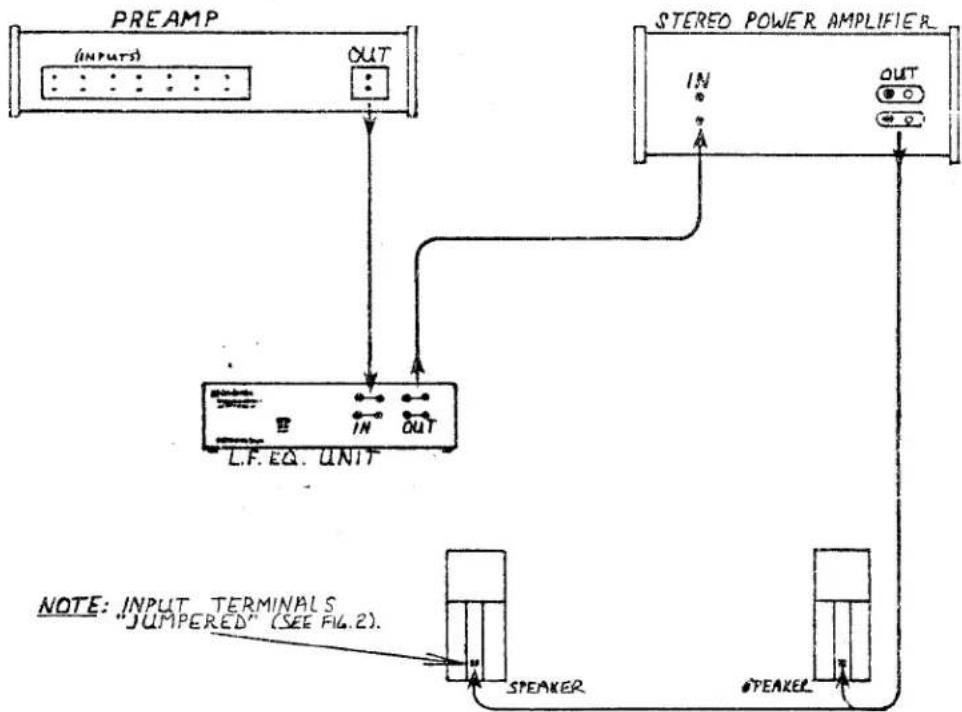
IF YOUR PREAMP IS A SEPARATE COMPONENT from your power amplifier, the Low Frequency Equalizer unit will be inserted between the output of the preamp and the input of the power amp, as illustrated in figure 3 on page 15.
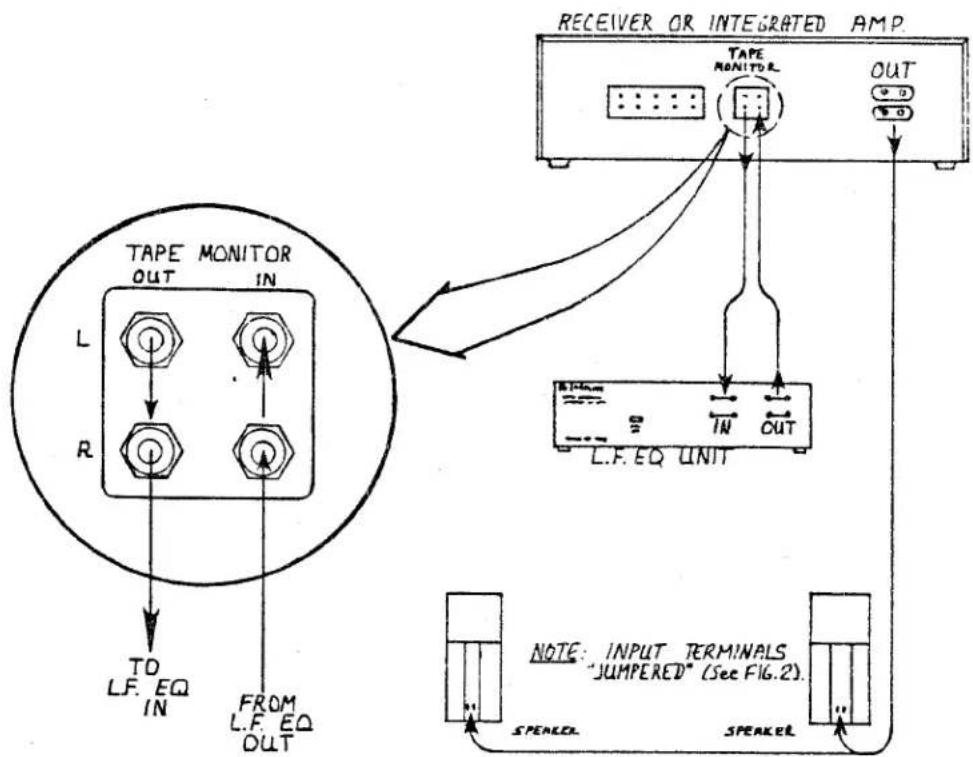
IF A RECEIVER OR INTEGRATED AMPLIFIER is to be used to power your system, the Equalizer unit will connect into its "tape monitor" (or "preamp out/amp in") circuit as illustrated in figure 4 on page 16.
Bi-Amped Mode:
(The amplifier used to drive the woofers should be able to deliver between 75 and 400 watts-per-channel into 4 ohms. The amp used to drive the midranges and tweeters should be able to deliver between 75 and 300 watts-per-channel.)
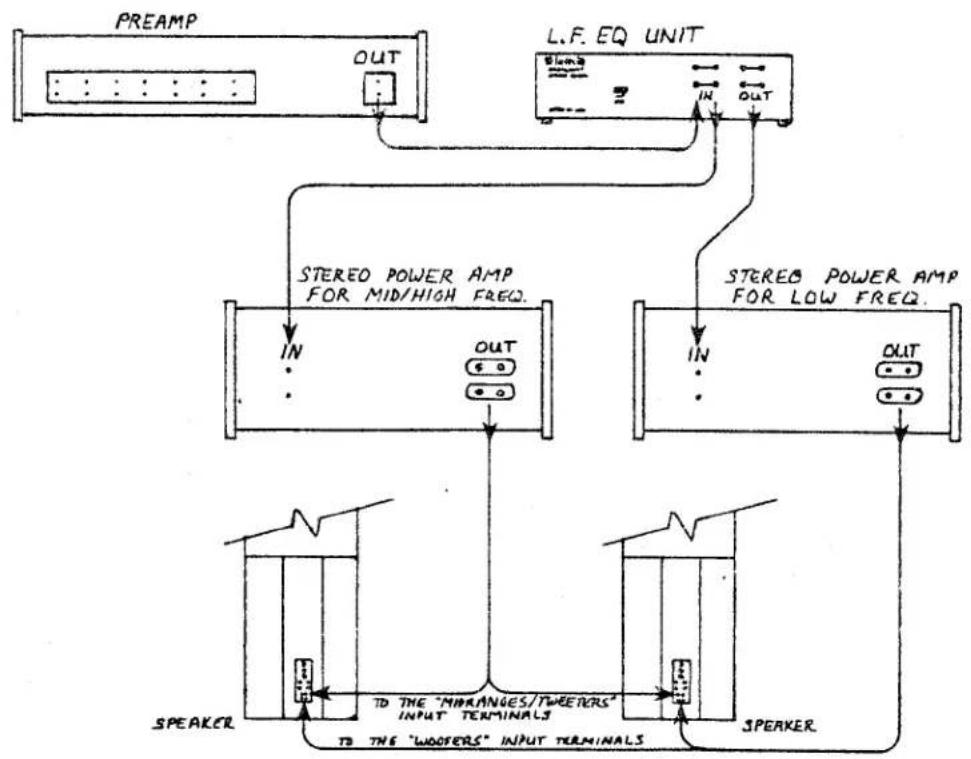
In this mode of operation, the shorting bars are not used: the upper set of speaker input terminals are for connecting the midrange/high-frequency power amp to the midranges and tweeters, and the lower set of input terminals are for connecting the low-frequency amp to the woofers.
Refer to figure 5 on page 17 for a connection diagram. Note that the Low Frequency Equalizer unit has two sets of input jacks and two sets of output jacks. The two left-channel input jacks are internally bridged, as are the two right-channel input jacks. This allows the output of the preamp to be fed into both the Equalizer unit and your midrange/high-frequency amplifier. (If your preamp has two sets of outputs, connect one set to the Equalizer unit and the other set to the inputs of your high-frequency power amp.) The output of the Equalizer unit feeds a modified bass-signal to your low-frequency power amplifier. DO NOT connect the output of the Equalizer unit to the inputs of the midrange/high-frequency power amplifier!
THE LOW FREQUENCY EQUALIZER UNIT
(Refer to figure 6 on page 18 for an illustration.)
The RS IIb Low Frequency Equalizer unit connects into the audio signal path between the output of your preamp and the input of your power amplifier. (Refer to "Connecting the System" on pages 3 and 4.) The Equalizer unit is to be used no matter which operating mode (single-amp or bi-amp) you choose.
The "BASS GAIN" control of the Equalizer unit varies the amount of bass equalization (or gain) below 100 Hz.
The "CONTOUR" control varies the overall level below 1 kHz.
The suggested starting position for the controls is at the "12 o'clock" (straight-up) position.
After connecting the Equalizer unit into your system, insert the small plug of the A.C. power adapter (included with the unit) into the "POWER" jack on the unit's rear panel. Push the plug into the jack firmly until it is fully seated. Plug the adapter's two-prong A.C. plug into a suitable source of A.C. line voltage.
NOTE: The adapter MUST be the proper voltage or the Equalizer will not operate properly and may suffer damage.
The Equalizer has no "ON/OFF" switch, but since it draws a minimal amount of current it may be left on (plugged in) while the rest of your system is off. If you choose to plug the unit's power adapter into a "switched" outlet, be sure to turn your volume control to zero (minimum) before turning the power on or off. (Failure to follow this recommendation will result in an unpleasant, "thumping" noise.)
THE PASSIVE CROSSOVER
The passive crossover controls are located on the rear baffle of the speakers. Refer to figure 7 on page 19 for an illustration.
The "ULTRA HF (high-frequency) LEVEL" control varies the output level of the uppermost front tweeter, in the frequency range of 8.5 kHz and higher.
The "HF (high-frequency) LEVEL" control varies the output level of the lower front tweeter, in the frequency range of 4.5 kHz to 10 kHz.
The "MID (midrange) LEVEL" control varies the output level of the center midrange driver, in the frequency range of 1.1 kHz to 4.5 kHz.
The suggested starting position for the controls on the passive crossover is at the "12 o'clock" (straight-up) position.
The four fuses help provide protection against damage due to overload conditions. The driver to which each fuse corresponds is indicated next to the fuse, along with its rating. Should any of the fuses blow (indicated by a loss of output from the corresponding driver), replace ONLY with the same size and type fuse. USING LARGER OR SLOWER FUSES THAN THOSE SPECIFIED WILL VOID YOUR WARRANTY.
The type and amount of furnishings in your listening room will have a definite effect on the tonal balance perceived by the ear, especially in the middle and upper-frequencies (vocals, symbols, etc.). After determining the most suitable location for your speakers (keeping in mind that your goal is acoustic realism as opposed to cosmetic appearances alone), use the two tweeter level controls to compensate for sound which seems "dull" or "bright". Adjusting the midrange control will affect how "near" or "distant" the music appears.
Generally speaking, rooms with heavily upholstered furniture and thick draperies will require slightly more output from the tweeters than lightly furnished, "reflective" rooms. Adjust the crossover controls in small increments, listening to a variety of your favorite material, until you establish the settings that are most suitable for you. Normally, once the controls are set, they are usually left alone until some changes are made in the listening room which affect its acoustics.
A WORD ABOUT ABSOLUTE PHASE
(Maintaining absolute phase is an essential factor in the proper performance of your Reference Standard IIb speaker system. For this reason, particular attention should be paid to the section which follows.)
If all amplifiers were "non-inverting" (that is, if their outputs were in-phase with their inputs), then maintaining absolute phase would simply involve observing and following the polarity coding of the speakers' connecting cables. However, since some amplifiers are "inverting" (their output signals are 180 degrees out-of-phase with their inputs), some changes in the speakers' hookups may be required in order to accommodate amplifiers which are "inverting". Consult the owner's manual (or the manufacturer) of your amplifier(s), along with your preamp (if applicable), to determine if the equipment you are using is inverting or non-inverting.
If you are going to operate your RS IIb speakers in the single-amp mode, and your power amplifier is inverting, reverse the "+" and the "-" speaker leads at either the output terminals of the amp or the speaker's input terminals.
If you are going to operate the speakers in the bi-amped mode, and your low-frequency amplifier is inverting, reverse the "+" and the "-" speaker leads at either the outputs of the amp or the woofer input terminals. If your midrange/high-frequency power amplifier is inverting, reverse the "+" and the "-" speaker leads at either the outputs of the amp or the midrange/tweeter input terminals.
If your only inverting component is your preamp, all of the speaker leads would have to be reversed at either the outputs of your amplifier or the speaker inputs.
(BE SURE NOT TO REVERSE THE LEFT AND RIGHT CHANNELS.)
FEEDBACK
If, after taking care in positioning your speakers, you find the bass response "boomy" and lacking "tightness", or you hear a rumble when using your turntable, or you notice excessive movement of the woofer cones, the cause may be acoustic feedback. This means that the vibrations radiating from your woofers are being picked up by your turntable's cartridge. Because of the extended low frequency response of the RS IIb, isolating the turntable from these vibrations calls for considerable care.
In general, make sure that the turntable is placed on a heavy, solid support, as far away from the speakers as possible. Some combinations of turntable, tone arm and cartridge are more apt to encounter difficulties with feedback than others. If you continue to experience difficulties after some experimenting, ask your Infinity dealer for assistance.
HUM
If you should experience an audible 50/60 cycle hum in your speakers, first check all cables and connections (especially your turntable's ground wire), and exchange the cables, one at a time, with ones that you are certain are functioning properly. If all of the cables and connections are proven to be okay, invert the two-prong A.C. plugs in their recepticles. If this does not solve the problem, you may try using a two-prong adapter (commonly called a cheater or a floater) on the A.C. power cords of your components that have three-prong plugs, one at a time, until the hum is eliminated. If floating is necessary, always keep AT LEAST ONE component grounded.
If the hum persists, and if none of the above suggestions seem to help, consult your Infinity dealer.
TROUBLESHOOTING
If the sound from your Reference Standard IIb speaker system seems distorted, or if part of the system seems to be damaged or inoperative, you may be able to find the source of the problem and correct it. Try, following closely the numbered steps which follow.
Then, if you have been unsuccessful in locating the specific source of the trouble, or if you have been unable to correct it, start to make these inquiries in a-b-c order:
A: Consult the Infinity dealer from whom you purchased the speakers. Infinity dealers are audio experts and can help solve most problems. But, if the dealer cannot help...
B: Get the name and address of the authorized Infinity service facility nearest you by calling our factory at (818) 709-9400 or (if outside of the United States) by writing or calling the national distributor of Infinity products. You may be instructed to take or send the unsatisfactory part or speaker to a service facility, or the Infinity factory, for service under terms of the warranty. (A copy of the warranty statement is included with the speaker system, or may be obtained upon request from Infinity Systems, Inc.).
NOTE: UNDER NO CONDITIONS ARE YOU TO SHIP ANY PRODUCTS FOR SERVICE WITHOUT PRIOR APPROVAL (A "RETURN AUTHORIZATION"), AND DO NOT MAKE ANY SHIPMENTS WITHOUT ENCLOSING A COPY OF YOUR ORIGINAL BILL OF SALE.
If there is no authorized service facility near you, or in the highly unlikely case that the service facility cannot solve the problem...
C: Contact the customer service department at Infinity Systems (9409 Owensmouth Ave., Chatsworth, California, 91311, U.S.A.; (818) 709-9400). Describe the difficulty as specifically as possible. The service department will then advise you as to what action you should take.
If the dealer, service facility, or factory service department instructs you to remove a driver for service or replacement, before you disconnect any of its wires you should use a piece of tape to "flag" the wire leading to the "+" (red) terminal. (This will prove valuable when the time comes to reconnect the driver.) If necessary, also note which wires connect to each driver, and be sure not to rewire the system incorrectly when reconnecting it.
NOTE BEFORE REMOVING DRIVERS:
Each tweeter is held in place with two black hexagonal-head screws, each midrange driver with four, each woofer with four. DO NOT loosen or remove any screws of any other type.
(TROUBLESHOOTING, con't.)
Before you consult your Infinity dealer, service facility or factory service department, these are the tests that YOU can perform to help locate and solve a problem in your speakers.
If the tweeters appear inoperative...
Step 1: Check the appropriate fuse(s) and replace if necessary using ONLY the same size and type of fuse. If the problem is not with the fuses, be sure that the system is connected properly and go on to...
Step 2: Look through the slots of the drivers at the etched voice-coils (thin silver lines) and diaphragms (thin plastic films). Look for broken or burnt lines, punctured or torn plastic films, lines that have come loose from the films or any other apparent damage. If you find any damage at all, call your Infinity dealer for instructions. If you cannot find any damage, carefully remove the tweeter and check to see that the wires are properly connected. Tighten and/or reconnect the wires if necessary, and if the problem persists go on to...
Step 3: Remove the suspected tweeter(s) and connect it to a low-volume source of music (prefereably one which is very light in the bass region). If the tweeter does not play, it is defective and must be repaired or replaced. If the tweeter plays, the problem is likely to be in the passive crossover. Call your Infinity dealer and describe the problem.
If the center midrange driver appears inoperative...
Step 1: Check the "UPPER MIDRANGE" fuse and replace if necessary using ONLY the same size and type of fuse. If the problem is not with the fuse, be sure that the system is connect properly and go on to...
Step 2: Look through the slots of the driver at the etched voice-coil (thin silver lines) and diaphragm (thin plastic film). Look for broken or burnt lines, punctured or torn plastic film, lines that have come loose from the film or any other apparent damage. If you find any damage at all, call your Infinity dealer for instructions. If you cannot find any damage, look behind the speaker at the wiring harness and check to see that the wires are properly connected. Tighten and/or reconnect the wires if necessary, and if the problem persists go on to...
Step 3: Remove the wires from the midrange driver and connect the driver to a low-volume source of music (prefereably one which is very light in the bass region). If the driver does not play, it is defective and must be repaired or replaced. If the driver plays, the problem is likely to be in the passive crossover; call your Infinity dealer and describe the problem.
(TROUBLESHOOTING, con't.)
If the top and bottom midrange drivers appear inoperative...
NOTE: These two midrange drivers are in a series circuit. Therefore if either of these drivers is inoperative or disconnected, neither will function.
Step 1: Look through the slots of the drivers at the etched voice-coils (thin silver lines) and diaphragms (thin plastic films). Look for broken or burnt lines, punctured or torn plastic films, lines that have come loose from the films or any other apparent damage. If you find any damage at all, call your Infinity dealer for instructions. If you cannot find any damage, look behind the speaker at the wiring harness and check to see that the wires are properly connected. Tighten and/or reconnect the wires if necessary, and if the problem persists go on to...
Step 2: Remove the wires from the affected drivers and connect them, one at a time, to a low-volume source of music (prefereably one which is very light in the bass region). If either one of the drivers does not play, it is defective and must be repaired or replaced. If both drivers play, the problem is likely to be in the passive crossover; call your Infinity dealer and describe the problem.
If the woofers appear inoperative...
NOTE: The two woofers are in a series circuit. Therefore if either of the woofers is inoperative or disconnected, neither will function.
Step 1: Check all of the connections and cables in the low-frequency equalization circuit. Replace defective cables, and repair connections if necessary. If the problem persists, go on to...
Step 2: Remove the woofers and check to see that the wires are securely connected. Tighten and/or reconnect the wires if necessary. If the problem persists, go on to...
Step 3: Disconnect the wires from the woofer terminals, and connect each woofer to a source of low-volume music (preferably one that is heavy in bass notes) and listen to the woofer. If the woofer does not play, or if it makes a rubbing, scratching or buzzing noise, it is defective. If both of the woofers operate properly, the problem is probably in the passive crossover; consult your Infinity dealer for instructions.
If one entire speaker appears inoperative...
Reverse the left and right speaker leads at the output terminals of your amplifier and determine if the problem has moved to the other speaker or remains in the same one. If the problem moves to the other speaker, there is a problem in your audio equipment and/or connections. If the problem remains in the same speaker after switching the channels, that speaker may have a problem in its passive crossover. Consult your Infinity dealer for instructions.
(TROUBLESHOOTING, con't.)
If the Low Frequency Equalizer unit appears inoperative...
DO NOT ATTEMPT ANY REPAIRS! If the indicator light on the unit's front panel does not illuminate when the unit is on, or if there is no output from the unit when it is plugged in, use a voltmeter to verify that the A.C. adapter is producing between 13 and 14 volts A.C. If the adapter is not functioning properly, contact your Infinity dealer for instructions. If the adapter works properly, the Equalizer unit may be defective; consult your Infinity dealer for instructions.
Infinity strives always to update and improve existing products, as well as create new ones. Therefore, the specifications and construction details of this Infinity publication and others are subject to change without notice.
(p/n .930...2030B)
FIGURE 1: Suggested Starting Position
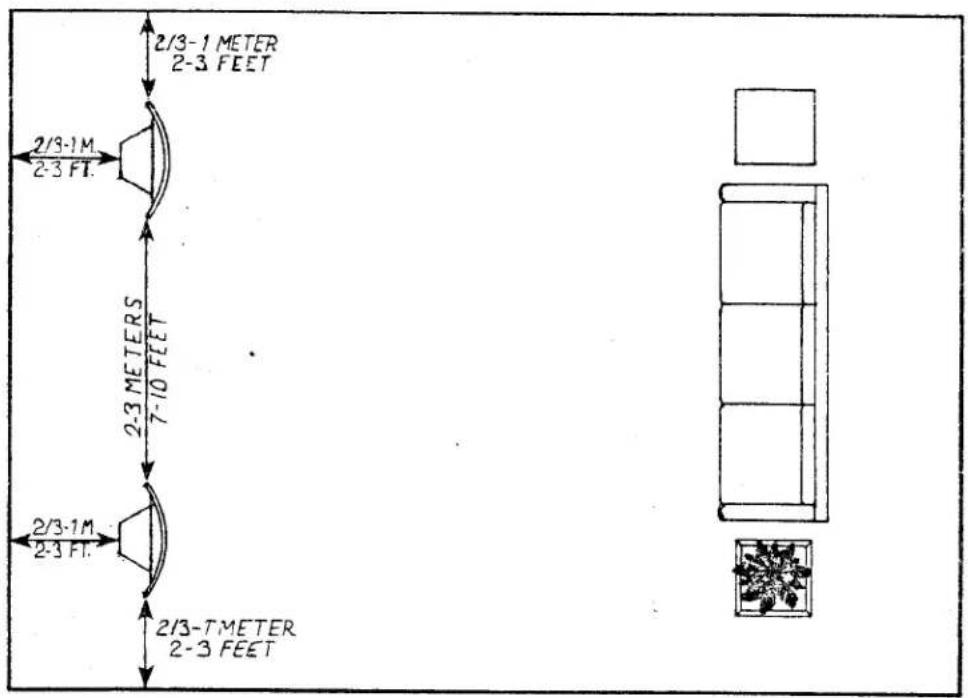
The above diagram is to be used only as a suggested starting point in positioning your speakers. The actual positioning will depend largely upon the type and amount of furnishings in the room, as well as personal tastes. It is worthwhile experimenting from this point to determine the exact position which is most suitable for your application.
(See text on page 3 for further information.)
FIGURE 2: Using the Shorting Bars (Single-Amp Mode ONLY)
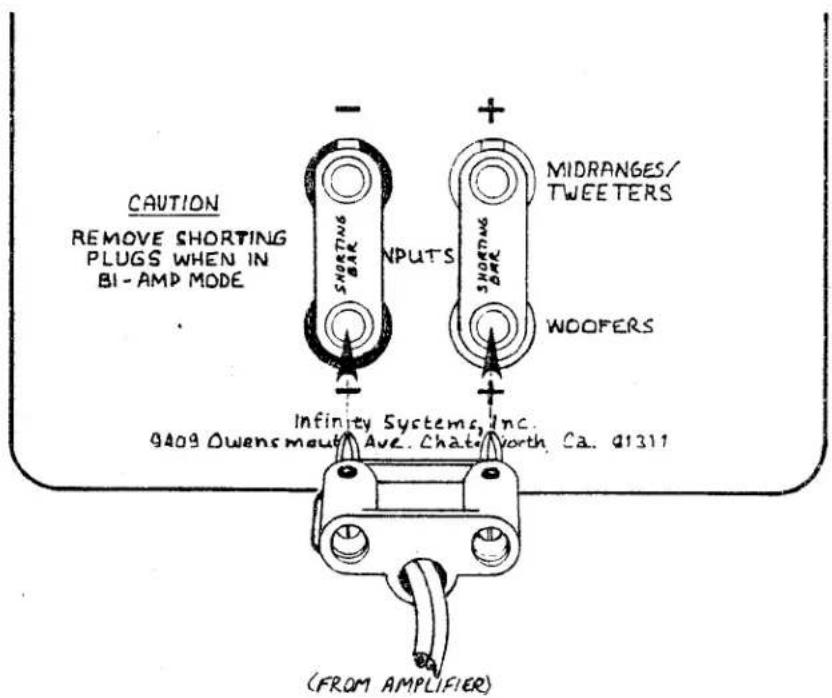
When one stereo power amplifier is to be used to drive the full range of the speakers it is necessary to insert the shorting bars (supplied) between the two "+" terminals and the two "-" terminals. This ties the woofer circuit to the midrange/tweeter circuit, enabling the system to be operated in the "Single-Amp" mode.
DO NOT INSERT THE SHORTING BARS BETWEEN THE "+" AND "-" TERMINALS as this may cause serious damage to your audio components!
Caution: Never connect the outputs of your amplifier "vertically" (between the two "+" or two "-" terminals) as this will short-circuit the amp and may cause serious damage.
(See text on page 4 for further information.)
FIGURE 3: Connecting the System, Single-Amp Mode
(Separate Components)
flowchart
graph TD
    A["PREAMP (INPUTS)"] --> B["OUT"]
    C["STEREO POWER AMPLIFIER"] --> D["IN"]
    C --> E["OUT"]
    F["L.F.EQ. UNIT"] --> G["IN"]
    F --> H["OUT"]
    I["NOTE: INPUT TERMINALS "JUMPERED" (SEE FIG.2)."] --> J["STEAKER"]
    K["STEAKER"] --> L["STEAKEL"]
If your preamp is a separate component from your power amplifier, the RS IIb Low Frequency Equalizer unit will be inserted between the output of the preamp and the input of the power amp, as illustrated above.
(See text on page 4 for further information.)
FIGURE 4: Connecting the System, Single-Amp Mode
(Receiver/Integrated Amplifier)
flowchart
graph TD
    A["RECEIVER OR INTEGRATED AMP"] --> B["TAPE MONITOR L"]
    B --> C["L F. EQ UNIT"]
    C --> D["SPEAKER"]
    D --> E["FROM L.F. EQ OUT"]
    E --> F["TAPE MONITOR OUT"]
    F --> G["L F. EQ IN"]
    G --> H["TO"]
    style A fill:#f9f,stroke:#333
    style B fill:#ccf,stroke:#333
    style C fill:#cfc,stroke:#333
    style D fill:#fcc,stroke:#333
    style E fill:#cff,stroke:#333
    style F fill:#ffc,stroke:#333
    style G fill:#cfc,stroke:#333
    style H fill:#fcc,stroke:#333
If a receiver or integrated amplifier is to be used to power your system, the RS IIb Low Frequency Equalizer unit will connect into its "tape monitor" (or "preamp out/amp in") circuit as illustrated above.
(See text on page 4 for further information.)
FIGURE 5: Connecting the System, Bi-Amped Mode
flowchart
graph TD
    A["PREAMP"] --> B["OUT"]
    C["L.F. EQ UNIT"] --> D["IN"]
    D --> E["OUT"]
    F["SPEAKER"] --> G["TO THE "MIRANGES/TWEERS" INPUT TERMINALS"]
    F --> H["TO THE "WOOFERS" INPUT TERMINALS"]
    I["STEREO POWER AMP FOR MID/HIGH FREQ."] --> J["IN"]
    K["STEREO POWER AMP FOR LOW FREQ."] --> L["IN"]
    M["SPEAKER"] --> N["TO THE "WOOFERS" INPUT TERMINALS"]
    O["SPEAKER"] --> P["OUT"]
Referring to the above illustration, note that the Low Frequency Equalizer unit has two sets of input jacks and two sets of output jacks. The two left-channel input jacks are internally bridged, as are the two right-channel input jacks. This allows the output of the preamp to be fed into both the Equalizer unit and your midrange/high-frequency power amplifier. (If your preamp has two sets of outputs, you may connect one set to the Equalizer unit and the other set to the inputs of your high-frequency power amp.) The output of the Equalizer unit feeds a modified bass-signal to your low-frequency power amplifier. DO NOT connect the output of the Equalizer unit to the inputs of the midrange/high-frequency power amplifier!
(In this mode of operation, the shorting bars are not used: the upper set of speaker input terminals are for connecting the midrange/high-frequency power amp to the midranges and tweeters, and the lower set of input terminals are for connecting the low-frequency amp to the woofers.)
(See text on page 4 for further information.)
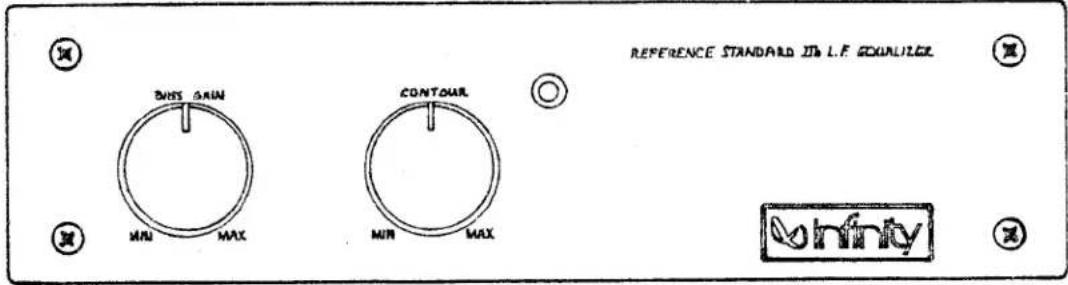
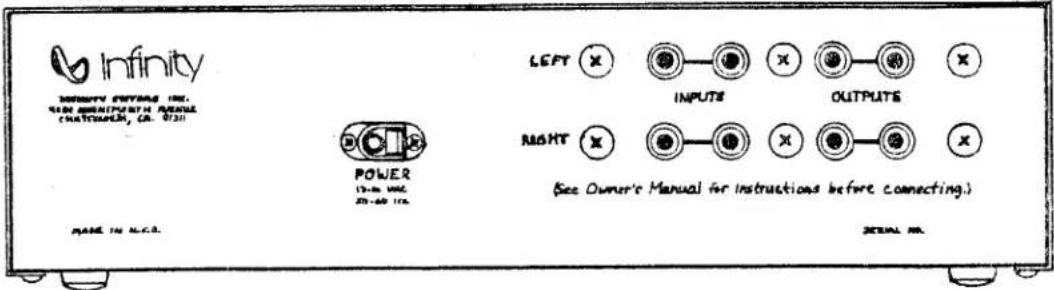
FIGURE 6: The Low Frequency Equalizer Unit
FRONT PANEL.
REAR PANEL:
The Low Frequency Equalizer unit connects into the audio signal path between the output of your preamp and the input of your power amplifier. (Refer to "Connecting the System" on pages 3 and 4.) The Equalizer unit MUST BE USED whether the speakers are being operated in the single-amp or bi-amped mode.
FRONT PANEL:
"BASS GAIN": Varies amount of gain below 100 Hz.
"CONTOUR": Varies overall level below 1 kHz.
(The suggested starting position for these controls is at the "12 o'clock" or straight-up position.)
POWER INDICATOR LED (not labeled) illuminates when the unit is on.
REAR PANEL:
"POWER": Plug the A.C. adapter (supplied) into this jack
"INPUTS" and "OUTPUTS": (The applications of these terminals are described in detail in the section entitled "Connecting the System, pages 3 and 4.)
(See text on page 4 for further information.)
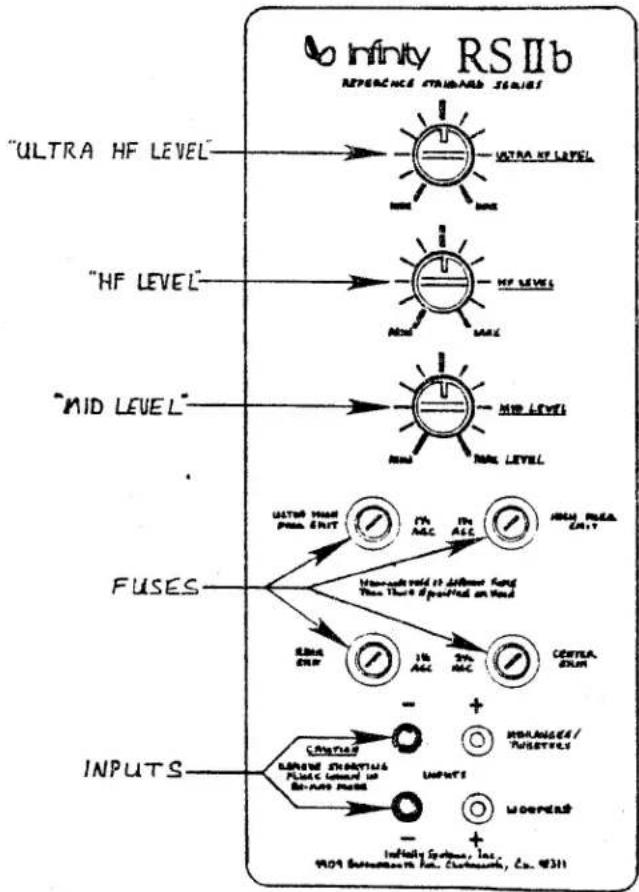
FIGURE 7: The Passive Crossover
flowchart
graph TD
    A["RF"] --> B["ULTRA HF LEVEL"]
    B --> C["HF LEVEL"]
    C --> D["MID LEVEL"]
    D --> E["FUSES"]
    E --> F["INPUTS"]
    F --> G["INTUITY SYSTEMS, INC., 9104 Substation in: Carcinette, Co. 4311"]

    subgraph "ULTRA HF LEVEL"
        H["Sunlight"] --> I["Ultra HF LEVEL"]
        J["Light"] --> K["High HF LEVEL"]
        L["Light"] --> M["Mid HF LEVEL"]
        N["Light"] --> O["Mid Level"]
    end

    subgraph "HF LEVEL"
        P["Light"] --> Q["High HF LEVEL"]
        R["Light"] --> S["Mid HF LEVEL"]
        T["Light"] --> U["Mid Level"]
    end

    subgraph "MID LEVEL"
        V["Light"] --> W["Mid Level"]
        X["Light"] --> Y["Mid Level"]
    end

    subgraph FUSES
        Z["Waveform"] --> AA["Microammaloid to defuser band Then There is specified on Wave"]
        AB["Signal"] --> AC["1Hz ACC"]
        AD["2Hz ACC"] --> AE["3Hz ACC"]
        AF["3Hz ACC"] --> AG["Centra, EXIM"]
    end

    subgraph INPUTS
        AH["Inputs"] --> AI["Ground"]
        AJ["Inputs"] --> AK["Ground"]
        AL["Inputs"] --> AM["Ground"]
        AN["Inputs"] --> AO["Ground"]
        AP["Inputs"] --> AQ["Ground"]
        AR["Inputs"] --> AS["Ground"]
    end
The "ULTRA HF (high-frequency) LEVEL" control varies the output level of the uppermost front tweeter, in the frequency range of 8.5 kHz and higher.
The "HF (high-frequency) LEVEL" control varies the output level of the lower front tweeter, in the frequency range of 4.5 kHz to 10 kHz.
The "MID (midrange) LEVEL" control varies the output level of the center midrange driver, in the frequency range of 1.1 kHz to 4.5 kHz.
The suggested starting position for the controls on the passive crossover is at the "12 o'clock" (straight-up) position.
The four fuses help provide protection against damage due to overload conditions. The driver to which each fuse corresponds is indicated next to the fuse, along with its rating. Should any of the fuses blow (indicated by a loss of output from the corresponding driver), replace ONLY with the same size and type fuse. USING LARGER OR SLOWER FUSES THAN THOSE SPECIFIED WILL VOID YOUR WARRANTY.
(See text on page 6 for further information.)
LIMITED WARRANTY
Who is protected by the warranty?
Your Infinity warranty protects the original retail purchaser and all subsequent owners for a period of five (5) years (parts and labor) from any failure as a result of an original manufacturing defect so long as: (1) your Infinity loudspeakers were purchased within the fifty United States or by military personnel from an authorized military outlet and (2) the original dated bill of sale is presented whenever service is required during the warranty period. This warranty does not apply to products purchased elsewhere; other purchasers should contact their local Infinity distributor for warranty information.
What does the Infinity warranty cover?
Except as specified below, this warranty covers all defects in original materials and workmanship. The following are not covered: Damage caused by accident, misuse, abuse, neglect, product modification; damage occurring during shipment; damage caused by failure to follow instructions in the owners' manual, including failure to perform recommended periodic or routine maintenance; damage resulting from repairs by someone not authorized by Infinity; claims based upon any misrepresentations by the seller; and any Infinity product on which the serial number has been altered, defaced or removed.
Who pays for what?
During the period of this warranty, subject to the above conditions, Infinity will pay all of the labor and material expenses to repair a warrantable defect.
How can warranty service be obtained?
In the event that your Infinity loudspeaker(s) should require service, you should first contact the Infinity dealer from whom the product was purchased or, if this is not practical, contact Infinity directly (ATTN: Customer Service) at 9409 Owensmouth Avenue, Chatsworth, CA 91311 (818) 709-9400. We may direct you to an authorized service center for Infinity products or ask you to send them to us for repair. In either case you will have to present your original dated bill of sale to establish warranty coverage. Do not send your speaker(s) to us without prior written authorization! You are responsible for transporting your product for repair and for payment of any and all shipping charges; however, Infinity will pay the return shipping charges if the repairs are covered by this warranty. If you experience difficulty in transporting your speaker(s) or need adequate packing materials, please contact us and we may be able to suggest alternative procedures or provide adequate packing.
LIMITATION OF IMPLIED WARRANTIES: All implied warranties, including fitness for a particular purpose and merchantability are limited in duration to the length of this warranty.
LIMITATION OF INCIDENTAL OR CONSEQUENTIAL DAMAGES: Infinity is not responsible for any incidental or consequential damages of any kind. Our liability is limited to the repair or replacement, at our option, of a defective product. Some states do not allow limitations on how long an implied warranty lasts and/or do not allow the exclusion of incidental or consequential damages so the above limitations or exclusions may not apply to you. This warranty gives you specific legal rights and you may also have other rights which vary from state to state.
For your records, please copy the serial numbers from your RS IIb speaker system's components here:
Speakers: ____, / ____
Low Frequency E.Q.:
Date of Purchase: ____
Marke : INFINITY
Modell : Reference RS 2B
Kategorie : Lautsprecher