
SP-11N - Kopfhörer TOA - Kostenlose Bedienungsanleitung
Finden Sie kostenlos die Bedienungsanleitung des Geräts SP-11N TOA als PDF.


| Produkttyp | VoIP-Telefon-Paging-Modul |
| Marke | TOA |
| Modell | SP-11N |
| Abmessungen (B x H x T) | 35 mm x 78 mm x 91 mm |
| Gewicht | 86 g |
| Stromversorgung | Netzteil (AC-Adapter im Lieferumfang) |
| Netzwerkanschluss | RJ-45, 10BASE-T/100BASE-TX, Auto-Negotiation |
| Netzwerkprotokoll | SIP (RFC3261), TCP, UDP, DHCP, RTP, SNMP, ICMP, HTTP |
| Audioformat | G.711 μ-law / a-law |
| Steuerausgang | 5 Kanäle, Open-Collector, max. 27 V DC, 50 mA |
| VOX/MUTE-Funktion | Sprachgesteuerte Ein-/Ausgabe, einstellbare Empfindlichkeit |
| Auto-Antwort | Ja |
| Betriebstemperatur | 0 °C bis 40 °C |
| Gehäusematerial | Aluminium, gebürstet |
| Lieferumfang | SP-11N Modul, Bedienungsanleitung, AC-Adapter |
| Reinigung | Mit einem trockenen, fusselfreien Tuch abwischen. Keine Flüssigkeiten verwenden. |
| Sicherheitshinweise | Vor Reinigung Netzstecker ziehen. Gerät nur in trockener Umgebung betreiben. |
| Reparatur | Das Gerät enthält keine vom Benutzer zu wartenden Teile. Reparaturen nur durch autorisiertes Fachpersonal. |
Häufig gestellte Fragen - SP-11N TOA
Benutzerfragen zu SP-11N TOA
0 Frage zu diesem Gerät. Beantworten Sie die, die Sie kennen, oder stellen Sie Ihre eigene.
Eine neue Frage zu diesem Gerät stellen
Laden Sie die Anleitung für Ihr Kopfhörer kostenlos im PDF-Format! Finden Sie Ihr Handbuch SP-11N - TOA und nehmen Sie Ihr elektronisches Gerät wieder in die Hand. Auf dieser Seite sind alle Dokumente veröffentlicht, die für die Verwendung Ihres Geräts notwendig sind. SP-11N von der Marke TOA.
BEDIENUNGSANLEITUNG SP-11N TOA
Please carefully follow the instructions in this manual to obtain the optimum results and to ensure long trouble-free use of your equipment.
1. GENERAL DESCRIPTION
The SP-11N is a VoIP phone paging module supported SIP (Session Initiation Protocol) with Auto-answer function. It can be connected with IP network and directly registered as one SIP phone station on various management software of SIP server. It also has VOX and mute functions designed for use with TOA's 9000M2, 900, 700 and BG-2000 series amplifiers.
2. NOMENCLATURE AND FUNCTIONS

- Network Connection terminal Can be connected with to a network of 10BASE-T/100BASE-TX in auto-sensing.
- ACT indicator (yellow) Lights while transmitting or receiving the data.
- LINK indicator (green) Lights when connected with a network.
- STATUS indicator (green) Lights when working in normal operation.
- ERROR indicator (red) Flashes during initialization or lights when an error happens.
-
VOX / MUTE Sensitivity Control Turn CCW to increase the dynamic sensitivity for VOX (Voice Operated Switch) or MUTE send, and CW to reduce it. (Factory preset: Fully CCW)
-
Control Output Terminal
5 ports of open collector output (Withstand Voltage: 27V DC, Control current: 50mA Max.). Can be controlled via dial data from SIP phone during the paging.
- AC adaptor Terminal
Connect the supplied AC adapter.

CAUTION
Never shut down the power supply nor remove this AC adaptor's connector when the amplifier this module is inserted into is ready to output audio, as doing so, it may cause a noise, damage of speakers or amplifier, and hearing impairments.
TOA Corporation
3. SYSTEM CONFIGURATION EXAMPLE
The system below is an example of “multiple zone paging system” initiated by SIP phone and other devices.
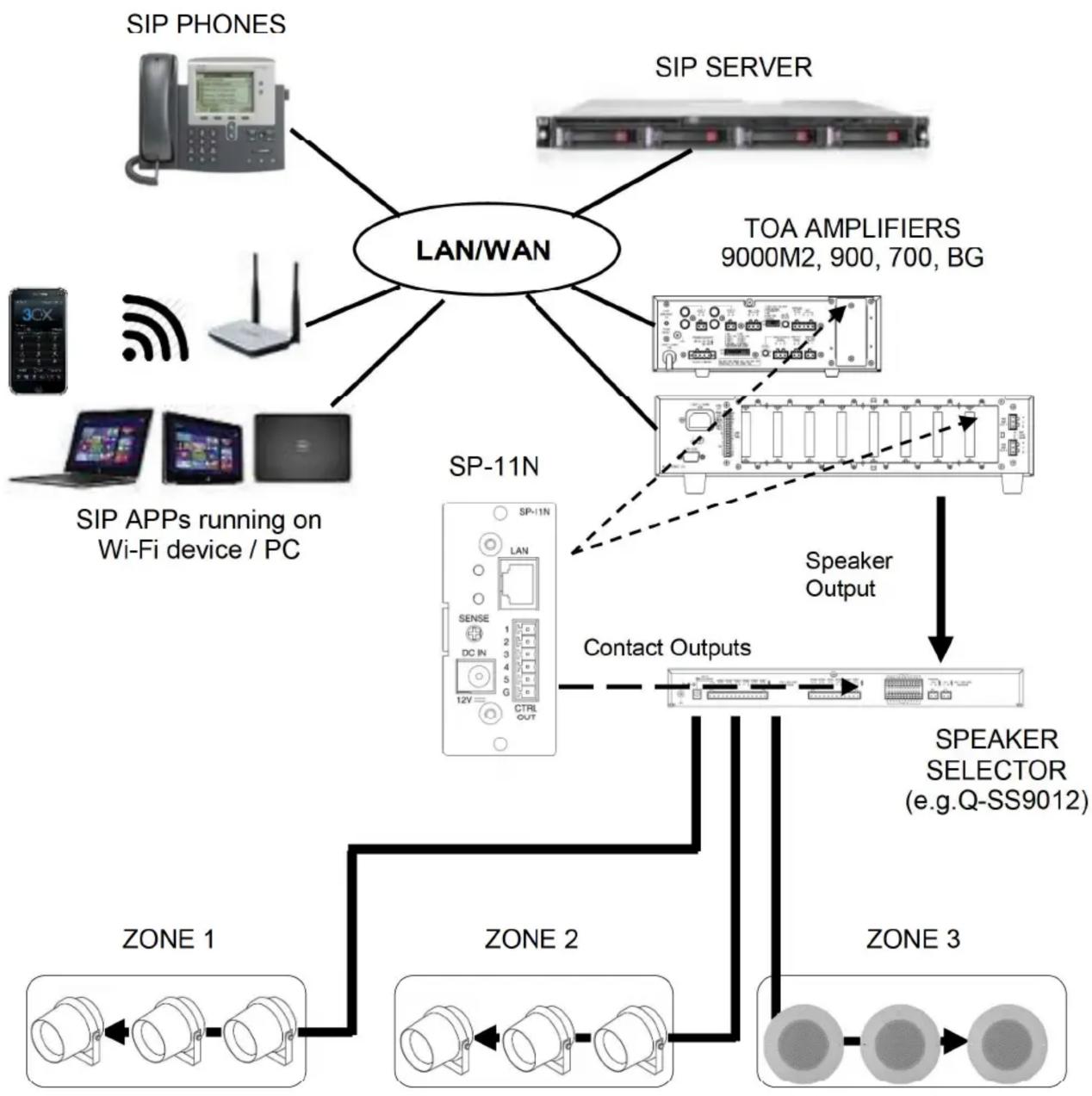
flowchart
graph TD
    A["SIP PHONES"] --> B["LAN/WAN"]
    C["SIP SERVER"] --> B
    D["SIP APPs running on Wi-Fi device / PC"] --> B
    E["TOA AMPLIFIERS 9000M2, 900, 700, BG"] --> F["SP-11N"]
    G["Speaker Selector (e.g.Q-SS9012)"] --> H["Contact Outputs"]
    I["ZONE 1"] --> J["ZONE 2"]
    K["ZONE 3"] --> L["ZONE 3"]
    B --> F
    F --> H
    H --> L
TOA Corporation
4. JUMPER AND SWITCH SETTINGS FOR VOX/MUTE FUNCTION
VOX (Voice Operated Switch) function:
When the level of input signal coming from phone system is the exceeded the threshold level adjusted by VOX/MUTE sensitivity control, the input signal goes into the amplifier. Using this function, user can avoid to have output of ambient noise around a paging station. And, user can start and finish paging only by the voice if there is a SIP call continuously connected.
This function can also turn on/off MUTE 1 or 2 bus of TOA 900 Series amplifiers, if the jumper is set to "SEND" position.
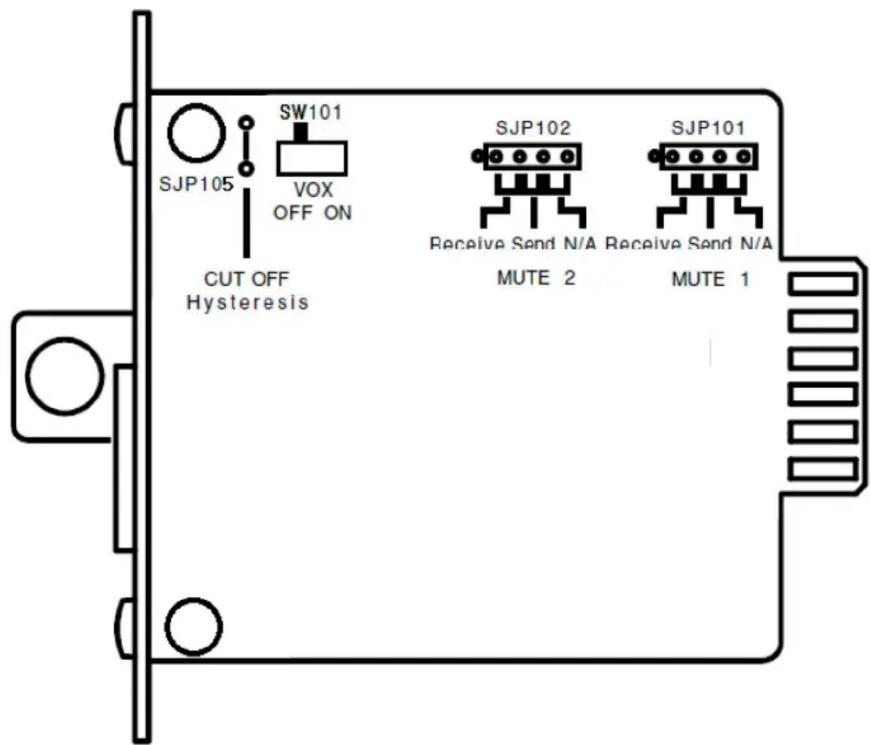
| Designator | Setting |
| SJP105 | Cutting the jumper disables hysteresis during VOX or MUTE send (if so set) operation. |
| SW101 | OFF: Disables VOX.ON : Enables VOX. |
| SJP101(for MUTE 1) | ○ ○ ○ ○ Rceive:This module is muted when the MUTE 1 or 2 bus is short-circuited by other module.○ ○ ○ ○ Send:Mutes other modules connected to the MUTE 1 or 2 bus when the signal is input to this module.○ ○ ○ ○ N/A: Mute function not applicable |
| SJP102(for MUTE 2) |
TOA Corporation
5. NETWORK SETTINGS
SP-11N has a Web (HTTP) server function for setting.
Factory default settings:
SP-11N doesn't have any static IP address setting by factory default. "0.0.0.0"
When connected with the network with a factory default setting, using IPzator™* technology, the unit itself finds out the applicable IP address in the network segment automatically. If there is no network node included PC in the network, the unit may get a default IP address, for example “192.168.1.168/16”.
After confirmation of self-assigned IP address, the unit starts to speak IP address setting towards inserted amplifier by SonicIP® function. Please connect PC with the same network and access that IP address using Web browser. For more details of settings, please see the help window on Web browser which you can access with "http://xxx.xxx.xxx.xxx".
Note
You can continuously use SonicIP® function every time turn on the power until you change the setting of this function to disabled from the setting window on Web browser. But, after registration on your SIP server, please setup static IP address specifying the registered address Then, it may be preferable to turn off SonicIP® function in order to avoid unnecessary paging.
- SPECIFICATIONS
| Power Source | AC mains (AC adapter is supplied with the unit.) |
| Network Interface | RJ-45 connector10BASE-T / 100BASE-TX, Auto-negotiation |
| Network Protocol | SIP (RFC3261), TCP. UDP, BOOTP, DHCP, RTP SNMP, ICMP, HTTP |
| Audio Format | G.711 u-law / a-law |
| Control Output | 5 channels open collector output(Max. Voltage: 27V DC, Control current: 50mA Max.)Removable terminal block (6 pin) |
| Operating Temperature | -32°F (0°C) degree to 104°F (40°C) degree |
| Finish | Panel: Aluminum, Hairline finish |
| Dimensions | 1.38"(W) x 3.07" (H) x 3.6"(D) |
| Weight | 0.2lb (86g) |


Marke : TOA
Modell : SP-11N
Kategorie : Kopfhörer