
Flex 2 - PC-Gehäuse Fractal Design - Kostenlose Bedienungsanleitung
Finden Sie kostenlos die Bedienungsanleitung des Geräts Flex 2 Fractal Design als PDF.


| Produkttyp | PCIe 4.0 Vertical Riser Bracket |
| Marke | Fractal Design |
| Modell | Flex 2 |
| Farbe | Schwarz |
| Material | Stahl, Kunststoff |
| PCIe-Standard | PCIe 4.0 |
| Riser-Kabellänge | ca. 300 mm (flexibel) |
| Kompatibilität | Fractal Design Flex 2 Serie, Standard ATX-Gehäuse mit vertikalem Montageplatz |
| Grafikkartenunterstützung | Dual-Slot, bis ca. 50 mm Dicke |
| Lieferumfang | PCI-Slot-Abdeckhalterung, GPU-Stützhalterung, flexibles PCIe 4.0 Riser-Kabel, 2x 6-32 Thumbschraube für PCI-Abdeckung, 2x 6-32 Captive Thumbschraube, 2x 6-32 Schraube für Riser-Kabel, 2x 6-32 Schraube für Halterung |
| Funktionen | Ermöglicht vertikale Montage der Grafikkarte, GPU-Stützhalterung zur Reduzierung von Durchbiegung, flexible Kabel für einfache Installation |
| Einbauhinweise | GPU-Stützhalterung in PCI-Slot-Abdeckhalterung einsetzen, Riser-Kabel anschließen, Grafikkarte montieren, Bracket im Gehäuse befestigen, Riser-Kabel mit Motherboard verbinden |
| Sicherheit | Schrauben nicht überdrehen; sicherstellen, dass alle Komponenten fest sitzen; Kabel nicht knicken |
| Reinigung und Wartung | Mit einem trockenen, weichen Tuch reinigen; keine Flüssigkeiten oder Reinigungsmittel verwenden |
| Ersatzteile | Nicht separat erhältlich; bei Bedarf Hersteller kontaktieren |
| Reparatur | Keine reparaturfähigen Teile; bei Defekt Komponente ersetzen |
| Garantie | Herstellergarantie: 2 Jahre |
| Herkunft | Designed in Sweden |
| Hersteller | Fractal Gaming AB, Victor Hasselblads Gata 16A, 421 31 Västra Frölunda, Schweden |
| UK-Vertreter | Authorised Rep Compliance Ltd., ARC House, Thurnham, Lancaster, LA2 0DT, UK |
Häufig gestellte Fragen - Flex 2 Fractal Design
Benutzerfragen zu Flex 2 Fractal Design
0 Frage zu diesem Gerät. Beantworten Sie die, die Sie kennen, oder stellen Sie Ihre eigene.
Eine neue Frage zu diesem Gerät stellen
Laden Sie die Anleitung für Ihr PC-Gehäuse kostenlos im PDF-Format! Finden Sie Ihr Handbuch Flex 2 - Fractal Design und nehmen Sie Ihr elektronisches Gerät wieder in die Hand. Auf dieser Seite sind alle Dokumente veröffentlicht, die für die Verwendung Ihres Geräts notwendig sind. Flex 2 von der Marke Fractal Design.
BEDIENUNGSANLEITUNG Flex 2 Fractal Design
Flex 2
PCIe 4.0 Vertical Riser Bracket

natural_image
Technical line drawing of a mechanical component with coiled spring and housing (no text or symbols)Contents
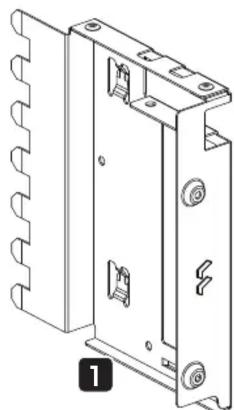
1 PCI Slot Cover Bracket
2 GPU Support Bracket
3 Flexible PCIe 4.0 Riser Cable
4 2 x 6-32 Thumbscrew for PCI Cover
5 2 x 6-32 Captive Thumbscrew
6 2 x 6-32 Screw for Riser Cable
7 2 x 6-32 Screw for Bracket
7
natural_image
Technical line drawing of a mechanical housing or enclosure with mounting holes and internal components (no text or symbols)6

natural_image
Technical line drawing of a mechanical bracket with mounting holes and a numbered label (2), no readable text or symbols present.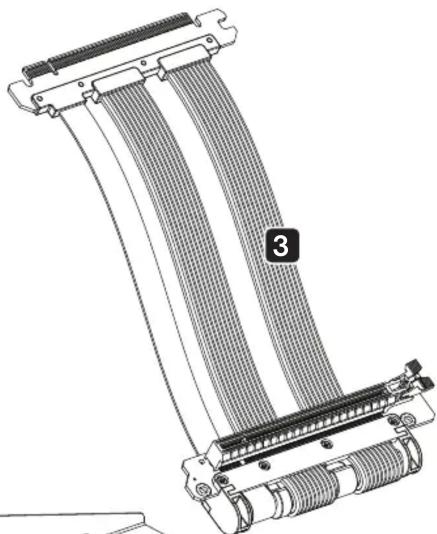
natural_image
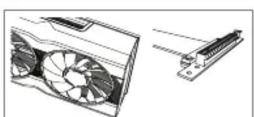
Technical line drawing of a flexible heat exchanger or cable connector with coiled insulation and connectors (no text or symbols)Insert GPU Support Bracket in PCI Slot Cover Bracket

natural_image
Technical illustration of a blue plastic aircraft wing assembly with an inset showing a mechanical component detail (no text or symbols present)Add PCIe Riser Cable

natural_image
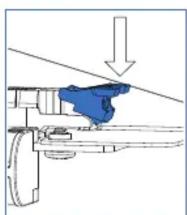
3D technical illustration of a mechanical assembly with blue components and white brackets (no text or symbols)- Install the Graphics Card
natural_image
Mechanical assembly diagram showing a blue component inserted into a bracket with an arrow indicating downward motion (no text or symbols present)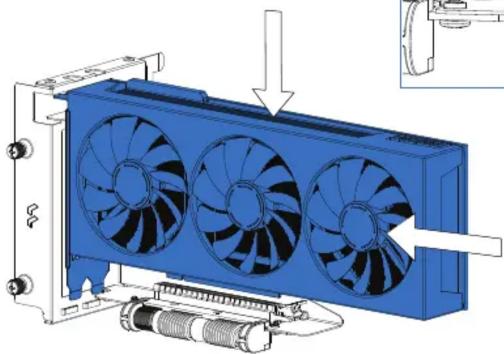
natural_image
3D diagram of a blue heat exchanger with three fans and cooling unit, showing internal components and assembly (no text or labels)5.
Mount Flex 2 Bracket in the Case

natural_image
3D technical illustration of a blue internal fan assembly with visible cooling fins and mounting hardware (no text or symbols)!

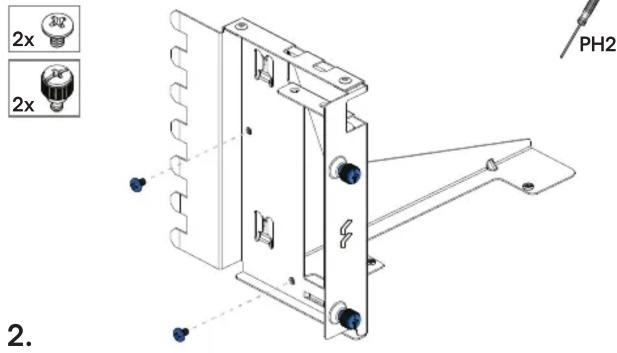
Insert 2 x Screw (6-32) and 2 x Captive Thumbscrew
Insert 2 x Screw (6-32) for Riser Cable


natural_image
Technical line drawing of a mechanical assembly with coiled heat exchangers and mounting brackets (no text or symbols)- Insert 2 x Thumbscrew in PCI Slot Cover Bracket


natural_image
Technical line drawing of a server rack with three fans and a screwdriver inserted (no text or symbols)6.
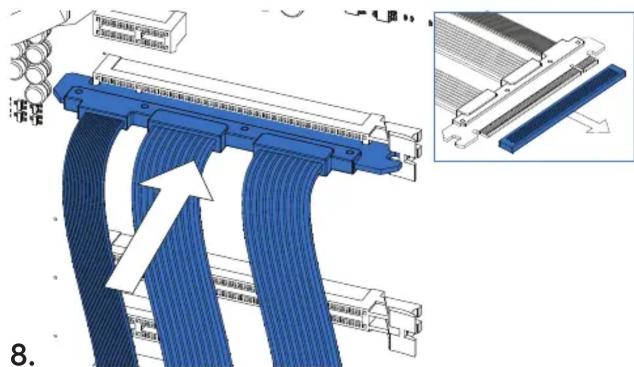
Connect PCIe 16x Riser Cable to Motherboard
Fractal Gaming AB,
Victor Hasselblads Gata 16A,
S-421 31, Västra Frölunda, Sweden
Designed in Sweden
fractal-design.com

Represented by:
Authorised Rep Compliance Ltd.
ARC House
Thurnham
Lancaster
LA2 ODT
UK


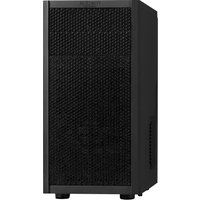
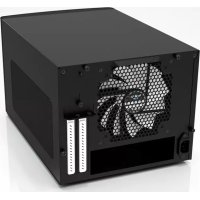
Marke : Fractal Design
Modell : Flex 2
Kategorie : PC-Gehäuse