
LM573R - Laserpointer Uni-T - Kostenlose Bedienungsanleitung
Finden Sie kostenlos die Bedienungsanleitung des Geräts LM573R Uni-T als PDF.


| Produkttyp | Laser-Nivelliergerät |
| Modell | LM573R |
| Marke | Uni-T |
| Lasertyp | Rot, hohe Helligkeit |
| Laserlinien | 12 Linien (horizontal und vertikal) |
| Laserklasse | Klasse 2 (635 nm) |
| Wellenlänge | 635 nm ± 10 nm |
| Horizontalgenauigkeit | ±3 mm/10 m |
| Verticalgenauigkeit | ±3 mm/10 m |
| Nivellierbereich | ±(3±1)° |
| Arbeitsbereich | >30 m (bei höchster Helligkeit) |
| Abmessungen | 130 × 87 × 120 mm |
| Stromversorgung | 3,7 V 6000 mAh Lithium-Akku |
| Akkulaufzeit | >30 h |
| Ladeanschluss | USB Typ-C |
| Betriebstemperatur | -10 °C bis 50 °C |
| Selbstnivellierung | Ja, magnetisch gedämpft |
| Manueller Modus | Ja |
| Fernbedienung | Ja (im Lieferumfang) |
| Helligkeitseinstellung | 3 Stufen einstellbar |
| Zubehör | Fernbedienung, 6000 mAh Akku, Wandhalterung, Ladekabel, Werkzeugkoffer |
| Pflege und Reinigung | Mit einem weichen, trockenen Tuch reinigen |
| Sicherheit | Nicht in den Laserstrahl blicken; Klasse 2 nach IEC 60825-1 |
| Ersatzteile und Reparierbarkeit | Akku austauschbar; bei Defekten an den Kundendienst wenden |
| Garantie | 1 Jahr auf Material- und Verarbeitungsfehler |
Häufig gestellte Fragen - LM573R Uni-T
Benutzerfragen zu LM573R Uni-T
0 Frage zu diesem Gerät. Beantworten Sie die, die Sie kennen, oder stellen Sie Ihre eigene.
Eine neue Frage zu diesem Gerät stellen
Laden Sie die Anleitung für Ihr Laserpointer kostenlos im PDF-Format! Finden Sie Ihr Handbuch LM573R - Uni-T und nehmen Sie Ihr elektronisches Gerät wieder in die Hand. Auf dieser Seite sind alle Dokumente veröffentlicht, die für die Verwendung Ihres Geräts notwendig sind. LM573R von der Marke Uni-T.
BEDIENUNGSANLEITUNG LM573R Uni-T
LM573R Laser Level User Manual
Preface
Thank you for purchasing this brand new LM573R laser level. In order to use this product safely and correctly, please read this manual thoroughly, especially the Safety Instructions part.
After reading this manual, it is recommended to keep the manual at an easily accessible place, preferably close to the device, for future reference.
Limited Warranty and Liability
Uni-Trend guarantees that the product is free from any defect in material and workmanship within one year from the purchase date. This warranty does not apply to damages caused by accident, negligence, misuse, modification, contamination and improper handling. The dealer shall not be entitled to give any other warranty on behalf of Uni-Trend. If you need warranty service within the warranty period, please contact your seller directly.
This warranty is the only compensation you can obtain. Uni-Trend will not be responsible for any special, indirect, incidental or subsequent damage or loss caused by any reason or speculation. As some areas or countries do not allow limitations on implied warranties and incidental or subsequent damage, the above limitation of liability and stipulation may not apply to you.
- Product Structure
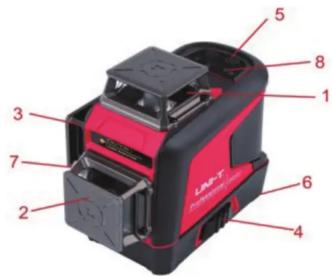
| 1 | 360° horizontal glass window 2 | 360° vertical glass window V1 | ||
| 3 | 360° vertical glass window V2 | 4 | Pendulum lock | |
| 5 | Button 6 Battery cover | |||
| 7 | Charging interface | |||
| 8 | LED indicator | |||
2. Safety Instructions
Before using this product, please carefully read and follow the safety instructions, otherwise the warranty may be invalid.
Warning!
• Class 2 laser product
● Wavelength: 635nm±10nm
Laser radiation:
- Do not stare into beam
- Do not directly expose to eyes
- Avoid using optical instruments
3. Cautions
Some product kits will provide glasses. Please note that these glasses are not safety glasses.
They are only used to help users recognize the laser beam in strong ambient light or when the light source of the laser instrument is distant.
Do not stare into beam or directly observe the laser beam via an optical instrument or set the instrument at the eye level (to avoid damage to eyes).
- Do not d isassemble the laser instrument without authorization.
- Do not refit the instrument without authorization in any way; otherwise it may cause harmful laser radiation exposure.
- Do not use the laser instrument around children or allow them to use it.
- Exposure to Class 2 lasers for no more than 2 seconds is generally considered safe, because natural eyelid reflexes (blinking) usually can provide adequate protection.
4. Operation Guidelines
- When the laser instrument is locked, press and hold the V button to turn it on and emit a horizontal laser line. At this time, the laser I line will flash once every 5 seconds, and the indicator will be green.
- When the instrument is unlocked (toggle the pendulum lock to the unlocked position) and turned on, it can also emit a horizontal laser line. When the instrument exceeds its self-leveling range (3^ ± 1^) , the laser beam will flash quickly.
Continuously press the V button to step through the operating modes of the instrument.
Generate 1# vertical plane
Generate 2# vertical plane
Simultaneously generate two vertical planes
Press the H button to switch to the horizontal plane
Generate a horizontal plane
Long press the V button to adjust the laser line brightness (three scales).
- Only when the pendulum lock is in its locked position, pressing and holding the V button can turn off the instrument.
Note: It is to ensure that users must toggle the pendulum lock to the locked position before turning off the instrument. - The self-leveling mode of the instrument can be turned on only when the pendulum lock is in the unlocked state.
- When the instrument is in use, the charging/power indicator is off. When the battery power is 20% remaining, the right indicator light of the control panel battery icon flashes blue, and the instrument will automatically shut down after it is fully discharged. When the battery pack is being charged, the charging/power indicator will flash in red color to remind users that the instrument is being charged. When fully charged, the charging/power indicator will switch to a steady green state. When directly using the charging interface on the instrument to charge, the green light will flash, and when it is fully charged, the indicator will switch to a steady green state.
5. Manual Mode
When the instrument is turned off, press and hold the V button for more than 3 seconds to enter the manual mode. At this time, the instrument is turned on and emits a horizontal laser line. The lock indicator is always on, and the laser line will flash once every five seconds to remind users that it is in the manual mode. The laser line can be set to different angles. In the manual mode, press and hold the V button again for more than 3 seconds, or toggle the pendulum lock to enter the self-leveling mode and then toggle it again to shut down.
Note: The laser line in the manual mode cannot be used as a horizontal/vertical reference line. 6. Remote Control Mode
This product is equipped with a remote control chip, which can remotely switch the functions of the instrument via the equipped remote control. Pairing is required when using the remote control for the first time. Turn on the instrument first and then press and hold the H button of the instrument and the H button of the remote control simultaneously for more than 3 seconds to successfully pair.
Note: The remote control function can only be used after the instrument is turned on. The remote control can only switch functions, and cannot remotely turn on/off the instrument. The brightness can be adjusted by using the remote control after the instrument is turned on or in the manual mode.
- Specifications
| Model | LM573R |
| Laser tube | SHARP LD |
| Laser type | Red, high brightness |
| Laser lines | 12 lines |
| Laser wavelength | 635nm±10nm |
| Laser class | CLASS II |
| Horizontal accuracy | ±3mm/10m |
| Vertical accuracy | ±3mm/10m |
| Brightness adjustment | 3 scales adjustable |
| Laser linewidth | 5mm±1/10m (indoor lighting: 80~100lux) |
| Emission angle | 360° |
| Leveling range | ±(3±1)° |
| Minimum distance to wall | 10mm |
| Battery life | >30h |
| Operating range | In the highest brightness, radius >30m |
| Leveling modes | Magnetic damping, heavy hammer |
| Alarm modes | Buzzer + laser line flashes |
| Product size | 130×87×120mm |
| Diagonal mode | √ |
| Operating temperature | -10~50°C |
| Power supply | 3.7V 6000mAh |
| Standard accessories | Laser level, 6000mAh battery pack, Type-C cable, user manual, Wall-mounted bracket+iron plate, remote control, toolbox |
8. Accessories
Laser level----1 PC
Remote control----1 PC
6000mAh lithium battery---- 1 PC
User manual----1 PC
Wall-mounted bracket+iron plate----1 PC
Type-C charging cable----1 PC
Toolbox----1 PC
UNI-T®
UNI-TREND TECHNOLOGY (CHINA) CO., LTD.
No.6, Gong Ye Bei 1st Road,
Songshan Lake National High-Tech Industrial
Development Zone, Dongguan City,
Guangdong Province, China
Marke : Uni-T
Modell : LM573R
Kategorie : Laserpointer