
UT665P - Videokamera Uni-T - Kostenlose Bedienungsanleitung
Finden Sie kostenlos die Bedienungsanleitung des Geräts UT665P Uni-T als PDF.


| Produkttyp | Videokamera |
| Marke | Uni-T |
| Modell | UT665P |
| Abmessungen (ca.) | 120 mm x 70 mm x 50 mm |
| Gewicht (ca.) | 300 g |
| Stromversorgung | Lithium-Ionen-Akku (3,7 V, 1200 mAh) |
| Auflösung Video | 1080p (1920 x 1080) bei 30 fps |
| Auflösung Foto | 12 Megapixel (interpoliert) |
| Speichermedium | microSD-Karte (max. 32 GB) |
| Sichtfeld | 120 Grad |
| Nachtsicht | Ja, Infrarot-LEDs (Reichweite ca. 5 m) |
| Bewegungserkennung | Ja |
| Anschlüsse | USB-C (Daten & Laden), AV-Ausgang |
| Befestigung | Stativgewinde (1/4 Zoll), Saugnapfhalterung |
| Wasserdichtigkeit | IP65 (staub- und spritzwassergeschützt) |
| Betriebstemperatur | -10 °C bis 50 °C |
| Reinigung | Mit einem weichen, trockenen Tuch abwischen. Keine aggressiven Reinigungsmittel verwenden. |
| Sicherheitshinweise | Nicht in Wasser eintauchen. Vor direkter Sonneneinstrahlung schützen. Akku nicht kurzschließen. |
| Ersatzteile | Akku, USB-Kabel, Halterungen (beim Hersteller oder Händler erhältlich) |
| Reparierbarkeit | Batterie austauschbar, keine weiteren kundenwartbaren Teile |
| Garantie | 2 Jahre (Herstellergarantie) |
Häufig gestellte Fragen - UT665P Uni-T
Benutzerfragen zu UT665P Uni-T
0 Frage zu diesem Gerät. Beantworten Sie die, die Sie kennen, oder stellen Sie Ihre eigene.
Eine neue Frage zu diesem Gerät stellen
Laden Sie die Anleitung für Ihr Videokamera kostenlos im PDF-Format! Finden Sie Ihr Handbuch UT665P - Uni-T und nehmen Sie Ihr elektronisches Gerät wieder in die Hand. Auf dieser Seite sind alle Dokumente veröffentlicht, die für die Verwendung Ihres Geräts notwendig sind. UT665P von der Marke Uni-T.
BEDIENUNGSANLEITUNG UT665P Uni-T
Handheld Single Lens Industrial Borescope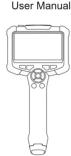 UT665PUT66SP-5mUT66SP-10mPlease read the User Manual carefully before your using! UT665PUT66SP-5mUT66SP-10mPlease read the User Manual carefully before your using! | PREFACThank you be purishing the new Handheld Single Lens Industrial. It is sure to use this product safety and mobility, please find it manual beforehandafter marking the device or use of a manual instrument or at any easily accessible place, particularly close to the device, for many reference.LIMITED WARRANTY AND LIABILITYUn-Trend guarantees that the product is free from any desired in material and understanding either one point from the purchase date. The security not is likely to degrade used by accessories, lighting, noise, insulation, capacitance and pressure handling. The device shall not be entitled to give any other warranty or behalf of Un-Trend. If you need warranty service within the warranty period, please trigger sufficient service or a suitable product without written description.This warranty is the only component you can differ. Un-Trend will not be responsible for any security, class, or equipment suitable for its cause you may be required. As some or more complete as neither includes or replaced necessary and/or necessary damage, the issue mentioned of safety and purpose and not apply to us. | Safety & MaintenanceDo not tell the Lens violently. Do not pull the cables so hard.Be careful to use the device in somewhere rough and uneven, and avoid scratching the waterproof layer of probe.The Lens probe is not made from head-resistant materials, so damage could down the temperature of engine to be normal when impacted it.Keep the Lens and device clean and dry when not using, to avoid contacting any oil spill conditions or other corrosives.The product is not suitable for users who are limited in body health, sanitary ability or split ability.Do not let children contact and operate the device.Do not disseminate the device sentrandy and contacted sellers for maintenance service if any damaged.The product is for industrial tonnoscope use, and not suitable for medical use or body check. | BatteryPlease charge the device via the home charger meets safety requirements (5V+1A).The device is supported to be used in the charging process.When the device is not used for a long time, charge it at least once every three months, to avoid unrecoverable damage caused by oven-discharge. | 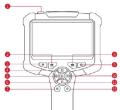 POWER Bolt-Lung press 3.6 to power work)Increase Screen Brightness (9.25-55.75 100%, increasing)Feature the Factory Settings (Reel the wedges to the original date)Contract Increase [Greater-Normal-Enhancer] (increasing)Duty In T-FTA (5.4%) IncreasingMobile Windows Switch Lens (100" Image addition, Blank Lens, long press to switch outside lens)Eye Up (100/100/80/100%, increasing)Decrease Screen Brightness (100/75-55-25-15%), decreasing)Block White Mode (Color and Black White, 11:Cycle)Jazz On (2.0-1.5-1.1 Rx, weakening)Contract Decrease (Endurance Normal Lessee) (increasing)Text Light Down (100-80-80-80%), (increasing) POWER Bolt-Lung press 3.6 to power work)Increase Screen Brightness (9.25-55.75 100%, increasing)Feature the Factory Settings (Reel the wedges to the original date)Contract Increase [Greater-Normal-Enhancer] (increasing)Duty In T-FTA (5.4%) IncreasingMobile Windows Switch Lens (100" Image addition, Blank Lens, long press to switch outside lens)Eye Up (100/100/80/100%, increasing)Decrease Screen Brightness (100/75-55-25-15%), decreasing)Block White Mode (Color and Black White, 11:Cycle)Jazz On (2.0-1.5-1.1 Rx, weakening)Contract Decrease (Endurance Normal Lessee) (increasing)Text Light Down (100-80-80-80%), (increasing) |
| -2. | -3.- | -4. | -5. | |
| Charging Guideline1. Charge the device via the Type-C adapter (5V+1A), and feel charge is not supported.2. During the charging, LED lights up in solid red.3. When it is fully charged, LED lights up in solid green. (Please charge the device via the Type-C tablet.)FAQ1) The image output is freezing upCheck the battery status of device, or restart the device.2) Unlock imagingThe optimum imaging focus is 10cm-15cm, please align the device with the target, or use a clear alcoholic cloth to wipe the front-end of Lens.3) ChargePlease charge the device via the charger (5V+1A), and feel charge is not supported.4) Lens overheatedThe Lens overload phenomenon is commonly seen, especially in the highest LED brightness of Lens, but without, affecting the normal use or service life. | Accessory Installation GuidelineAccessories: Fixed Buckout "3, Noise", Magnet", Slide Mirror"1Installation Diagram | SpecificationModel UT86P UT86SP Box UT86SP -10sSystem Screen Box 3.3*Screen Length DN20000000000000000000000000000000000000000000000000000000000000000000000000000000000000000000000000000 |  LINI-TLINI-WARD TECHNOLOGY (CHINA) CO., LTD.No. 6, Cng Ye He The Road,Senopah Lake National High Pitch IndustrialDevelopment Zone, Congguan City,Changqing Province, ChinaTel: (86-788) 6722 3888http://www.jp4968.com LINI-TLINI-WARD TECHNOLOGY (CHINA) CO., LTD.No. 6, Cng Ye He The Road,Senopah Lake National High Pitch IndustrialDevelopment Zone, Congguan City,Changqing Province, ChinaTel: (86-788) 6722 3888http://www.jp4968.com | |
| Home Measure Technical Test No. 10cmLens Lane Diameter Base 30x 10cmLight Function Display Control adjustment: Back-white Images, Color Shadow, Sounding, Lighting and Partboard, Engine progressive adjustment | ||||
| Body Mass Model 10cmLens Lane Diameter Base 30x 10cmLight Function Display Control adjustment: Back-white Images, Color Shadow, Sounding, Lighting and Partboard, Engine progressive adjustment | ||||
| Left Head of PSCS 10CupialDOPD 20-100mmAdjustable LCD Is Working & DSDsLighting 4000000000000000000000000000000000000000000000000000000000000000000000000000000000000000000000000000 | ||||
| Battery Battery 1.5×1000000000000000000000000000000000000000000000000000000000000000000000000000000000000000000000000000 | ||||
| Working Lens Temperature 27°C-48°CContinuous Banding 27°C-48°CContinuous Power Control Accessories: Unit: Handheld Single Lens Industrial Dimensiona, Type C Cabinb, Oil Boxc, Use Manuald, Blakes 'Th' onset, Side Bitonix, Impedra, Fixed Books eThe normal use is subject to change without ratedData for additional features, the available data is what products may be slightly offset from the project information, please select to the actual product modelExperiences also issued in the case is from manual ventilation of UVE. But I should not be a decrease or consumer to play online. Any question, please noted the same service, selected | ||||
| -6. | -7. | -8. |
| 1 | POWER Button (Long press 2-3a to power snr/p) |
| 2 | Increase Screen Brightness (10-25-50-75-100%, increasing) |
| 3 | Restore the Factory Settings (Reset the settings to the original state) |
| 4 | Contrast Increase (Leasee-Normal-Enhance) (increasing) |
| 5 | Zoom in (1-3-5-5-5m, increasing) |
| 6 | Rotate Images/Switch Lens (180° image rotation, Dual Lens: long press to switch front/Left Lens) |
| 7 | Turn Light (Up 40-80-100%, increasing) |
| 8 | Decrease Screen Brightness (100° 75-50-20-10%, decreasing) |
| 9 | Black White Mask (Color and Black White, In Cycle) |
| 10 | Zoom Out (2-0.1-5-1.0m, decreasing) |
| 11 | Contrast Decrease (Enhance-Normal-Leaver) (decreasing) |
| 12 | Turn Light Down (100-80-60-8%)(decreasing) |
| UNI-T. |
| UNI-TREND TECHNOLOGY (CHINA) CO., LTD. |
| No. 6, Gong Ye Bei 1st Road,Songshan Lake National High-Tech IndustrialDevelopment Zone, Dongguan City,Guangdong Province, ChinaTel: (86-769) 8572 3888http://www.uni-trend.com |
Marke : Uni-T
Modell : UT665P
Kategorie : Videokamera