
X3i - Lautsprecher BLUEANT - Kostenlose Bedienungsanleitung
Finden Sie kostenlos die Bedienungsanleitung des Geräts X3i BLUEANT als PDF.


| Produkttyp | Bluetooth-Lautsprecher |
| Marke | BlueAnt |
| Modell | X3i |
| Abmessungen (ca.) | 200 x 80 x 80 mm (Höhe x Durchmesser) |
| Gewicht (ca.) | 550 g |
| Akkulaufzeit | Über 15 Stunden bei 50 % Lautstärke; 4–5 Stunden bei 100 % Lautstärke |
| Ladezeit | Ca. 3 Stunden |
| Wasserdichtigkeit | IP67 (bei geschlossener Abdeckung) |
| Bluetooth | Ja (Version nicht spezifiziert) |
| Freisprecheinrichtung | Ja (Mikrofon integriert) |
| Bass Boost | Ja (Umschaltbar zwischen Standard-EQ und Bass Boost) |
| Duo-Mode (Stereo-Pairing) | Ja (Kopplung von zwei X3i-Lautsprechern) |
| AUX-Eingang | Ja (3,5 mm Klinke) |
| Powerbank-Funktion | Ja (USB-Ausgang 5 V, 1 A) |
| Stromversorgung | Micro-USB (im Lieferumfang: USB-Kabel und AC-Netzteil) |
| Lieferumfang | X3i Lautsprecher, USB-Ladekabel, AC-Netzteil, Bedienungsanleitung |
| Garantie | 1 Jahr beschränkte globale Garantie |
| Reinigung | Mit einem trockenen oder leicht feuchten Tuch abwischen |
| Sicherheitshinweise | Nicht extremen Temperaturen aussetzen; Gehör schützen; nur im trockenen Zustand laden |
| Hersteller | BlueAnt Wireless, Australien |
Häufig gestellte Fragen - X3i BLUEANT
Benutzerfragen zu X3i BLUEANT
0 Frage zu diesem Gerät. Beantworten Sie die, die Sie kennen, oder stellen Sie Ihre eigene.
Eine neue Frage zu diesem Gerät stellen
Laden Sie die Anleitung für Ihr Lautsprecher kostenlos im PDF-Format! Finden Sie Ihr Handbuch X3i - BLUEANT und nehmen Sie Ihr elektronisches Gerät wieder in die Hand. Auf dieser Seite sind alle Dokumente veröffentlicht, die für die Verwendung Ihres Geräts notwendig sind. X3i von der Marke BLUEANT.
BEDIENUNGSANLEITUNG X3i BLUEANT
BlueAnt

X3i
Product Manual

Your X3i


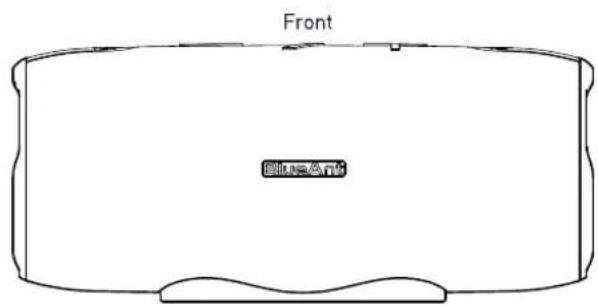

Welcome
Thank you for your purchasing the BlueAnt X3i. Please read through this manual to get the most out of your X3i speaker.
Inside the box

X3i Speaker

USB Charging Cable

AC Charger Body

1 x Product Manual

Charging Pins
Get to know your BlueAnt X3i Speaker
Button Functions

| Item | Button | Function |
| 1 | Battery Indicator | |
| 2 | Power button - short press to power on/off | |
| 3 | Bluetooth Indicator | |
| 4 | Volume Up - Short pressSkip forward button - Long press | |
| 5 | Play/Pause button - Press to play/pauseDouble Click for Siri/GooglePress to answer/end, Double press to reject call | |
| 6 | Volume Down - Short pressSkip backward button - Long press | |
| 7 | Microphone | |
| 8 | Duo mode indicator | |
| 9 | Bass Boost Button |
Get to know your BlueAnt X3i Speaker...cont'd
Behind the port cover - Back of the speaker

| Item | Button | Function |
| 10 | Charging port for charging the X3i Speaker | |
| 11 | POWERBANK (phone charger) output slot (output 5V 1A) | |
| 12 | Powerbank indicator | |
| 13 | Aux in Jack 3.5mm |
Getting Started
Charging the X3i

Please use the supplied USB cable and AC charger to charge the X3i. The charge port can be found at the rear of the speaker. A full charge will take around 3 hours.
Pairing the speaker to your phone or device
- Short press the ON/OFF button

- The speaker will turn on and say "Bluetooth". The light indicator will flash.
- On your phone or device, search for "BlueAnt X3i" under the Bluetooth settings menu.
- Once paired, the speaker will say "Connected". You are now ready to play some music!
Bass Boost Button

- Short press the Bass Boost Button to change from Standard EQ to Bass Boost.
- Bass Boost EQ will enhance the level of bass. Press again to go back to Standard EQ.
- Each time the X3i is powered on, it will reset to Standard EQ.
Powering the Speaker On/Off
Short press Ⓞ button to power on/off the speaker. Each time the speaker powers on, it will reset to 25% volume. After 10 mins with no connection the X3i will automatically power off to conserve battery.
Battery Life
• The X3i has a play time of over 15 hours at 50% volume
- When used at 100% volume the play time is 4-5 hours
• To use the X3i at 100% volume for longer please use the supplied AC charger
- Battery life will vary based on type of music, level of Bass and environmental factors
• 4 lights - Battery fully charged
Powerbank - For charging your phone

- The X3i has a built in powerbank function (at the back of the X3i) with an output of the 5V1A
- The X3i does not need to be powered on to use the powerbank function
- Use of the powerbank function will lower the overall play time of the X3i
- When the X3i battery is very low the powerbank function will turn off to conserve power
Using the Buttons for Music and Calls
A) Music Volume and Skipping tracks
| + Increase Volume | Fast Click to increase speaker volume |
| — Decrease Volume | Fast Click to decrease speaker volume |
| ▷ Play/Pause | Fast Click to play/pause |
| + Skip Forward | Press and hold for 1.5 seconds to skip forward a track |
| — Skip Back | Press and hold for 1.5 seconds to skip back a track |
| B Bass Boost | Bass Boost Button |
C) Siri/Google
| Play/Pause | Double click the Play button to activate or cancel Siri/Google voice dialing |
B) Making and Receiving Calls
| ▷ Play/Pause | Press to answer an incoming call |
| ▷ Play/Pause | Press to end the active call |
| ▷ Play/Pause | Double click to reject an incoming call or press and hold |
D) Disconnecting a paired Bluetooth device
| Play/Pause | Press and hold for 8 seconds to disconnect the current Bluetooth connected phone. The X3i will prompt "disconnected". Then other Bluetooth devices can find and pair with the X3i |
Duo Mode - Pairing two X3i Speakers together
Dual speaker wireless stereo pairing for wide stereo sound stage.
- Press the power button Ⓤ on the first speaker to turn the speaker "On".
- Press and hold the Volume + and Volume - buttons on the first speaker until the speaker says, "Duo Mode pairing" then release the buttons.
- Press the power button Ⓤ on the second speaker to turn the speaker "On"
- Press and hold the Volume + and Volume - buttons on the second speaker until the speaker says, "Duo Mode pairing" then release the buttons.
- Please wait until one speaker says "Duo Mode connected". This may take up to 1 minute. The speakers are now connected to each other.
- The speaker that says "Duo Mode connected" is the master speaker, and this is the speaker that you should pair with your phone.
For Bluetooth pairing search for "BlueAnt X3i" on your phone. If you receive a phone call while in Duo Mode, the call will only come through the master speaker. When in Duo Mode and you power off one speaker, both speakers will power off.
When you power on the speakers, they need to be turned on individually.
When both speakers are powered on, Duo Mode will automatically reconnect and you will hear "Duo Mode connected".
To disconnect Duo Mode, press and hold Volume + and Volume - until you hear "Duo Mode disconnected".
To clear Duo Mode pairing, press and hold Volume + and Volume - until the speaker says "Duo Mode cleared".
This takes about 8 seconds
Duo Mode - Pairing two X3i Speakers together...cont'd
Assuming direct line of sight, you should be able to achieve a range of 30 metres (100ft) between the two speakers.
When used indoors, the range will be affected by internal walls or obstacles between the speakers.
Aux in Mode

Use a 3.5mm Aux cable to connect the speaker to an audio source (PC, MP3/MP4, mobile phone).
When you plug the Aux cable into the X3i, it will automatically change to Aux in mode. When you unplug the Aux cable, the X3i will change back to Bluetooth mode. The speaker will play the music from the audio source.
To change or control tracks, please use your music source when in Aux in mode.
SAFETY INFORMATION AND WARRANTY TERMS
Important Safety Information
PLEASE READ THIS ENTIRE DOCUMENT CAREFULLY, BECAUSE IT CONTAINS IMPORTANT INFORMATION ABOUT THE USE OF BLUEANT DEVICES
WARNING - PROTECT YOUR HEARING
BLUEANT DEVICES CAN REACH VOLUMES ABOVE 100 DECIBELS
ONLY CHARGE WHEN DEVICE IS CLEAN AND DRY
Care and Handling
Your BlueAnt Bluetooth device is a precision engineered instrument. To ensure its ongoing performance, you should look after it as you would any quality consumer electronic product, and use it in accordance with the instructions. BlueAnt recommends that you take the following precautions. Avoid leaving your device in direct sunlight.
- Do not leave your device, or use your device, in any area where the temperature may exceed 50 degrees Centigrade, such as inside a closed car on a hot day. Remember that on a hot day, the temperature inside a closed car may be significantly higher than the outside air temperature.
- Do not leave your device, or use your device, in any area where the temperature is likely to drop below 0 degrees Centigrade (32 degrees Fahrenheit).
- Do not leave your device, or use your device, in any area exposed to humidity, dust, soot, other foreign objects, smoke, or steam as this may cause your device to malfunction.
PROLONGED USE AT HIGH VOLUMES MAY AFFECT YOUR HEARING CAPACITY AND MAY RESULT IN NOISE INDUCED HEARING LOSS (NIHL). TURN OFF THE POWER TO YOUR DEVICE WHEN NOT IN USE.
- Do not use any household or industrial grade detergents or cleaners to clean your device. If your device becomes dirty or smeared, in most instances a wipe with a dry or slightly damp cloth should be sufficient to clean it.
- Do not leave your Bluetooth device plugged into a wall for long periods after it is fully charged. BlueAnt does not recommend long periods of continued charging.
- Before charging your BlueAnt device, make sure that the AC outlet, adaptor and cable are not damaged. If you notice any abnormalities, seek advice from a qualified professional.
- If travelling internationally, ensure that your BlueAnt wall or car power adapter is approved for use in the country where you plan to use it and that the adapter voltage is suited to the local power supply.
- Should a fault develop with your BlueAnt product, contact BlueAnt for advice on how to proceed. Do not attempt to repair or alter any BlueAnt product yourself.
Approved Accessories
The use of accessories not approved by BlueAnt, including but not limited to batteries, antennas, wall adapters, car charger, ear gels and foam tips and convertible covers, may cause your BlueAnt device to malfunction or in the case of non approved electrical accessories may cause the device to exceed RF energy exposure guidelines.
Electromagnetic Interference
Nearly every electronic device is susceptible to electromagnetic interference (EMI) if inadequately shielded, electromagnetic configured for electromagnetic compatibility. Similar to a mobile phone, your BlueAnt device is a low power transmitter/receiver and is covered by regulations pertaining to such devices. Turn off your BlueAnt device in any facility where posted notices instruct you to do so. These facilities may include hospitals or health care facilities that may be using equipment that is sensitive to external RF energy.
- When instructed to do so, turn off your BlueAnt device when on board an aircraft. Any use of a mobile device must be in accordance with applicable laws, regulations and airline crew instructions.
- If you use any other personal medical device, consult the manufacturer of your device to determine if it is adequately shielded from RF energy. Your doctor or physician may be able to assist you in obtaining this information.
- If you are in doubt about whether your BlueAnt device can be safely turned on or used, please consult an authorised person in the location you want to use your BlueAnt device. If no authorised person is available or you remain uncertain, BlueAnt recommends that you turn off your Bluetooth device and any mobile phones unless they are required in an emergency situation.
Waterproof
The X3i features an IP67 rating making it waterproof, when the port cover is closed.
Recycling Bluetooth Accessories
Do not dispose of Bluetooth accessories, such as chargers, speakers, headphones or headsets with your household waste. In some countries or regions, collection systems are set up to handle electrical and electronic waste items, and may prohibit or restrict how such items are disposed of. Check the laws and regulations for your areas to determine how to properly dispose of such items.
BlueAnt Limited Global Warranty
This product is covered by BlueAnt's limited global warranty for one (1) year from the date of purchase by the first consumer purchaser of the product. Please refer to warranty.blueantwireless.com for full terms and conditions.
THANK YOU FOR CHOOSING A BLUEANT PRODUCT
For warranty and technical support, please email care@blueantwireless.com or head over to our website www.blueantwireless.com or call 1300 669 049.
Register your BlueAnt product for warranty and new product updates at register.blueantwireless.com
Australian Consumer Law
Our goods come with guarantees that cannot be excluded under the Australian Consumer Law. You are entitled to a replacement or refund for a major failure and compensation for any other reasonably foreseeable loss or damage. You are also entitled to have the goods repaired or replaced if goods fail to be of acceptable quality and the failure does not amount to a major failure.
BlueAnt Wireless
Suite 6, 861 Doncaster Road
Doncaster, Vic, 3109 Australia
Notes
BlueAnt
100% AUSTRALIAN DESIGNED & OWNED

HELP & SUPPORT
Visit support.blueantwireless.com
Email: care@blueantwireless.com
Contact: 1300 669 049
Register your BlueAnt product for warranty and new product updates at register.blueantwireless.com


www.blueantwireless.com

- BLUEANT
- WELCOME
- GET TO KNOW YOUR BLUEANT X3I SPEAKER
- GET TO KNOW YOUR BLUEANT X3I SPEAKER...CONT'D
- GETTING STARTED
- CHARGING THE X3I
- PAIRING THE SPEAKER TO YOUR PHONE OR DEVICE
- BASS BOOST BUTTON
- POWERING THE SPEAKER ON/OFF
- BATTERY LIFE
- POWERBANK - FOR CHARGING YOUR PHONE
- USING THE BUTTONS FOR MUSIC AND CALLS
- DUO MODE - PAIRING TWO X3I SPEAKERS TOGETHER
- DUO MODE - PAIRING TWO X3I SPEAKERS TOGETHER...CONT'D
- AUX IN MODE
- SAFETY INFORMATION AND WARRANTY TERMS
- IMPORTANT SAFETY INFORMATION
- PLEASE READ THIS ENTIRE DOCUMENT CAREFULLY, BECAUSE IT CONTAINS IMPORTANT INFORMATION ABOUT THE USE OF BLUEANT DEVICES
- WARNING - PROTECT YOUR HEARING
- ONLY CHARGE WHEN DEVICE IS CLEAN AND DRY
- CARE AND HANDLING
- APPROVED ACCESSORIES
- ELECTROMAGNETIC INTERFERENCE
- WATERPROOF
- RECYCLING BLUETOOTH ACCESSORIES
- BLUEANT LIMITED GLOBAL WARRANTY
- THANK YOU FOR CHOOSING A BLUEANT PRODUCT
- AUSTRALIAN CONSUMER LAW
- BLUEANT WIRELESS
Marke : BLUEANT
Modell : X3i
Kategorie : Lautsprecher