
RDP-980 - Nicht kategorisiert ROTEL - Kostenlose Bedienungsanleitung
Finden Sie kostenlos die Bedienungsanleitung des Geräts RDP-980 ROTEL als PDF.


| Produkttyp | Digital-Analog-Wandler (DAC) |
| Modell | RDP-980 |
| Marke | Rotel |
| Abmessungen (B x H x T) | 440 x 72 x 316 mm |
| Gewicht | 6,3 kg |
| Stromversorgung | 120 V oder 220–240 V, 50/60 Hz |
| Leistungsaufnahme | 15 W |
| Frequenzgang | 5 – 20.000 Hz (±0,5 dB) |
| Signal-Rausch-Abstand | 110 dB (IHFA) |
| Klirrfaktor (THD) | 0,0025 % (1 kHz) |
| Intermodulationsverzerrung | 0,006 % |
| Dynamikumfang | 95 dB |
| D/A-Wandler | 64-fach Oversampling ΔΣ |
| Digitalfilter | 8-fach Oversampling |
| Digitaleingänge | 4 x TOSLINK, 4 x Koaxial (jeweils + 1 Monitor) |
| Digitalausgänge | 1 x TOSLINK, 1 x Koaxial |
| Audioausgangsspannung | 2,0 V |
| Ausgangsimpedanz | 100 Ohm |
| Koaxialeingangsimpedanz | 75 Ohm |
| Besonderheiten | Phaseninvertierung, Stummschaltung, Monitorfunktion, Fernbedienung |
| Zubehör | Fernbedienung, Netzkabel, Bedienungsanleitung |
| Reinigung | Mit weichem, trockenem Tuch reinigen. Keine Reinigungsmittel oder Lösungsmittel verwenden. |
| Sicherheitshinweise | Nicht Regen oder Feuchtigkeit aussetzen. Keine Gegenstände oder Flüssigkeiten in die Öffnungen gelangen lassen. |
| Wartung | Keine vom Benutzer zu wartenden Teile im Inneren. Service nur durch qualifiziertes Personal. |
Häufig gestellte Fragen - RDP-980 ROTEL
Benutzerfragen zu RDP-980 ROTEL
0 Frage zu diesem Gerät. Beantworten Sie die, die Sie kennen, oder stellen Sie Ihre eigene.
Eine neue Frage zu diesem Gerät stellen
Laden Sie die Anleitung für Ihr Nicht kategorisiert kostenlos im PDF-Format! Finden Sie Ihr Handbuch RDP-980 - ROTEL und nehmen Sie Ihr elektronisches Gerät wieder in die Hand. Auf dieser Seite sind alle Dokumente veröffentlicht, die für die Verwendung Ihres Geräts notwendig sind. RDP-980 von der Marke ROTEL.
BEDIENUNGSANLEITUNG RDP-980 ROTEL
ROTEL
RDP 980
Digital Audio Processor
Owners Manual
Please write the serial number and purchase date of this RDP 980, in the spaces provided, for your records.
Serial Number ____.
Purchase date ____.
WARNING: TO REDUCE THE RISK OF FIRE OR ELECTRIC SHOCK, DO NOT EXPOSE THIS APPLIANCE TO RAIN OR MOISTURE.
CAUTION
RISK OF ELECTRIC SHOCK DO NOT OPEN

CAUTION: TO REDUCE THE RISK OF ELECTRIC SHOCK, DO NOT REMOVE COVER (OR BACK). NO USER-SERVICEABLE PARTS INSIDE. REFER SERVICING TO QUALIFIED SERVICE PERSONNEL.
Explanation of Graphical Symbols
The lightning flash with arrowhead symbol, within an equilateral triangle, is intended to alert the user to the presence of uninsulated 'dangerous voltage' within the product's enclosure that may be of sufficient magnitude to constitute a risk of electric shock to persons.
The exclamation point within an equilateral triangle is intended to alert the user to the presence of important operating and maintenance instructions in the literature accompanying the appliance.

SAFETY INSTRUCTIONS
- Read Instructions - All the safety and operating instructions should be read before the appliance is operated.
- Retain Instructions - The safety and operating instructions should be retained for future reference.
- Heed Warnings - All warnings on the appliance and in the operating instructions should be adhered to.
- Follow Instructions - All operating and use instructions should be followed.
-
Water and Moisture - The appliance should not be used near water - for example, near a bathtub, kitchen sink, laundry tub, in a wet basement or near a swimming pool, etc.
-
Carts and Stands - The appliance should be used only with a cart or stand that is recommended by the manufacturer.
6A. An appliance and cart combination should be moved with care. Quick stops, excessive force and uneven surfaces may cause the appliance and cart combination to overturn.
-
Wall or Ceiling Mounting - The appliance should be mounted to a wall or ceiling only as recommended
-
Ventilation - The appliance should be situated so that its location or position does not interfere with its proper ventilation. For example, the appliance should not be situated on a bed, sofa, rug, or similar surface that may block the ventilation openings; or placed in a built-in installation, such as a bookcase or cabinet that may that may impede the flow of air through the ventilation openings.
-
Heat - The appliance should be situated away from heat sources such as radiators, heat registers, stoves or other appliances (including amplifiers) that produce heat.

-
Power Sources - The appliance should be connected to a power supply only of the type described in the operating instructions or as marked on the appliance.
-
Grounding or Polarization - The precautions that should be taken so that the grounding or polarization means of an appliance is not defeated.
-
Power-Cord Protection - Power supply cords should be routed so that they are not likely to be walked on or pinched by items placed upon or against them, paying particular attention to cords and plugs, convenience receptacles and the point where they exit from the appliance.
-
Cleaning - The appliance should be cleaned only as recommended by the manufacturer.
-
Nonuse Periods - The power cord of the appliance should be unplugged from the outlet when left unused for a long period of time.
-
Object and Liquid Entry - Care should be taken so that objects do not fall and liquids are not spilled into the enclosure through the openings.
-
Damage Requiring Service - The appliance should be serviced by qualified factory-authorized service personnel when:
-
The power-supply cord or the plug has been damaged; or
- Objects have fallen, or liquid has been spilled into the appliance; or
• The appliance has been exposed to rain; or - The appliance does not appear to operate normally or exhibits a marked change in performance; or
-
The appliance has been dropped, or the enclosure damaged.
-
Servicing - The user should not attempt to service the appliance beyond that described in the operating instructions. All other servicing should be referred to qualified factory-authorized service personnel.
APPLICABLE FOR U.S.A., CANADA OR WHERE APPROVED TO THE USAGE.
| CAUTION: TO PREVENT ELECTRIC SHOCK, MATCH WIDE BLADE OF PLUG TO WIDE SLOT, FULLY INSERT. |
| ATTENTION: POUR ÉVITER LES CHOCS ÉLECTRIQUES, INTRODUIRE LA LAME LA PLUS LARGE DE LA FICHE DANS LA BORNE CORRESPONDANTE DE LA PRISE ET POUSSER JUSQÚ AU FOND. |
A WORD FROM AII OF US AT ROTEL
Thank you for purchasing our RDP 980 Digital to Analog Converter. We have been designing and manufacturing high quality, high performance audio electronics for more than 30 years. This Digital to Analog Converter will provide accurate reproduction of the digital signal and is a natural extension of our love for music. Our passion for good sound and our love of music is well known. We believe that the music played through the RDP 980 and a companion digital source component, such as the Rotel RDD 980, will be a source of enjoyment to you for many years to come.
Rotel is committed to making quality products to enhance your life. We have designed and manufactured this DAC to be durable, easy to use and to exactly replicate the original digital signal while converting it to an analog signal. Please read the owners manual to ensure that the RDP 980 is properly installed and able to offer optimum performance. We appreciate being a part of your life.
FEATURES OF THE RDP 980 DIGITAL TO ANALOG CONVERTER
Careful listening tests have shown that low jitter enhances the sound quality and the enjoyment of the music played through a digital system. We have incorporated recent design and manufacturing techniques to ensure the lowest possible distortion and jitter in this D to A Converter. We have utilized a 1 bit 64 x oversampling Delta Sigma ( ) digital to analog conversion chip including an 8 x oversampling digital filter. We have chosen this combination for its excellent sonic and measured performance. We include a 5th order switched capacitor filter, to minimize didital jitter, and then a 2nd order filter after the 8 x oversampling digital filter to eliminate spurious noise. The output stage is implemented with a low impedance buffer amplifier that includes a 2nd order Butterworth filter, to further reduce spurious high frequency noise. RDP 980 will provide accurate and musical reproduction of the digital information on your CDs or other digital source information.
By separating the DAC from the source component it is possible to optimize the design of both. The result is maximum performance and sound quality. Because the DAC and the source component have separate power supplies, there is no interaction between a mechanical assembly's power requirements and the audio circuits need for a clean, stable and ripple free power supply.
The multiple power regulation stages in the power supply of RDP 980 ensure each critical stage has noise free, stable power for operation. The printed circuit board layout (PCB), the PCB material, the star earth ground patterns and the exact part choices made during design and fine tuning (in the UK) have all been made for one reason only, to provide you with the finest possible Digital to Analog Converter at a reasonable price.
INSTALLATION OF THE RDP 980
Please place the unit on a DRY, level surface away from direct sunlight. Avoid placing objects on top of the RDP 980. Do not allow water to fall into the RDP 980 as this could damage the circuitry or drive components. Avoid installing the DAC in a location where excessive heat, humidity, vibration or moisture will be a problem.
We recommend installing the RDP 980 in furniture designed to house audio components. This will allow the RDP 980 to be on its own shelf, not stacked on another component or with something stacked on it. This will minimize potential interference with other components in your system, such as your tuner or amplifier. Component furniture has the added benefit of reducing
or suppressing vibration and all audio components will provide improved sound when free from vibration.
Component furniture will improve the looks of many system installations and provide adequate ventilation for amplifiers and isolation for other components. It is also easier to dress the wires to reduce interference between sensitive audio cables, speaker cables and power cords for components. Ask your ROTELhi fi Authorized Dealer for advice about component furniture and proper installation of audio components.
ELECTRICAL REQUIREMENTS
This DAC is designed to work on AC voltage and the correct voltage is displayed on the Back Panel. Do not attempt to operate the RDP 980 on incorrect voltage as this will damage the circuitry and void your warranty. If you are in doubt about the correct voltage we suggest that you read the label on the back panel, the label on the packing carton or consult your ROTELhi fi Authorized Dealer for confirmation of the correct voltage.
Connect the Power Cord to your wall socket for AC power. When you wish to disconnect the power cord from the wall, always hold the plug firmly and then pull it out of the wall socket. Do not unplug the power cord from the wall by pulling the cord only. This may damage the power cord and create a hazardous condition. We recommend that the RDP 980 be connected to the mains' wall socket or an AC power line filter, not an extension cord.
If you wish to clean the cabinet on the RDP 980 we suggest that you clean it with a soft, DRY cloth. Never use cleaning compounds or solvents to clean the cabinet as they may damage the finish or remove the labels. Cleaning compounds or liquids could damage the circuitry if any residue falls inside RDD 980. There is NO user serviceable part inside the RDP 980. Please do not open the cabinet as this will expose you to the risk of potentially dangerous high voltage and the risk of shock. This could also damage the circuits and possibly void your warranty.

Please refer to this drawing of the Front Panel when reading the section about Controls on the RDP 980.
CONTROLS ON THE RDP 980 DIGITAL TO ANALOG CONVERTER
The POWER button will turn the RDP 980 ON and OFF. Push it in and the RDP 980 will turn ON. The POWER INDICATOR LIGHT will illuminate at the same time. If you push the Power button again the power will go OFF and the Power Indicator Light will extinguish.
The Front Panel includes the REMOTE SENSOR for receiving the Infra Red signals from the REMOTE CONTROL handset. Please be certain not to block this as the remote control will not function if this is covered or blocked.
The RDP 980 will AUTOMATICALLY select the correct sampling frequency for the incoming digital signal. The RDP 980 will sample and convert 32 kHz, 44.1 kHz or 48 kHz signals from your digital source components. The frequency being sampled will be indicated by an illuminated indicator light. The OUTPUT signals from the RDP 980 are OPTICAL or COAXIAL. If you wish, both may be operated at the same time. This could be useful if you are recording from the Optical output and listening to the Coaxial output, as an example. The small lights over the labels will indicate which output is active when they are ON.
We have included a digital PHASE invert switch on the RDP 980. Many audiophiles have noticed the subtle, but readily apparent, difference between signals that are in correct absolute phase and signals that are in inverted phase. When an instrument is struck or plucked to create a note, it creates a positive energy pulse. Many recording studios do not have correct absolute phase in their recording circuits and the absolute phase of the signals recorded onto the master tape may be in correct absolute phase or inverted phase. With the Phase invert switch it is possible to compare the effect of reversing the absolute phase of the signal. The correct phase setting will exhibit more of a sense of "rightness" or "attack" to the transient signals from bells, triangles, drums, etc.. (This is not the same as incorrect phase when wiring speakers.) With RDP 980 it will be easy to experiment with this aspect of sound reproduction.
We have included a MUTE button for silencing the output of the RDP 980. When the output is muted a small light above the button will be illuminated.
The RDP 980 has a button to select a COAXIAL or OPTICAL INPUT from digital source components. An illuminated indicator light will show whether a Coax(ial) or an Opti(cal) input has been chosen.
The MONITOR (record monitor) button is for use with any digital recorder. It will be especially useful if you have a DAT deck that can read and write digital data at the same time. If you have such a deck (usually only professional machines have this feature) you will be able to compare the source and the recording by using the tape monitor button. When the tape monitor switch is ON a small indicator light will be illuminated above the button. The INPUT chosen before the MONITOR button was pushed will be the only one you can choose until you defeat the tape monitor button. This was done to avoid the possibility that someone would accidentally change the input while making a recording.
We have provided four INPUT SELECTOR buttons (1 to 4) on the RDP 980. These will accept the digital output of a CD player, Laser disc player, Digital Audio Tape recorder (DAT), Mini Disc (MD), Digital Compact Cassette (DCC), satellite broadcast tuner (BS or NICAM) or the digital output from a VCR or 8 mm video tape deck. These inputs will accept 75 ohm coaxial or TOSLINK optical inputs. You may select between optical and coaxial inputs with the INPUT COAX or OPTI buttons on the front panel.
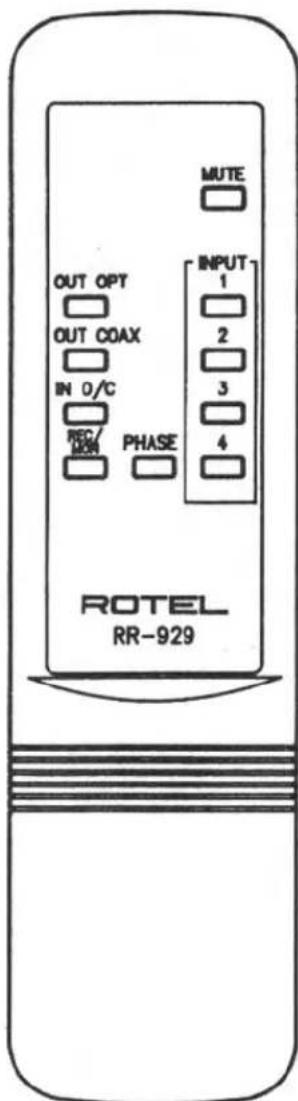
The REMOTE CONTROL for the RDP 980 will operate the INPUT SELECTOR, COAXIAL or OPTICAL INPUTS and OUTPUTS, PHASE, MUTE and the REC/MON switches. The buttons on the remote control are color coded for ease of use. The INPUT SWITCHING, OPTICAL or COAXIAL SWITCHING for the INPUTS and OUTPUTS are grey, the button for PHASE invert is orange and the MUTE button is black.
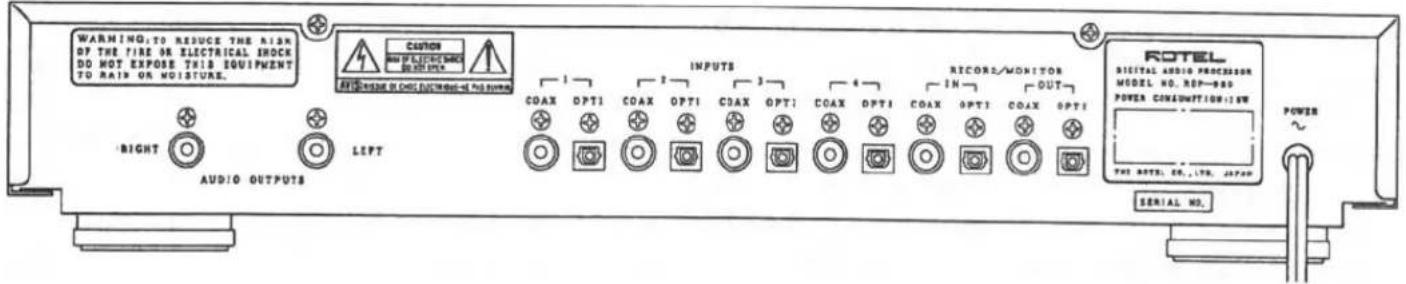
Please refer to this drawing of the Rear Panel when connecting components to your RDP 980.
CONNECTING THE RDP 980 IN YOUR SYSTEM
The AUDIO OUTPUTS of the RDP 980 are designed for RCA patch cables. Please note the LEFT and RIGHT channel output connections and connect them to the corresponding input channels of your preamplifier or integrated amplifier.
The INPUTS are numbered from 1 to 4 and have COAXIAL and OPTICAL connectors for each. Connect the digital output of the source component to the desired input of the RDP 980. The RECORD/MONITOR connections are clearly labeled and should be connected to the input and output of your digital recorder. IN receives a signal from your digital recorder and OUT sends a signal to your digital recorder. We suggest that the best sound will be obtained from the coaxial 75 ohm inputs and outputs with high quality 75 ohm characteristic impedance patch cables. High performance RCA patch cables will improve the sound of your stereo and we recommend them. Ask your ROTELhi fi AUTHORIZED DEALER for advice about cables for analog and digital signals in your sound system.
A FINAL WORD FROM ROTEL ABOUT THE RDP 980
We have designed this Digital to Analog Converter for high performance using test equipment and the human ear. We believe that both methods are useful in the design of audio electronics. This is a time consuming process but we feel that the music benefits from this care and attention to detail. We realize that there are many choices available in the market today. We thank you again for choosing our RDP 980 Digital to Analog Converter as the centerpiece for the digital components in your system. Enjoy the music!
SPECIFICATIONS : RDP 980 DIGITAL TO ANALOG CONVERTER
| Frequency Response | 5-20,000 Hz, ± 0.5 dB |
| Signal to Noise Ratio | 110 dB, IHFA |
| Total Harmonic Distortion | 0.0025 % (1 kHz) @ 44.1 kHz |
| Intermodulation Distortion | 0.006 % (400 Hz/ 7 kHz, 4:1 @ 0 dB) |
| Dynamic Range | 95 dB |
| D to A Converter | 64 x Oversampling Δ Σ |
| Digital Filter | 8 x Oversampling |
| TOSLINK Inputs | 4 + 1 (Monitor) |
| Coaxial Inputs | 4 + 1 (Monitor) |
| Coaxial Input Impedance | 75 Ohms |
| TOSLINK Output | -17 dB @ 660 NM (IEC) |
| Coaxial Output | 0.5 Volt P.P. @ 75 ohms |
| Audio Output | 2.0 volts |
| Output Impedance | 100 ohms |
| Power Consumption | 15 watts |
| Power Requirements (AC) | 120 volts 50/60 Hz or |
| 220-230-240 volts 50/60 Hz | |
| Weight | 6.3 Kg / 13.86 Lbs. |
| Dimensions | 440 mm x 72 mm x 316 mm (WxHxD) |
| 17-3/8" x 2-7/8" x 12-7/16" (WxHxD) |
All specifications are accurate at the time of printing. Rotel reserves the right to make improvements without notice.
- ROTEL
- RDP 980
- Digital Audio Processor
- Owners Manual
- CAUTION
- Explanation of Graphical Symbols
- SAFETY INSTRUCTIONS
- A WORD FROM AII OF US AT ROTEL
- FEATURES OF THE RDP 980 DIGITAL TO ANALOG CONVERTER
- INSTALLATION OF THE RDP 980
- ELECTRICAL REQUIREMENTS
- CONTROLS ON THE RDP 980 DIGITAL TO ANALOG CONVERTER
- CONNECTING THE RDP 980 IN YOUR SYSTEM
- A FINAL WORD FROM ROTEL ABOUT THE RDP 980
Marke : ROTEL
Modell : RDP-980
Kategorie : Nicht kategorisiert