
BRS-330 - Lautsprecher GEMINI - Kostenlose Bedienungsanleitung
Finden Sie kostenlos die Bedienungsanleitung des Geräts BRS-330 GEMINI als PDF.


| Produkttyp | Aktiver Lautsprecher |
| Modell | BRS-330 |
| Marke | GEMINI |
| Leistung (RMS) | 30 W |
| Frequenzbereich | 50 Hz – 20 kHz |
| Impedanz | 4 Ohm |
| Treiber | 1 x 3,5 Zoll Tieftöner, 1 x 1 Zoll Hochtöner |
| Anschlüsse | Bluetooth 5.0, 3,5 mm AUX-Eingang, USB-A (Ladeanschluss) |
| Stromversorgung | Netzteil (DC 12V 2A) oder integrierter Akku (7,4 V 2200 mAh) |
| Akkulaufzeit | ca. 6 Stunden bei mittlerer Lautstärke |
| Maße (B x H x T) | 160 x 250 x 140 mm |
| Gewicht | 1,8 kg |
| Gehäusematerial | MDF-Holz mit Kunststofffront |
| Farbe | Schwarz |
| Besonderheiten | Freisprechfunktion, TWS-Kopplung, integrierter Equalizer |
| Lieferumfang | Lautsprecher, Netzteil, AUX-Kabel, Bedienungsanleitung |
| Garantie | 2 Jahre |
| Entsorgung | Elektrogeräte nicht im Hausmüll, gemäß WEEE-Richtlinie |
Häufig gestellte Fragen - BRS-330 GEMINI
Benutzerfragen zu BRS-330 GEMINI
0 Frage zu diesem Gerät. Beantworten Sie die, die Sie kennen, oder stellen Sie Ihre eigene.
Eine neue Frage zu diesem Gerät stellen
Laden Sie die Anleitung für Ihr Lautsprecher kostenlos im PDF-Format! Finden Sie Ihr Handbuch BRS-330 - GEMINI und nehmen Sie Ihr elektronisches Gerät wieder in die Hand. Auf dieser Seite sind alle Dokumente veröffentlicht, die für die Verwendung Ihres Geräts notwendig sind. BRS-330 von der Marke GEMINI.
BEDIENUNGSANLEITUNG BRS-330 GEMINI
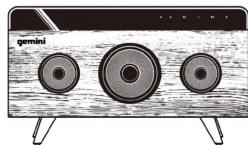


Read these safety instructions before using your device and store them for possible future reference.
- The device is not intended for use by persons (including children) with reduced physical, sensory or mental capacity. Persons who have not read the manual, unless they have received explanations by a person responsible for their safety and supervision should not use this unit.
● Children should be monitored to ensure that they do not play with the device.
● The device should always be readily accessible.
● The device should not be exposed to dripping or splashing water
- No objects filled with liquids such as vases shall be placed on the device.
● Always leave a minimum distance of 10 cm around the unit to ensure sufficient ventilation.
- Open flame sources, such as candles, should not be placed on top of the device.
● The device is intended for use only in a temperate climate.
- At full volume, prolonged listening to the portable audio device may damage the user's hearing and cause hearing troubles (temporary or permanent deafness, hearing drone, tinnitus, hyperacusis).
- So we recommend not to listen to the portable audio device at high audio volume and no more than one hour per day at medium audio volume.
- CAUTION: Danger of explosion if battery is incorrectly replaced or not replaced by the same type or equivalent.
● The battery should not be exposed to excessive heat such as sunshine,
Ire of similar
● Different types of batteries, new and used batteries should not be mixed.
- The battery must be installed according to the polarity.
- If the battery is worn, it must be removed from the product. - The battery must be disposed of safely. Always use the collection bins provided (check with your dealer) to protect the environment.
- The battery can't be replaced by the user, but only by the maker of this product, the after sales department or a qualified person.
Switch the device off where the use of the device is not allowed or where there is a risk of causing interference or danger, for example on board an aircraft, near medical equipment, fuel, chemicals or blasting sites.
Check the current laws and regulations regarding the use of this device in the areas where you drive.
Do not handle the device when driving.
Concentrate fully on the driving.
All wireless devices are susceptible to interference which may affect their performance.
All our device conform to international standards and regulations, and if need be national ones, with a view to limiting user exposure to electromagnetic fields. These standards and regulations were adopted after the completion of extensive scientific research. This research established no link between the use of the mobile headset and any adverse effects on health if the device is used in accordance with standard practices.
Only qualified people are authorized to install or repair this product.
Only use batteries, chargers and other accessories which are compatible with this equipment. Do not connect incompatible products.
This equipment is not water proof. Keep it dry.
Keep your device in a safe place, out of the reach of young children. The device contains small parts that may present a choking hazard.
1, Bluetooth compatible version : 4.
2, Output: Bluetooth, U disc
4. Speaker drivers: 78mm+52mm×2
4, Speaker driver: 70mm+32mm+2+passive bass speaker
5. Sound power : Woofer 10W. Tweeter: 2x6'W(RMS)
6, Frequency range : 80Hz-18KHz
7, SN: ≥80dB
8: Channel: 2.1 Stereo system
9, Li-ion battery 7.4V 2200mAh
10, Charge output DC (F/1A)
- Charge output DC 5VTA
Presentation of the product
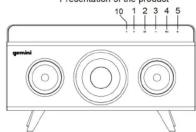
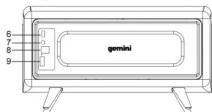
-
LED indicator
-
Mode
-
Previous track
-
Play/pause
-
Next track
-
Power ON/OFF Volume
-
AUX port
-
Micro USB charging port
-
MICRO USB
- USB port
10.MIC
Bluetooth pairing name is BSR-330.
(1) Rotate the volume knob to turn on the machine, then white color Bluetooth led indicator light on, with notification sound.
(2) After notification sound, the white led indicator light flash by 100ms speed waiting for pairing, use your mobile phone sourcing "BSR-330", if need password, then type: 0000.
After connected, the white led indicator light on and notification sound. The white led light flash slowly by a 1000ms speed, when use Bluetooth model play music.
Use the smartphone pairing the machine again, it will connect automatically.
(3) When play music by Bluetooth mode, there is phone call coming, press shortly on play/Pause key to accept phone call; Long press is to cancel the call; Double press play/pause key to redial last phone call, Speaker will stop play music and enter into voice call mode automatically. Press shortly on play/Pause bottom to finish phone call.
(4) When music play by Bluetooth mode, long press play/pause key, then disconnect the device pairing, Bluetooth notification, then enter into sourcing & pairing status.
(5)Press volume knob to adjust the volume+/-
(6) The level of battery power can be read under bluetooth mode. After connected, Battery capacity will indicate on top of smart phone.
(1)Turn on the machine, enter into Bluetooth mode automatically, and then insert USB, machine will change to USB play mode.
(2) When play the music by USB mode, the white led light on and flash slowly, when pause the speaker, white light stop flash, just long bright.
(1) Connect the speaker by 3.5mm stereo cable, speaker will enter into line in mode, the use your smartphone or other device to play music.
(2)Line in mode, the white led light flash slowly, press pause key, led light long bright
(1) Use the USB port to charge device. The output is 5V 1A, use USB power cable to connect your device, then it start to charge.
(1) When power lower to 6.6V, about 20% power, Iphone will indicate the power percentage. Less than 15S, the speaker will turn off with notice voice: Power off, and then turn off speaker
(2)Speaker turn off automatically, you need to switch power key to turn on speaker.
(1)Speaker will trun to stand by mode if no operation in 10 minutes. The LED light will flash in each 4s. Press mode key can wake it up.
MODE SEQUENCE: USB→LINE→BT. When there is no U Disc or Line, there is no such mode.
(1) 本次股东大会采用现场投票和网络投票相结合的方式进行。
15.19.1abelling requirements
This device complies with part 15 of the FCC Rules. Operation is subject to the following two conditions: (1) This device may not cause harmful interference, and (2) this device must accept any interference received, including interference that may cause undesired operation.
15.21 Changes or modification warning
Any Changes or modifications not expressly approved by the party responsible for compliance could void the user's authority to operate the equipment.
15.105 Information to the user.
Note: This equipment has been tested and found to comply with the limits for a Class B digital device, pursuant to part 15 of the FCC Rules. These limits are designed to provide reasonable protection against harmful interference in a residential installation. This equipment generates uses and can radiate radio frequency energy and, if not installed and used in accordance with the instructions, may cause harmful interference to radio communications.
However, there is no guarantee that interference will not occur in a particular installation. If this equipment does cause harmful interference to radio or television reception, which can be determined by turning the equipment off and on, the user is encouraged to try to correct the interference by one or more of the following measures:
teorient or relocate the receiving antenna.
increase the separation between the equipment and receiver.
connect the equipment into an outlet on a circuit different from that to which the ceiver is connected.
consult the dealer or an experienced radio/TV technician for help.
| NAME | MCDE | ||
| Bluetooth | USB | AUX | |
| MCDE | Mode change | Mode change | Mode change |
| PREVIOUS | Short press for reduce volume Long Press for previous | Short press for reduce volume Long Press for previous | Shortly press to reduce volume |
| PLAY / PAUSE / CELL | Short Press for play / pause and Long press to disconnect Double press for recall phone call. Long press to cancel a call | Short Press for play / pause | Short Press for play / pause |
| NEXT | Short press to increase volume Long Press for next | Short press to increase volume. Long Press for next | Short press to increase volume |

Marke : GEMINI
Modell : BRS-330
Kategorie : Lautsprecher