
Match MEC BT HD - Nicht kategorisiert Helix - Kostenlose Bedienungsanleitung
Finden Sie kostenlos die Bedienungsanleitung des Geräts Match MEC BT HD Helix als PDF.


| Produkttyp | Bluetooth® 5.0 Audio-Streaming-Modul (Erweiterungskarte) |
| Marke | Helix / MATCH |
| Modell | Match MEC BT HD |
| Bluetooth®-Standard | 5.0 + EDR |
| Bluetooth®-Profile | A2DP, AVRCP, SPP |
| Bluetooth®-Codecs | SBC, AAC, Qualcomm® aptX™, Qualcomm® aptX™ HD |
| Anzahl koppelbarer Geräte | 8 |
| Funkfrequenzbereich | 2402 – 2480 MHz |
| Reichweite | Bis zu 10 m |
| Digitaler optischer Ausgang | SPDIF (96 kHz / 24 Bit oder 48 kHz / 24 Bit, abhängig von der Abtastrate des Quellgeräts) |
| Status-LED | Blau (Standby), Blau/Rot wechselnd (Pairing-Modus), Blau alle 2 Sek. (verbunden), Blau doppelt alle 2 Sek. (Streaming) |
| Kompatibilität | Helix / MATCH DSP-Geräte mit entsprechendem Steckplatz (z. B. DSP.3, DSP.4) |
| Signalverarbeitung | I²S direkt an den DSP, keine zusätzliche Konvertierung |
| Drahtlose DSP-Konfiguration | Möglich über DSP PC-Tool V5 (nur DSP-Geräte mit ACO-Plattform) |
| Montage | Einbau in dafür vorgesehenen Steckplatz des Geräts; Antennenanschluss mit Mutter und Unterlegscheibe befestigen |
| Stromversorgung | Über das Wirtsgerät (keine separate Stromversorgung erforderlich) |
| Zertifizierung | CE-Kennzeichnung |
| Entsorgung | Elektro- und Elektronik-Altgeräte gemäß lokalen Vorschriften entsorgen |
Häufig gestellte Fragen - Match MEC BT HD Helix
Benutzerfragen zu Match MEC BT HD Helix
0 Frage zu diesem Gerät. Beantworten Sie die, die Sie kennen, oder stellen Sie Ihre eigene.
Eine neue Frage zu diesem Gerät stellen
Laden Sie die Anleitung für Ihr Nicht kategorisiert kostenlos im PDF-Format! Finden Sie Ihr Handbuch Match MEC BT HD - Helix und nehmen Sie Ihr elektronisches Gerät wieder in die Hand. Auf dieser Seite sind alle Dokumente veröffentlicht, die für die Verwendung Ihres Geräts notwendig sind. Match MEC BT HD von der Marke Helix.
BEDIENUNGSANLEITUNG Match MEC BT HD Helix
High Definition Bluetooth® 5.0 Audio Streaming Module
Congratulations!
Dear Customer,
congratulations on your purchase of this high-quality HELIX / MATCH EXTENSION CARD. We developed the BT HD based on state-of-the-art engineering and this is reflected in its exceptional quality and the impressive use of sophisticated technologies. We hope you enjoy using this product.
Yours,
AUDIOTEC FISCHER
General installation instructions for HELIX / MATCH components
To prevent damage to the unit / module and possible injury, read this manual carefully and follow all installation instructions. This product has been checked for proper function prior to shipping and is guaranteed against manufacturing defects.
Before starting your installation, disconnect the battery's negative terminal and all cables from the device to prevent damage to the unit / module, fire and / or risk of injury. For a proper performance and to ensure full warranty coverage, we strongly recommend to get this product installed by an authorized HELIX / MATCH dealer.
Install the Extension Card only in the designated device and its specific slot. Using the module in other devices or slots can result in damage of the Extension Card, the device, the head unit / radio or other connected devices!
Technical data
| Bluetooth® standard: 5.0 + EDR |
| Bluetooth® profile: A2DP, AVRCP, SPP |
| Bluetooth® codec: SBC, AAC, Qualcomm® aptXTM and Qualcomm® aptXTM HD |
| Number of paired devices: 8 |
| Wireless frequency range: 2402 ~ 2480 MHz |
| Range: Up to 10 m |
| Digital optical output: SPDIF with either 96 kHz / 24 Bit or 48 kHz / 24 Bit depending on sampling rate of the device |
Status LED of BT HD
| Blue LED on: 1 sec,off: 2 secs, repeat | All profiles are in standby but not connected with any Bluetooth® device yet |
| Blue & Red LED flash alternate | Enter pairing mode |
| Blue LED flash every 2 sec. Device is connected | |
| Blue LED flash twice every 2 sec. | Device is streaming |
Mounting information
- First disconnect all cables from the device.
-
Depending on the device there are two possibilities to get access to the Extension Card slot.
-
Bottom plate is bolted: untighten the screws of the bottom plate and remove it. Afterwards dismantle the appropriate side panel by removing its screws.
-
Bottom plate is not bolted: dismantle the appropriate side panel by removing its screws and pull out the bottom plate sideways.
-
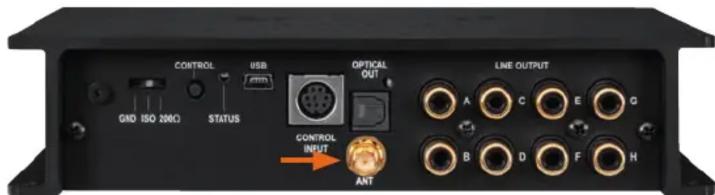
Remove the nut and the washer from the antenna socket of the Extension Card.
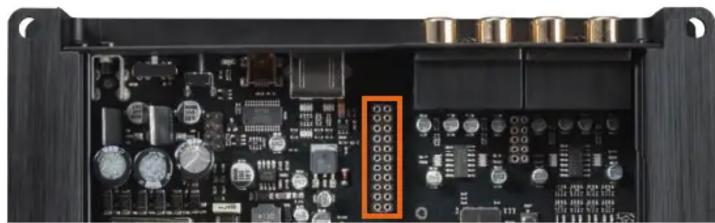
- Insert the Extension Card into the specific slot of the device which is marked in the following picture (the picture representatively displays the Extension Card slot of the HELIX DSP.3). The exact position of the slot can be found in the manual of each device.
natural_image
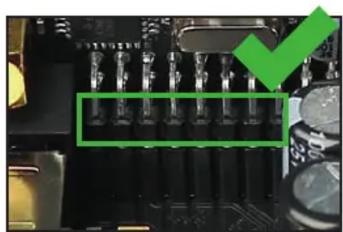
Interior view of an electronic device showing circuit board, capacitors, and components (no visible text or symbols)- Make sure that the module is installed properly and all pins are fully inserted into the socket:
natural_image
Close-up of electronic circuit board with a green checkmark overlay (no readable text or symbols)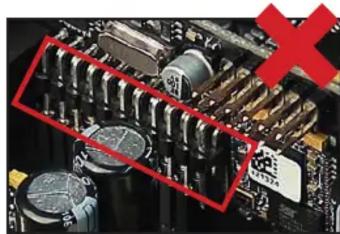
natural_image
Close-up of electronic circuit boards with a red X mark overlay (no readable text or symbols)-
If the bottom plate was bolted, fix the new side panel which is delivered with the Extension Card. Afterwards reinsert the bottom plate and fix it, too. Otherwise reinsert the bottom plate and fix the new side panel with the screws.
-
Put the washer and the nut on the antenna socket and bolt it to the side panel.
Caution: Do not overtighten the nut as this may damage the socket!
- Reconnect all cables to the device.

Bluetooth®

Qualcomm® aptX™

Qualcomm® aptX™ HD
Signal routing of the Extension Card
As soon as the Extension Card is installed, it is automatically detected by the device. Now you can allocate the Extension Card to the desired outputs in the "HEC (MEC) / AUX Routing" matrix.
![Input & Output Configuration Analog [Input A]... [Input B]... [Input C]... [Input D]... [Input E]... [Input F]... [Input G]... HEC / AUX AUX L AUX R DRAG & DROP HEC/AUX Routing Main Routing DIGITAL ROUTING AUX L 100.0 % AUX R 100.0 % AUX L 100.0 % AUX R 100.0 % AUX L 50.0 % AUX R 50.0 % AUX L 50.0 % AUX R 50.0 % Front L High Output A Front R High Output B Front L Mid Output C Front R Mid Output D Front L Low Output E Front R Low Output F](/content/2026/05/830159/images/44678c666f24efdf49c4e14bb1cb7b8fe426f07b7b1750d38ed1b3c67b9d2faf.jpg)
Several new features are visible in the DSP PC-Tool after installing an Extension Card.
Pairing of the Extension Card with other Bluetooth® devices
The HEC / MEC BT HD module supports the A2DP profile featuring Qualcomm® aptX™, Qualcomm® aptX™ HD and AAC codec for maximum sound performance. The digital Bluetooth® data stream in I²S format is directly fed into the DSP without any additional signal conversion. A one-time pairing procedure is mandatory to establish a connection between the HELIX / MATCH device and your device with Bluetooth® wireless technology. Make sure that the Bluetooth® function on your device has been activated before you start the pairing process.
Important: The Status LED of the HEC / MEC BT HD module flashes alternately blue and red. After three minutes the pairing mode is left automatically if the connection has not been established.
Option a)
Turn on the HELIX / MATCH device and push the “control” button for less than 1 sec. in order to start the pairing mode.
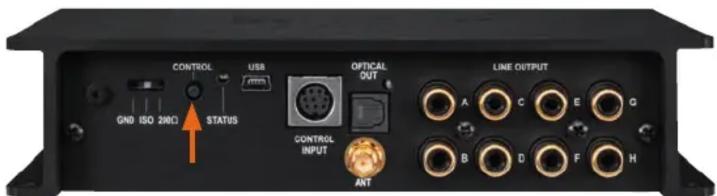
The picture representatively displays the "control" button of the HELIX DSP.3
Option b)
Start the pairing mode in the DSP PC-Tool software:
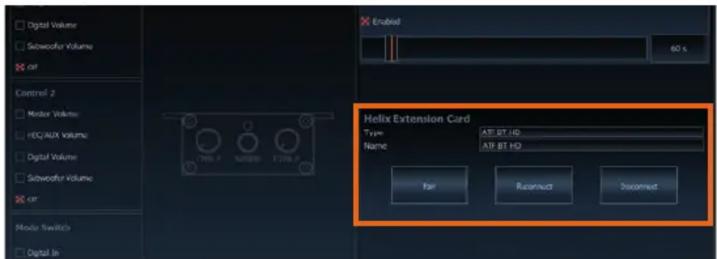
After the pairing mode is activated the Bluetooth® network can be found under the name "ATF BT HD".
Option c)
Start the pairing process through the CONDUCTOR or DIRECTOR remote control.
DIRECTOR: Go to the Bluetooth ^ Connect menu and push the "Pair" button.
CONDUCTOR: Switch to a Volume Control or Bluetooth Playback control menu and press the rotary knob for more than 5 seconds.
WIFI CONTROL: Go to the HEC / MEC menu and push the "Pair" button under the Bluetooth® Connect section.
Further information will be found in the corresponding user manual.
The HEC / MEC BT HD module can be paired with up to eight Bluetooth ^® devices. As soon as you try to pair a ninth device, the first one will be erased automatically from the pairing list.
The optical SPDIF output of the HEC / MEC BT HD module
The installation of the Extension Card adds as well as additional digital optical SPDIF output to your device. This output allows to transmit any unprocessed input or DSP-processed output signals to other devices.
A new matrix "Digital Output Routing" appears in the "Input and Output Configuration" page in which you can make your desired settings.
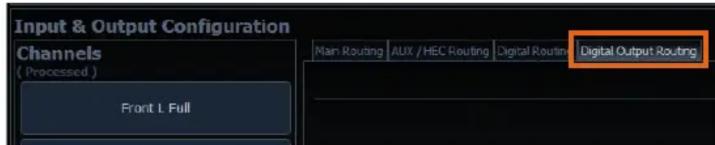
The digital output delivers an uncoded stereo PCM signal with either 96 kHz / 24 Bit or 48 kHz / 24 Bit, depending on the sampling rate of the designated device.
Wireless DSP tuning – only DSP devices with ACO
The HEC / MEC BT HD also offers a wireless configuration of the DSP via the DSP PC-Tool V5 software and a PC with Bluetooth® wireless technology for all DSP devices equipped with ACO platform.
Therefore follow the subsequent steps:
- Pair your HEC / MEC BT HD with your PC as explained on the left side.
- Start the DSP PC-Tool software (version 5.0 or higher required).
- Toggle the connect type button, located at the right side navigation, to "BT". The software now automatically detects the device.
- Select the device which should be configured and click the "Connect" button. You can now start your configuration.
Warranty disclaimer
The warranty service is based on the statutory regulations. Defects and damage caused by overload or improper handling are excluded from the warranty service. Any return can only take place following prior consultation, in the original packaging together with a detailed description of the error and a valid proof of purchase.
Technical modifications and errors excepted! We accept no liability for damage to the vehicle or device defects caused by the incorrect operation of the device. This product has been issued a CE marking. This means that the device is certified for use in vehicles within the European Union (EU).
Legal notes:
Qualcomm aptX is a product of Qualcomm Technologies, Inc. and/or its subsidiaries. Qualcomm is a trademark of Qualcomm Incorporated, registered in the United States and other countries. aptX is a trademark of Qualcomm Technologies International, Ltd., registered in the United States and other countries. The Bluetooth ^® word mark and logos are registered trademarks owned by Bluetooth SIG, Inc. and any use of such marks by Audiotec Fischer GmbH is under license. Other trademarks and trade names are those of their respective owners.

- High Definition Bluetooth® 5.0 Audio Streaming Module
- Congratulations!
- General installation instructions for HELIX / MATCH components
- Mounting information
- Bluetooth®
- Signal routing of the Extension Card
- Pairing of the Extension Card with other Bluetooth® devices
- Option a)
- Option b)
- Option c)
- The optical SPDIF output of the HEC / MEC BT HD module
- Wireless DSP tuning – only DSP devices with ACO
- Warranty disclaimer
Marke : Helix
Modell : Match MEC BT HD
Kategorie : Nicht kategorisiert