
PM-33 - Nicht kategorisiert Carson - Kostenlose Bedienungsanleitung
Finden Sie kostenlos die Bedienungsanleitung des Geräts PM-33 Carson als PDF.


| Produkttyp | Taschenlupe |
| Marke | Carson |
| Modell | PM-33 |
| Vergrößerung 2,5x | Große Linse |
| Vergrößerung 4,5x | Linke kleine Linse |
| Vergrößerung 6x | Rechte kleine Linse |
| Beleuchtung | LED, einschaltbar über schwarzen Knopf |
| Stromversorgung | 2x CR2032 Knopfzellen (Alkaline) |
| Batteriewechsel | Batteriefach an der Rückseite öffnen, Polarität beachten |
| Batteriehinweis | Nur Alkaline-Batterien verwenden; nicht mischen; nicht aufladbar; vor Hitze schützen |
| Linsenreinigung | Mit weichem Mikrofasertuch, bei Bedarf angefeuchtet; keine scharfen Reinigungsmittel |
| Sicherheitshinweis | Nicht direktem Sonnenlicht aussetzen (Brandgefahr) |
| Kundenservice USA | Telefon: 1-631-963-5000, E-Mail: info@carson.com |
| Kundenservice UK/EU | Telefon: +44 (0) 1938 557440, E-Mail: uksupport@carson.com / eusupport@carson.com |
| Lieferumfang | Lupe, 2 CR2032 Batterien (eingelegt), Bedienungsanleitung |
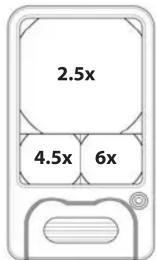
| Verwendung der Linsen | Die größte Linse bietet 2,5-fache Vergrößerung, die linke kleinere 4,5-fache und die rechte 6-fache Vergrößerung |
Häufig gestellte Fragen - PM-33 Carson
Benutzerfragen zu PM-33 Carson
0 Frage zu diesem Gerät. Beantworten Sie die, die Sie kennen, oder stellen Sie Ihre eigene.
Eine neue Frage zu diesem Gerät stellen
Laden Sie die Anleitung für Ihr Nicht kategorisiert kostenlos im PDF-Format! Finden Sie Ihr Handbuch PM-33 - Carson und nehmen Sie Ihr elektronisches Gerät wieder in die Hand. Auf dieser Seite sind alle Dokumente veröffentlicht, die für die Verwendung Ihres Geräts notwendig sind. PM-33 von der Marke Carson.
BEDIENUNGSANLEITUNG PM-33 Carson
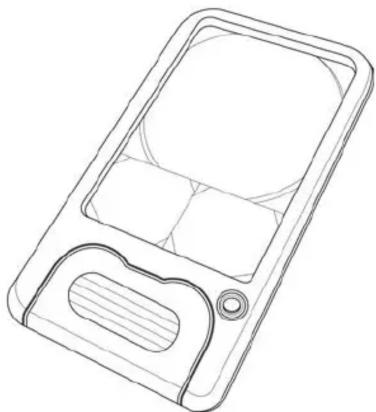
CARSON® POCKET MAGNIFIER
2.5x / 4.5x / 6x LED LIGHTED MAGNIFIER
Instructions for use:
natural_image
Line drawing of a mobile phone casing with internal compartments and a handle (no text or symbols)PM-33
To Activate LED Light
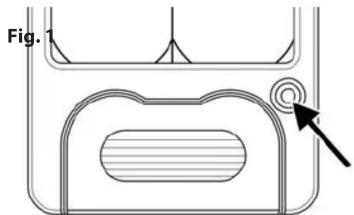
To turn light on, press black button on front of magnifier (Fig. 1). Turn light off when not in use.
Note: Please remove battery tab before first use.
natural_image
Technical diagram showing a cross-sectional view of a mechanical component with an arrow pointing to a circular feature (no text or symbols present)Using Your Magnifier
Look through largest lens for 2.5x magnification. Look through smaller lens on left for 4.5x magnification. For 6x magnification look through smaller lens on right (Fig. 2).
Fig. 2
Replacing Batteries
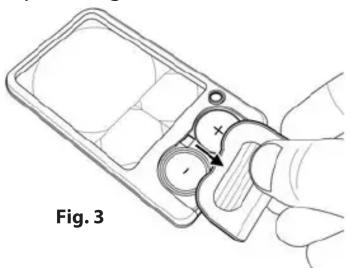
Pull back battery door and set aside (Fig. 3). Remove spent batteries and replace with two fresh CR2032 button cell batteries according to polarity indicators marked inside battery compartment (Fig. 4). Replace battery door when complete (Fig. 5).
natural_image
Line drawing of a hand holding a device with a knob and handle, labeled Fig. 3 (no text or symbols on the diagram itself)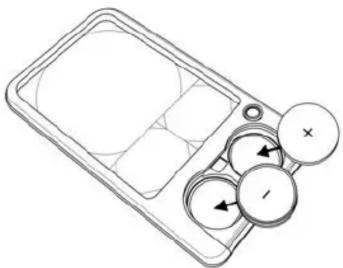
natural_image
Line drawing of a handheld device with circular buttons and a grid panel (no text or symbols)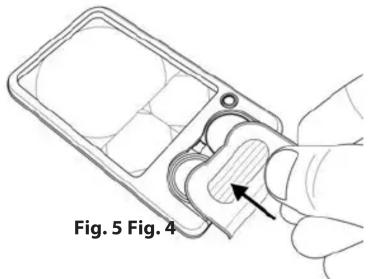
Warning: Use only alkaline batteries. Mixing old and new, different brands or types within brands may cause batteries to leak, overheat or explode. Keep away from fire or excessive heat. Inspect batteries for corrosion or leakage. Insert in direction indicated. Rechargeable batteries not recommended.
Cleaning Your Magnifier
Clean lens with a soft, clean microfiber cloth by rubbing gently in a circular motion. Moisten the lens cloth with water if needed. Do not use harsh chemicals, solvents or abrasives as they may damage the lens.
CAUTION - FIRE HAZARD:
Keep magnifier away from direct sunlight to prevent accidental fire.
Customer Service:
If you experience any difficulties, please contact us and we will be happy to help you.
In the U.S.A.
Phone: 1-631-963-5000
Email: info@carson.com
In the U.K.
Phone: +44 (0) 1938 557440
Email: uksupport@carson.com
In the E.U.
Phone: +44 (0) 1938 557440
Email: eusupport@carson.com


Marke : Carson
Modell : PM-33
Kategorie : Nicht kategorisiert