
MagniTouch MT-33 - Nicht kategorisiert Carson - Kostenlose Bedienungsanleitung
Finden Sie kostenlos die Bedienungsanleitung des Geräts MagniTouch MT-33 Carson als PDF.


| Produkttyp | Digitaler Bildschirmleser / Vergrößerungsgerät |
| Marke | Carson |
| Modell | MagniTouch MT-33 |
| Abmessungen (ca.) | 15 x 8 x 2 cm |
| Gewicht (ca.) | 200 g |
| Stromversorgung | Lithium-Ionen-Akku 3,7 V, 1500 mAh |
| Ladezeit | ca. 2 Stunden |
| Betriebszeit (ca.) | 4 Stunden Dauerbetrieb |
| Display | LCD-Farbbildschirm 7,6 cm (3 Zoll) |
| Vergrößerungsbereich | 2x bis 16x stufenlos |
| Funktionen | Standbild, 6 Farbmodi, Helligkeitsregelung, Kontrastanpassung |
| Kamera | Hochauflösende Kamera (5 MP) für Nah- und Fernaufnahmen |
| Speicher | Micro-SD-Karte (bis 32 GB) für Bildaufnahmen |
| Ausgänge | HDMI (Mini) für externen Monitor, Kopfhöreranschluss 3,5 mm |
| Reinigung und Pflege | Display und Gehäuse mit weichem, fusselfreiem Tuch reinigen; kein Wasser oder Reinigungsmittel |
| Sicherheitshinweise | Gerät nicht in Flüssigkeiten tauchen; von Kindern fernhalten; nur Original-Zubehör verwenden |
| Ersatzteile | Ersatzakku, Ladekabel, Netzteiler, Schutztasche |
| Garantie | 2 Jahre |
| Lieferumfang | MagniTouch MT-33, USB-Ladekabel, Kurzanleitung, Schutztasche |
Häufig gestellte Fragen - MagniTouch MT-33 Carson
Benutzerfragen zu MagniTouch MT-33 Carson
0 Frage zu diesem Gerät. Beantworten Sie die, die Sie kennen, oder stellen Sie Ihre eigene.
Eine neue Frage zu diesem Gerät stellen
Laden Sie die Anleitung für Ihr Nicht kategorisiert kostenlos im PDF-Format! Finden Sie Ihr Handbuch MagniTouch MT-33 - Carson und nehmen Sie Ihr elektronisches Gerät wieder in die Hand. Auf dieser Seite sind alle Dokumente veröffentlicht, die für die Verwendung Ihres Geräts notwendig sind. MagniTouch MT-33 von der Marke Carson.
BEDIENUNGSANLEITUNG MagniTouch MT-33 Carson
CARSON®
MAGNITOUCH™
3x "Touch Activated" LED Lighted Loupe
INSTRUCTIONS FOR USE
MT-33

Congratulations on selecting your new Carson® MT-33 MagniTouch™ magnifier! With reasonable care, your magnifier will provide you with years of enjoyment. In order to achieve optimum performance, please read the instructions carefully on the proper use and care of your magnifier.
Installing batteries:
Turn item upside down and locate battery compartment. (Please note there are two battery compartments. The compartment closest to the light switch is the one that powers the item. The other battery compartment is used to store batteries that are not in use.)
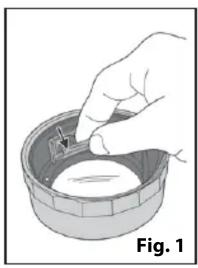
Pull battery door up and fold door away from the battery compartment (see Fig 1). Insert two fresh CR2016 coin cell batteries into battery compartment. Make sure positive side of battery is facing outward (see Fig 2). Close battery door securely when finished.
Warning:
Do not leave batteries installed during extended periods of disuse. Do not mix new and old batteries. Do not mix alkaline, standard (carbon-zinc) or rechargeable (nickel-cadmium) batteries.
Instructions for use:
Select the LED light setting you would like to use (see Fig. 3).
For constant light, move the switch to middle position (marked ON). To use the "touch activated" setting, position the switch to the position marked "AUTO".
With the switch on AUTO, you simply need to touch the silver ring on top of the loupe that surrounds the lens (as shown in Fig. 4) to activate the light.
Once you have selected your LED light setting, place the loupe on top of the subject you would like to magnify. Focus the magnifier by rotating the top portion of the loupe until the viewing subject is sharp and clear (see Fig. 5).
Care and Maintenance:
Always store loupe in included protective case when not in use to avoid damaging the lens. Clean lens with a soft, clean microfiber cloth rubbing gently in a circular motion.
Moisten the lens cloth with water if necessary.
Do not use harsh chemicals, solvents or abrasives as they may damage the lens.
Caution:
Fire Hazard. Keep magnifier away from direct sunlight to prevent accidental fire. Do not stare directly at LED lights as this might damage your eyes.
natural_image
Illustration of a hand placing a small object into a bowl, labeled Fig. 1 (no text or symbols on the object itself)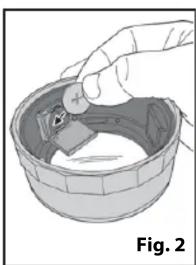
natural_image
Illustration of a hand holding a small object inside a bowl, labeled Fig. 2 (no text or symbols on the object itself)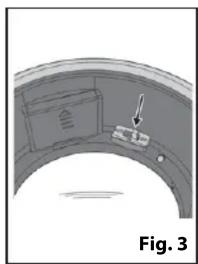
natural_image
Diagram of a curved mechanical component with an arrow pointing to a labeled section (no text or symbols present)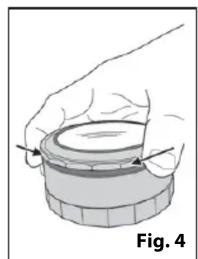
natural_image
Illustration of a hand holding a circular object with a pointer, labeled Fig. 4 (no text or symbols on the object itself)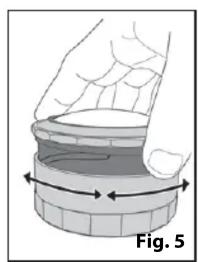
natural_image
Illustration of a hand holding a circular object with arrows indicating rotation or movement (no text or symbols)


Marke : Carson
Modell : MagniTouch MT-33
Kategorie : Nicht kategorisiert