
PMP58U - Megafon Pyle - Kostenlose Bedienungsanleitung
Finden Sie kostenlos die Bedienungsanleitung des Geräts PMP58U Pyle als PDF.


| Produkttyp | Megafon |
| Marke | Pyle |
| Modell | PMP58U |
| Stromversorgung | 6 x C-Batterien (nicht im Lieferumfang) |
| Ausgangsleistung | 10 Watt (Spitze) |
| Reichweite | Bis zu 500 Meter |
| Abmessungen (H x D) | ca. 25,4 cm x 15,2 cm |
| Gewicht | ca. 680 g (ohne Batterien) |
| Material | Kunststoffgehäuse |
| Farbe | Schwarz / Gelb |
| Funktionen | Sprachverstärkung, Sirenenfunktion |
| Lautstärkeregelung | Drehregler |
| Mikrofon | Eingebautes dynamisches Mikrofon |
| Trageriemen | Inklusive |
| Bedienung | Ein/Aus-Schalter, Sprechtaste |
| Reinigung | Mit feuchtem Tuch abwischen; keine aggressiven Reinigungsmittel |
| Sicherheitshinweise | Nicht in der Nähe von Ohren verwenden; vor Feuchtigkeit schützen |
| Ersatzteile | Batterien; Ersatzteile über den Hersteller erhältlich |
| Reparierbarkeit | Fachgerechte Reparatur durch autorisierten Service |
| Garantie | 1 Jahr |
Häufig gestellte Fragen - PMP58U Pyle
Benutzerfragen zu PMP58U Pyle
0 Frage zu diesem Gerät. Beantworten Sie die, die Sie kennen, oder stellen Sie Ihre eigene.
Eine neue Frage zu diesem Gerät stellen
Laden Sie die Anleitung für Ihr Megafon kostenlos im PDF-Format! Finden Sie Ihr Handbuch PMP58U - Pyle und nehmen Sie Ihr elektronisches Gerät wieder in die Hand. Auf dieser Seite sind alle Dokumente veröffentlicht, die für die Verwendung Ihres Geräts notwendig sind. PMP58U von der Marke Pyle.
BEDIENUNGSANLEITUNG PMP58U Pyle
This user manual contains important information for safe operation and optimal megaphone performance. Please carefully read and follow safety notes and instructions. Save this manual for future reference.
Ensure it is available to all persons using this device.
PRECAUTIONS
- Ensure correct polarity of cells used. Insert the batteries correctly by aligning the (-) marks on the batteries with the spring in the back cover.
- Use new batteries/cells whenever possible.
- When the megaphone is not in use for a long period, remove the dry cells and replace them. Drained cells or rechargeable batteries may result in insufficient sound volume.
OPERATING INSTRUCTIONS
1. Carrying the Megaphone:
When carrying the megaphone on your shoulder, press the (1) press-to-talk power on-off switch, located on the left side of the microphone.

- Using the Grip: When holding the megaphone by the grip, fix the microphone hanger into the microphone fixing hanger, then press the (2) press-to-talk power on-off switch on the back with your index finger.
- Positioning the Megaphone: Point the speaker opening towards your intended audience, and speak into the microphone mouthpiece. Hold the mouthpiece close to your lips and speak normally.
- Adjusting the Volume: Turn the sound volume control knob on the right-hand side of the microphone to adjust the sound level to maximum without causing feedback (howling).
Battery Insertion
- Access the Battery Compartment: Unfasten the clip located near the top, back-side of the unit. This will release the lid to reveal the battery compartment.
- Insert Batteries: Insert 8 x Type-C (UM-2) batteries into the battery compartment, ensuring that the correct polarity is observed. Follow the positive (+) and negative (-) markings inside the battery case for proper placement.
- Close the Battery Compartment: Close the cover and fasten the clip until locked.
Note: Ensure the batteries are inserted correctly, observing the correct polarity.

WARNING: Cancer and Reproductive Harm - www.P65warnings.ca.gov
Panel Operating Instructions
Select Previous Track: Short press to skip to the previous track. Press and hold to decrease the volume.
Pause/Play: Short press to pause or play the current track. Press and hold to stop playback.
Select Next Track: Short press to skip to the next track. Press and hold to increase the volume.
USB Function Instructions
-
Connecting the USB Device: Plug the USB device into the port and switch the LOCK button, located on the left side of the microphone, to the top position. Once connected, the megaphone will automatically play the first file on the USB drive. You can then choose the file you prefer and adjust the volume as shown in the diagram on the right.
-
Stopping USB Playback: When finished, switch the LOCK button to the bottom position and unplug the USB device.
Notice:
- You can play music from the USB and use the microphone simultaneously without interference.
- If you do not need to speak while playing music, turn off the microphone volume to reduce noise and save battery power.
- Do not touch the USB device while the indicator light is flashing.
- The maximum supported USB device capacity is 6GB, and only MP3 files will be recognized.
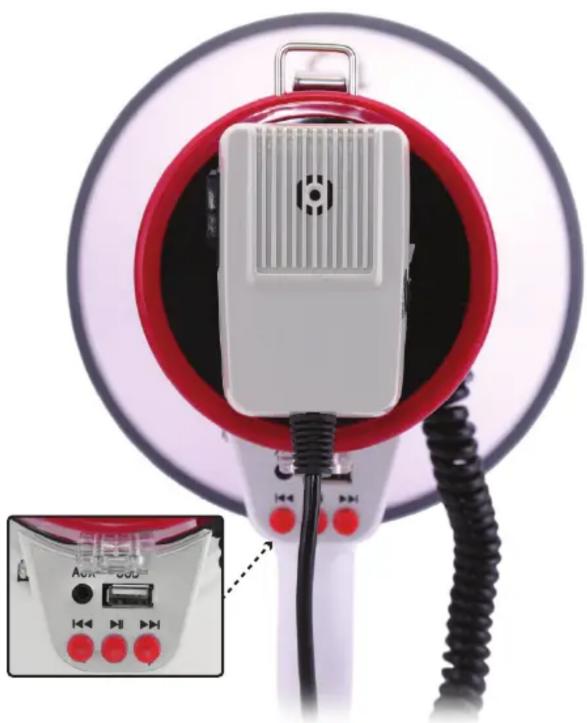
natural_image
Close-up of a red and white photo camera with a speaker grille and cable, shown in an inset view (no text or symbols visible)Features:
• (2) Megaphone Modes: Talk + Siren
- Adjustable Volume Control
• USB Input for Music Projection
• MP3 Digital Audio File Compatibility
- Aux (3.5mm) Input Jack
- Connect & Stream Audio from External Devices
- Simple Button Control Operation
• High-Powered Audio Reproduction
- Wide Bell Diameter for Extended Projection
- Convenient Coiled-Cord Handheld Microphone
- Ergonomic Pistol Grip & Lightweight Chassis
- Battery Operated: Requires (8) x 'C' Batteries
- Can be Optionally Powered via 12V Adapter
- Perfect for Outdoor Events and Crowd Control
• Used by U.S. Service Personnel & Armed Forces
Technical Specs:
• MAX Power Output: 50 Watt
• Audio Projection Range: Up to 1700 Square Yards
• Sound Processor: Dynamic Piezo Driver
- USB Flash Drive Support: Up to 32GB
• Digital File Compatibility: MP3, WMA, AVI
Register Product
Thank you for choosing PyleUSA. By registering your product, you ensure that you receive the full benefits of our exclusive warranty and personalized customer support. Complete the form to access expert support and to keep your PyleUSA purchase in perfect condition.
Start Here

Model Number: PMP58U
PyleUSA.com/pages/register

natural_image
Exterior view of a PYLE Pyle USA megaphone with red and white casing (no visible text or symbols on body)
Questions or Comments?
We are here to help!
Phone: 1.718.535.1800
PyleUSA.com/ContactUs

Marke : Pyle
Modell : PMP58U
Kategorie : Megafon