
PMP64VC - Megafon Pyle - Kostenlose Bedienungsanleitung
Finden Sie kostenlos die Bedienungsanleitung des Geräts PMP64VC Pyle als PDF.


| Produkttyp | Megafon |
| Marke | Pyle |
| Modell | PMP64VC |
| Leistung (max.) | 100 Watt |
| Schalltrichterdurchmesser | 8,46 Zoll (ca. 21,5 cm) |
| Reichweite | Bis zu 1500 Quadratyards |
| Abmessungen (Durchmesser x Länge) | 8,46 x 14,96 Zoll (ca. 21,5 x 38 cm) |
| Gewicht (mit Batterien) | ca. 1,5 kg |
| Material | ABS-Kunststoff |
| Stromversorgung | 8 x C-Batterien (nicht enthalten) oder 12V Lithium-Akku (im Lieferumfang) |
| Betriebsmodi | Sprechen, Sirene, Musik, Pfeife |
| Stimmverzerrung | Monster, Spooky, Roboter, Geist, Alien, Kind |
| Bluetooth | Ja (Reichweite ca. 10 m) |
| AUX-Eingang | 3,5 mm Klinke |
| USB/SD-Karte | Ja (MP3, max. 6 GB) |
| Mikrofon | Kabelgebundenes Handmikrofon (im Lieferumfang) |
| Aufnahmefunktion | Ja (Sprachaufnahme und Wiedergabe) |
| Lieferumfang | Megafon, Mikrofon, Tragegurt, 12V Lithium-Akku |
| Reinigung | Mit einem trockenen, fusselfreien Tuch reinigen. Nicht in Wasser tauchen. |
| Sicherheitshinweise | Nicht in der Nähe von Wasser oder Feuchtigkeit verwenden. Keine offenen Flammen in der Nähe. |
| Reparatur | Bei Defekten wenden Sie sich an den Pyle-Kundendienst. |
Häufig gestellte Fragen - PMP64VC Pyle
Benutzerfragen zu PMP64VC Pyle
0 Frage zu diesem Gerät. Beantworten Sie die, die Sie kennen, oder stellen Sie Ihre eigene.
Eine neue Frage zu diesem Gerät stellen
Laden Sie die Anleitung für Ihr Megafon kostenlos im PDF-Format! Finden Sie Ihr Handbuch PMP64VC - Pyle und nehmen Sie Ihr elektronisches Gerät wieder in die Hand. Auf dieser Seite sind alle Dokumente veröffentlicht, die für die Verwendung Ihres Geräts notwendig sind. PMP64VC von der Marke Pyle.
BEDIENUNGSANLEITUNG PMP64VC Pyle
PMP64VC
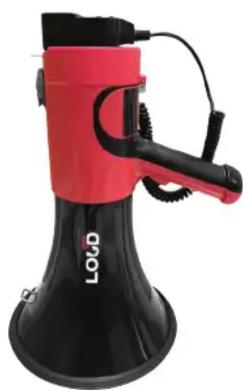
Lightweight and Portable Megaphone Bullhorn
Aux (3.5mm) Input for MP3/Music, Automatic Siren,
100-Watt, MIC/TALK, BT, Voice Change
PYLE
PyleUSA.com
USER GUIDE
OPERATION
Open the back cover. Remove the plastic battery sleeve and insert 8 nos. UM-2 cells with correct polarity, insert the sleeve into the battery compartment according to the instructions in the compartment. Then close the back cover until it locks. Now your megaphone is ready for action. You can also open the back cover, remove the plastic battery sleeve and insert one 12V rechargeable battery then close the back cover until it locks.
Toggle power switch to ON, press to power ON the MIC, then the RED indicator lights up.

Now the megaphone is ready for the following function operation:
TALK OPERATION
When the power is turned ON, you can speak directly into the microphone without pressing any key.
Alarm sound and Whistle Operation: Short press S/W to sound the alarm, press again to turn OFF the alarm. Press and hold S/W to sound the whistle, short press to turn OFF.
Recording Operation: Press REC, the recording indicator blinks at this time, now the recording function is ready. Speak to the microphone to record. To finish or stop the recording, just press the 'REC' button again. To play the music or voice you recorded circularly, press the 'PLAY' button. To stop, press 'PLAY' button again.
Volume Adjustment Operation: (If theres no SD or USB inserted) Press and hold "VOL+ or VOL-" to increase or decrease the volume.
Bluetooth Operation: When the MIC is powered ON, press and hold the PLAY/BT key and you will hear a Bluetooth voice signaling it is ready to be paired via Bluetooth with your device. The megaphone will appear as 'MEGAPHONE' in your Bluetooth device list. Connect to the megaphone and you will be able to instantly stream media through the megaphone's speaker. Press and hold the PLAY/BT key again to exit bluetooth mode and go back to TALK operation.

MP3 Operation: Plug in USB or SD card to play music. The megaphone's LED indicator will then blink while playing music. Press M button to choose the music between AUX and USB/SD card.
Notice:
- You can play the music on the disk and speak at the same time, they will not effect each other.
- If you don't want to speak when playing music, turn off the volume control, thus it can turn down the noise and save the battery.
- DO NOT touch the USB while the indicator light is flashing.
- The capability of the USB is no more than 6G, and it can only identify MP3 format.
Control Panel Operation Instruction
Short press for previous track, press and hold for volume decrease.
▶II Short press to play music or pause. Press and hold to stop
▶▶▶ Short press for next track, press and hold for volume increase.
AUX 3.5mm Audio Line IN
M Audio Source Mode Switch
TO REPLACE BATTERIES

natural_image
Illustration of a hand holding a small object with a circular top, no text or symbols present
natural_image
Illustration of two hands holding a cylindrical object, no text or symbols present
natural_image
Simple line drawing of a hand holding a small object with circular elements, no text or symbols present
natural_image
Simple line drawing of a bowl with contents inside, no text or symbols present- Loosen the locking screw of the battery compartment cover on the back of the body. The battery compartment cover comes off.
- Insert 8 x type-C (UM-2) batteries in the battery case observing correct polarity.
- Insert the battery case with batteries into the battery compartment of the megaphone, paying attention to polarity.
TO REPLACE RECHARGEABLE BATTERIES
- Open the back cover. Remove the plastic battery sleeve and insert the rechargeable battery, close the back cover until it locks.
Notes:
- Make sure the batteries are inserted correctly, observe correct polarity.
- Charge the battery for 6-8 hours in 110-220V before first use.
- When the megaphone is not in use for a long period of time, remove the dry cells and replace.
- Drained cells or rechargeable battery will not give sufficient sound volume.
- After the lithium battery is fully charged, the indicator light will turn red into green.
- Swith the button to OFF if you have finished using the megaphone.
Features:
- Modes: Talk, Siren, Music, Whistle
• Voice Change: MONSTER, SPOOKY, ROBOT, GHOST, ALIEN, CHILD
• Aux (3.5mm) Input Connector Jack - Stream MP3 & Digital Audio Files
- Ability to Connect External Devices (iPhone, Android, Smartphone, iPad, Tablet, etc.)
- Includes Plug-in Handheld Microphone
- Button Activated Automatic Siren Alarm
- Adjustable Volume Control
- Ergonomic Pistol Grip and Lightweight Chassis
- For Indoor/Outdoor Use
• Built-in Automatic Siren Function
• Talk, Music, and Siren Switch - Bluetooth
What's in The Box:
- Megaphone Speaker
- Microphone
- Strap
- 12V Lithium Battery
Technical Specs:
• Constructional Materials: ABS
• Power Output: 100 Watt MAX
• Bell Width: 8.46" -inches
- Projection Range: Up to 1500 Square Yards
- Battery Powered: Requires 8 x 'C' Batteries, Not Included
- Product Dimensions (D x L): 8.46" x 14.96" -inches
natural_image
Red and black megaphone device with visible branding (no text or symbols on body)Questions? Comments?
We are here to help!
Phone: (1) 718-535-1800
Email: support@pyleusa.com

Marke : Pyle
Modell : PMP64VC
Kategorie : Megafon