
Detroit - Kopfhörer Urbanista - Kostenlose Bedienungsanleitung
Finden Sie kostenlos die Bedienungsanleitung des Geräts Detroit Urbanista als PDF.


| Produkttyp | Bluetooth-Kopfhörer |
| Marke | Urbanista |
| Modell | Detroit |
| Farbe | Schwarz |
| Kategorie | Bluetooth-Kopfhörer |
| Akku-Laufzeit (Musik) | 12 Stunden |
| Standby-Zeit | 30 Stunden |
| Ladezeit | ca. 2,5 Stunden |
| Ladeanschluss | Micro-USB |
| Kopfhöreranschluss | 3,5 mm Klinke |
| Bluetooth-Version | Nicht angegeben (typisch 5.0) |
| Gewicht | ca. 200 g |
| Lieferumfang | Kopfhörer, Micro-USB-Kabel, Bedienungsanleitung |
| Funktionen | Bluetooth-Kopplung, Freisprechen, Sprachassistent, Musiksteuerung |
| LED-Anzeigen | Blau (eingeschaltet), rot (ausschalten), blau blinkend (Kopplung) |
| Tasten | Multifunktionstaste, Lautstärke +/– |
| Reinigung & Pflege | Mit einem trockenen, weichen Tuch reinigen |
| Sicherheitshinweise | Nicht in Flüssigkeiten tauchen, vor Hitze schützen |
Häufig gestellte Fragen - Detroit Urbanista
Benutzerfragen zu Detroit Urbanista
0 Frage zu diesem Gerät. Beantworten Sie die, die Sie kennen, oder stellen Sie Ihre eigene.
Eine neue Frage zu diesem Gerät stellen
Laden Sie die Anleitung für Ihr Kopfhörer kostenlos im PDF-Format! Finden Sie Ihr Handbuch Detroit - Urbanista und nehmen Sie Ihr elektronisches Gerät wieder in die Hand. Auf dieser Seite sind alle Dokumente veröffentlicht, die für die Verwendung Ihres Geräts notwendig sind. Detroit von der Marke Urbanista.
BEDIENUNGSANLEITUNG Detroit Urbanista
DETROIT
(SIMPLICITY)

Manual:
DETROIT
Category:
SIMPLICITY

HOW TO SYNC THE HEADPHONES WITH YOUR BLUETOOTH DEVICE:
Begin by turning the headphones on by pressing and holding the multifunction but ton for 5 seconds until you hear a beeping noise. Via the Bluetooth settings menu of the device you want to pair the headphones to, select Urbanista Detroit. If paired success fully, the LED will turn a solid blue then blink continuously every 12 seconds.
Once the headphones are connected with your phone/device, you can start using the Detroit to listen to music or to make calls. The Detroit has a play time of 12 hours and a standby time of 30 hours. A full charge takes around 2,5 hours.
To charge the headphone s, connect the included cable to the micro USB port. Then insert the USB plug to a power outlet or to your computer.

-
(+)
-
Multifunction
-
(-)
-
Micro-USB
-
Audio jack
ON/OFF
ON - Press and hold the multifunction button for 1 second to turn the device on.
OFF - When powered on, press and hold the multifunction button for 3 seconds to turn the device off.
LED STATUS
POWER ON - LED turns solid blue.
POWER OFF - LED flashes red, then stops.
PAIRING - LED blinks blue continuously as the device is waiting to be p aire d. Once the device is p aire d the LED will turn a solid blue and will continue to blink once every 12 seconds.
MUSIC AND CALLS
Via the multifunction button:
ACTIVATE VOICE ASSISTANT - Tap twice
ACCEPT CALL - Tap once
END CALL - Tap once
Via the + and - volume buttons:
INCREASE VOLUME - Tap (+)
DECREASE VOLUME - Tap (-)
SKIP TO NEXT TRACK - Hold (+) for 1 second
SKIP TO PREVIOUS TRACK - Hold (-) for 1 second
PLAY/PAUSE - Tap once on the multifunction button
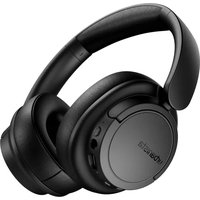



Marke : Urbanista
Modell : Detroit
Kategorie : Kopfhörer