
BC7217 - Batterie FLUKE - Kostenlose Bedienungsanleitung
Finden Sie kostenlos die Bedienungsanleitung des Geräts BC7217 FLUKE als PDF.


| Produkttyp | Akkuladegerät |
| Marke | Fluke |
| Modell | BC7217 (BC7217-120 / BC7217-INTL) |
| Geeignete Akkus | Fluke BP72XX Serie (Ni-Cd und Ni-MH) |
| Eingangsspannung (Netzteil) | 90–264 V AC, 47–63 Hz |
| Ausgangsspannung (Netzteil) | 15 V DC, 2 A |
| Ladegerät Eingangsspannung | 14–20 V DC |
| Ladeverfahren | Schnellladung (Konstantstrom), Erhaltungsladung (Trickle Charge), Impulsladung (Ni-MH) |
| Ladeanzeige | Rote LED: Aus (kein Akku/Fehler), Dauerlicht (Schnellladung), Blinken 50% (Erhaltungsladung), Blinken <50% (Vorladung) |
| Ladezeit (voll) | Ni-Cd: ca. 1,5 Stunden; Ni-MH: ca. 2,5 Stunden + 3 Stunden Nachladung |
| Schutzart | Interne Sicherung (fest eingelötet, nicht austauschbar) |
| Sicherheitszulassungen | UL, CSA, TÜV |
| Betriebstemperatur | 0 °C bis 40 °C |
| Lagertemperatur | -20 °C bis 70 °C |
| Luftfeuchtigkeit (Betrieb) | 0–90 % relative Feuchte (nicht kondensierend) |
| Luftfeuchtigkeit (Lagerung) | 5–95 % relative Feuchte (nicht kondensierend) |
| Garantie | 1 Jahr (ausgenommen Verschleißteile) |
| Lieferumfang | Ladegerät-Basis, Netzteil (länderspezifisch), Bedienungsanleitung |
Häufig gestellte Fragen - BC7217 FLUKE
Benutzerfragen zu BC7217 FLUKE
0 Frage zu diesem Gerät. Beantworten Sie die, die Sie kennen, oder stellen Sie Ihre eigene.
Eine neue Frage zu diesem Gerät stellen
Laden Sie die Anleitung für Ihr Batterie kostenlos im PDF-Format! Finden Sie Ihr Handbuch BC7217 - FLUKE und nehmen Sie Ihr elektronisches Gerät wieder in die Hand. Auf dieser Seite sind alle Dokumente veröffentlicht, die für die Verwendung Ihres Geräts notwendig sind. BC7217 von der Marke FLUKE.
BEDIENUNGSANLEITUNG BC7217 FLUKE
In Case of Difficulty
For service help or to contact Fluke for any reason, call one of the following telephone numbers:
USA and Canada: 1-888-99-FLUKE (1-888-993-5853)
Europe: +31 402-678-200
Japan: +81-3-3434-0181
Singapore: +65-*-276-6196
Anywhere in the world: +1-425-356-5500
Or, visit Fluke's Web site at www.fluke.com.
LIMITED WARRANTY & LIMITATION OF LIABILITY
This Fluke product will be free from defects in material and workmanship for one year from the date of purchase. This warranty does not cover fuses, disposable batteries or damage from accident, neglect, misuse or abnormal conditions of operation or handling. Resellers are not authorized to extend any other warranty on Fluke's behalf. To obtain service during the warranty period, send your defective tester to the nearest Fluke Authorized Service Center with a description of the problem.
THIS WARRANTY IS YOUR ONLY REMEDY. NO OTHER WARRANTIES, SUCH AS FITNESS FOR A PARTICULAR PURPOSE, ARE EXPRESSED OR IMPLIED. FLUKE IS NOT LIABLE FOR ANY SPECIAL, INDIRECT, INCIDENTAL OR CONSEQUENTIAL DAMAGES OR LOSSES, ARISING FROM ANY CAUSE OR THEORY. Since some states or countries do not allow the exclusion or limitation of an implied warranty or of incidental or consequential damages, this limitation of liability may not apply to you.
Fluke Corporation
P.O. Box 9090
Everett WA
98206-9090
Fluke Europe B.V.
P.O. Box 1186
5602 B.D. Eindhoven
The Netherlands
FLUKE®
BC7217-120
BC7217-INTL
Battery Chargers
Instruction Sheet
Introduction
The Fluke BC7217 Battery Charger charges Fluke BP72XX series Nickel-Cadmium and Nickel-Metal-Hydride battery packs for handheld test tools. The BC7217 consists of a charger base and a power supply.
Connecting the Charger to Line Power
Model BC7217-120, Model BC7217-INTL
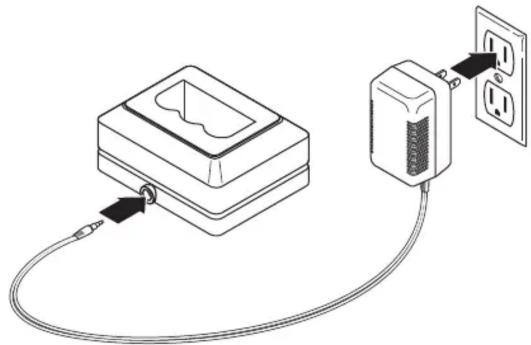
Connect the wall adapter to line power within the following range: 90 to 264V ac, 47 to 63 Hz. Plug the barrel connector into the charger dc input jack as shown in Figure 1.
natural_image
Diagram of a cable-connected electrical outlet connected to a device with two outlets (no text or symbols present)zq1f.eps
Figure 1. Connecting the Charger to Line Power
Charging the Battery
Note
Sometimes a new battery needs several charge/discharge cycles before it performs to full capacity.
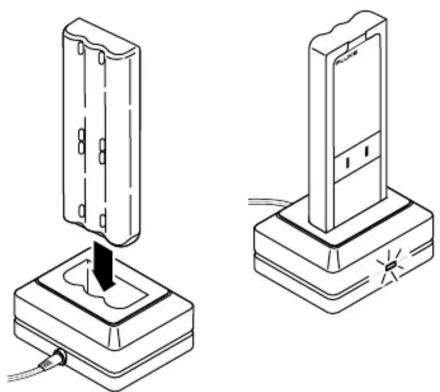
Before you use a new battery for the first time, charge it fully. Connect the charger to line power and place the battery in the charger as shown in Figure 2. You can leave the battery pack on trickle-charge indefinitely without damage. The charger will not overcharge a battery, even if you reinsert a charged battery.
- Nickel-Cadmium Battery
To obtain a full charge, charge the battery until the indicator blinks (approximately 1-1/2 hours).
• Nickel-Metal Hydride Battery
To obtain a full charge, charge the battery until the indicator blinks (approximately 2-1/2 hours), then leave it in the charger 3 more hours for a full charge.
Note
When you remove a charged battery from the charger, wait for the blinking indicator to go off before you insert a discharged battery. It takes about 2 seconds for the battery charger to reset.
natural_image
Technical line drawing showing two mechanical components with a base and mounting base, no text or symbols present.zq2f.eps
Figure 2. Inserting the Battery
When to Charge
Wait until the battery is fully discharged before you charge the battery. The battery will retain its charge longer.
Charge Mode Indicator
The red indicator light on the side of the charger shows the status of the battery charge cycle as follows:
- Off
The battery is not inserted, or it is inserted incorrectly, power is disconnected or not available, or the internal fuse is blown.
- Steady on
High-current fast charge mode.
- Blinking (50% duty cycle)
Nickel-Cadmium battery: trickle-charge mode.
Nickel-Metal Hydride battery: pulsed charge for the first 3 hours after blinking starts, then trickle-charge mode.
- Blinking (less than 50% duty cycle)
Pre-charge delay for proper battery temperature or voltage conditions.
Internal Fuse
An internal fuse is soldered in place. If the charger indicator does not go on when a battery is installed, this fuse may be blown. The fuse cannot be replaced by the user.
Specifications
BC7217-120, BC-7217-INTL:
Wall Adapter: Input Voltage: 90 to 264 V ac Input Voltage Frequency: 47 to 63 Hz Output Voltage: 15 V dc, 2 A
Line power adapters: Europe, UK, Australia
North A
Safety Approvals: UL, CSA and TUV
Both Models:
Charger Input Voltage: 14 to 20 V dc
DC Power Plug Polarity: - Ring Negative + Center Positive
Temperature: Operating: 0 to 40 °C Storage: -20 to 70 °C
Humidity (noncondensing):
Operating: 0 to 90% R.H. Storage: 5 to 95% R.H.

Marke : FLUKE
Modell : BC7217
Kategorie : Batterie