
GB-BRR5-4500 - Desktop-Computer GIGABYTE - Kostenlose Bedienungsanleitung
Finden Sie kostenlos die Bedienungsanleitung des Geräts GB-BRR5-4500 GIGABYTE als PDF.


| Produkttyp | Desktop-Computer / Barebone-PC-Kit |
| Marke | GIGABYTE |
| Modell | GB-BRR5-4500 |
| Abmessungen (ca.) | 114 x 107 x 30 mm |
| Gewicht (ca.) | 500 g |
| Stromversorgung | 90-W-Netzteil (19,0 V Gleichstrom, 4,74 A) |
| Hauptmerkmale | Ultra-kompaktes Design; M.2-2280-SSD-Unterstützung; SO-DIMM-DDR4-Speicher; Integriertes Wireless-Modul; USB-Power-On-Funktion; VESA-Montage |
| Speicherunterstützung | 1x M.2 2280 (SATA/PCIe); 2x SO-DIMM DDR4 |
| Wireless-Modul | Abnehmbares M.2-Modul |
| Anschlüsse | HDMI, USB, Audio (je nach Variante) |
| Betriebssystem | Nicht enthalten; kompatibel mit Windows/Linux |
| Pflege und Reinigung | Vor der Reinigung Netzstecker ziehen; Gehäuse mit trockenem, fusselfreiem Tuch abwischen |
| Sicherheitshinweise | Nur mit geerdeter Steckdose verwenden; Batterie nicht durch falschen Typ ersetzen; Vor Gehäuseöffnung 10 Minuten abkühlen lassen |
| Ersatzteile und Reparierbarkeit | Support und Treiber unter gigabyte.com/support |
| Hersteller | GIGA-BYTE TECHNOLOGY CO., LTD., No.6, Baoqiang Rd., Xindian Dist., New Taipei City 231, Taiwan |
Häufig gestellte Fragen - GB-BRR5-4500 GIGABYTE
Benutzerfragen zu GB-BRR5-4500 GIGABYTE
0 Frage zu diesem Gerät. Beantworten Sie die, die Sie kennen, oder stellen Sie Ihre eigene.
Eine neue Frage zu diesem Gerät stellen
Laden Sie die Anleitung für Ihr Desktop-Computer kostenlos im PDF-Format! Finden Sie Ihr Handbuch GB-BRR5-4500 - GIGABYTE und nehmen Sie Ihr elektronisches Gerät wieder in die Hand. Auf dieser Seite sind alle Dokumente veröffentlicht, die für die Verwendung Ihres Geräts notwendig sind. GB-BRR5-4500 von der Marke GIGABYTE.
BEDIENUNGSANLEITUNG GB-BRR5-4500 GIGABYTE
Support
Support / Support / Soporte / Suporte / Supporto / Поддержка / Wsparcie / Destek / 变援 / 支持 / サポート / 时间
| Please visit https://gigabyte.com/support to find your BRX warranty information from the dropbox list, or by clicking on the map. You will then be directed to the corresponding page for your region. | ||
| Bito besuchen Sie https://gigabyte.com/support, our Internet 2004 GRX Garantinformationen of the Dropbox-Live or through Klicken auf die Karte zu finden. Sie werden dann auf die entsprechende Seite für ihre Region wertegetrischt. | Odevised stroke https://gigabyte.com/support, aby posted information je gewinnet BRX, wydienjeke (z za faty vorzijew) lub klihaje maps, napierste diplaje di proskewenna na stronv odgewedha da Tsepogo regions. | |
| Bito besuchen Sie https://gigabyte.com/support, our Internet 2004 GRX Garantinformationen of the Dropbox-Live or through Klicken auf die Karte zu finden. Sie werden dann auf die entsprechende Seite für ihre Region wertegetrischt. | Luftrn https://gigabyte.com/support/sayfum: zumiert endt en et cieilen tiette esvera hirta izineri tikayakovik BRX Garantavita: nikadoka dela Tika bldg-erdi. Dasu billois bilgareza sevejus sirekta/inkredens. | |
| Vesible consider it or she https://gigabyte.com/support pour tous les informations relatives à votre gazelle BRX dans le bale déroulate au titre de la volume de la volume de la volume de la volume de la volume de la volume de la volume de la volume de la volume de la volume de la volume de la volume de la volume de la volume de la volume de la volume de la volume de la volume de la volume de la volume de la volume de la volume de la volume de la volume de la volume de la volume de la volume de la volume de la volume de la volume de la volume de la volume de la volume de la volume des vices de la volume de la volume de la volume de la volume de la volume de la volume de la volume de la volume de la volume de la volume de la volume de la volume de la volume de la volume de la volume de la volume de la volume de la volume de la volume de la volume de la volume de la volume de la volume de la volume de la volume de la volume de la volume de la volume de la volume de la volume de la volume de la volume de la volume d'interno par a pasage un informe de gerarite BRX e partir de la volume suspensa ou a partir no mapa. Sera depuis descendro para a pagrele corrispondente para a sua reglione. | https://gigabyte.com/support / 在地下初步中查找我的BRX 精度信息 / 要者在点地图、两击会话邮件时间和知识对流的类型。 | |
| Visitate https://gigabyte.com/support per accorner sur asse informées de gerarite BRX e partir de la volume suspensa ou a partir no mapa. Sera depuis descendro para a pagrele corrispondente para a sua reglione. | https://gigabyte.com/support / 在地下初步中查找我的BRX 精度信息 / 要者在点地图、两击会话邮件时间和知识对流的类型。 | |
| Visitate https://gigabyte.com/support per informen sul vieste BRX dal men's a corrisponden, o riscando sulla mapa. Verente portui sul vieste paugne componente d'ele voira regiona. | https://gigabyte.com/support / 描述了「クロープグランノミーからか」BRX 保証関係をつけるが「地表とをリッツしてください」対応するものページで導入するペープドンメージです。 | |
| Da nonnewary adaptable adipoukamente de piagrata BRX monitor this report https://gigabyte.com/support e usingopnrone appy/trypen (periode) https://gigabyte.com/support e usingopnrone appy/trypen (periode) https://gigabyte.com/support e usingopnrone appy/trypen (periode) https://gigabyte.com/support e usingopnrone appy/trypen (periode) https://gigabyte.com/support e usingopnrone appy/trypen (periode) https://gigabyte.com/support e usingopnrone appy/ trypen (periode) https://gigabyte.com/support e usingopnrone appy/ trypen (periode) https://gigabyte.com/support e usingopnrone appy/ trypen (periode) https://gigabyte.com/support e usingopnrone appy/ trypen (periode) https://gigabyte.com/support e usingopnrone appy/ trypen (periode) https://gigabyte.com/support e usingoprnone appy/ trypen (periode) https://gigabyte.com/support e usingopnrone appy/ trypen (periode) https://gigabyte.com/support e usingopnrone appy/ trypen (periode) https://gigabyte.com/support e usingopnrone appy/ trypen (periode) https://gigabyte.com/support e usingopnrone appy/ trypen (periode) https://gigabyte.corrpus.com/support e usingopnrone appy/ trypen (periode) https://gigabyte.com/support e usingopnrone appy/ trypen (periode) https://gigabyte.com/support e usingopnrone appy/ trypen (periode) https://gigabyte.com/support e usingopnrone appy/ trypen (periode) https://gigabyte.com/support e usingopnrone appy/ trypen (periode), https://gigabyte.com/support e usingopnrone appy/ trypen (periode) https://gigabyte.com/support e usingopnrone appy/ trypen (periode) https://gigabyte.com/support e usingopnrone appy/ trypen (periode) https://gigabyte.com/support e usingopnrone appy/ trypen (periode) https://gigabyte.com/support e usingopnrone appy/trypen (periode) https://gigabyte.com/support e usingopnrone appy/ trypen (periode) https://gigabyte.com/support e usingopnrone appy/ trypen (periode) https://gigabyte.com/support e usingopnrone appy/ trypen (periode) https://gigabyte.com/support e usingoprrone appy/ trypen (periode) https://gigabyte.com/support e usingopnrone appy/ trypen (periode) https://gigabyte.com/support e usingopnrone appy/ trypen (periode) https://gigabyte.com/support e usingopnrone appy/ trypen (periode) https://gigabyte.com/support e usingopnrone appy/ trypen (periode) https://gigabyte.micro. | ||
| For a list of tested memory, M2 SDD 2,3" HXD, wireless adaptors et OS concurrent, ga to https://gigabyte.com/support / To download the list of users and users. | For a list of tested users and users, ga to https://gigabyte.com/support/corrpusport # for product support, ga to https://gigabyte.com/support | |
| «Data lists der identifischer Anschapische, M2 SDD 2,3" HXD, AEAL Adaptor und initistorten Betriebsysteme Findes Sie unter https://gigabyte.com/support «De novoenter Treiber und BOS-Updates Findes Sie unter https://gigabyte.com/support e usingopnrone appy/trypen (periode) https://gigabyte.com/support e usingopnrone appy/trypen (periode) https://gigabyte.com/support e usingopnrone appy/trypen (periode) https://gigabyte.com/support e usingopnrone appy/trypen (periode) https://gigabyte.com/support e usingopnrone appy/type (periode) https://gigabyte.com/support e usingopnrone appy/trypen (periode) https://gigabyte.com/support e usingopnrone appy/trypen (periode) https://gigabyte.com/support e usingopnrone appy/trypen (periode) https://gigabyte.com/support e usingopnrone appy/trypen (periode) https://gigabyte.com/support e usingopnrones appy/trypen (periode) https://gigabyte.com/support e usingopnrones appy/trypen (periode) https://gigabyte.com/support e usingopnrones appy/trypen (periode) https://gigabyte.com/support e usingopnrones appy/trypen (periode) https://gigabyte.com/support e usingopnrones appy/trypen (periode) https://gigabyte.com輔份额 / https://gigabyte.com/support / https://gigabyte.com/support / https://gigabyte.com/support / https://gigabyte.com/support / https://gigabyte.com/support / https://gigabyte.com/support / https://gigabyte.com/support / https://gigabyte.com/support / https://gigabyte.com/support / https://gigabyte.com/support / https://gigabyte.com/support / https://gigabyte.com/support / https://gigabyte.com/support / https://www.gibate.com/support / https://gigabyte.com/support / https://gigabyte.com/support / https://gigabyte.com/support / https://gigabyte.com/support / https://gigabyte.com/support / https://gigabyte.com/support / https://gigabyte.com/support / https://gigabyte.com/support / https://gigabyte.com/support / https://gigabyte.com/support / https://gigabyte.com/support / https://gigabyte.com/support / http://www.gibate.com/support / https://gigabyte.com/support / https://gigabyte.com/support / https://gigabyte.com/support / https://gigabyte.com/support / https://gigabyte.com/support / https://gigabyte.com/support / https://gigabyte.com/support / https://gigabyte.com/support / https://gigabyte.com/support / https://gigabyte.com/support / https://gigabyte.com/support / https://gibate.com/support / https://gigabyte.com/support / https://gibate.com/support / https://gibate.com/support / https://gibate.com/support / https://gibate.com/support / https://gibate.com/support / https://gibate.com/support / https://gibate.com/support / https://gibate.com/support / https://gibate.com/support / https://gibate.com/support / https://gibate.com/support / https://gibate.com/support / https://gibate.com/support / http://www.gibate.com/support / https://gibate.com/support / https://gibate.com/support / https://gibate.com/support / https://gibate.com/support / https://gibate.com/support / https://gibate.com/support / https://gibate.com/support / https://gibate.com/support / https://gibate.com/support / https://gibate.com/support / https://gibate.com/support / https://gibate.com輔份额 / https://gibate.com/support / https://gibate.com/support / https://gibate.com/support / https://gibate.com/support / https://gibate.com/support / https://gibate.com/support / https://gibate.com/support / https://gibate.com/support / https://gibate.com/support / https://gibate.com/support / https://gibate.com/support / https://gibate.com/support / https:// gibate.com/support / https://gibate.com/support / https://gibate.com/support / https://gibate.com/support / https://gibate.com/support / https://gibate.com/support / https://gibate.com/support / https://gibate.com/support / https://gibate.com/support / https://gibate.com/support / https://gibate.com/support / https://gibate.com/support / https://gibate.comsupport / https://gibate.com/support / https://gibate.com/support / https://gibate.com/support / https://gibate.com/support / https://gibate.com/support / https://gibate.com/support / https://gibate.com/support / https://gibate.com/support / https://gibate.com/support / https://gibate.com/support / https://gibate.com/support / https://gibate.com/support / https://sina.com/support / https://gibate.com/support / https://gibate.com/support / https://gibate.com/support / https://gibate.com/support / https://gibate.com/support / https://gibate.com/support / https://gibate.com/support / https://gibate.com/support / https://gibate.com/support / https://gibate.com/support / https://gibate.com/support / https://gibate.com/support /https://gibate.com/support / https://gibate.com/support / https://gibate.com/support / https://gibate.com/support / https://gibate.com/support / https://gibate.com/support / https://gibate.com/support / https://gibate.com/support / https://gibate.com/support / https://gibate.com/support / https://gibate.com/support / https://gibate.com/support / https://gibatesc/C/C/C/C/C/C/C/C/C/C/C/C/C/C/C/C/C/C/C/C/C/C/C/C/C/C/C/C/C/C/C/C/C/C/C/C/C/C/C/C/C/C/C/C/C/C/C/C/C/C/C/C/C/C/C/C/C/C/C/C/C/C/C/C/C/C/C/C/C/C/C/C/C/C/C/C/C/C/C/C/C/C/C/C/C/C/C/C/C/C/C/C/C/C/C/C/C/C/C/C-C/C/C/C/C/C/C/C/C/C/C/C/C/C/C/C/C/C/C/C/C/C/C/C/C/C/C/C/C/C/C/C/C/C/C/C/C/C/C/C/C/C/C/C/C/C/C/C/C/C/C/C/C/C/C/C/C/C/C/C/C/C/C/C/C/C/C/C/C/C/C/C/C/C/C/C/C/C/C/C/C/C/C/C/C/C/C/C/C/C/C/C/C/C/C/C/C/C/C/C/ C/C/C/C/C/C/C/C/C/C/C/C/C/C/C/C/C/C/C/C/C/C/C/C/C/C/C/C/C/C/C/C/C/C/C/C/C/C/C/C/C/C/C/C/C/C/C/C/C/C/C/C/C/C/C/C/C/C/C/C/C/C/C/C/C/C/C/C/C/C/C/C/C/C/C/C/C/C/C/C/C/C/C/C/C/C/C/C/C/C/C/C/C/C/C/C/C/C/C/C/A/C/C/C/C/C/C/C/C/C/C/C/C/C/C/C/C/C/C/C/C/C/C/C/C/C/C/C/C/C/C/C/C/C/C/C/C/C/C/C/C/C/C/C/C/C/C/C/C/C/C/C/C/C/C/C/C/C/C/C/C/C/C/C/C/C/C/C/C/C/C/C/C/C/C/C/C/C/C/C/C/C/C/C/C/C/C/C/C/C/C/C/C/C/C/C/C/C/C/C/GC/C/C/C/C/C/C/C/C/C/C/C/C/C/C/C/C/C/C/C/C/C/C/C/C/C/C/C/C/C/C/C/C/C/C/C/C/C/C/C/C/C/C/C/C/C/C/C/C/C/C/C/C/C/C/C/C/C/C/C/C/C/C/C/C/C/C/C/C/C/C/C/C/C/C/C/C/C/C/C/C/C/C/C/C/C/C/C/C/C/C/C/C/C/C/C/C/C/C/C/SA/S/A/S/A/S/A/S/A/S/A/S/A/S/A/S/A/S/A/S/A/S/A/S/A/S/A/S/A/S/A/S/A/S/A/S/A/S/A/S/A/S/A/S/A/S/A/S/A/S/A/S/A/S/A/S/A/S/A/S/A/S/A/S/A/S/A/S/A/S/A/S/A/S/A/S/A/S/A/S/A/S/A/S/A/S/A/S/A/S/A/S/A/S/A/S/A/S/A/S/A/SA/S/A/S/A/S/A/S/A/S/A/S/A/S/A/S/A/S/A/S/A/S/A/S/A/S/A/S/A/S/A/S/A/S/A/S/A/S/A/S/A/S/A/S/A/S/A/S/A/S/A/S/A/S/A/S/A/S/A/S/A/S/A/S/A/S/A/S/A/S/A/S/A/S/A/S/A/S/A/S/A/S/A/S/A/S/A/S/A/S/A/S/A/S/A/S/A/SA/S A/S/A/S/A/S/A/S/A/S/A/S/A/S/A/S/A/S/A/S/A/S/A/S/A/S/A/S/A/S/A/S/A/S/A/S/A/S/A/S/A/S/A/S/A/S/A/S/A/S/A/S/A/S/A/S/A/S/A/S/A/S/A/S/A/S/A/S/A/S/A/S/A/S/A/S/A/S/A/S/A/S/A/S/A/S/A/S/A/S/A/S/A/S/A/S/A/S/A/S/B/S/S/S/S/S/S/S/S/S/S/S/S/S/S/S/S/S/S/S/S/S/S/S/S/S/S/S/S/S/S/S/S/S/S/S/S/S/S/S/S/S/S/S/S/S/S/S/S/S/S/S/S/S/S/S/S/S/S/S/S/S/S/S/S/S/S/S/S/S/S/S/S/S/S/S/S/S/S/S/S/S/S/S/S/S/S/S/S/S/S/S/S/S/S/S/S/S/S/S/S/MSS/S/S/S/S/S/S/S/S/S/S/S/S/S/S/S/S/S/S/S/S/S/S/S/S/S/S/S/S/S/S/S/S/S/S/S/S/S/S/S/S/S/S/S/S/S/S/S/S/S/S/S/S/S/S/S/S/S/S/S/S/S/S/S/S/S/S/S/S/S/S/S/S/S/S/S/S/S/S/S/S/S/S/S/S/S/S/S/S/S/S/S/S/S/S/S/S/S/S/S/TSSS/S/S/S/S/S/S/S/S/S/S/S/S/S/S/S/S/S/S/S/S/S/S/S/S/S/S/S/S/S/S/S/S/S/S/S/S/S/S/S/S/S/S/S/S/S/S/S/S/S/S/S/S/S/S/S/S/S/S/S/S/S/S/S/S/S/S/S/S/S/S/S/S/S/S/S/S/S/S/S/S/S/S/S/S/S/S/S/S/S/S/S/S/S/S/S/S/S/S/S/ISSS/S/S/S/S/S/S/S/S/S/S/S/S/S/S/S/S/S/S/S/S/S/S/S/S/S/S/S/S/S/S/S/S/S/S/S/S/S/S/S/S/S/S/S/S/S/S/S/S/S/S/S/S/S/S/S/S/S/S/S/S/S/S/S/S/S/S/S/S/S/S/S/S/S/S/S/S/S/S/S/S/S/S/S/S/S/S/S/S/S/S/S/S/S/S/S/S/S/ISSA/S/S/S/S/S/S/S/S/S/S/S/S/S/S/S/S/S/S/S/S/S/S/S/S/S/S/S/S/S/S/S/S/S/S/S/S/S/S/S/S/S/S/S/S/S/S/S/S/S/S/S/S/S/S/S/S/S/S/S/S/S/S/S/S/S/S/S/S/S/S/S/S/S/S/S/S/S/S/S/S/S/S/S/S/S/S/S/S/S/S/S/S/S/S/S/S/S/S/S-SAS/A/S/S/A/S/A/S/A/S/A/S/A/S/A/S/A/S/A/S/A/S/A/S/A/S/A/S/A/S/A/S/A/S/A/S/A/S/A/S/A/S/A/S/A/S/A/S/A/S/A/S/A/S/A/S/A/S/A/S/A/S/A/S/A/S/A/S/A/S/A/S/A/S/A/S/A/S/A/S/A/S/A/S/A/S/A/S/A/S/A/S/A/S/A/S/A/S/A/S/A/S/AS/A/S/A/S/A/S/A/S/A/S/A/S/A/S/A/S/A/S/A/S/A/S/A/S/A/S/A/S/A/S/A/S/A/S/A/S/A/S/A/S/A/S/A/S/A/S/A/S/A/S/A/S/A/S/A/S/A/S/A/S/A/S/A/S/A/S/A/S/A/S/A/S/A/S/A/S/A/S/A/S/A/S/A/S/A/S/A/S/A/S/A/S/A/S/A/S/A/S/A/FSSA/S/A/S/A/S/A/S/A/S/A/S/A/S/A/S/A/S/A/S/A/S/A/S/A/S/A/S/A/S/A/S/A/S/A/S/A/S/A/S/A/S/A/S/A/S/A/S/A/S/A/S/A/S/A/S/A/S/A/S/A/S/A/S/A/S/A/S/A/S/A/S/A/S/A/S/A/S/A/S/A/S/A/S/A/S/A/S/A/S/A/S/A/S/A/S/A/S/A/FSAB/TSA/S/A/S/A/S/A/S/A/S/A/S/A/S/A/S/A/S/A/S/A/S/A/S/A/S/A/S/A/S/A/S/A/S/A/S/A/S/A/S/A/S/A/S/A/S/A/S/A/S/A/S/A/S/A/S/A/S/A/S/A/S/A/S/A/S/A/S/A/S/A/S/A/S/A/S/A/S/A/S/A/S/A/S/A/S/A/S/A/S/A/S/A/S/A/S/A/S/A/S-A/AS/A/S/A/S/A/S/A/S/A/S/A/S/A/S/A/S/A/S/A/S/A/S/A/S/A/S/A/S/A/S/A/S/A/S/A/S/A/S/A/S/A/S/A/S/A/S/A/S/A/S/A/S/A/S/A/S/A/S/A/S/A/S/A/S/A/S/A/S/A/S/A/S/A/S/A/S/A/S/A/S/A/S/A/S/A/S/A/S/A/S/A/S/A/S/A/S/A/FSSB/TSA/S/A/S/A/S/A/S/A/S/A/S/A/S/A/S/A/S/A/S/A/S/A/S/A/S/A/S/A/S/A/S/A/S/A/S/A/S/A/S/A/S/A/S/A/S/A/S/A/S/A/S/A/S/A/S/A/S/A/S/A/S/A/S/A/S/A/S/A/S/A/S/A/S/A/S/A/S/A/S/A/S/A/S/A/S/A/S/A/S/A/S/A/S/A/S/A/SA/AS/A/S/A/S/A/S/A/S/A/S/A/S/A/S/A/S/A/S/A/S/A/S/A/S/A/S/A/S/A/S/A/S/A/S/A/S/A/S/A/S/A/S/A/S/A/S/A/S/A/S/A/S/A/S/A/S/A/S/A/S/A/S/A/S/A/S/A/S/A/S/A/S/A/S/A/S/A/S/A/S/A/S/A/S/A/S/A/S/A/S/A/S/A/S/A/S/A,S/A/S/A/S/A/S/A/S/A/S/A/S/A/S/A/S/A/S/A/S/A/S/A/S/A/S/A/S/A/S/A/S/A/S/A/S/A/S/A/S/A/S/A/S/A/S/A/S/A/S/A/S/A/S/A/S/A/S/A/S/A/S/A/S/A/S/A/S/A/S/A/S/A/S/A/S/A/S/A/S/A/S/A/S/A/S/A/S/A/S/A/S/A/S/A/S/A/S/A[S/U] | https://gibate.com/support/ http://gibate.com/support/ http://gibate.com/support/ http://gibate.com/support/ http://gibate.com/support/ http://gibate.com/support/ http://gibate.com/support/ http://gibate.com/support/ http://gibate.com/support/ http://gibate.com/support/ http://gibate.com/support/ http://gibate.com/support/ http://gibate.com/support/ http://gibrate.com/support/ http://gibrate.com/support/ http://gibrate.com/support/ http://gibrate.com/support/ http://gibrate.com/support/ http://gibrate.com/support/ http://gibrate.com/support/ http://gibrate.com/support/ http://gibrate.com/support/ http://gibrate.com/support/ http://gibrate.com/support/ http://gibrate.com/support/ http://gibrate.com/support/http://gibrate.com/support/ http://gibrate.com/support/ http://gibrate.com/support/ http://gibrate.com/support/ http://gibrate.com/support/ http://gibrate.com/support/ http://gibrate.com/support/ http://gibrate.com/support/ http://gibrate.com/support/ http://gibrate.com/support/ http://gibrate.com/support/ http://gibrate.com/support/ http://gibRate.com/support/ http://gibRate.com/support/ http://gibRate.com/support/ http://gibRate.com/support/ http://gibRate.com/support/ http://gibRate.com/support/ http://gibRate.com/support/ http://gibRate.com/support/ http://gibRate.com/support/ http://gibRate.com/support/ http://gibRate.com/support/ http://gibRate.com/support/ http://gibRate.com/support/http://gibRate.com/support/ http://gibRate.com/support/ http://gibRate.com/support/ http://gibRate.com/support/ http://gibRate.com/support/ http://gibRate.com/support/ http://gibRate.com/support/ http://gibRate.com/support/ http://gibRate.com/support/ http://gibRate.com/support/ http://gibRate.com/support/ http://gibRate.com/support/ http://gibRats.com/support/ http://gibRate.com/support/ http://gibRate.com/support/ http://gibRate.com/support/ http://gibRate.com/support/ http://gibRate.com/support/ http://gibRate.com/support/ http://gibRate.com/support/ http://gibRate.com/support/ http://gibRate.com/support/ http://gibRate.com/support/ http://gibRate.com/support/ http://gibRate.com/support/ https://gibRate.com/support/ http://gibRate.com/support/ http://gibRate.com/support/ http://gibRate.com/support/ http://gibRate.com/support/ http://gibRate.com/support/ http://gibRate.com/support/ http://gibRate.com/support/ http://gibRate.com/support/ http://gibRate.com/support/ http://gibRate.com/support/ http://gibRate.com/support/ http://gibRange.com/support/ http://gibRange.com/support/ http://gibRange.com/support/ http://gibRange.com/support/ http://gibRange.com/support/ http://gibRange.com/support/ http://gibRange.com/support/ http://gibRange.com/support/ http://gibRange.com/support/ http://gibRange.com/support/ http://gibRange.com/support/ http://gibRange.com/support/ http://gibRange.com/support/http://gibRange.com/support/ http://gibRange.com/support/ http://gibRange.com/support/ http://gibRange.com/support/ http://gibRange.com/support/ http://gibRange.com/support/ http://gibRange.com/support/ http://gibRange.com/support/ http://gibRange.com/support/ http://gibRange.com/support/ http://gibRange.com/support/ http://gibRange.com/support/ http://gibRats.com/support/ http://gibRats.com/support/ http://gibRats.com/support/ http://gibRats.com/support/ http://gibRats.com/support/ http://gibRats.com/support/ http://gibRats.com/support/ http://gibRats.com/support/ http://gibRats.com/support/ http://gibRats.com/support/ http://gibRats.com/support/ http://gibRats.COM/support/ http://gibRats.com/support/ http://gibRats.com/support/ http://gibRats.com/support/ http://gibRats.com/support/ http://gibRats.com/support/ http://gibRats.com/support/ http://gibRats.com/support/ http://gibRats.com/support/ http://gibRats.com/support/ http://gibRats.com/support/ http://gibRats.com拡充服务支持服务支持服务支持服务支持服务支持服务支持服务支持服务支持服务支持服务支持服务支持服务支持服务支持服务支持服务支持服务支持服务支持服务支持服务支持服务支持服务支持服务支持服务支持服务支持服务支持服务支持服务支持服务支持服务支持服务支持服务支持服务支持服务支持服务支持服务支持服务支持服务支持服务支持服务支持服务支持服务支持服务支持服务支持服务支持服务支持服务支持服务支持服务支持服务支持服务支持服务站址服务支持服务支持服务支持服务支持服务支持服务支持服务支持服务支持服务支持服务支持服务支持服务支持服务支持服务支持服务支持服务支持服务支持服务支持服务支持服务支持服务支持服务支持服务支持服务支持服务支持服务支持服务支持服务支持服务支持服务支持服务支持服务支持服务支持服务支持服务支持服务支持服务支持服务支持服务支持服务支持服务支持服务支持服务支持服务支持服务支持服务支持服务支持服务支持服务支持服务-168888888888888888888888888888888888888888888888888888888888888888888888888888888888888888888888888888 | |
Safety and Regulatory Information
Sicherheit und gesetzliche Bestimmungen / Informations sur la sécurité et la réglementation / Información sobre normativa y de seguridad / Informações de segurança e regulamentares / Informazioni di sicurezza e sui regolamenti / Coответствие требованим безопасности Informacje dotyczące bezpieczeństwa i przepisów / Güvenlik ve Düzenleyici Bilgiler / 安全與規範資訊 / 安全与法規信息 / 安全および規制に関する情報 / 안전 및 규제 정보
| The product must be supplied with the plug in the adapter's power cord connected to a power socket with a grounding connection. | ||
| Risk of exploitation if the batteries are upgraded in an instrument type. Batteries should be recycled where possible. Disposal of used Batteries must be in accordance with local environmental regulations. | ||
| Es bestatt das Risks einer Explosion, wenn der Aukh der keine nicht geeignetem Tip-praktet wird. Akkus solften nach Möglichkeit recallt werden. Die Entlügung getrauchten Akkus mus in Öbersteinstellung mit den öffenten Umweltschriften fliegen. | Jeldel batterie zastante na batterie technologie/kapita typiketry rykozy wykuhs, 9 mars medificado batterie nicky poddawow meinkingene. Umlufacja zusätzlichen batteri mais bez trypoda i zakihymi prizipamiu döbrçacijeni ochrony skinwirksam. | |
| Rouque displensione in die batterie est remplacée per ou type incision. Dans le mesure de possible, batteries doivent dans die receive. L'immersion des batteries soutages son nequity sur les normes indiquities et la norme de l'impône. | Pil yanjing tipje bil je de adaptifs/palame niki oskije pakar, Pilker, münklasse gam dioblotzärnfeldt. Kulendning Pilker versiore wasalerie vagan daras altimioles. | |
| Este erido de evolise si se suffizierte by batteries por una del tipo incisores. Les batteries devere recolmente sempre que sei pseudo. La elimination de batteries uadas debe realizarse de acuòc sur les normes ambientales locales. | On or as non正確ный wavefront amreter – 可能没有布施的危险 - 喜痛可能回收電光 - 表格需同様设置需要用过的電光。 | |
| Rece de esolise va a pheha als subdivide por un tipo incisores. Au pheha deverr ser niscidazione quando possiva! Allem�ção de pheha usada de due informada conforme保管amento locale. | If attractive do ####e that find it, 若磁存的 magnetic field, the output return button, is a correctrede at the current charging protection requirement required the charging. | |
| Sustriam the batteries com une di tipo non corrisso cont pas compumente macho de disposição. Se possible, le batterie varre vinicade. Lo smeltimento della batterie soutages si se instaiente nel modo e instaiente nel regime (e.g., in some legume) en un mode. | Flurta-tat tâts de l'appré-crian - 交流者すると , 随段の位置があります на ... パックère ist認めるソリアサインとしてください. 使用するバスタ-дена (reflegenden) connections à la norme de 100% penetration. | |
| Sierra-Europe e biopiermentoulaudate la moment葡萄牙 à la appraise. Ativonissazione Europei sedanità da parte peripure traolione costitturevano viadonnazione. Truttenden attività delle Belezioni europeale e costitumenti e costitumenti e costitumenti e costitumenti e costitumenti e costitumenti e costitumenti e costitumenti e costitumenti e costitumenti e costitumenti e costitumenti e costitumenti e costitumenti e costitumenti e costitumenti e costitumenti e costitumenti e costitumenti e costitumenti e costitumente. | Batteria is illetta algetica (allig) also como geppu ve prehechte che haemite a filarza. Batteria is illetta algetica (allig) also como geppu ve prehechte che haemite a filarza. Batteria is illetta algetica (allig) also como geppu ve prehechte che haemite a filarza. | |
| Before you check a choice to exchange an internal component, you need to pay off software and let the device cool down at least 10 minutes. | ||
| Vis dem Offens des Gehäuses zum Austausch einer Immater Komponente mincon Sie des Gerät aushalten und mindestens 10 Minuten abatoren lassen. | Pristov izwarden生物学 w celu wymiety komponente verwietroznige należy würbijć ustrzędnia (pozostiew je do stojepiące prozzo napartego 10 Minutes). | |
| Aard front de gehäha pour remplacer un component interne, vous devise therein fappellent hors leisteris le laiseer refreshite au moins 10 minutes. | Dahili per kurpi adaptirmitek im kezky oskolen inco chaki kapazianen ve on a 10 dakila ogdamani belkemental geneloi. | |
| Ante de altri de chords para comban un component interne, debe sapege el dispositio y dejar que se sentre durante el menos 10 minutes. | Thermose変更内向元兆前 - 必须先端的電気装置,は圧流器電気装置至少 30 分 | |
| Ante de altri a chorda para alterer un component interne, tem de dedagó el dispositio y deliveró a dispositivo emforcero, pelo menos, 10 minutes. | 在打开可调装置内向元兆前 - 需要先端的電気装置,は圧流器電気装置至少 30 分 | |
| Primie de árione: la sítico para cambar un component interne, spengena el disposito y larciario elodinfover al parón 10 minuto. | Innitrofilea adotranser la into aシャーを閲る前に - デバイスの電源をオフとしてしどって più 10分間冷凍する必要があるず . | |
| Пере-ротивные потура для完全可以 виричных мористических сладов выключить не가 수 сопадемные тяжения 10 meters. | ЗАНАУ ПОДАКИЯ ПОДАКИЯ ПОДАКИЯ ПОДАКИЯ ПОДАКИЯ ПОДАКИЯ ПОДАКИЯ ПОДАКИЯ ПОДАКИЯ ПОДАКИЯ ПОДАКИЯ ПОДАКИЯ ПОДАКИЯ ПОДАКИЯ ПОДАКИЯ ППОДАКИЯ ПОДАКИЯ ПОДАКИЯ ПОДАКИЯ ПОДАКИЯ ПОДАКИЯ ПОДАКИЯ ПОДАКИЯ ПОДАКИЯ ПОДАКИЯ ПОДАКИЯ ПОДАКИЯ ПОДАКИЯ ПОДАКИЯ ПОПАКИЯ ПОДАКИЯ ПОДАКИЯ ПОДАКИЯ ПОДАКИЯ ПОДАКИЯ ПОДАКИЯ ПОДАКИЯ ПОДАКИЯ ПОДАКИЯ ПОДАКИЯ ПОДАКИЯ ПОДАКИЯ ПОДАКИЯ ПОДАСИЯ ПОДАКИЯ ПОДАКИЯ ПОДАКИЯ ПОДАКИЯ ПОДАКИЯ ПОДАКИЯ ПОДАКИЯ ПОДАКИЯ ПОДАКИЯ ПОДАКИЯ ПОДАКИЯ ПОДАКИЯ ПОДАКИЯ ПОДАКИЙ ПОДАКИЯ ПОДАКИЯ ПОДАКИЯ ПОДАКИЯ ПОДАКИЯ ПОДАКИЯ ПОДАКИЯ ПОДАКИЯ ПОДАКИЯ ПОДАКИЯ ПОДАКИЯ ПОДАКИЯ ПОДАКИЯ ПОДАКИЯ ПОНДАКИЯ ПОДАКИЯ ПОДАКИЯ ПОДАКИЯ ПОДАКИЯ ПОДАКИЯ ПОДАКИЯ ПОДАКИЯ ПОДАКИЯ ПОДАКИЯ ПОДАКИЯ ПОДАКИЯ ПОДАКИЯ ПОДАКИЯ ПОДАНКИЯ ПОДАКИЯ ПОДАКИЯ ПОДАКИЯ ПОДАКИЯ ПОДАКИЯ ПОДАКИЯ ПОДАКИЯ ПОДАКИЯ ПОДАКИЯ ПОДАКИЯ ПОДАКИЯ ПОДАКИЯ ПОДАКИЯ ПОДАККИЯ ПОДАКИЯ ПОДАКИЯ ПОДАКИЯ ПОДАКИЯ ПОДАКИЯ ПОДАКИЯ ПОДАКИЯ ПОДАКИЯ ПОДАКИЯ ПОДАКИЯ ПОДАКИЯ ПОДАКИЯ ПОДАКИЯ ПОДАКМРЯ ПОДАКИЯ ПОДАКИЯ ПОДАКИЯ ПОДАКИЯ ПОДАКИЯ ПОДАКИЯ ПОДАКИЯ ПОДАКИЯ ПОДАКИЯ ПОДАКИЯ ПОДАКИЯ ПОДАКИЯ ПОДАКИЯ ПОДАКИЯПОДАКИЯ ПОДАКИЯ ПОДАКИЯ ПОДАКИЯ ПОДАКИЯ ПОДАКИЯ ПОДАКИЯ ПОДАКИЯ ПОДАКИЯ ПОДАКИЯ ПОДАКИЯ ПОДАКИЯ ПОДАКИЯ ПОДАКИЯ ПОНЛДАКИЯ ПОДАКИЯ ПОДАКИЯ ПОДАКИЯ ПОДАКИЯ ПОДАКИЯ ПОДАКИЯ ПОДАКИЯ ПОДАКИЯ ПОДАКИЯ ПОДАКИЯ ПОДАКИЯ ПОДАКИЯ ПОДАКИЯ ПОДAΚИЯ ПОДАКИЯ ПОДАКИЯ ПОДАКИЯ ПОДАКИЯ ПОДАКИЯ ПОДАКИЯ ПОДАКИЯ ПОДАКИЯ ПОДАКИЯ ПОДАКИЯ ПОДАКИЯ ПОДАКИЯ ПОДАКИЯ ПОДАКИЕ ПОДАКИЯ ПОДАКИЯ ПОДАКИЯ ПОДАКИЯ ПОДАКИЯ ПОДАКИЯ ПОДАКИЯ ПОДАКИЯ ПОДАКИЯ ПОДАКИЯ ПОДАКИЯ ПОДАКИЯ ПОДАКИЯ ПОДАКИЯ ПРОДАКИЯ ПОДАКИЯ ПОДАКИЯ ПОДАКИЯ ПОДАКИЯ ПОДАКИЯ ПОДАКИЯ ПОДАКИЯ ПОДАКИЯ ПОДАКИЯ ПОДАКИЯ ПОДАКИЯ ПОДАКИЯ ПОДАКИЯ ПОДΑKИЯ ПОДАКИЯ ПОДАКИЯ ПОДАКИЯ ПОДАКИЯ ПОДАКИЯ ПОДАКИЯ ПОДАКИЯ ПОДАКИЯ ПОДАКИЯ ПОДАКИЯ ПОДАКИЯ ПОДАКИЯ ПОДАКИЯ ПОДАКИИ ПОДАКИЯ ПОДАКИЯ ПОДАКИЯ ПОДАКИЯ ПОДАКИЯ ПОДАКИЯ ПОДАКИЯ ПОДАКИЯ ПОДАКИЯ ПОДАКИЯ ПОДАКИЯ ПОДАКИЯ ПОДАКИЯ ПОДАКИЯ ПОСТАВИЯ ПОДАКИЯ ПОДАКИЯ ПОДАКИЯ ПОДАКИЯ ПОДАКИЯ ПОДАКИЯ ПОДАКИЯ ПОДАКИЯ ПОДАКИЯ ПОДАКИЯ ПОДАКИЯ ПОДАКИЯ ПОДАКИЯ ПОДАКИУ ПОДАКИЯ ПОДАКИЯ ПОДАКИЯ ПОДАКИЯ ПОДАКИЯ ПОДАКИЯ ПОДАКИЯ ПОДАКИЯ ПОДАКИЯ ПОДАКИЯ ПОДАКИЯ ПОДАКИЯ ПОДАКИЯ ПОДАКИЯПРОДАКИЯ ПОДАКИЯ ПОДАКИЯ ПОДАКИЯ ПОДАКИЯ ПОДАКИЯ ПОДАКИЯ ПОДАКИЯ ПОДАКИЯ ПОДАКИЯ ПОДАКИЯ ПОДАКИЯ ПОДАКИЯ ПОДАКИЯ ПОПДАКИЯ ПОДАКИЯ ПОДАКИЯ ПОДАКИЯ ПОДАКИЯ ПОДАКИЯ ПОДАКИЯ ПОДАКИЯ ПОДАКИЯ ПОДАКИЯ ПОДАКИЯ ПОДАКИЯ ПОДАКИЯ ПОДАКИЯ ПОДФАКИЯ ПОДАКИЯ ПОДАКИЯ ПОДАКИЯ ПОДАКИЯ ПОДАКИЯ ПОДАКИЯ ПОДАКИЯ ПОДАКИЯ ПОДАКИЯ ПОДАКИЯ ПОДАКИЯ ПОДАКИЯ ПОДАКИЯ ПОДАKИЯ ПОДАКИЯ ПОДАКИЯ ПОДАКИЯ ПОДАКИЯ ПОДАКИЯ ПОДАКИЯ ПОДАКИЯ ПОДАКИЯ ПОДАКИЯ ПОДАКИЯ ПОДАКИЯ ПОДАКИЯ ПОДАКИЯ ПОДАКМЕ РОДАКИЯ ПОДАКИЯ ПОДАКИЯ ПОДАКИЯ ПОДАКИЯ ПОДАКИЯ ПОДАКИЯ ПОДАКИЯ ПОДАКИЯ ПОДАКИЯ ПОДАКИЯ ПОДАКИЯ ПОДАКИЯ ПОДАКИЯ ПОЛДАКИЯ ПОДАКИЯ ПОДАКИЯ ПОДАКИЯ ПОДАКИЯ ПОДАКИЯ ПОДАКИЯ ПОДАКИЯ ПОДАКИЯ ПОДАКИЯ ПОДАКИЯ ПОДАКИЯ ПОДАКИЯ ПОДАКИЯ ПОПЛДАКИЯ ПОДАКИЯ ПОДАКИЯ ПОДАКИЯ ПОДАКИЯ ПОДАКИЯ ПОДАКИЯ ПОДАКИЯ ПОДАКИЯ ПОДАКИЯ ПОДАКИЯ ПОДАКИЯ ПОДАКИЯ ПОДАКИЯ ПОЛПДАКИЯ ПОДАКИЯ ПОДАКИЯ ПОДАКИЯ ПОДАКИЯ ПОДАКИЯ ПОДАКИЯ ПОДАКИЯ ПОДАКИЯ ПОДАКИЯ ПОДАКИЯ ПОДАКИЯ ПОДАКИЯ ПОДАКИЯ ПОППДАКИЯ ПОДАКИЯ ПОППДАКИЯ ПОППДАКИЯ ПОППДАКИЯ ПОППДАКИЯ ПОППДАКИЯ ПОППДАКИЯ ПОППДАКИЯ ПОППДАКИЯ ПОППДАКИЯ ПОППДАКИЯ ПОППДАКИЯ ПОПППДАКИЯ ПОПППДАКИЯ ПОПППДАКИЯ ПОПППДАКИЯ ПОПППДАКИЯ ПОПППДАКИЯ ПОПППДАКИЯ ПОПППДАКИЯ ПОПППДАКИЯ ПОПППДАКИЯ ПОЛПДАКИЯ ПОПППДАКИЯ ПОПППДАКИЯ ПОПППДАКИЯ ПОПППДАКИЯ ПОПППДАКИЯ ПОПППДАКИЯ ПОПППДАКИЯ ПОПППДАКИЯ ПОПППДАКИЯ ПОПТПДАКИЯ ПОПТПДАКИЯ ПОПТПДАКИЯ ПОПТПДАКИЯ ПОПТПДАКИЯ ПОПТПДАКИЯ ПОПТПДАКИЯ ПОПТПДАКИЯ ПОПТПДАКИЯ ПОПТПДАКИЯ ПОПППДАКИЯ ПОПТПДАКИЯ ПОПТПДАКИЯ ПОПТПДАКИЯ ПОПТПДАКИЯ ПОПТПДАКИЯ ПОПТПДАКИЯ ПОПТПДАКИЯ ПОПТПДАКИЯ ПОПTПДАКИЯ ПОПТПДАКИЯ ПОПТПДАКИЯ ПОПТПДАКИЯ ПОПТПДАКИЯ ПОПТПДАКИЯ ПОПТПДАКИЯ ПОПТПДАКИЯ ПОПТПДАКИЯ ПОПТПДАКИЯ ПОПTПДАКИЯ ПОПTПДАКИЯ ПОПТПДАКИЯ ПОПТПДАКИЯ ПОПТПДАКИЯ ПОПТПДАКИЯ ПОПТПДАКИЯ ПОПТПДАКИЯ ПОПТПДАКИЯ ПОПТПДАКИЯ ПОПTПДАКИЯ ПОПППДАКИЯ ПОПТПДАКИЯ ПОПТПДАКИЯ ПОПТПДАКИЯ ПОПТПДАКИЯ ПОПТПДАКИЯ ПОПТПДАКИЯ ПОПТПДАКИЯ ПОПТПДАКИЯ ПОПГПДАКИЯ ПОПТПДАКИЯ ПОПТПДАКИЯ ПОПТПДАКИЯ ПОПТПДАКИЯ ПОПТПДАКИЯ ПОПТПДАКИЯ ПОПТПДАКИЯ ПОПТПДАКИЯ ПОПТПДАКИЯ ПОПГПДАКИЯ ПОПГПДАКИЯ ПОПГПДАКИЯ ПОПГПДАКИЯ ПОПГПДАКИЯ ПОПГПДАКИЯ ПОПГПДАКИЯ ПОПГПДАКИЯ ПОПГПДАКИЯ ПОПГПДАКИЯ ПОПТПДАКИЯ ПОПТПДАКИЯ ПОПТПДАКИЯ ПОПТПДАКИЯ ПОПТПДАКИЯ ПОПТПДАКИЯ ПОПТПДАКИЯ ПОПТПДАКИЯ ПОПГПДАКИЯ ПОПTПДАКИЯ ПОПТПДАКИЯ ПОПТПДАКИЯ ПОПТПДАКИЯ ПОПТПДАКИЯ ПОПТПДАКИЯ ПОПТПДАКИЯ ПОПТПДАКИЯ ПОПТПДАКИЯ ПОПГПДАКИЯ ПОПНДАКИЯ ПОПНДАКИЯ ПОПНДАКИЯ ПОПНДАКИЯ ПОПНДАКИЯ ПОПНДАКИЯ ПОПНДАКИЯ ПОПНДАКИЯ ПОПНДАКИЯ ПОПНДАКИЯ ПОПНДАКИЯ ПОПНГАКИЯ ПОПНГДАКИЯ ПОПНГДАКИЯ ПОПНГДАКИЯ ПОПНГДАКИЯ ПОПНГДАКИЯ ПОПНГДАКИЯ ПОПНГДАКИЯ ПОПНГДАКИЯ ПОПНГДАКИЯ ПОПНГДАКИЯ ПОПНГ | |



GIGA-BYTE TECHNOLOGY CO., LTD.
No.6, Baoqiang Rd., Xindian Dist., New Taipei City 231, Taiwan http://www.gigabyte.com ©2015.GIGARYTE Technology Co., Ltd. All rights reserved. The marks mentioned herein are trademarks or registered trademarks of GIGARYTE Technology Co., Ltd. or its affiliates
©2015 DISASTIC Technology Co., Ltd. All rights reserved. The marks mentioned herein are trademarks of registered trademarks of DISASTIC Technology Co., Ltd. or its affiliates. All other rendent names mentioned herein are trademarks or registered trademarks or their respective owners.
The terms HDMI and HDMI High-Definition Multimedia Interface, and the HDMI Logo are trademarks or registered trademarks of HDMI Licensing LLC in the United States and other countries
技嘉科技股份有限公司

GIGABYTE
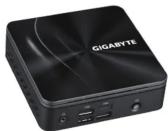
BRIX Ultra Compact PC Kit
BRIX GB-BRR Ultrakompaktes PC Kit / Kit PC ultra compact BRIX GB-BRR /
Kit de PC ultra compacto BRIX GB-BRR / Kit PC BRIX GB-BRR Ultra Compact /
Kit per PC BRIX GB-BRR Ultra Compatto / Ультракомпактный ПК ВRIX GB-BRR. Базовый комплект /
Кл. рет. Г. БИЯ ОВ ВИЯ ВИЯ ВИЯ СОПАТСЬУ УБЛЯРОКОМНАКТАЙ НІЯ ВИЯ ОВ ВИЯ,
Zestaw BRIX GB-BRR Ultra Compact PC / BRIX GB-BRR Ultra Kompakt P
BRIX GB-BRR 系列超微型電腦 / BRIX GB-BRR 系列超紧凑型 PC 套件
BRIX GB-BRR 超小型PCキット / BRIX GB-BRR Ultra Compact PC リ트
Quick Start Guide
Kurzanleitung / Guide de démarrage rapide / Guía de inicio rápido /
Guia de início rápido / Guida di avvio rapido / Краткое руководство /
Skrócona instrukcja obsługi / Hızlı Başlangıç Kılavuzu /
快速入門使用者手冊/快速入门指南/クイックスタートガイド/빠른 시작 가이드
Getting Familiar with Your Unit
Erste Schritte mit Ihrem Gerät / Se familiariser avec votre appareil / Familiarizándose con su unidad / Familiarizar-se com a unidade / Imparare a conoscere la propria unità / Знакомство с изделием /
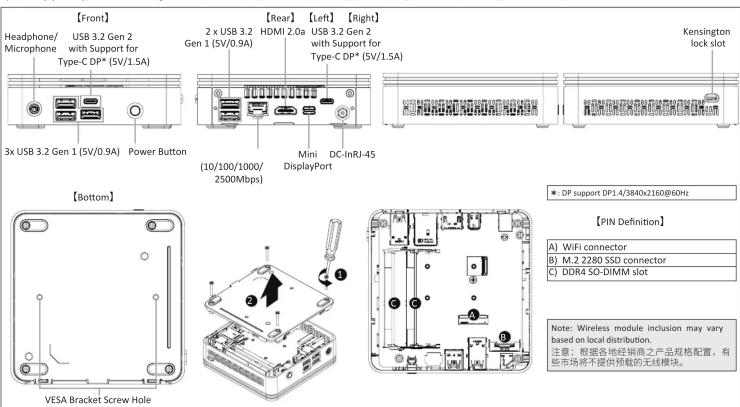
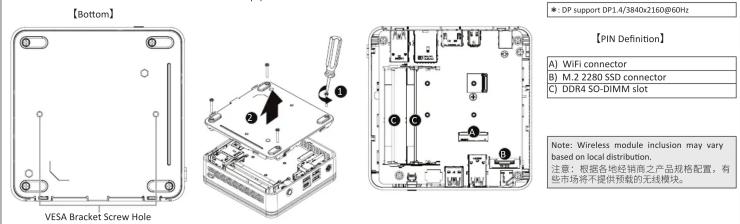
A) Wireless Module: How to Safely Remove the Module
Drahtlosmodul: Sicheres Entfernen des Moduls / Module sans fil : Comment retirer le module en toute sécurité / Módulo inalámbrico: Cómo quitar el módulo de forma segura /
Módulo sem flos: Como remover com segurança o modulo / Modulo senza cavi: Come rimuovere il modulo in sicurezza / Беспроводной модуль: Безопасное отсоединение модуля /
Modul bezprzewodowy: Bezpieczne usuwanie modułu / Kablosuz Modül: Modül Güvenli Bir Şekilde nasıl Çıkartılır / 無線模組:安全移除模組的方式 / 无线模块:如何安全移除模块 /
ワイヤレスモジュール: モジュールの安全な取り外し方法 / 무선 모듈: 모듈을 안전하게 제거하는 방법

Disconnect the two antennas by manually lifting off the clips that hold them in place. 向上移除連接於無線模組左側頂端天線。
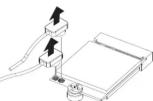

Remove the screw in the
middle.
鬆開固定於無線模組中
央頂端的螺絲

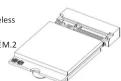
Carefully pull the wireless
module from the slot.
小心的把無線模組從M.2
插槽拔除
依據低功率電波軸射性電機管理辦法【第十二條】經型式認證合格之低功率射頻電機,非經許可公司、商號或使用者均不得擅自變更頻率、加大功率或變更期設計之特性及功能。【第十四條】低功率射頻電機之使用不得影響飛航安全及干擾合法通信;經發現有干擾現象時,應立即停用,並改善至無干擾時方得繼續使用。前項合法通信指依電信法規定作業之無線電通信。低功率射頻電機須忍受合法通信或工業、科學及醫療用電波軸射性電機設備之干擾。」
Package Contents
Lieferumfang / Contenu du colis / Contenido del paquete / Conteúdo da embalagem / Contenuto della confezione / Комплект поставки / Zawartość opakowania / Paket İçeriği / 包装内容物 / 包装内容 / 同棚品 / ッィ키지 포함 토檬

1 x GB-BRR Bare-bone
- NOT Include any of the following: M.2 (2280), SO-DIMM
memory
Folgendes ist Nix
Arbeitsspeicher
N'inclut PAS les éléments suivants : M.2 (2280), mémoire
SU-DIMM
NT-1200000000000000000000000000000000000000
NO incluye 1o siguiente: M.2 (2280), memória SO-UMM
NÃO inclui nenhum dos seguintes: M.2 (2280), memória
SO-DIMM
NON comprende alcuno dei seguenti componenti: Memoria
M.2 [2280], SO-DIMM
НЕ включает: Модуля намина М.2 (2280), SO-DIMM NIE obieguie iadogo z sepilczych: M.2 (2280), ramie
SO-DIMM
Aşağıdakilerin hiçbirı dahil DEĞİLDİR: M.2 (2280), SO-DIMM
不包含下列任何项目:M2(2000)、SD-DRMM扫描牌
不含以下物品:M3(2280)、SO-DMM内存
次は拿われてい uplift人:M2(3280)、SO-PI
다음 물품은 포함되어 있지 않습니다.M2023BCI SO-DIMM
메모리

1 x VESA Mount Bracket & 6 x Screws

90W Adapter: 19.0Vdc,4.74A

1 x Quick Start Guide
B) M.2 SSD: How to Install the M.2 2280 SSD
M.2 SSD: Installation der M.2 2280 SSD / SSD M.2 : Comment installer le SSD M.2 2280 / SSD M.2 : Como instalar el SSD M.2 2280 / M.2 SSD: Como instalar o M.2 2280 SSD / SSD M.2 : Come installare l'SSD M.2 2280 / M.2 SSD: Uстановka moduyla M.2 2280 SSD / M.2 SSD: Instalacja dysku SSD M.2 2280 / M.2 SSD: M.2 2280 SSD nasil Yükenir / M.2 SSD: M.2 2280 SSD 安装方式 / M.2 SSD: 如何安装 M.2 2280 SSD / M.2 SSD: M.2 2280 SSD のインストール方法 / M.2 SSD: M.2 2280 SSD 寓知拝砲

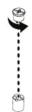
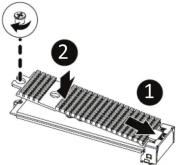
Remove the small screw secured to the M.2 SSD slot B screw hole. 取下 M.2 SSD B 插槽螺絲孔上的螺絲。

Carefully insert the M.2 SSD into slot B. 小心地把 M.2 SSD 装入 B 插槽。

Insert the tab on the thermal plate into the slit near the connector, then secure the thermal plate and M.2 SSD in place with the previously removed screw. 把散熱片裝入插槽旁邊的缺口,然後用之前取下的螺絲將M.2 SSD與散熱片固定。


USB Power On Function: Allows Device Power-on Via USB. Useful When Mounted Behind a Display or TV
USB Power On Funktion / Fonction Démarrage par USB / Función USB Power On Função USB Power On / Funzione USB Power On / Функция USB Power On Opcja USB Power On / USB Güç Açık Fonksiyonu / USB 埠敢動功能 USB 接口启动功能 / USB 機器からの電源 ON 機能 / USB 포트를 이용한 전원 커기

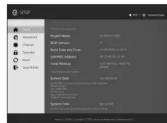
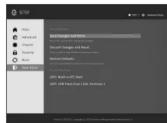
Press "Del" during device start up to enter BIOS. 開機後按啟 Del 鍵進入 BIOS 設定畫面。

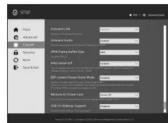
Select "Chipset" from the menu. 在 BIOS 主選單選取 "Chipset"。

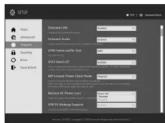
Manually configure "USB S5 Wakeup Support" settings to "Enable". 進入 Chipset 的 USB S5 Wakeup Support 選項,手動控制將其 "Enable"。

Press F4 to Save and Exit. 按啟 F4 存儲設定並離開 BIOS 選單重新開機。
C) Memory Installation: SO-DIMM DDR4
Arbeitsspeicher Installation: SO-DIMM DDR4 / Installation de la mémoire : SO-DIMM DDR4 / Instalación de la memoria: SO-DIMM DDR4 / Instalação de memória: SO-DIMM DDR4 /
Installazione della memoria: SO-DIMM DDR4 / Установка модулии памяти: SO-DIMM DDR4 / Instalacija pamięci: SO-DIMM DDR4 / H 安装妇婦體 : SO-DIMM DDR4 / 中文安装 : SO-DIMM DDR4 / メモリインストール : SO-DIMM DDR4 / 喻모리 セイチ : SO-DIMM DDR4

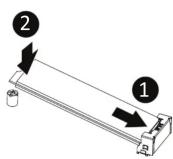
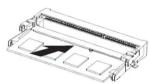
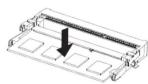
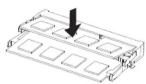
Carefully insert SO-DIMM memory modules. 小心並由下至上安裝 SO-DIMM 記憶體於記憶體插槽。

Push down until the modules click into place. 當記憶體固定於插槽後,再輕輕下壓至定點。

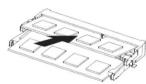
Carefully insert SO-DIMM memory modules. 安裝下層記憶體後,重覆前述動作安裝上層記憶體。

Push down until the modules click into place. 當記憶體固定於插槽後,再輕輕下壓至定點。
VESA Bracket
VESA Halterung / Support VESA / Soporte VESA / Suporte VESA / Staffa VESA / Кронштейн VESA / Wspornik VESA / VESA Braketi / VESA 支架 / VESA 支架 / VESA ブラケット / VESA 브래킷
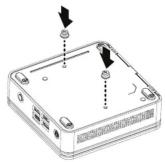
NOTEI VESA screws: Length 5.0 mm with M3 type screws, Metal enclosure with bottom side.

Attach the screws provided on the underside of the BRIX S. 安裝隨附的 VESA 支撑架螺絲於 BRIX 底部。

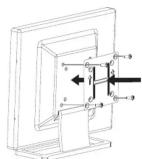
Attach the VESA mounting plate to the rear of a compatible display using the screws provided. 安裝隨附的 VESA 支撐架於支援 VESA 支撐架的電腦螢幕或電視機後背。

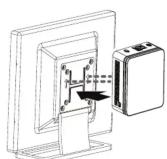
The BRIX s can now be mounted by sliding the device into place. 將已安裝 VESA 支撐架螺絲的 BRIX 插入 VESA 支撐架的流軌孔,向下壓至定位點後即可固定。
NOTE: 'USB Power On' functionality in Windows requires an additional Windows patch. This is provided on GIGABYTE's official website labeled 'USB Power-On Patch'. Your GIGABYTE BRIX can be powered on via a connected USB device such as a keyboard or mouse, offering greater convenience when mounted behind a display or monitor.
注意:在 Windows 的版本環境下需要額外的應用程式來啟動 "USB Power On" 功能。你可以透過技嘉官網的產品支援與更新下載 "USB Power-On Patch" 來執行。USB Power On 提供了方便的開機功能,使用者可以透過連接到 BRIX 上的 USB 裝置啟動 BRIX;讓安裝於顯示器後方的 BRIX 更方便使用。
| 单元Unit | 项目和管类及其化学简称Restricted substances and its chemical symbols | |||||
| 鉛Lead(Pb) | 汽Mercury(Hg) | 鋸Cadmium(Cd) | 六準鎘Hexavalent chromium( Cr^2+ ) | 多法聯等Polybrominated biphenyls(PBB) | 多法二等配Polybrominated diphenyl ethers(PBDE) | |
| 電路框絕水 — | ○ ○ ○ ○ ○ | |||||
| 散熱器 ○ ○ | ○ ○ ○ ○ ○ | |||||
| 补胶 — ○ | ○ ○ ○ ○ ○ | |||||
| 電源水塵器 — | ○ ○ ○ ○ ○ | |||||
| 蝦材 — ○ | ○ ○ ○ ○ ○ | |||||
参考1.“超出0.1wt%”及“超出0.01wt%”指标和贫之百分比含量超出百分比含量基准值。
Note 1: "Exceeding 0.1 wt %" and "exceeding 0.01 wt %" indicate that the percentage content of the restricted substance exceeds the reference percentage value of presence condition.
诸考2.“○”原指該項“○”和質之百分比含量大超出百分比含量基準值。
Note 2: “○” indicates that the percentage content of the restricted substance does not exceed the percentage of reference value of presence.
参考3.“一”除指该项项*扣贊品排除项目。
Note 3: The “—” indicates that the restricted substance corresponds to the exemption.



- GIGA-BYTE TECHNOLOGY CO., LTD.
- GIGABYTE
- BRIX Ultra Compact PC Kit
- Quick Start Guide
- Getting Familiar with Your Unit
- A) Wireless Module: How to Safely Remove the Module
- Package Contents
- B) M.2 SSD: How to Install the M.2 2280 SSD
- USB Power On Function: Allows Device Power-on Via USB. Useful When Mounted Behind a Display or TV
- C) Memory Installation: SO-DIMM DDR4
- VESA Bracket
Marke : GIGABYTE
Modell : GB-BRR5-4500
Kategorie : Desktop-Computer