
GWS2V - Waage GEMINI - Kostenlose Bedienungsanleitung
Finden Sie kostenlos die Bedienungsanleitung des Geräts GWS2V GEMINI als PDF.


| Produkttyp | Körperanalysewaage |
| Modell | GWS2V |
| Marke | Gemini |
| Abmessungen (B x T x H) | 300 x 260 x 25 mm |
| Stromversorgung | 2 x 3V CR2032 Lithiumbatterien (im Lieferumfang enthalten) |
| Maximale Kapazität | 180 kg / 396 lb / 28,34 St |
| Messfunktionen | Gewicht, Körperfett, Wasseranteil, Muskelmasse, Knochenmasse, Kalorien, BMI |
| Benutzerspeicher | 10 Benutzer (P0-P9) |
| Einheitenauswahl | kg, lb, st |
| Messgenauigkeit | Nicht angegeben (ca. 0,1 kg) |
| Glasplattform | Rutschfest, mit 4 Präzisionssensoren |
| Anzeige | LCD mit Symbolen für Fett, Wasser, Muskel, Knochen, Alter, Größe, etc. |
| Automatische Abschaltung | Ja, nach Anzeige der Ergebnisse |
| Einschaltmethode | Automatisch beim Betreten (nur Gewicht) oder manuell über Tasten |
| Nutzungshinweise | Auf hartem, flachem Boden verwenden; barfuß und mit trockenen Füßen messen |
| Reinigung | Mit feuchtem Tuch abwischen; keine chemischen Reinigungsmittel; kein Wasser im Inneren |
| Batteriewechsel | Batteriefach an der Unterseite; bei längerer Nichtnutzung Batterien entfernen |
| Sicherheitshinweise | Nicht für Schwangere oder Personen mit Herzschrittmacher; nicht auf Teppich verwenden; nicht selbst reparieren |
| Fehleranzeigen | FErr (Fettfehler), Flo (Fett <5%), FH (Fett >50%), Lo (Batterie schwach) |
| Zubehör | Batterien bereits eingelegt; keine weiteren Teile |
| Garantie | Keine Angabe in der Anleitung |
| Hersteller | Gemini, eine Gilman Group Marke |
| Kundendienst | ToolBox Customer Service Centre, Hongkong |
Häufig gestellte Fragen - GWS2V GEMINI
Benutzerfragen zu GWS2V GEMINI
0 Frage zu diesem Gerät. Beantworten Sie die, die Sie kennen, oder stellen Sie Ihre eigene.
Eine neue Frage zu diesem Gerät stellen
Laden Sie die Anleitung für Ihr Waage kostenlos im PDF-Format! Finden Sie Ihr Handbuch GWS2V - GEMINI und nehmen Sie Ihr elektronisches Gerät wieder in die Hand. Auf dieser Seite sind alle Dokumente veröffentlicht, die für die Verwendung Ihres Geräts notwendig sind. GWS2V von der Marke GEMINI.
BEDIENUNGSANLEITUNG GWS2V GEMINI
gemini ITALY
BODY COMPOSITION MONITORING SCALE
體重體脂測量儀
MODEL NO 型號: GWS2V
A GILMAN GROUP BRAND
IMPORTANT SAFEGUARDS
- READ ALL INSTRUCTIONS BEFORE USE
• PREGNANT WOMAN AND USERS WITH A PACEMAKER OR ELECTRIC EQUIPMENT INSIDE THE BODY SHALL NOT USE THE SCALE.
• The glass surface of the scale should be kept dry to prevent slipping.
- The scale can only bear normal static pressure when it is weighing. Under abnormal use or impact, there maybe risk of damage to the scale.
- Clean the scale with a damp cloth but do not allow water to go inside the scale and do not use any chemical cleaning agents.
- Do not store the scale in an upright position when it is not in use as this will drain the batteries.
- Remove the batteries if the scale is not being used for a long time.
- The scale is for family use to measure weight, body fat, water mass, muscle mass, bone mass, calorie, BMI. It is not used for commercial or other weighing purpose.
- The body fat parameter is only for your reference. If you target to loss or gain weight, consult your doctor for medical advice.
- In order to get the accurate parameter, please make sure the surrounding area of scale has no electromagnetic objects to avoid interference.
- Please do not repair this scale by yourself. If the scale does not operate normally, check the batteries condition and if the connection direction is right. If the problem cannot be solved, please contact our after-sales service center for assistance.
PARTS IDENTIFICATION
Before using the scale for the first time, please be familiar with all of the parts. Read all Instructions and Safeguards carefully.
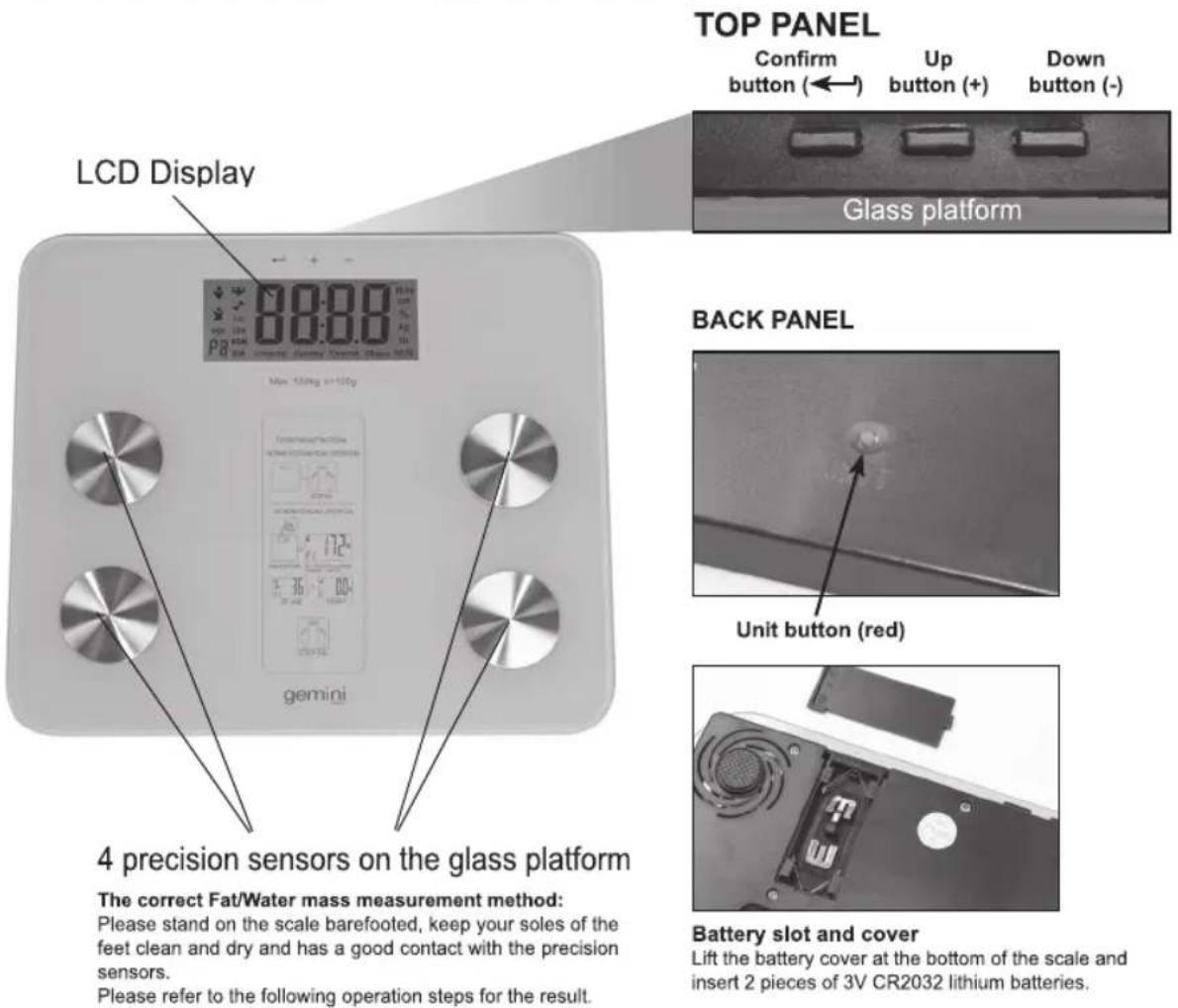
Please stand on the scale barefooted, keep your soles of the feet clean and dry and has a good contact with the precision sensors.
Please refer to the following operation steps for the result.
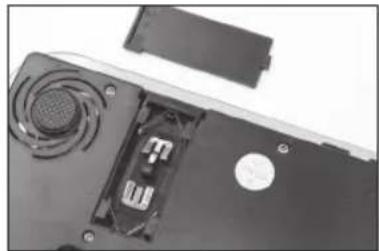
Lift the battery cover at the bottom of the scale and insert 2 pieces of 3V CR2032 lithium batteries.
USING THE APPLIANCE
- Put the scale on a hard and flat floor, avoid to use it on carpet or other soft surface, otherwise it will influence the accuracy.
- To select the measuring unit at the beginning, press the "Unit" button (red) which is located at the scale's base, the corresponding unit can be selected on the LCD screen, i.e. Kilograms (kg), Stone (st) or Pounds (lb). Choose the desired "Unit" to start the measurement.
- Stand on the scale directly when using the weight function only.
- Stand static and put your feet evenly on the glass platform of the scale and wait for the weight calculating result, the correct weight will be displayed on the LCD screen.
Tips: The automatic switch on function is only activated for weight function only. You have to input your personal parameters to measure the weight, body fat, water mass, muscle mass, bone mass, calorie and BMI.
MEASURING WEIGHT, BODY FAT, WATER MASS, MUSCLE MASS, BONE MASS, CALORIE AND BMI
LCD DISPLAY DETAILS
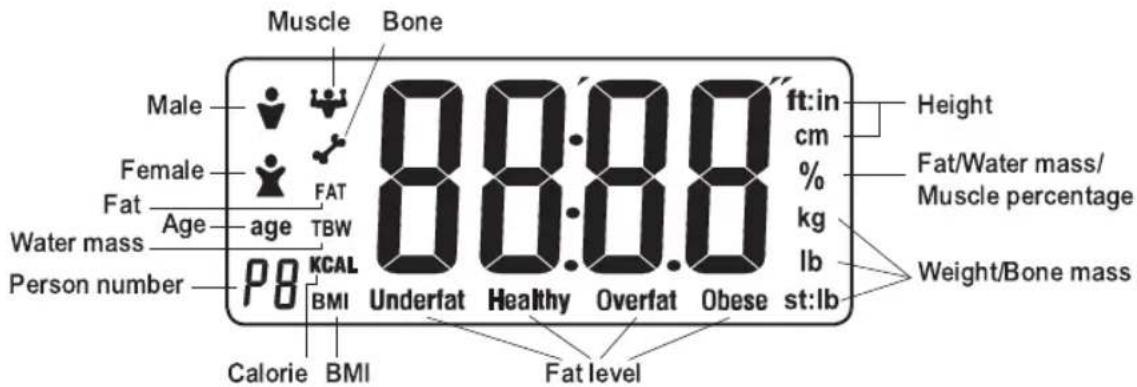
- Put the scale on a hard and flat floor, avoid to use it on carpet or other soft surface, otherwise it will influence the accuracy.
- Press the "Unit" button (red) at the back of scale, the desired weight unit can be selected, i.e. Kilograms (kg), Stone (st) or Pounds (lb). The corresponding unit will be displayed on the right side of the LCD.
3.
a. Press the "Confirm (←)" button to switch on the screen and wait for "0.0" to appear in display window.
b. Select a user number and then input your personal data.
Enter User Number
• P0 will flash on the LCD display window.
- Press "UP(+) or "DOWN(-)" button to select your individual user number. (Total 10 users from P0-P9)
- When the selected user number appears on display, press "Confirm (←)" button to save user number.
Set Gender
• The gender icon will flash on the LCD display.
- Press "UP(+) or "DOWN(-)" button to select male (💡) or female (💡) icon.
- Press "Confirm (←)" button to save gender information.
Set Height
• The height setting will flash on the LCD display.
- Press "UP(+) or DOWN(-)" button to scroll to your height measurement.
- Press "Confirm (←)" button to save height information.
• The scale is now ready for you to enter your age.
Set Age
- The "Age" icon will flash on the LCD display.
- Press "UP(+) or DOWN(-)" button to scroll to your age.
- Press "Confirm (←)" button to save age information.
-
After the setting, the display will show 0:0 under the preset user number, it is ready to weight.
-
Please make sure your feet are dry and clean when stand on the glass platform, and step on the 4 precision sensors on the glass platform to start weighing, the display will show your weight, body fat, water mass, muscle mass, bone mass, calorie and BMI. These data will be displayed respectively for three times. Each data will display for 2 seconds and then the scale will be switched off automatically.
Example:
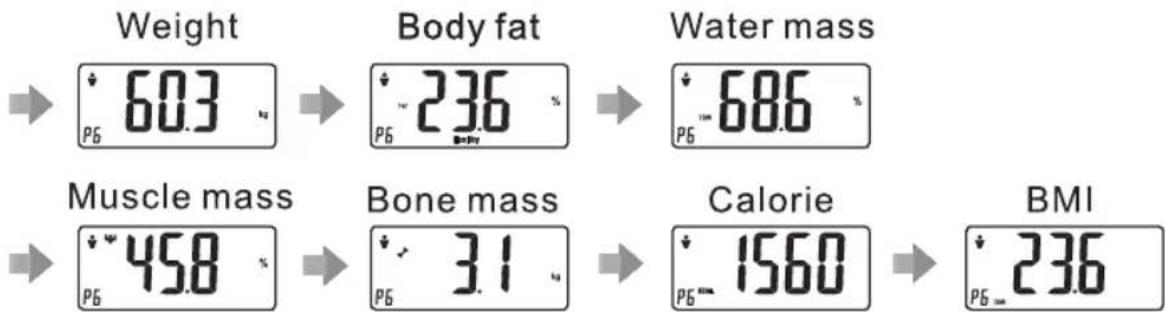
other
| Metric | Value (%) | | :--- | :--- | | Weight | 603 | | Body fat | 236 | | Water mass | 686 | | Muscle mass | 458 | | Bone mass | 31 | | Calorie | 1560 | | BMI | 236 |- Please remember your User Number which was set in the beginning. When you use the scale next time, you just need to select your User Number and wait for about 7 seconds, it will display 0.0 on screen. Then stand on the scale to measure your weight, body fat, water mass, muscle mass, bone mass, calorie and BMI.
Tips: Please make sure your shoes and socks are taken off before standing on the scale.
Tips: When input the data, please do not stand on the glass platform.
OTHER OPERATION INSTRUCTIONS
- Fat percentage error indication is FErr on screen.
- Fat percentage lower than 5%, will show Flo on screen.
- Fat percentage higher than 50%, will show FH on screen.
4.Low battery indication is on screen.
* If you see any of the above error codes, step down from the scale and let the scale off. Try again after 30 seconds.
INTERPRETING THE MEASUREMENT DATA
| Age | Level of Fat | Male | Female | ||||||||
| Body fat (%) | Water mass (%) | Muscle mass (%) | Calorie mass | Bone mass (%) | Body fat (%) | Water mass (%) | Muscle mass (%) | Calorie mass | Bone mass (%) | ||
| <20 | Underfat | <12 | <17 | ||||||||
| Healthy | 12-20 | 46-69 | 38-56 | 1200-2600 | 2.0-4.1 | 17-25 | 43-68 | 35-56 | 1100-2400 | 1.8-3.9 | |
| Overfat | 21-29 | 26-34 | |||||||||
| Obese | >29 | >34 | |||||||||
| 20-30 | Underfat | <13 | <17 | ||||||||
| Healthy | 13-21 | 48-69 | 43-64 | 1150-2800 | 2.1-4.0 | 17-25 | 43-67 | 38-58 | 1050-2600 | 1.8-3.8 | |
| Overfat | 22-30 | 26-34 | |||||||||
| Obese | >30 | >34 | |||||||||
| 31-40 | Underfat | <15 | <19 | ||||||||
| Healthy | 15-23 | 45-68 | 48-69 | 1100-2400 | 1.8-4.0 | 19-27 | 40-69 | 42-58 | 1000-2200 | 1.5-3.8 | |
| Overfat | 24-32 | 28-36 | |||||||||
| Obese | >32 | >36 | |||||||||
| 41-50 | Underfat | <16 | <20 | ||||||||
| Healthy | 16-24 | 43-69 | 46-62 | 1030-2150 | 1.9-3.8 | 20-28 | 42-68 | 40-56 | 950-2050 | 1.6-3.7 | |
| Overfat | 25-33 | 29-37 | |||||||||
| Obese | >33 | >37 | |||||||||
| 51-60 | Underfat | <17 | <21 | ||||||||
| Healthy | 17-25 | 43-65 | 44-59 | 980-2060 | 1.9-3.7 | 21-29 | 42-65 | 39-55 | 950-2000 | 1.5-3.6 | |
| Overfat | 26-34 | 30-38 | |||||||||
| Obese | >34 | >38 | |||||||||
| >60 | Underfat | <18 | <21 | ||||||||
| Healthy | 18-26 | 42-68 | 41-58 | 720-1750 | 1.6-3.7 | 21-29 | 41-64 | 35-51 | 600-1500 | 1.3-3.5 | |
| Overfat | 27-35 | 30-38 | |||||||||
| Obese | >35 | >38 | |||||||||
The above level of fat is calculated based on the result of body fat (%) and can be seen on screen. The above Water mass / Muscle mass / Bone mass (%) and Calorie show the general range of a Healthy level of fat in terms of Male and Female.
(The above information is for reference only. Please consult your doctor for details and professional advice.)
BMI STANDARD INDEX FOR DIFFERENT GENDER
- The BMI (Body Mass Index) is defined as the body weight divided by the square of the body height, and is universally expressed in units of kg/m ^2 , resulting from weight in kilograms and height in metres.
$$ \mathrm{BMI} = \frac {\mathrm{w}}{\mathrm{h} ^ {2}} $$
w= weight; unit: kilogram
h= height; unit: metre
| Gender\BMI | Under weight | Not orahaveigh | Overweight | Obese |
| Male < | 20 20-25 26-30 > | 31 20-25 | 26-30 | >31 |
| Female < | 19 19-24 25-29 > | 30 19-24 | 25-29 | >30 |
- Since BMI does not consider body fat content and other body composition ratios, the BMI range is only a reference based on body weight & height.
TECHNICAL DATA
Item no: GWS2V
Power: 2 x 3V CR2032 lithium batteries (Included)
Product Dimension: 300(W) x 260(D) x 25(H)mm
Maximum Capacity: 396 lb / 180 kg / 28.34 ST
重要事項
使用前請仔細閱讀本說明書。
孕婦和體內有起搏器或其他電子儀器的人仕,請不要使用本測量儀。
- 確保測量儀玻璃表面保持乾爽,防止滑倒。
- 當使用時,本產品只可承受正常靜態壓力。如承受非正常壓力時,本產品有機會損壞。
- 清潔本產品時可使用濕布擦拭,請不要使用任何化學清潔劑。並確保不會有任何液體進入本測量儀。
- 不使用時,請勿以直立方式存放本測量儀,否則有機會損耗電池。
- 如長時間不使用本產品,請拔除電池。
- 請勿作商業用途或在戶外使用。
- 本產品只作家用用途,用於測量體重、身體脂肪率、水份含量、肌肉含量、骨骼含量、卡路里熱量,體重指數值(BMI)。
- 本產品顯示數據及指標只作參考用途,如想增加或減低體重,請與醫生查詢。
- 為了得到更準確的參考數據,請確保使用周邊沒有帶電磁的物品,以避免干擾本產品。
- 如有產品損壞或發生故障時,請勿使用本測量儀。請檢查電池狀態及安裝方式是否正確。如有疑問,請勿自行維修,以免損壞本產品及發生危險,請聯絡本司的售後服務中心查詢。
- 8歲以上的兒童、身體、感觀、智力比較弱,欠經驗和知識的人仕,在經過指導,說明安全使用方法和知道可能的危險後,可以使用本測量儀。
- 兒童不可以把玩本測量儀。
- 請勿將本測量儀浸入水中或其他液體中。
零件標示
首次使用本測量儀前,請先熟悉測量儀的各個零件。
請仔細閱讀本說明書和操作指南。
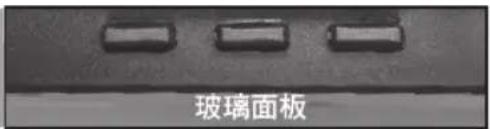
上方的控制面板
確定按鍵 (←) 增加按鍵 (+) 減少按鍵 (-)
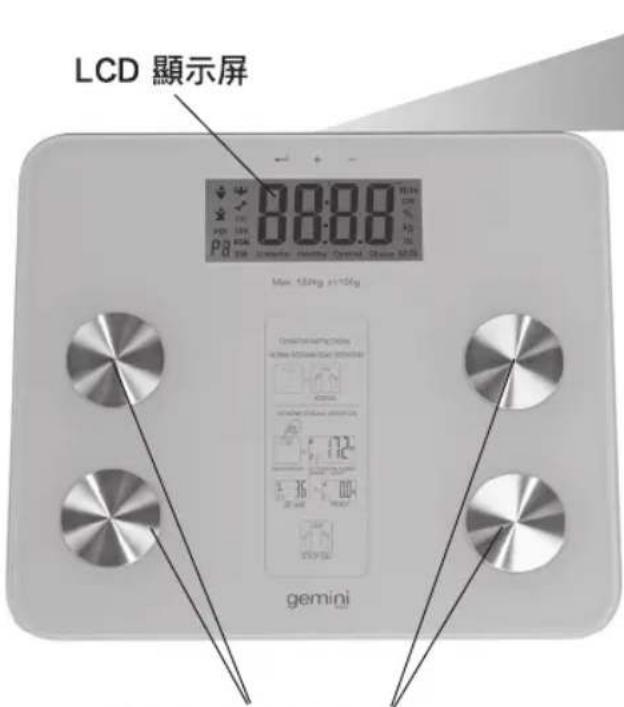
玻璃表面上的四塊電感應片
正確的體重脂肪/水分含量測量方法:
請赤腳站在四塊電感應片,保持你的腳底清潔
和乾爽,並同時與四塊電感應片接觸良好。
本測量儀的底部
natural_image
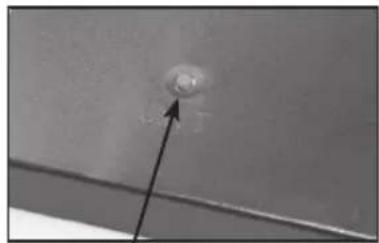
Close-up of a small circular object with an arrow pointing upward, against a plain background (no text or symbols visible)調校量度顯示單位的按鍵 (紅色)
natural_image
Laptop interior showing ventilation fan, drive mechanism, and battery cover (no text or symbols visible)電池蓋及電池槽
按指示方向推開及提起於本測量儀底部的
電池蓋,更換2顆3V鋰電池(CR2032)
操作指示
- 為避免影響參考數據的準確性,請將本產品平放於堅硬而平滑的地面上,避免於地毯或不平的表面上使用。
- 請於使用前設定所需的量度顯示單位,單位按鍵(紅色)於本測量儀底部。按一下按鍵,顯示屏上的單位顯示閃動並可選擇所需單位千克(kg),石(st)或磅(lb),然後便可開始測量。
- 直接站於本測量儀上即可開始使用測量體重功能 (STEP ON 功能)。
- 將雙腳平均地站於玻璃表面上的四塊電感應片上,並靜止不動。當本產品測量完成後,正確體重將顯示於LCD顯示屏上。
温馨提示:STEP ON功能只能啟動測量體重功能。使用者必須輸入個人參數以測量體重、身體脂肪率、水份含量、肌肉含量、骨骼含量、卡路里熱量,體重指數值(BMI)。
測量體重、身體脂肪率、水份含量、肌肉含量、骨骼含量、卡路里熱量和體重指數值(BMI)
LCD 顯示屏
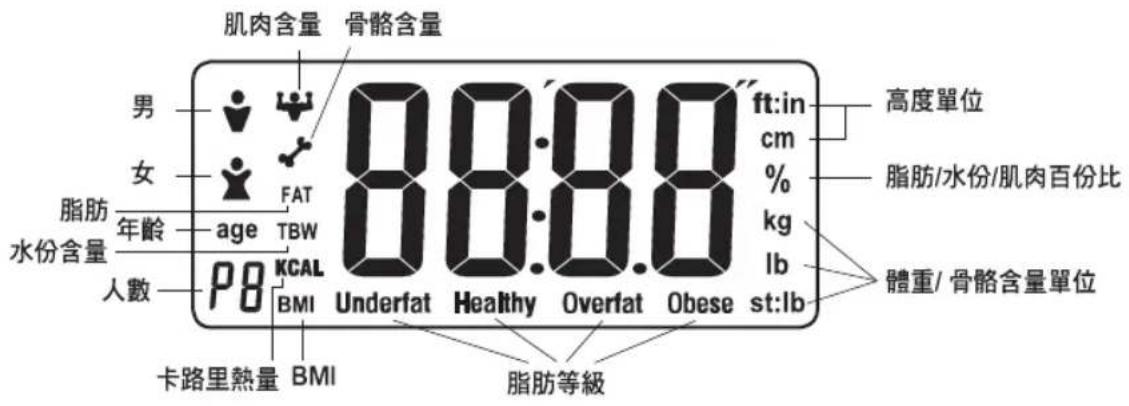
- 為避免影響參考數據的準確性,請將本產品平放於堅硬而平滑的地面上,避免於地毯或不平的表面上使用。
- 請於使用前設定所需的量度顯示單位,單位按鍵(紅色)於本測量儀底部。按一下按鍵,顯示屏上的單位顯示閃動並可選擇所需單位千克(kg),石(st)或磅(lb),然後便可開始測量。
3.
a. 按一下“確認按鍵(←)”以啟動本測量儀,等待0.0顯示於LCD顯示屏上。
b. 選擇使用者號碼,然後輸入個人資料。
輸入使用者號碼
- P0 將於顯示屏上閃動。
- 按增加按鍵 (+) 或減少按鍵 (-) 選擇個人使用號碼 (由P0-P9共10個)。
- 當要選擇的使用者號碼顯示於 LCD 顯示屏上,按一下確認按鍵 (←) 儲存已設定的使用者號碼。
設定性別
- 性別標誌將於 LCD 顯示屏上閃動。
- 按減少按鍵 (-) 或 增加按鍵 (+) 選擇男性 (♀) 或女性 (♂) 設定。
- 按下確認按鍵 (←) 儲存性別資料。
設定身高
- 高度數字設定將在LCD 顯示屏上閃動。
- 按減少按鍵 (-) 或 增加按鍵 (+) 轉動至設定身高數字。
- 按下確認按鍵儲存身高資料。
- 然後本測量儀將進入年齡設置
設定年齡
- 年齡標誌將於 LCD 顯示屏上閃動。
- 按減少按鍵 (-) 或 增加按鍵 (+) 轉動至設定年齡數字。
- 按下確認按鍵儲存年齡資料。
-
完成設定後,顯示屏將顯示 0.0 而左下方將顯示使用者號碼,即可開始測量體重。
-
請赤腳站在四塊電感應片上,確保你的腳底清潔和乾爽,並同時與四塊電感應片接觸良好。靜待顯示屏將閣下的體重、身體脂肪率、水份含量、肌肉含量、骨骼含量、卡路里熱量及體重指數值(BMI)。所有資料將順序顯示三次,其中每項資料中相隔約2秒,顯示完成後本測量儀將自動關閉。
例子:
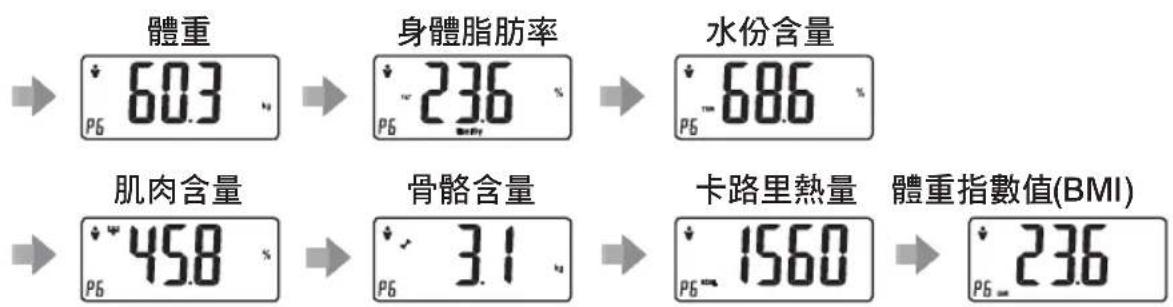
- 請記下閣下於開始時設定及使用的使用者號碼,當下次使用時,選擇適當的使用者號碼後等待大約7秒,顯示屏會顯示0.0,即可踏上本測量儀重新測量閣下的體重、身體脂肪率、水份含量、肌肉含量、骨骼含量、熱量和體重指數值(BMI)。
温馨提示:請確保閣下於踏上本測量儀前已經除下鞋及襪子。
溫馨提示:當輸入使用者資料時,請勿踏上本測量儀。
其他操作說明
- 身體脂肪率錯誤,FErr 顯示於顯示屏上
- 身體脂肪率低於5%,Flo 將顯示於顯示屏上
- 身體脂肪率高於50%,FH 將顯示於顯示屏上
- 低電量時,將顯示 Lo 於顯示屏上
*當出現以上錯誤標示時,請踏離本測量儀並等待本測量儀LCD顯示屏自動關閉。請於30秒後重新踏上測量便可。
測量數字參考數值
| 年齡 | 脂肪等級 | 男 | 女 | ||||||||
| 身體脂肪率(%) | 水份含量(%) | 肌肉含量(%) | 卡路里熱量 | 骨骼含量(%) | 身體脂肪率(%) | 水份含量(%) | 肌肉含量(%) | 卡路里熱量 | 骨骼含量(%) | ||
| <20 | 過輕(Underfat) | <12 | <17 | ||||||||
| 健康(Healthy) | 12-20 | 46-69 | 38-56 | 1200-2600 | 2.0-4.1 | 17-25 | 43-68 | 35-56 | 1100-2400 | 1.8-3.9 | |
| 過重(Overfat) | 21-29 | 26-34 | |||||||||
| 肥胖(Obese) | >29 | >34 | |||||||||
| 20-30 | 過輕(Underfat) | <13 | <17 | ||||||||
| 健康(Healthy) | 13-21 | 48-69 | 43-64 | 1150-2800 | 2.1-4.0 | 17-25 | 43-67 | 38-58 | 1050-2600 | 1.8-3.8 | |
| 過重(Overfat) | 22-30 | 26-34 | |||||||||
| 肥胖(Obese) | >30 | >34 | |||||||||
| 31-40 | 過輕(Underfat) | <15 | <19 | ||||||||
| 健康(Healthy) | 15-23 | 45-68 | 48-69 | 1100-2400 | 1.8-4.0 | 19-27 | 40-69 | 42-58 | 1000-2200 | 1.5-3.8 | |
| 過重(Overfat) | 24-32 | 28-36 | |||||||||
| 肥胖(Obese) | >32 | >36 | |||||||||
| 41-50 | 過輕(Underfat) | <16 | <20 | ||||||||
| 健康(Healthy) | 16-24 | 43-69 | 46-62 | 1030-2150 | 1.9-3.8 | 20-28 | 42-68 | 40-56 | 950-2050 | 1.6-3.7 | |
| 過重(Overfat) | 25-33 | 29-37 | |||||||||
| 肥胖(Obese) | >33 | >37 | |||||||||
| 51-60 | 過輕(Underfat) | <17 | <21 | ||||||||
| 健康(Healthy) | 17-25 | 43-65 | 44-59 | 980-2060 | 1.9-3.7 | 21-29 | 42-65 | 39-55 | 950-2000 | 1.5-3.6 | |
| 過重(Overfat) | 26-34 | 30-38 | |||||||||
| 肥胖(Obese) | >34 | >38 | |||||||||
| >60 | 過輕(Underfat) | <18 | <21 | ||||||||
| 健康(Healthy) | 18-26 | 42-68 | 41-58 | 720-1750 | 1.6-3.7 | 21-29 | 41-64 | 35-51 | 600-1500 | 1.3-3.5 | |
| 過重(Overfat) | 27-35 | 30-38 | |||||||||
| 肥胖(Obese) | >35 | >38 | |||||||||
表格內提供的脂肪等級分類是以身體脂肪率(%)為計算指標。而水份含量/肌肉含量/骨骼含量(%)及卡路里熱量顯示數值為男性及女性一般健康參考範圍。
(以上資料只作參考用途,如需要更詳細測量及專業意見,請與醫生查詢。)
標準身體質量指數值(BMI)
BMI 身體質量指數的定義是體重除以身高的平方,一般以公斤/平方米的單位為普遍表示,從體重(公斤)和身高按米作單位計算的。
$$ \mathrm{BMI} = \frac {\mathrm{w}}{\mathrm{h} ^ {2}} $$
w= 重量; 單位: 公斤
h= 高度; 單位: 米
| 性别\BMI等量 | 過輕 | 適中 | 過重適肥胖 | 過重 | 肥胖 | |
| 男 | <20 | 26-25 | 26-30 | >320-25 | 26-30 | >31 |
| 女 | <19 | 19-24 | 25-29 | >309-24 | 25-29 | >30 |
由於BMI指數值不將身體脂肪比率計算在內,所以BMI指數值的級別只根據體重及身高來評定。
產品規格
型號 : GWS2V
功率 : 2顆 x 3V CR2032 鋰電池 (包括)
產品尺寸:300(闊)×260(深)×25(高)毫米
最大重量:396磅/180千克/28.34石
請記錄下列產品資料
- 型號
- 機身編號
• 經銷商名稱
• 購買日期
本產品不斷改進中,如功能有所更改,恕不另行通知,如有疑問,請與客戶服務中心聯絡,不便之處,敬請原諒。
說明書內容以英文版本為準
ToolBox Customer Service Centre 客戶服務中心:
4/F, DCH Building, 20 Kai Cheung Road, Kowloon Bay, Hong Kong 香港九龍灣啓祥道20號大昌行集團大廈4樓
Customer Service Hotline 客戶服務熱線:(852) 8210 8210
Service E-mail 電郵地址:8210service@gilman-group.com
Please register now at 請即上網登記:www Equilbox.hk
Website 網址:www.gilman-group.com
Proudly Serviced by:

Gilman
since 1841
a Gilman Group Company
太平家庭電器

- gemini ITALY
- BODY COMPOSITION MONITORING SCALE
- 體重體脂測量儀
- IMPORTANT SAFEGUARDS
- PARTS IDENTIFICATION
- USING THE APPLIANCE
- MEASURING WEIGHT, BODY FAT, WATER MASS, MUSCLE MASS, BONE MASS, CALORIE AND BMI
- Enter User Number
- Set Gender
- Set Height
- Set Age
- Example:
- OTHER OPERATION INSTRUCTIONS
- BMI STANDARD INDEX FOR DIFFERENT GENDER
- TECHNICAL DATA
- 重要事項
- 孕婦和體內有起搏器或其他電子儀器的人仕,請不要使用本測量儀。
- 零件標示
- 操作指示
- 測量體重、身體脂肪率、水份含量、肌肉含量、骨骼含量、卡路里熱量和體重指數值(BMI)
- 輸入使用者號碼
- 設定性別
- 設定身高
- 設定年齡
- 其他操作說明
- 標準身體質量指數值(BMI)
- 產品規格
- 請記錄下列產品資料
- ToolBox Customer Service Centre 客戶服務中心:
- 太平家庭電器
Marke : GEMINI
Modell : GWS2V
Kategorie : Waage