
EQ 700 - Nicht kategorisiert BLAUPUNKT - Kostenlose Bedienungsanleitung
Finden Sie kostenlos die Bedienungsanleitung des Geräts EQ 700 BLAUPUNKT als PDF.


| Produkttyp | 7-Band-Equalizer |
| Marke | Blaupunkt |
| Modell | EQ 700 |
| Stromversorgung | 11-15 V DC, negative Masse |
| Maximale Ausgangsspannung | 7 V RMS |
| Frequenzbänder | 50 Hz, 125 Hz, 315 Hz, 750 Hz, 2,2 kHz, 6 kHz, 16 kHz |
| Equalizer-Bereich | ±12 dB |
| Subwoofer-Frequenz | 30-120 Hz |
| Eingangsimpedanz | 15 kOhm |
| Signal-Rausch-Abstand | 90 dB |
| Gesamtklirrfaktor | 0,05 % |
| Kanaltrennung | 70 dB |
| Frequenzgang | 10 Hz - 50 kHz (-3 dB) |
| Eingänge | AUX IN, DVD IN |
| Ausgänge | Front OUT, Rear OUT, Subwoofer OUT |
| Regler | Lautstärke, Fader, Subwoofer-Pegel, parametrischer Equalizer |
| Betriebstemperatur | -10 °C bis 85 °C |
| Lagertemperatur | 15 °C bis 35 °C |
| Abmessungen (ca.) | Nicht angegeben (übliche Einbaugröße: 1-DIN) |
| Gewicht | Nicht angegeben (ca. 500 g) |
| Zubehör | 4x Spaxschrauben 4x14 mm, 4x Maschinenschrauben 3x10 mm, 2x Montagebügel |
| Reinigung | Trockenes oder leicht feuchtes Tuch |
| Sicherheitshinweise | Batterie abklemmen vor Installation, Kabelquerschnitt ≥ 2,5 mm², nur 12 V DC |
| Entsorgung | Nicht im Hausmüll, Rückgabesysteme nutzen |
Häufig gestellte Fragen - EQ 700 BLAUPUNKT
Benutzerfragen zu EQ 700 BLAUPUNKT
0 Frage zu diesem Gerät. Beantworten Sie die, die Sie kennen, oder stellen Sie Ihre eigene.
Eine neue Frage zu diesem Gerät stellen
Laden Sie die Anleitung für Ihr Nicht kategorisiert kostenlos im PDF-Format! Finden Sie Ihr Handbuch EQ 700 - BLAUPUNKT und nehmen Sie Ihr elektronisches Gerät wieder in die Hand. Auf dieser Seite sind alle Dokumente veröffentlicht, die für die Verwendung Ihres Geräts notwendig sind. EQ 700 von der Marke BLAUPUNKT.
BEDIENUNGSANLEITUNG EQ 700 BLAUPUNKT
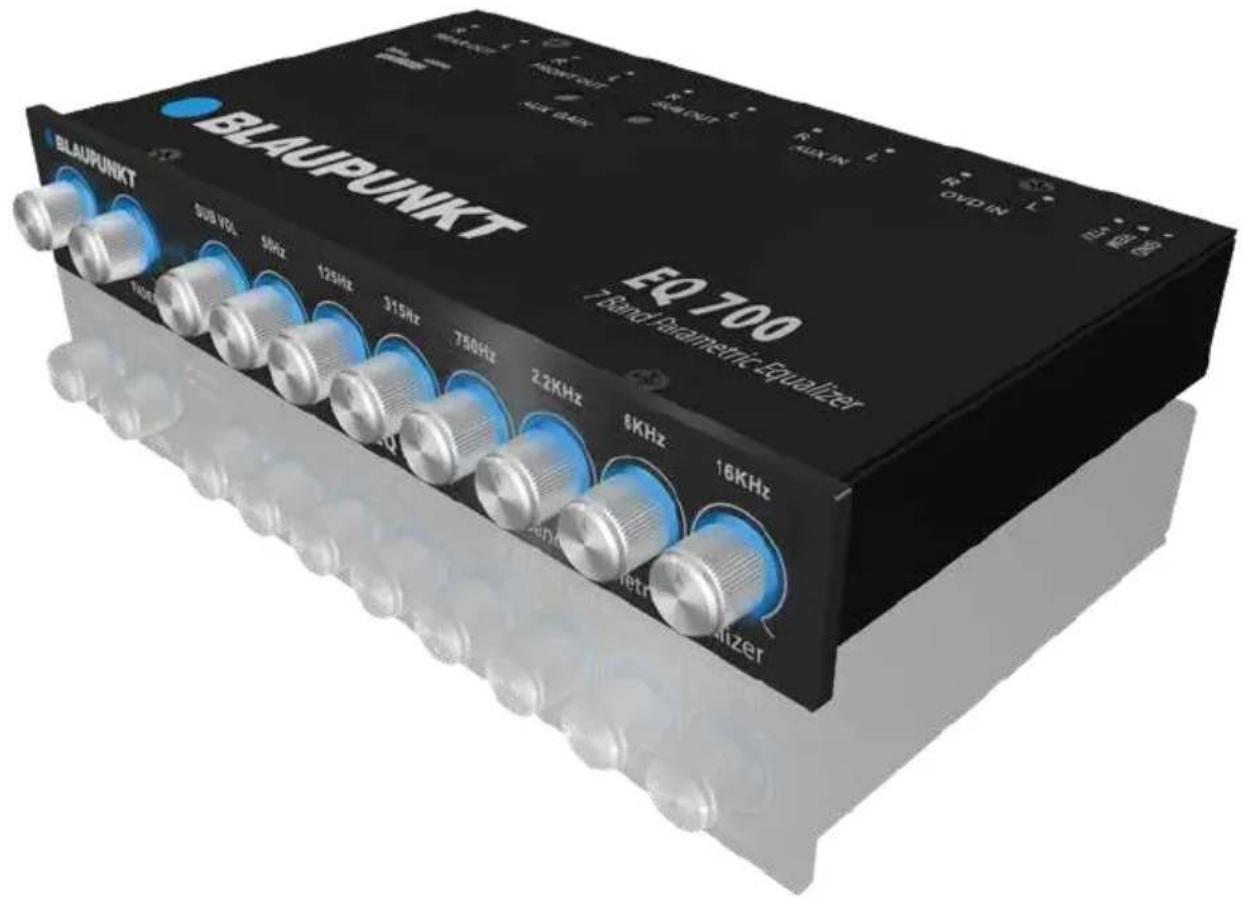
7-BAND EQUALIZER EQ 700
Enjoy it.
INTRODUCTION
Proper system planning is vital in order to maximize the device's performance and road safety. Plan your installation carefully to avoid compromising performance reliability of the system. Consult an authorized Blaupunkt delaler for installation or reparation. Read the manual carefult before operating the device for the first time.
Safety Notes
Ensure to follow below safety notes during installation and wiring connection: -
- Disconnect the negative terminal of the battery. Refer to the safety notes of the vehicle manufacturer.
- Ensure positions of the holes are nowhere near the vehicle component to avoid any damage during drilling.
- Ensure cross section of the cable is no less than 2.5mm^2 if the positive and negative cables are too long.
- Incorrect installation may result in malfunction of the device or the car sound system.
Installation and Connection Instructions
- Select a dry and well-ventilated location to install the device.
- The device must not be installed in overly exposed location such on therear shelf, rear seat etc.
- The installation location must be suitable for screw holes and have stable ground support.
Disclaimer
In no event shall Blaupunkt be liable for any direct, indirect, punitive, incidental, special consequential damages to property or life and whatsoever arising out of or connected with the use or misuse of our products.
USA & CANADA: This product is not intended for sale in the United States and Canada. If purchased in the U.S. or Canada, this product is purchased on as-is basis. No warranty, whether expressed or implied is provided in the U.S. or Canada.
General Safety Notes
Observe the following to protect yourself against injuries:
- The supply voltage requirement is 12V DC with grounded negative connection. Unauthorised dismantling or modifying may void the warranty of the device. Blaupunkt is not liable for any loss or damaged caused or resulting from unauthorized reparation or modification to the device. Refer to a Blaupunkt specialist in case of any installation or reparation required.
- The device's core components may be damaged when the car is driven on bumpy roads for a prolonged period of time or if it is used to play non-standard volume level.
- Please do not operate the car radio under extreme temperature conditions (extremely high temperature or extremely low temperature); ensure the temperature within the car ranges from -10°C to 85°C (Storage temperature: 15°C to 35°C) before connecting to the power supply.
- For abnormalities, please refer to TROUBLESHOOTING. Consult a specialist if the problem persist.
- Solvents, cleaning and scouring agents as well as dashboard spray and plastics care products may contain materials which can damage the surface and screen of the device. Use only dry or slightly moistened cloth to clean the device.
Recycling and Disposal
Do not dispose of your old unit in the
household trash!
Use the return and collection systems
available to dispose of the old device.
This manual may be updated from time to time without any notice.
FUNCTION
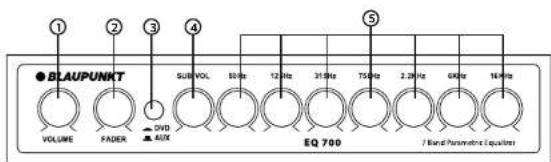
- Volume Control: Adjust the output level of the volume
- Fader Control: Adjust the volume of the 4 front & rear speakers
- Input Selector Switch: Switch between DVD or AUX inputs
- Subwoofer Control: Adjust the output level of the subwoofer
- Parametric Equilization Control: Control the frequency response of the Booster or cut with 4 tone controls each 50Hz, 125Hz, 315Hz, 750Hz, 2.2kHz, 6kHz & 16kHz.
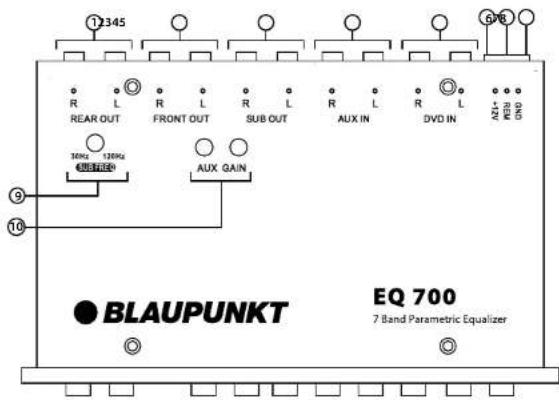
- REAR OUT
- FRONT OUT
- SUBOUT
- BUY IN
- AUX IN
- DVD IN
- DVDIN
- +12V Connection
- REM Control
- GND
- Sub Frequency
- AUX Volume Control
SPECIFICATION
• Power Supply: 11-15V DC Neg. Ground
• Max. Output Voltage: 7V RMS
• Pre Graphic Frequency : 50Hz, 125Hz, 315Hz, 750Hz, 2.2kHz, 6KHz, 16KHz
• Equalization Range : 12dB
- Subwoofer Frequency: 30-120Hz
• Input impedance: 15K Ohms
- S/N Ratio: 90dB
• Total Harmonic Distortion: 0.05%
• Channel Separation: 70dB
• Frequency Response : 10Hz-50KHz (-3dB)
Accessories
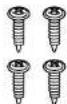
Tapping Screws x4 (4x14mm)

Machine Screws x4 (3x10mm)
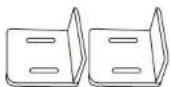
Mounting Brackets x2
WIRING DIAGRAM
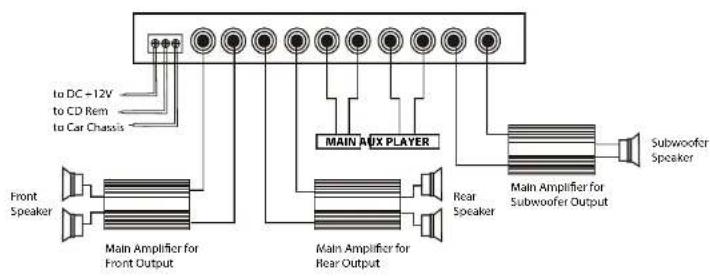
flowchart
graph TD
    A["Front Speaker"] --> B["Main Amplifier for Front Output"]
    B --> C["Main Amplifier for Rear Output"]
    C --> D["Main AUX PLAYER"]
    D --> E["Subwoofer Speaker"]
    E --> F["Main Amplifier for Subwoofer Output"]
    F --> G["Main Amplifier for Rear Output"]
    G --> H["Main Aux Player"]
    H --> I["To DC - 12V to CD Rem to Car Chassis"]
WIRING DIAGRAM
Option 1
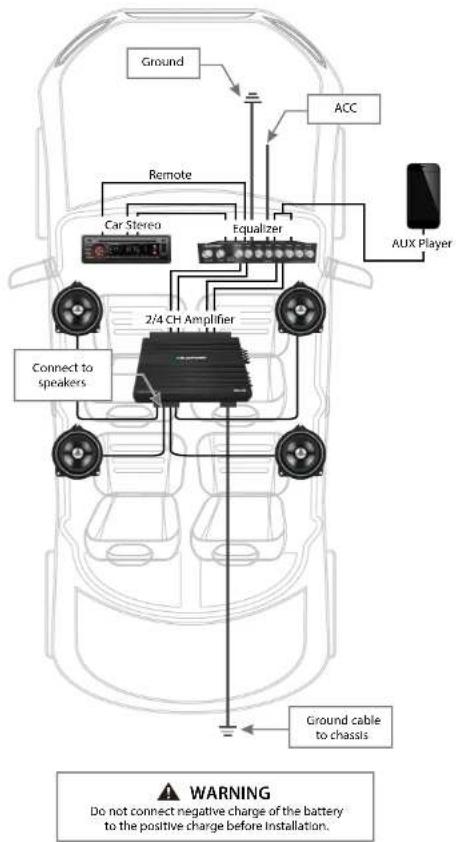
WIRING DIAGRAM
Option 2
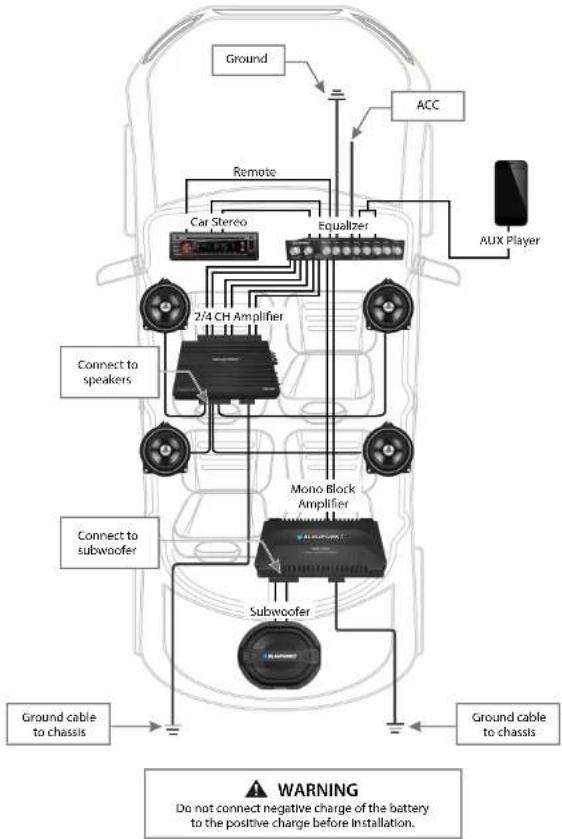
flowchart
graph TD
    A["Ground"] --> B["Car Stereo"]
    B --> C["2/4 CH Amplifier"]
    C --> D["Subwoofer"]
    D --> E["Subwoofer"]
    E --> F["Ground cable to chassis"]
    F --> G["Ground cable to chassis"]
    H["ACC"] --> I["AUX Player"]
    J["Monocable Block Amplifier"] --> K["Monocable Block Amplifier"]
    L["Auto Charger"] --> M["Auto Charger"]
    N["Radio Line"] --> O["Radio Line"]
    P["Ground Cable"] --> Q["Ground Cable to chassis"]
    R["Outdoor Control"] --> S["Outdoor Control"]
    T["External Control"] --> U["External Control"]
    V["External Control"] --> W["External Control"]
    X["External Control"] --> Y["External Control"]
    Z["External Control"] --> AA["External Control"]
    AB["External Control"] --> AC["External Control"]
    AD["External Control"] --> AE["External Control"]
    AF["External Control"] --> AG["External Control"]
    AH["External Control"] --> AI["External Control"]
    AJ["External Control"] --> AK["External Control"]
    AL["External Control"] --> AM["External Control"]
    AN["External Control"] --> AO["External Control"]
    AP["External Control"] --> AQ["External Control"]
    AR["External Control"] --> AS["External Control"]
    AT["External Control"] --> AU["External Control"]
    AV["External Control"] --> AW["External Control"]
    AX["External Control"] --> AY["External Control"]
INSTALLATION
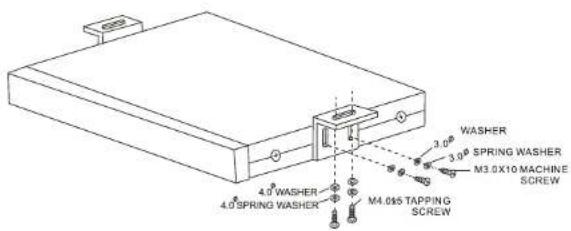
- Select an ideal installation location to mount the product unit under the dashboard.
- Drill 4 holes with 4.2mm diameter. Fix the mounting brackets under the dash or in the rear of the car with 4pcs of 4x14mm tapping screws. Be careful when drilling to avoid damaging existing wiring under the dashboard.
- Mount the unit to the mounting bracket with 4pcs of 3x10mm machine screw.
TROUBLESHOOTING
If any of the following problem occur, please resort to Troubleshooting for the possible solutions. Consult Blaupunkt authorized dealer if problem persist.
| Problems | Possible Causes | Solutions |
| No audio output | Disconnected power wires. | Examine power wire and ground connections. Replace and repair accordingly. |
| Disconnected speaker wires. | Examine speaker wires. Replace or repair accordingly. | |
| Remote wire failed to work. | Examine voltage output/connection and repair accordingly. | |
| Equalizer effect cannot be obtained | The input and output connections are reversed. | Check the connection of input & output, ensure that the connection is correct. |
| Distorting Speakers | Equalizer is overdriven. | Adjust the equalization levels. |
| Lower the volume of the source unit. | ||
| Lower sub level. |

Designed and engineered by Blaupunkt Competence Centre