NMH405 - Server CISCO - Kostenlose Bedienungsanleitung
Finden Sie kostenlos die Bedienungsanleitung des Geräts NMH405 CISCO als PDF.


Benutzerfragen zu NMH405 CISCO
0 Frage zu diesem Gerät. Beantworten Sie die, die Sie kennen, oder stellen Sie Ihre eigene.
Eine neue Frage zu diesem Gerät stellen
Laden Sie die Anleitung für Ihr Server kostenlos im PDF-Format! Finden Sie Ihr Handbuch NMH405 - CISCO und nehmen Sie Ihr elektronisches Gerät wieder in die Hand. Auf dieser Seite sind alle Dokumente veröffentlicht, die für die Verwendung Ihres Geräts notwendig sind. NMH405 von der Marke CISCO.
BEDIENUNGSANLEITUNG NMH405 CISCO
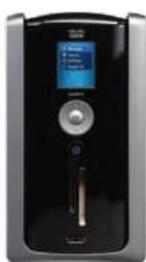
Key Features
NHE-05 NHE-10
Drive Bay Cover:
Protects the two drive bays, pre-installed with one SATA hard drive - add another for more protection or increased storage.
LCD Display:
Full-color LCD screen lets you initiate backups, see alerts, check on hard drive usage, view the status of the Media Hub, and more.
Navigation Pad:
Navigate easily through the LCD menus.
Power Button on LED:
The Power LED flashes blue when the Media Hub boots up, installs a disk, or shuts down.
Memory Card Slots:
Insert CompactFlash, Secure Digital (SD), MMC, xD or MS card to access files.
USB Port:
Expand your storage or import more media content without a computer.
NMEED
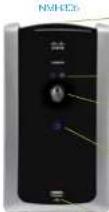
Drive Bay Cover:
Protects the two drive boys, pre-installed with one SATA hard drive - acid another for more protection or increased storage. Disk1/Disk2:
LED flashes when disk is ready for use.
Back Up Buttons (Windows XP or Vista only):
Initiate backup jobs.
Power Button on LED:
The Power LED flashes blue when the Media Hub boots up, installs a disk, or shuts down.
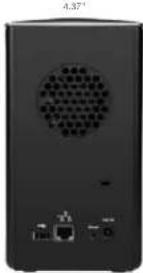
USB Port
Expand your storage or import more media content without a computer.
Air Vent:
Allows air to circulate and cool the Media Hub.
Ethernet Ports:
For connection to an Ethernet network device, LED flashes with network activity and connections.
USB Port:
Connects to USB storage device.
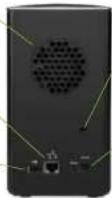
Security Slot: Attach lock to help protect Media Hub from theft.
Power Port: Connects to power adapter,
Key Features:
- Automated Backup: Files and saves your files periodically.
- Expandability: Increased storage capacity when additional SATA
hard drives are purchased. Up to 2TB capacity achievable.
- PC/Mac Interface: Easy to use at home or on the go. - Intelligent Appreciation: Funds and banks are fixed away
- Intelligent Aggregation. Play all checks up miss across your NETWORK.
- HD Streaming: Delivers up to 3 high de video streams simultaneously
• Built-In Media Reader: Reads your memory cards for direct storage (IM-201) Series only.
• Full-color LCD: At a glance view of your storage space (NMH400)
Sarea


| NMH300 - Media HubNMH305 - Media Hub | NMH405 - Media Hubwith LED | NMH410 - Media Hubwith LED |
| PortsOne Power, One GigabitEthernet (DCW1000),One USD 2.0 | PortsOne Power, One GigabitEthernet (DCW1000),Two USD 2.0 | PortsOne Power, One GigabitEthernet (DCW1000),One USD 2.0 |
| ButtonsOne Backup, One Planet,One Point | ButtonsFree Navigation, One Planet.One Point | ButtonsFree Navigation, One Planet.One Point |
| LEDOne Power, One Disk | LEDOne Power | LEDOne Power |
| Drive BagsMVHAT-2 mono occupiedMVHAT-2 mono accounted | LCD DisplayOne 1 12 , 176 × 200 ,81K Colors | LCD DisplayOne 1 12 , 176 × 200 ,81K Colors |
| StorageMVHAT- Mono installed MVHAT- One 200GB Drive installed | Drive Bags2 mono occupiedStorageOne 200GB Drive installed | Drive Bags2 mono accountedStorageOne ± 18 Drive installed |
| Dimensions 1.37" × 2.5" × 6.61" 1Wm·Ci | Dimensions 1.37" × 2.5" × 6.61" 1Wm·Ci | Dimensions 1.37" × 2.5" × 6.61" 1Wm·Ci |

For more information please visit: www.linksysbyolsc.com/mediahub
* A method of Inform Access is not used from clinical examination. Fases may apply themselves but are subject to change. Can to www.litoxshycson.com for further information and details of items and conditions applicable to the Inform Access services.
- Medium performance across from FFP Standard 802-1 specifications. Actual performance can vary, including lower-tier core network capacity, data through user data, ranges and coverage. Performance depends on many factors, conditions and values, including distances from the access point, volume of network traffic, building materials and construction, operating system used, mix of wireless products used, interference and other adverse conditions.
2 - Viewing media on a TV source of UFP-compatible digital play
Specifications are subject to drugs with a Price Linkage. Data and the Case Logre are based on information under the use of Cases Systems, which is included in the US and section of other countries. China's data and reports are presented in terms of the respective studies. Copyright © 2003 Data Systems, Inc. All rights reserved.

natural_image
Collage of wedding and family photos including a bride, groom, child, and others (no visible text or symbols)Meet the Linksys by Cisco Media Hub.
Protect, organize, share and access your irreplaceable tiles, throughout your home and wherever you go.
It's so much more than storage.
Your Photos

Safely store hundreds of thousands of photos.
Easily find and view your photos by creating albums or searching by date, name or most recent.
Share with friends and family.
Share in slideshow mode and through remote access with any computer with an Internet connection.
Load and store at home or on the go.
Away from home? Find a computer and an Internet connection, and you can upload your photos to your Media Hub just by logging onto your unique page.
Your Music

Get organized.
No more searching all your computers to find just the right track. The Media Hub finds the music on your network, organizes it by album or artist, and saves it along with the album art. You can even see the Media Hub in your iTunes® application.
So anyone in the family can listen to any of your music, all across the house—on computers, wireless-enabled stereos, or the Linksys by Cisco Wireless Home Audio system.
Access your music anywhere.
At a party, at the office—just about anywhere with an Internet connection. Just log in and start playing.
Your Movies

On your computer.
The Media Hub can deliver 3 video streams at once. So, show home movies in the living room, Kung Fu in the kid's room and comedy for the teens.
On your TV.
Get out from behind your desk and get the family together. The Media Hub uses your home router or modem/ router to send movie files wirelessly to your Xbox 360 or PlayStation 3 and on to your TV.
Automatic Backup and Storage
Media Hub makes it easy.
Back up all your important tiles, across computers in your home, as often as you choose, so you can feel safe.
Don't be fooled by its size
The Media Hub has the capacity to store hundreds of hours of video and hundreds of thousands of photos and songs depending on your configuration. Just choose the one that fits your needs, and you can expand later if needed.
text_image
4.37"7.8°
Anywhere Access

Easy web-based interface.
The Media Hub provides an easy, web-based interface for uploading or downloading data on the go.
All you have to do is visit your personal Media Hub Web page to access all your files. Or give access to friends and family anywhere in the world.

natural_image
Man using a laptop at an outdoor table with lab equipment and glassware in the background (no visible text or symbols)LINKSYS® by Cisco
Media Hub
Protect your memories. Share your moments.
Learn more inside.
natural_image
Two modern audio equipment units displayed against a blue background, with no visible text or symbols on the devices themselves.CISCO
So How Does It Work?
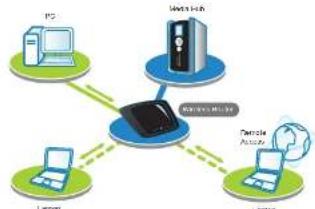
1 Connect to your network.
It's easy to get started and easy to use. Just plug your Media Hub into your router or modem/router. It'll find your networked devices by itself, so there's nothing else to hook up.
2 Safely store your files.
The Media Hub looks through your network, finds and backs up your important files. Define how often you want to back up. You can easily add additional storage for up to 2 Terabytes by adding another drive to the bay, or connect an external hard drive via USB.
flowchart
graph TD
    PC["PC"] -->|Data Bus| CentralDevice["Central Device"]
    InternetHost["Internet Host"] -->|Data Bus| CentralDevice
    LinuxLaptop["Laptop"] -->|Data Bus| CentralDevice
    NetworkAssets["Network Assets"] -->|Data Bus| CentralDevice
    CentralDevice -->|Data Bus| InternetHost
    CentralDevice -->|Data Bus| LinuxLaptop
3 Stream your photos, movies, and music.
The Media Hub lets you stream or download to all your networked devices. So you can watch different movies and slideshows in different rooms of the house on your computer or TV.
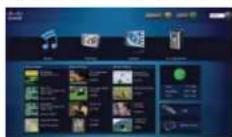
Stream photos and videos to your computer.
Stream through your wireless or wired connection.
Stream photos and videos to your TV.
Stream photos and videos through a media extender like a Playstation 3 or Xbox 350.
Stream music throughout your home.
Stream music through your wireless-enabled stereo
or Wireless Home Audio device.
4 Access your files anywhere.
The easy-to-use interface is also available online. Just visit www.ciacomediahub.com and enter your unique login. Upload and download files all across the world or give the URL to friends and family so they can see your latest photos or share your playlists.